window KIA CEED 2017 Owner's Guide
[x] Cancel search | Manufacturer: KIA, Model Year: 2017, Model line: CEED, Model: KIA CEED 2017Pages: 653, PDF Size: 54.59 MB
Page 245 of 653

4161
Features of your vehicle
For maximum defrosting, set the tem-perature control to the hottest position
and the fan speed control to the high-est speed.
If warm air to the floor is desired while defrosting or defogging, set the modeto the floor-defrost position.
Before driving, clear all snow and ice from the windshield, rear window, out-
side rear view mirrors, and all side win-
dows.
Clear all snow and ice from the hood and air inlet in the cowl grill to improveheater and defroster efficiency and to
reduce the probability of fogging up theinside of the windshield. Manual climate control systemTo defog inside windshield
1. Set the fan speed to the desired posi-
tion.
2. Select desired temperature.
3. Select the position.
4. The outside (fresh) air will be selected automatically. If the position is selected, air conditioning (if equipped)
will also be selected automatically.
If the air conditioning and/or outside(fresh) air position are not selected auto-
matically, press the corresponding button
manually.
To defrost outside windshield
1. Set the fan speed to the highest posi- tion.
2. Set the temperature to the hottest position.
3. Select the position.
4. The outside (fresh) air and air condi- tioning will be selected automatically.
WINDSHIELD DEFROSTING AND DEFOGGING
WARNING - Windshield
heating
Do not use the position during
cooling operation in extremely
humid weather. The differencebetween the temperature of the out-side air and the windshield couldcause the outer surface of the
windshield to fog up, causing loss
of visibility. In this case, set the
mode selection to the position
and fan speed control to the lowerspeed.
OJD042123OJD042124
Page 255 of 653

4171
Features of your vehicle
Sunvisor
Use the sunvisor to shield direct light
through the front or side windows.
To use a sunvisor, pull it downward.
To use a sunvisor for a side window, pull
it downward, unsnap it from the bracket
(1) and swing it to the side. (2)
To use the vanity mirror, pull down the
visor and open the mirror cover (3).
To use the vanity mirror lamp, switch it
on. (if equipped)
The ticket holder (4) is provided for hold-
ing a tollgate ticket. (if equipped)
✽✽NOTICE
Close the vanity mirror cover securely
and return the sunvisor to its original
position after use.
❈ To learn how to use the vanity mirror
lamp, refer to "Interior light" in this
chapter.
OMD040167K
CAUTION - Vanity mirror
lamp (if equipped)
Always have the switch in the off position when the vanity mirrorlamp is not in use. If the sunvisor isclosed without the lamp off, it may
discharge the battery or damagethe sunvisor.
WARNING
For your safety, do not obstruct your
vision when using the sunvisor.
Page 273 of 653
Features of your vehicle
4 189
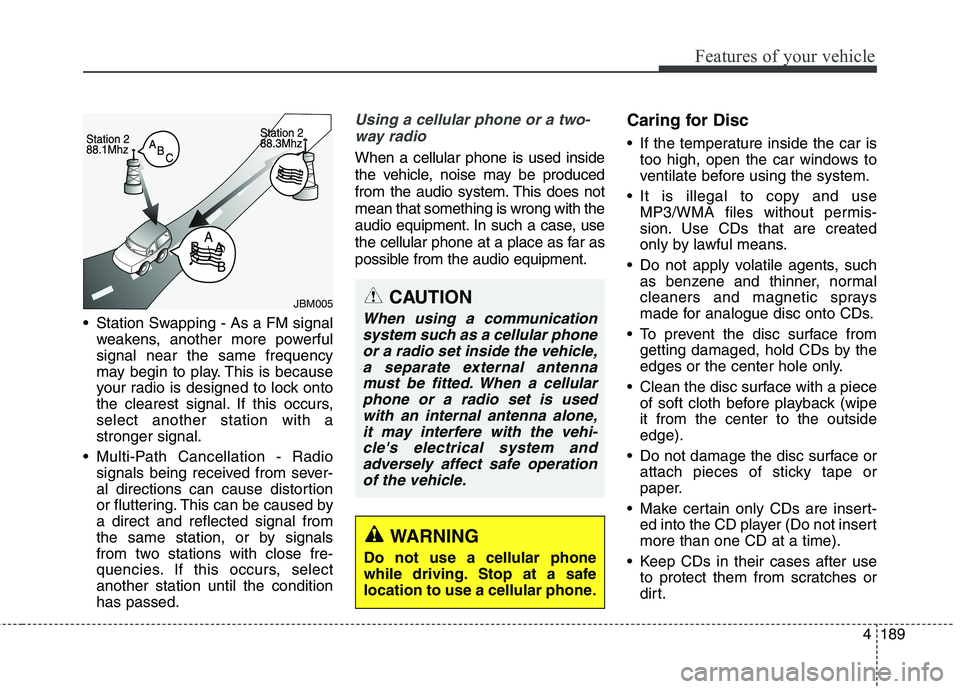
Station Swapping - As a FM signal
weakens, another more powerful signal near the same frequency
may begin to play. This is because
your radio is designed to lock onto
the clearest signal. If this occurs,select another station with astronger signal.
Multi-Path Cancellation - Radio signals being received from sever-
al directions can cause distortion
or fluttering. This can be caused bya direct and reflected signal from
the same station, or by signals
from two stations with close fre-
quencies. If this occurs, selectanother station until the conditionhas passed.
Using a cellular phone or a two-
way radio
When a cellular phone is used inside
the vehicle, noise may be produced
from the audio system. This does notmean that something is wrong with the
audio equipment. In such a case, use
the cellular phone at a place as far as
possible from the audio equipment. Caring for Disc
If the temperature inside the car is
too high, open the car windows to
ventilate before using the system.
It is illegal to copy and use MP3/WMA files without permis-
sion. Use CDs that are created
only by lawful means.
Do not apply volatile agents, such as benzene and thinner, normal
cleaners and magnetic sprays
made for analogue disc onto CDs.
To prevent the disc surface from getting damaged, hold CDs by the
edges or the center hole only.
Clean the disc surface with a piece of soft cloth before playback (wipeit from the center to the outsideedge).
Do not damage the disc surface or attach pieces of sticky tape or
paper.
Make certain only CDs are insert- ed into the CD player (Do not insertmore than one CD at a time).
Keep CDs in their cases after use to protect them from scratches or
dirt.
CAUTION
When using a communication
system such as a cellular phoneor a radio set inside the vehicle, a separate external antennamust be fitted. When a cellularphone or a radio set is used with an internal antenna alone,it may interfere with the vehi-cle's electrical system andadversely affect safe operation of the vehicle.
WARNING
Do not use a cellular phone
while driving. Stop at a safe
location to use a cellular phone.
JBM005
Page 282 of 653
Features of your vehicle
198
4
✽✽
NOTICE - USING VOICE
COMMAND
The voice recognition feature of this product supports recognition
of the commands listed within this
user’s manual.
While using voice recognition, operating the steering remote con-
trol or the device will terminate
voice recognition and allow you to
manually operate desired func-
tions.
Position the microphone above the head of the driver’s seat. For supe-
rior performance, maintain good
posture when saying voice com-
mands. (Continued)(Continued)
Voice recognition may not func-
tion properly due to outside noise.
The following conditions can
affect the performance of Voice
Recognition:
-When the windows and sunroofare open
-When the heating/cooling system is on
-When passing a tunnel
-When driving on rugged and uneven roads
After downloading Bluetooth®
Wireless Technology phone book,
the system requires some times to
convert the phone book into voice
information. During this time,
voice recognition may not operate
properly.
Upon inputting your phone book, special symbols and numbers can-
not be recognized by voice. For
example, “# John Doe%&” will be
recognized as “John Doe”.
Page 359 of 653

Features of your vehicle
4 275
✽✽NOTICE - USING THE VOICE
RECOGNITION
When using the voice recognition feature, only commands listed
within the user's manual are sup-
ported.
Be aware that during the opera- tion of the voice recognition sys-
tem, pressing any key other than
the key or touching the screen
will terminate voice recognition
mode.
For superior voice recognition performance, position the micro-
phone used for voice recognition
above the head of the driver’s seat
and maintain a proper position
when saying commands.
Within the following situations, voice recognition may not function
properly due to external sound.
- When the windows and sunroofare open
- When the wind of the cooling / heating device is strong
- When entering and passing through tunnels
- When driving on tgged and uneven roads (Continued)(Continued)
- During severe rain (heavy rains,windstorms)
Phone related voice commands can be used only when a
Bluetooth ®
Wireless Technology
device is connected.
When making calls by stating a name, the corresponding contact
must be downloaded and stored
within the audio system.
After downloading the Bluetooth®
Wireless Technology phone book,
it takes some times to convert the
phone book data into voice infor-
mation. During this time, voice
recognition may not properly
operate.
Pronounce the voice commands naturally and clearly as if in a nor-
mal conversation.
Page 381 of 653

53
Driving your vehicle
WARNING- ENGINE EXHAUST CAN BE DANGEROUS!
Engine exhaust fumes can be extremely dangerous. If, at any time, you smell exhaust fumes inside the vehicle, open the win-
dows immediately.
• Do not inhale exhaust fumes.
Exhaust fumes contain carbon monoxide, a colorless, odorless gas that can cause unconsciousness and death by asphyxia- tion.
The exhaust system should be checked whenever the vehicle is raised to change the oil or for any other purpose. If you hear
a change in the sound of the exhaust or if you drive over something that strikes the underneath side of the vehicle, we rec-
ommend that the system be checked by an authorized Kia dealer.
Letting the engine idle in your garage, even with the garage door open, is a hazardous practice. Never run the engine in your
garage any longer than it takes to start the engine and back the vehicle out.
If it is necessary to idle the engine for a prolonged period with people inside the vehicle, be sure to do so only in an open a rea
with the air intake set at "Fresh" and fan operating at one of the higher speeds so fresh air is drawn into the interior.
If you must drive with the tailgate/trunk open because you are carrying objects that make this necessary:
1. Close all windows.
2. Open side vents.
3. Set the air intake control at "Fresh", the air flow control at "Floor" or "Face" and the fan at one of the higher speeds.
To assure proper operation of the ventilation system, be sure the ventilation air intakes located just in front of the windshie ld are
kept clear of snow, ice, leaves or other obstructions.
Page 382 of 653

Driving your vehicle
4
5
Before entering vehicle
• Be sure that all windows, outside mir-
ror(s), and outside lights are clean.
Check the condition of the tires.
Check under the vehicle for any sign of leaks.
Be sure there are no obstacles behind you if you intend to back up. Necessary inspections
Fluid levels, such as engine oil, engine
coolant, brake fluid, and washer fluid
should be checked on a regular basis,
with the exact interval depending on the
fluid. Further details are provided in
chapter 7, “Maintenance”.
Before starting
Close and lock all doors.
Position the seat so that all controls are
easily reached.
Adjust the inside and outside rearview mirrors.
Be sure that all lights work.
Check all gauges.
Check the operation of warning lights when the ignition switch is turned to the ON position.
Release the parking brake and make sure the brake warning light goes out.
For safe operation, be sure you are famil-
iar with your vehicle and its equipment.
BEFORE DRIVING
WARNING
All passengers must be properly
belted whenever the vehicle is mov-
ing. Refer to “Seat belts” in chapter
3 for more information on their
proper use.
WARNING
Always check the surrounding areas
near your vehicle for people, espe-
cially children, before putting a vehi-
cle into “D (Drive)” or “R (Reverse)”.
WARNING
Driving while distracted can result
in a loss of vehicle control, that
may lead to an accident, severe
personal injury, and death. The dri-
ver’s primary responsibility is in
the safe and legal operation of a
vehicle, and use of any handheld
devices, other equipment, or vehi-
cle systems which take the driver’s
eyes, attention and focus away
from the safe operation of a vehicle
or which are not permissible by law
should never be used during oper-
ation of the vehicle.
Page 444 of 653
Driving your vehicle
66
5
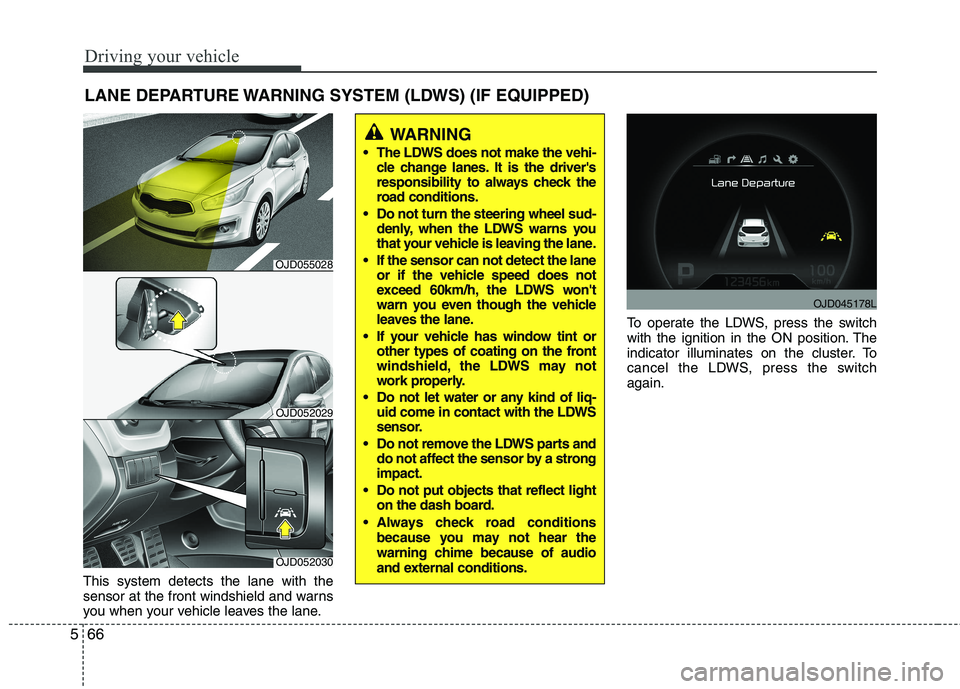
This system detects the lane with the
sensor at the front windshield and warns
you when your vehicle leaves the lane. To operate the LDWS, press the switch
with the ignition in the ON position. The
indicator illuminates on the cluster. To
cancel the LDWS, press the switchagain.
LANE DEPARTURE WARNING SYSTEM (LDWS) (IF EQUIPPED)
WARNING
The LDWS does not make the vehi- cle change lanes. It is the driver's
responsibility to always check the
road conditions.
Do not turn the steering wheel sud- denly, when the LDWS warns you
that your vehicle is leaving the lane.
If the sensor can not detect the lane or if the vehicle speed does not
exceed 60km/h, the LDWS won't
warn you even though the vehicle
leaves the lane.
If your vehicle has window tint or other types of coating on the front
windshield, the LDWS may not
work properly.
Do not let water or any kind of liq- uid come in contact with the LDWS
sensor.
Do not remove the LDWS parts and do not affect the sensor by a strongimpact.
Do not put objects that reflect light on the dash board.
Always check road conditions because you may not hear the
warning chime because of audio
and external conditions.
OJD052030
OJD052029
OJD045178L
OJD055028
Page 458 of 653

Driving your vehicle
80
5
The BSD indicator on the outer side view
mirror may not illuminate properly when:
• The outside rearview mirror housing is
damaged.
The mirror is covered with dirt, snow, or debris.
The window is covered with dirt, snow, or debris.
The window is tinted.
Driver’s Attention
The driver must be cautious in the below
situations, because the system may not
detect other vehicles or objects in certain
circumstances.
The vehicle drives on a curved road or through a tollgate.
The vehicle is turning left or right at a crossroad.
The sensor is polluted with rain, snow, mud, etc.
The rear bumper where the sensor is located is covered with a foreign object
such as a bumper sticker, a bumper
guard, a bike rack, etc.
The rear bumper is damaged, or the sensor is out of the original defaultposition. The vehicle height gets lower or higher
due to heavy loading in the luggage
compartment, abnormal tire pressure,etc.
The vehicle drives in inclement weath- er such as heavy rain or snow.
There is a fixed object near the vehicle, such as a guardrail, person, animal,etc.
The vehicle is driven near areas con- taining metal substances such as a
construction zone, railroad, etc.
A big vehicle is near such as a bus or truck.
A motorcycle or bicycle is near.
A flat trailer is near.
If the vehicle has started at the same time as the vehicle next to you and has
accelerated.
When the other vehicle passes at a very fast speed.
While changing lanes.
When going down or up a steep, uneven road.
When the other vehicle approaches very close.
When a trailer or carrier is installed.
When the temperature near the rear bumper area is high or low. When the sensors are blocked by other
vehicles, walls or parking-lot pillars.
When the detected vehicle also moves back, as your vehicle drives back.
If there are small objects in the detect- ing area such as a shopping cart or a
baby stroller.
If there is a low height vehicle such as a sports car.
When other vehicles are close to your vehicle.
When the vehicle in the next lane moves two lanes away from you OR
when the vehicle two lanes away
moves to the next lane from you.
When driving through a narrow road with many plants.
When driving through a large area with few cars or structures around, such as
a desert, rural area, etc.
When driving on wet surface.
Page 460 of 653

Driving your vehicle
82
5
Remember, your vehicle does not
require extended warm-up. After the
engine has started, allow the engine to
run for 10 to 20 seconds prior to plac-
ing the vehicle in gear. In very cold
weather, however, give your engine a
slightly longer warm-up period.
Do not "lug" or "over-rev" the engine. Lugging is driving too slowly in too
high a gear resulting engine bucking. If
this happens, shift to a lower gear.
Over-revving is racing the engine
beyond its safe limit. This can be avoid-
ed by shifting at the recommended
speeds.
Use your air conditioning sparingly. The air conditioning system is operat-
ed by engine power so your fuel econ-
omy is reduced when you use it.
Open windows at high speeds can reduce fuel economy.
Fuel economy is less in crosswinds and headwinds. To help offset some of
this loss, slow down when driving in
these conditions. Keeping a vehicle in good operating con-
dition is important both for economy and
safety. We recommend in general that the
vehicle be serviced by an authorized Kia
dealer.
WARNING
- Engine off dur-
ing motion
Never turn the engine off to coast
down hills or anytime the vehicle is
in motion. The power steering and
power brakes will not function
properly without the engine run-
ning. Instead, keep the engine on
and downshift to an appropriate
gear for engine braking effect. In
addition, turning off the ignition
while driving could engage the
steering wheel lock (if equipped)
resulting in loss of vehicle steering
which could cause serious injuryor death.