warning light KIA CEED 2017 Workshop Manual
[x] Cancel search | Manufacturer: KIA, Model Year: 2017, Model line: CEED, Model: KIA CEED 2017Pages: 653, PDF Size: 54.59 MB
Page 174 of 653

Features of your vehicle
90
4
Engine oil level warning
light (if equipped, for diesel)
The engine oil level warning light illumi-
nates when the engine oil level should be
checked.
If the warning light comes on, check the
engine oil level as soon as possible andadd engine oil as required.
Slowly pour the recommended oil little by
little into a funnel. (Oil refill capacity :
approximately 0.6 ~ 1.0 l)
Use only the specified engine oil. (Refer
to "Recommended lubricants and capac-ities" in chapter 8.)
Do not overfill the engine oil to ensure
the oil level is not above F mark on the
dipstick.
✽✽ NOTICE
If you travel approximately 50 km~100 km after the engine warms
up, after adding the engine oil, the
warning light will go off.
Cycle the ignition from OFF to ON 3
times within 10 seconds, the warning
light will go off immediately. However,
when you turn off the warning light
without adding the engine oil, the light
will come on again after traveling
approximately 50 km ~ 100 km after
the engine warms up.CAUTION
If the oil pressure warning light
stays on while the engine is run-
ning, serious engine damage mayresult. The oil pressure warninglight comes on whenever there is insufficient oil pressure. In normal
operation, it should come on whenthe ignition switch is turned on, thengo out when the engine is started. If
the oil pressure warning light stayson while the engine is running, thereis a serious malfunction.
If this happens, stop the car as soonas it is safe to do so, turn off the
engine and check the oil level. If the oil level is low, fill the engine oil tothe proper level and start the engineagain. If the light stays on with the
engine running, turn the engine off immediately. In any instance wherethe oil light stays on when theengine is running, we recommend
that the system be checked by anauthorized Kia dealer.
CAUTION
If the light comes on continuously after adding the engine oil and trav-
eling approximately 50 km~100 km after the engine warms up, we rec-ommend that the system be checked by an authorized Kia dealer.
Even if this light doesn't come onafter the engine has started, the engine oil should be checked andsupplied periodically.
Page 176 of 653

Features of your vehicle
92
4
Engine coolant tempera-
ture warning light(if equipped)
The warning light illuminates if the tem-
perature of the engine coolant is above120±3°C (248±5.4°F).
Do not continue driving with an overheat-
ed engine. If your vehicle overheats, refer
to “Overheating” in chapter 6.
✽✽ NOTICE
If the engine coolant temperature warn-
ing light illuminates, it indicates over-
heating that may damage the engine.
Glow indicator (Diesel engine)
The indicator light illuminates when the
ignition switch is placed at the ON posi-
tion. The engine can be started after the
preheat indicator light goes off. The illu-
minating time varies with the water tem-
perature, air temperature and batterycondition.
✽✽ NOTICE
If the engine does not start within 10
seconds after the preheating is complet-
ed, turn the ignition key once more to
the LOCK/OFF position for 10 seconds,
and then to the ON position, in order to
preheat again.
Fuel filter warning light (Diesel engine)
This warning light illuminates for 3 sec-
onds after the ignition switch is set to the
ON position and then it will go out. If it
lights up while the engine is running, it
indicates that water has accumulated
inside the fuel filter. If this happens,
remove the water from the fuel filter.
For more details, refer to “Fuel filter” in chapter 7.
CAUTION
If the preheat indicator light contin- ues to illuminate or flash on and offafter the engine has warmed up orwhile driving, we recommend that
the system be checked by an authorized Kia dealer.
CAUTION
When the fuel filter warning lightilluminates, engine power (vehiclespeed & idle speed) may decrease. If you keep driving with the warning
light on, you can damage your vehi-cle's engine parts and injection sys- tem of the Common Rail. If this occurs, we recommend that the
system be checked by an author-ized Kia dealer.
Page 178 of 653

Features of your vehicle
94
4
TPMS (if equipped)
The monitor will display the correspon-
ding tire that is low with pressure.
For details, see Tire Pressure Monitoring System on chapter 6. Icy road warning light (if equipped)
This warning light is to warn the driver
the road may be icy when:
Ignition ON
Temperature range: approximately below
4°C (39.2°F).
The warning light will blink for 10 sec-
onds and then illuminate. Also, the warn-ing chime will sound.
✽✽ NOTICE
If the icy road warning light appears
while driving, you should drive more
attentively and safely refraining from
over-speeding, rapid acceleration, sud-
den braking or sharp turning, etc.
OJD042144OJD042146
Page 190 of 653

Features of your vehicle
106
4
Non-operating condition
Never use the Smart Parking Assist
System in the below conditions.
Curved parking space
Inclined roads
A vehicle loaded with longer or wider
cargo compared to the vehicle
Diagonal parking space
Parking space with trash, grass or bar- riers
Heavy snow or rain
A pole close to the parking line
Bumpy roads
A vehicle equipped with a snow chain or spare tire
Tire pressure lower or higher than the standard tire pressure
A trailer connected to the vehicle
Slippery or uneven road
Big vehicles such as buses or trucks parked
Sensor covered with foreign matter, such as snow or water
Moisture frozen on the sensor.
A motorcycle or bicycle parked
A trash can or obstacle near Heavy wind
Wheel changed to an unauthorized
size
A problem with the wheel alignment
Next to a garden or bush
A accessory installed on the detective area the of sensors (such as number plate holder)
Vehicle leaned severely to one side
Strong sunlight or very cold weather
Ultrasonic interference other vehicle's. Such as horn sounds of other vehicles,
motorcycle's engine noise, air brake
noise of heavy vehicles and with the
other vehicle's parking assist system
working.
Near a circular pillar or narrow pillar, or a pillar surrounded by object such as
fire extinguisher, etc.
The sensor is positioned incorrectly by an impact to the bumper
WARNING
Do not use the Smart Parking
Assist System in the following con-
ditions for unexpected results mayoccur and cause a serious accident.
1. Parking on inclines
The driver must apply the accelera- tor and brake pedal when parking
on inclines. If the driver is unfamil-
iar with applying the accelerator
and brake pedal, a car accident may
occur.
(Continued)
OJD042156
Page 204 of 653

Features of your vehicle
120
4
REARVIEW CAMERA (IF EQUIPPED)
❈ The actual rear view in the vehicle may dif-
fer from the illustration. The rearview camera will activate when
the back-up light is ON with the ignition
switch ON and the shift lever in the R
(Reverse) position. This system is a supplemental system
that shows behind the vehicle through
the navigation monitor while backing-up. ❈
For more detailed informations, refer
to supplement for navigation system. The hazard warning flasher should be
used whenever you find it necessary to
stop the vehicle in a hazardous location.
When you must make such an emer-
gency stop, always pull off the road as far
as possible.
The hazard warning lights are turned on
by pushing in the hazard switch. Both
turn signal lights will blink. The hazard
warning lights will operate even though
the key is not in the ignition switch.
To turn the hazard warning lights off,
push the switch again.
OJD042089
HAZARD WARNING FLASHER
WARNING
This system is a supplementary function only. It is the responsibil-
ity of the driver to always check
the inside/outside rearview mirror
and the area behind the vehicle
before and while backing upbecause there is a dead zone that
can't see through the camera.
Always keep the camera lens clean. If lens is covered with for-
eign matter, the camera may not
operate normally.
OJD045086
OJD042088
RRRReeeeaaaarrrr vvvviiiieeeewwww ddddiiiissssppppllllaaaayyyy
Page 208 of 653

Features of your vehicle
124
4
High - beam operation
1. Turn the light switch to the headlight
position.
2. Push the lever away from you. The high-beam indicator will light when
the headlight high beams are switched on.
To prevent the battery from being dis- charged, do not leave the lights on fora prolonged time while the engine is
not running.Flashing headlights
Pull the lever towards you. It will return to
the normal position when released. The
headlight switch does not need to be on
to use this flashing feature.
WARNING
Do not use high beam when there
are other vehicles. Using highbeam could obstruct the other dri-ver's vision.
OED040801OED040802
Page 210 of 653

Features of your vehicle
126
4
Turn signals and lane change sig- nals
The ignition switch must be on for the
turn signals to function. To turn on the
turn signals, move the lever up or down
(A). Green arrow indicators on the instru-
ment panel indicate which turn signal is
operating.
They will self-cancel after a turn is com-
pleted. If the indicator continues to flash
after a turn, manually return the lever tothe OFF position.
To signal a lane change, move the turn
signal lever slightly and hold it in position
(B). The lever will return to the OFF posi-tion when released.
OED040804
WARNING
Do not place any accessories, stickers or tint the windshield.
Have the windshield glass replaced from an authorized deal-
er.
Do not remove or impact related parts of the high beam assist.
Be careful that water doesn’t get into the high beam assist unit.
Do not place objects on the dash- board that reflects light such as
mirrors, white paper, etc. The sys-
tem may malfunction if the sun-light is reflected.
At times, the high beam assist system may not work properly,
always check the road conditions
for your safety. When the system
does not operate normally, manu-
ally change the high beam and
low beam.CAUTION
When the headlamp is not
repaired or replaced at an author-
ized dealer.
When the headlamp aiming is not properly adjusted.
When driving on a narrow curved road or rough road.
When driving downhill or uphill. When part of the vehicle in front is visible.
When there is a traffic light, reflecting sign, flash sign or mir-ror.
When the road conditions are bad such as being wet or covered
with snow.
When the front vehicle’s head- lights are off but the fog lights on.
When a suddenly appears from a curve.
When the vehicle is tilted from a flat tire or being towed.
Page 213 of 653

4129
Features of your vehicle
The higher the number of the switch is
positioned, the lower the headlight beam
level. Always keep the headlight beam at
the proper leveling position, or headlights
may dazzle other road users.
Listed below are the examples of proper
switch settings. For loading conditions
other than those listed below, adjust the
switch position so that the beam level
may be the nearest as the conditionobtained according to the list.Automatic type
It automatically adjusts the headlight
beam level according to the number of
passengers and loading weight in theluggage area.
And it offers proper headlight beam
under various conditions.Adaptive Front Lighting System (AFLS) (if equipped)
Adaptive front lighting system uses the
steering angle and vehicle speed, to
keep your field of vision wide by swiveling
and leveling the headlamp.
Change the switch to the AUTO position
when the engine is running. The adaptive
front lighting system will operate when
the headlamp is ON. To turn off the
AFLS, change the switch to other posi-
tions. After turning the AFLS off, head-
lamp swiveling no longer occurs, but lev-
eling operates continuously.
OYN049201
Loading condition Switch position
Driver only 0
Driver + Front passenger 0 Full passengers
(including driver) 1
Full passengers (including
driver) + Maximum permis-
sible loading 2
Driver + Maximum permis-
sible loading 3
WARNING
If it does not work properly even
though your car is inclined back-
ward according to passenger's
posture, or the headlight beam is
irradiated to the high or low posi-
tion, we recommend that the sys-
tem be inspected by an authorized
Kia dealer. Do not attempt to inspect or
replace the wiring yourself.
Page 219 of 653
4135
Features of your vehicle
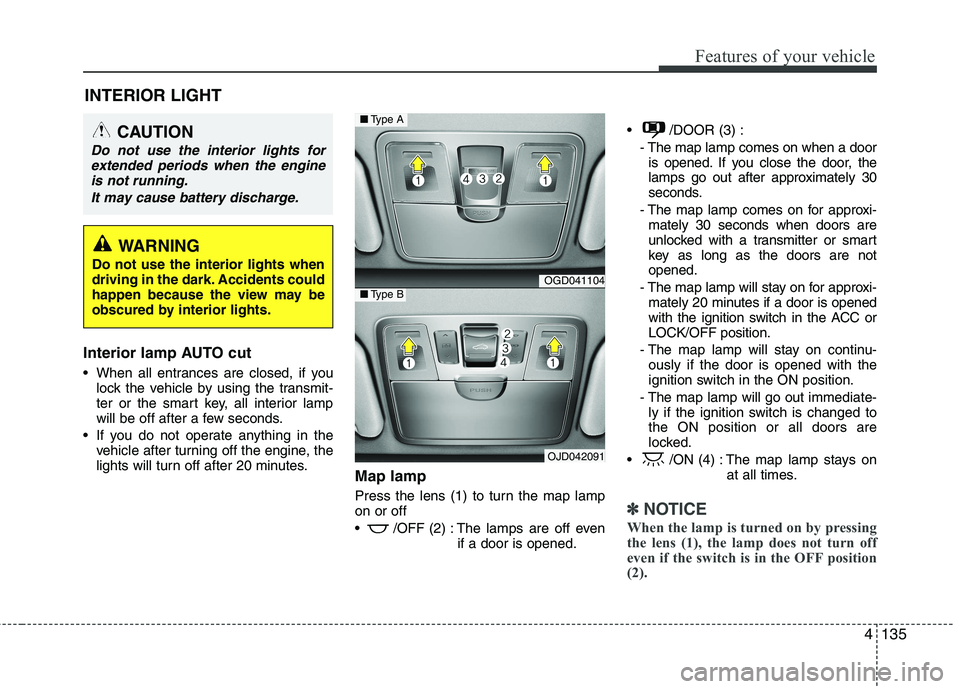
Interior lamp AUTO cut
When all entrances are closed, if youlock the vehicle by using the transmit-
ter or the smart key, all interior lamp
will be off after a few seconds.
If you do not operate anything in the vehicle after turning off the engine, the
lights will turn off after 20 minutes. Map lamp
Press the lens (1) to turn the map lamp on or off
/OFF (2) : The lamps are off even
if a door is opened. /DOOR (3) :
- The map lamp comes on when a dooris opened. If you close the door, the
lamps go out after approximately 30
seconds.
- The map lamp comes on for approxi- mately 30 seconds when doors are
unlocked with a transmitter or smart
key as long as the doors are notopened.
- The map lamp will stay on for approxi- mately 20 minutes if a door is opened
with the ignition switch in the ACC orLOCK/OFF position.
- The map lamp will stay on continu- ously if the door is opened with the
ignition switch in the ON position.
- The map lamp will go out immediate- ly if the ignition switch is changed tothe ON position or all doors are
locked.
/ON (4) : The map lamp stays on at all times.
✽✽NOTICE
When the lamp is turned on by pressing
the lens (1), the lamp does not turn off
even if the switch is in the OFF position(2).
INTERIOR LIGHT
CAUTION
Do not use the interior lights for extended periods when the engine
is not running.
It may cause battery discharge.
WARNING
Do not use the interior lights when
driving in the dark. Accidents could
happen because the view may be
obscured by interior lights.
OGD041104
OJD042091
■ Type A
■Type B
Page 240 of 653

Features of your vehicle
156
4
Fan speed control
The fan speed can be set to the desired
speed by pressing the fan speed control
button.
To change the fan speed, press the upper
button ( ) for higher speed, or press
the lower button ( ) for lower speed.
Pressing the OFF button turns off the
fan.
Air conditioning (if equipped)
Press the A/C button to turn the air con- ditioning system on (indicator light willilluminate).
Press the button again to turn the air
conditioning system off.
OJD042114OJD042115
WARNING
The continuous use of recirculat- ed air in the climate control sys-
tem may increase humidity inside
the vehicle, causing the glass to
fog and obscuring visibility.
Do not sleep in a vehicle with the air conditioning or heating system
on. It may cause serious harm or
death due to a drop in the oxygen
level and/or body temperature.
The continuous use of recirculat- ed air in the climate control sys-
tem can produce drowsiness or
sleepiness, which may result in a
loss of vehicle control. Set the air
intake control to the outside
(fresh) air position as much as
possible while driving.