buttons KIA CEED 2017 Owners Manual
[x] Cancel search | Manufacturer: KIA, Model Year: 2017, Model line: CEED, Model: KIA CEED 2017Pages: 653, PDF Size: 54.59 MB
Page 26 of 653
39
Safety features of your vehicle
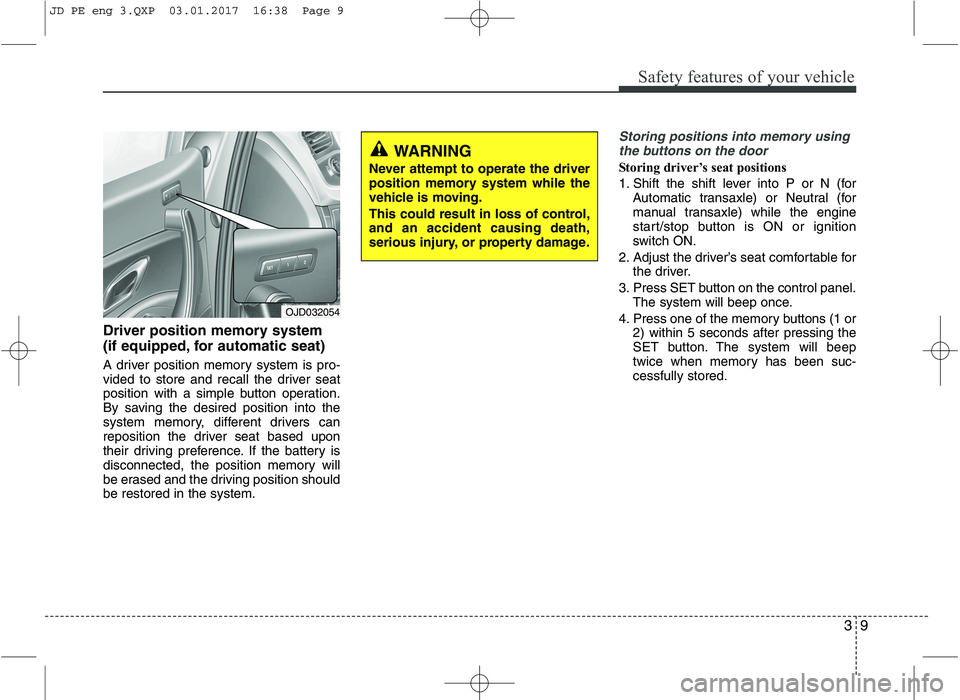
Driver position memory system
(if equipped, for automatic seat)
A driver position memory system is pro-
vided to store and recall the driver seat
position with a simple button operation.
By saving the desired position into the
system memory, different drivers can
reposition the driver seat based upon
their driving preference. If the battery is
disconnected, the position memory will
be erased and the driving position shouldbe restored in the system.
Storing positions into memory usingthe buttons on the door
Storing driver’s seat positions
1. Shift the shift lever into P or N (for Automatic transaxle) or Neutral (for
manual transaxle) while the engine
start/stop button is ON or ignition
switch ON.
2. Adjust the driver’s seat comfortable for the driver.
3. Press SET button on the control panel. The system will beep once.
4. Press one of the memory buttons (1 or 2) within 5 seconds after pressing the
SET button. The system will beep
twice when memory has been suc-cessfully stored.
WARNING
Never attempt to operate the driver
position memory system while the
vehicle is moving.
This could result in loss of control, and an accident causing death,
serious injury, or property damage.
OJD032054
JD PE eng 3.QXP 03.01.2017 16:38 Page 9
Page 95 of 653
411
Features of your vehicle
SMART KEY (IF EQUIPPED)
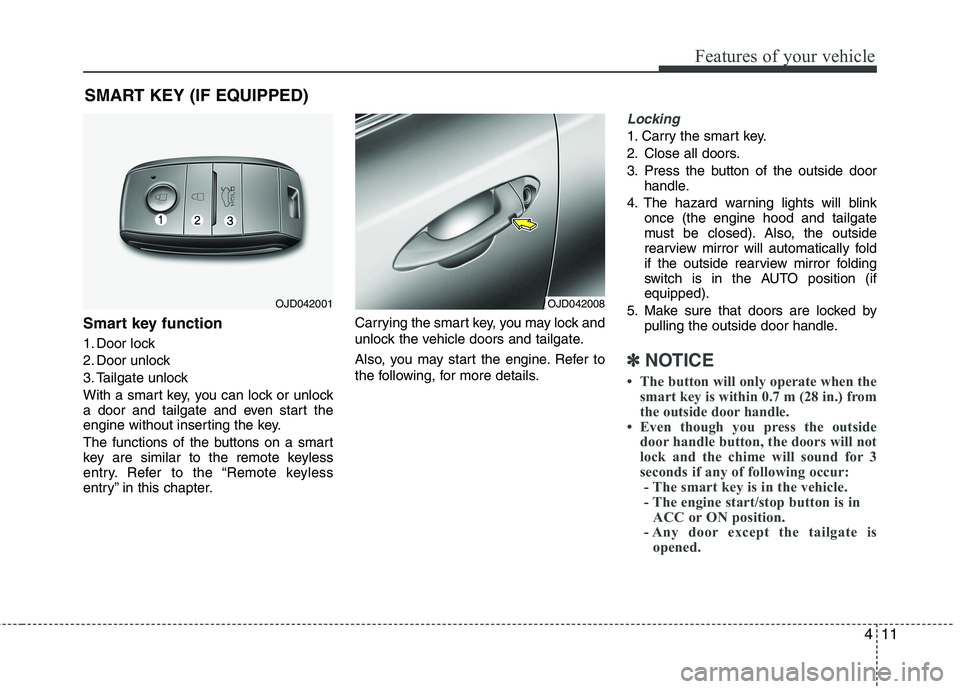
Smart key function
1. Door lock
2. Door unlock
3. Tailgate unlock
With a smart key, you can lock or unlock
a door and tailgate and even start the
engine without inserting the key.
The functions of the buttons on a smart
key are similar to the remote keyless
entry. Refer to the “Remote keyless
entry” in this chapter. Carrying the smart key, you may lock and
unlock the vehicle doors and tailgate.
Also, you may start the engine. Refer to
the following, for more details.
Locking
1. Carry the smart key.
2. Close all doors.
3. Press the button of the outside door
handle.
4. The hazard warning lights will blink once (the engine hood and tailgate
must be closed). Also, the outside
rearview mirror will automatically fold
if the outside rearview mirror folding
switch is in the AUTO position (ifequipped).
5. Make sure that doors are locked by pulling the outside door handle.
✽✽ NOTICE
The button will only operate when the smart key is within 0.7 m (28 in.) from
the outside door handle.
Even though you press the outside
door handle button, the doors will not
lock and the chime will sound for 3
seconds if any of following occur:- The smart key is in the vehicle.
- The engine start/stop button is in ACC or ON position.
- Any door except the tailgate is opened.
OJD042001OJD042008
Page 236 of 653

Features of your vehicle
152
4
Manual heating and air condition- ing The heating and cooling system can be
controlled manually by pressing buttons
or turning knob(s) other than the AUTO
button. In this case, the system workssequentially according to the order of
buttons or knob(s) selected.
1. Start the engine.
2. Set the mode to the desired position.
To improve the effectiveness of heat-ing and cooling:
- Heating:- Cooling:
3. Set the temperature control to the desired position.
4. Set the air intake control to the outside (fresh) air or recirculated position.
5. Set the fan speed control to the desired speed.
6. If air conditioning is desired, turn the air conditioning system on.
Press the AUTO button in order to con-
vert to full automatic control of the sys-tem.
Mode selection
The mode selection button controls the direction of the airflow in the vehicle.
If you push the button once, the corresponding switch will turn on, and if you push the
button again, the switch will turn off.
OJD042102
((((iiiiffff eeeeqqqquuuuiiiippppppppeeeedddd))))
Page 241 of 653

4157
Features of your vehicle
OFF mode
Press the OFF button to turn off the air
climate control system. However, you can
still operate the air intake buttons as long
as the ignition switch is in the ON posi-tion.System operation
Ventilation
1. Set the mode to the position.
2. Set the air intake control to the outside
(fresh) air position.
3. Set the temperature control to the desired position.
4. Set the fan speed control to the desired speed.
Heating
1. Set the mode to the position.
2. Set the air intake control to the outside(fresh) air position.
3. Set the temperature control to the desired position.
4. Set the fan speed control to the desired speed.
5. If dehumidified heating is desired, turn the air conditioning system on.
If the windshield fogs up, set the mode to the or
position. Operation Tips
To keep dust or unpleasant fumes from
entering the vehicle through the venti-
lation system, temporarily set the air
intake control to the recirculated air
position. Be sure to return the control
to the fresh air position when the irrita-
tion has passed to keep fresh air in the
vehicle. This will help keep the driver
alert and comfortable.
Air for the heating/cooling system is drawn in through the grilles just ahead
of the windshield. Care should be
taken that these are not blocked by
leaves, snow, ice or other obstructions.
To prevent interior fog on the wind- shield, set the air intake control to the
fresh air position and fan speed to the
desired position, turn on the air condi-tioning system, and adjust the temper-
ature control to desired temperature.OJD042118
Page 270 of 653

Features of your vehicle
186
4 Steering wheel audio controls (If equipped)
The steering wheel may incorporate
audio control buttons.
VOLUME ( / ) (1)
• Press the lever upward ( ) to
increase the volume.
Press the lever downward ( ) to decrease the volume.
SEEK/PRESET ( / ) (2)
The SEEK/PRESET lever has differ- ent functions based on the system
mode. For the following functions the
lever should be pressed for 0.8 sec-
onds or more.
RADIO mode
It will function as the AUTO SEEK
select button.
CD/USB/ i Pod ®
mode
It will function as the FF/REW button.
If the SEEK/PRESET button is
pressed for less than 0.8 seconds, it
will work as follows in each mode. RADIO mode
It will function as the PRESET STA-
TION buttons.
CD/USB/ i Pod
®
mode
It will function as TRACK UP/DOWN
button.
MODE ( ) (3)
Press the button to change audio
source. FM ➟ AM ➟ CD ➟ USB/iPod ®
➟ AUX ➟
MY MUSIC ➟
Bluetooth®Wireless
Technology audio
MUTE ( ) (4, if equipped)
Press the button to mute the sound.
Press the button to turn off the microphone during a telephone call.
Detailed information for audio control
buttons are described in the followingpages in this section.
CAUTION
Do not operate audio remote control buttons simultaneously.
OUM044210L
■
Type A
■ Type B ■
Type C
■ Type D
Page 321 of 653
Features of your vehicle
4 237
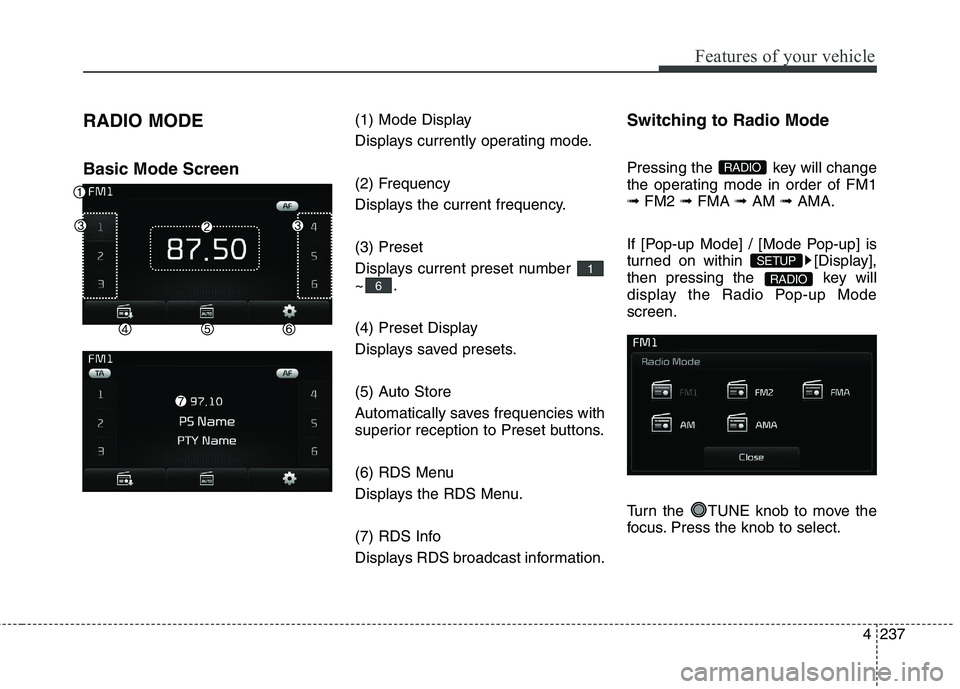
RADIO MODE Basic Mode Screen
(1) Mode Display
Displays currently operating mode.
(2) Frequency
Displays the current frequency. (3) Preset
Displays current preset number ~.
(4) Preset Display
Displays saved presets.
(5) Auto Store
Automatically saves frequencies with
superior reception to Preset buttons.
(6) RDS Menu
Displays the RDS Menu.
(7) RDS Info
Displays RDS broadcast information.Switching to Radio Mode
Pressing the key will change
the operating mode in order of FM1➟
FM2 ➟FMA ➟AM ➟AMA.
If [Pop-up Mode] / [Mode Pop-up] is
turned on within [Display],
then pressing the key will
display the Radio Pop-up Modescreen.
Turn the TUNE knob to move the
focus. Press the knob to select.
RADIO
SETUP
RADIO
6
1
Page 322 of 653
Features of your vehicle
238
4 Searching Radio Frequencies
Using Seek
Press the key to play the
previous/next frequency.
Using TUNE
Turn the TUNE knob to select the
desired frequency.
Using Radio Mode
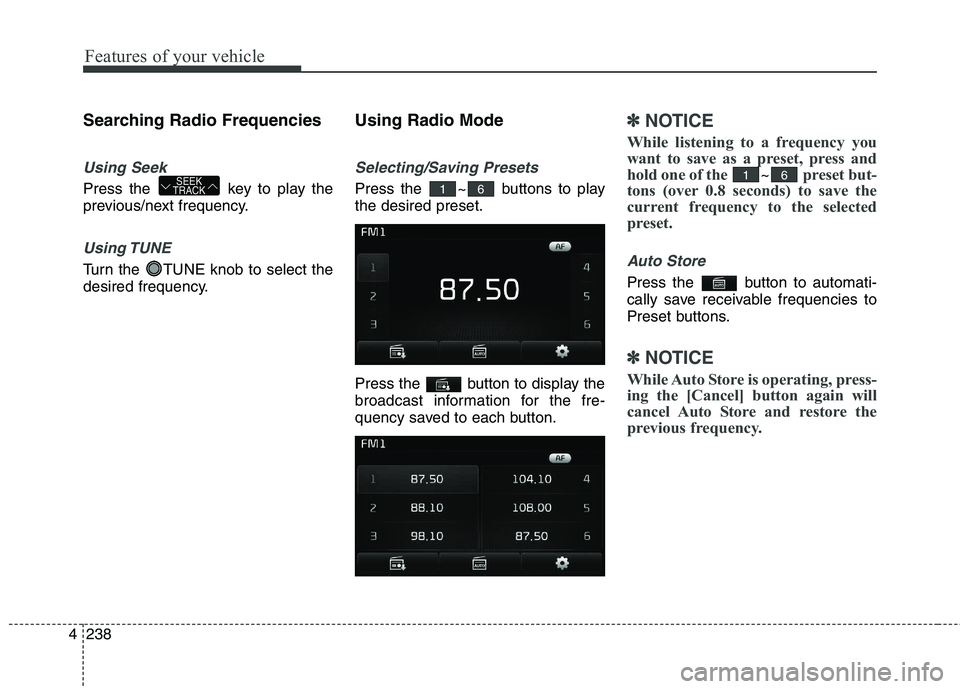
Selecting/Saving Presets
Press the ~ buttons to play the desired preset.
Press the button to display the
broadcast information for the fre-
quency saved to each button.
✽✽
NOTICE
While listening to a frequency you
want to save as a preset, press and
hold one of the
~preset but-
tons (over 0.8 seconds) to save the
current frequency to the selected
preset.
Auto Store
Press the button to automati-
cally save receivable frequencies to
Preset buttons.
✽✽ NOTICE
While Auto Store is operating, press-
ing the [Cancel] button again will
cancel Auto Store and restore the
previous frequency.
6161SEEK
TRACK
Page 346 of 653

Features of your vehicle
262
4 List Menu
From the List screen, it is possible to
delete files you previously saved intoMy Music.
Press the button or individual-
ly select the files you want to delete.Once files are selected, the
button and buttons will be
enabled.
(1) : Moves to the previous
screen
(2) Select All : Selects all files
(3) Unselect All : Deselects all select- ed files
(4) Delete : Deletes selected files
After selecting the files you want to
delete, press the button to
delete the selected files.
✽✽ NOTICE
If there is memory available, up to 6,000 files can be saved.
Identical files cannot be copied more than 1,000 times.
To check memory information, go to [System] [Memory
Information] ✽
✽
NOTICE - USING THE
Bluetooth®
Wireless Technology AUDIOMODE
Bluetooth ®
Wireless Technology
Audio Mode can be used only when a Bluetooth ®
Wireless Technology
phone has been connected.
Bluetooth ®
Wireless Technology
Audio Mode will not be available
when connecting mobile phones
that do not support this feature.
While Bluetooth®
Wireless
Technology Audio is playing, if the
Bluetooth ®
Wireless Technology
phone is connected, then the music
will also stop.
Moving the Track up/down while playing Bluetooth®
Wireless
Technology audio mode may
result in pop noises in some mobile
phones.
Bluetooth ®
Wireless Technology
streaming audio may not be sup-
ported in some mobile phones. (Continued)
SETUP
Page 368 of 653
![KIA CEED 2017 Owners Manual Features of your vehicle
284
4 SETUP
Starting Mode
Press the key to display the Setup screen.
You can select and control options
related to [Display], [Sound],[Phone] and [System].
Display Settin](/img/2/57941/w960_57941-367.png "KIA CEED 2017 Owners Manual Features of your vehicle
284
4 SETUP
Starting Mode
Press the key to display the Setup screen.
You can select and control options
related to [Display], [Sound],[Phone] and [System].
Display Settin")
Features of your vehicle
284
4 SETUP
Starting Mode
Press the key to display the Setup screen.
You can select and control options
related to [Display], [Sound],[Phone] and [System].
Display Settings
Adjusting the Brightness
Press the key Select
[Display] Select [Brightness]
Use the , buttons to adjust the
screen brightness or set the
Brightness on Automatic, Day, or
Night mode.
Press the button to reset.
(1) Automatic : Adjusts the bright-
ness automatically
(2) Day : Always maintains the bright- ness on high
(3) Night : Always maintains the brightness on low
Pop-up Mode
Press the key Select
[Display] Select [Pop-up Mode]
This feature is used to display the
Pop-up Mode screen when entering
radio and media modes.
When this feature is turned on, pressing the or key
will display the Pop-up Mode screen.
✽✽ NOTICE
The media Pop-up Mode screen can
be displayed only when two or more
media modes have been connected.
MEDIA RADIO
SETUP
Default
SETUP
SETUP
Page 370 of 653
Features of your vehicle
286
4 Use the , , , buttons to
adjust the Fader/Balance settings.
Use the , buttons to adjust the
Bass/Middle/Treble settings.
Press the button to reset.
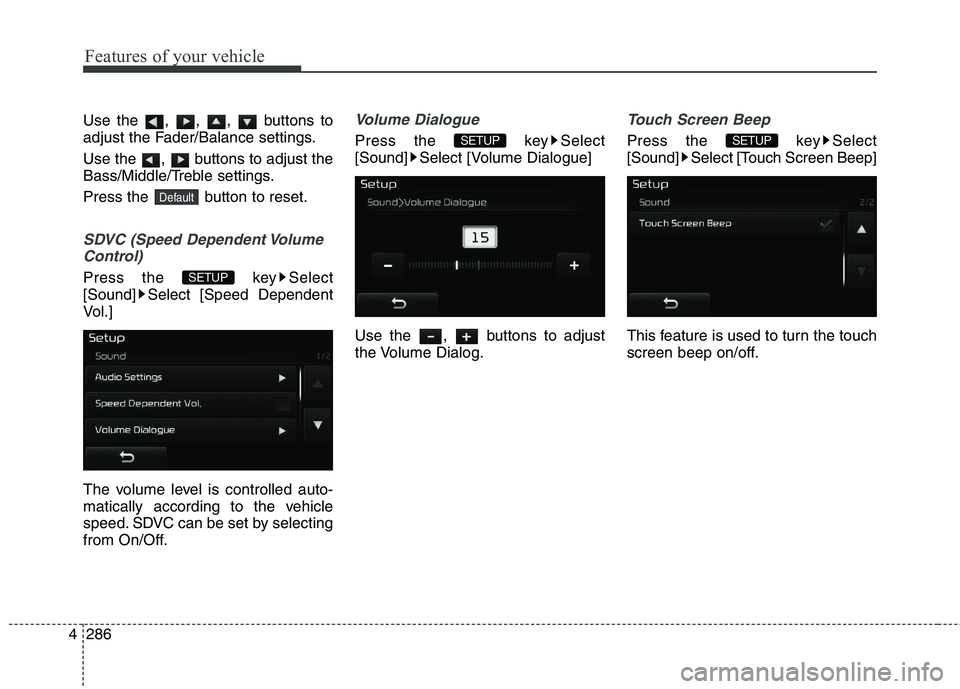
SDVC (Speed Dependent Volume
Control)
Press the key Select
[Sound] Select [Speed Dependent
Vol.]
The volume level is controlled auto-
matically according to the vehicle
speed. SDVC can be set by selecting
from On/Off.
Volume Dialogue
Press the key Select
[Sound] Select [Volume Dialogue]
Use the , buttons to adjust
the Volume Dialog.
Touch Screen Beep
Press the key Select
[Sound] Select [Touch Screen Beep]
This feature is used to turn the touch
screen beep on/off.SETUPSETUP
SETUP
Default