trunk KIA CERATO 2006 User Guide
[x] Cancel search | Manufacturer: KIA, Model Year: 2006, Model line: CERATO, Model: KIA CERATO 2006Pages: 315, PDF Size: 11.29 MB
Page 162 of 315
Driving your vehicle
50
4
1 23456789
Daytime running light (if equipped)
Daytime Running Lights (DRL) can
make it easier for others to see the
front of your vehicle during the day.
DRL can be helpful in many different
driving conditions, and it is especial-
ly helpful after dawn and before sun-set.
The DRL system will make your low-
beam headlights turn OFF when:
1. The headlight switch is ON.
2. The parklight switch is ON.
3. Engine stops. Headlight leveling device (if equipped)
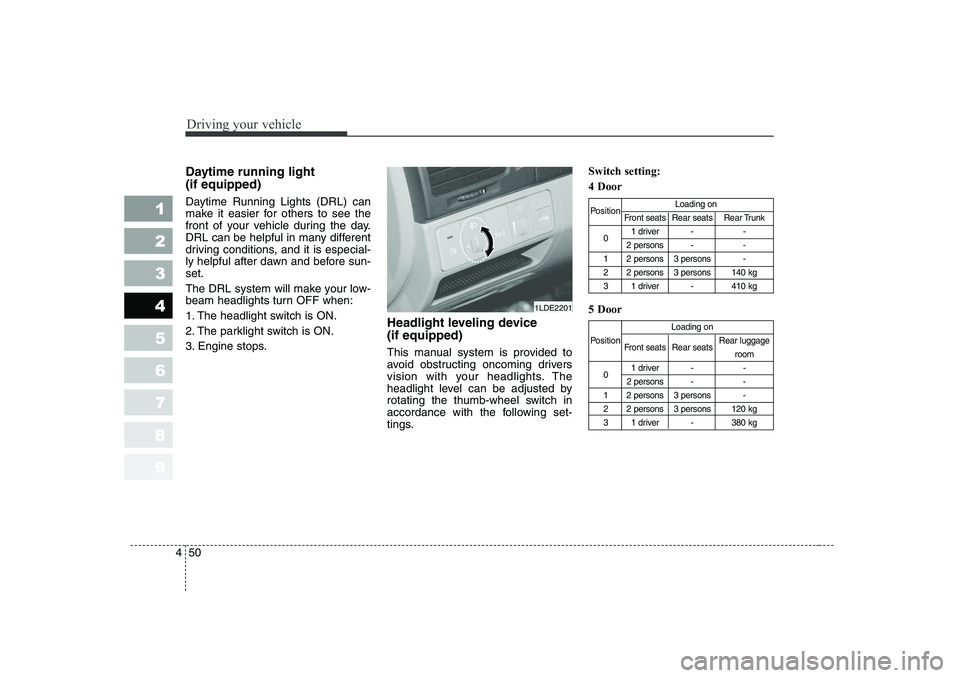
This manual system is provided to
avoid obstructing oncoming drivers
vision with your headlights. The
headlight level can be adjusted by
rotating the thumb-wheel switch in
accordance with the following set-
tings.Switch setting: 4 Door 5 Door
Position
Loading on
Front seats Rear seats Rear Trunk
0 1 driver - -
2 persons - -
1 2 persons 3 persons -
2 2 persons 3 persons 140 kg
3 1 driver - 410 kg
Loading on
Position Front seats Rear seats Rear luggage
room
0 1 driver - -
2 persons - -
1 2 persons 3 persons -
2 2 persons 3 persons 120 kg
3 1 driver - 380 kg
1LDE2201
Page 196 of 315
Driving your vehicle
84
4
1 23456789
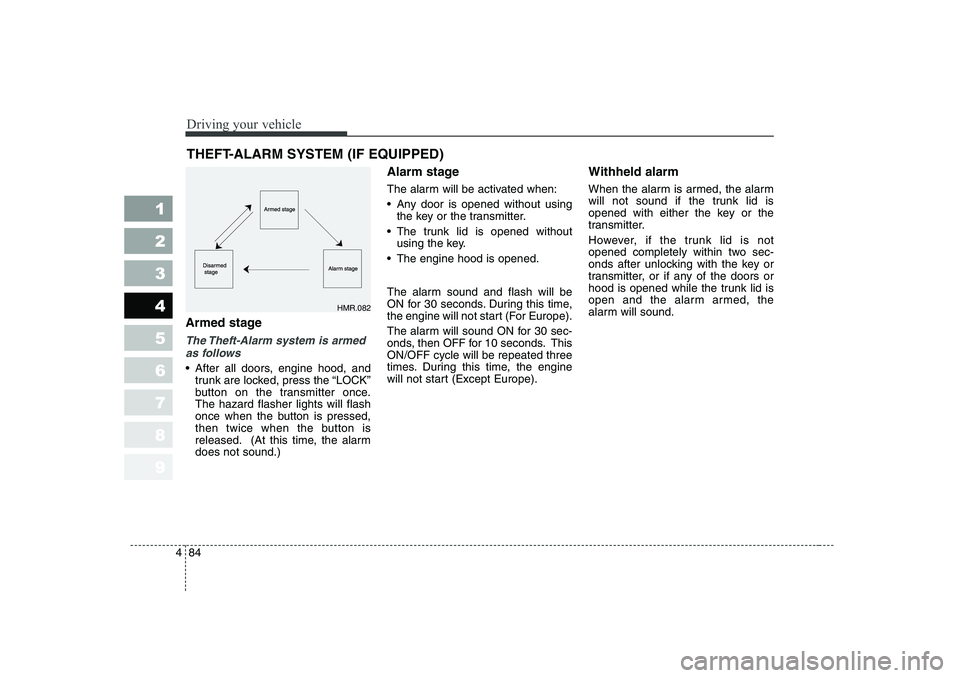
Armed stage
The Theft-Alarm system is armed
as follows
After all doors, engine hood, and
trunk are locked, press the “LOCK ”
button on the transmitter once.The hazard flasher lights will flash
once when the button is pressed,
then twice when the button is
released. (At this time, the alarmdoes not sound.) Alarm stage
The alarm will be activated when:
Any door is opened without using
the key or the transmitter.
The trunk lid is opened without
using the key.
The engine hood is opened.
The alarm sound and flash will be
ON for 30 seconds. During this time,
the engine will not start (For Europe).
The alarm will sound ON for 30 sec-
onds, then OFF for 10 seconds. ThisON/OFF cycle will be repeated three
times. During this time, the engine
will not start (Except Europe). Withheld alarm
When the alarm is armed, the alarm
will not sound if the trunk lid is
opened with either the key or the
transmitter.
However, if the trunk lid is not
opened completely within two sec-
onds after unlocking with the key or
transmitter, or if any of the doors or
hood is opened while the trunk lid is
open and the alarm armed, the
alarm will sound.
THEFT-ALARM SYSTEM (IF EQUIPPED)
HMR.082
Page 197 of 315
485
1 23456789
Driving your vehicle
Disarmed stage
The armed stage will be deactivated when: The “ ” button on the transmit-
ter is pressed.
After depressing unlock button,
you must open the doors within 30
seconds or all doors will be lockedagain and automatically placed
into the armed stage.
The ignition switch is in the “ON ”
position.
The doors are unlocked with the
ignition key. The alarm will be deactivated when:
The lock ( ), unlock ( ) or
trunk lid open ( ) button on
the transmitter is pressed.
The ignition switch is in the “ON ”
position for 30 seconds or more.
The doors are unlocked with the
ignition key.
✽✽
NOTICE
If the ignition key is in the ignition
switch, the transmitter will not func-
tion. Avoid trying to start the enginewith the alarm activated.
Page 231 of 315
611
In case of an emergency
1 23456789
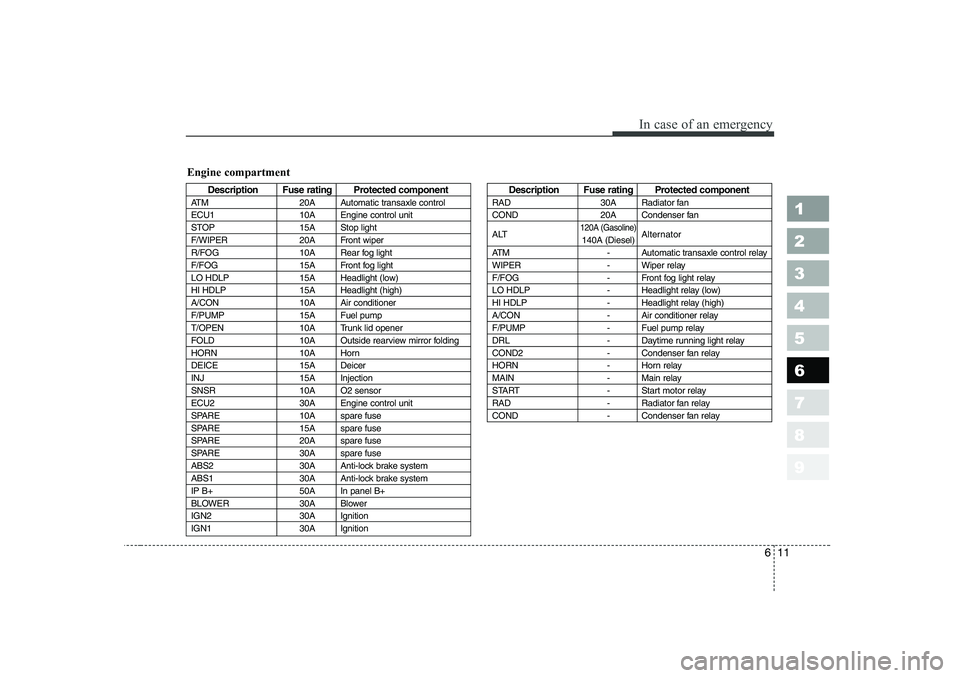
Description Fuse rating Protected component
ATM 20A Automatic transaxle control
ECU1 10A Engine control unit
STOP 15A Stop light
F/WIPER 20A Front wiper
R/FOG 10A Rear fog light
F/FOG 15A Front fog light
LO HDLP 15A Headlight (low)
HI HDLP 15A Headlight (high)
A/CON 10A Air conditioner
F/PUMP 15A Fuel pump
T/OPEN 10A Trunk lid opener
FOLD 10A Outside rearview mirror folding
HORN 10A Horn
DEICE 15A Deicer
INJ 15A Injection
SNSR 10A O2 sensor
ECU2 30A Engine control unit
SPARE 10A spare fuse
SPARE 15A spare fuse
SPARE 20A spare fuse
SPARE 30A spare fuse
ABS2 30A Anti-lock brake system
ABS1 30A Anti-lock brake system
IP B+ 50A In panel B+
BLOWER 30A Blower
IGN2 30A Ignition
IGN1 30A IgnitionDescription Fuse rating Protected component
RAD 30A Radiator fan
COND 20A Condenser fan
ALT
120A (Gasoline)Alternator
140A (Diesel)
ATM - Automatic transaxle control relay
WIPER - Wiper relay
F/FOG - Front fog light relay
LO HDLP - Headlight relay (low)
HI HDLP - Headlight relay (high)
A/CON - Air conditioner relay
F/PUMP - Fuel pump relay
DRL - Daytime running light relay
COND2 - Condenser fan relay
HORN - Horn relay
MAIN - Main relay
START - Start motor relay
RAD - Radiator fan relay
COND - Condenser fan relay
Engine compartment
Page 239 of 315
619
In case of an emergency
1 23456789
IF YOU HAVE A FLAT TIRE
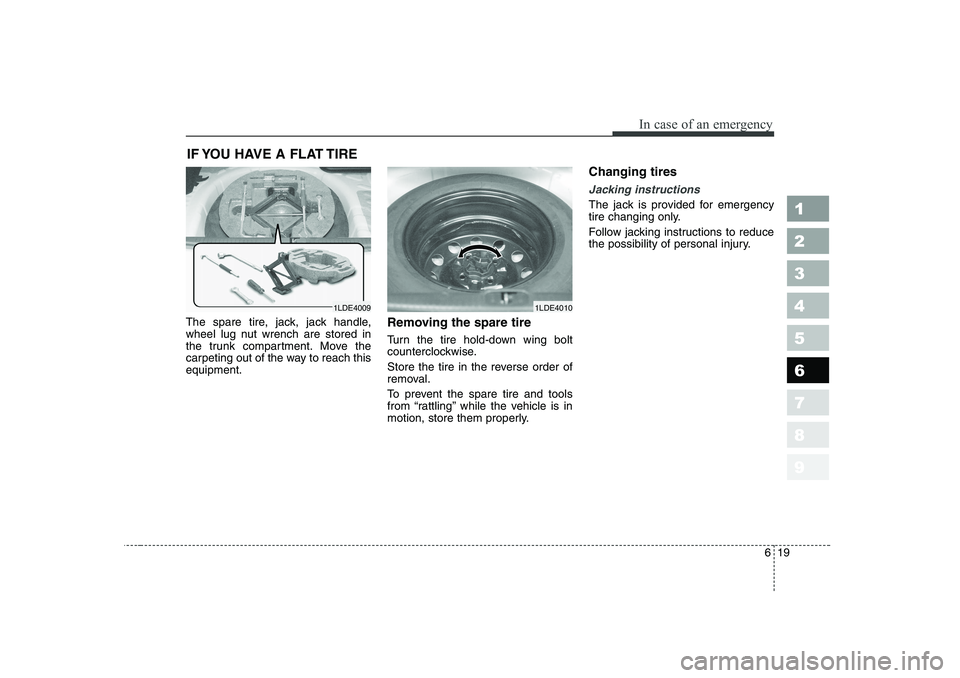
The spare tire, jack, jack handle,
wheel lug nut wrench are stored in
the trunk compartment. Move the
carpeting out of the way to reach thisequipment. Removing the spare tire
Turn the tire hold-down wing bolt
counterclockwise.
Store the tire in the reverse order of
removal.
To prevent the spare tire and tools
from “rattling” while the vehicle is in
motion, store them properly.Changing tires
Jacking instructions
The jack is provided for emergency
tire changing only.
Follow jacking instructions to reduce
the possibility of personal injury.
1LDE40091LDE4010
Page 244 of 315
In case of an emergency
24
6
EMERGENCY COMMODITY (IF EQUIPPED)
There are some emergency com-
modities in the vehicle to help yourespond to the emergency situation. Fire extinguisher
The fire extinguisher is located in the
trunk.
If there is small fire and you know
how to use the fire extinguisher, take
the following steps carefully.
1. Pull the pin at the top of the extin-
guisher that keeps the handle from being accidentally pressed.
2. Aim the nozzle toward the base of the fire.
3. Stand approximately 2.5 m (8 ft) away from the fire and squeeze
the handle to discharge the extin-
guisher. If you release the handle,
the discharge will stop.
4. Sweep the nozzle back and forth at the base of the fire. After the fire
appears to be out, watch it careful-
ly since it may re-ignite. First aid kit There are some items such as scis-
sors, bandage and adhesive tape
and etc. in the kit to give first aid toan injured person.
Triangle reflector
Place the triangle reflector on the
road to warn oncoming vehicles dur-
ing emergencies, such as when the
vehicle is parked by the roadside due
to any problems.
1 23456789
Page 297 of 315
Maintenance
52
7
1 23456789
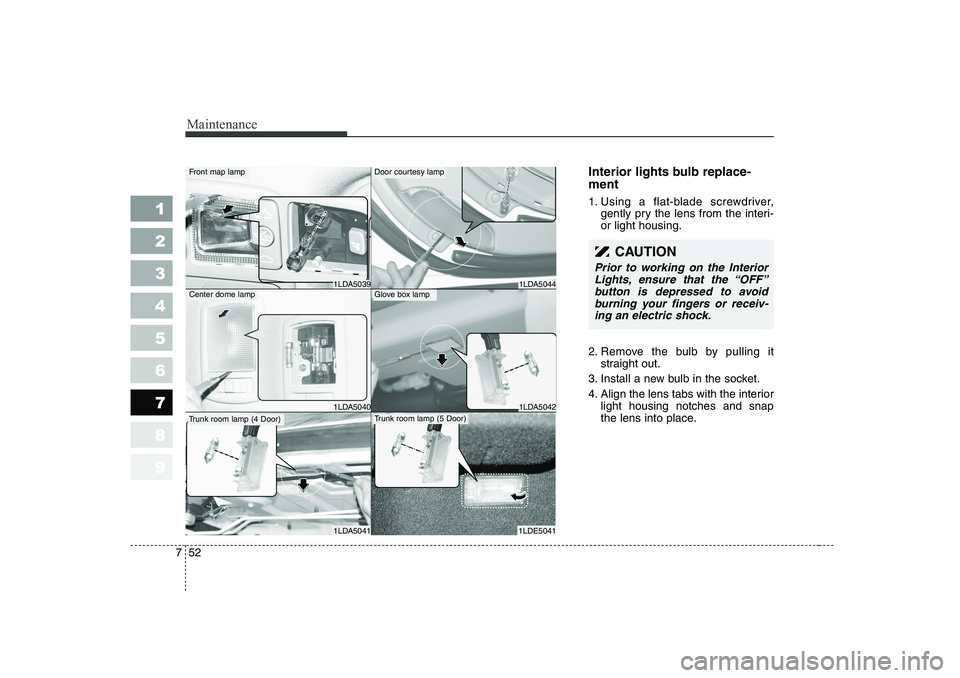
Interior lights bulb replace- ment
1. Using a flat-blade screwdriver,
gently pry the lens from the interi- or light housing.
2. Remove the bulb by pulling it straight out.
3. Install a new bulb in the socket.
4. Align the lens tabs with the interior light housing notches and snap
the lens into place.
CAUTION
Prior to working on the Interior
Lights, ensure that the “OFF”button is depressed to avoidburning your fingers or receiv- ing an electric shock.
1LDA5044
1LDA5042
1LDE5041
Door courtesy lamp
Glove box lamp
Trunk room lamp (5 Door)
1LDA5039
1LDA5040
1LDA5041
Front map lamp
Center dome lamp
Trunk room lamp (4 Door)
Page 298 of 315
753
Maintenance
1 23456789
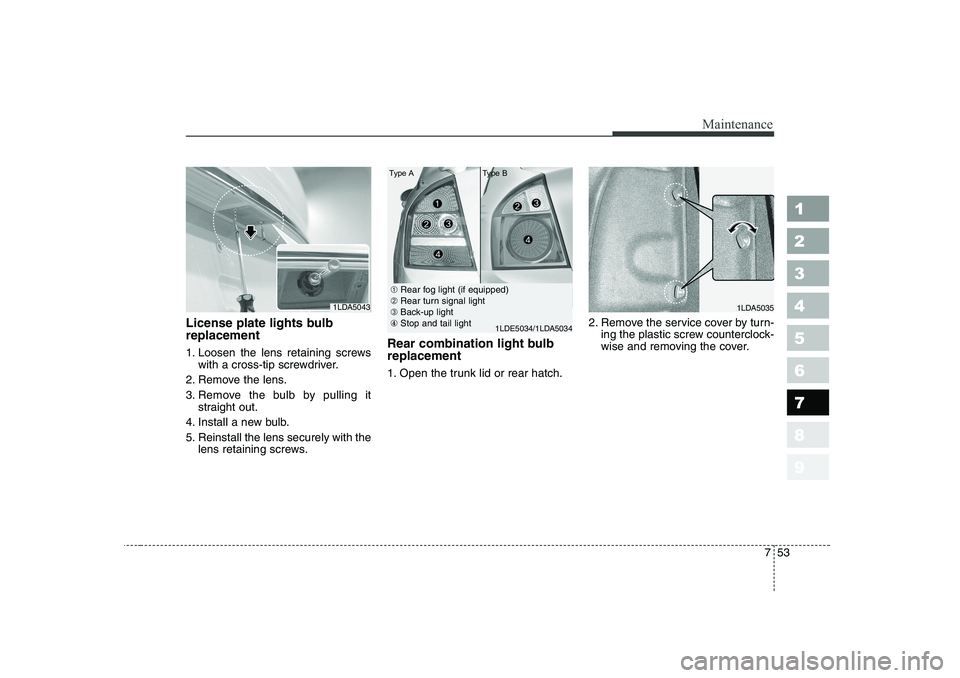
License plate lights bulb replacement
1. Loosen the lens retaining screwswith a cross-tip screwdriver.
2. Remove the lens.
3. Remove the bulb by pulling it straight out.
4. Install a new bulb.
5. Reinstall the lens securely with the lens retaining screws. Rear combination light bulb replacement
1. Open the trunk lid or rear hatch.
2. Remove the service cover by turn-
ing the plastic screw counterclock-
wise and removing the cover.
1LDA50431LDA5035
➀Rear fog light (if equipped)
➁ Rear turn signal light
➂ Back-up light
④ Stop and tail light
1LDE5034/1LDA5034
Type A Type B
Page 299 of 315
Maintenance
54
7
1 23456789
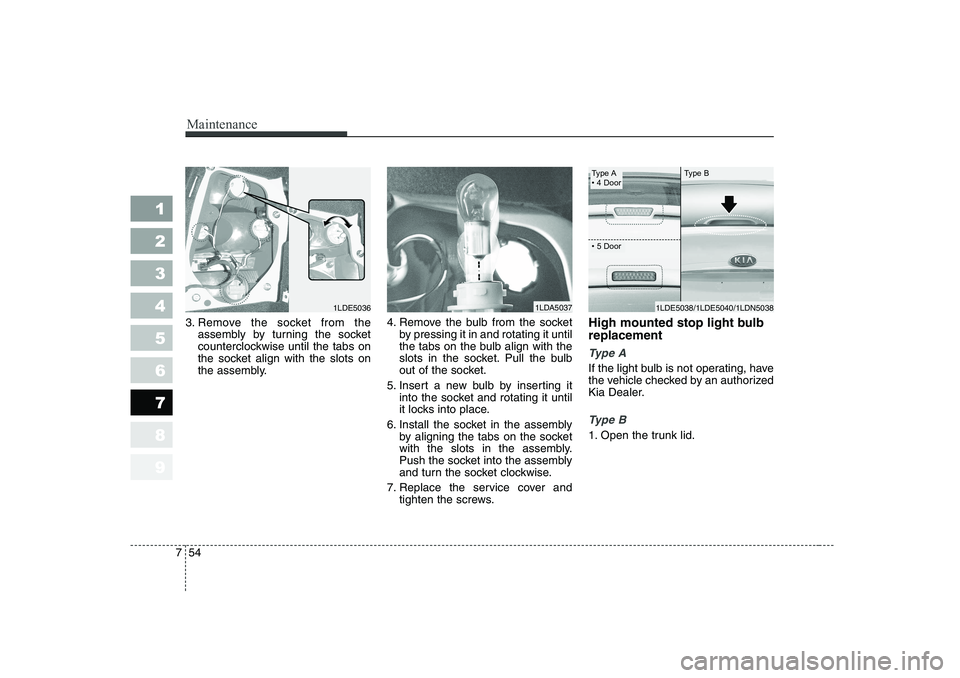
3. Remove the socket from the
assembly by turning the socket
counterclockwise until the tabs on
the socket align with the slots on
the assembly. 4. Remove the bulb from the socket
by pressing it in and rotating it until
the tabs on the bulb align with the
slots in the socket. Pull the bulb
out of the socket.
5. Insert a new bulb by inserting it into the socket and rotating it until
it locks into place.
6. Install the socket in the assembly by aligning the tabs on the socket
with the slots in the assembly.
Push the socket into the assembly
and turn the socket clockwise.
7. Replace the service cover and tighten the screws. High mounted stop light bulb replacement
Type A
If the light bulb is not operating, have
the vehicle checked by an authorized
Kia Dealer.
Type B
1. Open the trunk lid.
1LDA50371LDE5036
Type A
Page 311 of 315
Specifications
4
8
1 23456789
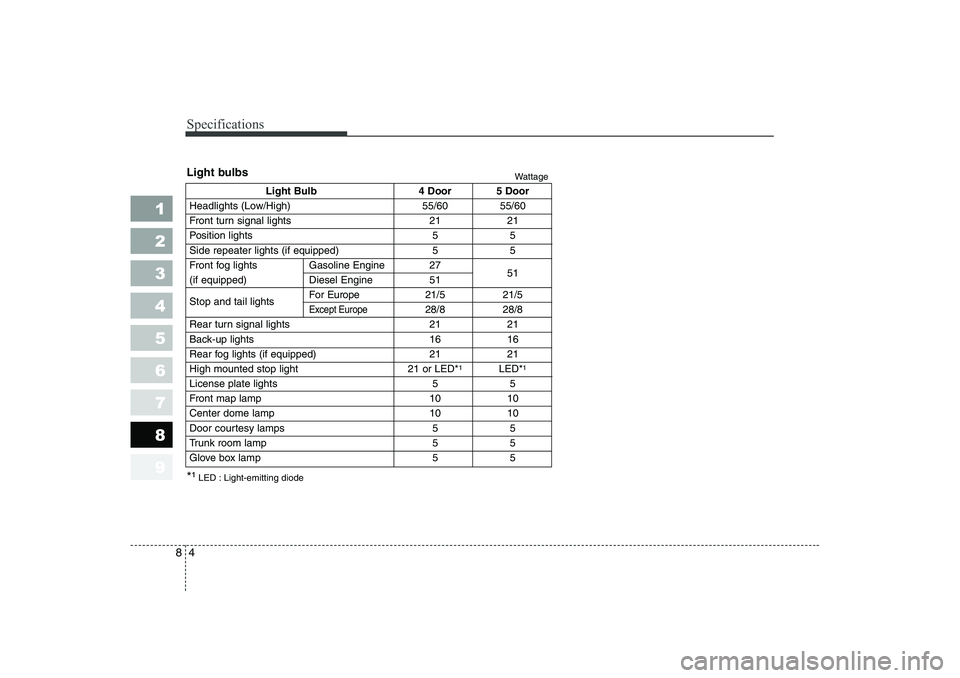
Light Bulb 4 Door 5 Door
Headlights (Low/High) 55/60 55/60
Front turn signal lights 21 21
Position lights 5 5
Side repeater lights (if equipped) 5 5
Front fog lights Gasoline Engine 27 51
(if equipped) Diesel Engine 51 Stop and tail lights For Europe
21/5 21/5
Except Europe28/8 28/8
Rear turn signal lights 21 21
Back-up lights 16 16
Rear fog lights (if equipped) 21 21
High mounted stop light 21 or LED* 1
LED*1
License plate lights 5 5
Front map lamp 10 10
Center dome lamp 10 10
Door courtesy lamps 5 5
Trunk room lamp 5 5
Glove box lamp 5 5
Light bulbs
Wattage
*¹ LED : Light-emitting diode