ESP KIA CERATO 2007 User Guide
[x] Cancel search | Manufacturer: KIA, Model Year: 2007, Model line: CERATO, Model: KIA CERATO 2007Pages: 329, PDF Size: 34.09 MB
Page 153 of 329
Driving your vehicle
18
4
1 23456789
Anti-lock brake system (ABS) (if equipped) The ABS system continuously sens-
es the speed of the wheels. If the
wheels are going to lock, the ABSsystem repeatedly modulates the
hydraulic brake pressure to the
wheels.
When you apply your brakes under
conditions which may lock the
wheels, you may hear a “tik-tik’’
sound from the brakes, or feel a cor-
responding sensation in the brake
pedal. This is normal and it means
your ABS system is active.
In order to obtain the maximum ben-
efit from your ABS system in anemergency situation, do not attempt
to modulate your brake pressure and
do not try to pump your brakes.
Press your brake pedal as hard as
possible or as hard as the situation
warrants and allow the ABS system
to control the force being delivered to
the brakes.
WARNING
- ABS Brakes
Your ABS is not a substitute for
good driving judgement. You
can still have an accident. In
fact, your ABS system will prob-
ably not be able to prevent an
accident in the following drivingconditions:
Dangerous driving, such as neglecting safety precautions,
speeding, or driving too close
to the vehicle in front of you.
Driving at high speed in situa- tions providing considerably
less traction, such as wet con-
ditions where hydroplaning
could occur.
(Continued)
(Continued)
Driving too fast on poor roadsurfaces. The ABS is
designed to improve maxi-
mum braking effectiveness on
typical highways and roads in
good condition. On poor roadsurfaces in poor condition,
the ABS may actually reduce
braking effectiveness.
Page 184 of 329

449
1 23456789
Driving your vehicle
Daytime running light (if equipped)
Daytime Running Lights (DRL) can
make it easier for others to see the
front of your vehicle during the day.
DRL can be helpful in many different
driving conditions, and it is especial-
ly helpful after dawn and before sun-set.
The DRL system will make your low-
beam headlights turn OFF when:
1. The headlight switch is ON.
2. The parklight switch is ON.
3. Engine stops.Headlight leveling device (if equipped)
This manual system is provided to
avoid obstructing oncoming drivers
vision with your headlights. The
headlight level can be adjusted by
rotating the thumb-wheel switch in
accordance with the following set-
tings.Switch setting: 4 Door 5 Door
Position
Loading on
Front seats Rear seats Rear Trunk
0 1 driver - -
2 persons - -
1 2 persons 3 persons -
2 2 persons 3 persons 140 kg
3 1 driver - 410 kg
Loading on
Position Front seats Rear seats Rear luggage
room
0 1 driver - -
2 persons - -
1 2 persons 3 persons -
2 2 persons 3 persons 120 kg
3 1 driver - 380 kg
OLD026203L
Page 209 of 329
Driving your vehicle
74
4
1 23456789
level for bi-level operation, set the
mode to the position and
adjust the temperature control to
maintain maximum comfort.
maximum cooling is desired, set the temperature con-
trol to the minimum 17°C/62°F
and set the air intake to the recir-culated air position, then set the
fan speed control to the highestspeed.✽✽NOTICE
When using the air conditioning sys-
tem, monitor the temperature gauge
closely while driving up hills or inheavy traffic when outside tempera-
tures are high. Air conditioning sys-tem operation may cause engineoverheating. Continue to use the
blower fan but turn the air condi-
tioning system off if the temperaturegauge indicates engine overheating. Air conditioning system oper- ation tips
If the vehicle has been parked in direct sunlight during hot weather,
open the windows for a short time
to let the hot air inside the vehicle
escape.
To help reduce moisture inside of windows on rainy humid days,decrease the humidity inside the
vehicle by operating the air condi-tioning system.
During air conditioning system operation, you may occasionallynotice a slight change in enginespeed at idle as the air condition-
ing compressor cycles on. This is
a normal system operation charac-
teristics.
Use the air conditioning system every month if only for a few min-
utes to ensure maximum system
performance.
When using the air conditioning system, you may notice clear water
dripping (or even pudding) on the
ground under the passenger side
of the vehicle. This is a normal sys-
tem operation characteristics.
Page 211 of 329
Driving your vehicle
76
4
1 23456789
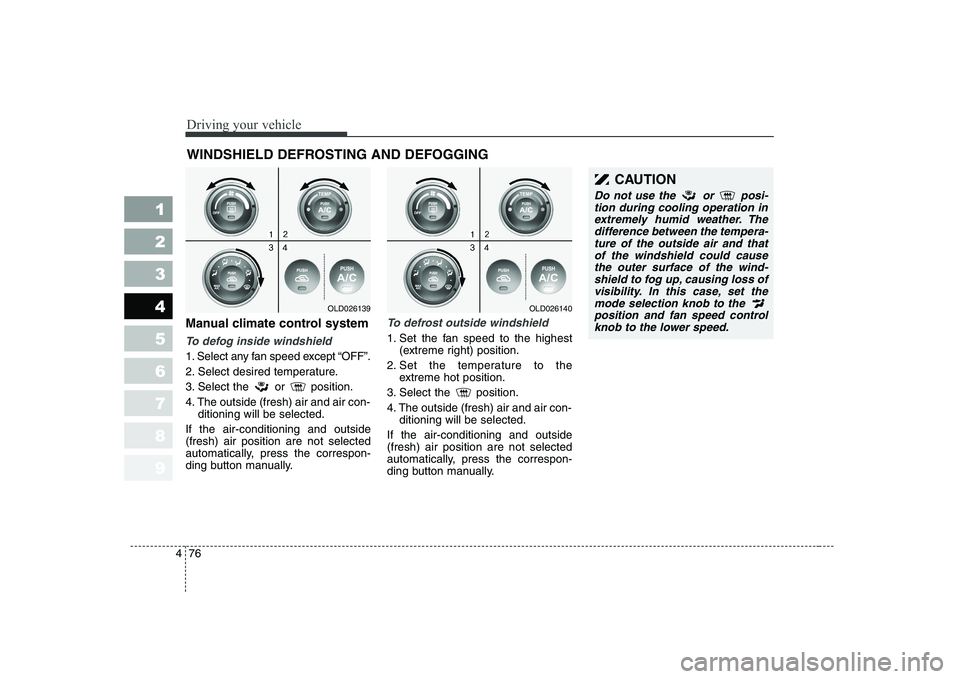
Manual climate control system
To defog inside windshield
1. Select any fan speed except “OFF”.
2. Select desired temperature.
3. Select the or position.
4. The outside (fresh) air and air con- ditioning will be selected.
If the air-conditioning and outside (fresh) air position are not selected
automatically, press the correspon-
ding button manually.
To defrost outside windshield
1. Set the fan speed to the highest (extreme right) position.
2. Set the temperature to the extreme hot position.
3. Select the position.
4. The outside (fresh) air and air con- ditioning will be selected.
If the air-conditioning and outside (fresh) air position are not selected
automatically, press the correspon-
ding button manually.
WINDSHIELD DEFROSTING AND DEFOGGING
OLD026139OLD026140
CAUTION
Do not use the or posi- tion during cooling operation inextremely humid weather. The difference between the tempera-ture of the outside air and thatof the windshield could cause the outer surface of the wind-shield to fog up, causing loss ofvisibility. In this case, set themode selection knob to the position and fan speed controlknob to the lower speed.
Page 212 of 329
477
1 23456789
Driving your vehicle
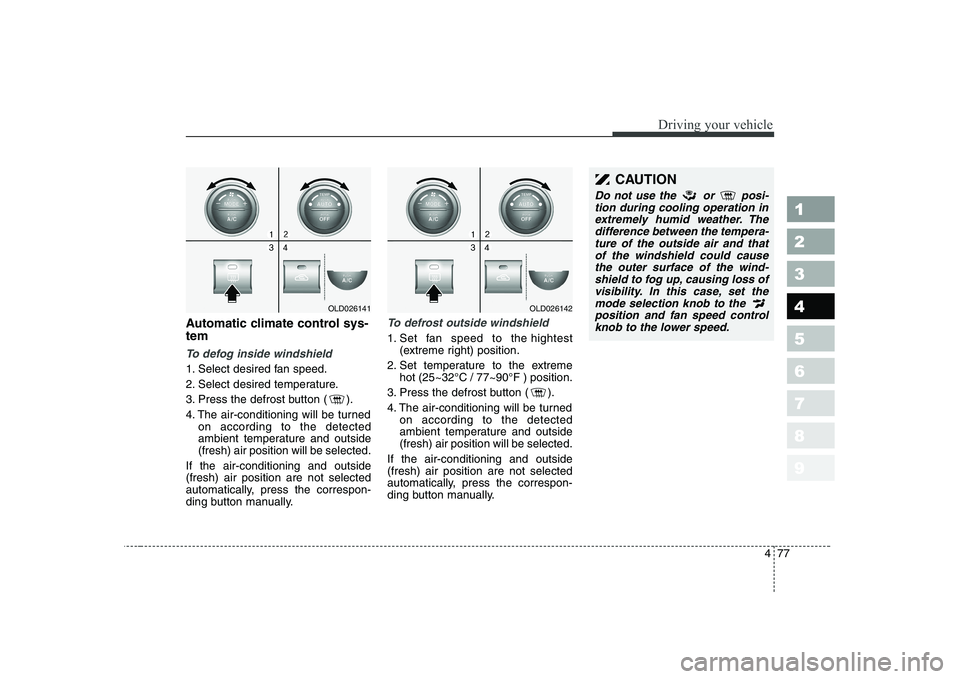
Automatic climate control sys- tem
To defog inside windshield
1. Select desired fan speed.
2. Select desired temperature.
3. Press the defrost button ( ).
4. The air-conditioning will be turnedon according to the detected
ambient temperature and outside(fresh) air position will be selected.
If the air-conditioning and outside(fresh) air position are not selected
automatically, press the correspon-
ding button manually.
To defrost outside windshield
1. Set fan speed to the hightest (extreme right) position.
2. Set temperature to the extreme hot (25~32°C / 77~90°F ) position.
3. Press the defrost button ( ).
4. The air-conditioning will be turned on according to the detected
ambient temperature and outside(fresh) air position will be selected.
If the air-conditioning and outside(fresh) air position are not selected
automatically, press the correspon-
ding button manually.
OLD026141OLD026142
CAUTION
Do not use the or posi- tion during cooling operation inextremely humid weather. The difference between the tempera-ture of the outside air and thatof the windshield could cause the outer surface of the wind-shield to fog up, causing loss ofvisibility. In this case, set the mode selection knob to the position and fan speed controlknob to the lower speed.
Page 213 of 329
Driving your vehicle
78
4
1 23456789
For maximum defrosting, set the
temperature control to the extreme
right/hot position and the fan speedcontrol to the highest speed.
If warm air to the floor is desired while defrosting or defogging, setthe mode to the floor-defrost posi-tion.
Before driving, clear all snow and ice from the windshield, rear win-
dow, outside rear view mirrors, and
all side windows.
Clear all snow and ice from the hood and air inlet in the cowl grill to
improve heater and defroster effi-ciency and to reduce the probabili-
ty of fogging up inside of the wind-shield. Defogging logic
Manual climate control system
To reduce the probability of fogging up the inside of the windshield, the
air intake control is set to the outside(fresh) air position automatically if
any of following occur.
The mode is selected to the or
while the system is acti-
vated.
The ignition switch is turned on while the mode is selected to the or .
In this case, the air conditioning will
automatically operate if the mode is
selected to the or .
If you don’t want the air-conditioning or outside (fresh) air position, press
the corresponding button to cancel
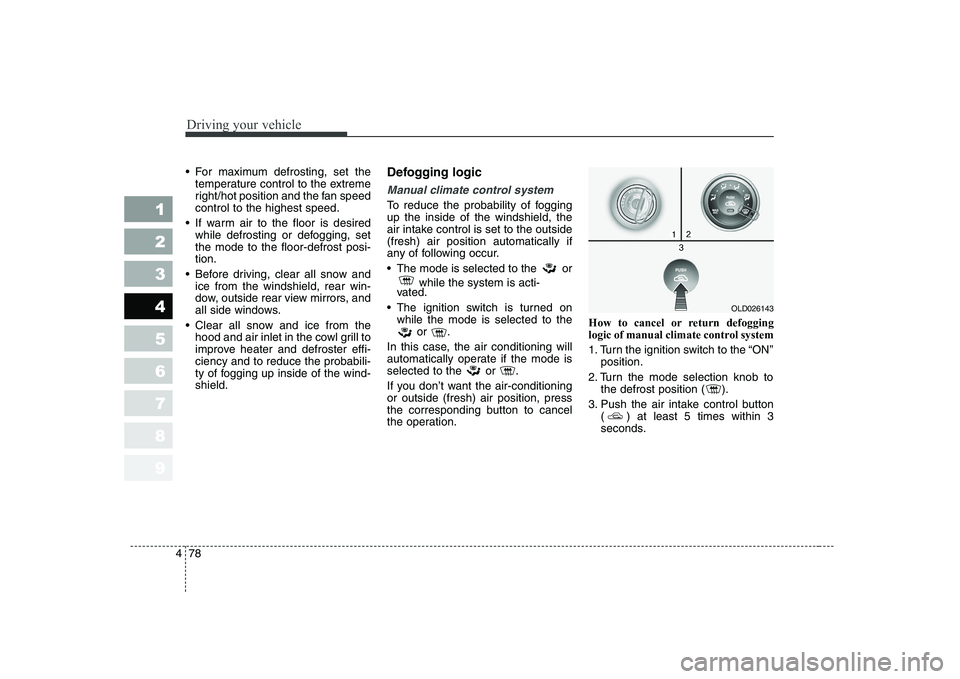
the operation. How to cancel or return defogging
logic of manual climate control system
1. Turn the ignition switch to the “ON”
position.
2. Turn the mode selection knob to the defrost position ( ).
3. Push the air intake control button ( ) at least 5 times within 3
seconds.
OLD026143
Page 214 of 329
479
1 23456789
Driving your vehicle
Then the indicator light in the air
intake control button will blink 3 times
with 0.5 second of interval. It indi-
cates that the defogging logic is can-
celed or returned to the programmed
status.
If the battery has been discharged or
disconnected, it is reset as the defog
logic status.Automatic climate control system
To reduce the probability of fogging up inside of the windshield, the air
intake control is set to outside (fresh)
air position automatically if any of fol-
lowing occur.
The ignition switch is turned on.
The OFF button is pushed.
The mode is selected to the orposition.
In this case, the air conditioning will
automatically operate if the mode is
selected to the or .
If you don’t want the air-conditioning or outside (fresh) air position, press
the corresponding button to cancel
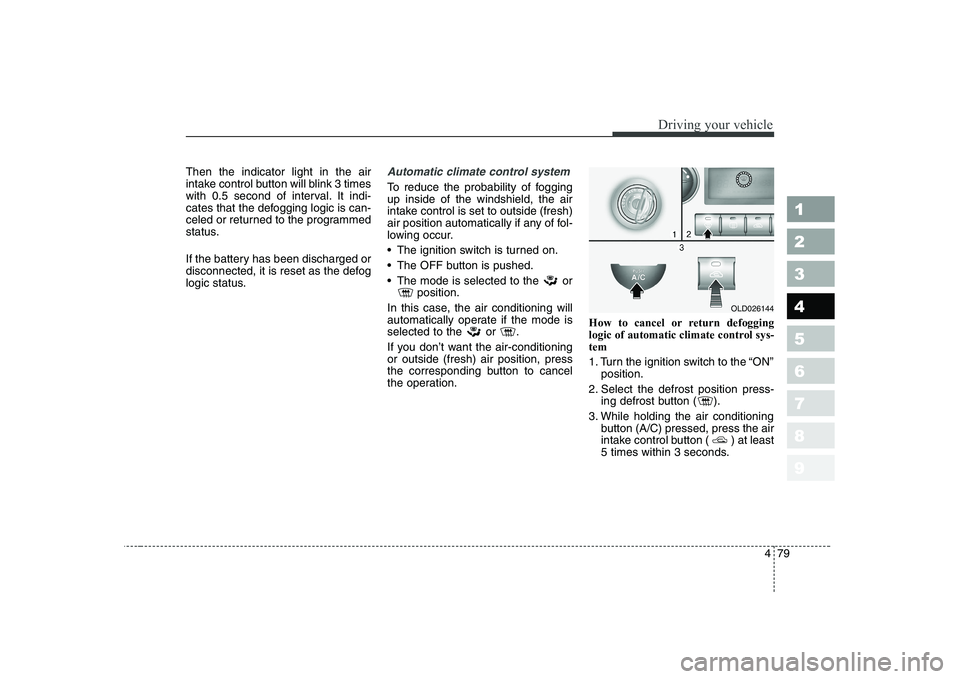
the operation. How to cancel or return defogging
logic of automatic climate control sys-tem
1. Turn the ignition switch to the “ON”
position.
2. Select the defrost position press- ing defrost button ( ).
3. While holding the air conditioning button (A/C) pressed, press the air
intake control button ( ) at least
5 times within 3 seconds.
OLD026144
Page 219 of 329

Driving tips
2
5
FUEL REQUIREMENTS
Gasoline engine (unleaded)
Your new Kia vehicle is designed to
use only unleaded fuel having an
Octane Rating of RON (ResearchOctane Number) 91 / AKI (Anti-
Knock Index) 87 or higher.
Your new Kia is designed to obtain
maximum performance with
UNLEADED FUEL, as well as mini-
mize exhaust emissions and spark
plug fouling.
✽✽ NOTICE
NEVER USE LEADED FUEL. The use of leaded fuel is detrimental to
the catalytic converter and will
damage the engine control system’s
oxygen sensor and affect emission
control.
Never add any fuel system cleaning
agents to the fuel tank other thanwhat Kia has specified. (Consult an
Authorized Kia Dealer for details.)
Gasoline Engine (Leaded)
In countries using LEADED FUEL,
your new Kia vehicle must use
LEADED FUEL. Your new Kia Vehicleis designed to correspond to LEAD-
ED FUEL specifically. Please check
your vehicle whether your vehiclecan use LEADED FUEL or not. Gasoline containing alcohol and methanol Gasohol, a mixture of gasoline and
ethanol (also known as grain alco-hol), and gasoline or gasohol con-
taining methanol (also known as
wood alcohol) are being marketedalong with or instead of leaded or
unleaded gasoline. Do not use gasohol containing more than 10% ethanol, and do not use
gasoline or gasohol containing any
methanol. Either of these fuels may
cause drivability problems and dam-age to the fuel system.
Discontinue using gasohol of any
kind if drivability problems occur.
1 23456789
Page 225 of 329

Driving tips
8
5
Driving at night
Because night driving presents more
hazards than driving in the daylight,
here are some important tips to
remember:
Slow down and keep more dis-
tance between you and other vehi-
cles, as it may be more difficult tosee at night, especially in areas
where there may not be any street
lights.
Adjust your mirrors to reduce the glare from other driver's head-
lights.
Keep your headlights clean and properly aimed on vehicles notequipped with the automatic head-
light aiming feature. Dirty or
improperly aimed headlights will
make it much more difficult to seeat night.
Avoid staring directly at the head- lights of oncoming vehicles. You
could be temporarily blinded, and it
will take several seconds for your
eyes to readjust to the darkness. Driving in the rain
Rain and wet roads can make driving
dangerous, especially if you’re not
prepared for the slick pavement.
Here are a few things to consider
when driving in the rain:
A heavy rainfall will make it harder
to see and will increase the dis-
tance needed to stop your vehicle,
so slow down.
Keep your windshield wiping equipment in good shape. Replace
your windshield wiper blades when
they show signs of streaking ormissing areas on the windshield.
If your tires are not in good condi- tion, making a quick stop on wet
pavement can cause a skid and
possibly lead to an accident. Be
sure your tires are in good shape.
Turn on your headlights to make it easier for others to see you.
1 23456789
WARNING - Spinning tires
Do not spin the wheels, espe-
cially at speeds more than 56
km/h (35 mph). Spinning thewheels at high speeds when the
vehicle is stationary could
cause a tire to overheat, explode
and injure bystanders.
Page 234 of 329
517
Driving tips
1 23456789
Safety chains
You should always attach chains
between your vehicle and your trail-
er. Cross the safety chains under the
tongue of the trailer so that thetongue will not drop to the road if it
becomes separated from the hitch.
Instructions about safety chains may
be provided by the hitch manufactur-
er or by the trailer manufacturer.
Follow the manufacturer’s recom-
mendation for attaching safety
chains. Always leave just enough
slack so you can turn with your trail-
er. And, never allow safety chains to
drag on the ground.
Trailer brakes
If your trailer weighs more than the
maximum trailer weight without trailer
brakes loaded, then it needs its own
brakes and they must be adequate.
Be sure to read and follow the
instructions for the trailer brakes so
you’ll be able to install, adjust and
maintain them properly.
Don’t tap into your vehicle's brake system.
Driving with a trailer
Towing a trailer requires a certain
amount of experience. Before setting
out for the open road, you must get
to know your trailer. Acquaint your-
self with the feel of handling and
braking with the added weight of the
trailer. And always keep in mind that
the vehicle you are driving is now a
good deal longer and not nearly so
responsive as your vehicle is by
itself.
Before you start, check the trailer
hitch and platform, safety chains,
electrical connector(s), lights, tires
and mirror adjustment. If the trailer
has electric brakes, start your vehicle
and trailer moving and then apply the
trailer brake controller by hand to be
sure the brakes are working. This lets
you check your electrical connection
at the same time.
During your trip, check occasionally
to be sure that the load is secure,
and that the lights and any trailer
brakes are still working.
WARNING
Do not use a trailer with its own
brakes unless you are absolute-
ly certain that you have properly
set up the brake system. This is
not a task for amateurs. Use an
experienced, competent trailer
shop for this work.