audio KIA CERATO 2007 User Guide
[x] Cancel search | Manufacturer: KIA, Model Year: 2007, Model line: CERATO, Model: KIA CERATO 2007Pages: 329, PDF Size: 34.09 MB
Page 117 of 329
3 107
Knowing your vehicle
1 23456789
4. AUTO SEEK Select Button(Automatic Channel Selection)
Press the AUTO SEEK select button.
When the side is pressed, theunit will automatically tune to the
next higher frequency and when the side is pressed, it will automati-
cally tune to the next lower frequen-
cy.
5. CD SCAN (BSM) Button
When the CD SCAN (BSM) button is pressed, the six channels from thehighest field intensity are selected
next and stored in memory. The sta-tions selected are stored in thesequence of frequency from the first
preset key.
6. EQ Button
Press the EQ button to select the
CLASSIC, POPS, ROCK, JAZZ and
OFF MODE for the desired tone
quality. Each press of the button
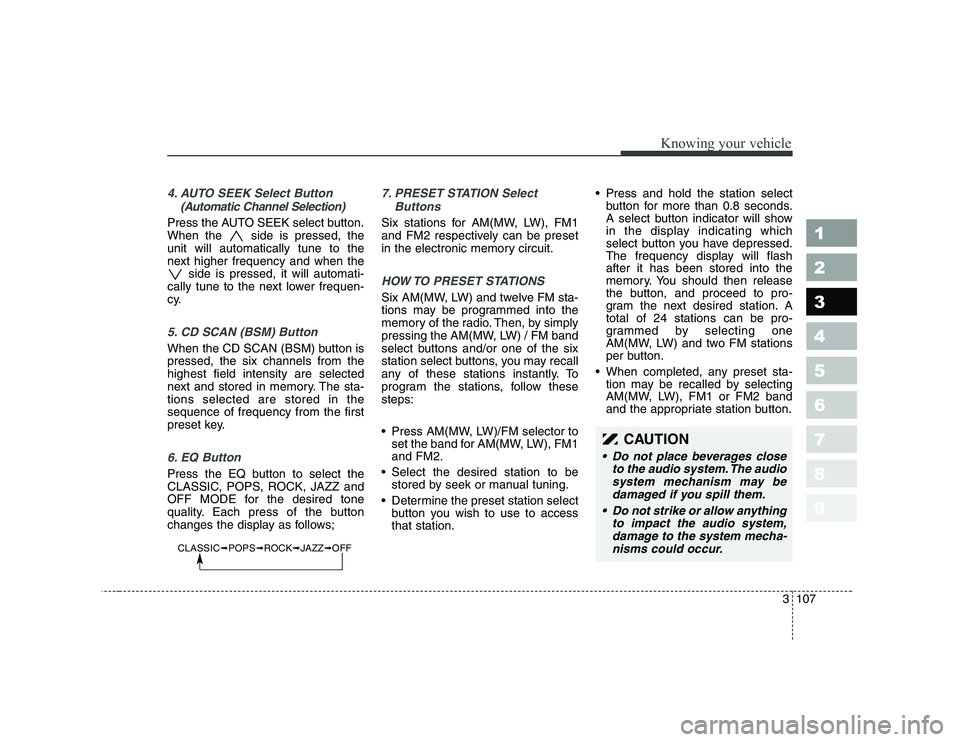
changes the display as follows;
7. PRESET STATION Select
Buttons
Six stations for AM(MW, LW), FM1
and FM2 respectively can be preset
in the electronic memory circuit.
HOW TO PRESET STATIONS
Six AM(MW, LW) and twelve FM sta-
tions may be programmed into the
memory of the radio. Then, by simply
pressing the AM(MW, LW) / FM band
select buttons and/or one of the six
station select buttons, you may recall
any of these stations instantly. To
program the stations, follow thesesteps:
Press AM(MW, LW)/FM selector toset the band for AM(MW, LW), FM1 and FM2.
Select the desired station to be stored by seek or manual tuning.
Determine the preset station select button you wish to use to accessthat station. Press and hold the station select
button for more than 0.8 seconds.
A select button indicator will show
in the display indicating which
select button you have depressed.
The frequency display will flashafter it has been stored into the
memory. You should then release
the button, and proceed to pro-
gram the next desired station. Atotal of 24 stations can be pro-
grammed by selecting one
AM(MW, LW) and two FM stations
per button.
When completed, any preset sta- tion may be recalled by selecting
AM(MW, LW), FM1 or FM2 band
and the appropriate station button.
CAUTION
• Do not place beverages close
to the audio system. The audiosystem mechanism may bedamaged if you spill them.
Do not strike or allow anything to impact the audio system,damage to the system mecha- nisms could occur.
CLASSIC ➟POPS ➟ROCK ➟JAZZ ➟OFF
Page 122 of 329
Knowing your vehicle
112
3
1 23456789
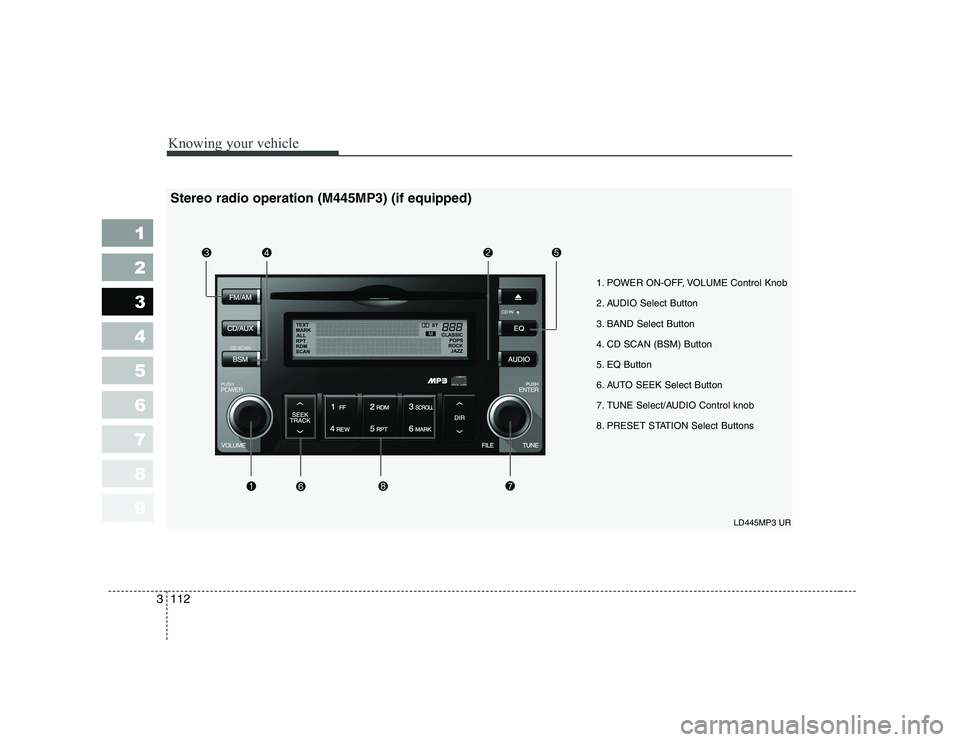
1. POWER ON-OFF, VOLUME Control Knob
2. AUDIO Select Button
3. BAND Select Button
4. CD SCAN (BSM) Button
5. EQ Button
6. AUTO SEEK Select Button
7. TUNE Select/AUDIO Control knob
8. PRESET STATION Select Buttons
LD445MP3 UR
Stereo radio operation (M445MP3) (if equipped)
Page 123 of 329
3 113
Knowing your vehicle
1 23456789
1. POWER ON-OFF Control Knob
The radio unit may be operatedwhen the ignition key is in the
"ACC" or "ON" position. Press the
button to switch the power on. The
LCD shows the radio frequency in
the radio mode, the tape directionindicator in the tape mode or
CD/MP3 track in the CD/MP3
mode. To switch the power off,
press the button again.
Push the FM/AM(MW, LW), TAPE or CD/MP3 to turn on that function
without pushing the Power ON-
OFF control knob.
VOLUME Control
Rotate the knob clockwise to
increase the volume and turn the
knob counterclockwise to reduce the
volume.
2. AUDIO Select Button
Pressing the AUDIO button changes
the BASS, MID-RANGE, TREBLE,
FADER and BALANCE mode.
The mode selected is shown on the
display.
After selecting each mode, rotate the
Audio control knob clockwise or
counterclockwise.
BASS Control
To increase the BASS, rotate the
knob clockwise, while to decreasethe BASS, rotate the knob counter-
clockwise.
MID-RANGE Control
To increase the MID-RANGE, rotate
the knob clockwise, while todecrease the MID-RANGE, rotate
the knob counterclockwise.
TREBLE Control
To increase the TREBLE, rotate the
knob clockwise, while to decrease
the TREBLE, rotate the knob coun-
terclockwise. FADER Control
Turn the control knob clockwise to
emphasize rear speaker sound (front
speaker sound will be attenuated).
When the control knob is turned
counterclockwise, front speaker
sound will be emphasized (rear
speaker sound will be attenuated).
BALANCE Control
Rotate the knob clockwise to empha-
size right speaker sound (left speak-
er sound will be attenuated). When
the control knob is turned counter
clockwise, left speaker sound will be
emphasized (right speaker sound
will be attenuated).
3. BAND Select Button
Pressing the FM/AM button changes
the AM(MW, LW), FM1 and FM2
bands. The mode selected is shown
on the display.
Page 124 of 329
Knowing your vehicle
114
3
1 23456789
4. CD SCAN (BSM) Button
When the CD SCAN (BSM) button is pressed, the six channels from thehighest field intensity are selected
next and stored in memory. The sta-tions selected are stored in thesequence frequency from the first
preset key.
5. EQ Button
Press the EQ button to select the
CLASSIC, POPS, ROCK, JAZZ and
OFF MODE for the desired tone
quality. Each press of the button
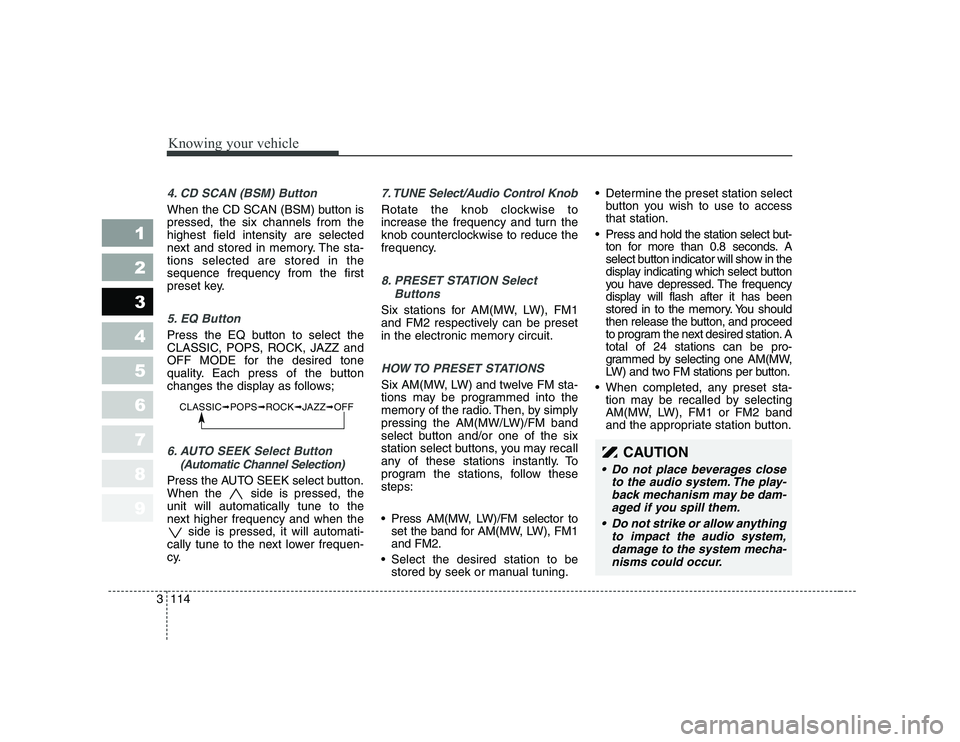
changes the display as follows;
6. AUTO SEEK Select Button
(Automatic Channel Selection)
Press the AUTO SEEK select button.
When the side is pressed, theunit will automatically tune to the
next higher frequency and when the side is pressed, it will automati-
cally tune to the next lower frequen-
cy.
7. TUNE Select/Audio Control Knob
Rotate the knob clockwise to
increase the frequency and turn the
knob counterclockwise to reduce the
frequency.
8. PRESET STATION Select
Buttons
Six stations for AM(MW, LW), FM1
and FM2 respectively can be preset
in the electronic memory circuit.
HOW TO PRESET STATIONS
Six AM(MW, LW) and twelve FM sta-
tions may be programmed into the
memory of the radio. Then, by simply
pressing the AM(MW/LW)/FM band
select button and/or one of the six
station select buttons, you may recall
any of these stations instantly. To
program the stations, follow thesesteps:
Press AM(MW, LW)/FM selector toset the band for AM(MW, LW), FM1 and FM2.
Select the desired station to be stored by seek or manual tuning. Determine the preset station select
button you wish to use to accessthat station.
Press and hold the station select but- ton for more than 0.8 seconds. A
select button indicator will show in the
display indicating which select button
you have depressed. The frequency
display will flash after it has been
stored in to the memory. You should
then release the button, and proceed
to program the next desired station. Atotal of 24 stations can be pro-
grammed by selecting one AM(MW,
LW) and two FM stations per button.
When completed, any preset sta- tion may be recalled by selecting
AM(MW, LW), FM1 or FM2 band
and the appropriate station button.
CLASSIC ➟POPS ➟ROCK ➟JAZZ ➟OFF
CAUTION
Do not place beverages close
to the audio system. The play-back mechanism may be dam-aged if you spill them.
Do not strike or allow anything to impact the audio system,damage to the system mecha-nisms could occur.
Page 125 of 329
3 115
Knowing your vehicle
1 23456789
LD 445MP3 UR
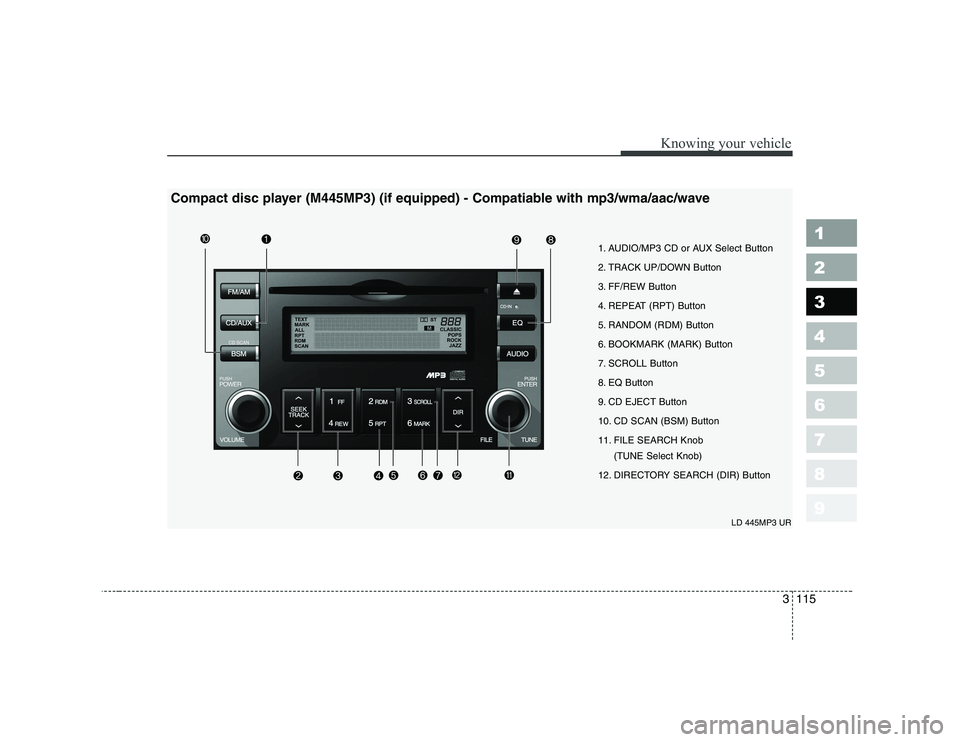
Compact disc player (M445MP3) (if equipped) - Compatiable with mp3/wma/aac/wave
1. AUDIO/MP3 CD or AUX Select Button
2. TRACK UP/DOWN Button
3. FF/REW Button
4. REPEAT (RPT) Button
5. RANDOM (RDM) Button
6. BOOKMARK (MARK) Button
7. SCROLL Button
8. EQ Button
9. CD EJECT Button
10. CD SCAN (BSM) Button
11. FILE SEARCH Knob
(TUNE Select Knob)
12. DIRECTORY SEARCH (DIR) Button
Page 126 of 329
Knowing your vehicle
116
3
1 23456789
1. AUDIO/MP3 CD or AUX Select
Button
AUDIO/MP3 CD Select
Insert the CD with the label facingupward.
Insert the CD to start CD playback, during radio operation or cassette
tape playblack.
If you press the CD/AUX button while a disc is in the CD deck, the
CD player will begin playing even if
the radio or cassette player is beingused.
The CD/AUX player can be used
when the ignition switch is in either
the “ON” or “ACC” position.
Push the CD/AUX button to turn on
that function without pushing the
Power ON-OFF control knob.
✽✽ NOTICE
Page 129 of 329
3 119
Knowing your vehicle
1 23456789
(Continued) Do not attempt to grab or pull the compact disc out while thedisc is being pulled into theaudio unit by the self-loadingmechanism. Damage to the audio unit and compact disccould occur.
Avoid using recorded compact discs in your audio unit.Original compact discs are recommended for best results.
WARNING
When driving your vehicle, be
sure to keep the volume of the
unit set low enough to allow you
to hear sounds coming from the
outside.
CAUTION
Do not insert warped or poor quality discs into the CD play-er as damage to the unit mayoccur.
Do not insert anything like coins into the player slot asdamage to the unit may occur.
Do not place beverages close to the audio system. The play-back mechanism may be dam- aged if you spill them.
Do not strike or allow anything to impact the audio system,damage to the system mecha- nisms could occur.
Off-road or rough surface driving may cause the com-pact disc to skip. Do not usethe compact disc when driv- ing in such conditions asdamage to the compact discface could occur.
(Continued)
Page 130 of 329
Knowing your vehicle
120
3
1 23456789
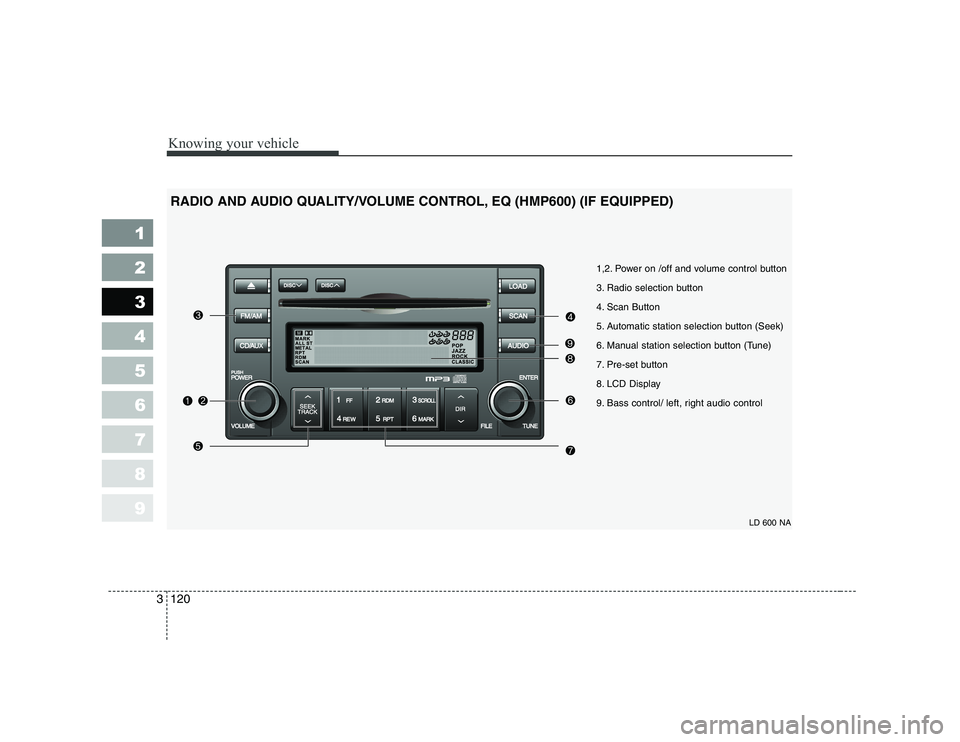
LD 600 NA
1,2. Power on /off and volume control button
3. Radio selection button
4. Scan Button
5. Automatic station selection button (Seek)
6. Manual station selection button (Tune)
7. Pre-set button
8. LCD Display
9. Bass control/ left, right audio control
RADIO AND AUDIO QUALITY/VOLUME CONTROL, EQ (HMP600) (IF EQUIPPED)
Page 132 of 329
Knowing your vehicle
122
3
1 23456789
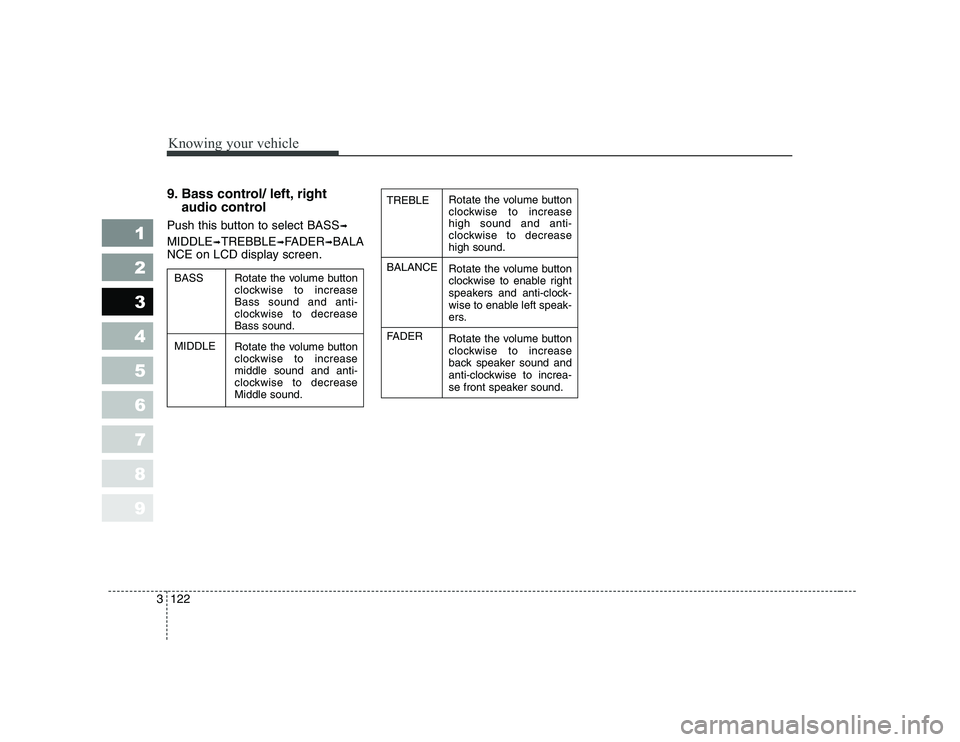
9. Bass control/ left, right
audio control
Push this button to select BASS ➟
MIDDLE ➟TREBBLE ➟FADER ➟BALA
NCE on LCD display screen.Rotate the volume button
clockwise to increasehigh sound and anti-
clockwise to decreasehigh sound.
Rotate the volume button
clockwise to enable right
speakers and anti-clock-
wise to enable left speak-
ers.
Rotate the volume button
clockwise to increase
back speaker sound and
anti-clockwise to increa-
se front speaker sound.
TREBLE BALANCE
FADER
Rotate the volume button
clockwise to increaseBass sound and anti-
clockwise to decreaseBass sound.
Rotate the volume button
clockwise to increasemiddle sound and anti-
clockwise to decreaseMiddle sound.
BASS MIDDLE
Page 248 of 329

In case of an emergency
8
6
Fuse replacement
Driver-side knee bolster
1. Turn the ignition switch and allother switches off.
2. Pull the suspected fuse straight out. Use the removal tool provided
on the cover.
3. Check the removed fuse; replace it if it is blown.
Spare fuses are provided in the
fuse panel in engine compart-ment.
4. Push in a new fuse of the same rating, and make sure it fits tightly
in the clips.
If it fits loosely, consult an Authorized
Kia Dealer.
If you do not have a spare, use a fuse of the same rating from a circuityou may not need for operating thevehicle, such as the audio fuse.
If the headlights or other electrical
components do not work and the
fuses are OK, check the fuse block in
the engine compartment. If a fuse is
blown, it must be replaced.
1 23456789
1LDA40031LDN4022
WARNING - Fuse replace-
ment
Never replace a fuse with any- thing but another fuse of the same rating.
A higher capacity fuse could cause damage through over-
heating and possibly a fire.
Never install a wire instead of the proper fuse - even as a
temporary repair. It may cause
extensive wiring damage and
possibly a fire.
Do not use a screwdriver or any other metal object to
remove fuses because it may
cause a short circuit and dam-
age the system.