instrument panel KIA CERATO 2007 User Guide
[x] Cancel search | Manufacturer: KIA, Model Year: 2007, Model line: CERATO, Model: KIA CERATO 2007Pages: 329, PDF Size: 34.09 MB
Page 171 of 329

Driving your vehicle
36
4
1 23456789
Average speed
This mode indicates the average
speed from the starting of the vehicle
to the ignition key “OFF”. When the
ignition key is “OFF”, it will initialize to0 km/h (0 mph).
Driving time
This mode indicates the total time
from the starting of the vehicle to the
ignition key “OFF” after resetting.
When the “TRIP” switch is pushed, it
will initialize to 0:00. Reset
Push “TRIP” for more than 1 second
to initialize the displayed information
such as average speed and driving
time. Instrument panel illumination (if equipped)
When the vehicle’s parking lights or headlights are on, rotate the illumina-
tion control knob to adjust the instru-
ment panel illumination intensity.
OLD026204LOLD026097OLD026095
Page 180 of 329
445
1 23456789
Driving your vehicle
Battery saver function
The purpose of this feature is toprevent the battery from being dis-
charged. The system automatically
turns off the small light when the
driver removes the ignition key and
opens the driver- side door.
With this feature, the parklight will be turned off automatically if the
driver parks on the side of road atnight.
If necessary, to keep the lights on
when the ignition key is removed,
perform the following :
1) Open the driver-side door.
2) Turn the parklights OFF and ON again using the light switch on the
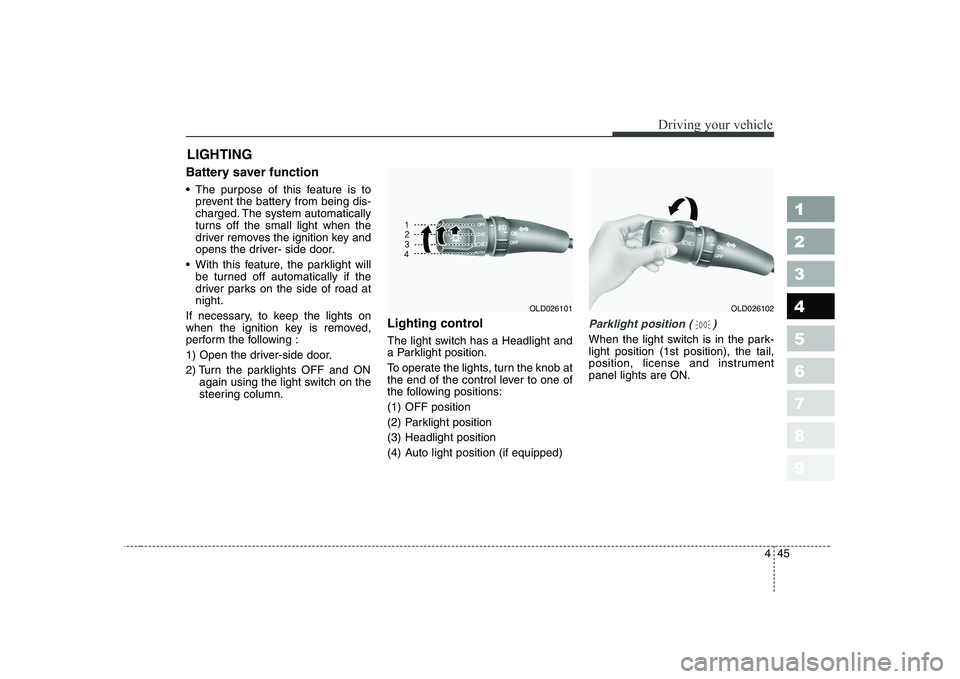
steering column. Lighting control
The light switch has a Headlight and
a Parklight position.
To operate the lights, turn the knob at
the end of the control lever to one of
the following positions:
(1) OFF position
(2) Parklight position
(3) Headlight position
(4) Auto light position (if equipped)
Parklight position ( )
When the light switch is in the park- light position (1st position), the tail,
position, license and instrumentpanel lights are ON.
LIGHTING
OLD026102OLD026101
Page 181 of 329
Driving your vehicle
46
4
1 23456789
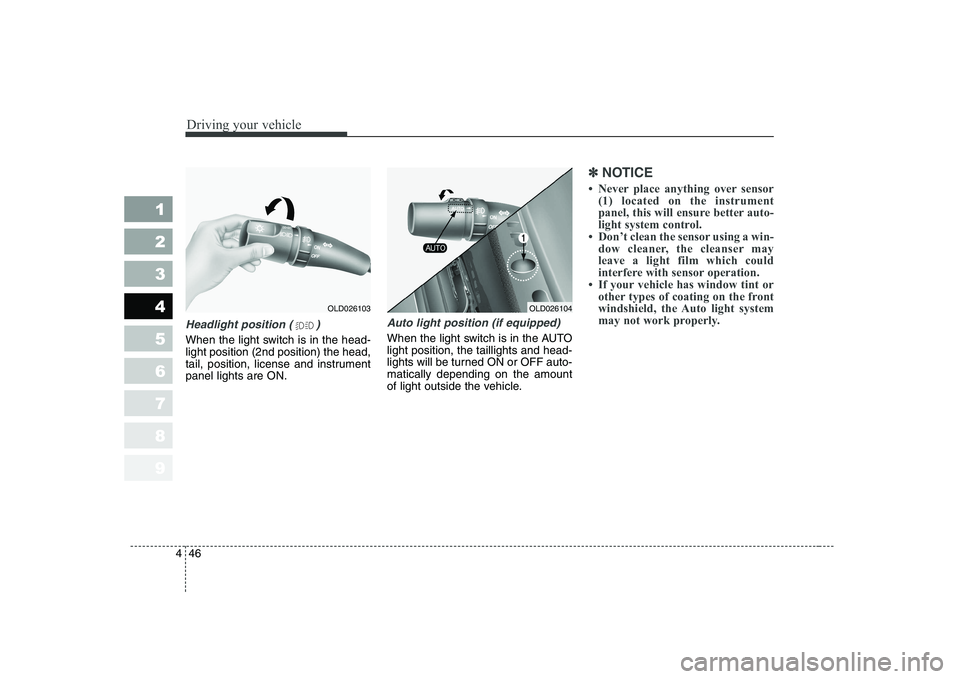
Headlight position ( )
When the light switch is in the head- light position (2nd position) the head,
tail, position, license and instrumentpanel lights are ON.
Auto light position (if equipped)
When the light switch is in the AUTO light position, the taillights and head-
lights will be turned ON or OFF auto-matically depending on the amount
of light outside the vehicle.
✽✽
NOTICE
Page 182 of 329

447
1 23456789
Driving your vehicle
High - beam operation
To turn on the high beam headlights,
push the lever away from you. Pull it
back for low beams. The high-beam indicator will light when the headlight high beams are
switched on.
To prevent the battery from being
discharged, do not leave the lights
on for a prolonged time while the
engine is not running.Flashing headlights
To flash the headlights, pull the lever
towards you. It will return to the nor-
mal (low-beam) position when
released. The headlight switch doesnot need to be on to use this flashing
feature.
Turn signals (A)
The ignition switch must be on for the
turn signals to function. To turn on
the turn signals, move the lever up or
down. Green arrow indicators on the
instrument panel indicate which turn
signal is operating. They will self-
cancel after a turn is completed. If
the indicator continues to flash after
a turn, manually return the lever tothe OFF position.
OLD0261061LDN2107OLD026105
Page 193 of 329
Driving your vehicle
58
4
1 23456789
Face position
Air flow is directed toward
the upper body and face.
Additionally, each outletcan be controlled to directthe air discharged fromthe outlet.
(outlet port: B, D)
Face - floor position
Air flow is directedtowards the face and the
floor. The air to the floor is
warmer than the air to the
face (except when the
temperature control is set
to the extreme cold posi-tion).
(outlet port: B, D, C, E)
Floor position
Most of the air flow is
directed to the floor, with asmall amount of the airbeing directed to the wind-
shield and side window
defroster.
(outlet port: C, E, A, D)
Floor - defrost position
Most of the air flow is directed to the floor andthe windshield with asmall amount directed to
the side window defrosters.
(outlet port: A, C, E, D)
Defrost position
Most of the air flow is directed to the windshieldwith a small amount of airdirected to the side win-
dow defrosters.
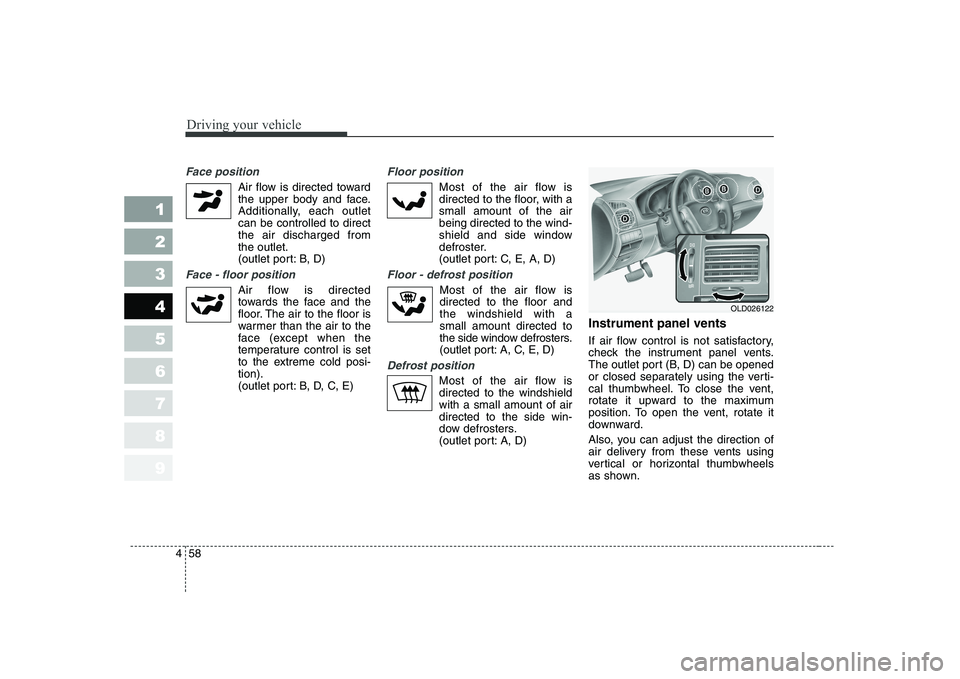
(outlet port: A, D) Instrument panel vents
If air flow control is not satisfactory,
check the instrument panel vents.
The outlet port (B, D) can be opened
or closed separately using the verti-
cal thumbwheel. To close the vent,
rotate it upward to the maximum
position. To open the vent, rotate it
downward.
Also, you can adjust the direction of
air delivery from these vents using
vertical or horizontal thumbwheels
as shown.
OLD026122
Page 200 of 329
465
1 23456789
Driving your vehicle
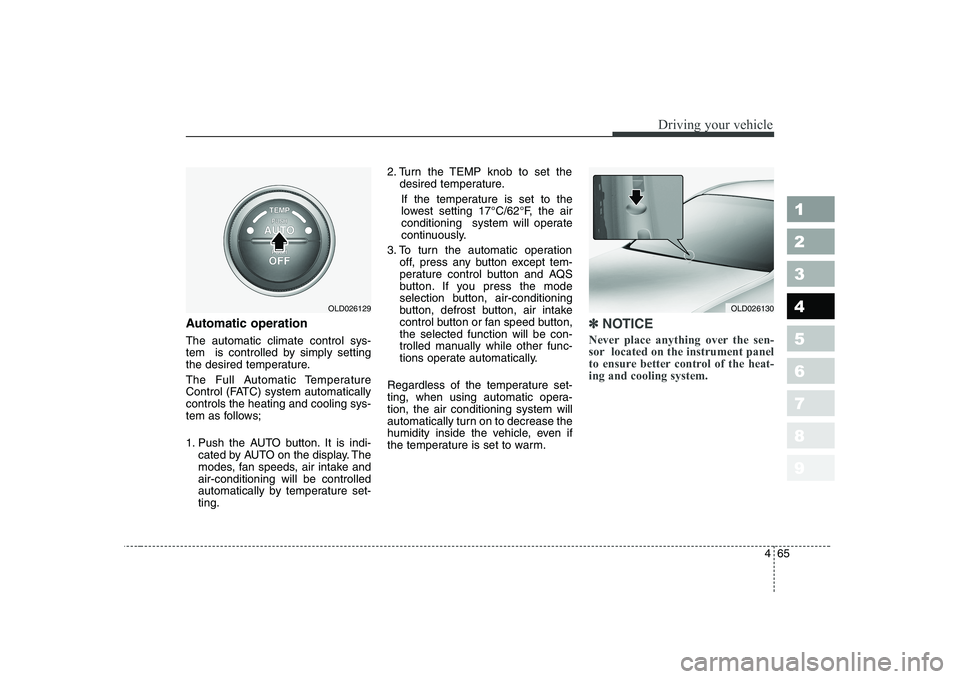
Automatic operation The automatic climate control sys-
tem is controlled by simply setting
the desired temperature.
The Full Automatic Temperature
Control (FATC) system automaticallycontrols the heating and cooling sys-
tem as follows;
1. Push the AUTO button. It is indi-cated by AUTO on the display. The
modes, fan speeds, air intake andair-conditioning will be controlled
automatically by temperature set-ting. 2. Turn the TEMP knob to set the
desired temperature.
If the temperature is set to the
lowest setting 17°C/62°F, the air
conditioning system will operate
continuously.
3. To turn the automatic operation off, press any button except tem-
perature control button and AQS
button. If you press the mode
selection button, air-conditioning
button, defrost button, air intake
control button or fan speed button,the selected function will be con-
trolled manually while other func-
tions operate automatically.
Regardless of the temperature set-
ting, when using automatic opera-tion, the air conditioning system will
automatically turn on to decrease the
humidity inside the vehicle, even if
the temperature is set to warm.✽✽ NOTICE
Never place anything over the sen-
sor located on the instrument panel
to ensure better control of the heat-ing and cooling system.
OLD026129OLD026130
Page 207 of 329
Driving your vehicle
72
4
1 23456789
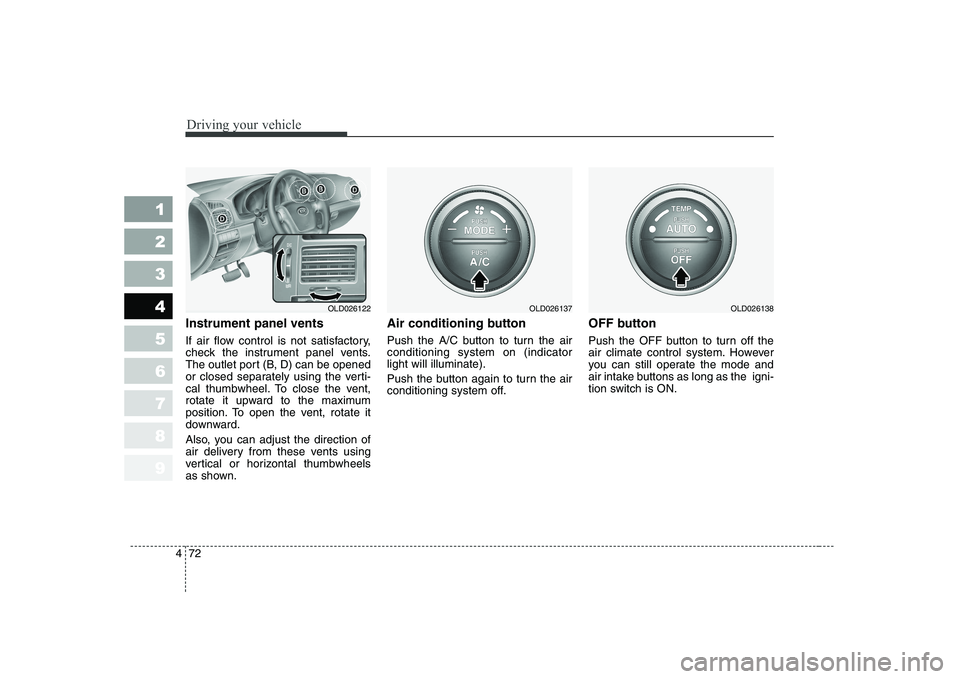
Instrument panel vents
If air flow control is not satisfactory,
check the instrument panel vents.
The outlet port (B, D) can be opened
or closed separately using the verti-
cal thumbwheel. To close the vent,
rotate it upward to the maximum
position. To open the vent, rotate it
downward.
Also, you can adjust the direction of
air delivery from these vents using
vertical or horizontal thumbwheels
as shown. Air conditioning button
Push the A/C button to turn the air conditioning system on (indicatorlight will illuminate).
Push the button again to turn the air
conditioning system off.
OFF button
Push the OFF button to turn off the
air climate control system. However
you can still operate the mode and
air intake buttons as long as the igni-
tion switch is ON.
OLD026122OLD026137OLD026138
Page 235 of 329
Driving tips
18
5
1 23456789
Following distance
Stay at least twice as far behind the
vehicle ahead as you would when
driving your vehicle without a trailer.
This can help you avoid situations
that require heavy braking and sud-
den turns.
Passing
You’ll need more passing distance
up ahead when you’re towing a trail-
er. And, because you’re a good deal
longer, you’ll need to go much farther
beyond the passed vehicle before
you can return to your lane.
Backing up
Hold the bottom of the steering
wheel with one hand. Then, to move
the trailer to the left, just move your
hand to the left. To move the trailer to
the right, move your hand to the
right. Always back up slowly and, if
possible, have someone guide you.
Making turns
When you’re turning with a trailer,
make wider turns than normal. Do
this so your trailer won’t strike soft
shoulders, curbs, road signs, trees,
or other objects. Avoid jerky or sud-
den maneuvers. Signal well in
advance.
Turn signals when towing a trailer
When you tow a trailer, your vehicle
has to have a different turn signal
flasher and extra wiring. The green
arrows on your instrument panel will
flash whenever you signal a turn or
lane change. Properly connected,
the trailer lights will also flash to alert
other drivers you’re about to turn,
change lanes, or stop.
When towing a trailer, the green
arrows on your instrument panel will
flash for turns even if the bulbs on
the trailer are burned out. Thus, you
may think drivers behind you are
seeing your signals when, in fact,
they are not. It’s important to check
occasionally to be sure the trailer
bulbs are still working. You must also
check the lights every time you dis-connect and then reconnect the
wires.
Page 328 of 329
93
1 23456789
Index
If you have a flat tire . . . . . . . . . . . . . . . . . . . . . . . . 6-19
Ignition switch . . . . . . . . . . . . . . . . . . . . . . . . . . . . . . 4-2
Immobilizer system . . . . . . . . . . . . . . . . . . . . . . . . . . 3-5
Instrument cluster . . . . . . . . . . . . . . . . . . . . . . . . . . 4-30
Instrument panel overview . . . . . . . . . . . . . . . . . . . . 2-3
Interior care . . . . . . . . . . . . . . . . . . . . . . . . . . . . . . . 7-55
Interior features . . . . . . . . . . . . . . . . . . . . . . . . . . . . 3-90
Interior lights . . . . . . . . . . . . . . . . . . . . . . . . . . . . . . 3-86
Interior overview . . . . . . . . . . . . . . . . . . . . . . . . . . . . 2-2
Keys . . . . . . . . . . . . . . . . . . . . . . . . . . . . . . . . . . . . . . 3-2
Label information . . . . . . . . . . . . . . . . . . . . . . . . . . 5-22
Lighting . . . . . . . . . . . . . . . . . . . . . . . . . . . . . . . . . . 4-45
Lubricants and fluids . . . . . . . . . . . . . . . . . . . . . . . . 7-26
Luggage net . . . . . . . . . . . . . . . . . . . . . . . . . . . . . . . 3-99
Maintenance services . . . . . . . . . . . . . . . . . . . . . . . . . 7-3
Maintenance under severe usage conditions . . . . . . . 7-9Manual climate control system . . . . . . . . . . . . . . . . 4-55
Manual transaxle . . . . . . . . . . . . . . . . . . . . . . . 4-7, 7-23
Mirrors . . . . . . . . . . . . . . . . . . . . . . . . . . . . . . . . . . . 3-82
Normal maintenance schedule . . . . . . . . . . . . . . . . . . 7-5
Overheating . . . . . . . . . . . . . . . . . . . . . . . . . . . . . . . . 6-3
Overloading . . . . . . . . . . . . . . . . . . . . . . . . . . . . . . . 5-21
Owner maintenance . . . . . . . . . . . . . . . . . . . . . . . . . 7-11
Parking brake. . . . . . . . . . . . . . . . . . . . . . . . . . . . . . 7-22
Power steering . . . . . . . . . . . . . . . . . . . . . . . . . . . . . 7-23
Remote keyless entry . . . . . . . . . . . . . . . . . . . . . . . . . 3-3
Road warning . . . . . . . . . . . . . . . . . . . . . . . . . . . . . . . 6-2
Safety belts . . . . . . . . . . . . . . . . . . . . . . . . . . . . . . . . 3-30
Seat . . . . . . . . . . . . . . . . . . . . . . . . . . . . . . . . . . . . . . 3-16
I
K
L
M
N
O
P
R
S