Instrument KIA Cerato 2010 1.G User Guide
[x] Cancel search | Manufacturer: KIA, Model Year: 2010, Model line: Cerato, Model: KIA Cerato 2010 1.GPages: 321, PDF Size: 6.3 MB
Page 54 of 321
Safety features of your vehicle42
3
(Continued)
Air bags can only be used once –
have an authorized KIA dealer
replace the air bag immediately
after deployment.
The SRS is designed to deploy the front air bags only when an
impact is sufficiently severe and
when the impact angle is less
than 30° from the forward longitu-
dinal axis of the vehicle.
Additionally, the air bags will only
deploy once. Seat belts must be
worn at all times.
Front air bags are not intended to deploy in side-impact, rear-
impact or rollover crashes. In
addition, front air bags will not
deploy in frontal crashes below
the deployment threshold.
(Continued)
(Continued)
No objects should be placed overor near the air bag modules on
the steering wheel, instrument
panel, and the front passenger's
panel above the glove box,
because any such object could
cause harm if the vehicle is in a
crash severe enough to cause
the air bags to deploy.
Do not tamper with or disconnect SRS wiring or other components
of the SRS system. Doing so
could result in injury, due to acci-
dental deployment of the air bags
or by rendering the SRS inopera-
tive.
If the SRS air bag warning light remains illuminated while the
vehicle is being driven, have an
authorized KIA dealer inspect the
air bag system as soon as possi-
ble.
(Continued)
(Continued)
A child restraint system mustnever be placed in the front seat.
The infant or child could be
severely injured or killed by an air
bag deployment in case of an
accident.
Children age 12 and under must always be properly restrained in
the rear seat. Never allow chil-
dren to ride in the front passen-
ger seat. If a child over 12 must
be seated in the front seat, he or
she must be properly belted and
the seat should be moved as far
back as possible.
For maximum safety protection in all types of crashes, all occu-
pants including the driver should
always wear their seat belts
whether or not an air bag is also
provided at their seating position
to minimize the risk of severe
injury or death in the event of a
crash. Do not sit or lean unneces-
sarily close to the air bag while
the vehicle is in motion.
(Continued)
Page 63 of 321
351
Safety features of your vehicle
C041100ATDSRS CareThe SRS is virtually maintenance-free
and so there are no parts you can safely
service by yourself. If the SRS air bag
warning light does not illuminate, or con-
tinuously remains on, have your vehicle
immediately inspected by an authorized
KIA dealer.
Any work on the SRS system, such as
removing, installing, repairing, or any
work on the steering wheel must be per-
formed by an authorized KIA dealer.
Improper handling of the SRS system
may result in serious personal injury.
WARNING
Modification to SRS componentsor wiring, including the addition
of any kind of badges to the pad
covers or modifications to the
body structure, can adversely
affect SRS performance and lead
to possible injury.
For cleaning the air bag pad cov- ers, use only a soft, dry cloth or
one which has been moistened
with plain water. Solvents or
cleaners could adversely affect
the air bag covers and proper
deployment of the system.
No objects should be placed over or near the air bag modules on
the steering wheel, instrument
panel, and the front passenger's
panel above the glove box,
because any such object could
cause harm if the vehicle is in a
crash severe enough to cause
the air bags to inflate.
(Continued)
(Continued)
If the air bags inflate, they mustbe replaced by an authorized KIA
dealer.
Do not tamper with or disconnect SRS wiring, or other components
of the SRS system. Doing so
could result in injury, due to acci-
dental inflation of the air bags or
by rendering the SRS inopera-
tive.
If components of the air bag sys- tem must be discarded, or if the
vehicle must be scrapped, certain
safety precautions must be
observed. An authorized KIA
dealer knows these precautions
and can give you the necessary
information. Failure to follow
these precautions and proce-
dures could increase the risk of
personal injury.
If your vehicle was flooded and has soaked carpeting or water on
the floor, you shouldn't try to
start the engine; have the vehicle
towed to an authorized KIA deal-
er.
Page 66 of 321
4
Keys / 4-2
Smart key / 4-6
Remote keyless entry / 4-8
Door locks / 4-12
Trunk / 4-16
Windows / 4-18
Hood / 4-21
Fuel filler lid / 4-23
Sunroof / 4-26
Steering wheel / 4-30
Mirrors / 4-33
Instrument cluster / 4-37
Hazard warning flasher / 4-55
Lighting / 4-56
Wipers and washers / 4-59
Interior light / 4-61
Defroster / 4-62
Manual climate control system / 4-64
Automatic climate control system / 4-73
Windshield defrosting and defogging / 4-80
Storage compartment / 4-83
Interior features / 4-85
Audio system / 4-88
Features of your vehicle
Page 102 of 321
437
Features of your vehicle
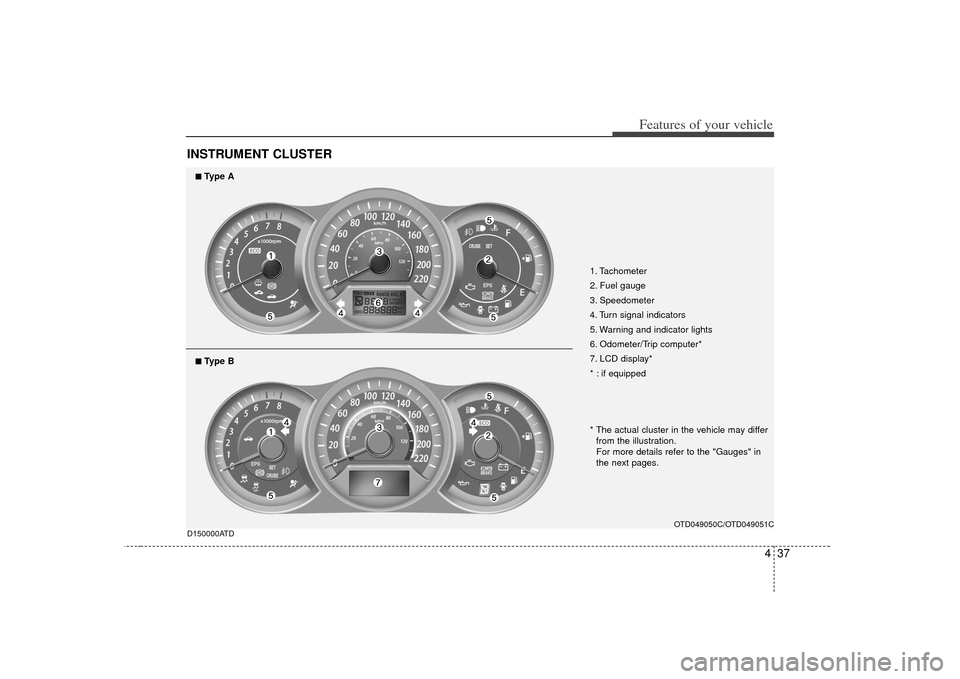
INSTRUMENT CLUSTER
1. Tachometer
2. Fuel gauge
3. Speedometer
4. Turn signal indicators
5. Warning and indicator lights
6. Odometer/Trip computer*
7. LCD display*
* : if equipped
OTD049050C/OTD049051C
D150000ATD
■
■Type A
* The actual cluster in the vehicle may differ
from the illustration.
For more details refer to the "Gauges" in
the next pages.
■
■Type B
Page 103 of 321
Features of your vehicle38
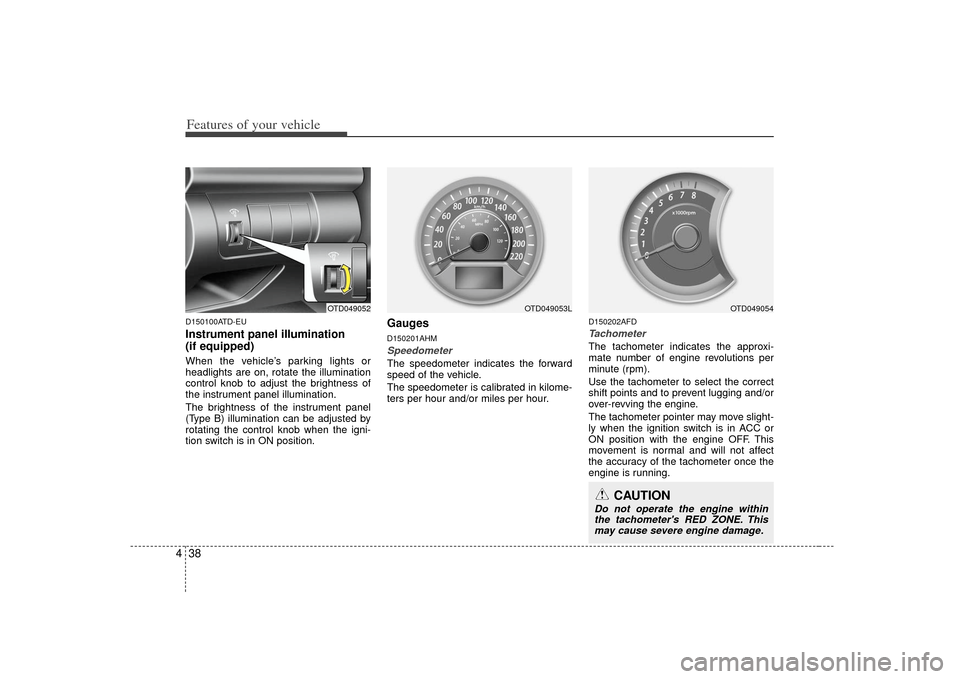
4D150100ATD-EUInstrument panel illumination
(if equipped)When the vehicle’s parking lights or
headlights are on, rotate the illumination
control knob to adjust the brightness of
the instrument panel illumination.
The brightness of the instrument panel
(Type B) illumination can be adjusted by
rotating the control knob when the igni-
tion switch is in ON position.
GaugesD150201AHMSpeedometer The speedometer indicates the forward
speed of the vehicle.
The speedometer is calibrated in kilome-
ters per hour and/or miles per hour.
D150202AFDTachometer The tachometer indicates the approxi-
mate number of engine revolutions per
minute (rpm).
Use the tachometer to select the correct
shift points and to prevent lugging and/or
over-revving the engine.
The tachometer pointer may move slight-
ly when the ignition switch is in ACC or
ON position with the engine OFF. This
movement is normal and will not affect
the accuracy of the tachometer once the
engine is running.
OTD049052
OTD049053L
CAUTION
Do not operate the engine within
the tachometer's RED ZONE. Thismay cause severe engine damage.
OTD049054
Page 108 of 321
443
Features of your vehicle
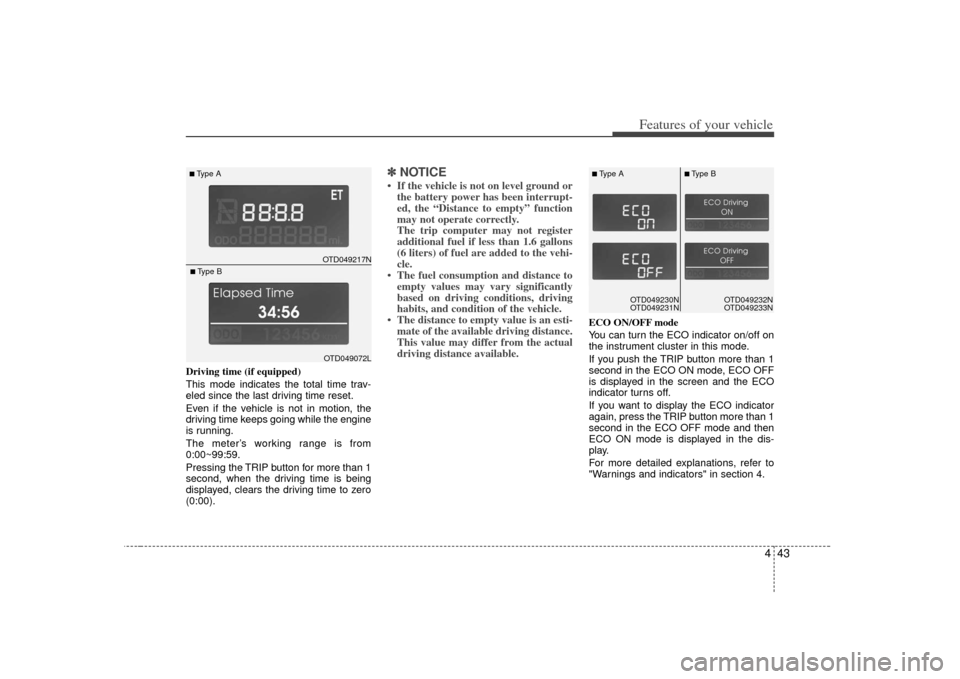
Driving time (if equipped)
This mode indicates the total time trav-
eled since the last driving time reset.
Even if the vehicle is not in motion, the
driving time keeps going while the engine
is running.
The meter’s working range is from
0:00~99:59.
Pressing the TRIP button for more than 1
second, when the driving time is being
displayed, clears the driving time to zero
(0:00).
✽ ✽NOTICE• If the vehicle is not on level ground or
the battery power has been interrupt-
ed, the “Distance to empty” function
may not operate correctly.
The trip computer may not register
additional fuel if less than 1.6 gallons
(6 liters) of fuel are added to the vehi-
cle.
• The fuel consumption and distance to empty values may vary significantly
based on driving conditions, driving
habits, and condition of the vehicle.
• The distance to empty value is an esti- mate of the available driving distance.
This value may differ from the actual
driving distance available.
ECO ON/OFF mode
You can turn the ECO indicator on/off on
the instrument cluster in this mode.
If you push the TRIP button more than 1
second in the ECO ON mode, ECO OFF
is displayed in the screen and the ECO
indicator turns off.
If you want to display the ECO indicator
again, press the TRIP button more than 1
second in the ECO OFF mode and then
ECO ON mode is displayed in the dis-
play.
For more detailed explanations, refer to
"Warnings and indicators" in section 4.
OTD049217N
■Type A
OTD049072L
■Type B
OTD049230N
OTD049231NOTD049230N
OTD049231N
■Type A
■Type B
OTD049232N
OTD049233N
Page 116 of 321
451
Features of your vehicle
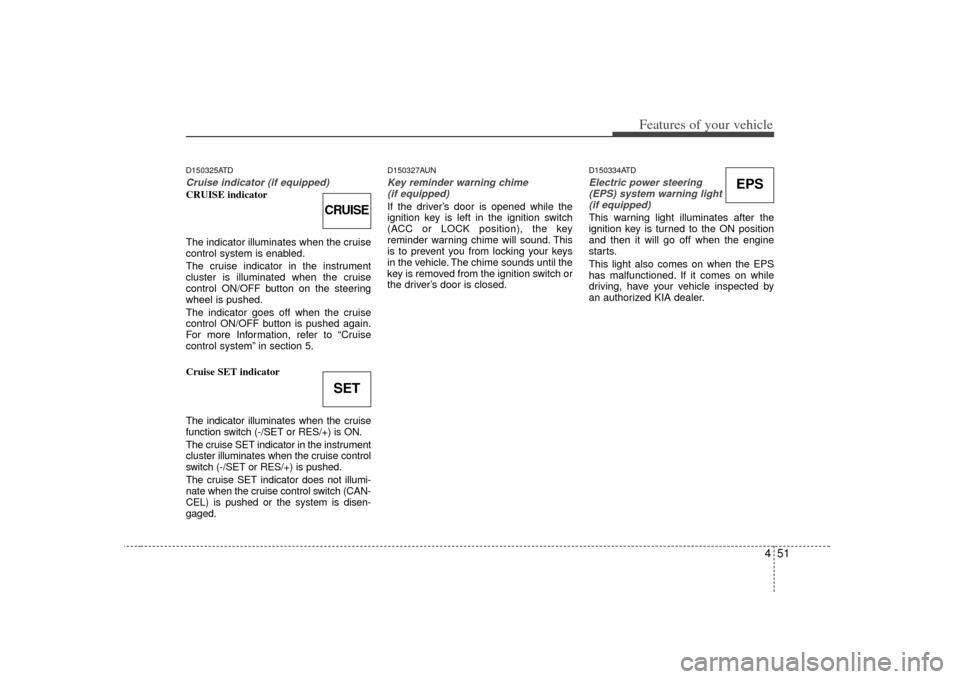
D150325ATDCruise indicator (if equipped)CRUISE indicator
The indicator illuminates when the cruise
control system is enabled.
The cruise indicator in the instrument
cluster is illuminated when the cruise
control ON/OFF button on the steering
wheel is pushed.
The indicator goes off when the cruise
control ON/OFF button is pushed again.
For more Information, refer to “Cruise
control system” in section 5.
Cruise SET indicator
The indicator illuminates when the cruise
function switch (-/SET or RES/+) is ON.
The cruise SET indicator in the instrument
cluster illuminates when the cruise control
switch (-/SET or RES/+) is pushed.
The cruise SET indicator does not illumi-
nate when the cruise control switch (CAN-
CEL) is pushed or the system is disen-
gaged.
D150327AUNKey reminder warning chime (if equipped)If the driver’s door is opened while the
ignition key is left in the ignition switch
(ACC or LOCK position), the key
reminder warning chime will sound. This
is to prevent you from locking your keys
in the vehicle. The chime sounds until the
key is removed from the ignition switch or
the driver’s door is closed.
D150334ATDElectric power steering (EPS) system warning light(if equipped)This warning light illuminates after the
ignition key is turned to the ON position
and then it will go off when the engine
starts.
This light also comes on when the EPS
has malfunctioned. If it comes on while
driving, have your vehicle inspected by
an authorized KIA dealer.
CRUISESET
EPS
Page 121 of 321
Features of your vehicle56
4D190100APBBattery saver function The purpose of this feature is to pre-
vent the battery from being dis-
charged. The system automatically
turns off the exterior lights when the
driver removes the ignition key and
opens the driver- side door.
With this feature, the parking lights will turn off automatically if the driver parks
on the side of the road at night.
If necessary, to keep the lights on
when the ignition key is removed, per-
form the following :
1) Open the driver-side door.
2) Turn the parking lights OFF and ON again using the light switch on the
steering column.
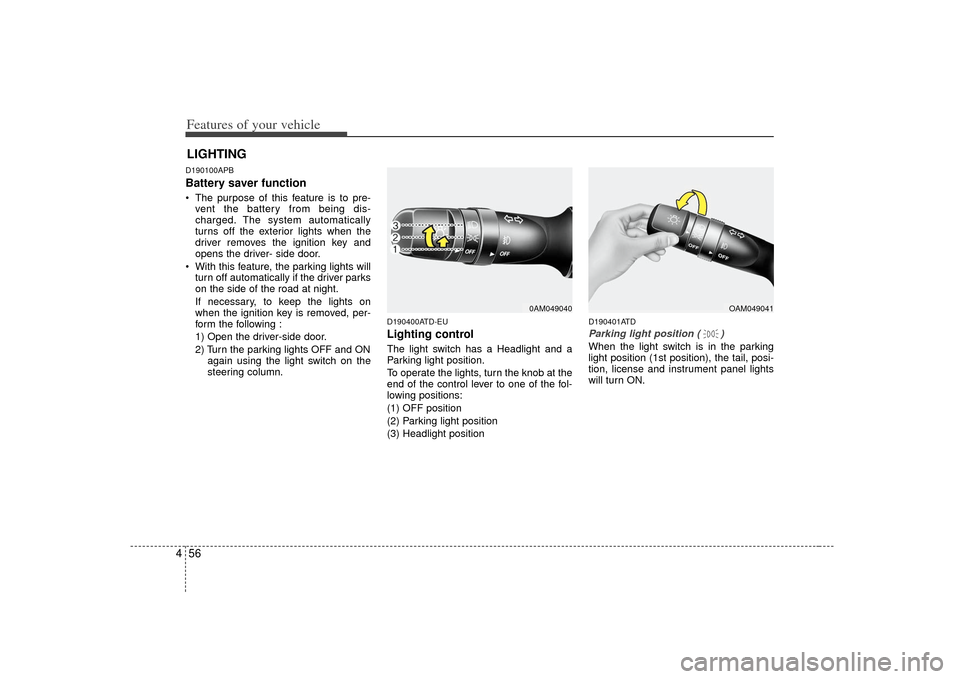
D190400ATD-EULighting controlThe light switch has a Headlight and a
Parking light position.
To operate the lights, turn the knob at the
end of the control lever to one of the fol-
lowing positions:
(1) OFF position
(2) Parking light position
(3) Headlight position
D190401ATDParking light position ( )When the light switch is in the parking
light position (1st position), the tail, posi-
tion, license and instrument panel lights
will turn ON.
LIGHTING
0AM049040
OAM049041
Page 122 of 321
457
Features of your vehicle
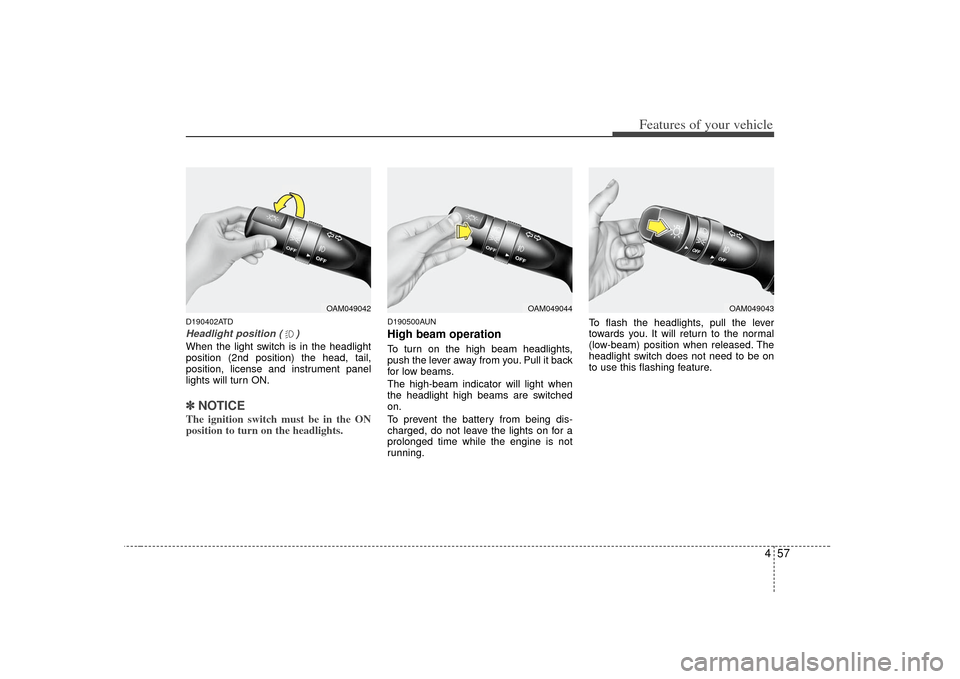
D190402ATDHeadlight position ( )When the light switch is in the headlight
position (2nd position) the head, tail,
position, license and instrument panel
lights will turn ON.✽ ✽NOTICEThe ignition switch must be in the ON
position to turn on the headlights.
D190500AUNHigh beam operation To turn on the high beam headlights,
push the lever away from you. Pull it back
for low beams.
The high-beam indicator will light when
the headlight high beams are switched
on.
To prevent the battery from being dis-
charged, do not leave the lights on for a
prolonged time while the engine is not
running. To flash the headlights, pull the lever
towards you. It will return to the normal
(low-beam) position when released. The
headlight switch does not need to be on
to use this flashing feature.
OAM049042
OAM049044
OAM049043
Page 123 of 321
Features of your vehicle58
4
CAUTION
When in operation, the fog lights
consume large amounts of vehicleelectrical power. Only use the foglights when visibility is poor.
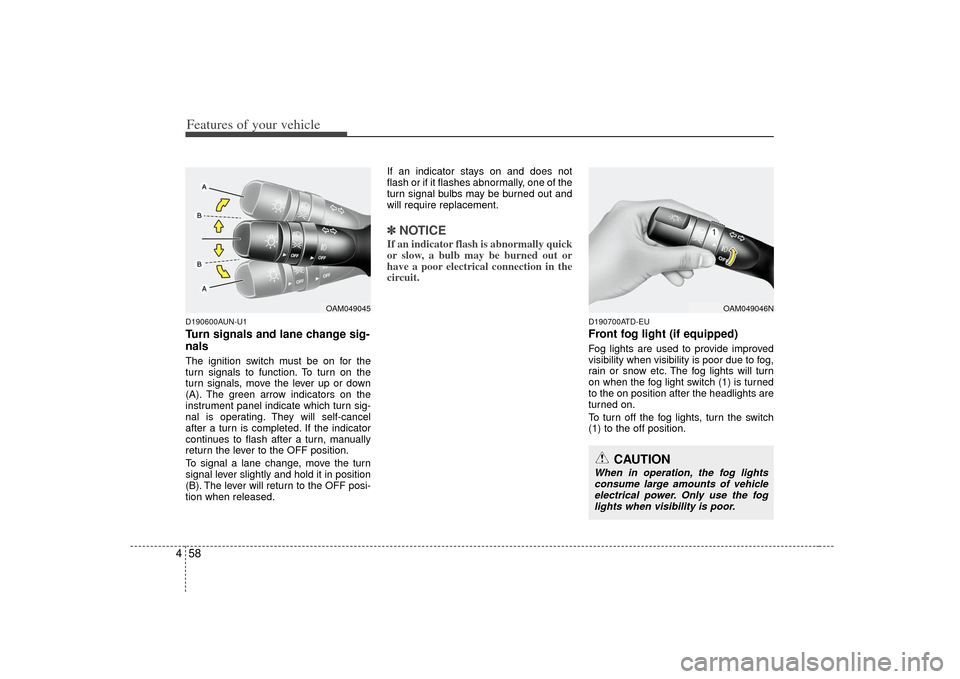
D190600AUN-U1Turn signals and lane change sig-
nalsThe ignition switch must be on for the
turn signals to function. To turn on the
turn signals, move the lever up or down
(A). The green arrow indicators on the
instrument panel indicate which turn sig-
nal is operating. They will self-cancel
after a turn is completed. If the indicator
continues to flash after a turn, manually
return the lever to the OFF position.
To signal a lane change, move the turn
signal lever slightly and hold it in position
(B). The lever will return to the OFF posi-
tion when released. If an indicator stays on and does not
flash or if it flashes abnormally, one of the
turn signal bulbs may be burned out and
will require replacement.
✽ ✽
NOTICEIf an indicator flash is abnormally quick
or slow, a bulb may be burned out or
have a poor electrical connection in the
circuit.
D190700ATD-EUFront fog light (if equipped) Fog lights are used to provide improved
visibility when visibility is poor due to fog,
rain or snow etc. The fog lights will turn
on when the fog light switch (1) is turned
to the on position after the headlights are
turned on.
To turn off the fog lights, turn the switch
(1) to the off position.
OAM049045
OAM049046N