Support KIA Cerato 2011 1.G User Guide
[x] Cancel search | Manufacturer: KIA, Model Year: 2011, Model line: Cerato, Model: KIA Cerato 2011 1.GPages: 342, PDF Size: 7.23 MB
Page 183 of 342
4109
Features of your vehicle
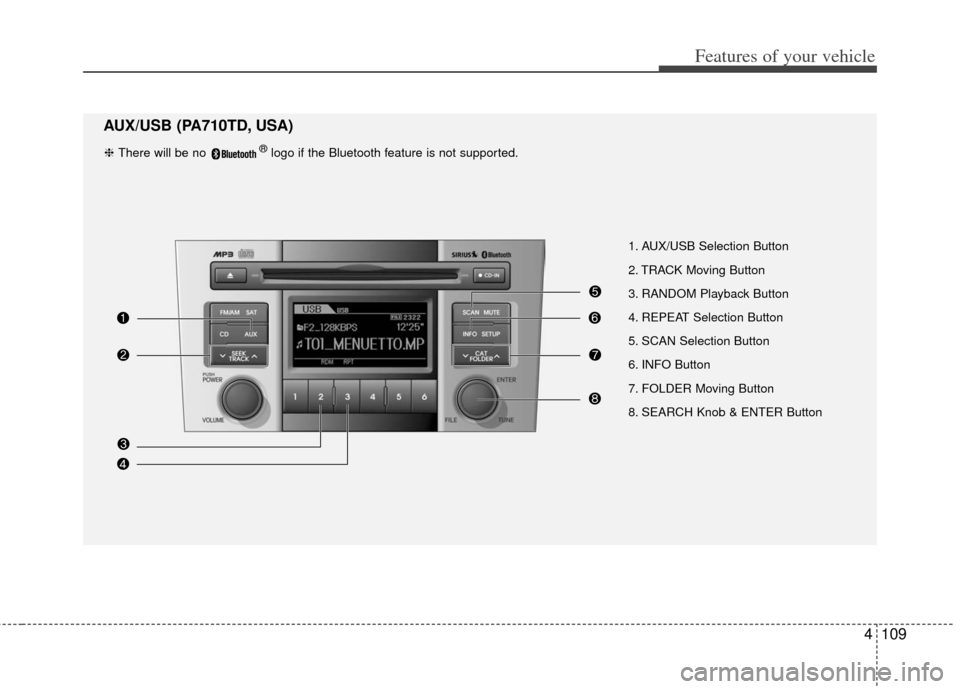
1. AUX/USB Selection Button
2. TRACK Moving Button
3. RANDOM Playback Button
4. REPEAT Selection Button
5. SCAN Selection Button
6. INFO Button
7. FOLDER Moving Button
8. SEARCH Knob & ENTER Button
AUX/USB (PA710TD, USA)
❈ There will be no ®logo if the Bluetooth feature is not supported.
Page 184 of 342

Features of your vehicle
110
4
1. AUX/USB Selection Button
2. TRACK Moving Button
3. RANDOM Playback Button
4. REPEAT Selection Button
5. SCAN Selection Button
6. INFO Button
7. FOLDER Moving Button
8. SEARCH Knob & ENTER Button
AUX/USB (PA760TD, USA)
❈ There will be no ®logo if the Bluetooth feature is not supported.
Page 188 of 342
Features of your vehicle
114
4
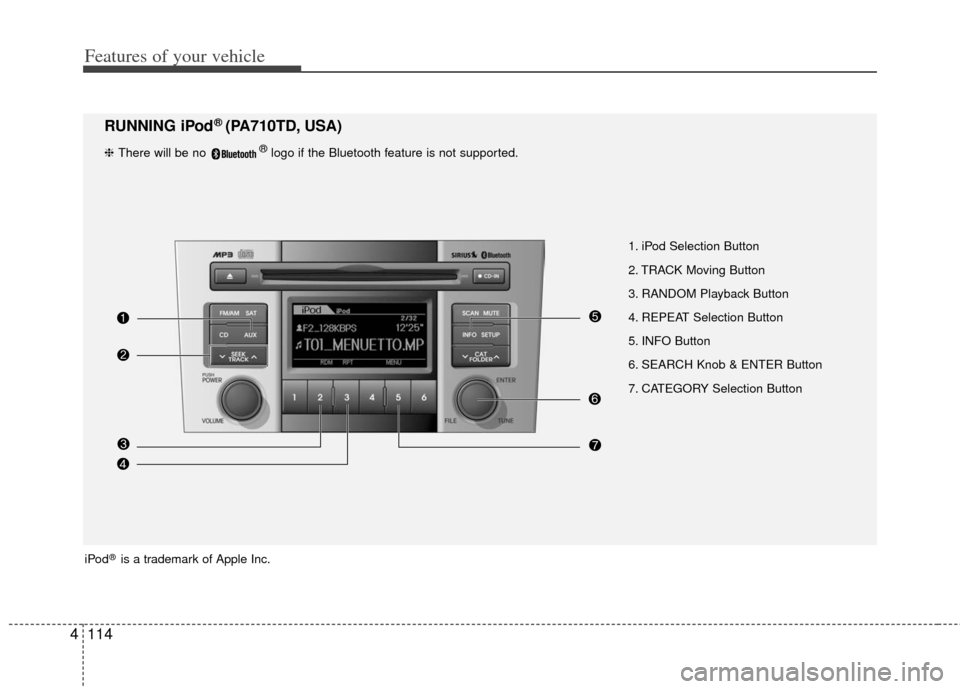
1. iPod Selection Button
2. TRACK Moving Button
3. RANDOM Playback Button
4. REPEAT Selection Button
5. INFO Button
6. SEARCH Knob & ENTER Button
7. CATEGORY Selection Button
RUNNING iPod® (PA710TD, USA)
iPod®is a trademark of Apple Inc.
❈ There will be no ®logo if the Bluetooth feature is not supported.
Page 189 of 342
4115
Features of your vehicle
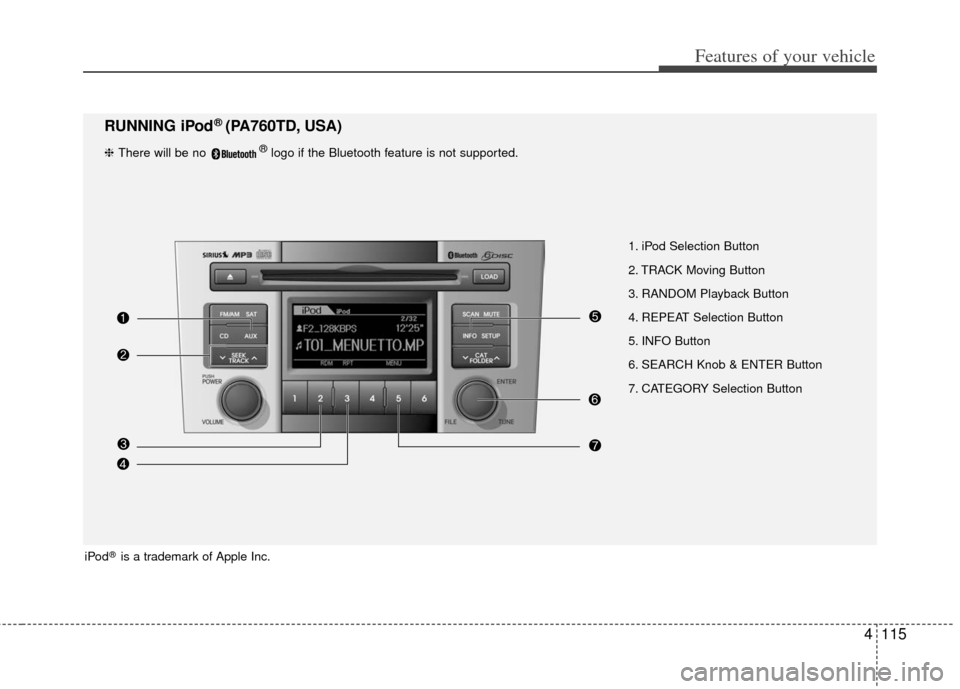
1. iPod Selection Button
2. TRACK Moving Button
3. RANDOM Playback Button
4. REPEAT Selection Button
5. INFO Button
6. SEARCH Knob & ENTER Button
7. CATEGORY Selection Button
RUNNING iPod® (PA760TD, USA)
❈ There will be no ®logo if the Bluetooth feature is not supported.
iPod®is a trademark of Apple Inc.
Page 191 of 342
4117
Features of your vehicle
✽
✽NOTICE FOR USING THE
iPod®DEVICE
• Some iPod models might not sup-
port the communication protocol
and the files will not be played.
Supported iPod models:
- iPod Mini
- iPod 4th(Photo) ~ 6th(Classic)
generation
- iPod Nano 1st~4th generation
- iPod Touch 1st~2nd generation
• The order of search or playback of songs in the iPod can be different
from the order searched in the
audio system.
• If the iPod disabled due to its own malfunction, reset the iPod. (Reset:
Refer to iPod manual)
• An iPod may not operate normally on low battery.
• Some iPod devices, such as the iPhone, can be connected through the
Bluetooth
®interface. The device
must have audio Bluetooth®capabili-
ty (such as for stereo headphone
Bluetooth
®). The device can play, but
it will not be controlled by the audio
system.
CAUTION IN USING
iPod®DEVICE
You need the power cable exclu-
sive for an iPod in order to oper-ate an iPod with the buttons onthe audio system. The PC cableprovided by Apple may cause amalfunction and do not use it forvehicle use.
When connecting the device with an iPod cable, push in the jackfully not to interfere with commu-nication.
When adjusting the sound effects of an iPod and the audio system,the sound effects of both deviceswill overlap and might reduce ordistort the quality of the sound.
Deactivate (turn off) the equalizer function of an iPod when adjust-ing the audio system’s volume,and turn off the equalizer of the audio system when using theequalizer of an iPod.
(Continued)
(Continued) When the iPod cable is connected, the system can be switched to theAUX mode even without the iPoddevice and can cause noise. Disconnect the iPod cable whenyou are not using the iPod device.
When the iPod is not used for the audio system, the iPod cable hasto be separate from iPod devices.Original display of iPod may not bedisplayed.
Page 192 of 342
Features of your vehicle
118
4
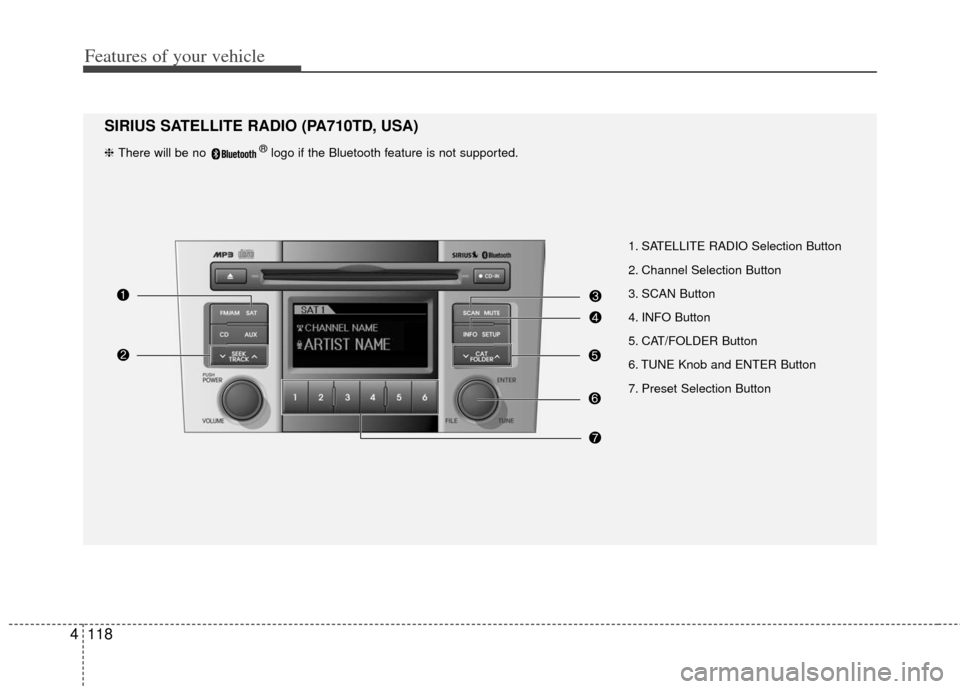
1. SATELLITE RADIO Selection Button
2. Channel Selection Button
3. SCAN Button
4. INFO Button
5. CAT/FOLDER Button
6. TUNE Knob and ENTER Button
7. Preset Selection Button
SIRIUS SATELLITE RADIO (PA710TD, USA)
❈ There will be no ®logo if the Bluetooth feature is not supported.
Page 193 of 342
4119
Features of your vehicle
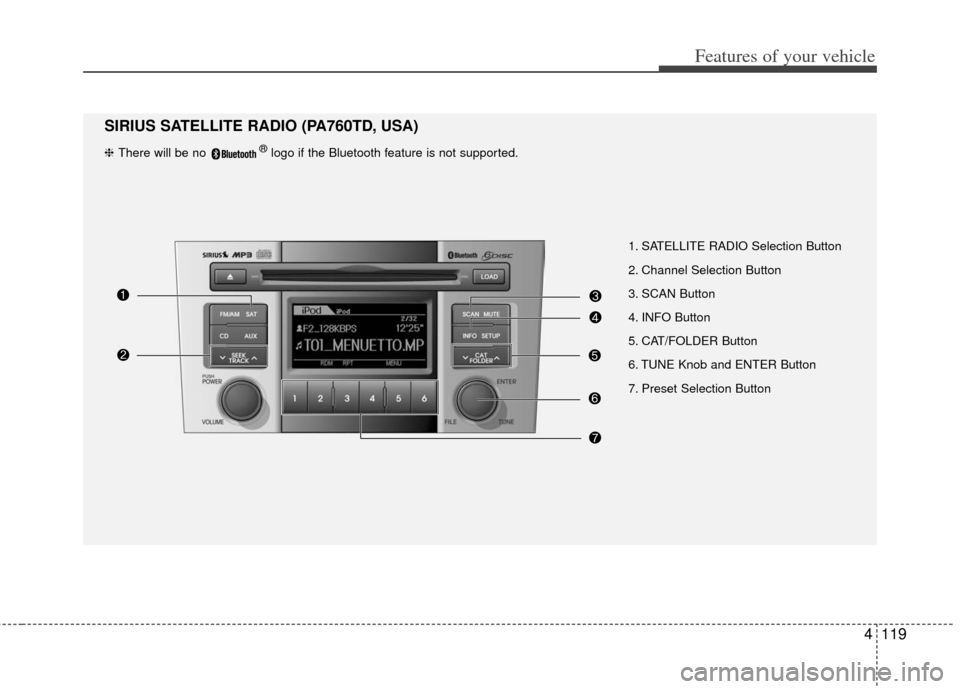
1. SATELLITE RADIO Selection Button
2. Channel Selection Button
3. SCAN Button
4. INFO Button
5. CAT/FOLDER Button
6. TUNE Knob and ENTER Button
7. Preset Selection Button
SIRIUS SATELLITE RADIO (PA760TD, USA)
❈ There will be no ®logo if the Bluetooth feature is not supported.
Page 197 of 342
BLUETOOTH®PHONE OPERATION
(IF EQUIPPED)
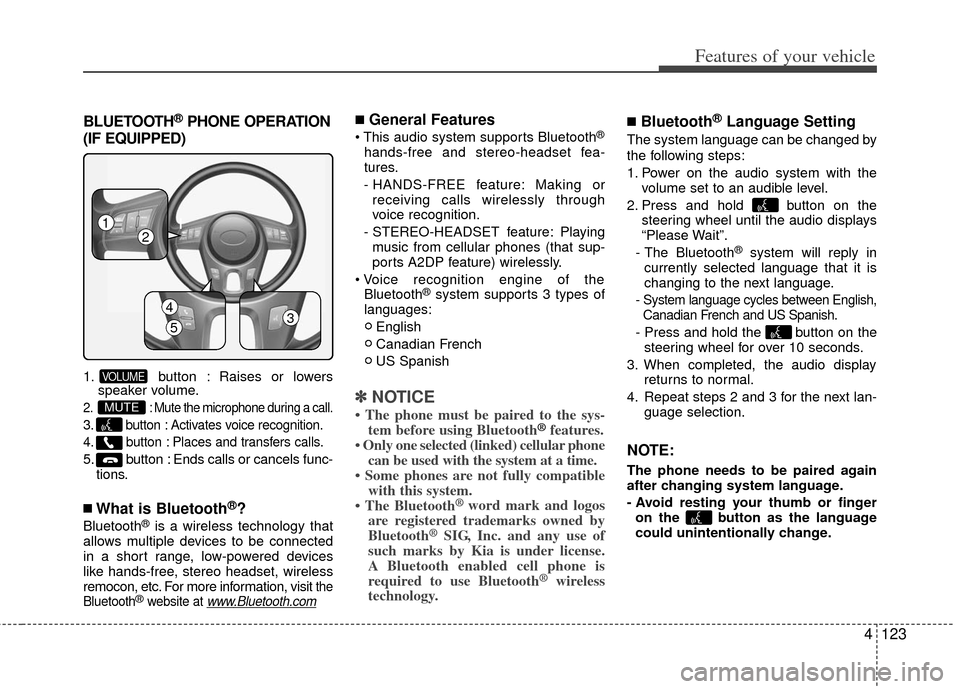
1. button : Raises or lowers speaker volume.
2. : Mute the microphone during a call.
3. button : Activates voice recognition.
4. button : Places and transfers calls.
5. button : Ends calls or cancels func-
tions.
■What is Bluetooth®?
Bluetooth®is a wireless technology that
allows multiple devices to be connected
in a short range, low-powered devices
like hands-free, stereo headset, wireless
remocon, etc. For more information, visit
the
Bluetooth®website at www.Bluetooth.com
■General Features
®
hands-free and stereo-headset fea-
tures.
- HANDS-FREE feature: Making or receiving calls wirelessly through
voice recognition.
- STEREO-HEADSET feature: Playing music from cellular phones (that sup-
ports A2DP feature) wirelessly.
Bluetooth
®system supports 3 types of
languages:
English
Canadian French
US Spanish
✽ ✽ NOTICE
• The phone must be paired to the sys-
tem before using Bluetooth®features.
• Only one selected (linked) cellular phone can be used with the system at a time.
• Some phones are not fully compatible with this system.
• The Bluetooth
® word mark and logos
are registered trademarks owned by
Bluetooth
®SIG, Inc. and any use of
such marks by Kia is under license.
A Bluetooth enabled cell phone is
required to use Bluetooth
®wireless
technology.
■Bluetooth®Language Setting
The system language can be changed by
the following steps:
1. Power on the audio system with the
volume set to an audible level.
2. Press and hold button on the steering wheel until the audio displays
“Please Wait”.
- The Bluetooth
®system will reply in
currently selected language that it is
changing to the next language.
- System language cycles between English, Canadian French and US Spanish.
- Press and hold the button on the steering wheel for over 10 seconds.
3. When completed, the audio display returns to normal.
4. Repeat steps 2 and 3 for the next lan- guage selection.
NOTE:
The phone needs to be paired again
after changing system language.
- Avoid resting your thumb or fingeron the button as the language
could unintentionally change.
MUTE
VOLUME
4123
Features of your vehicle
12
4
53
Page 198 of 342
Features of your vehicle
124
4
■Receiving a Phone Call
When receiving a phone call, a ringtone
is audible from speakers and the audio
system changes into telephone mode.
When receiving a phone call, “Incoming
call” message and incoming phone num-
ber (if available) are displayed on the
audio.
- Press button on the steering wheel.
- Press button on the steering wheel.
- Use VOLUME buttons on the steering
wheel.
Call):
- Press and hold button on the steering wheel until the audio system
transfers a call to the phone.
■Talking on the Phone
When talking on the phone, “Active Call”
message and the other party’s phone
number (if available) are displayed on the
audio.
- Press button on the steering wheel.
✽ ✽ NOTICE
In the following situations, you or the
other party may have difficulty hearing
each other:
1. Speaking at the same time, your voice
may not reach each other parties. (This
is not a malfunction.) Speak alternate-
ly with the other party on the phone.
2. Keep the Bluetooth
®volume to a low
level. High-level volume may result in
distortion and echo.
3. When driving on a rough road.
4. When driving at high speeds.
5. When the window is open.
6. When the air conditioning vents are facing the microphone.
7. When the sound of the air condition- ing fan is loud.
■Bluetooth®Audio Music Streaming
The audio system supports Bluetooth®
A2DP (Audio Advanced Distribution
Profile) and AVRCP (Audio Video
Remote Control Profile) technologies.
Both profiles provide steaming of music
via compatible “PAIRED” Bluetooth
®
Cellular phone.
To stream music from the Bluetooth® cel-
lular phone, play your music files on your
cellular phone according to your cellular
phone user’s manual and press the button on the audio system until
“MP3 play” is displayed on the LCD.
The audio system head unit displays
‘MP3 MODE’.
AUX
Page 199 of 342
4125
Features of your vehicle
NOTE:
all music and sound files your cellu-
lar phone supports can be played
by the audio system.
®compatible cellular
phones must include A2DP and
AVRCP capabilities.
AVRCP compatible Bluetooth
®cellular phones may not
play music through the audio sys-
tem initially. These cellular phones
may need to have the Bluetooth
®
streaming enabled, for example;
i.e : Menu
➟Filemanager➟Music➟Option➟Play via Bluetooth
cellular phone for more information.
To cancel Bluetooth
®cellular phone
music streaming, stop music play-
back on the cellular phone or
change the audio mode to AM/FM,
SIRIUS, CD, iPod, ect.
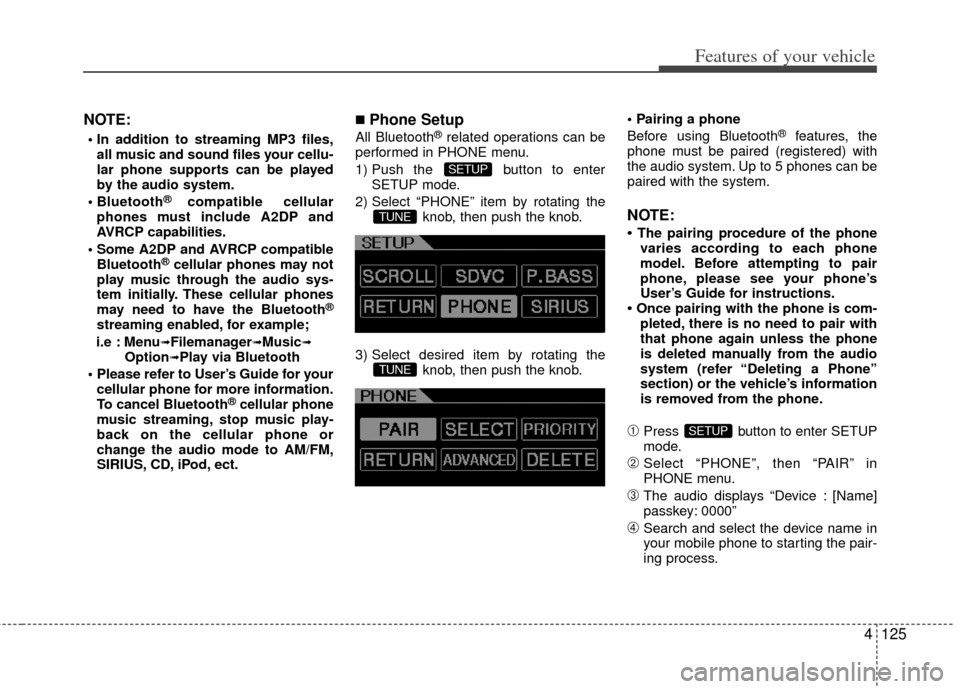
■Phone Setup
All Bluetooth®related operations can be
performed in PHONE menu.
1) Push the button to enter SETUP mode.
2) Select “PHONE” item by rotating the knob, then push the knob.
3) Select desired item by rotating the knob, then push the knob.
Before using Bluetooth®features, the
phone must be paired (registered) with
the audio system. Up to 5 phones can be
paired with the system.
NOTE:
• The pairing procedure of the phone varies according to each phone
model. Before attempting to pair
phone, please see your phone’s
User’s Guide for instructions.
• Once pairing with the phone is com- pleted, there is no need to pair with
that phone again unless the phone
is deleted manually from the audio
system (refer “Deleting a Phone”
section) or the vehicle’s information
is removed from the phone.
➀Press button to enter SETUP
mode.
\bSelect “PHONE”, then “PAIR” in
PHONE menu.
➂The audio displays “Device : [Name]
passkey: 0000”
➃Search and select the device name in
your mobile phone to starting the pair-
ing process.
SETUP
TUNE
TUNE
SETUP