Trans KIA Cerato 2011 1.G User Guide
[x] Cancel search | Manufacturer: KIA, Model Year: 2011, Model line: Cerato, Model: KIA Cerato 2011 1.GPages: 342, PDF Size: 7.23 MB
Page 86 of 342
Features of your vehicle
12
4
D050100ATD-EU
Operating door locks from out-
side the vehicle
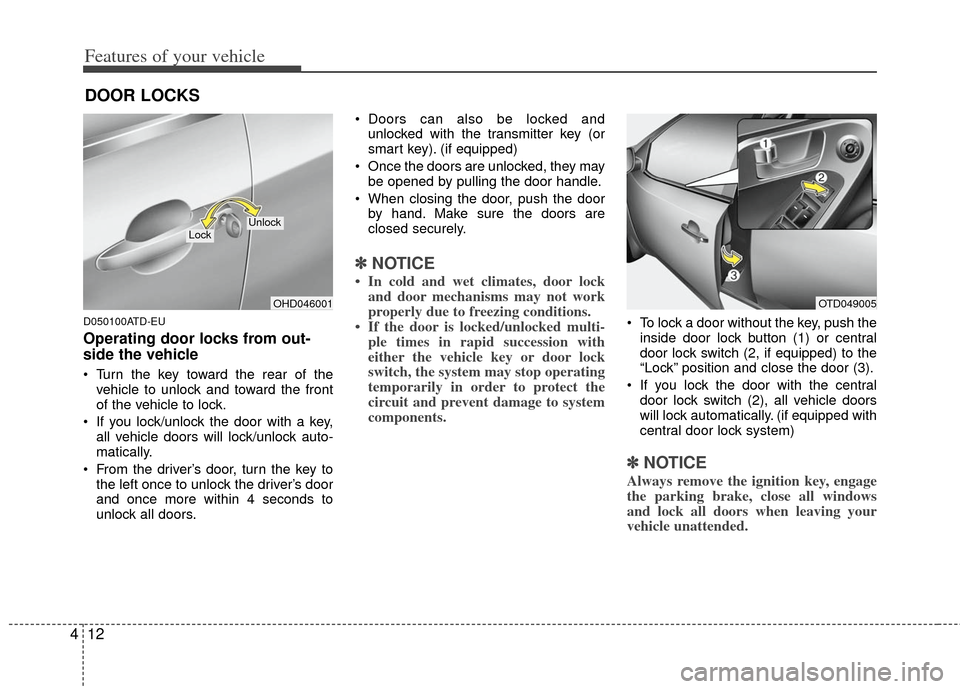
Turn the key toward the rear of the
vehicle to unlock and toward the front
of the vehicle to lock.
If you lock/unlock the door with a key, all vehicle doors will lock/unlock auto-
matically.
From the driver’s door, turn the key to the left once to unlock the driver’s door
and once more within 4 seconds to
unlock all doors. Doors can also be locked and
unlocked with the transmitter key (or
smart key). (if equipped)
Once the doors are unlocked, they may be opened by pulling the door handle.
When closing the door, push the door by hand. Make sure the doors are
closed securely.
✽ ✽ NOTICE
• In cold and wet climates, door lock
and door mechanisms may not work
properly due to freezing conditions.
• If the door is locked/unlocked multi- ple times in rapid succession with
either the vehicle key or door lock
switch, the system may stop operating
temporarily in order to protect the
circuit and prevent damage to system
components.
To lock a door without the key, push the
inside door lock button (1) or central
door lock switch (2, if equipped )to the
“Lock” position and close the door (3).
If you lock the door with the central door lock switch (2), all vehicle doors
will lock automatically. (if equipped with
central door lock system)
✽ ✽ NOTICE
Always remove the ignition key, engage
the parking brake, close all windows
and lock all doors when leaving your
vehicle unattended.
DOOR LOCKS
OHD046001
LockUnlock
OTD049005
Page 88 of 342
Features of your vehicle
14
4
Press the switch to the "Lock" position
(1), all vehicle doors will lock.
Press the switch to the "Unlock" posi- tion (2), all vehicle doors will unlock.
If the key is in the ignition switch (or if the smart key is in the vehicle) and any
front door is opened, the doors will not
lock when the “Lock” position (1) of the
central door lock switch is pressed. (if
equipped)D050300AHM
Impact sensing door unlock sys-
tem (if equipped)
All doors will automatically unlock when
an impact causes the air bags to deploy.
D050400ATD-EU
Auto door lock/unlock feature
(if equipped)
All doors will automatically lock whenthe transaxle shift lever is shifted out of
P (Park).
All doors will automatically unlock when the transaxle shift lever is shifted
into P (Park).
WARNING- Unlocked
vehicles
Leaving your vehicle unlocked can
invite theft or possible harm to you
or others from someone hiding in
your vehicle while you are gone.
Always remove the ignition key,
engage the parking brake, close all
windows and lock all doors when
leaving your vehicle unattended.
WARNING- Unattendedchildren
An enclosed vehicle can become
extremely hot, causing death or
severe injury to unattended chil-
dren or animals who cannot escape
the vehicle. Furthermore, children
might operate features of the vehi-
cle that could injure them, or they
could encounter other harm, possi-
bly from someone gaining entry to
the vehicle. Never leave children or
animals unattended in your vehicle.
WARNING - Doors
The doors should always be fully
closed and locked while the vehi-
cle is in motion to prevent acci-
dental opening of the door.
Locked doors will also discour-
age potential intruders when the
vehicle stops or slows.
Be careful when opening doors and watch for vehicles, motorcy-
cles, bicycles or pedestrians
approaching the vehicle in the
path of the door. Opening a door
when something is approaching
can cause damage or injury.
Page 89 of 342
415
Features of your vehicle
D050400ATD-EE
✽
✽NOTICE
An authorized KIA dealer can activate
or deactivate some auto door lock/
unlock features as follows;
• Auto door unlock by using the dri-
ver's door lock button
• Auto door lock/unlock by shifting the transaxle shift lever out of P (Park) or
into P (Park)
• Auto door unlock when the ignition key is removed from the ignition
switch (for smart key, when the
ENGINE START/STOP button is
turned to the OFF position)
If you want to activate or deactivate
some door lock/unlock feature, consult
an authorized KIA dealer.
D050500ATD-EU
Child-protector rear door lock
(for 4 door, 5 door vehicle only)
The child safety lock is provided to help
prevent children from accidentally open-
ing the rear doors from inside the vehicle.
The rear door safety locks should be
used whenever children are in the vehi-
cle.
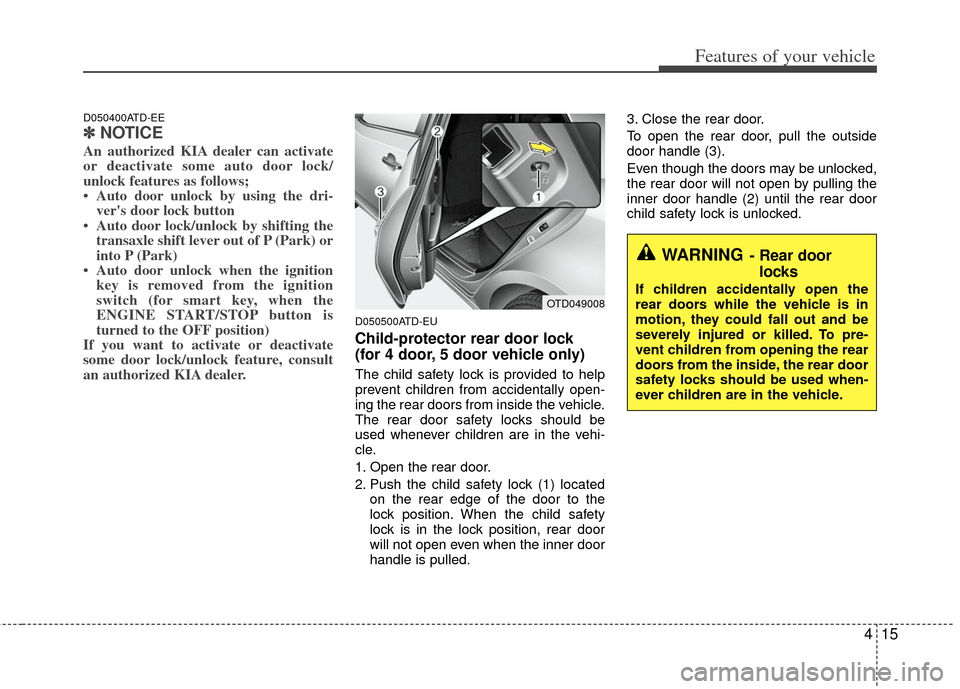
1. Open the rear door.
2. Push the child safety lock (1) located
on the rear edge of the door to the
lock position. When the child safety
lock is in the lock position, rear door
will not open even when the inner door
handle is pulled. 3. Close the rear door.
To open the rear door, pull the outside
door handle (3).
Even though the doors may be unlocked,
the rear door will not open by pulling the
inner door handle (2) until the rear door
child safety lock is unlocked.
WARNING- Rear door
locks
If children accidentally open the
rear doors while the vehicle is in
motion, they could fall out and be
severely injured or killed. To pre-
vent children from opening the rear
doors from the inside, the rear door
safety locks should be used when-
ever children are in the vehicle.OTD049008
Page 90 of 342
Features of your vehicle
16
4
D070100BTD
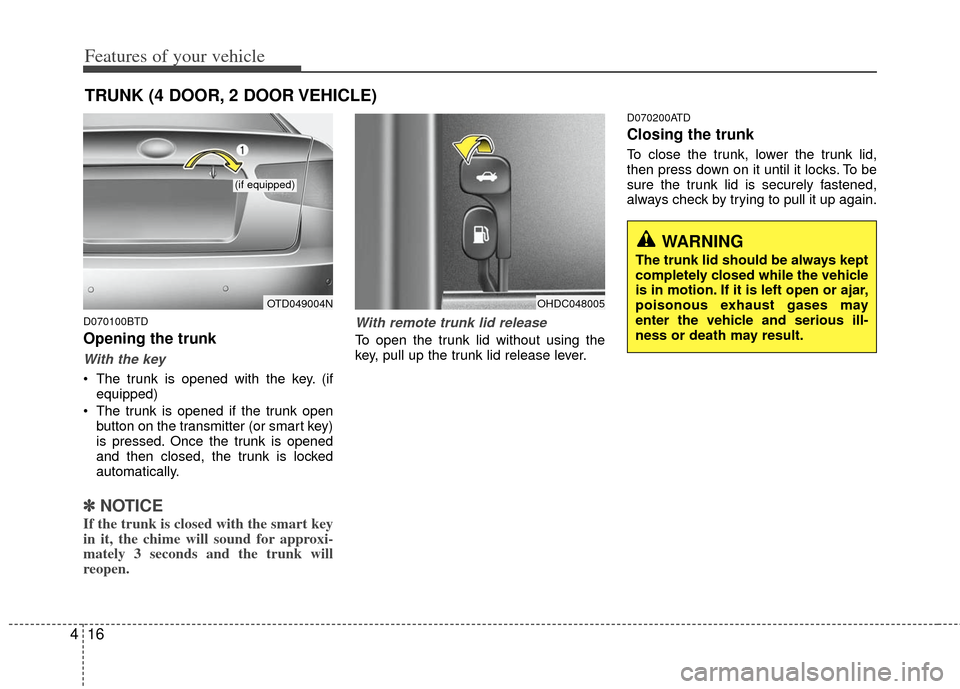
Opening the trunk
With the key
The trunk is opened with the key. (if
equipped)
The trunk is opened if the trunk open button on the transmitter (or smart key)
is pressed. Once the trunk is opened
and then closed, the trunk is locked
automatically.
✽ ✽ NOTICE
If the trunk is closed with the smart key
in it, the chime will sound for approxi-
mately 3 seconds and the trunk will
reopen.
With remote trunk lid release
To open the trunk lid without using the
key, pull up the trunk lid release lever.
D070200ATD
Closing the trunk
To close the trunk, lower the trunk lid,
then press down on it until it locks. To be
sure the trunk lid is securely fastened,
always check by trying to pull it up again.
TRUNK (4 DOOR, 2 DOOR VEHICLE)
OTD049004N
(if equipped)
OHDC048005
WARNING
The trunk lid should be always kept
completely closed while the vehicle
is in motion. If it is left open or ajar,
poisonous exhaust gases may
enter the vehicle and serious ill-
ness or death may result.
Page 92 of 342
Features of your vehicle
18
4
D070100AFD
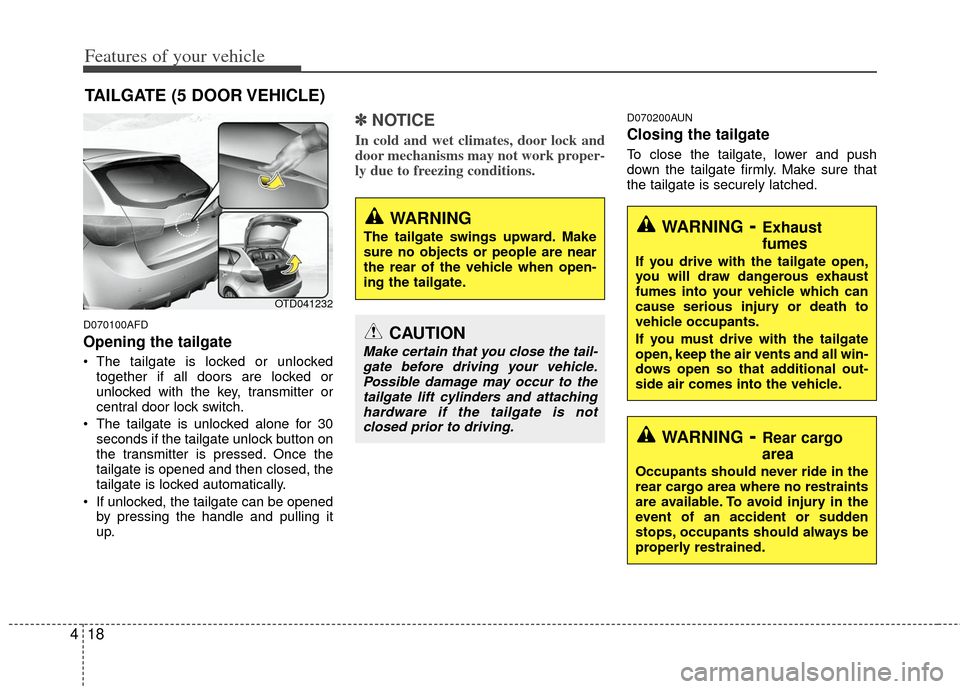
Opening the tailgate
The tailgate is locked or unlocked
together if all doors are locked or
unlocked with the key, transmitter or
central door lock switch.
The tailgate is unlocked alone for 30 seconds if the tailgate unlock button on
the transmitter is pressed. Once the
tailgate is opened and then closed, the
tailgate is locked automatically.
If unlocked, the tailgate can be opened by pressing the handle and pulling it
up.
✽ ✽ NOTICE
In cold and wet climates, door lock and
door mechanisms may not work proper-
ly due to freezing conditions.
D070200AUN
Closing the tailgate
To close the tailgate, lower and push
down the tailgate firmly. Make sure that
the tailgate is securely latched.
TAILGATE (5 DOOR VEHICLE)
OTD041232
WARNING
The tailgate swings upward. Make
sure no objects or people are near
the rear of the vehicle when open-
ing the tailgate.
CAUTION
Make certain that you close the tail-
gate before driving your vehicle.Possible damage may occur to thetailgate lift cylinders and attachinghardware if the tailgate is not closed prior to driving.
WARNING- Exhaust
fumes
If you drive with the tailgate open,
you will draw dangerous exhaust
fumes into your vehicle which can
cause serious injury or death to
vehicle occupants.
If you must drive with the tailgate
open, keep the air vents and all win-
dows open so that additional out-
side air comes into the vehicle.
WARNING- Rear cargo
area
Occupants should never ride in the
rear cargo area where no restraints
are available. To avoid injury in the
event of an accident or sudden
stops, occupants should always be
properly restrained.
Page 123 of 342
449
Features of your vehicle
D150308ATD
Parking brake & brake fluidwarning light
Parking brake warning
This warning light illuminates for 3 sec-
onds after the ignition switch is turned to
the ON position and then it will go out.
Also, this light illuminates when the park-
ing brake is applied with the ignition
switch in the START or ON position. The
warning light should go out when the
parking brake is released.
Low brake fluid level warning
If the warning light remains on, it may
indicate that the brake fluid level in the
reservoir is low.
If the warning light remains on:
1. Drive carefully to the nearest safe location and stop your vehicle.
2. With the engine stopped, check the brake fluid level immediately and add
fluid as required. Then check all brake
components for fluid leaks.
3. Do not drive the vehicle if leaks are found, the warning light remains on or
the brakes do not operate properly.
Have the vehicle towed to any author-
ized KIA dealer for a brake system
inspection and necessary repairs. Your vehicle is equipped with dual-diago-
nal braking systems. This means you still
have braking on two wheels even if one
of the dual systems should fail. With only
one of the dual systems working, more
than normal pedal travel and greater
pedal pressure are required to stop the
vehicle. Also, the vehicle will not stop in
as short a distance with only a portion of
the brake system working. If the brakes
fail while you are driving, shift to a lower
gear for additional engine braking and
stop the vehicle as soon as it is safe to do
so.
To check bulb operation, check whether
the parking brake and brake fluid warning
light illuminates when the ignition switch
is in the ON position.
D150309APB
Front fog light indicator
(if equipped)
This indicator comes on when the front
fog lights are ON.
D150312AAM
Shift pattern indicator (if equipped)
The indicator displays which automatic
transaxle shift position is selected.
WARNING
Driving the vehicle with a warning
light on is dangerous. If the brake
warning light remains on, have the
brakes checked and repaired imme-
diately by an authorized KIA dealer.
Page 128 of 342
Features of your vehicle
54
4
D150340ATD-EU
ECOMINDERTMindicator
(if equipped)
The ECOMINDERTMindicator is dis-
played to help you improve fuel efficiency
when you are driving.
The ECOMINDER
TMindicator will turn
the ECO light green on the instrument
panel when you are driving fuel effi-
ciently in the ECO ON mode.
If you don't want the indicator dis-
played, you can turn the ECO ON
mode to OFF mode by pressing the
TRIP button.
When the instant fuel consumption mode(if equipped) is displayed on the
LCD display or the system is not work-
ing properly, the indicator turns off. If
the indicator turns off when the instant
fuel consumption mode or ECO OFF
mode is not selected, have the system
checked by an authorized KIA dealer
as soon as possible.
The fuel efficiency depends on the dri- ver's driving habit and road condition.
The system stops operating when the transaxle is in the P (Park), R
(Reverse), N (Neutral) position or
sports mode, or when the instant fuel
consumption mode is selected.
D150400ATD
LCD display warning (if equipped)
Door Open
This warning illuminates when a door is
not closed securely.
The indicator displays which door is
opened.
Low Battery
This warning indicates a malfunction of
either the generator or electrical charging
system.
If the warning illuminates while the vehi-
cle is in motion:
1. Drive to the nearest safe location.
2. With the engine off, check the genera- tor drive belt for looseness or break-
age.
3. If the belt is adjusted properly, a prob- lem exists somewhere in the electrical
charging system. Have an authorized
KIA dealer correct the problem as soon
as possible.ECOECOMINDERTM WARNING
Don't keep watching the “ECO”
ECOMINDERTM indicator while driv-
ing. It may distract you while driv-
ing and cause an accident that
could result in severe personal
injury.
Page 171 of 342
497
Features of your vehicle
D281400AFD
Aux, USB and iPod®*
(if equipped)
If your vehicle has an aux and/or USB
(universal serial bus) port or iPod port,
you can use an aux port to connect audio
devices and an USB port to plug in an
USB and also an iPod port to plug in an
iPod.
✽ ✽ NOTICE
When using a portable audio device
connected to the power outlet, noise may
occur during playback. If this happens,
use the power source of the portable
audio device.
*iPod®is a trademark of Apple Inc.
D300800ATD
How car audio works
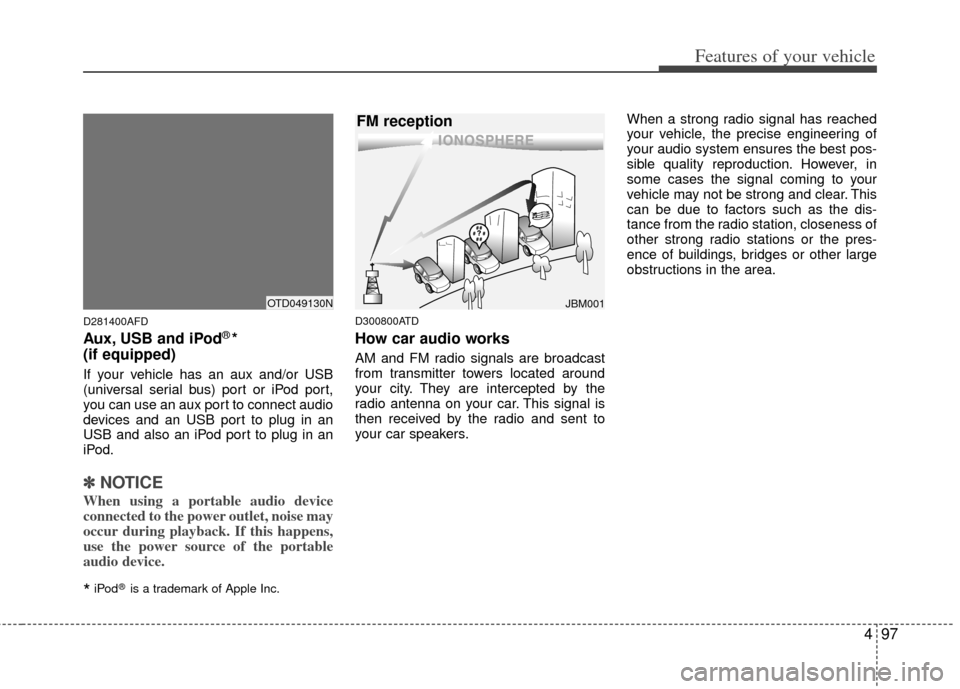
AM and FM radio signals are broadcast
from transmitter towers located around
your city. They are intercepted by the
radio antenna on your car. This signal is
then received by the radio and sent to
your car speakers. When a strong radio signal has reached
your vehicle, the precise engineering of
your audio system ensures the best pos-
sible quality reproduction. However, in
some cases the signal coming to your
vehicle may not be strong and clear. This
can be due to factors such as the dis-
tance from the radio station, closeness of
other strong radio stations or the pres-
ence of buildings, bridges or other large
obstructions in the area.
JBM001
FM reception
OTD049130N
Page 172 of 342
Features of your vehicle
98
4
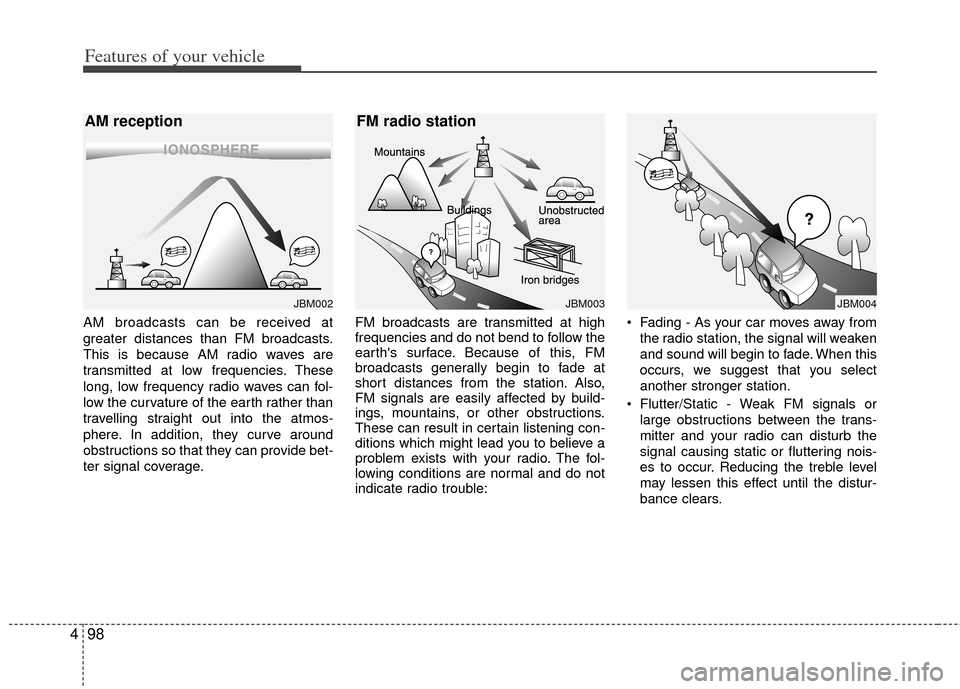
AM broadcasts can be received at
greater distances than FM broadcasts.
This is because AM radio waves are
transmitted at low frequencies. These
long, low frequency radio waves can fol-
low the curvature of the earth rather than
travelling straight out into the atmos-
phere. In addition, they curve around
obstructions so that they can provide bet-
ter signal coverage. FM broadcasts are transmitted at high
frequencies and do not bend to follow the
earth's surface. Because of this, FM
broadcasts generally begin to fade at
short distances from the station. Also,
FM signals are easily affected by build-
ings, mountains, or other obstructions.
These can result in certain listening con-
ditions which might lead you to believe a
problem exists with your radio. The fol-
lowing conditions are normal and do not
indicate radio trouble: Fading - As your car moves away from
the radio station, the signal will weaken
and sound will begin to fade. When this
occurs, we suggest that you select
another stronger station.
Flutter/Static - Weak FM signals or large obstructions between the trans-
mitter and your radio can disturb the
signal causing static or fluttering nois-
es to occur. Reducing the treble level
may lessen this effect until the distur-
bance clears.
JBM002
AM reception
JBM003
FM radio station
JBM004
Page 197 of 342
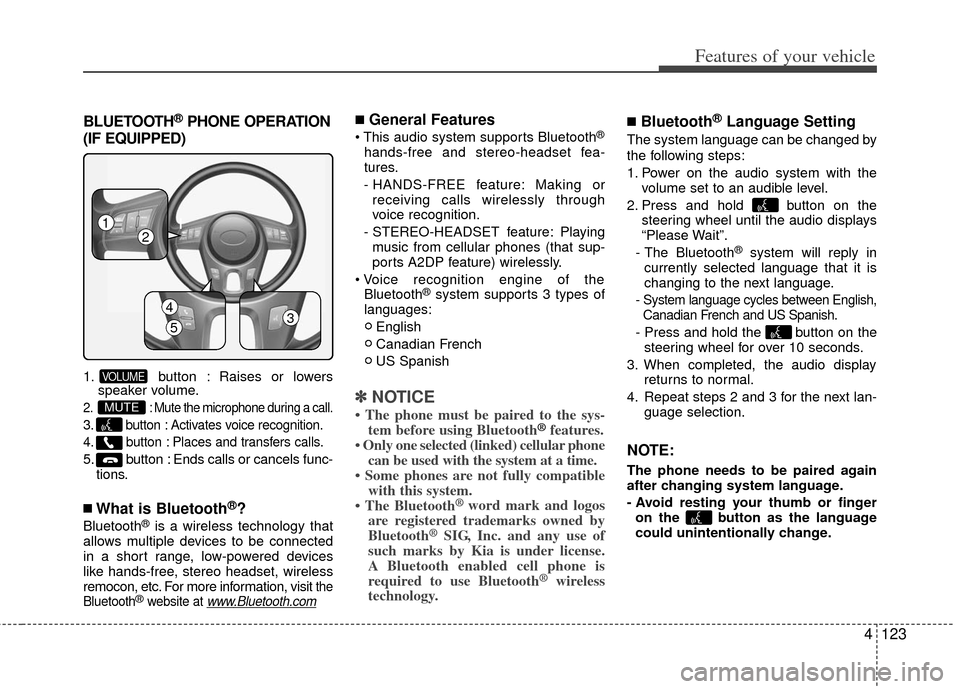
BLUETOOTH®PHONE OPERATION
(IF EQUIPPED)
1. button : Raises or lowers speaker volume.
2. : Mute the microphone during a call.
3. button : Activates voice recognition.
4. button : Places and transfers calls.
5. button : Ends calls or cancels func-
tions.
■What is Bluetooth®?
Bluetooth®is a wireless technology that
allows multiple devices to be connected
in a short range, low-powered devices
like hands-free, stereo headset, wireless
remocon, etc. For more information, visit
the
Bluetooth®website at www.Bluetooth.com
■General Features
®
hands-free and stereo-headset fea-
tures.
- HANDS-FREE feature: Making or receiving calls wirelessly through
voice recognition.
- STEREO-HEADSET feature: Playing music from cellular phones (that sup-
ports A2DP feature) wirelessly.
Bluetooth
®system supports 3 types of
languages:
English
Canadian French
US Spanish
✽ ✽ NOTICE
• The phone must be paired to the sys-
tem before using Bluetooth®features.
• Only one selected (linked) cellular phone can be used with the system at a time.
• Some phones are not fully compatible with this system.
• The Bluetooth
® word mark and logos
are registered trademarks owned by
Bluetooth
®SIG, Inc. and any use of
such marks by Kia is under license.
A Bluetooth enabled cell phone is
required to use Bluetooth
®wireless
technology.
■Bluetooth®Language Setting
The system language can be changed by
the following steps:
1. Power on the audio system with the
volume set to an audible level.
2. Press and hold button on the steering wheel until the audio displays
“Please Wait”.
- The Bluetooth
®system will reply in
currently selected language that it is
changing to the next language.
- System language cycles between English, Canadian French and US Spanish.
- Press and hold the button on the steering wheel for over 10 seconds.
3. When completed, the audio display returns to normal.
4. Repeat steps 2 and 3 for the next lan- guage selection.
NOTE:
The phone needs to be paired again
after changing system language.
- Avoid resting your thumb or fingeron the button as the language
could unintentionally change.
MUTE
VOLUME
4123
Features of your vehicle
12
4
53