mirror KIA Cerato 2011 1.G User Guide
[x] Cancel search | Manufacturer: KIA, Model Year: 2011, Model line: Cerato, Model: KIA Cerato 2011 1.GPages: 342, PDF Size: 7.23 MB
Page 164 of 342
Features of your vehicle
90
4
D280300ATD
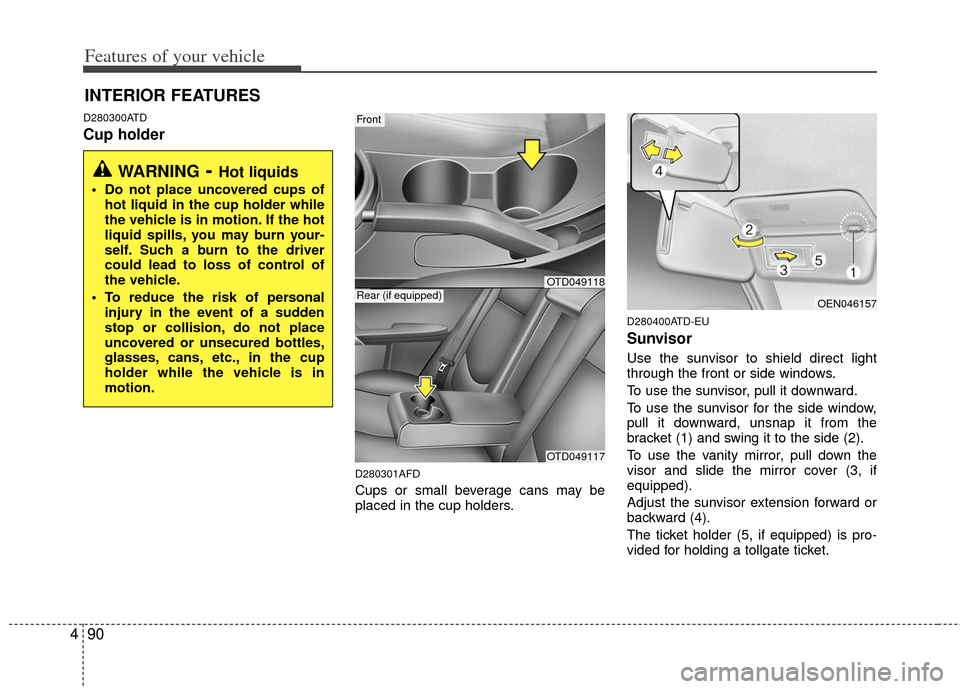
Cup holder
D280301AFD
Cups or small beverage cans may be
placed in the cup holders.
D280400ATD-EU
Sunvisor
Use the sunvisor to shield direct light
through the front or side windows.
To use the sunvisor, pull it downward.
To use the sunvisor for the side window,
pull it downward, unsnap it from the
bracket (1) and swing it to the side (2).
To use the vanity mirror, pull down the
visor and slide the mirror cover (3, if
equipped).
Adjust the sunvisor extension forward or
backward (4).
The ticket holder (5, if equipped) is pro-
vided for holding a tollgate ticket.
INTERIOR FEATURES
WARNING- Hot liquids
Do not place uncovered cups of
hot liquid in the cup holder while
the vehicle is in motion. If the hot
liquid spills, you may burn your-
self. Such a burn to the driver
could lead to loss of control of
the vehicle.
To reduce the risk of personal injury in the event of a sudden
stop or collision, do not place
uncovered or unsecured bottles,
glasses, cans, etc., in the cup
holder while the vehicle is in
motion.
Front
OTD049117
Rear (if equipped)OEN046157
OTD049118
Page 165 of 342
491
Features of your vehicle
D280500AEN
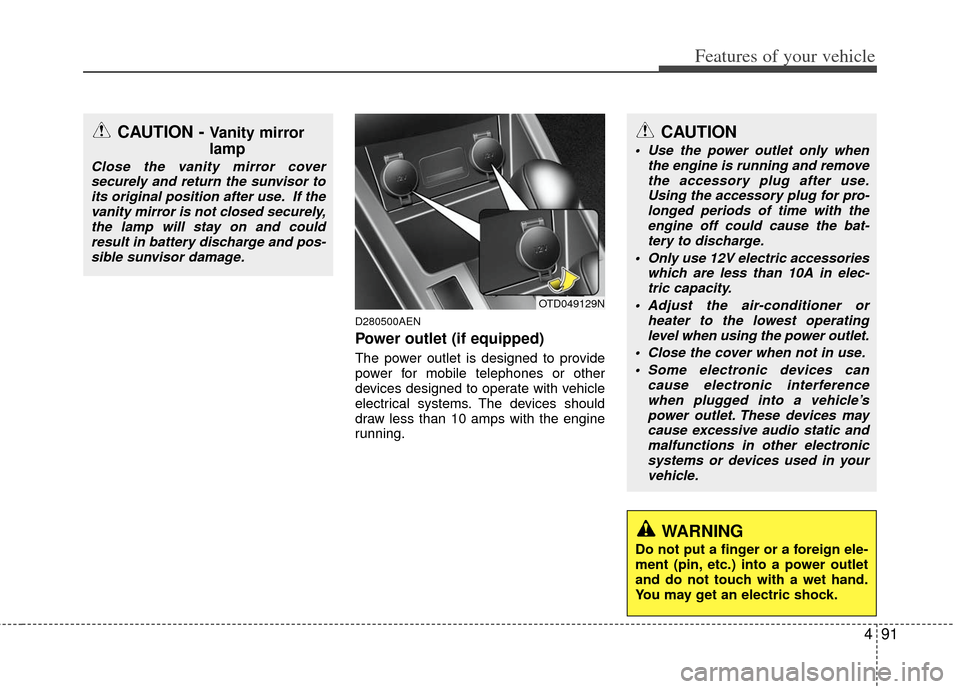
Power outlet (if equipped)
The power outlet is designed to provide
power for mobile telephones or other
devices designed to operate with vehicle
electrical systems. The devices should
draw less than 10 amps with the engine
running.
CAUTION - Vanity mirror
lamp
Close the vanity mirror coversecurely and return the sunvisor toits original position after use. If thevanity mirror is not closed securely,the lamp will stay on and could result in battery discharge and pos-sible sunvisor damage.
OTD049129N
CAUTION
Use the power outlet only when the engine is running and removethe accessory plug after use. Using the accessory plug for pro-longed periods of time with theengine off could cause the bat- tery to discharge.
Only use 12V electric accessories which are less than 10A in elec-tric capacity.
Adjust the air-conditioner or heater to the lowest operatinglevel when using the power outlet.
Close the cover when not in use. Some electronic devices can cause electronic interferencewhen plugged into a vehicle’s power outlet. These devices maycause excessive audio static and malfunctions in other electronicsystems or devices used in yourvehicle.
WARNING
Do not put a finger or a foreign ele-
ment (pin, etc.) into a power outlet
and do not touch with a wet hand.
You may get an electric shock.
Page 209 of 342
53
Driving your vehicle
E020100AUN
Before entering vehicle
• Be sure that all windows, outside mir-ror(s), and outside lights are clean.
Check the condition of the tires.
Check under the vehicle for any sign of leaks.
Be sure there are no obstacles behind you if you intend to back up.
E020200AUN
Necessary inspections
Fluid levels, such as engine oil, engine
coolant, brake fluid, and washer fluid
should be checked on a regular basis,
with the exact interval depending on the
fluid. Further details are provided in
Section 7, “Maintenance”.
E020300AHM
Before starting
Close and lock all doors.
Position the seat so that all controls areeasily reached.
Adjust the inside and outside rearview mirrors.
Be sure that all lights work.
Check all gauges.
Check the operation of warning lights when the ignition switch is turned to
the ON position.
Release the parking brake and make sure the brake warning light goes out.
For safe operation, be sure you are famil-
iar with your vehicle and its equipment.
BEFORE DRIVING
WARNING
All passengers must be properly
belted whenever the vehicle is mov-
ing. Refer to “Seat belts” in section
3 for more information on their
proper use.
WARNING
Always check the surrounding areas
near your vehicle for people, espe-
cially children, before putting a vehi-
cle into D (Drive) or R (Reverse).
WARNING
Driving while distracted can result
in a loss of vehicle control, that
may lead to an accident, severe
personal injury, and death. The dri-
ver's primary responsibility is in
the safe and legal operation of a
vehicle, and use of any handheld
devices, other equipment, or vehi-
cle systems which take the driver's
eyes, attention and focus away
from the safe operation of a vehicle
or which are not permissible by law
should never be used during oper-
ation of the vehicle.
Page 247 of 342
541
Driving your vehicle
Adjust your mirrors to reduce the glarefrom other driver's headlights.
Keep your headlights clean and prop- erly aimed on vehicles not equipped
with the automatic headlight aiming
feature. Dirty or improperly aimed
headlights will make it much more diffi-
cult to see at night.
Avoid staring directly at the headlights of oncoming vehicles. You could be
temporarily blinded, and it will take
several seconds for your eyes to read-
just to the darkness.
E110500AUN
Driving in the rain
Rain and wet roads can make driving
dangerous, especially if you’re not pre-
pared for the slick pavement. Here are a
few things to consider when driving in the
rain:
A heavy rainfall will make it harder tosee and will increase the distance
needed to stop your vehicle, so slow
down.
Keep your windshield wiping equip- ment in good shape. Replace your
windshield wiper blades when they
show signs of streaking or missing
areas on the windshield. If your tires are not in good condition,
making a quick stop on wet pavement
can cause a skid and possibly lead to
an accident. Be sure your tires are in
good shape.
Turn on your headlights to make it eas- ier for others to see you.
Driving too fast through large puddles can affect your brakes. If you must go
through puddles, try to drive through
them slowly.
If you believe you may have gotten your brakes wet, apply them lightly
while driving until normal braking oper-
ation returns.E110600AUN
Driving in flooded areas
Avoid driving through flooded areas
unless you are sure the water is no high-
er than the bottom of the wheel hub.
Drive through any water slowly. Allow
adequate stopping distance because
brake performance may be affected.
After driving through water, dry the
brakes by gently applying them several
times while the vehicle is moving slowly.
1JBB3303
Page 319 of 342
Maintenance
44
7
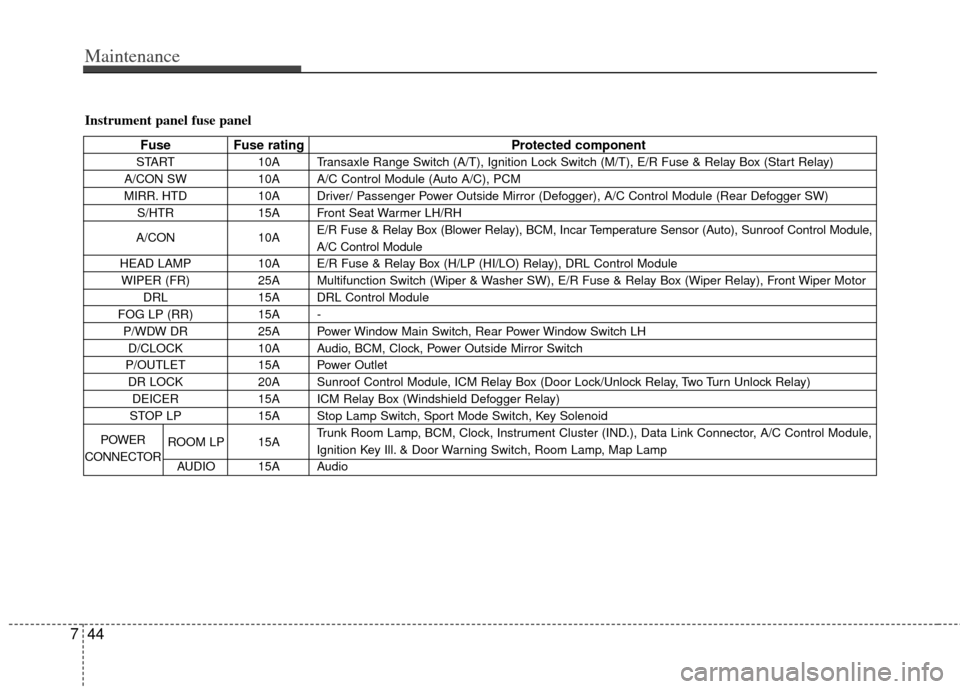
Instrument panel fuse panel
Fuse Fuse rating Protected component
START10A Transaxle Range Switch (A/T), Ignition Lock Switch (M/T), E/R Fuse & Relay Box (Start Relay)
A/CON SW 10A A/C Control Module (Auto A/C), PCM
MIRR. HTD 10A Driver/ Passenger Power Outside Mirror (Defogger), A/C Control Module (Rear Defogger SW)
S/HTR 15A Front Seat Warmer LH/RH
A/CON 10AE/R Fuse & Relay Box (Blower Relay), BCM, Incar Temperature Sensor (Auto), Sunroof Control Module,
A/C Control Module
HEAD LAMP 10A E/R Fuse & Relay Box (H/LP (HI/LO) Relay), DRL Control Module
WIPER (FR) 25A Multifunction Switch (Wiper & Washer SW), E/R Fuse & Relay Box (Wiper Relay), Front Wiper Motor
DRL 15A DRL Control Module
FOG LP (RR) 15A -
P/WDW DR 25A Power Window Main Switch, Rear Power Window Switch LH
D/CLOCK 10A Audio, BCM, Clock, Power Outside Mirror Switch
P/OUTLET 15A Power Outlet
DR LOCK 20A Sunroof Control Module, ICM Relay Box (Door Lock/Unlock Relay, Two Turn Unlock Relay)
DEICER 15A ICM Relay Box (Windshield Defogger Relay)
STOP LP 15A Stop Lamp Switch, Sport Mode Switch, Key Solenoid
ROOM LP 15A Trunk Room Lamp, BCM, Clock, Instrument Cluster (IND.), Data Link Connector, A/C Control Module,
Ignition Key Ill. & Door Warning Switch, Room Lamp, Map Lamp
AUDIO 15A Audio
POWER
CONNECTOR
Page 320 of 342
745
Maintenance
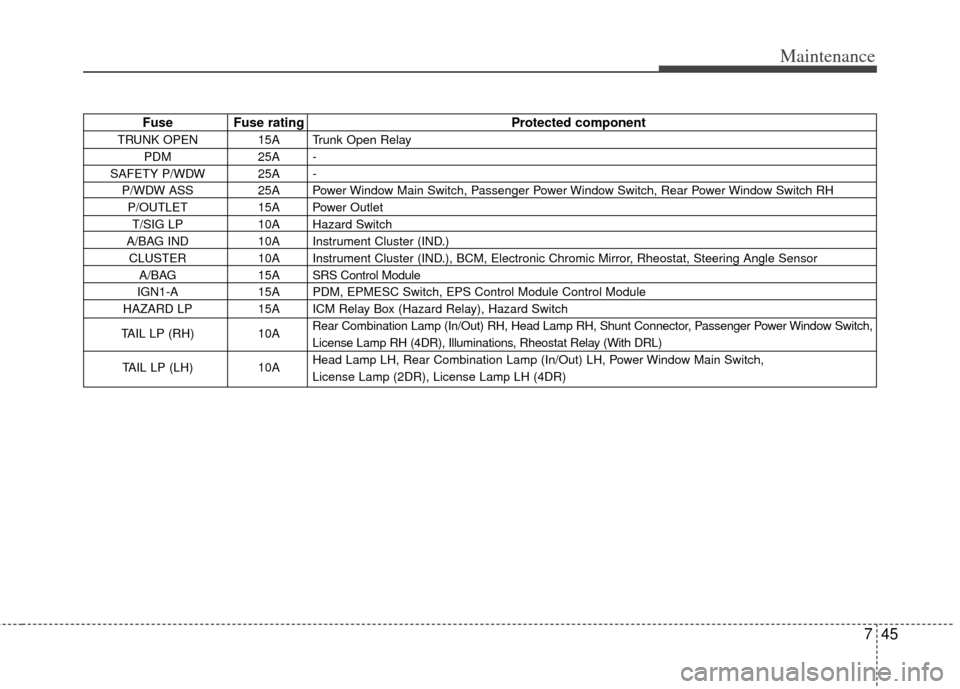
Fuse Fuse ratingProtected component
TRUNK OPEN 15A Trunk Open Relay
PDM 25A -
SAFETY P/WDW 25A - P/WDW ASS 25A Power Window Main Switch, Passenger Power Window Switch, Rear Power Window Switch RHP/OUTLET 15A Power OutletT/SIG LP 10A Hazard Switch
A/BAG IND 10A Instrument Cluster (IND.) CLUSTER 10A Instrument Cluster (IND.), BCM, Electronic Chromic Mirror, Rheostat, Steering Angle Sensor A/BAG 15A SRS Control Module
IGN1-A 15A PDM, EPMESC Switch, EPS Control Module Control Module
HAZARD LP 15A ICM Relay Box (Hazard Relay), Hazard Switch
TAIL LP (RH) 10A Rear Combination Lamp (In/Out) RH, Head Lamp RH, Shunt Connector, Passenger Power Window Switch,
License Lamp RH (4DR), Illuminations, Rheostat Relay (With DRL)
TAIL LP (LH) 10A Head Lamp LH, Rear Combination Lamp (In/Out) LH, Power Window Main Switch,
License Lamp (2DR), License Lamp LH (4DR)
Page 341 of 342

I3
Index
In case of an emergency while driving ··················\
··········6-2
Indicator symbols on the instrument cluster ··················\
·1-5
Instrument cluster ··················\
··················\
··················\
····4-39
Instrument panel overview··················\
··················\
···········2-3
Interior features··················\
··················\
··················\
········4-96
Interior light ··················\
··················\
··················\
·············4-66
Interior overview··················\
··················\
··················\
········2-2
Key positions ··················\
··················\
··················\
·············5-4
Keys ··················\
··················\
··················\
··················\
·········4-2
Lighting··················\
··················\
··················\
··················\
··4-59
Maintenance schedule··················\
··················\
··················\
7-6
Maintenance services ··················\
··················\
··················\
·7-3
Manual climate control system··················\
··················\
··4-69
Manual transaxle··················\
··················\
··················\
······5-12
Mirrors ··················\
··················\
··················\
··················\
···4-35
Owner maintenance ··················\
··················\
··················\
···7-4Parking brake ··················\
··················\
··················\
···········7-20
Power steering fluid ··················\
··················\
··················\
·7-18
Rearview camera··················\
··················\
··················\
······4-58
Recommended lubricants and capacities ··················\
·······8-4
Remote keyless entry ··················\
··················\
··················\
·4-8
Road warning ··················\
··················\
··················\
·············6-2
Seat··················\
··················\
··················\
··················\
···········3-2
Seat belts ··················\
··················\
··················\
··················\
3-15
Smart key ··················\
··················\
··················\
··················\
·4-6
Special driving conditions ··················\
··················\
·········5-39
Starting the engine ··················\
··················\
··················\
·····5-9
Steering wheel ··················\
··················\
··················\
·········4-32
Storage compartment ··················\
··················\
·················4-88\
Sunroof··················\
··················\
··················\
··················\
···4-28
Tire specification and pressure label ··················\
·············8-7
Tires and wheels ··················\
··················\
··················\
7-26/8-3
Towing ··················\
··················\
··················\
··················\
···6-15
Trailer towing··················\
··················\
··················\
···········5-45
K
L
M
O
P
R
S
T