Fog KIA Cerato 2014 2.G User Guide
[x] Cancel search | Manufacturer: KIA, Model Year: 2014, Model line: Cerato, Model: KIA Cerato 2014 2.GPages: 446, PDF Size: 7.32 MB
Page 194 of 446
4125
Features of your vehicle
System operation
Ventilation
1. Set the mode to the position.
2. Set the air intake control to theoutside (fresh) air position.
3. Set the temperature control to the desired position.
4. Set the fan speed control to the desired speed.
Heating
1. Set the mode to the position.
2. Set the air intake control to theoutside (fresh) air position.
3. Set the temperature control to the desired position.
4. Set the fan speed control to the desired speed.
5. If dehumidified heating is desired, turn the air conditioning system (if
equipped) on.
If the windshield fogs up, set the mode to the or position. Operation Tips
To keep dust or unpleasant fumes
from entering the vehicle through
the ventilation system, temporarily
set the air intake control to the
recirculated air position. Be sure to
return the control to the fresh air
position when the irritation has
passed to keep fresh air in the
vehicle. This will help keep the driv-
er alert and comfortable.
Air for the heating/cooling system is drawn in through the grilles just
ahead of the windshield. Care
should be taken that these are not
blocked by leaves, snow, ice or
other obstructions.
To prevent interior fog on the wind- shield, set the air intake control to
the fresh air position and fan speed
to the desired position, turn on the
air conditioning system, and adjust
the temperature control to desired
temperature.
Air conditioning
Kia Air Conditioning Systems are
filled with R-134a refrigerant.
1. Start the engine. Press the air con- ditioning button.
2. Set the mode to the position.
3. Set the air intake control to the out- side air or recirculated air position.
4. Adjust the fan speed control and temperature control to maintain
maximum comfort.
When maximum cooling is desired, set the temperature control to the
extreme left position, then set the
fan speed control to the highest
speed.
Page 195 of 446
Features of your vehicle
126
4
✽
✽
NOTICE
• When using the air conditioning
system, monitor the temperature
gauge closely while driving up
hills or in heavy traffic when out-
side temperatures are high. Air
conditioning system operation
may cause engine overheating.
Continue to use the blower fan but
turn the air conditioning system
off if the temperature gauge indi-
cates engine overheating.
• When opening the windows in humid weather air conditioning
may create water droplets inside
the vehicle. Since excessive water
droplets may cause damage to
electrical equipment, air condi-
tioning should only be used with
the windows closed.
Air conditioning system operation tips
If the vehicle has been parked in
direct sunlight during hot weather,
open the windows for a short time
to let the hot air inside the vehicle
escape.
To help reduce moisture inside of the windows on rainy or humid
days, decrease the humidity inside
the vehicle by operating the air
conditioning system.
During air conditioning system operation, you may occasionally
notice a slight change in engine
speed as the air conditioning com-
pressor cycles. This is a normal
system operation characteristic.
Use the air conditioning system every month only for a few minutes
to ensure maximum system per-
formance.
When using the air conditioning system, you may notice clear water
dripping (or even puddling) on the
ground under the passenger side
of the vehicle. This is a normal sys-
tem operation characteristic. Operating the air conditioning sys-
tem in the recirculated air position
provides maximum cooling, how-
ever, continual operation in this
mode may cause the air inside the
vehicle to become stale.
During cooling operation, you may occasionally notice a misty air flow
because of rapid cooling and
humid air intake. This is a normal
system operation characteristic.
If you operate air conditioner excessively, the difference between
the temperature of the outside air
and that of the windshield could
cause the outer surface of the
windshield to fog up, causing loss
of visibility. In this case, set the
mode selection knob or button to
the position and fan speed
control to the lower speed.
Page 196 of 446
4127
Features of your vehicle
WINDSHIELD DEFROSTING AND DEFOGGING
For maximum defrosting, set thetemperature control to the extreme
right/hot position and the fan speed
control to the highest speed.
If warm air to the floor is desired while defrosting or defogging, set the
mode to the floor-defrost position.
Before driving, clear all snow and ice from the windshield, rear win-
dow, outside rear view mirrors, and
all side windows.
Clear all snow and ice from the hood and air inlet in the cowl grill to
improve heater and defroster effi-
ciency and to reduce the probabili-
ty of fogging up the inside of the
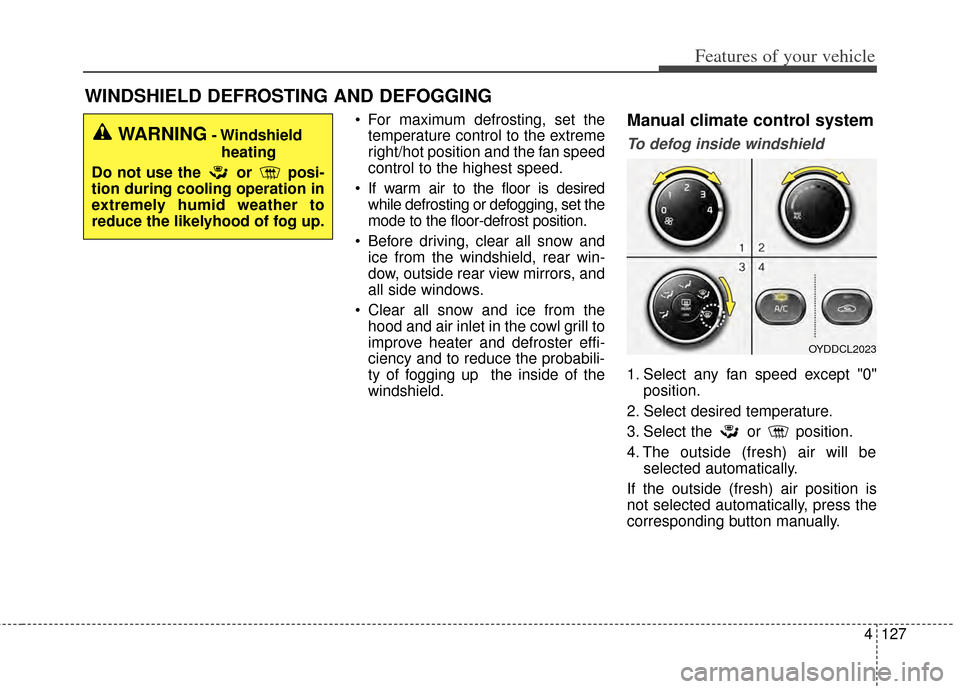
windshield.Manual climate control system
To defog inside windshield
1. Select any fan speed except "0" position.
2. Select desired temperature.
3. Select the or position.
4. The outside (fresh) air will be selected automatically.
If the outside (fresh) air position is
not selected automatically, press the
corresponding button manually.
WARNING- Windshield heating
Do not use the or posi-
tion during cooling operation in
extremely humid weather to
reduce the likelyhood of fog up.
OYDDCL2023
Page 197 of 446
Features of your vehicle
128
4
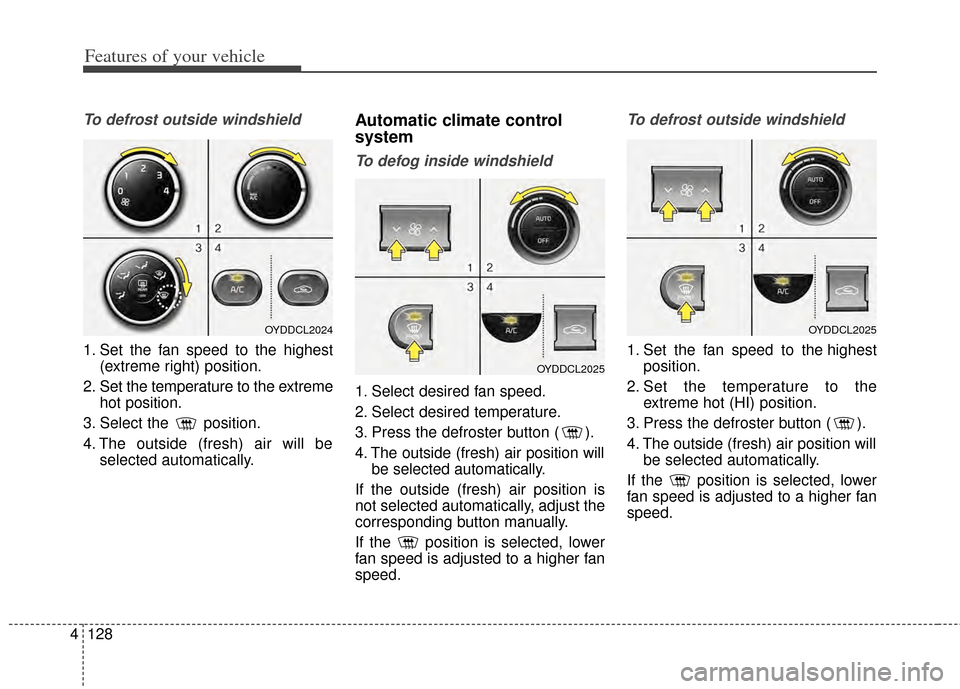
To defrost outside windshield
1. Set the fan speed to the highest
(extreme right) position.
2. Set the temperature to the extreme hot position.
3. Select the position.
4. The outside (fresh) air will be selected automatically.
Automatic climate control
system
To defog inside windshield
1. Select desired fan speed.
2. Select desired temperature.
3. Press the defroster button ( ).
4. The outside (fresh) air position willbe selected automatically.
If the outside (fresh) air position is
not selected automatically, adjust the
corresponding button manually.
If the position is selected, lower
fan speed is adjusted to a higher fan
speed.
To defrost outside windshield
1. Set the fan speed to the highest position.
2. Set the temperature to the extreme hot (HI) position.
3. Press the defroster button ( ).
4. The outside (fresh) air position will be selected automatically.
If the position is selected, lower
fan speed is adjusted to a higher fan
speed.
OYDDCL2024
OYDDCL2025
OYDDCL2025
Page 198 of 446
4129
Features of your vehicle
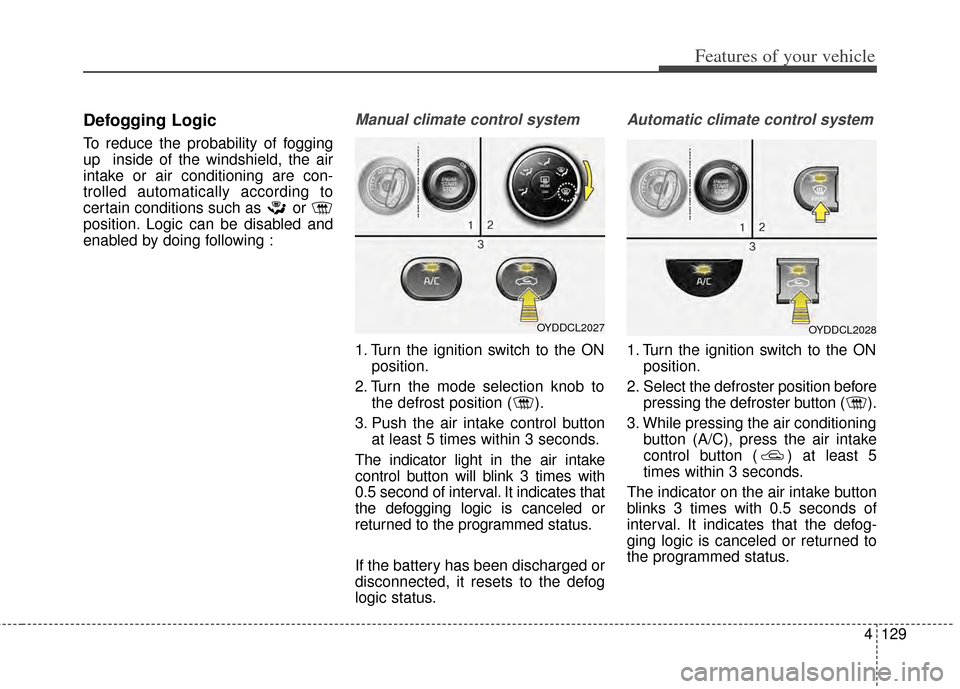
Defogging Logic
To reduce the probability of fogging
up inside of the windshield, the air
intake or air conditioning are con-
trolled automatically according to
certain conditions such as or
position. Logic can be disabled and
enabled by doing following :
Manual climate control system
1. Turn the ignition switch to the ONposition.
2. Turn the mode selection knob to the defrost position ( ).
3. Push the air intake control button at least 5 times within 3 seconds.
The indicator light in the air intake
control button will blink 3 times with
0.5 second of interval. It indicates that
the defogging logic is canceled or
returned to the programmed status.
If the battery has been discharged or
disconnected, it resets to the defog
logic status.
Automatic climate control system
1. Turn the ignition switch to the ON position.
2. Select the defroster position before pressing the defroster button ( ).
3. While pressing the air conditioning button (A/C), press the air intake
control button ( ) at least 5
times within 3 seconds.
The indicator on the air intake button
blinks 3 times with 0.5 seconds of
interval. It indicates that the defog-
ging logic is canceled or returned to
the programmed status.
OYDDCL2027OYDDCL2028
Page 199 of 446
Features of your vehicle
130
4
If the battery has been discharged or
disconnected, it resets to the defog
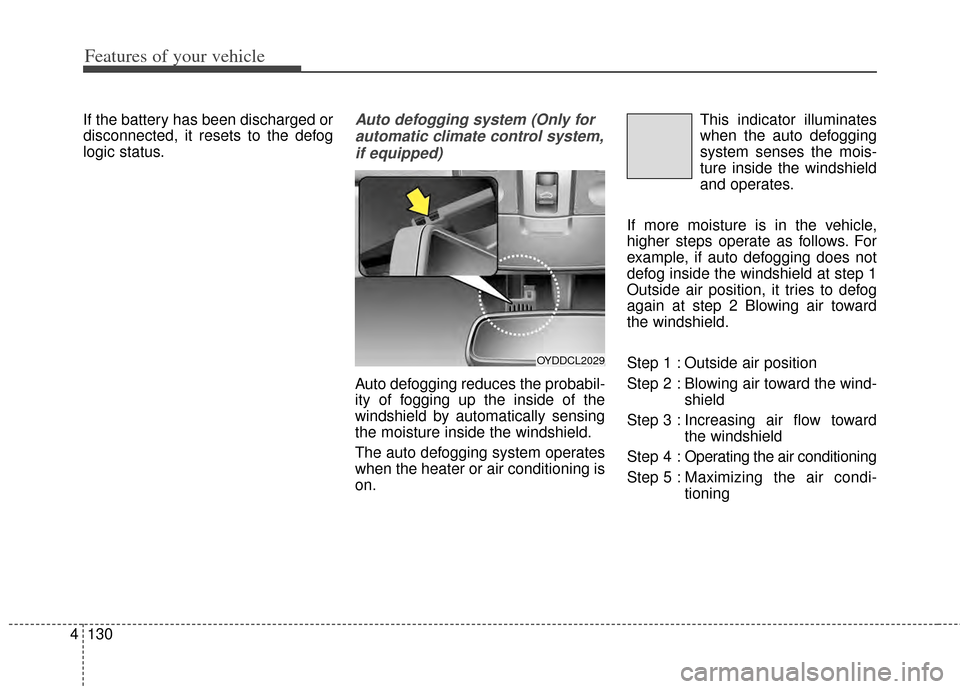
logic status.Auto defogging system (Only for
automatic climate control system,if equipped)
Auto defogging reduces the probabil-
ity of fogging up the inside of the
windshield by automatically sensing
the moisture inside the windshield.
The auto defogging system operates
when the heater or air conditioning is
on. This indicator illuminates
when the auto defogging
system senses the mois-
ture inside the windshield
and operates.
If more moisture is in the vehicle,
higher steps operate as follows. For
example, if auto defogging does not
defog inside the windshield at step 1
Outside air position, it tries to defog
again at step 2 Blowing air toward
the windshield.
Step 1 : Outside air position
Step 2 : Blowing air toward the wind- shield
Step 3 : Increasing air flow toward the windshield
Step 4 : Operating the air conditioning
Step 5 : Maxim izing the air condi-
tioning
OYDDCL2029
Page 200 of 446
4131
Features of your vehicle
If your vehicle is equipped with the
auto defogging system, it is automat-
ically activated when the conditions
are met. However, if you would like to
cancel the auto defogging system,
press the front defroster button 4
times within 2 seconds while press-
ing the AUTO button. The indicator
will blink 3 times to notify you that the
system is cancelled. To use the auto
defogging system again, follow the
procedures mentioned above.
If the battery has been disconnected
or discharged, it resets to the auto
defogging status.✽ ✽NOTICE
• When the air conditioning is
turned on by Auto defogging sys-
tem, if you try to turn off the air
conditioning, the indicator will
blink 3 times and the air condi-
tioning will not be turned off.
• For efficiency, do not select recir- culated air position while Auto
defogging system is operating.
CAUTION
Do not remove the sensor cover
located on the upper end of thedriver side windshield glass.Damage to the system partscould occur and may not be cov-ered by your vehicle warranty.
Page 425 of 446
777
Maintenance
Cleaning the lap/shoulder beltwebbing
Clean the belt webbing with any mild
soap solution recommended for
cleaning upholstery or carpet. Follow
the instructions provided with the
soap. Do not bleach or re-dye the
webbing because this may weaken
it.
Cleaning the interior windowglass
If the interior glass surfaces of the
vehicle become fogged (that is, cov-
ered with an oily, greasy or waxy
film), they should be cleaned with
glass cleaner. Follow the directions
on the glass cleaner container.
CAUTION - Rear windows
Do not scrape or scratch theinside of the rear window. Thismay result in damage to the rearwindow defroster grid.
Page 431 of 446
83
Specifications & Consumer information
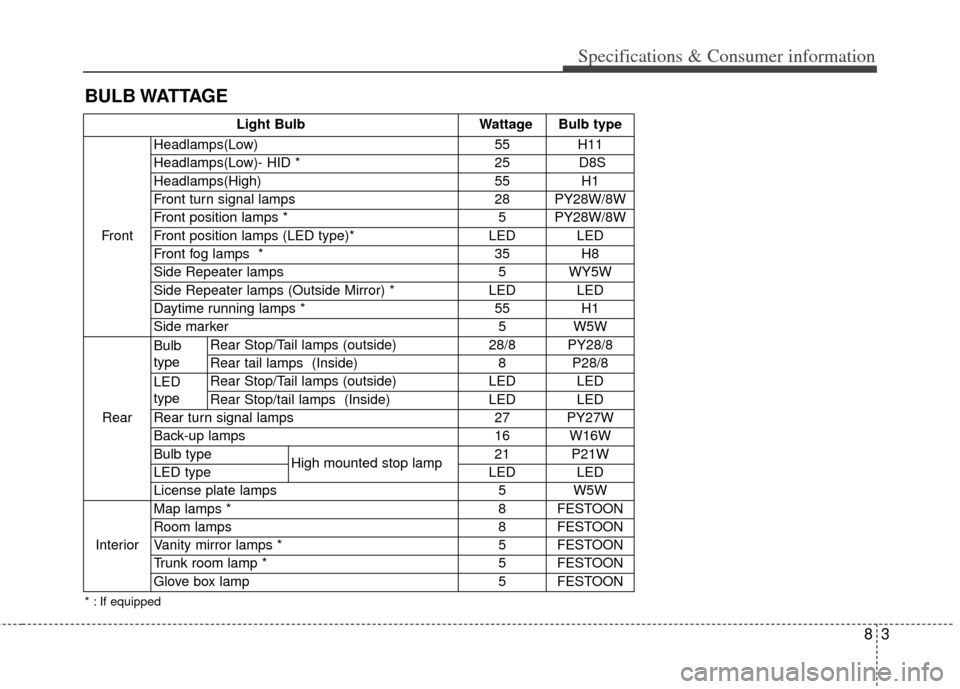
BULB WATTAGE
Light BulbWattage Bulb type
Front Headlamps(Low)
55 H11
Headlamps(Low)- HID * 25 D8S
Headlamps(High) 55H1
Front turn signal lamps 28 PY28W/8W
Front position lamps * 5 PY28W/8W
Front position lamps (LED type)* LED LED
Front fog lamps * 35H8
Side Repeater lamps 5 WY5W
Side Repeater lamps (Outside Mirror) * LED LED
Daytime running lamps * 55H1
Side marker5W5W
Rear Bulb
type
Rear Stop/Tail lamps (outside) 28/8 PY28/8
Rear tail lamps (Inside) 8 P28/8
LED
type Rear Stop/Tail lamps (outside) LED LED
Rear Stop/tail lamps (Inside) LED LED
Rear turn signal lamps 27 PY27W
Back-up lamps 16 W16W
Bulb type High mounted stop lamp 21 P21W
LED type LED LED
License plate lamps 5 W5W
Interior Map lamps * 8 FESTOON
Room lamps 8 FESTOON
Vanity mirror lamps * 5 FESTOON
Trunk room lamp * 5 FESTOON
Glove box lamp 5 FESTOON
* : If equipped
Page 443 of 446
I5
Index
Trunk room lamp . . . . . . . . . . . . . . . . . . . . . . . . . . 4-103
Vanity mirror lamp . . . . . . . . . . . . . . . . . . . . . . . . . 4-104
Interior overview. . . . . . . . . . . . . . . . . . . . . . . . . . . . . . . 2-4
Key positions . . . . . . . . . . . . . . . . . . . . . . . . . . . . . . . . . 5-5
Keys . . . . . . . . . . . . . . . . . . . . . . . . . . . . . . . . . . . . \
. . . . 4-4 Key operations . . . . . . . . . . . . . . . . . . . . . . . . . . . . . . 4-4
Record your key number . . . . . . . . . . . . . . . . . . . . . . 4-4
LCD display . . . . . . . . . . . . . . . . . . . . . . . . . . . . . . . . . 4-58 A/V Mode. . . . . . . . . . . . . . . . . . . . . . . . . . . . . . . . . 4-63
LCD Modes . . . . . . . . . . . . . . . . . . . . . . . . . . . . . . . 4-58
Service Mode . . . . . . . . . . . . . . . . . . . . . . . . . . . . . . 4-59
Turn By Turn Mode . . . . . . . . . . . . . . . . . . . . . . . . . 4-63
User Settings Mode . . . . . . . . . . . . . . . . . . . . . . . . . 4-60
Warning Messages . . . . . . . . . . . . . . . . . . . . . . . . . . 4-64
Lighting. . . . . . . . . . . . . . . . . . . . . . . . . . . . . . . . . . . . \
. 4-93 Battery saver function . . . . . . . . . . . . . . . . . . . . . . . 4-93
Daytime running light . . . . . . . . . . . . . . . . . . . . . . . 4-94
Front fog light . . . . . . . . . . . . . . . . . . . . . . . . . . . . . 4-98
Headlamp escort function . . . . . . . . . . . . . . . . . . . . 4-93
High - beam operation . . . . . . . . . . . . . . . . . . . . . . . 4-96
Lighting control . . . . . . . . . . . . . . . . . . . . . . . . . . . . 4-94
Turn signals and lane change signals . . . . . . . . . . . . 4-97 Maintenance services . . . . . . . . . . . . . . . . . . . . . . . . . . . 7-4
Owner maintenance precautions . . . . . . . . . . . . . . . . 7-5
Owner’s responsibility . . . . . . . . . . . . . . . . . . . . . . . . 7-4
Manual climate control system. . . . . . . . . . . . . . . . . . 4-107 Climate control air filter. . . . . . . . . . . . . . . . . . . . . 4-115
Heating and air conditioning . . . . . . . . . . . . . . . . . 4-108
Refrigerant and compressor lubricant . . . . . . . . . . 4-116
System operation . . . . . . . . . . . . . . . . . . . . . . . . . . 4-113
Manual transaxle. . . . . . . . . . . . . . . . . . . . . . . . . . . . . . 5-13 Manual transaxle operation . . . . . . . . . . . . . . . . . . . 5-13
Mirrors . . . . . . . . . . . . . . . . . . . . . . . . . . . . . . . . . . . . \
. 4-43 Inside rearview mirror . . . . . . . . . . . . . . . . . . . . . . . 4-43
Outside rearview mirror . . . . . . . . . . . . . . . . . . . . . . 4-48
Owner maintenance . . . . . . . . . . . . . . . . . . . . . . . . . . . . 7-6 Owner maintenance schedule. . . . . . . . . . . . . . . . . . . 7-6
Parking assist system . . . . . . . . . . . . . . . . . . . . . . . . . . 4-86 Non-operational conditions . . . . . . . . . . . . . . . . . . . 4-89
Operation . . . . . . . . . . . . . . . . . . . . . . . . . . . . . . . . . 4-87
Self-diagnosis . . . . . . . . . . . . . . . . . . . . . . . . . . . . . . 4-91
K
L
M
O
P