audio system KIA Cerato 2015 2.G Owner's Guide
[x] Cancel search | Manufacturer: KIA, Model Year: 2015, Model line: Cerato, Model: KIA Cerato 2015 2.GPages: 452, PDF Size: 7.85 MB
Page 254 of 452
4183
Features of your vehicle
Bluetooth®Wireless Technology
Pairing a
Bluetooth®Wireless
Technology Device
What is Bluetooth®Wireless
Technology Pairing?
Pairing refers to the process of syn-
chronizing your
Bluetooth®Wireless
Technology phone or device with the
car audio system for connection.
Pairing is necessary to connect and
use the
Bluetooth®Wireless
Technology feature.
The
Bluetooth®word mark and logos
are registered trademarks owned by
Bluetooth SIG, Inc. and any use of
such marks by Kia is under license.
Other trademarks and trade names
are those of their respective owners.
A
Bluetooth®enabled cell phone is
required to use
Bluetooth®wireless
technology
Pairing Key / Key on
the Steering Remote Controller
When No Devices have been Paired
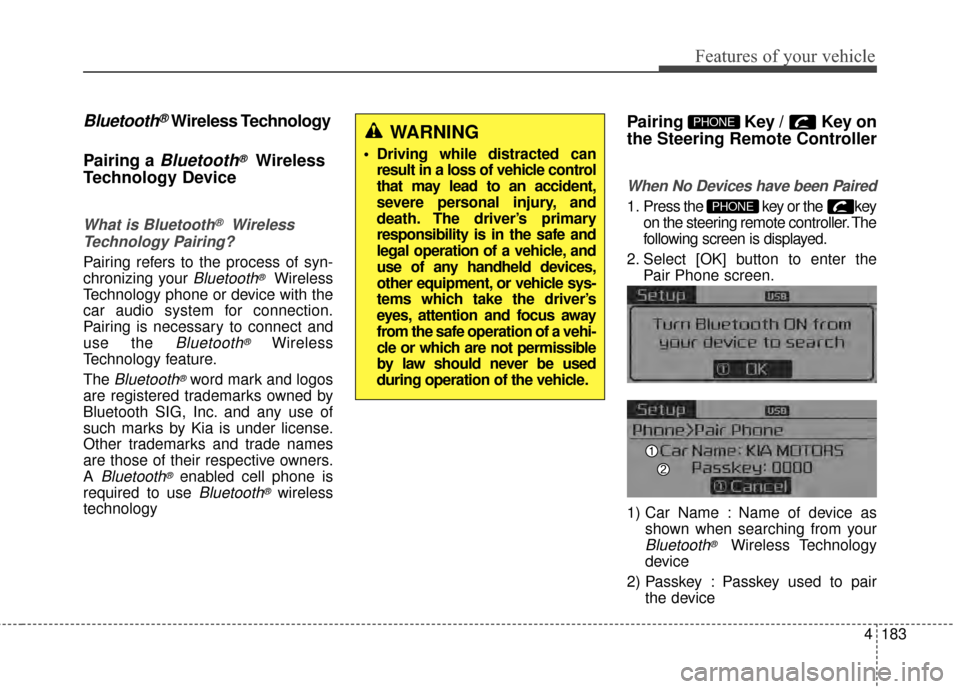
1. Press the key or the key on the steering remote controller. The
following screen is displayed.
2. Select [OK] button to enter the Pair Phone screen.
1) Car Name : Name of device as shown when searching from your
Bluetooth®Wireless Technology
device
2) Passkey : Passkey used to pair the device
PHONE
PHONEWARNING
Driving while distracted canresult in a loss of vehicle control
that may lead to an accident,
severe personal injury, and
death. The driver’s primary
responsibility is in the safe and
legal operation of a vehicle, and
use of any handheld devices,
other equipment, or vehicle sys-
tems which take the driver’s
eyes, attention and focus away
from the safe operation of a vehi-
cle or which are not permissible
by law should never be used
during operation of the vehicle.
Page 255 of 452
Features of your vehicle
184
4
3. From your Bluetooth®Wireless
Technology device (i.e. Mobile
Phone), search and select your
car audio system.
4. After a few moments, a screen is displayed where the passkey is
entered. Here, enter the passkey
“0000” to pair your
Bluetooth®
Wireless Technology device with
the car audio system.
5. Once pairing is complete, the fol- lowing screen is displayed.
Some phones (i.e., iPhone, Android
and Blackberry phones) may offer an
option to allow acceptance of all
future
Bluetooth®connection
requests by default." and "Visit
http://www.kia.com/#/bluetooth for
additional information on pairing your
Bluetooth-enabled mobile phone, and
to view a phone compatibility list.
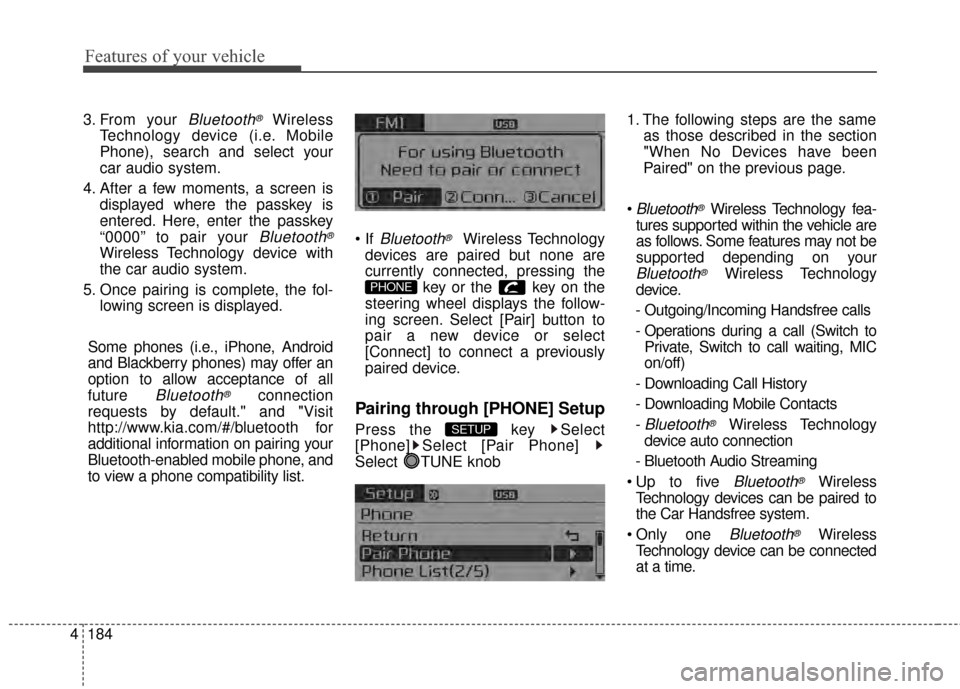
Bluetooth®Wireless Technology
devices are paired but none are
currently connected, pressing the key or the key on the
steering wheel displays the follow-
ing screen. Select [Pair] button to
pair a new device or select
[Connect] to connect a previously
paired device.
Pairing through [PHONE] Setup
Press the key Select
[Phone] Select [Pair Phone]
Select TUNE knob 1. The following steps are the same
as those described in the section
"When No Devices have been
Paired" on the previous page.
Bluetooth®Wireless Technology fea-
tures supported within the vehicle are
as follows. Some features may not be
supported depending on your
Bluetooth®Wireless Technology
device.
- Outgoing/Incoming Handsfree calls
- Operations during a call (Switch to Private, Switch to call waiting, MIC
on/off)
- Downloading Call History
- Downloading Mobile Contacts
-
Bluetooth®Wireless Technology
device auto connection
- Bluetooth Audio Streaming
Bluetooth®Wireless
Technology devices can be paired to
the Car Handsfree system.
one
Bluetooth®Wireless
Technology device can be connected
at a time.
SETUP
PHONE
Page 257 of 452
Features of your vehicle
186
4
Changing Priority
What is Priority?
It is possible to pair up to five
Bluetooth®Wireless Technology
devices with the car audio system.
The "Change Priority" feature is used
to set the connection priority of
paired phones.
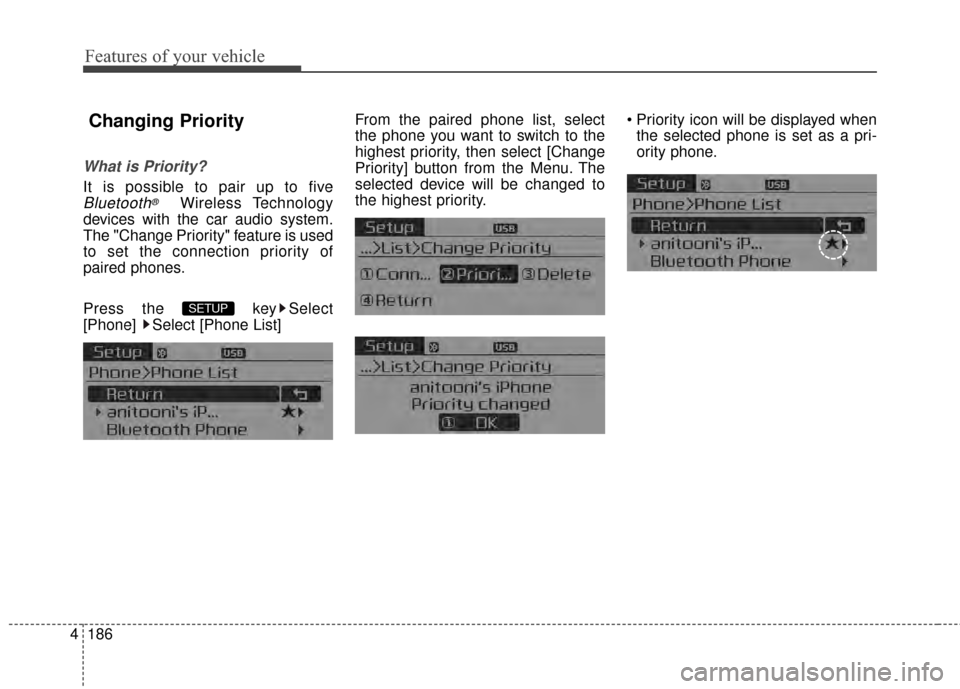
Press the key Select
[Phone] Select [Phone List] From the paired phone list, select
the phone you want to switch to the
highest priority
, then select [Change
Priority] button from the Menu. The
selected device will be changed to
the highest priority. Priority icon will be displayed when
the selected phone is set as a pri-
ority phone.
SETUP
Page 262 of 452
4191
Features of your vehicle
Bluetooth®Wireless
Technology Setting
The Bluetooth®word mark and logos
are registered trademarks owned by
Bluetooth SIG, Inc. and any use of such
marks by Kia is under license. Other
trademarks and trade names are those
of their respective owners. A
Bluetooth®
enabled cell phone is required to use
Bluetooth®wireless technology
Pairing a New Device
Press the key Select
[Phone] Select [Pair Phone]
Bluetooth®Wireless Technology
devices can be paired with the audio
system.
For more information, refer to the
“Pairing through Phone Setup” section
within
Bluetooth®Wireless Technology.
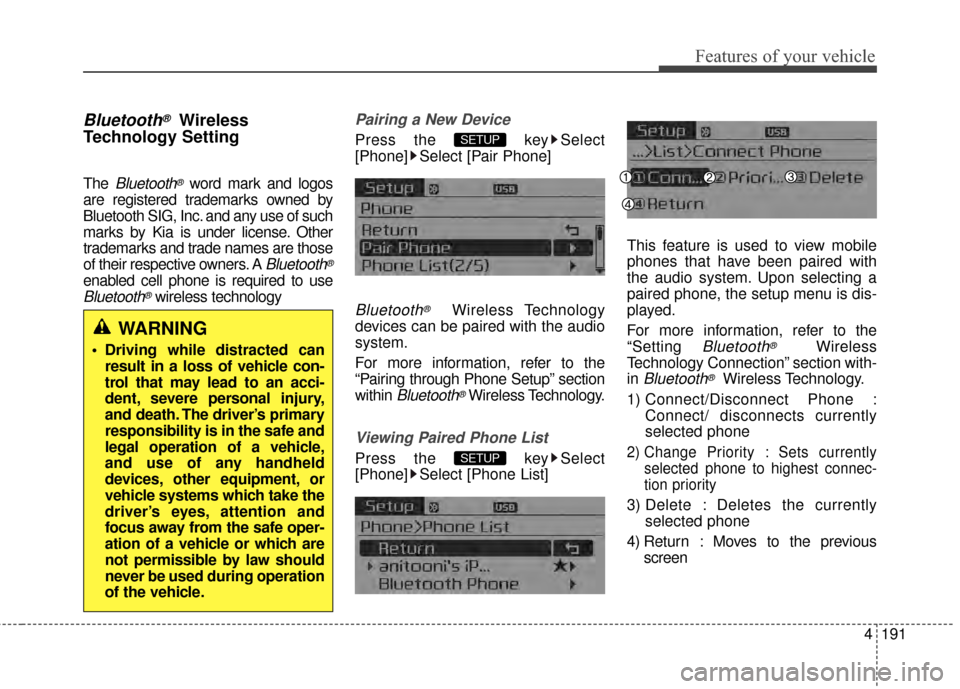
Viewing Paired Phone List
Press the key Select
[Phone] Select [Phone List] This feature is used to view mobile
phones that have been paired with
the audio system. Upon selecting a
paired phone, the setup menu is dis-
played.
For more information, refer to the
“Setting
Bluetooth®Wireless
Technology Connection” section with-
in
Bluetooth®Wireless Technology.
1) Connect/Disconnect Phone : Connect/ disconnects currently
selected phone
2) Change Priority : Sets currentlyselected phone to highest connec-
tion priority
3) Delete : Deletes the currently selected phone
4) Return : Moves to the previous screen
SETUP
SETUP
WARNING
Driving while distracted canresult in a loss of vehicle con-
trol that may lead to an acci-
dent, severe personal injury,
and death. The driver’s primary
responsibility is in the safe and
legal operation of a vehicle,
and use of any handheld
devices, other equipment, or
vehicle systems which take the
driver’s eyes, attention and
focus away from the safe oper-
ation of a vehicle or which are
not permissible by law should
never be used during operation
of the vehicle.
Page 264 of 452
![KIA Cerato 2015 2.G Owners Guide 4193
Features of your vehicle
Audio Streaming
Press the key Select
[Phone] Select [Audio Streaming]
When Audio Streaming is turned on,
you can play music files saved in
your
Bluetooth®Wireless Tech](/img/2/2961/w960_2961-263.png "KIA Cerato 2015 2.G Owners Guide 4193
Features of your vehicle
Audio Streaming
Press the key Select
[Phone] Select [Audio Streaming]
When Audio Streaming is turned on,
you can play music files saved in
your
Bluetooth®Wireless Tech")
4193
Features of your vehicle
Audio Streaming
Press the key Select
[Phone] Select [Audio Streaming]
When Audio Streaming is turned on,
you can play music files saved in
your
Bluetooth®Wireless Technology
device through the audio system.
Outgoing Volume
Press the key Select
[Phone] Select [Outgoing Volume]
Use TUNE knob to adjust the out-
going volume level.
on a call, the volume can be changed by using the key.
Turning Bluetooth System Off
Press the key Select
[Phone] Select [Bluetooth System
Off]
Once
Bluetooth®Wireless Technology
is turned off,
Bluetooth®Wireless
Technology related features will not
be supported within the audio system.
turn
Bluetooth®Wireless
Technology back on, go to [Phone] and select “Yes”.SETUP
SETUP
SEEK
TRACK
SETUP SETUP
Page 397 of 452
743
Maintenance
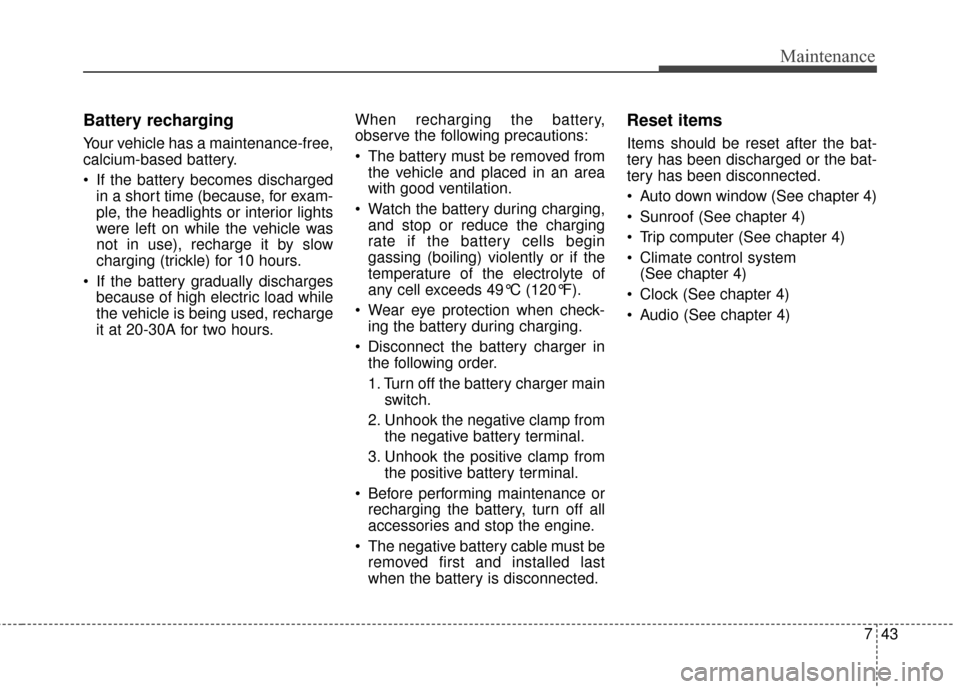
Battery recharging
Your vehicle has a maintenance-free,
calcium-based battery.
If the battery becomes dischargedin a short time (because, for exam-
ple, the headlights or interior lights
were left on while the vehicle was
not in use), recharge it by slow
charging (trickle) for 10 hours.
If the battery gradually discharges because of high electric load while
the vehicle is being used, recharge
it at 20-30A for two hours. When recharging the battery,
observe the following precautions:
The battery must be removed from
the vehicle and placed in an area
with good ventilation.
Watch the battery during charging, and stop or reduce the charging
rate if the battery cells begin
gassing (boiling) violently or if the
temperature of the electrolyte of
any cell exceeds 49°C (120°F).
Wear eye protection when check- ing the battery during charging.
Disconnect the battery charger in the following order.
1. Turn off the battery charger main switch.
2. Unhook the negative clamp from the negative battery terminal.
3. Unhook the positive clamp from the positive battery terminal.
Before performing maintenance or recharging the battery, turn off all
accessories and stop the engine.
The negative battery cable must be removed first and installed last
when the battery is disconnected.
Reset items
Items should be reset after the bat-
tery has been discharged or the bat-
tery has been disconnected.
Auto down window (See chapter 4)
Sunroof (See chapter 4)
Trip computer (See chapter 4)
Climate control system (See chapter 4)
Clock (See chapter 4)
Audio (See chapter 4)
Page 446 of 452
Index
2I
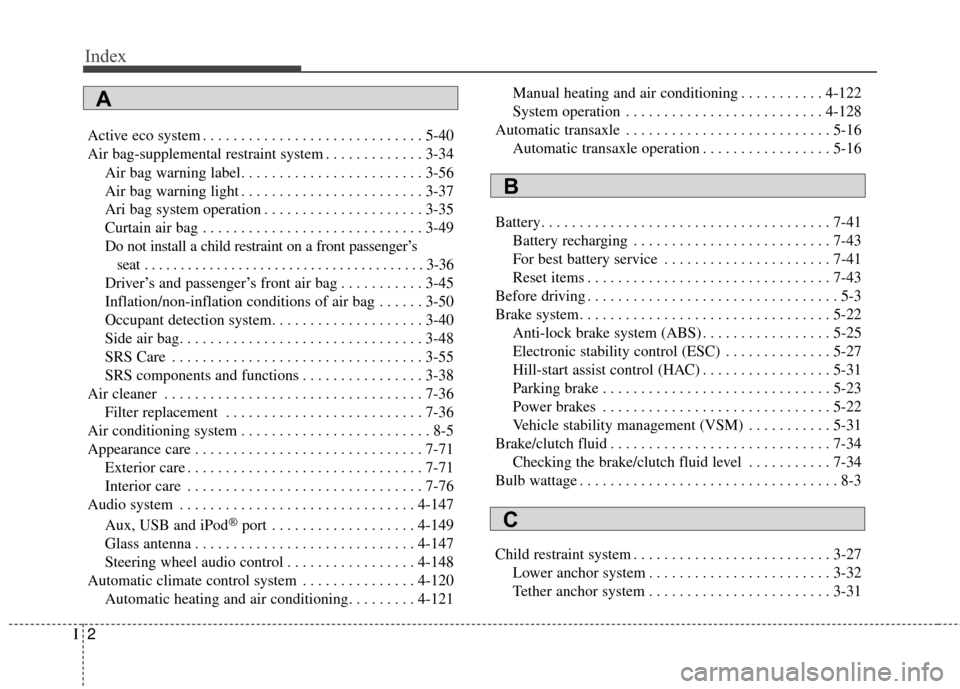
Active eco system . . . . . . . . . . . . . . . . . . . . . . . . . . . . . 5-40
Air bag-supplemental restraint system . . . . . . . . . . . . . 3-34Air bag warning label. . . . . . . . . . . . . . . . . . . . . . . . 3-56
Air bag warning light . . . . . . . . . . . . . . . . . . . . . . . . 3-37
Ari bag system operation . . . . . . . . . . . . . . . . . . . . . 3-35
Curtain air bag . . . . . . . . . . . . . . . . . . . . . . . . . . . . . 3-49
Do not install a child restraint on a front passenger’sseat . . . . . . . . . . . . . . . . . . . . . . . . . . . . . . . . . . . . \
. . . 3-36
Driver’s and passenger’s front air bag . . . . . . . . . . . 3-45
Inflation/non-inflation conditions of air bag . . . . . . 3-50
Occupant detection system. . . . . . . . . . . . . . . . . . . . 3-40
Side air bag. . . . . . . . . . . . . . . . . . . . . . . . . . . . . . . . 3-48
SRS Care . . . . . . . . . . . . . . . . . . . . . . . . . . . . . . . . . 3-55
SRS components and functions . . . . . . . . . . . . . . . . 3-38
Air cleaner . . . . . . . . . . . . . . . . . . . . . . . . . . . . . . . . . . 7-36\
Filter replacement . . . . . . . . . . . . . . . . . . . . . . . . . . 7-36
Air conditioning system . . . . . . . . . . . . . . . . . . . . . . . . . 8-5
Appearance care . . . . . . . . . . . . . . . . . . . . . . . . . . . . . . 7-71 Exterior care . . . . . . . . . . . . . . . . . . . . . . . . . . . . . . . 7-71
Interior care . . . . . . . . . . . . . . . . . . . . . . . . . . . . . . . 7-76
Audio system . . . . . . . . . . . . . . . . . . . . . . . . . . . . . . . 4-147
Aux, USB and iPod
®port . . . . . . . . . . . . . . . . . . . 4-149
Glass antenna . . . . . . . . . . . . . . . . . . . . . . . . . . . . . 4-147
Steering wheel audio control . . . . . . . . . . . . . . . . . 4-148
Automatic climate control system . . . . . . . . . . . . . . . 4-120 Automatic heating and air conditioning. . . . . . . . . 4-121 Manual heating and air conditioning . . . . . . . . . . . 4-122
System operation . . . . . . . . . . . . . . . . . . . . . . . . . . 4-128
Automatic transaxle . . . . . . . . . . . . . . . . . . . . . . . . . . . 5-16 Automatic transaxle operation . . . . . . . . . . . . . . . . . 5-16
Battery. . . . . . . . . . . . . . . . . . . . . . . . . . . . . . . . . . . . \
. . 7-41 Battery recharging . . . . . . . . . . . . . . . . . . . . . . . . . . 7-43
For best battery service . . . . . . . . . . . . . . . . . . . . . . 7-41
Reset items . . . . . . . . . . . . . . . . . . . . . . . . . . . . . . . . 7-43
Before driving . . . . . . . . . . . . . . . . . . . . . . . . . . . . . . . . . 5-3
Brake system. . . . . . . . . . . . . . . . . . . . . . . . . . . . . . . . . 5-22 Anti-lock brake system (ABS) . . . . . . . . . . . . . . . . . 5-25
Electronic stability control (ESC) . . . . . . . . . . . . . . 5-27
Hill-start assist control (HAC) . . . . . . . . . . . . . . . . . 5-31
Parking brake . . . . . . . . . . . . . . . . . . . . . . . . . . . . . . 5-23
Power brakes . . . . . . . . . . . . . . . . . . . . . . . . . . . . . . 5-22
Vehicle stability management (VSM) . . . . . . . . . . . 5-31
Brake/clutch fluid . . . . . . . . . . . . . . . . . . . . . . . . . . . . . 7-34 Checking the brake/clutch fluid level . . . . . . . . . . . 7-34
Bulb wattage . . . . . . . . . . . . . . . . . . . . . . . . . . . . . . . . . . 8-3
Child restraint system . . . . . . . . . . . . . . . . . . . . . . . . . . 3-27 Lower anchor system . . . . . . . . . . . . . . . . . . . . . . . . 3-32
Tether anchor system . . . . . . . . . . . . . . . . . . . . . . . . 3-31
A
B
C