Ac switch KIA Cerato 2015 2.G Owner's Manual
[x] Cancel search | Manufacturer: KIA, Model Year: 2015, Model line: Cerato, Model: KIA Cerato 2015 2.GPages: 452, PDF Size: 7.85 MB
Page 13 of 452
Your vehicle at a glance
42
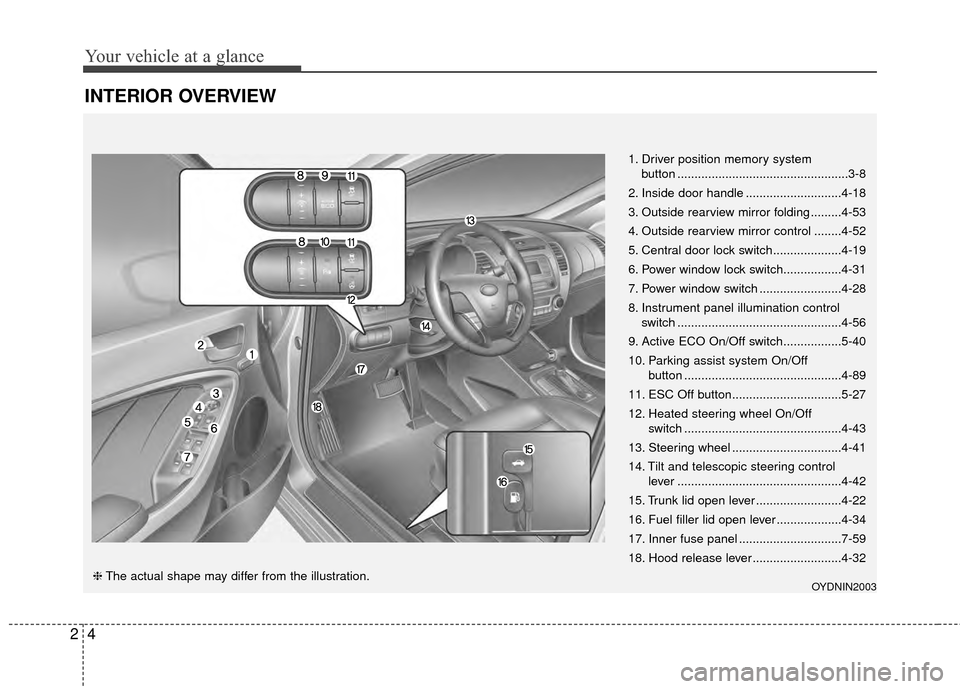
INTERIOR OVERVIEW
1. Driver position memory systembutton ..................................................3-8
2. Inside door handle ............................4-18
3. Outside rearview mirror folding .........4-53
4. Outside rearview mirror control ........4-52
5. Central door lock switch....................4-19
6. Power window lock switch.................4-31
7. Power window switch ........................4-28
8. Instrument panel illumination control switch ................................................4-56
9. Active ECO On/Off switch.................5-40
10. Parking assist system On/Off button ..............................................4-89
11. ESC Off button................................5-27
12. Heated steering wheel On/Off switch ..............................................4-43
13. Steering wheel ................................4-41
14. Tilt and telescopic steering control lever ................................................4-42
15. Trunk lid open lever .........................4-22
16. Fuel filler lid open lever ...................4-34
17. Inner fuse panel ..............................7-59
18. Hood release lever ..........................4-32
OYDNIN2003❈ The actual shape may differ from the illustration.
Page 14 of 452
25
Your vehicle at a glance
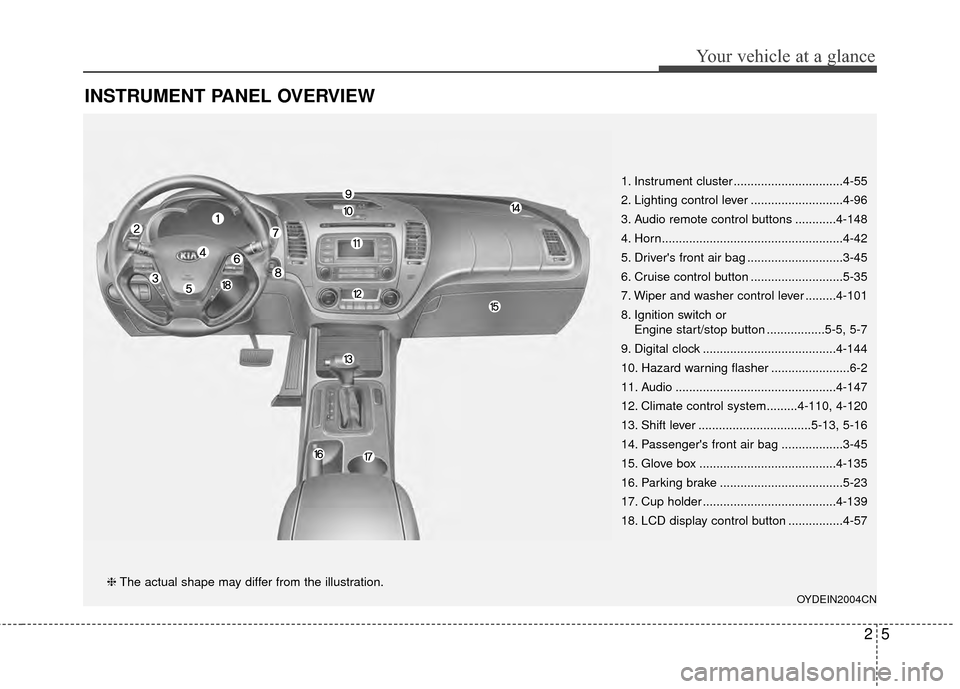
INSTRUMENT PANEL OVERVIEW
1. Instrument cluster ................................4-55
2. Lighting control lever ...........................4-96
3. Audio remote control buttons ............4-148
4. Horn.....................................................4-42
5. Driver's front air bag ............................3-45
6. Cruise control button ...........................5-35
7. Wiper and washer control lever .........4-101
8. Ignition switch orEngine start/stop button .................5-5, 5-7
9. Digital clock .......................................4-144
10. Hazard warning flasher .......................6-2
11. Audio ...............................................4-147
12. Climate control system.........4-110, 4-120
13. Shift lever .................................5-13, 5-16
14. Passenger's front air bag ..................3-45
15. Glove box ........................................4-135
16. Parking brake ....................................5-23
17. Cup holder .......................................4-139
18. LCD display control button ................4-57
OYDEIN2004CN
❈ The actual shape may differ from the illustration.
Page 21 of 452
Safety features of your vehicle
63
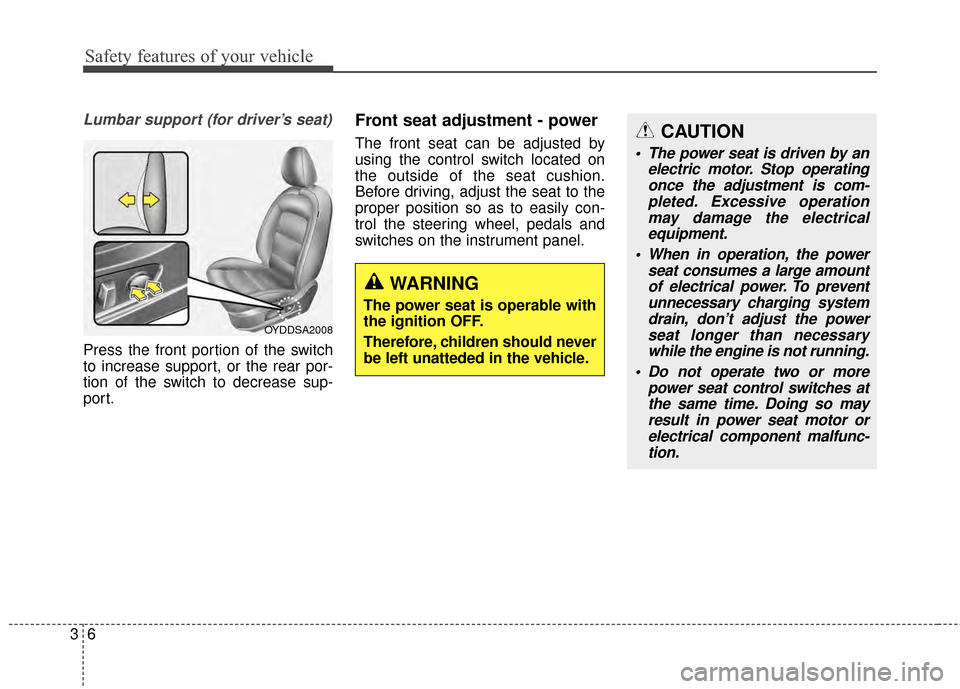
Lumbar support (for driver’s seat)
Press the front portion of the switch
to increase support, or the rear por-
tion of the switch to decrease sup-
port.
Front seat adjustment - power
The front seat can be adjusted by
using the control switch located on
the outside of the seat cushion.
Before driving, adjust the seat to the
proper position so as to easily con-
trol the steering wheel, pedals and
switches on the instrument panel.
WARNING
The power seat is operable with
the ignition OFF.
Therefore, children should never
be left unatteded in the vehicle.
CAUTION
The power seat is driven by anelectric motor. Stop operatingonce the adjustment is com-pleted. Excessive operationmay damage the electricalequipment.
When in operation, the power seat consumes a large amountof electrical power. To preventunnecessary charging systemdrain, don’t adjust the powerseat longer than necessarywhile the engine is not running.
Do not operate two or more power seat control switches atthe same time. Doing so mayresult in power seat motor orelectrical component malfunc-tion.
OYDDSA2008
Page 22 of 452
37
Safety features of your vehicle
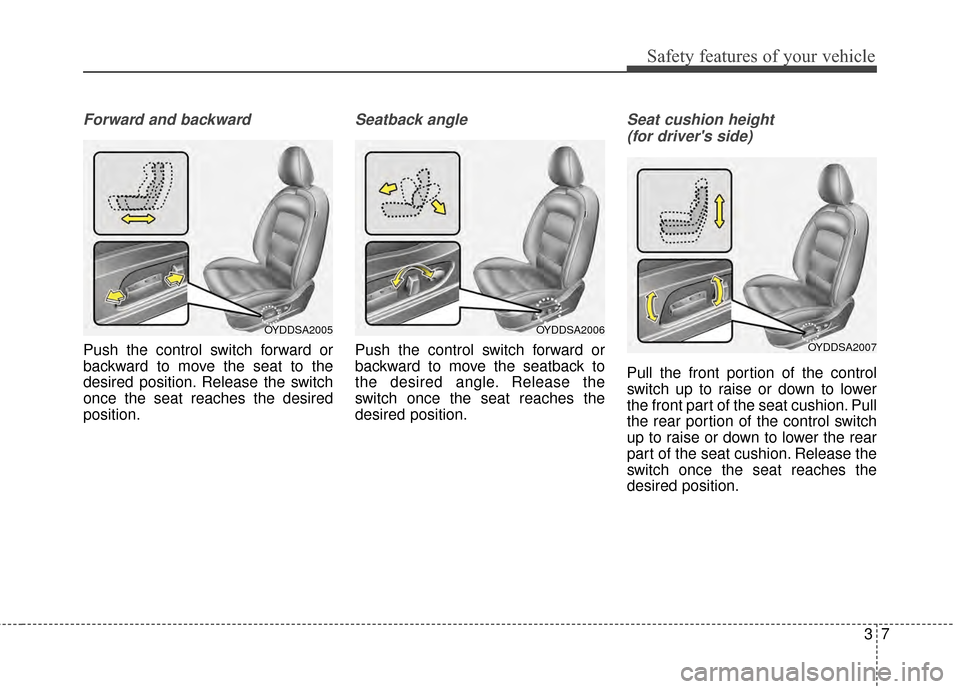
Forward and backward
Push the control switch forward or
backward to move the seat to the
desired position. Release the switch
once the seat reaches the desired
position.
Seatback angle
Push the control switch forward or
backward to move the seatback to
the desired angle. Release the
switch once the seat reaches the
desired position.
Seat cushion height (for driver's side)
Pull the front portion of the control
switch up to raise or down to lower
the front part of the seat cushion. Pull
the rear portion of the control switch
up to raise or down to lower the rear
part of the seat cushion. Release the
switch once the seat reaches the
desired position.
OYDDSA2006
OYDDSA2007
OYDDSA2005
Page 23 of 452
Safety features of your vehicle
83
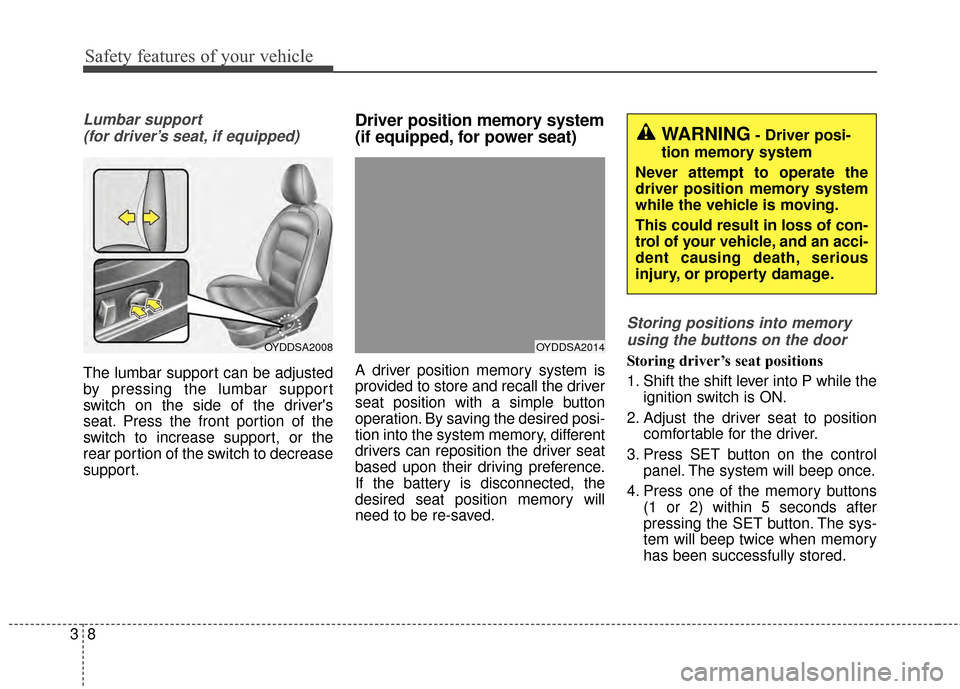
Lumbar support (for driver’s seat, if equipped)
The lumbar support can be adjusted
by pressing the lumbar support
switch on the side of the driver's
seat. Press the front portion of the
switch to increase support, or the
rear portion of the switch to decrease
support.
Driver position memory system
(if equipped, for power seat)
A driver position memory system is
provided to store and recall the driver
seat position with a simple button
operation. By saving the desired posi-
tion into the system memory, different
drivers can reposition the driver seat
based upon their driving preference.
If the battery is disconnected, the
desired seat position memory will
need to be re-saved.
Storing positions into memoryusing the buttons on the door
Storing driver’s seat positions
1. Shift the shift lever into P while the ignition switch is ON.
2. Adjust the driver seat to position comfortable for the driver.
3. Press SET button on the control panel. The system will beep once.
4. Press one of the memory buttons (1 or 2) within 5 seconds after
pressing the SET button. The sys-
tem will beep twice when memory
has been successfully stored.OYDDSA2014OYDDSA2008
WARNING- Driver posi-
tion memory system
Never attempt to operate the
driver position memory system
while the vehicle is moving.
This could result in loss of con-
trol of your vehicle, and an acci-
dent causing death, serious
injury, or property damage.
Page 24 of 452

39
Safety features of your vehicle
Recalling positions from memory
1. Shift the shift lever into P while theignition switch is ON.
2. To recall the position in memory, press the desired memory button
(1 or 2). The system will beep
once, then the driver seat will
automatically adjust to the stored
positions.
Adjusting the control switch for the
driver seat while the system is recall-
ing the stored position will cause the
movement to stop and move in the
direction that the control switch is
moved.Easy access function (if equipped)
With the shift lever in the P position,
the system will move the driver's seat
automatically as follows:
Without smart key system
- It will move the driver’s seat rear-ward when the ignition key is
removed and front driver’s door is
opened.
- It will move the driver’s seat for- ward when the ignition key is
inserted.
With smart key system - It will move the driver’s seat rear-ward when the engine start/stop
button is turned to the OFF posi-
tion and front driver’s door is
opened.
- It will move the driver’s seat for- ward when the engine start/stop
button is turned to the ACC or
START position.
You can activate or deactivate this
feature. Refer to "User settings" in
chapter 4.
Headrest (for front seat)
The driver's and front passenger's
seats are equipped with a headrest
for the occupant's safety and comfort.
The headrest not only provides com-
fort for the driver and front passen-
ger, but also helps protect the head
and neck in the event of a collision.
OMG038400
Page 25 of 452
Safety features of your vehicle
10
3
For maximum effectiveness in case
of an accident, the headrest should
be adjusted so the middle of the
headrest is at the same height of the
center of gravity of an occupant's
head. Generally, the center of gravity
of most people's head is similar with
the height of the top of their eyes.
Also, adjust the headrest as close to
your head as possible.
For this reason, the use of a cushion
that holds the body away from the
seatback is not recommended.Adjusting the height up and down
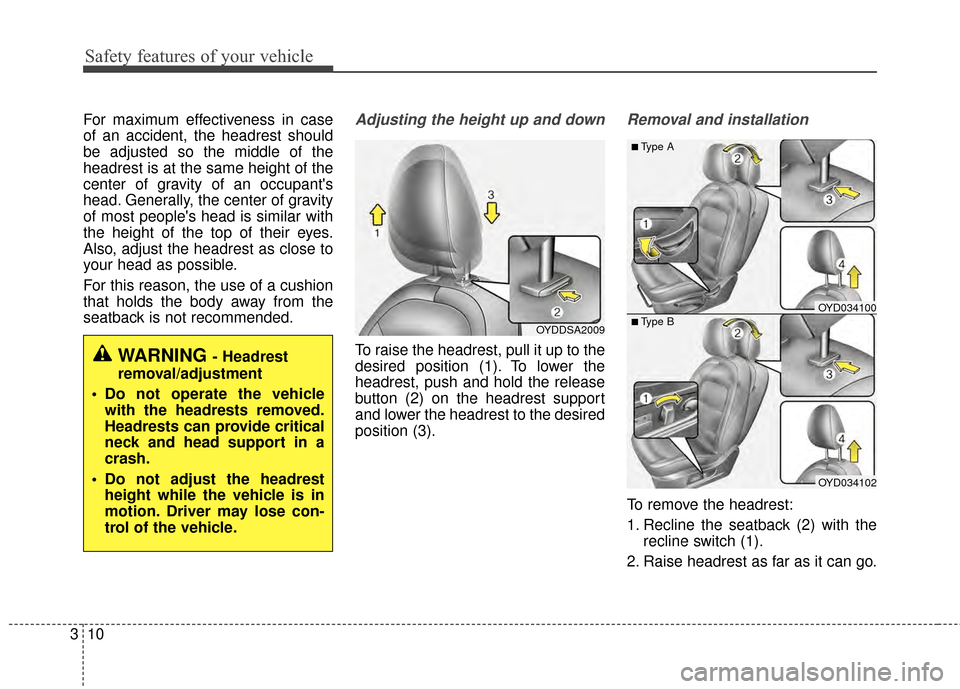
To raise the headrest, pull it up to the
desired position (1). To lower the
headrest, push and hold the release
button (2) on the headrest support
and lower the headrest to the desired
position (3).
Removal and installation
To remove the headrest:
1. Recline the seatback (2) with the
recline switch (1).
2. Raise headrest as far as it can go.
WARNING - Headrest
removal/adjustment
Do not operate the vehicle with the headrests removed.
Headrests can provide critical
neck and head support in a
crash.
Do not adjust the headrest height while the vehicle is in
motion. Driver may lose con-
trol of the vehicle.
OYDDSA2009
OYD034102
■Type B
■Type A
OYD034100
Page 26 of 452
311
Safety features of your vehicle
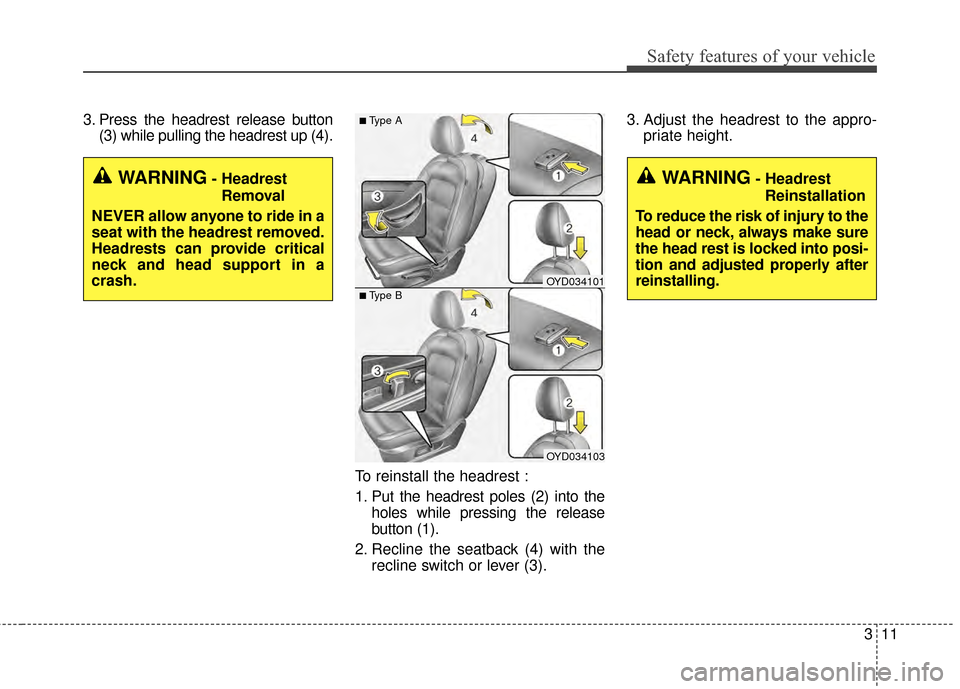
3. Press the headrest release button(3) while pulling the headrest up (4).
To reinstall the headrest :
1. Put the headrest poles (2) into theholes while pressing the release
button (1).
2. Recline the seatback (4) with the recline switch or lever (3). 3. Adjust the headrest to the appro-
priate height.
OYD034103
■Type B
■Type A
OYD034101
WARNING- Headrest
Removal
NEVER allow anyone to ride in a
seat with the headrest removed.
Headrests can provide critical
neck and head support in a
crash.WARNING- Headrest Reinstallation
To reduce the risk of injury to the
head or neck, always make sure
the head rest is locked into posi-
tion and adjusted properly after
reinstalling.
Page 33 of 452
Safety features of your vehicle
18
3
Seat belt warning
(for driver’s seat)
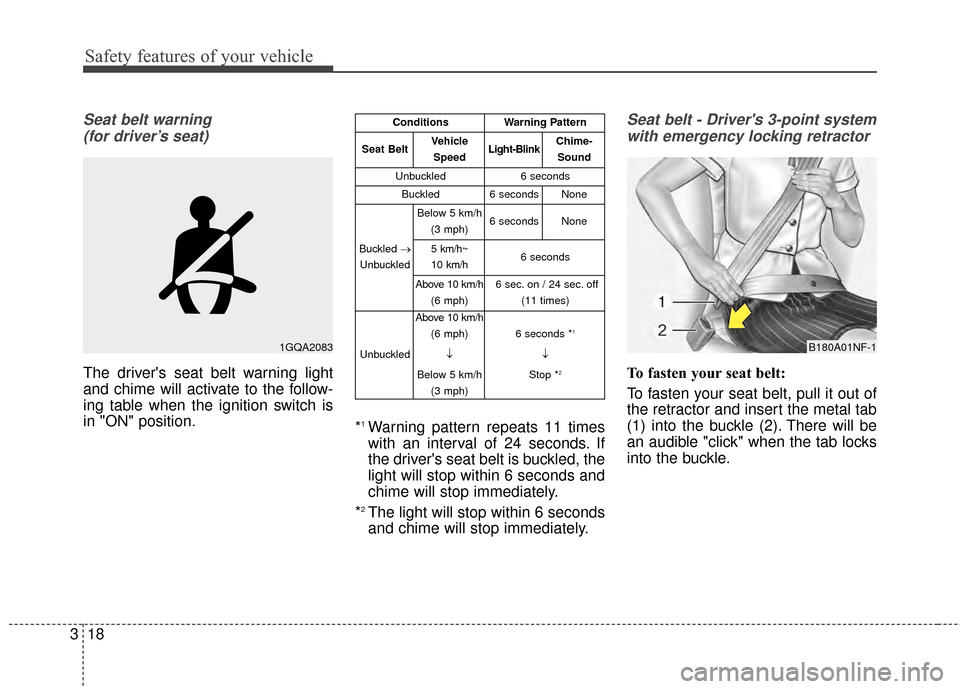
The driver's seat belt warning light
and chime will activate to the follow-
ing table when the ignition switch is
in "ON" position. *
1Warning pattern repeats 11 times
with an interval of 24 seconds. If
the driver's seat belt is buckled, the
light will stop within 6 seconds and
chime will stop immediately.
*
2The light will stop within 6 seconds
and chime will stop immediately.
Seat belt - Driver's 3-point system with emergency locking retractor
To fasten your seat belt:
To fasten your seat belt, pull it out of
the retractor and insert the metal tab
(1) into the buckle (2). There will be
an audible "click" when the tab locks
into the buckle.
1GQA2083B180A01NF-1
ConditionsWarning Pattern
Seat BeltVehicle
SpeedLight-BlinkChime-Sound
Unbuckled6 seconds
Buckled6 secondsNone
Buckled →
Unbuckled
Below 5 km/h (3 mph)6 secondsNone
5 km/h~
10 km/h6 seconds
Above 10 km/h (6 mph)6 sec. on / 24 sec. off (11 times)
Unbuckled
Above 10 km/h(6 mph)
↓
Below 5 km/h (3 mph)
6 seconds *1
↓
Stop *
2
Page 39 of 452
Safety features of your vehicle
24
3
Because the sensor that activates the
SRS air bag is connected with the
pre-tensioner seat belt, the SRS air
bag warning light ( ) on the instru-
ment panel will illuminate for approxi-
mately 6 seconds after the ignition
switch has been turned to the ON
position, and then it should turn off.
If the pre-tensioner seat belt does
not work properly, this warning light
will illuminate even if the SRS air bag
has not malfunctioned. If the SRS air
bag warning light does not illuminate
when the ignition switch is turned
ON, or if it remains illuminated after
illuminating for approximately 6 sec-
onds, or if it illuminates while the
vehicle is being driven, please have
an authorized Kia dealer inspect the
pre-tensioner seat belt or SRS air
bag system as soon as possible.
✽ ✽
NOTICE
Do not attempt to service or repair
the pre-tensioner seat belt system in
any manner. Do not attempt to
inspect or replace the pre-tensioner
seat belts yourself. This must be
done by an authorized Kia dealer.
Pre-tensioners are designed to oper-
ate only one time. After activation,
pre-tensioner seat belts must be
replaced. If the pre-tensioner must
be replaced, contact an authorized
Kia dealer.
Seat belt precautions
Infant or small child
You should be aware of the specific
requirements in your country. Child
and/or infant seats must be properly
placed and installed in the rear seat.
For more information about the use
of these restraints, refer to “Child
restraint system” in this section.
WARNING - Hot pre -
tensioner
Do not touch the pre-tensioner
seat belt assemb
lies for several
minutes after they have been
activated. When the pre-ten-
sioner seat belt mechanism
fires during a collision the pre-
tensioner becomes hot and can
burn you.