ESP KIA Forte 2010 1.G User Guide
[x] Cancel search | Manufacturer: KIA, Model Year: 2010, Model line: Forte, Model: KIA Forte 2010 1.GPages: 321, PDF Size: 6.3 MB
Page 145 of 321
Features of your vehicle80
4WINDSHIELD DEFROSTING AND DEFOGGINGD250000AUN
For maximum defrosting, set the tem-
perature control to the extreme
right/hot position and the fan speed
control to the highest speed.
If warm air to the floor is desired while defrosting or defogging, set the mode
to the floor-defrost position.
Before driving, clear all snow and ice from the windshield, rear window, out-
side rear view mirrors, and all side win-
dows.
Clear all snow and ice from the hood and air inlet in the cowl grill to improve
heater and defroster efficiency and to
reduce the probability of fogging up
the inside of the windshield.
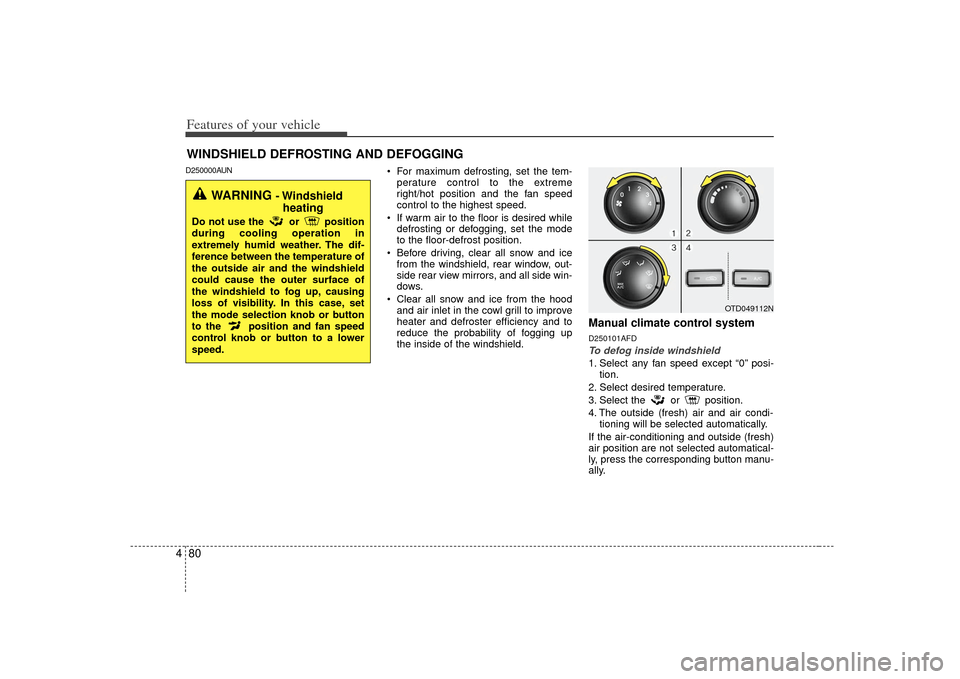
Manual climate control systemD250101AFDTo defog inside windshield 1. Select any fan speed except “0” posi- tion.
2. Select desired temperature.
3. Select the or position.
4. The outside (fresh) air and air condi- tioning will be selected automatically.
If the air-conditioning and outside (fresh)
air position are not selected automatical-
ly, press the corresponding button manu-
ally.
OTD049112N
WARNING
- Windshield heating
Do not use the or position
during cooling operation in
extremely humid weather. The dif-
ference between the temperature of
the outside air and the windshield
could cause the outer surface of
the windshield to fog up, causing
loss of visibility. In this case, set
the mode selection knob or button
to the position and fan speed
control knob or button to a lower
speed.
Page 146 of 321
481
Features of your vehicle
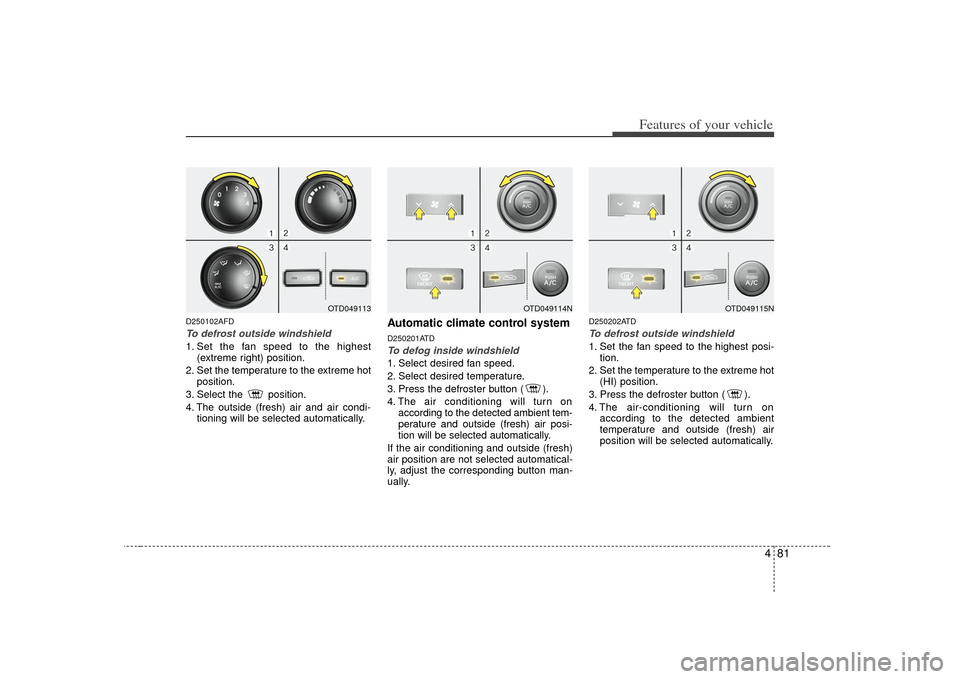
D250102AFDTo defrost outside windshield 1. Set the fan speed to the highest(extreme right) position.
2. Set the temperature to the extreme hot position.
3. Select the position.
4. The outside (fresh) air and air condi- tioning will be selected automatically.
Automatic climate control systemD250201ATDTo defog inside windshield 1. Select desired fan speed.
2. Select desired temperature.
3. Press the defroster button ( ).
4. The air conditioning will turn onaccording to the detected ambient tem-
perature and outside (fresh) air posi-
tion will be selected automatically.
If the air conditioning and outside (fresh)
air position are not selected automatical-
ly, adjust the corresponding button man-
ually.
D250202ATDTo defrost outside windshield 1. Set the fan speed to the highest posi- tion.
2. Set the temperature to the extreme hot (HI) position.
3. Press the defroster button ( ).
4. The air-conditioning will turn on according to the detected ambient
temperature and outside (fresh) air
position will be selected automatically.
OTD049114N
OTD049115N
OTD049113
Page 160 of 321
495
Features of your vehicle
1. FM/AM Selection ButtonTurns to FM or AM mode, and toggles
FM1
➟ FM2
➟AM
➟ FM1
➟... when the
button is pressed each time.
2. Automatic Channel Selection Button ] button is pressed, it
reduces the band frequency by 200 kHz
to automatically select a channel. Stops
at the previous frequency if no channel is
found.
] button is pressed, it increases the band frequency by 200
kHz to automatically select a channel.
Stops at the previous frequency if no
channel is found.3. Power ON/OFF Button & Volume Control KnobTurns on/off the set when the IGNITION
SWITCH is on ACC or ON. If the button
is turned to the right, it increases the vol-
ume and left, decreases the volume.
4. SCAN ButtonWhen the button is pressed, the frequen-
cies will become increased and receive
the corresponding broadcasts. This func-
tion will play the frequencies for 5 sec-
onds each and find other broadcasts as
the frequency increases. Press the but-
ton again when desiring to continue lis-
tening to the currently playing broadcast.5. SETUP ButtonPress this button to turn to the TEXT
SCROLL, SDVC and P.BASS adjustment
mode. If no action is taken for 5 seconds
after pressing the button, it will return to
the play mode. (After entering SETUP
mode, move between items using the
left, right and PUSH functions of the
[TUNE] button.)
The setup items changes from TEXT
SCROLL
↔
SDVC
↔
P.BASS
↔
SIRIUS
↔ PHONE...
This function is used to display charac-
ters longer than the LCD text display and
can be turned ON/OFF through the vol-
ume controller.
This function automatically adjusts the
volume level according to the speed of
the vehicle and can be turned ON/OFF
through the volume controller.
This function creates virtual sound
effects and allows adjustments to the
BASS level.
HIGH
➟MID
➟LOW
➟OFF
6. Manual Channel Selection
Knob & SETUP ButtonRotate the knob clockwise by one notch
to increase frequency by 50 kHz from
current frequency.
Rotate the knob counterclockwise by one
notch to decrease frequency by 50 kHz
from current frequency.
Pressing the button changes the BASS,
MIDDLE, TREBLE, FADER and BAL-
ANCE TUNE mode. The mode selected
is shown on the display. After selecting
each mode, rotate the Audio control knob
clockwise or counterclockwise.
Page 161 of 321
Features of your vehicle96
4
To increase the BASS, rotate the knob
clockwise, while to decrease the BASS,
rotate the knob counterclockwise.
To increase the MIDDLE, rotate the knob
clockwise, while to decrease the MID-
DLE, rotate the knob counterclockwise.
Control
To increase the TREBLE, rotate the knob
clockwise, while to decrease the TRE-
BLE, rotate the knob counterclockwise.
Turn the control knob clockwise to
emphasize rear speaker sound (front
speaker sound will be attenuated). When
the control knob is turned counterclock-
wise, front speaker sound will be empha-
sized (rear speaker sound will be attenu-
ated).
Rotate the knob clockwise to emphasize
right speaker sound (left speaker sound
will be attenuated). When the control
knob is turned counter clockwise, left
speaker sound will be emphasized (right
speaker sound will be attenuated).
7. Preset ButtonPress [1]~[6] buttons less than 0.8 sec-
ond to play the channel saved in each
button.
Press [1]~[6] button more than 0.8 sec-
ond or longer to save current station to
the respective button with a beep.
Page 179 of 321
Features of your vehicle114
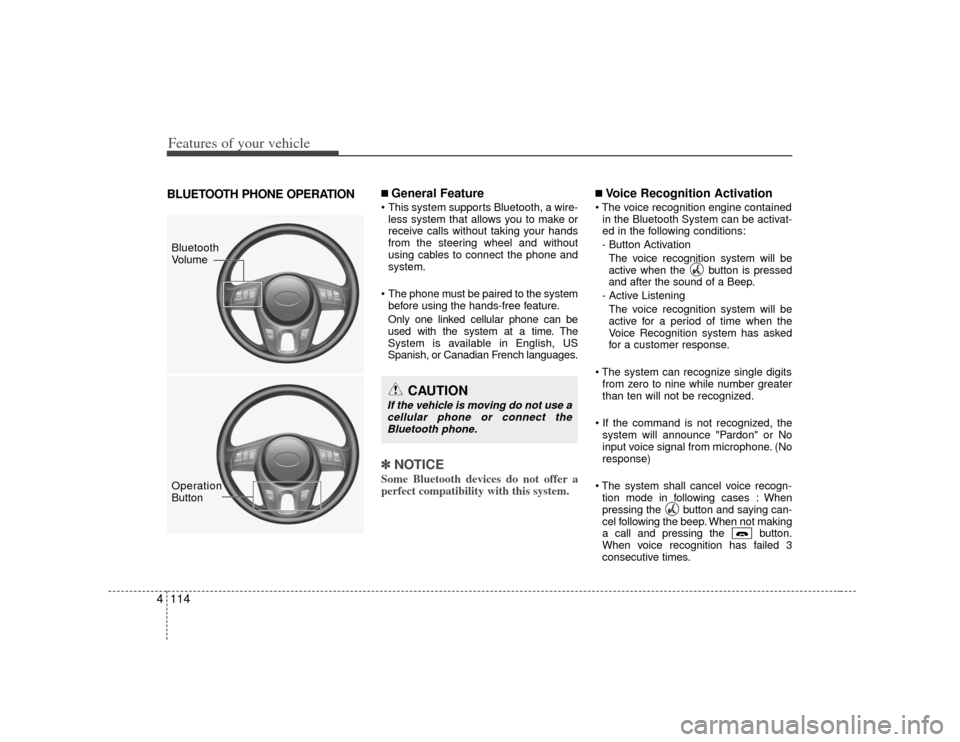
4BLUETOOTH PHONE OPERATION
■ General Feature This system supports Bluetooth, a wire-
less system that allows you to make or
receive calls without taking your hands
from the steering wheel and without
using cables to connect the phone and
system.
The phone must be paired to the system before using the hands-free feature.
Only one linked cellular phone can be
used with the system at a time. The
System is available in English, US
Spanish, or Canadian French languages.✽ ✽ NOTICESome Bluetooth devices do not offer a
perfect compatibility with this system.
■Voice Recognition Activation
in the Bluetooth System can be activat-
ed in the following conditions:
- Button Activation The voice recognition system will be
active when the button is pressed
and after the sound of a Beep.
- Active Listening The voice recognition system will be
active for a period of time when the
Voice Recognition system has asked
for a customer response.
from zero to nine while number greater
than ten will not be recognized.
system will announce "Pardon" or No
input voice signal from microphone. (No
response)
tion mode in following cases : When
pressing the button and saying can-
cel following the beep. When not making
a call and pressing the button.
When voice recognition has failed 3
consecutive times.
CAUTION
If the vehicle is moving do not use acellular phone or connect theBluetooth phone.
Bluetooth
Volume
Operation
Button
Page 181 of 321
Features of your vehicle116
4 Changing Priority
The connection priority for registered
phones can be changed.
1. Press the button.
2. Say "Set Up".
3. Say "Change Priority".
4. Say the name of the contact or the number of the contact.
5. Say "Yes".
Turning Bluetooth on / off
Bluetooth function can be switched ON/
OFF. initial status : Bluetooth ON
1. Press the button.
2. Say "Set Up".
3. Say "Bluetooth off".
4. Say "Yes".
Turning Bluetooth on
1. Press the send or button.
2. Say "yes".
3. The Bluetooth will be turned on.
■ Phone Book Adding Entry
Phone numbers and voice tags can be
registered. Entries registered in the phone
can also be transferred.
Adding Entry by Voice
1. Press the button.
2. Say "phonebook".
3. Say "add entry".
4. Say "by voice".
5. Say the name of the contact.
6. Say "yes".
7. Say the phone number.
8. Say "store".
9. Say "Home", "Office", "Mobile", "Other" or "default".
10. Say "Yes" to store an additional loca- tion for this contact.
Adding Entry by phone
1. Press the button.
2. Say "phonebook".
3. Say "add entry".
4. Say "by phone".
5. Say "yes".
6. Transfer procedures may vary depend- ing on the cellular phone.
✽ ✽NOTICEThe system can recognize single digits
from zero to nine. Numbers that are ten
or greater are not recognized.
To speed up input, it is a good idea to
group all digits into a continuous string.
However, you can enter each digit indi-
vidually or group digits together in pre-
ferred string lengths.
The display corresponding to each oper-
ation appears on the screen as follows:
Input operation
1. say: "Nine, nine, five"
Display: "995"
2. say: "Seven, three, four" Display: "995734"Changing Name
The registered names can be changed.
1. Press the button.
2. Say "phonebook".
3. Say "Change name".
4. Say the name of the phonebook [voice tag].
5. Say "yes".
6. Say the name of the phonebook to be changed.
Page 187 of 321
53
Driving your vehicle
E020100AUNBefore entering vehicle• Be sure that all windows, outside mir-ror(s), and outside lights are clean.
Check the condition of the tires.
Check under the vehicle for any sign of leaks.
Be sure there are no obstacles behind you if you intend to back up.E020200AUNNecessary inspections Fluid levels, such as engine oil, engine
coolant, brake fluid, and washer fluid
should be checked on a regular basis,
with the exact interval depending on the
fluid. Further details are provided in
Section 7, “Maintenance”.
E020300AHMBefore starting Close and lock all doors.
Position the seat so that all controls areeasily reached.
Adjust the inside and outside rearview mirrors.
Be sure that all lights work.
Check all gauges.
Check the operation of warning lights when the ignition switch is turned to
the ON position.
Release the parking brake and make sure the brake warning light goes out.
For safe operation, be sure you are famil-
iar with your vehicle and its equipment.
BEFORE DRIVING
WARNING
All passengers must be properly
belted whenever the vehicle is mov-
ing. Refer to “Seat belts” in section
3 for more information on their
proper use.
WARNING
Always check the surrounding
areas near your vehicle for people,
especially children, before putting a
vehicle into D (Drive) or R
(Reverse).
Page 198 of 321
Driving your vehicle14
5E050200APBGood driving practices Never take the vehicle out of gear and
coast down a hill. This is extremely
hazardous. Always leave the vehicle in
gear.
Don't "ride" the brakes. This can cause them to overheat and malfunction.
Instead, when you are driving down a
long hill, slow down and shift to a lower
gear. When you do this, engine braking
will help slow down the vehicle.
Slow down before shifting to a lower gear. This will help avoid over-revving
the engine, which can cause damage.
Slow down when you encounter cross winds. This gives you much better con-
trol of your vehicle.
Be sure the vehicle is completely stopped before you attempt to shift into
R (Reverse). The transaxle can be
damaged if you do not. To shift into R
(Reverse), depress the clutch, move
the shift lever to neutral, wait three sec-
onds, then shift to the R (Reverse)
position.
Exercise extreme caution when driving on a slippery surface. Be especially
careful when braking, accelerating or
shifting gears. On a slippery surface,
an abrupt change in vehicle speed can
cause the drive wheels to lose traction
and the vehicle to go out of control.
WARNING
Always buckle-up! In a collision,
an unbelted occupant is signifi-
cantly more likely to be seriously
injured or killed than a properly
belted occupant.
Avoid high speeds when corner- ing or turning.
Do not make quick steering wheel movements, such as sharp
lane changes or fast, sharp turns.
The risk of rollover is greatly increased if you lose control of
your vehicle at highway speeds.
Losing control often occurs if two or more wheels drop off the road-
way and the driver oversteers to
reenter the roadway.
In the event your vehicle leaves the roadway, do not steer sharply.
Instead, slow down before pulling
back into the travel lanes.
Never exceed posted speed lim- its.
Page 200 of 321
Driving your vehicle16
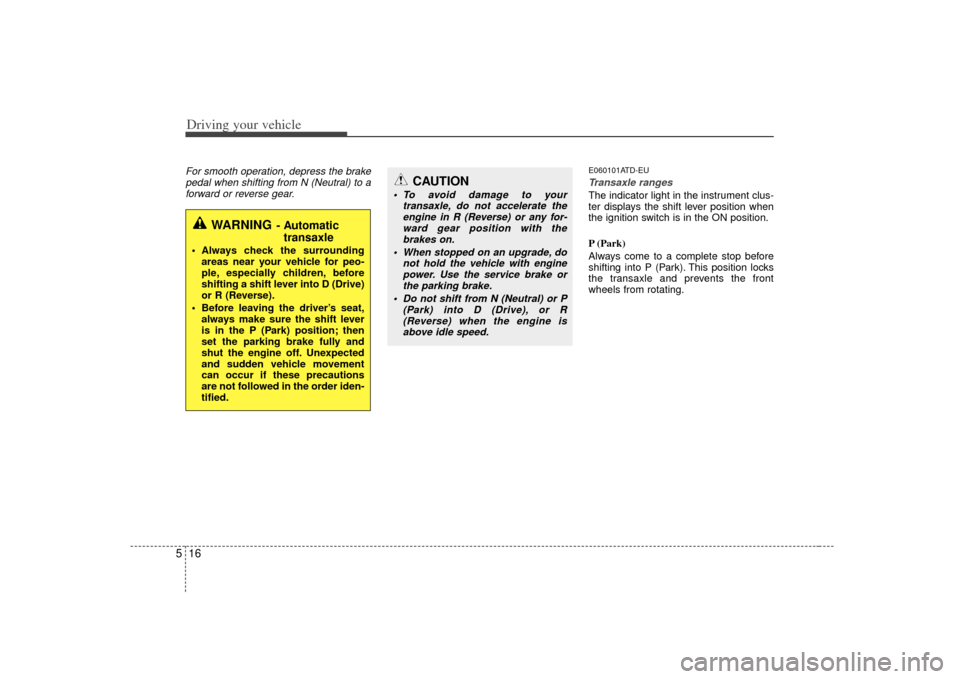
5For smooth operation, depress the brake
pedal when shifting from N (Neutral) to aforward or reverse gear.
E060101ATD-EUTransaxle rangesThe indicator light in the instrument clus-
ter displays the shift lever position when
the ignition switch is in the ON position.
P (Park)
Always come to a complete stop before
shifting into P (Park). This position locks
the transaxle and prevents the front
wheels from rotating.
WARNING
- Automatic transaxle
Always check the surrounding
areas near your vehicle for peo-
ple, especially children, before
shifting a shift lever into D (Drive)
or R (Reverse).
Before leaving the driver’s seat, always make sure the shift lever
is in the P (Park) position; then
set the parking brake fully and
shut the engine off. Unexpected
and sudden vehicle movement
can occur if these precautions
are not followed in the order iden-
tified.
CAUTION
To avoid damage to your transaxle, do not accelerate theengine in R (Reverse) or any for-ward gear position with the brakes on.
When stopped on an upgrade, do not hold the vehicle with enginepower. Use the service brake or the parking brake.
Do not shift from N (Neutral) or P (Park) into D (Drive), or R(Reverse) when the engine isabove idle speed.
Page 204 of 321
Driving your vehicle20
5E060103AUNIgnition key interlock system
(if equipped)The ignition key cannot be removed
unless the shift lever is in the P (Park)
position.
E060200APBGood driving practices Never move the shift lever from P (Park) or N (Neutral) to any other posi-
tion with the accelerator pedal
depressed.
Never move the shift lever into P (Park) when the vehicle is in motion.
Be sure the vehicle is completely stopped before you attempt to shift into
R (Reverse) or D (Drive).
Never take the vehicle out of gear and coast down a hill. This may be
extremely hazardous. Always leave the
car in gear when moving.
Do not "ride" the brakes. This can cause them to overheat and malfunc-
tion. Instead, when you are driving
down a long hill, slow down and shift to
a lower gear. When you do this, engine
braking will help slow down the vehicle.
Slow down before shifting to a lower gear. Otherwise, the lower gear may
not be engaged.
Always use the parking brake. Do not depend on placing the transaxle in P
(Park) to keep the vehicle from moving. Exercise extreme caution when driving
on a slippery surface. Be especially
careful when braking, accelerating or
shifting gears. On a slippery surface,
an abrupt change in vehicle speed can
cause the drive wheels to lose traction
and the vehicle to go out of control.
Optimum vehicle performance and economy is obtained by smoothly
depressing and releasing the accelera-
tor pedal.