USB KIA Forte 2015 2.G User Guide
[x] Cancel search | Manufacturer: KIA, Model Year: 2015, Model line: Forte, Model: KIA Forte 2015 2.GPages: 452, PDF Size: 7.85 MB
Page 246 of 452
4175
Features of your vehicle
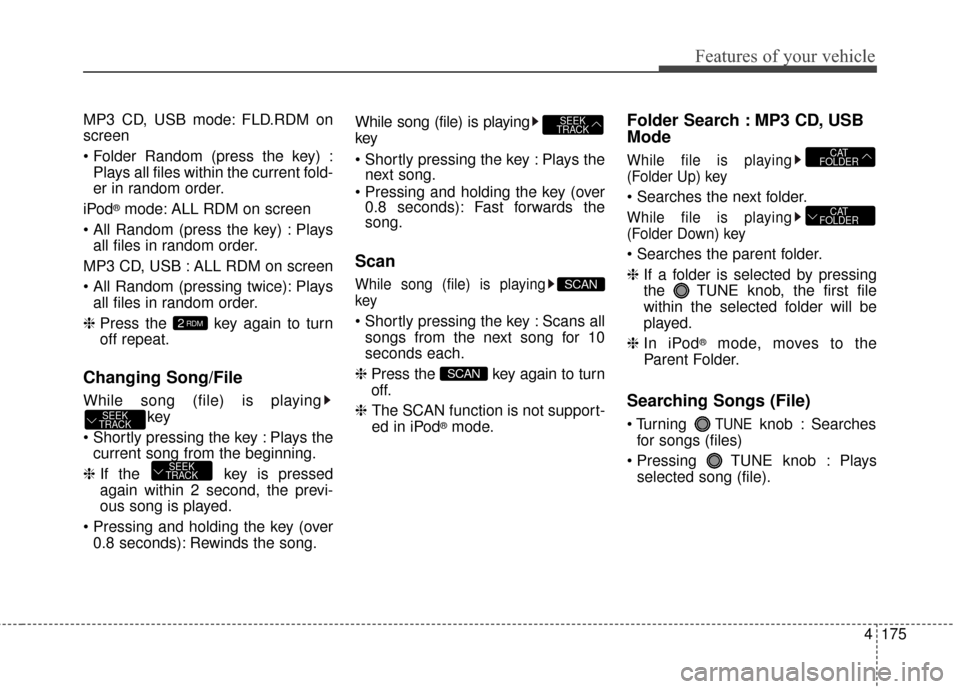
MP3 CD, USB mode: FLD.RDM on
screen
Plays all files within the current fold-
er in random order.
iPod
®mode: ALL RDM on screen
Plays all files in random order.
MP3 CD, USB : ALL RDM on screen
Plays all files in random order.
❈ Press the key again to turn
off repeat.
Changing Song/File
While song (file) is playing
key
Plays the current song from the beginning.
❈ If the key is pressed
again within 2 second, the previ-
ous song is played.
0.8 seconds): Rewinds the song. While song (file) is playing
key
Plays the
next song.
0.8 seconds): Fast forwards the
song.
Scan
While song (file) is playing
key
Scans all
songs from the next song for 10
seconds each.
❈ Press the key again to turn
off.
❈ The SCAN function is not support-
ed in iPod
®mode.
Folder Search : MP3 CD, USB
Mode
While file is playing
(Folder Up) key
While file is playing
(Folder Down) key
❈ If a folder is selected by pressing
the TUNE knob, the first file
within the selected folder will be
played.
❈ In iPod
®mode, moves to the
Parent Folder.
Searching Songs (File)
TUNEknob : Searches
for songs (files)
TUNE knob : Plays selected song (file).
CAT
FOLDER
CAT
FOLDER
SCAN
SCAN
SEEK
TRACK
SEEK
TRACK
SEEK
TRACK
2RDM
Page 247 of 452
![KIA Forte 2015 2.G User Guide Features of your vehicle
176
4
MENU : Audio CD
Press the CD MP3 mode key
to set the Repeat, Random,
Information features.
Repeat
Press the key Set [ RPT]
through the TUNE knob or
key to repeat the](/img/2/2961/w960_2961-246.png "KIA Forte 2015 2.G User Guide Features of your vehicle
176
4
MENU : Audio CD
Press the CD MP3 mode key
to set the Repeat, Random,
Information features.
Repeat
Press the key Set [ RPT]
through the TUNE knob or
key to repeat the")
Features of your vehicle
176
4
MENU : Audio CD
Press the CD MP3 mode key
to set the Repeat, Random,
Information features.
Repeat
Press the key Set [ RPT]
through the TUNE knob or
key to repeat the current song.
❈ Press RPT again to turn off.
Random
Press the key Set [ RDM]
through the TUNE knob or
key to randomly play songs within
the current folder.
❈Press RDM again to turn off.
Information
Press the key Set [ Info]
through the
TUNEknob or
key to display information of the cur-
rent song.
❈ Press the key to turn off
info display
.
MENU : MP3 CD / USB
Press the CD MP3 mode key
to set the Repeat, Folder Random,
Folder Repeat, All Random,
Information, and Copy features.
Repeat
Press the key Set [ RPT]
through the
TUNEknob or
key to repeat the current song.
❈ Press RPT again to turn off.1 RPTMENU
MENU
MENU
3
MENU
2 RDM
MENU
1 RPT
MENU
MENU
Page 248 of 452
![KIA Forte 2015 2.G User Guide 4177
Features of your vehicle
Folder Random
Press the key Set [ F.RDM]
through the
TUNEknob or
key to randomly play songs within the
current folder.
❈ Press F.RDM again to turn off.
Folder Repea](/img/2/2961/w960_2961-247.png "KIA Forte 2015 2.G User Guide 4177
Features of your vehicle
Folder Random
Press the key Set [ F.RDM]
through the
TUNEknob or
key to randomly play songs within the
current folder.
❈ Press F.RDM again to turn off.
Folder Repea")
4177
Features of your vehicle
Folder Random
Press the key Set [ F.RDM]
through the
TUNEknob or
key to randomly play songs within the
current folder.
❈ Press F.RDM again to turn off.
Folder Repeat
Press the key Set [ F.RPT]
through the
TUNEknob or
key to repeat songs within the cur-
rent folder.
❈ Press F.RPT again to turn off.
All Random
Press the key Set [ A.RDM]
through the
TUNEknob or key
to randomly play all songs within the
CD.
❈ Press A.RDM again to turn off.
Information
Press the key Set [ Info]
through the
TUNEknob or
key to display information of the cur-
rent song.
❈ Press the key to turn off
info display.
Copy
Press the key Set [
Copy] through the
TUNEknob
or key.
This is used to copy the current
song into My Music. You can play
the copied Music in My Music
mode.
❈ If another key is pressed while
copying is in progress, a pop up
asking you whether to cancel
copying is displayed.
❈ If another media is connected or
inserted (USB, CD, iPod
®, AUX)
while copying is in progress, copy-
ing is canceled.
❈ Music will not be played while
copying is in progress.
6
MENU
MENU
5
MENU
4
MENU
3
MENU
2 RDM
MENU
Page 252 of 452
4181
Features of your vehicle
Bluetooth®Wireless Technology
AUDIO
What is Bluetooth®Wireless
Technology
?
Bluetooth®Wireless Technology
allows devices to be connected in a
short distance, including hands-free
devices, stereo headsets, wireless
remote controllers, etc. For more
information, visit
the Bluetooth®
Wireless Technologywebsite at
www.Bluetooth.com
Before using Bluetooth®Wireless
Technology audio features
Bluetooth®Wireless Technology
audio may not be supported depend-
ing on the compatibility of your
Bluetooth®Wireless Technology
mobile phone.
Bluetooth®Wireless
Technology audio, you must first
pair and connect the
Bluetooth®
Wireless Technology mobile phone.
Bluetooth®word mark and
logos are registered trademarks
owned by Bluetooth SIG, Inc. and
any use of such marks by Kia is
under license. Other trademarks
and trade names are those of their
respective owners. A
Bluetooth®
enabled cell phone is required to
use
Bluetooth®Wireless Technology
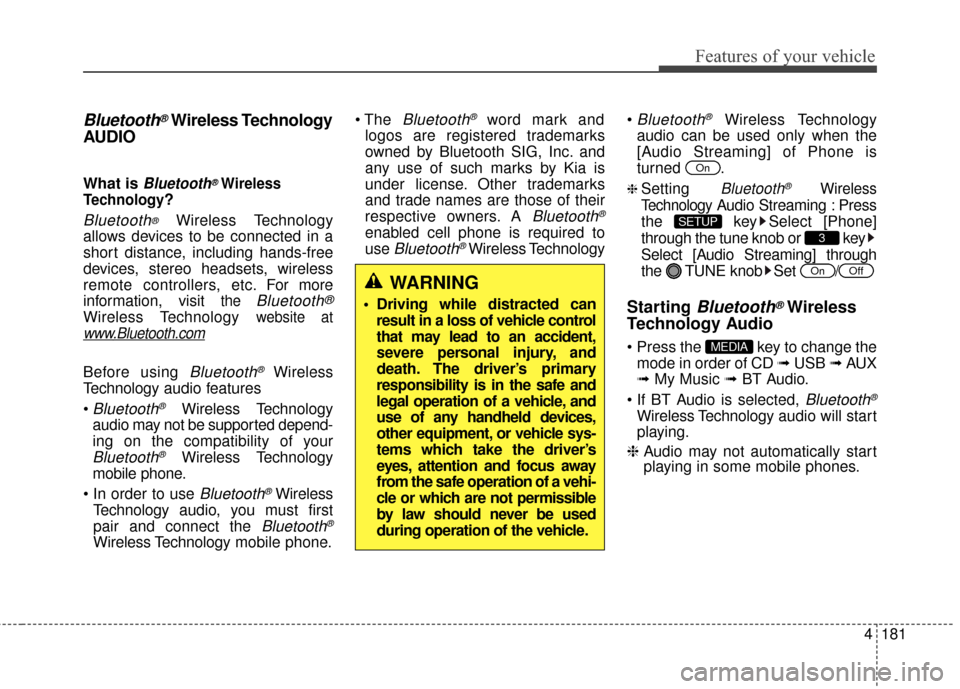
Bluetooth®Wireless Technology
audio can be used only when the
[Audio Streaming] of Phone is
turned .
❈ Setting Bluetooth®Wireless
Technology
Audio Streaming : Press
the key Select [Phone]
through the tune knob or key
Select [Audio Streaming] through
the TUNE knob Set
/
Starting Bluetooth®Wireless
Technology Audio
key to change the
mode in order of CD ➟ USB ➟ AUX
➟ My Music ➟ BT Audio.
Bluetooth®
Wireless Technology audio will start
playing.
❈ Audio may not automatically start
playing in some mobile phones.
MEDIA
OffOn
3
SETUP
On
WARNING
Driving while distracted can
result in a loss of vehicle control
that may lead to an accident,
severe personal injury, and
death. The driver’s primary
responsibility is in the safe and
legal operation of a vehicle, and
use of any handheld devices,
other equipment, or vehicle sys-
tems which take the driver’s
eyes, attention and focus away
from the safe operation of a vehi-
cle or which are not permissible
by law should never be used
during operation of the vehicle.
Page 267 of 452
Features of your vehicle
196
4
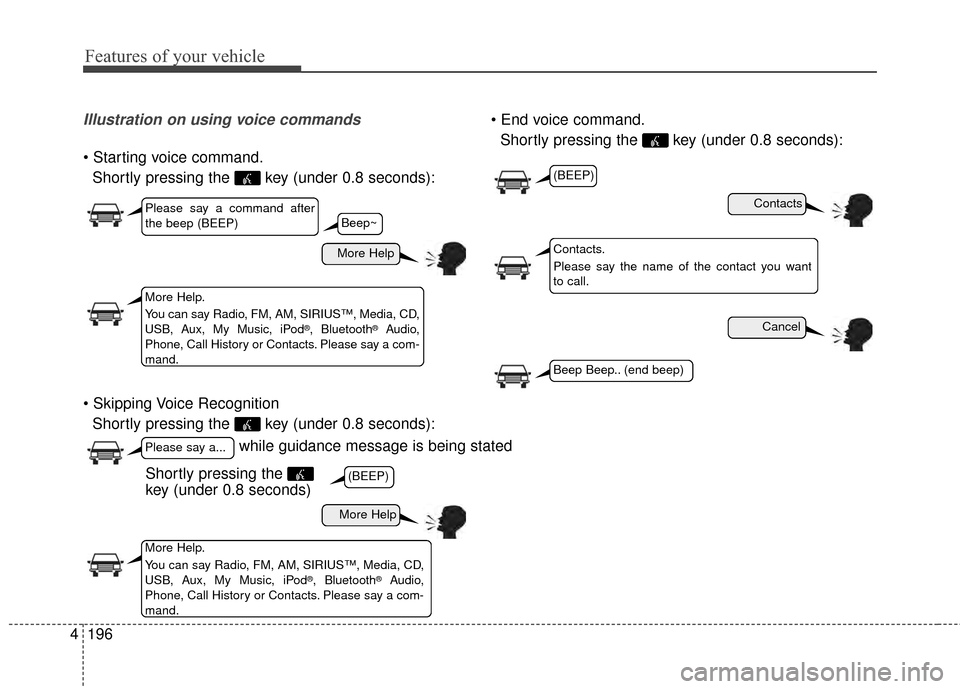
Illustration on using voice commands
Shortly pressing the key (under 0.8 seconds):
Shortly pressing the key (under 0.8 seconds):
Shortly pressing the key (under 0.8 seconds):
while guidance message is being stated
More Help
Contacts
Cancel
More Help
Please say a command after
the beep (BEEP)
Please say a...
More Help.
You can say Radio, FM, AM, SIRIUS™, Media, CD,
USB, Aux, My Music, iPod
®, Bluetooth®Audio,
Phone, Call History or Contacts. Please say a com-
mand.
Contacts.
Please say the name of the contact you want
to call.
More Help.
You can say Radio, FM, AM, SIRIUS™, Media, CD,
USB, Aux, My Music, iPod
®, Bluetooth®Audio,
Phone, Call History or Contacts. Please say a com-
mand.
(BEEP)
(BEEP)
Beep Beep.. (end beep)
Shortly pressing the
key (under 0.8 seconds)
Beep~
Page 269 of 452
Features of your vehicle
198
4
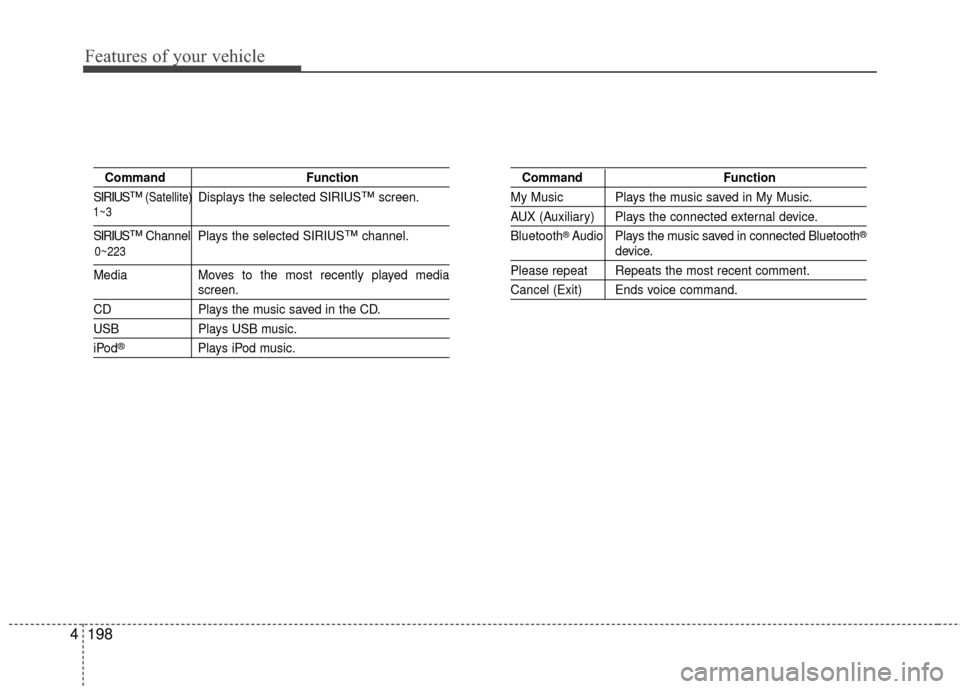
Command Function
SIRIUS
™(Satellite)Displays the selected SIRIUS™screen.
SIRIUS™Channel Plays the selected SIRIUS™channel.
Media Moves to the most recently played mediascreen.
CD Plays the music saved in the CD.
USBPlays USB music.
iPod®Plays iPod music.
Command Function
My Music Plays the music saved in My Music.
AUX (Auxiliary) Plays the connected external device.
Bluetooth
®Audio Plays the music saved in connected Bluetooth®
device.
Please repeat Repeats the most recent comment.
Cancel (Exit) Ends voice command.
0~223
1~3
Page 271 of 452
Features of your vehicle
200
4
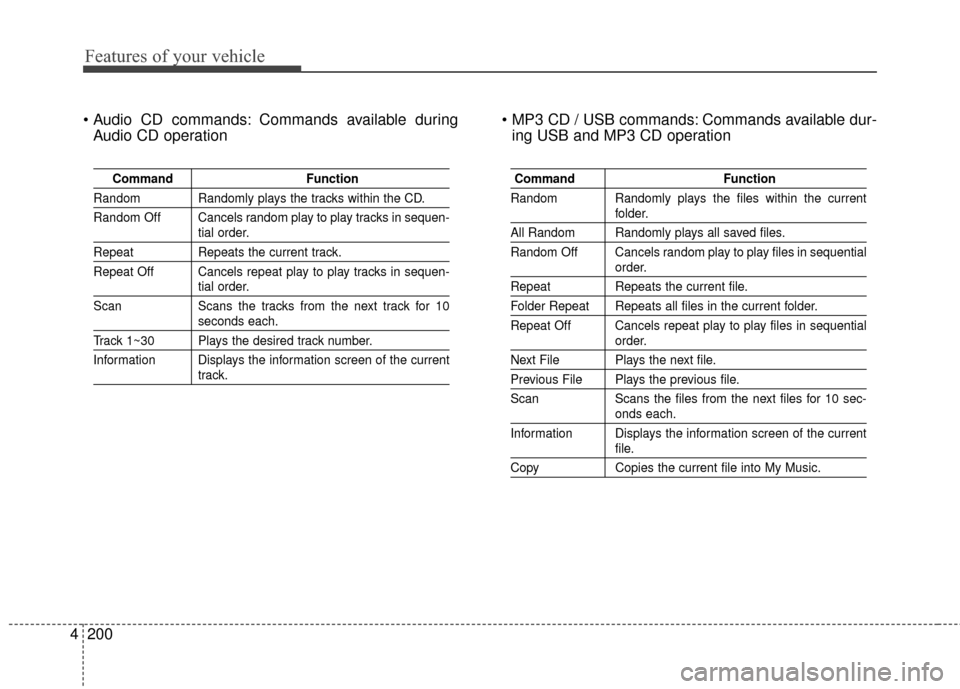
Commands available during
Audio CD operation Commands available dur-
ing USB and MP3 CD operation
Command Function
Random Randomly plays the tracks within the CD.
Random Off Cancels random play to play tracks in sequen-
tial order.
RepeatRepeats the current track.
Repeat Off Cancels repeat play to play tracks in sequen-
tial order.
Scan Scans the tracks from the next track for 10
seconds each.
Track 1~30 Plays the desired track number.
Information Displays the information screen of the current
track.
Command Function
Random Randomly plays the files within the current
folder.
All Random Randomly plays all saved files.
Random Off Cancels random play to play files in sequential
order.
Repeat Repeats the current file.
Folder Repeat Repeats all files in the current folder.
Repeat Off Cancels repeat play to play files in sequential
order.
Next File Plays the next file.
Previous File Plays the previous file.
Scan Scans the files from the next files for 10 sec-
onds each.
Information Displays the information screen of the current
file.
Copy Copies the current file into My Music.
Page 446 of 452
Index
2I
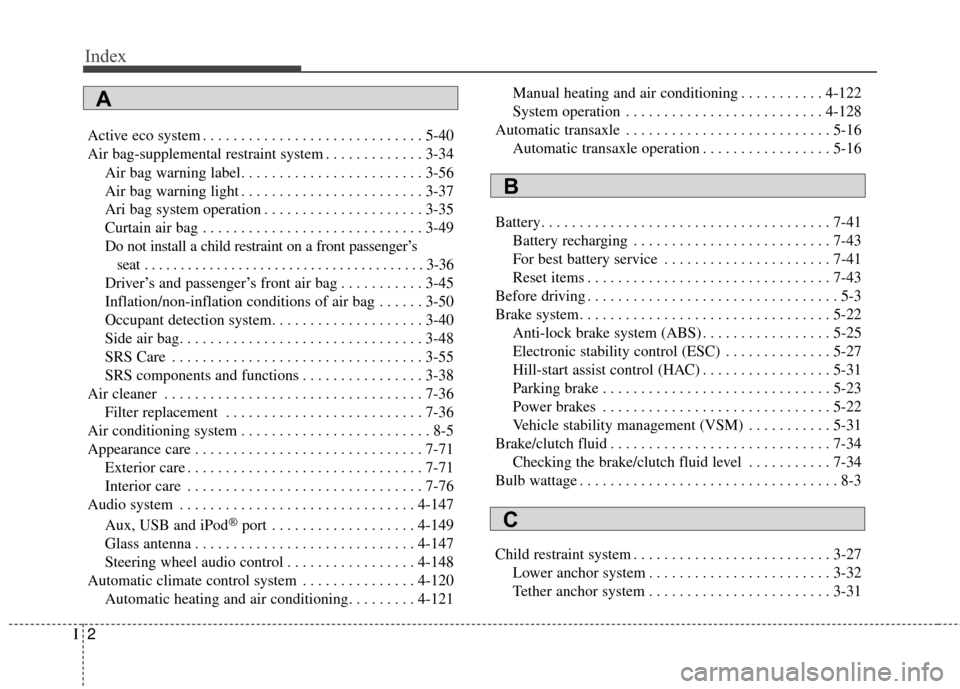
Active eco system . . . . . . . . . . . . . . . . . . . . . . . . . . . . . 5-40
Air bag-supplemental restraint system . . . . . . . . . . . . . 3-34Air bag warning label. . . . . . . . . . . . . . . . . . . . . . . . 3-56
Air bag warning light . . . . . . . . . . . . . . . . . . . . . . . . 3-37
Ari bag system operation . . . . . . . . . . . . . . . . . . . . . 3-35
Curtain air bag . . . . . . . . . . . . . . . . . . . . . . . . . . . . . 3-49
Do not install a child restraint on a front passenger’sseat . . . . . . . . . . . . . . . . . . . . . . . . . . . . . . . . . . . . \
. . . 3-36
Driver’s and passenger’s front air bag . . . . . . . . . . . 3-45
Inflation/non-inflation conditions of air bag . . . . . . 3-50
Occupant detection system. . . . . . . . . . . . . . . . . . . . 3-40
Side air bag. . . . . . . . . . . . . . . . . . . . . . . . . . . . . . . . 3-48
SRS Care . . . . . . . . . . . . . . . . . . . . . . . . . . . . . . . . . 3-55
SRS components and functions . . . . . . . . . . . . . . . . 3-38
Air cleaner . . . . . . . . . . . . . . . . . . . . . . . . . . . . . . . . . . 7-36\
Filter replacement . . . . . . . . . . . . . . . . . . . . . . . . . . 7-36
Air conditioning system . . . . . . . . . . . . . . . . . . . . . . . . . 8-5
Appearance care . . . . . . . . . . . . . . . . . . . . . . . . . . . . . . 7-71 Exterior care . . . . . . . . . . . . . . . . . . . . . . . . . . . . . . . 7-71
Interior care . . . . . . . . . . . . . . . . . . . . . . . . . . . . . . . 7-76
Audio system . . . . . . . . . . . . . . . . . . . . . . . . . . . . . . . 4-147
Aux, USB and iPod
®port . . . . . . . . . . . . . . . . . . . 4-149
Glass antenna . . . . . . . . . . . . . . . . . . . . . . . . . . . . . 4-147
Steering wheel audio control . . . . . . . . . . . . . . . . . 4-148
Automatic climate control system . . . . . . . . . . . . . . . 4-120 Automatic heating and air conditioning. . . . . . . . . 4-121 Manual heating and air conditioning . . . . . . . . . . . 4-122
System operation . . . . . . . . . . . . . . . . . . . . . . . . . . 4-128
Automatic transaxle . . . . . . . . . . . . . . . . . . . . . . . . . . . 5-16 Automatic transaxle operation . . . . . . . . . . . . . . . . . 5-16
Battery. . . . . . . . . . . . . . . . . . . . . . . . . . . . . . . . . . . . \
. . 7-41 Battery recharging . . . . . . . . . . . . . . . . . . . . . . . . . . 7-43
For best battery service . . . . . . . . . . . . . . . . . . . . . . 7-41
Reset items . . . . . . . . . . . . . . . . . . . . . . . . . . . . . . . . 7-43
Before driving . . . . . . . . . . . . . . . . . . . . . . . . . . . . . . . . . 5-3
Brake system. . . . . . . . . . . . . . . . . . . . . . . . . . . . . . . . . 5-22 Anti-lock brake system (ABS) . . . . . . . . . . . . . . . . . 5-25
Electronic stability control (ESC) . . . . . . . . . . . . . . 5-27
Hill-start assist control (HAC) . . . . . . . . . . . . . . . . . 5-31
Parking brake . . . . . . . . . . . . . . . . . . . . . . . . . . . . . . 5-23
Power brakes . . . . . . . . . . . . . . . . . . . . . . . . . . . . . . 5-22
Vehicle stability management (VSM) . . . . . . . . . . . 5-31
Brake/clutch fluid . . . . . . . . . . . . . . . . . . . . . . . . . . . . . 7-34 Checking the brake/clutch fluid level . . . . . . . . . . . 7-34
Bulb wattage . . . . . . . . . . . . . . . . . . . . . . . . . . . . . . . . . . 8-3
Child restraint system . . . . . . . . . . . . . . . . . . . . . . . . . . 3-27 Lower anchor system . . . . . . . . . . . . . . . . . . . . . . . . 3-32
Tether anchor system . . . . . . . . . . . . . . . . . . . . . . . . 3-31
A
B
C