wheel KIA Forte 2015 2.G User Guide
[x] Cancel search | Manufacturer: KIA, Model Year: 2015, Model line: Forte, Model: KIA Forte 2015 2.GPages: 452, PDF Size: 7.85 MB
Page 63 of 452
Safety features of your vehicle
48
3
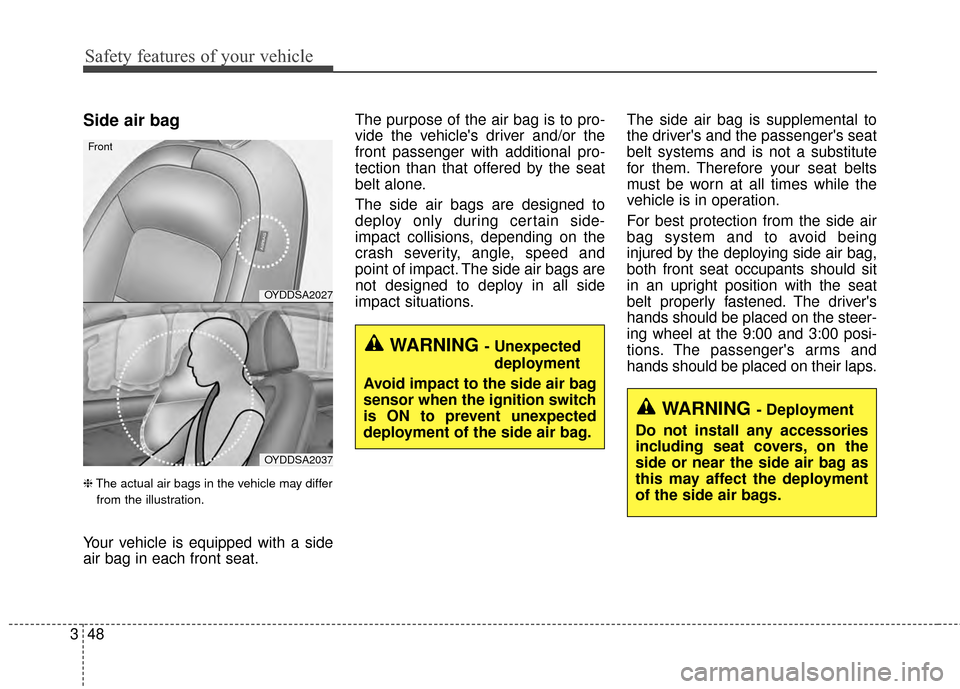
Side air bag
❈ The actual air bags in the vehicle may differ
from the illustration.
Your vehicle is equipped with a side
air bag in each front seat. The purpose of the air bag is to pro-
vide the vehicle's driver and/or the
front passenger with additional pro-
tection than that offered by the seat
belt alone.
The side air bags are designed to
deploy only during certain side-
impact collisions, depending on the
crash severity, angle, speed and
point of impact. The side air bags are
not designed to deploy in all side
impact situations.
The side air bag is supplemental to
the driver's and the passenger's seat
belt systems and is not a substitute
for them. Therefore your seat belts
must be worn at all times while the
vehicle is in operation.
For best protection from the side air
bag system and to avoid being
injured by the deploying side air bag,
both front seat occupants should sit
in an upright position with the seat
belt properly fastened. The driver's
hands should be placed on the steer-
ing wheel at the 9:00 and 3:00 posi-
tions. The passenger's arms and
hands should be placed on their laps.
WARNING - Unexpected
deployment
Avoid impact to the side air bag
sensor when the ignition switch
is ON to prevent unexpected
deployment of the side air bag.
OYDDSA2027
OYDDSA2037
Front
WARNING - Deployment
Do not install any accessories
including seat covers, on the
side or near the side air bag as
this may affect the deployment
of the side air bags.
Page 70 of 452
355
Safety features of your vehicle
SRS Care
The SRS is virtually maintenance-free
and there are no parts you can safely
service by yourself. If the SRS air bag
warning light does not illuminate, or
continuously remains on, have your
vehicle immediately inspected by an
authorized Kia dealer.
Any work on the SRS system, such
as removing, installing, repairing, or
any work on the steering wheel must
be performed by an authorized Kia
dealer. Improper handling of the SRS
system may result in serious person-
al injury.
For cleaning the air bag pad covers,
use only a soft, dry cloth or one
which has been moistened with plain
water. Solvents or cleaners could
adversely affect the air bag covers
and proper deployment of the sys-
tem.If components of the air bag system
must be discarded, or if the vehicle
must be scrapped, certain safety
precautions must be observed. An
authorized Kia dealer knows these
precautions and can give you the
necessary information. Failure to fol-
low these precautions and proce-
dures could increase the risk of per-
sonal injury.
Adding equipment to or modi-
fying your air bag-equipped
vehicle
If you modify your vehicle by chang-
ing your vehicle's frame, bumper sys-
tem, front end or side sheet metal or
ride height, this may affect the oper-
ation of your vehicle's air bag sys-
tem.
WARNING - Tampering
with SRS
Do not tamper with or discon-
nect SRS wiring, or other com-
ponents of the SRS system.
Doing so could result in the
accidental inflation of the air
bags or by rendering the SRS
inoperative.
Page 72 of 452

Features of your vehicle
Keys . . . . . . . . . . . . . . . . . . . . . . . . . . . . . . . . . . . . \
. . 4-4
• Record your key number . . . . . . . . . . . . . . . . . . . . . . . 4-4
. . . . . . . . . . . . . . . . . . . . . . . . . . . . . . . . 4-4
Smart key . . . . . . . . . . . . . . . . . . . . . . . . . . . . . . . . . 4-6
. . . . . . . . . . . . . . . . . . . . . . . . . . . . 4-6
. . . . . . . . . . . . . . . . . . . . . . . . . . . . . . . . . . . 4-\
7
Remote keyless entry . . . . . . . . . . . . . . . . . . . . . . . . 4-9
. . . . . . . . . . . 4-9
. . . . . . . . . . . . . . . . . . . . . . . 4-10
. . . . . . . . . . . . . . . . . . . . . . . . . . 4-11
. . . . . . . . . . . . . . . . . . . . . . . . . . 4-12
Theft-alarm system . . . . . . . . . . . . . . . . . . . . . . . . 4-15
. . . . . . . . . . . . . . . . . . . . . . . . . . . . . . . . . 4-15
. . . . . . . . . . . . . . . . . . . . . . . . . . . . 4-16
Door locks . . . . . . . . . . . . . . . . . . . . . . . . . . . . . . . . 4-18
. . . . . . . . . . . . . . . . . . . . . . . . . . . . . . . . 4-18
. . . . . . . . . . . . . . . . . . . . . . . . . . . . . . . . . 4-18
. . . . . . . . . . . . . . 4-20
. . . . . . . . . . . . . . . . . . 4-20
. . . . . . . . . . . . . . . . . 4-21
. . . . . . . . . . . . . . . . . 4-21
Trunk . . . . . . . . . . . . . . . . . . . . . . . . . . . . . . . . . . . . \
4-22
. . . . . . . . . . . . . . . . . . . . . . . . . . . . 4-22
. . . . . . . . . . . . . . . . . . . . . . . . . . . . . 4-23 . . . . . . . . . . . . . . . . . 4-23
Windows . . . . . . . . . . . . . . . . . . . . . . . . . . . . . . . . . 4-27
. . . . . . . . . . . . . . . . . . . . . . . . . . . . . . 4-28
Hood. . . . . . . . . . . . . . . . . . . . . . . . . . . . . . . . . . . . \
. 4-32
. . . . . . . . . . . . . . . . . . . . . . . . . . . . 4-32
. . . . . . . . . . . . . . . . . . . . . . . . . . . . . 4-32
Fuel filler lid . . . . . . . . . . . . . . . . . . . . . . . . . . . . . . 4-34
. . . . . . . . . . . . . . . . . . . . . . 4-34
. . . . . . . . . . . . . . . . . . . . . . . 4-34
Sunroof . . . . . . . . . . . . . . . . . . . . . . . . . . . . . . . . . . 4-37\
. . . . . . . . . . . . . . . . . . . . . . . . . . . 4-38
. . . . . . . . . . . . . . . . . . . . . . . . . . . . 4-39
. . . . . . . . . . . . . . . . . . . . . . . . . . . . . . . . . . . 4-\
39
. . . . . . . . . . . . . . . . . . . . . . . . . 4-40
Steering wheel . . . . . . . . . . . . . . . . . . . . . . . . . . . . . 4-41
. . . . . . . . . . . . . . . . . . . . . . 4-41
. . . . . . . . . . . . . . . . . . . . . . 4-42
. . . . . . . . . . . . . . . . . . . . . . . . . . . . . . . . . . . . \
. . . 4-42
. . . . . . . . . . . . . . . . . . . . . . . . . 4-43
. . . . . . . . . . . . . . . . . . . . . . . . . . . . . . . 4-43
Mirrors . . . . . . . . . . . . . . . . . . . . . . . . . . . . . . . . . . 4-46\
. . . . . . . . . . . . . . . . . . . . . . . . 4-46
. . . . . . . . . . . . . . . . . . . . . . . 4-51
4
Page 112 of 452
441
Features of your vehicle
Electric power steering (EPS)
Power steering uses the motor to
assist you in steering the vehicle. If
the engine is off or if the power steer-
ing system becomes inoperative, the
vehicle may still be steered, but it will
require increased steering effort.
The motor driven power steering is
controlled by the power steering con-
trol unit which senses the steering
wheel torque and vehicle speed to
command the motor.
The steering wheel becomes heavier
as the vehicle’s speed increases and
becomes lighter as the vehicle’s
speed decreases for better control of
the steering wheel.
Should you notice any change in the
effort required to steer during normal
vehicle operation, have the power
steering checked by an authorized
Kia dealer.
✽ ✽NOTICE
The following symptoms may occur
during normal vehicle operation:
• The steering effort is increased
immediately after turning the igni-
tion switch on. This happens as the
system performs the EPS system
diagnostics. When the diagnostics
are completed, the steering wheel
will return to its normal condition
• A click noise may be heard from the EPS relay after the ignition
switch is turned to the ON or
LOCK position.
• Motor noise may be heard when the vehicle is at a stop or at a low
driving speed.
• The steering effort increases if the steering wheel is rotated continu-
ously when the vehicle is not in
motion. However, after a few min-
utes, it will return to its normal
condition.
• When you operate the steering wheel in low temperature, noise
may occur. If the temperature
rises, the noise will likely disap-
pear. This is a normal condition. (Continued)(Continued)
• When the charging system warn-
ing light comes on or the battery
voltage is low (when the alternator
or battery does not operate nor-
mally), the steering wheel may get
heavy and become difficult to con-
trol operate abnormally.
If the Electric Power Steering System
does not operate normally, the warn-
ing light will illuminate on the instru-
ment cluster. The steering wheel may
require increased steering effort.
Take your vehicle to an authorized
Kia dealer and have the vehicle
checked as soon as possible.
STEERING WHEEL
Page 113 of 452
Features of your vehicle
42
4
Tilt and telescoping steering
Tilt steering allows you to adjust the
steering wheel before you drive. You
can also raise it to give your legs
more room when you exit and enter
the vehicle.
The steering wheel should be posi-
tioned so that it is comfortable for
you to drive, while permitting you to
see the instrument panel warning
lights and gauges.
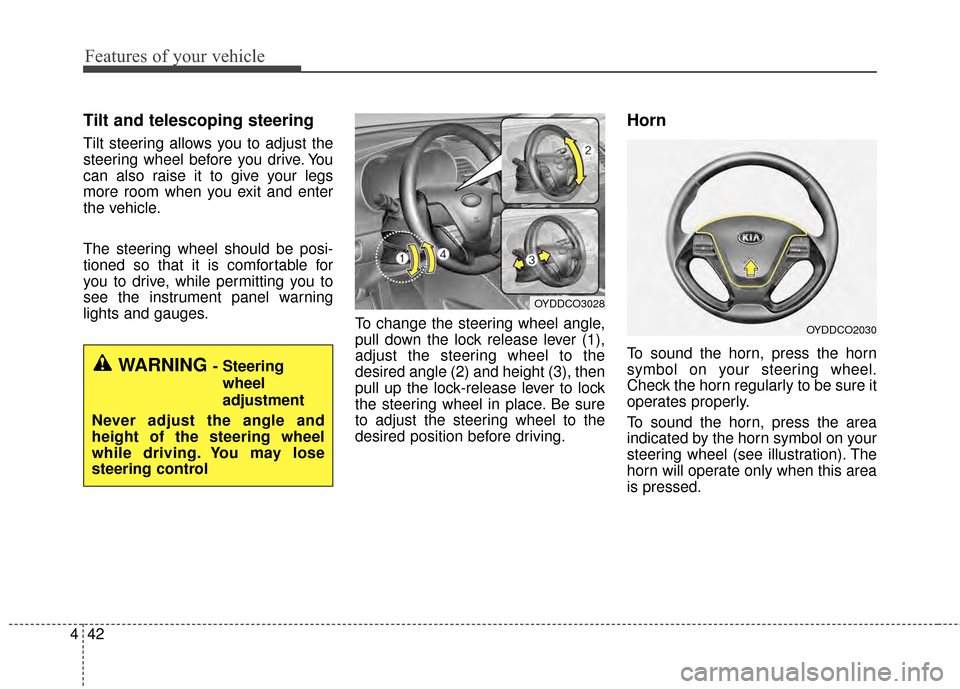
To change the steering wheel angle,
pull down the lock release lever (1),
adjust the steering wheel to the
desired angle (2) and height (3), then
pull up the lock-release lever to lock
the steering wheel in place. Be sure
to adjust the steering wheel to the
desired position before driving.
Horn
To sound the horn, press the horn
symbol on your steering wheel.
Check the horn regularly to be sure it
operates properly.
To sound the horn, press the area
indicated by the horn symbol on your
steering wheel (see illustration). The
horn will operate only when this area
is pressed.WARNING - Steering
wheel
adjustment
Never adjust the angle and
height of the steering wheel
while driving. You may lose
steering control
OYDDCO3028
OYDDCO2030
Page 114 of 452
443
Features of your vehicle
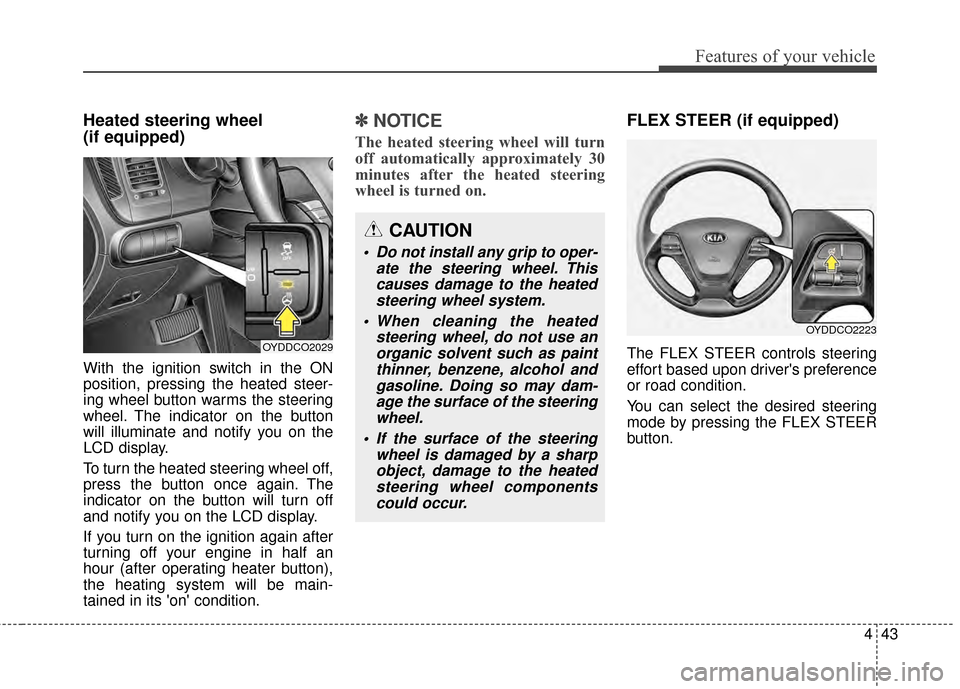
Heated steering wheel
(if equipped)
With the ignition switch in the ON
position, pressing the heated steer-
ing wheel button warms the steering
wheel. The indicator on the button
will illuminate and notify you on the
LCD display.
To turn the heated steering wheel off,
press the button once again. The
indicator on the button will turn off
and notify you on the LCD display.
If you turn on the ignition again after
turning off your engine in half an
hour (after operating heater button),
the heating system will be main-
tained in its 'on' condition.
✽ ✽NOTICE
The heated steering wheel will turn
off automatically approximately 30
minutes after the heated steering
wheel is turned on.
FLEX STEER (if equipped)
The FLEX STEER controls steering
effort based upon driver's preference
or road condition.
You can select the desired steering
mode by pressing the FLEX STEER
button.
CAUTION
Do not install any grip to oper-
ate the steering wheel. Thiscauses damage to the heatedsteering wheel system.
When cleaning the heated steering wheel, do not use anorganic solvent such as paintthinner, benzene, alcohol andgasoline. Doing so may dam-age the surface of the steeringwheel.
If the surface of the steering wheel is damaged by a sharpobject, damage to the heatedsteering wheel componentscould occur.
OYDDCO2029
OYDDCO2223
Page 115 of 452
Features of your vehicle
44
4
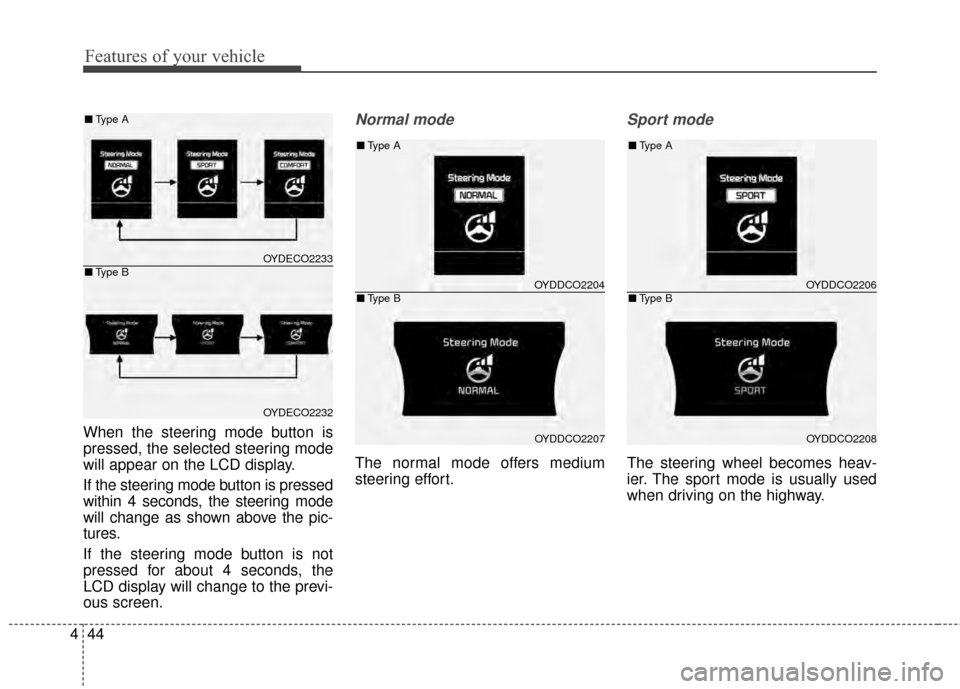
When the steering mode button is
pressed, the selected steering mode
will appear on the LCD display.
If the steering mode button is pressed
within 4 seconds, the steering mode
will change as shown above the pic-
tures.
If the steering mode button is not
pressed for about 4 seconds, the
LCD display will change to the previ-
ous screen.
Normal mode
The normal mode offers medium
steering effort.
Sport mode
The steering wheel becomes heav-
ier. The sport mode is usually used
when driving on the highway.
OYDDCO2204
OYDDCO2207
■ Type A
■Type B
OYDECO2233
OYDECO2232
■Type A
■Type BOYDDCO2206
OYDDCO2208
■Type A
■Type B
Page 116 of 452
445
Features of your vehicle
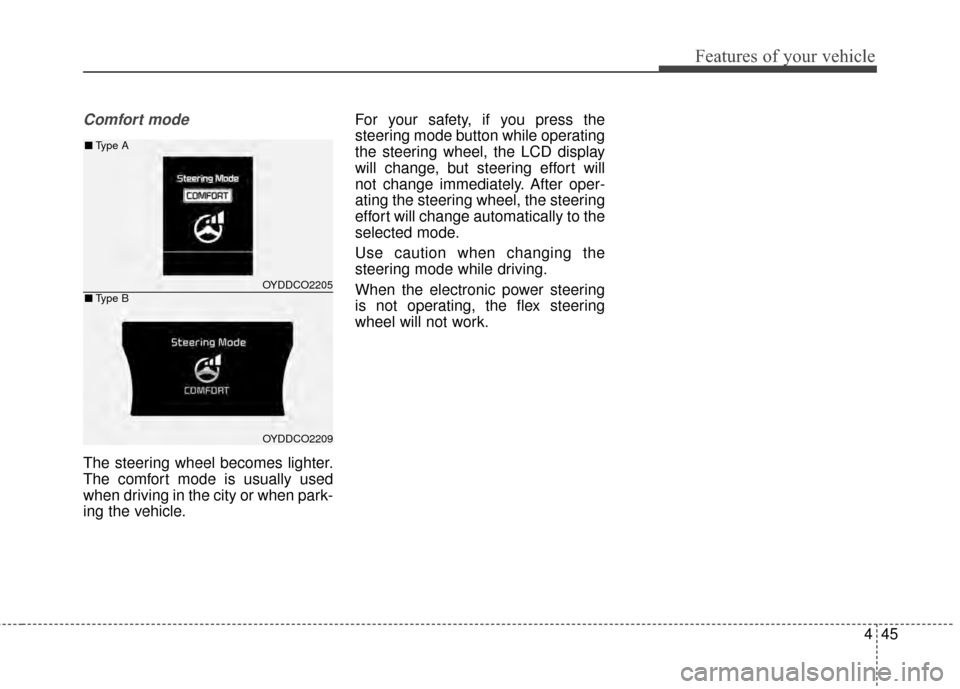
Comfort mode
The steering wheel becomes lighter.
The comfort mode is usually used
when driving in the city or when park-
ing the vehicle.For your safety, if you press the
steering mode button while operating
the steering wheel, the LCD display
will change, but steering effort will
not change immediately. After oper-
ating the steering wheel, the steering
effort will change automatically to the
selected mode.
Use caution when changing the
steering mode while driving.
When the electronic power steering
is not operating, the flex steering
wheel will not work.
OYDDCO2205
OYDDCO2209
■
Type A
■Type B
Page 128 of 452
![KIA Forte 2015 2.G User Guide 457
Features of your vehicle
LCD Display Control
The LCD display modes can be
changed by using the control buttons
on the steering wheel.
[Type A]
(1) TRIP : TRIP button for changingtrip modes
(2) RES](/img/2/2961/w960_2961-127.png "KIA Forte 2015 2.G User Guide 457
Features of your vehicle
LCD Display Control
The LCD display modes can be
changed by using the control buttons
on the steering wheel.
[Type A]
(1) TRIP : TRIP button for changingtrip modes
(2) RES")
457
Features of your vehicle
LCD Display Control
The LCD display modes can be
changed by using the control buttons
on the steering wheel.
[Type A]
(1) TRIP : TRIP button for changingtrip modes
(2) RESET : RESET button for reset- ting items [Type B]
(1) : MODE button for changing
modes
(2) : MOVE button for changing items
(3) : SELECT/RESET button for setting or resetting the
selected item
❈ For the LCD modes, refer to "LCD
Display" in this chapter.
Gauges
Speedometer
The speedometer indicates the for-
ward speed of the vehicle.
The speedometer is calibrated in
kilometers per hour and/or miles per
hour.
OYDDDI2018OYDEDI2003L
OYDEDI2004L
■Type A, B
■ Type C
■Type A
■Type B
Page 138 of 452
467
Features of your vehicle
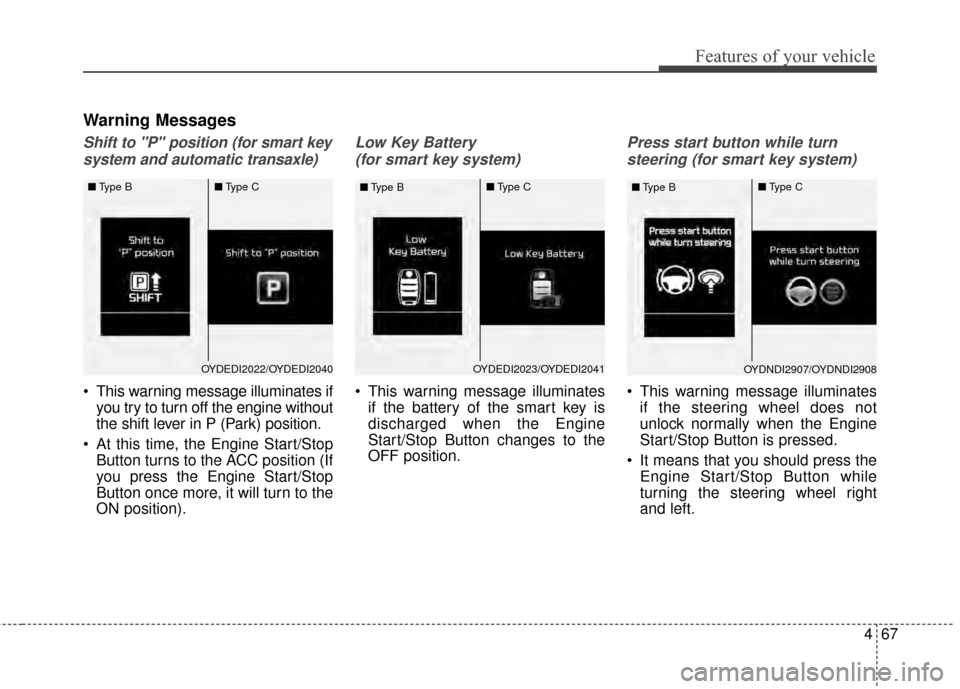
Warning Messages
Shift to "P" position (for smart keysystem and automatic transaxle)
This warning message illuminates if you try to turn off the engine without
the shift lever in P (Park) position.
At this time, the Engine Start/Stop Button turns to the ACC position (If
you press the Engine Start/Stop
Button once more, it will turn to the
ON position).
Low Key Battery
(for smart key system)
This warning message illuminates if the battery of the smart key is
discharged when the Engine
Start/Stop Button changes to the
OFF position.
Press start button while turn
steering (for smart key system)
This warning message illuminates if the steering wheel does not
unlock normally when the Engine
Start/Stop Button is pressed.
It means that you should press the Engine Start/Stop Button while
turning the steering wheel right
and left.
OYDEDI2023/OYDEDI2041
■
Type B ■
Type COYDNDI2907/OYDNDI2908
■
Type B ■
Type COYDEDI2022/OYDEDI2040
■
Type B ■
Type C