roof KIA FORTE 2017 User Guide
[x] Cancel search | Manufacturer: KIA, Model Year: 2017, Model line: FORTE, Model: KIA FORTE 2017Pages: 595, PDF Size: 11.5 MB
Page 238 of 595
4 166
Features of your vehicle
Voice Recognition
• When using the voice recognition
feature, only commands listed with-
in the user's manual are supported.
• Be aware that during the operation
of the voice recognition system,
pressing any key other than the
key terminate voice recognition
mode.
• For superior voice recognition per-
formance, position the microphone
used for voice recognition above
the head of the driver’s seat and
maintain a proper position when
saying commands.
• Within the following situations,
voice recognition may not function
properly due to external sound.
- When the windows and sunroof
are open
- When the wind of the cooling /
heating device is strong
- When entering and passing
through tunnels
(Continued)(Continued)
- When driving on rugged and
uneven roads
- During severe rain (heavy rains,
windstorms)
• Phone related voice commands
can be used only when a
Bluetooth®Wireless Technology
device is connected.
• When making calls by stating a
name, the corresponding contact
must be downloaded and stored
within the audio system.
• After downloading the
Bluetooth®
Wireless Technology phone book, it
takes some times to convert the
phone book data into voice infor-
mation. During this time, voice
recognition may not properly oper-
ate.
• Pronounce the voice commands
naturally and clearly as if in a nor-
mal conversation.
Page 252 of 595
4 180
Features of your vehicle
✽NOTICE - Using Voice
Recognition
• When using the voice recognition
feature, only commands listed
within the user's manual are sup-
ported.
• Be aware that during the opera-
tion of the voice recognition sys-
tem, pressing any button other
than the button terminates the
voice recognition mode.
• For optimal voice recognition per-
formance, position your head
below the microphone above the
driver’s seat and maintain proper
position when speaking voice com-
mands.
• Within the following situations,
voice recognition may not function
properly due to external sound.
- When the windows and sunroof
are open
- When the blower AC/heater is
set to high
- When entering and passing
through tunnels
- When driving on rugged and
uneven roads
- During severe rain (heavy rains,
windstorms)
(Continued)(Continued)
• Phone related voice commands can
be used only when a Bluetooth®
Wireless Technology device is con-
nected.
• When making calls by stating a
name, the corresponding contact
must be downloaded and stored
within the audio system.
• After downloading the Bluetooth
®
Wireless Technology phone book,
it takes some times to convert the
phone book data into voice infor-
mation. During this time, voice
recognition may not properly
operate.
• Pronounce the voice commands
naturally and clearly as if in a nor-
mal conversation.
Page 254 of 595
4 182
Features of your vehicle
SiriusXM®Satellite Radio information
Satellite Radio channels:
Enjoy SiriusXM Satellite Radio with a
3-month trial subscription to the
Sirius Select package. You’ll get over
140 channels, including commercial-
free music, plus all your favorite
sports, exclusive talk, entertainment,
and a selection of premium program-
ming. For more information and a
complete list of SiriusXM channels,
visit siriusxm.com in the United
States, siriusxm.ca in Canada, or call
SiriusXM at 1-888-539-7474.
Satellite Radio reception factors:
To receive the satellite signal, your
vehicle has been equipped with a
satellite radio antenna located on the
roof of your vehicle. The vehicle roof
provides the best location for an
unobstructed, open view of the sky, a
requirement of a satellite radio sys-
tem. Like AM/FM, there are several
factors that can affect satellite radio
reception performance:
• Antenna obstructions: For optimal
reception performance, keep the
antenna clear of snow and ice
build-up and keep luggage and
other material as far away from the
anten
na as possible.• Terrain: Hills, mountains, tall build-
ings, bridges, tunnels, freeway
overpasses, parking garages,
dense tree foliage and thunder-
storms can interfere with your
reception.
SiriusXM Satellite Radio service:
SiriusXM is a subscription-based
satellite radio service that broad-
casts music, sports, news and enter-
tainment programming to radio
receivers, which are available for
installation in motor vehicles or facto-
ry installed, as well as for the home,
portable and wireless devices, and
through an Internet connection on a
personal computer.
Vehicles that are equipped with a
factory installed SiriusXM Satellite
Radio system include:
• Hardware and an introductory trial
subscription term, which begins on
the date of sale or lease of the
vehicle.
• For a small upgrade fee, access to
SiriusXM music channels, and
other select channels over the
Internet using any computer con-
nected to the Internet (U.S. cus-
tomers only).For information on extended sub-
scription terms, contact SiriusXM at
1-888-539-7474.
NOTE:
SiriusXM services require a sub-
scription sold separately, or as a
package, by Sirius XM Radio Inc. If
you decide to continue service
after your trial, the subscription
plan you choose will automatical-
ly renew thereafter and you will be
charged according to your chosen
payment method at then-current
rates. Fees and taxes apply. To
cancel you must call SiriusXM at
1-866-635-2349. See SiriusXM
Customer Agreement for com-
plete terms at www.siriusxm.com.
SiriusXM U.S. satellite and data
services are available only in the
48 contiguous states, DC and
Puerto Rico (with coverage limita-
tions). SiriusXM satellite service is
also available in Canada; see
www.siriusxm. ca. All fees and
programming subject to change.
Sirius, XM and all related marks
and logos are trademarks of Sirius
XM Radio Inc.
Page 298 of 595
4 226
Features of your vehicle
✽NOTICE - Using Voice
Recognition
• When using the voice recognition
feature, only commands listed
within the user's manual are sup-
ported.
• Be aware that during the opera-
tion of the voice recognition sys-
tem, pressing any button other
than the button will terminate
the voice recognition mode.
• For optimal voice recognition per-
formance, position your head
below the microphone above the
driver’s seat and maintain proper
position when speaking voice com-
mands.
• Within the following situations,
voice recognition may not function
properly due to external sound.
- When the windows and sunroof
are open
- When the blower AC/heater is
set to high
- When entering and passing
through tunnels
- When driving on rugged and
uneven roads
- During severe rain (heavy rains,
windstorms)
(Continued)(Continued)
• Phone related voice commands can
be used only when a Bluetooth®
Wireless Technology device is con-
nected.
• When making calls by stating a
name, the corresponding contact
must be downloaded and stored
within the audio system.
• After downloading the Bluetooth
®
Wireless Technology phone book,
it takes some time to convert the
phone book data into voice infor-
mation. During this time, voice
recognition may not properly
operate.
• Pronounce the voice commands
naturally and clearly as if in a nor-
mal conversation..
Page 301 of 595
229 4
Features of your vehicle
SiriusXM®Satellite Radio information
Satellite Radio channels:
Enjoy SiriusXM Satellite Radio with a 3-
month trial subscription to the Sirius
Select package. You’ll get over 140 chan-
nels, including commercial-free music,
plus all your favorite sports, exclusive
talk, entertainment, and a selection of
premium programming. For more infor-
mation and a complete list of SiriusXM
channels, visit siriusxm.com in the United
States, siriusxm.ca in Canada, or call
SiriusXM at 1-888-539-7474.
Satellite Radio reception factors:
To receive the satellite signal, your vehi-
cle has been equipped with a satellite
radio antenna located on the roof of
your vehicle. The vehicle roof provides
the best location for an unobstructed,
open view of the sky, a requirement of
a satellite radio system. Like AM/FM,
there are several factors that can affect
satellite radio reception performance:
• Antenna obstructions: For optimal
reception performance, keep the
antenna clear of snow and ice
build-up and keep luggage and
other material as far away from the
antenna as possible.• Terrain: Hills, mountains, tall build-
ings, bridges, tunnels, freeway
overpasses, parking garages,
dense tree foliage and thunder-
storms can interfere with your
reception.
SiriusXM Satellite Radio service:
SiriusXM is a subscription-based
satellite radio service that broad-
casts music, sports, news and enter-
tainment programming to radio
receivers, which are available for
installation in motor vehicles or facto-
ry installed, as well as for the home,
portable and wireless devices, and
through an Internet connection on a
personal computer.
Vehicles that are equipped with a
factory installed SiriusXM Satellite
Radio system include:
• Hardware and an introductory trial
subscription term, which begins on
the date of sale or lease of the vehicle.
• For a small upgrade fee, access to
SiriusXM music channels, and other
select channels over the Internet
using any computer connected to
the Internet (U.S. customers only).For information on extended sub-
scription terms, contact SiriusXM at
1-888-539-7474.
NOTE:
SiriusXM services require a sub-
scription sold separately, or as a
package, by Sirius XM Radio Inc.
If you decide to continue service
after your trial, the subscription
plan you choose will automatical-
ly renew thereafter and you will be
charged according to your chosen
payment method at then-current
rates. Fees and taxes apply. To
cancel you must call SiriusXM at
1-866-635-2349. See SiriusXM
Customer Agreement for com-
plete terms at www.siriusxm.com.
SiriusXM U.S. satellite and data
services are available only in the
48 contiguous states, DC and
Puerto Rico (with coverage limita-
tions). SiriusXM satellite service
is also available in Canada; see
www.siriusxm.ca. All fees and pro-
gramming subject to change.
Sirius, XM and all related marks
and logos are trademarks of Sirius
XM Radio Inc.
Page 471 of 595
79
Maintenance
SCHEDULED MAINTENANCE SERVICE
Follow the Normal Maintenance
Schedule if the vehicle is usually
operated where none of the following
conditions apply. If any of the following
conditions apply, follow the
Maintenance Under Severe Usage
Conditions.
• Repeated driving short distance of
less than 8 km (5 miles) in normal
temperature or less than 16 km (10
miles) in freezing temperature
• Extensive engine idling or low
speed driving for long distances
• Driving on rough, dusty, muddy,
unpaved, graveled or salt-spread
roads
• Driving in areas using salt or other
corrosive materials or in very cold
weather
• Driving in heavy dust condition
• Driving in heavy traffic area
• Driving on uphill, downhill, or
mountain road repeatedly• Towing a trailer or using a camper,
or roof rack
• Driving as a patrol car, taxi, other
commercial use of vehicle towing
• Driving over 107 km/h (106 mph)
• Frequently driving in stop-and-go
conditionIf your vehicle is operated under the
above conditions, you should
inspect, replace or refill more fre-
quently than the following Normal
Maintenance Schedule. After 120
months or 240,000 km (150,000
miles) continue to follow the pre-
scribed maintenance intervals.
Page 493 of 595
731
Maintenance
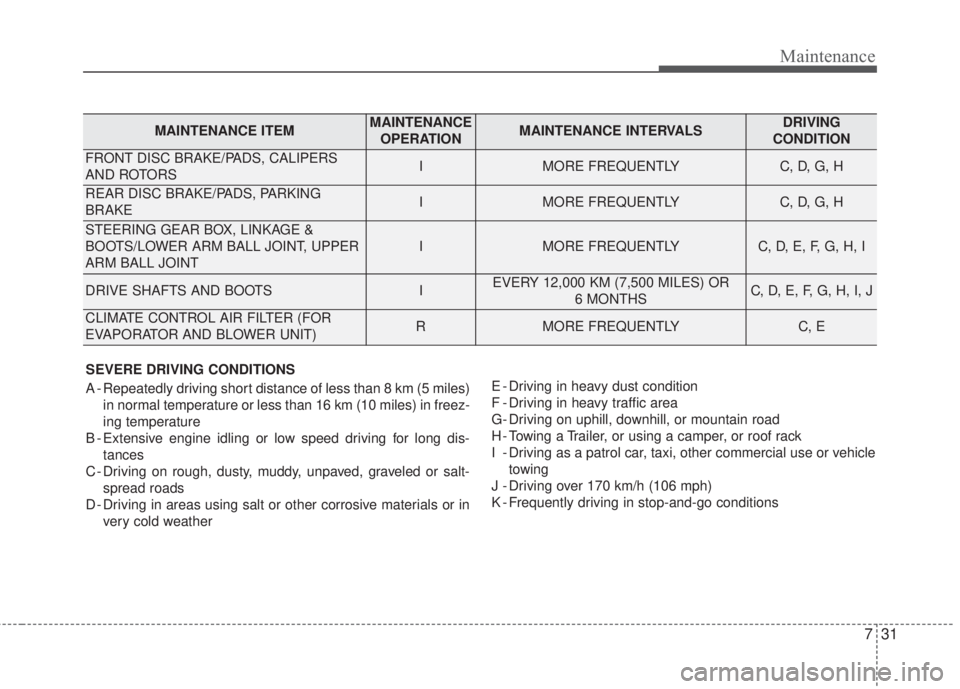
SEVERE DRIVING CONDITIONS
A - Repeatedly driving short distance of less than 8 km (5 miles)
in normal temperature or less than 16 km (10 miles) in freez-
ing temperature
B - Extensive engine idling or low speed driving for long dis-
tances
C - Driving on rough, dusty, muddy, unpaved, graveled or salt-
spread roads
D - Driving in areas using salt or other corrosive materials or in
very cold weatherE - Driving in heavy dust condition
F - Driving in heavy traffic area
G- Driving on uphill, downhill, or mountain road
H - Towing a Trailer, or using a camper, or roof rack
I - Driving as a patrol car, taxi, other commercial use or vehicle
towing
J - Driving over 170 km/h (106 mph)
K - Frequently driving in stop-and-go conditions
MAINTENANCE ITEMMAINTENANCE
OPERATIONMAINTENANCE INTERVALSDRIVING
CONDITION
FRONT DISC BRAKE/PADS, CALIPERS
AND ROTORSIMORE FREQUENTLYC, D, G, H
REAR DISC BRAKE/PADS, PARKING
BRAKEIMORE FREQUENTLYC, D, G, H
STEERING GEAR BOX, LINKAGE &
BOOTS/LOWER ARM BALL JOINT, UPPER
ARM BALL JOINT
IMORE FREQUENTLYC, D, E, F, G, H, I
DRIVE SHAFTS AND BOOTSIEVERY 12,000 KM (7,500 MILES) OR
6 MONTHSC, D, E, F, G, H, I, J
CLIMATE CONTROL AIR FILTER (FOR
EVAPORATOR AND BLOWER UNIT)RMORE FREQUENTLYC, E
Page 516 of 595
Maintenance
54 7
Battery recharging
Your vehicle has a maintenance-free,
calcium-based battery.
• If the battery becomes discharged
in a short time (because, for exam-
ple, the headlights or interior lights
were left on while the vehicle was
not in use), recharge it by slow
charging (trickle) for 10 hours.
• If the battery gradually discharges
because of high electric load while
the vehicle is being used, recharge
it at 20-30A for two hours.When recharging the battery,
observe the following precautions:
• The battery must be removed from
the vehicle and placed in an area
with good ventilation.
• Watch the battery during charging,
and stop or reduce the charging
rate if the battery cells begin
gassing (boiling) violently or if the
temperature of the electrolyte of
any cell exceeds 49°C (120°F).
• Wear eye protection when check-
ing the battery during charging.
• Disconnect the battery charger in
the following order.
1. Turn off the battery charger main
switch.
2. Unhook the negative clamp from
the negative battery terminal.
3. Unhook the positive clamp from
the positive battery terminal.
• Before performing maintenance or
recharging the battery, turn off all
accessories and stop the engine.
• The negative battery cable must be
removed first and installed last
when the battery is disconnected.
Reset items
Items should be reset after the bat-
tery has been discharged or the bat-
tery has been disconnected.
• Auto down window (See chapter 4)
• Sunroof (See chapter 4)
• Trip computer (See chapter 4)
• Climate control system
(See chapter 4)
• Clock (See chapter 4)
• Audio (See chapter 4)
Page 527 of 595
765
Maintenance
Intended Outboard Sidewall:The
side of an asymmetrical tire, that
must always face outward when
mounted on a vehicle.
Kilopascal (kPa):The metric unit for
air pressure.
Light truck (LT) tire:A tire designat-
ed by its manufacturer as primarily
intended for use on lightweight trucks
or multipurpose passenger vehicles.
Load ratings:The maximum load
that a tire is rated to carry for a given
inflation pressure.
Load Index:An assigned number
ranging from 1 to 279 that corre-
sponds to the load carrying capacity
of a tire.
Maximum Inflation Pressure:The
maximum air pressure to which a
cold tire may be inflated. The maxi-
mum air pressure is molded onto the
sidewall.
Maximum Load Rating:The load
rating for a tire at the maximum per-
missible inflation pressure for that tire.Maximum Loaded Vehicle Weight:
The sum of curb weight; accessory
weight; vehicle capacity weight; and
production options weight.
Normal Occupant Weight:The
number of occupants a vehicle is
designed to seat multiplied by 68 kg
(150 pounds).
Occupant Distribution:Designated
seating positions.
Outward Facing Sidewall:The side
of a asymmetrical tire that has a par-
ticular side that faces outward when
mounted on a vehicle. The outward
facing sidewall bears white lettering
or bears manufacturer, brand, and/or
model name molding that is higher or
deeper than the same moldings on
the inner facing sidewall.
Passenger (P-Metric) Tire:A tire
used on passenger cars and some
light duty trucks and multipurpose
vehicles.
Ply:A layer of rubber-coated parallel
cords.Pneumatic tire:A mechanical
device made of rubber, chemicals,
fabric and steel or other materials,
that, when mounted on an automo-
tive wheel, provides the traction and
contains the gas or fluid that sustains
the load.
Production options weight:The
combined weight of installed regular
production options weighing over 2.3
kg (5 lb.) in excess of the standard
items which they replace, not previ-
ously considered in curb weight or
accessory weight, including heavy
duty brakes, ride levelers, roof rack,
heavy duty battery, and special trim.
Recommended Inflation Pressure:
Vehicle manufacturer's recommend-
ed tire inflation pressure and shown
on the tire placard.
Radial Ply Tire:A pneumatic tire in
which the ply cords that extend to the
beads are laid at 90 degrees to the
centerline of the tread.
Rim:A metal support for a tire and
upon which the tire beads are seated.
Page 539 of 595

777
Maintenance
Instrument panel fuse panel
Fuse Name Fuse rating Circuit Protected
P/SEAT DRV 30A Driver IMS Module, Driver Seat Manual Switch
SPARE 4 25A -
P/WDW RH 25A Smart Junction Block (Power Window RH Relay), Passenger Safety Power Window Module
TRUNK 10A Smart Junction Box (Trunk Relay)
P/WDW LH 25A Smart Junction Block (Power Window LH Relay), Driver Safety Power Window Module
DR LOCK 20A Smart Junction Block (Door Lock Relay, Door Unlock Relay), ICM Relay Box (Two Turn Unlock Relay)
SPARE 3 20A -
POWER OUTLET 1 20A Cigarette Lighter & Power Outlet (Cigarette Lighter)
S/HEATER RR 20A Rear Seat Warmer LH/RH
MODULE 8 10A BCM, Smart Key Control Module
SPARE 2 7.5A -
MODULE 9 15A Driver/Passenger Smart Key Outside Handle, Driver/Passenger Power Outside Handle
MODULE 1 10ASmart Key Control Module, BCM, Digital Clock, Audio, A/V & Navigation Head Unit, Power Outside
Mirror Switch
A/CON 7.5A A/C Control Module, Cluster Ionizer, E/R Junction Block (Blower Relay, GSL PTC Heater Relay)
MODULE 5 7.5ADriver/Passenger Seat Warmer Module, Driver Passenger Air Ventilation Seat Control Module, Rear
Seat Warmer LH/RH, Sunroof
HTD MIRR 10A ECM/PCM, A/C Control Module, Driver/Passenger Power Outside Mirror
INTERIOR LAMP 7.5ATrunk Room Lamp, Glove Box Lamp, Vanity Lamp LH/RH, Room Lamp, Overhead Console Lamp,
Ignition Key ILL. & Door Warning Switch, Luggage Lamp
MODULE 6 7.5A Key Solenoid
PDM 2 7.5A [With Smart Key] Smart Key Control Module [W/O Smart Key] Immobilizer Module
SUNROOF 20ASunroof