door lock KIA FORTE 2017 Owner's Manual
[x] Cancel search | Manufacturer: KIA, Model Year: 2017, Model line: FORTE, Model: KIA FORTE 2017Pages: 595, PDF Size: 11.5 MB
Page 92 of 595
Features of your vehicle
20 4
Child-protector rear door lock
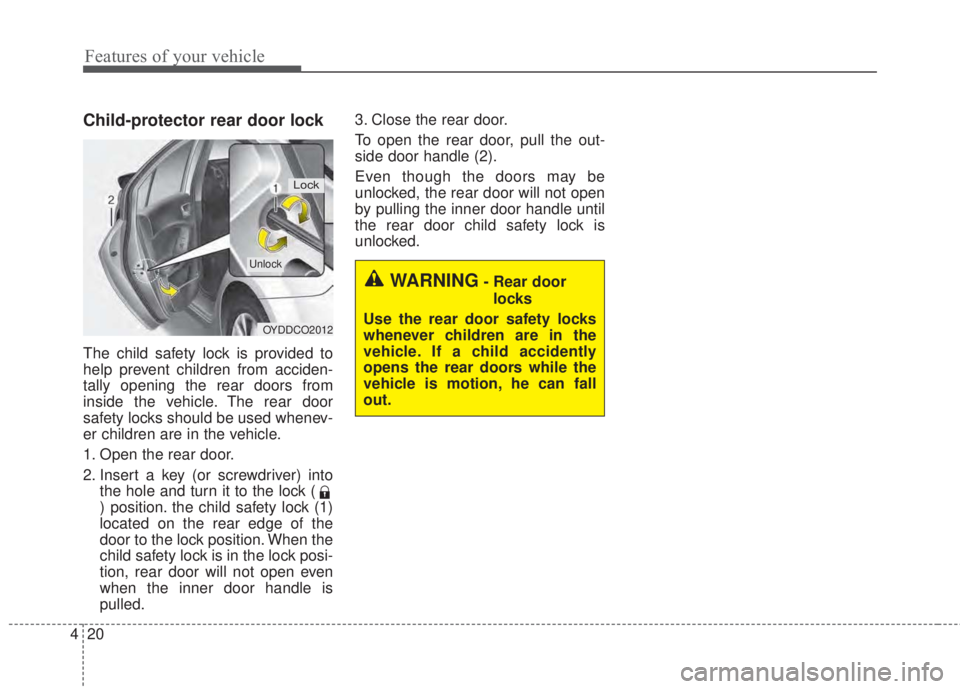
The child safety lock is provided to
help prevent children from acciden-
tally opening the rear doors from
inside the vehicle. The rear door
safety locks should be used whenev-
er children are in the vehicle.
1. Open the rear door.
2. Insert a key (or screwdriver) into
the hole and turn it to the lock (
) position. the child safety lock (1)
located on the rear edge of the
door to the lock position. When the
child safety lock is in the lock posi-
tion, rear door will not open even
when the inner door handle is
pulled.3. Close the rear door.
To open the rear door, pull the out-
side door handle (2).
Even though the doors may be
unlocked, the rear door will not open
by pulling the inner door handle until
the rear door child safety lock is
unlocked.
OYDDCO2012
Lock
Unlock
WARNING- Rear door
locks
Use the rear door safety locks
whenever children are in the
vehicle. If a child accidently
opens the rear doors while the
vehicle is motion, he can fall
out.
Page 93 of 595
421
Features of your vehicle
Opening the trunk
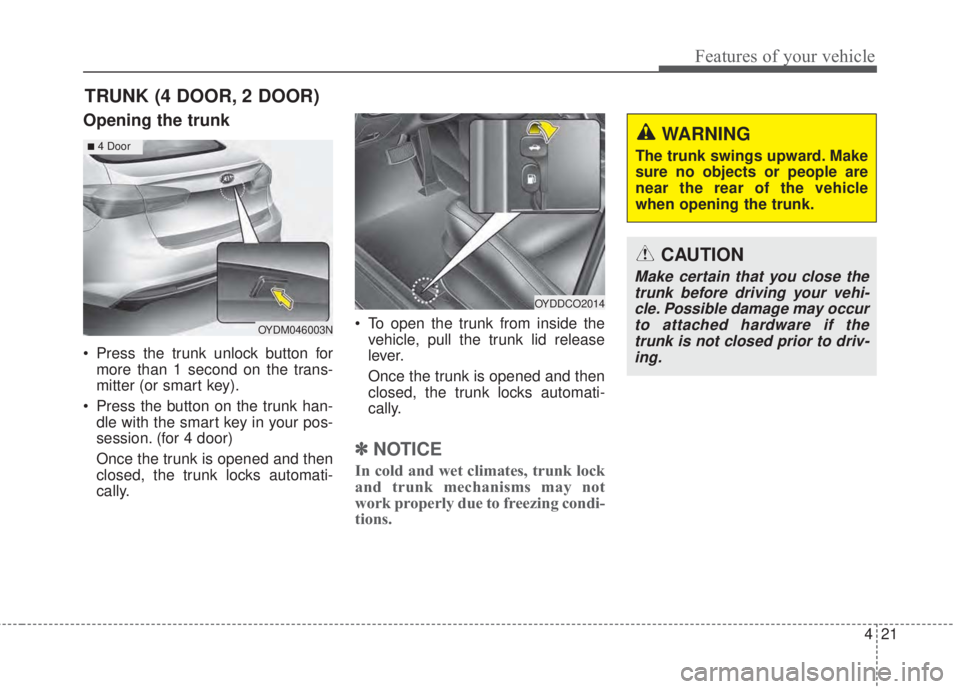
• Press the trunk unlock button for
more than 1 second on the trans-
mitter (or smart key).
• Press the button on the trunk han-
dle with the smart key in your pos-
session. (for 4 door)
Once the trunk is opened and then
closed, the trunk locks automati-
cally.• To open the trunk from inside the
vehicle, pull the trunk lid release
lever.
Once the trunk is opened and then
closed, the trunk locks automati-
cally.
✽NOTICE
In cold and wet climates, trunk lock
and trunk mechanisms may not
work properly due to freezing condi-
tions.
TRUNK (4 DOOR, 2 DOOR)
OYDDCO2014
OYDM046003N
CAUTION
Make certain that you close the
trunk before driving your vehi-
cle. Possible damage may occur
to attached hardware if the
trunk is not closed prior to driv-
ing.
WARNING
The trunk swings upward. Make
sure no objects or people are
near the rear of the vehicle
when opening the trunk.■4 Door
Page 95 of 595
423
Features of your vehicle
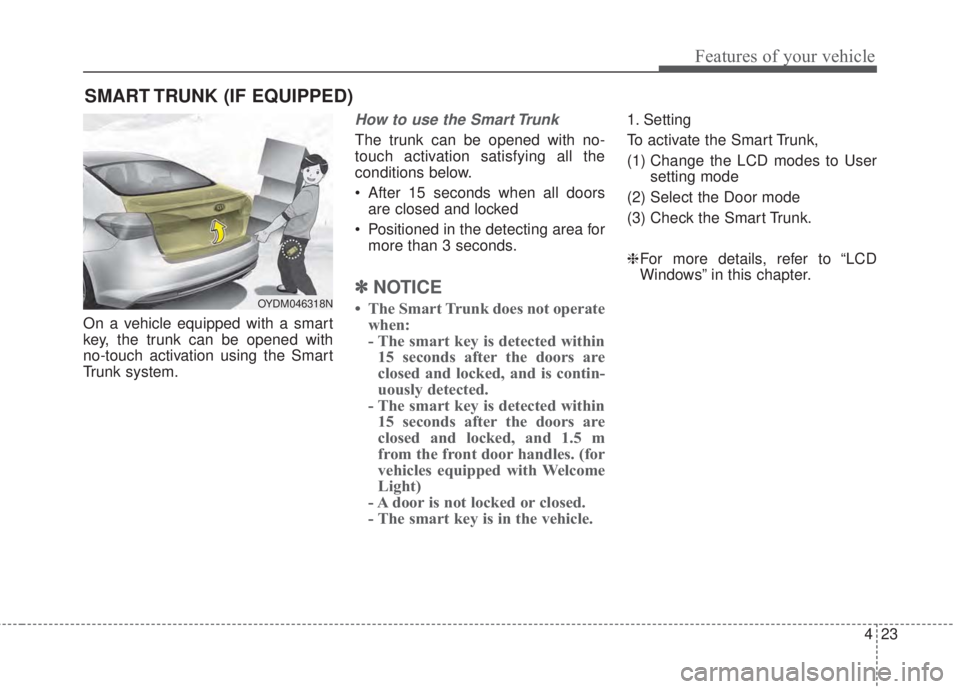
On a vehicle equipped with a smart
key, the trunk can be opened with
no-touch activation using the Smart
Trunk system.
How to use the Smart Trunk
The trunk can be opened with no-
touch activation satisfying all the
conditions below.
• After 15 seconds when all doors
are closed and locked
• Positioned in the detecting area for
more than 3 seconds.
✽NOTICE
• The Smart Trunk does not operate
when:
- The smart key is detected within
15 seconds after the doors are
closed and locked, and is contin-
uously detected.
- The smart key is detected within
15 seconds after the doors are
closed and locked, and 1.5 m
from the front door handles. (for
vehicles equipped with Welcome
Light)
- A door is not locked or closed.
- The smart key is in the vehicle.
1. Setting
To activate the Smart Trunk,
(1) Change the LCD modes to User
setting mode
(2) Select the Door mode
(3) Check the Smart Trunk.
❈For more details, refer to “LCD
Windows” in this chapter.
SMART TRUNK (IF EQUIPPED)
OYDM046318N
Page 97 of 595
425
Features of your vehicle
How to deactivate the Smart Trunk
function using the smart key
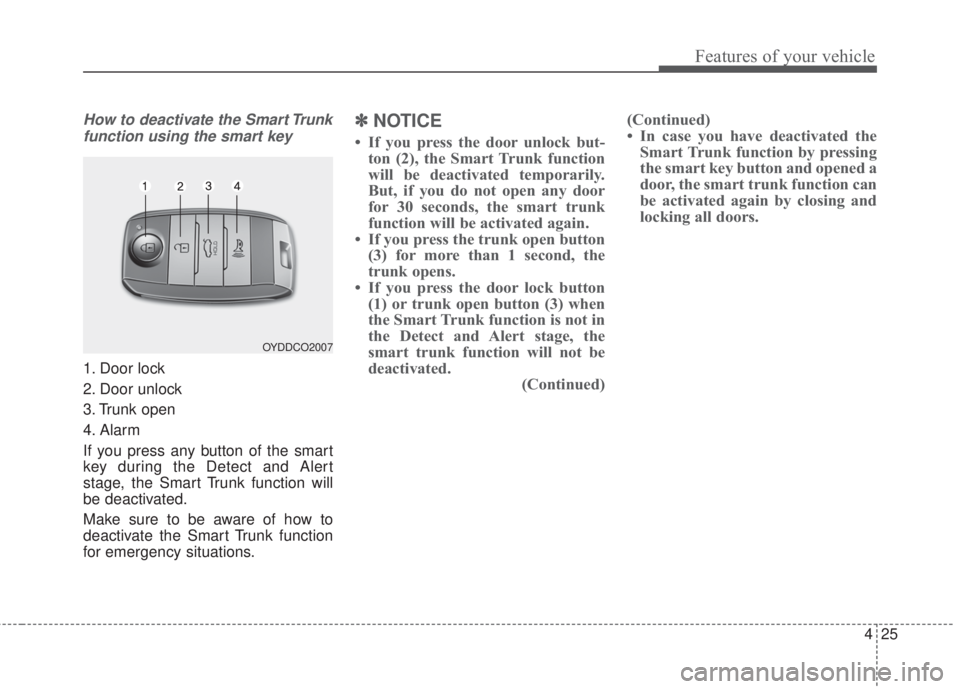
1. Door lock
2. Door unlock
3. Trunk open
4. Alarm
If you press any button of the smart
key during the Detect and Alert
stage, the Smart Trunk function will
be deactivated.
Make sure to be aware of how to
deactivate the Smart Trunk function
for emergency situations.
✽NOTICE
• If you press the door unlock but-
ton (2), the Smart Trunk function
will be deactivated temporarily.
But, if you do not open any door
for 30 seconds, the smart trunk
function will be activated again.
• If you press the trunk open button
(3) for more than 1 second, the
trunk opens.
• If you press the door lock button
(1) or trunk open button (3) when
the Smart Trunk function is not in
the Detect and Alert stage, the
smart trunk function will not be
deactivated.
(Continued)(Continued)
• In case you have deactivated the
Smart Trunk function by pressing
the smart key button and opened a
door, the smart trunk function can
be activated again by closing and
locking all doors.
OYDDCO2007
Page 99 of 595
427
Features of your vehicle
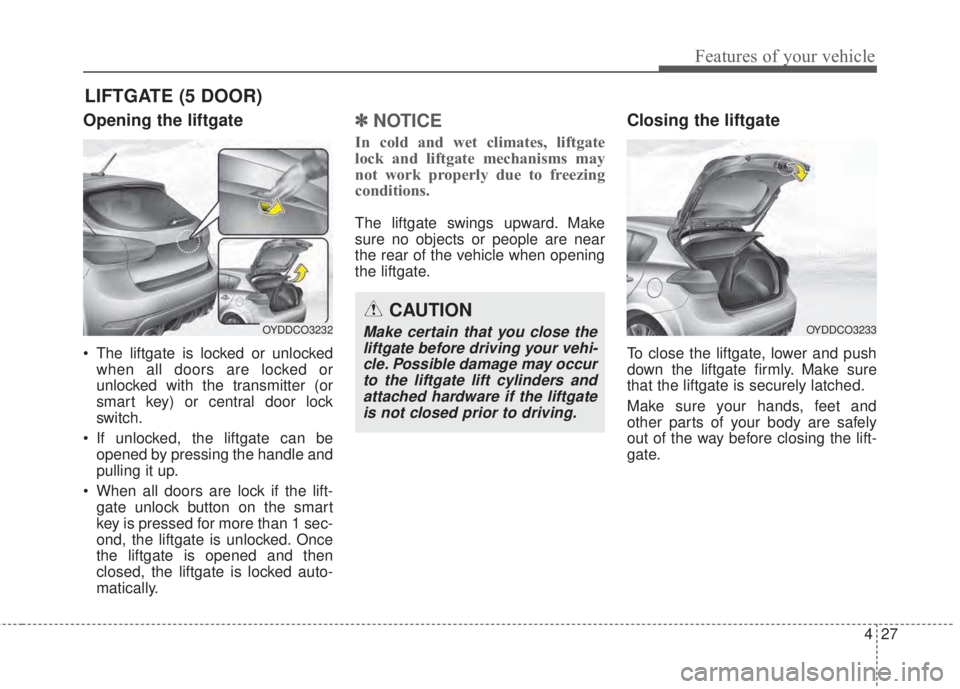
Opening the liftgate
• The liftgate is locked or unlocked
when all doors are locked or
unlocked with the transmitter (or
smart key) or central door lock
switch.
• If unlocked, the liftgate can be
opened by pressing the handle and
pulling it up.
• When all doors are lock if the lift-
gate unlock button on the smart
key is pressed for more than 1 sec-
ond, the liftgate is unlocked. Once
the liftgate is opened and then
closed, the liftgate is locked auto-
matically.
✽NOTICE
In cold and wet climates, liftgate
lock and liftgate mechanisms may
not work properly due to freezing
conditions.
The liftgate swings upward. Make
sure no objects or people are near
the rear of the vehicle when opening
the liftgate.
Closing the liftgate
To close the liftgate, lower and push
down the liftgate firmly. Make sure
that the liftgate is securely latched.
Make sure your hands, feet and
other parts of your body are safely
out of the way before closing the lift-
gate.
LIFTGATE (5 DOOR)
CAUTION
Make certain that you close the
liftgate before driving your vehi-
cle. Possible damage may occur
to the liftgate lift cylinders and
attached hardware if the liftgate
is not closed prior to driving.OYDDCO3233OYDDCO3232
Page 102 of 595
Features of your vehicle
30 4
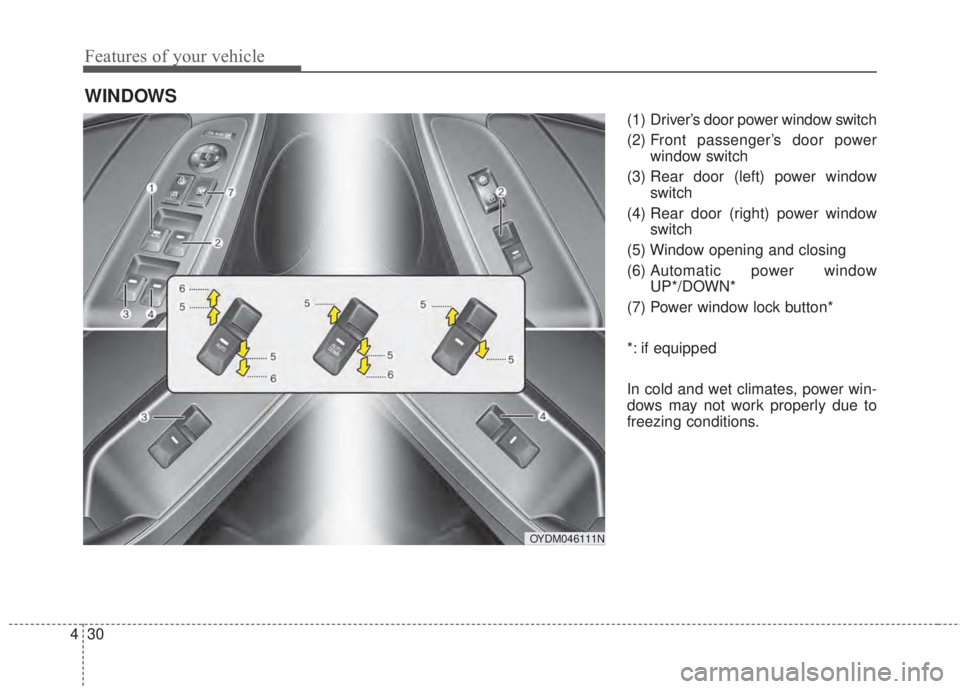
(1) Driver’s door power window switch
(2) Front passenger’s door power
window switch
(3) Rear door (left) power window
switch
(4) Rear door (right) power window
switch
(5) Window opening and closing
(6) Automatic power window
UP*/DOWN*
(7) Power window lock button*
*: if equipped
In cold and wet climates, power win-
dows may not work properly due to
freezing conditions.
WINDOWS
OYDM046111N
Page 103 of 595
431
Features of your vehicle
Power windows (if equipped)
The ignition switch must be in the ON
position for power windows to oper-
ate. Each door has a power window
switch that controls the door’s win-
dow. The driver has a power window
lock switch which can block the oper-
ation of passenger windows.
The power windows can be operated
for approximately 30 seconds after
the ignition key is removed or turned
to the ACC or LOCK position.
However, if the front doors are
opened, the power windows cannot
be operated even within the 30 sec-
ond period.
✽NOTICE
While driving with the rear windows
down or with the sunroof (if
equipped) in an open (or partially
open) position, your vehicle may
demonstrate a wind buffeting or pul-
sation noise. This noise is a normal
occurrence and can be reduced or
eliminated by taking the following
actions. If the noise occurs with one
or both of the rear windows down,
partially lower both front windows
approximately 2.5 cm (1 inch). If you
experience the noise with the sunroof
open, slightly reduce the size of the
sunroof opening.
Window opening and closing
(if equipped)
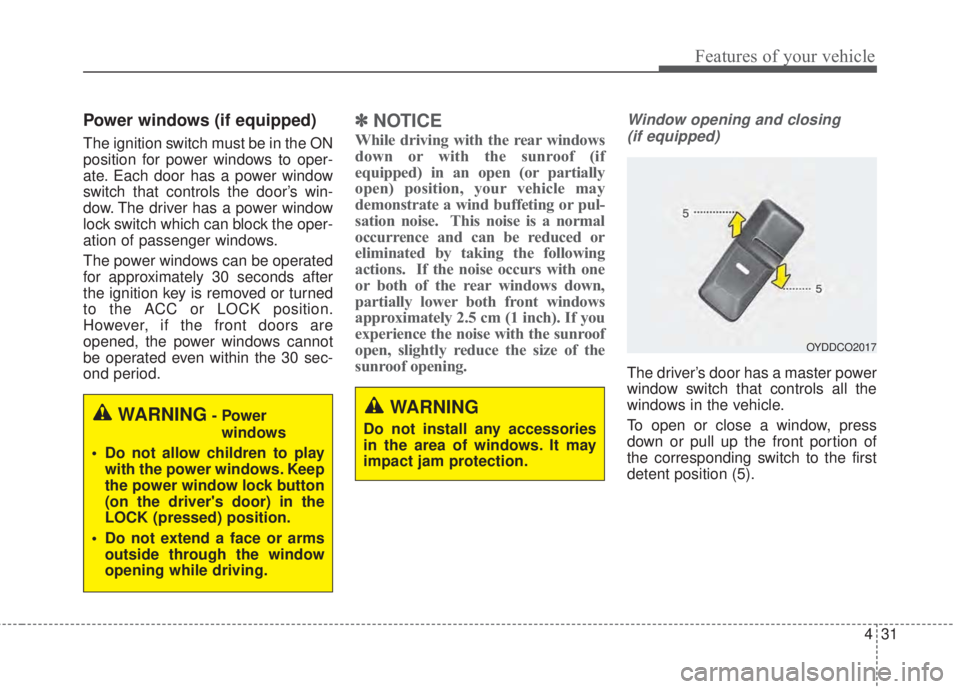
The driver’s door has a master power
window switch that controls all the
windows in the vehicle.
To open or close a window, press
down or pull up the front portion of
the corresponding switch to the first
detent position (5).
OYDDCO2017
WARNING
Do not install any accessories
in the area of windows. It may
impact jam protection.WARNING- Power
windows
• Do not allow children to play
with the power windows. Keep
the power window lock button
(on the driver's door) in the
LOCK (pressed) position.
• Do not extend a face or arms
outside through the window
opening while driving.
Page 106 of 595
Features of your vehicle
34 4
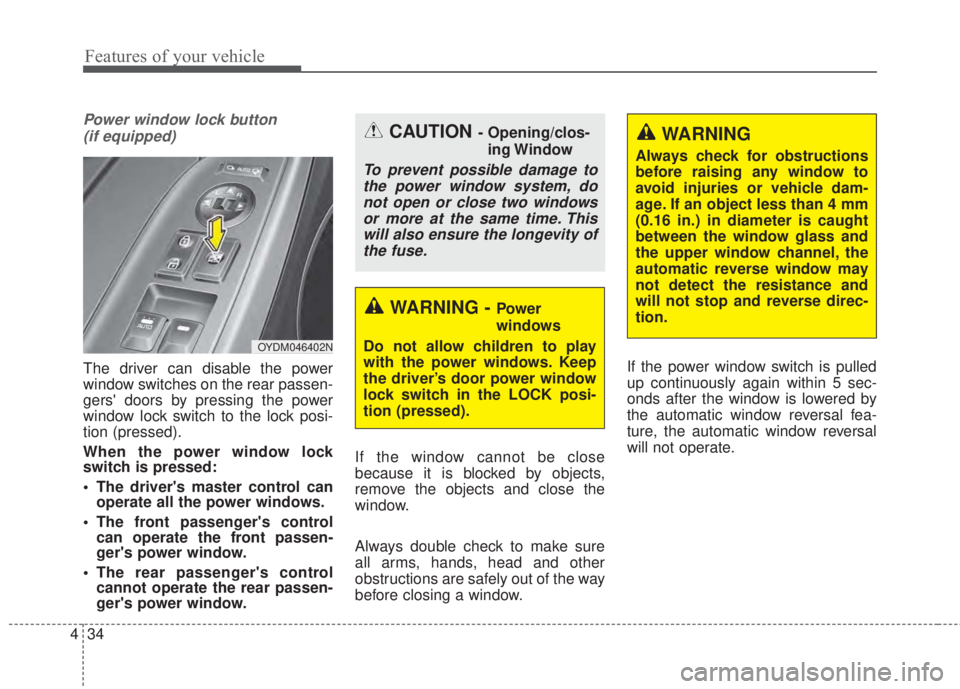
Power window lock button
(if equipped)
The driver can disable the power
window switches on the rear passen-
gers' doors by pressing the power
window lock switch to the lock posi-
tion (pressed).
When the power window lock
switch is pressed:
• The driver's master control can
operate all the power windows.
• The front passenger's control
can operate the front passen-
ger's power window.
• The rear passenger's control
cannot operate the rear passen-
ger's power window.If the window cannot be close
because it is blocked by objects,
remove the objects and close the
window.
Always double check to make sure
all arms, hands, head and other
obstructions are safely out of the way
before closing a window.If the power window switch is pulled
up continuously again within 5 sec-
onds after the window is lowered by
the automatic window reversal fea-
ture, the automatic window reversal
will not operate.
CAUTION - Opening/clos-
ing Window
To prevent possible damage to
the power window system, do
not open or close two windows
or more at the same time. This
will also ensure the longevity of
the fuse.
WARNING - Power
windows
Do not allow children to play
with the power windows. Keep
the driver’s door power window
lock switch in the LOCK posi-
tion (pressed).
WARNING
Always check for obstructions
before raising any window to
avoid injuries or vehicle dam-
age. If an object less than 4 mm
(0.16 in.) in diameter is caught
between the window glass and
the upper window channel, the
automatic reverse window may
not detect the resistance and
will not stop and reverse direc-
tion.
OYDM046402N
Page 124 of 595
Features of your vehicle
52 4
Rolling code programming
To train a garage door opener (or
other rolling code equipped devices)
with the rolling code feature, follow
these instructions after completing
the “Programming” portion of this
text. (A second person may make the
following training procedures quicker
& easier.)
4. Locate the “learn” or “smart” but-
ton on the device’s motor head
unit. Exact location and color of
the button may vary by product
brand. If there is difficulty locating
the “learn” or “smart” button, refer-
ence the device’s owner’s manual
or contact Homelink
®at 1-800-
355-3515 or on the internet at
www.homelink.com.
5. Press and release the “learn” or
“smart” button on the device’s
motor head unit. You have 30 sec-
onds to complete step number 6.6. Return to the vehicle and firmly
press and release the pro-
grammed Homelink
®button up to
three times. The rolling code
equipped device should now rec-
ognize the Homelink
®signal and
activate when the Homelink®but-
ton is pressed. The remaining two
buttons may now be programmed
if this has not previously been
done. Refer to the “Programming”
portion of this text.Operating Homelink
®
To operate, simply press the pro-
grammed Homelink®button.
Activation will now occur for the
trained product (garage door, securi-
ty system, entry door lock, estate
gate, or home or office lighting). For
convenience, the hand-held trans-
mitter of the device may also be used
at any time. The Homelink
®Wireless
Controls System (once programmed)
or the original hand-held transmitter
may be used to activate the device
(e.g. garage door, entry door lock,
etc.). In the event that there are still
programming difficulties, contact
Homelink
®at 1-800-355-3515 or on
the internet at www.homelink.com.
Page 128 of 595
Features of your vehicle
56 4
Folding the outside rearview mirror
Electric type
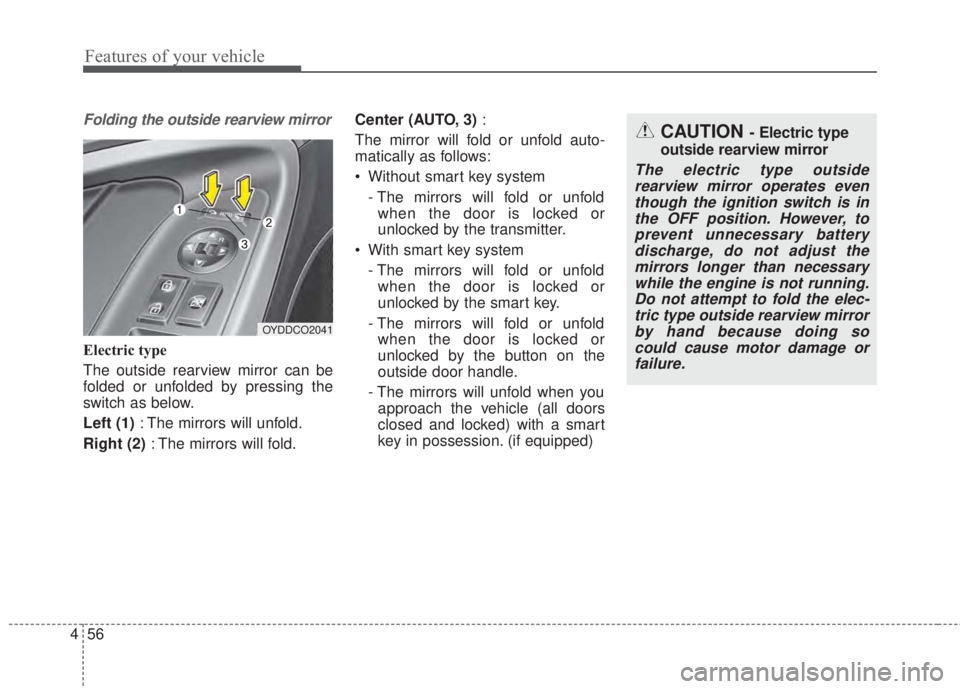
The outside rearview mirror can be
folded or unfolded by pressing the
switch as below.
Left (1): The mirrors will unfold.
Right (2): The mirrors will fold.Center (AUTO, 3):
The mirror will fold or unfold auto-
matically as follows:
• Without smart key system
- The mirrors will fold or unfold
when the door is locked or
unlocked by the transmitter.
• With smart key system
- The mirrors will fold or unfold
when the door is locked or
unlocked by the smart key.
- The mirrors will fold or unfold
when the door is locked or
unlocked by the button on the
outside door handle.
- The mirrors will unfold when you
approach the vehicle (all doors
closed and locked) with a smart
key in possession. (if equipped)
OYDDCO2041
CAUTION - Electric type
outside rearview mirror
The electric type outside
rearview mirror operates even
though the ignition switch is in
the OFF position. However, to
prevent unnecessary battery
discharge, do not adjust the
mirrors longer than necessary
while the engine is not running.
Do not attempt to fold the elec-
tric type outside rearview mirror
by hand because doing so
could cause motor damage or
failure.