Lighting KIA FORTE 2017 Owners Manual
[x] Cancel search | Manufacturer: KIA, Model Year: 2017, Model line: FORTE, Model: KIA FORTE 2017Pages: 595, PDF Size: 11.5 MB
Page 12 of 595
25
Your vehicle at a glance
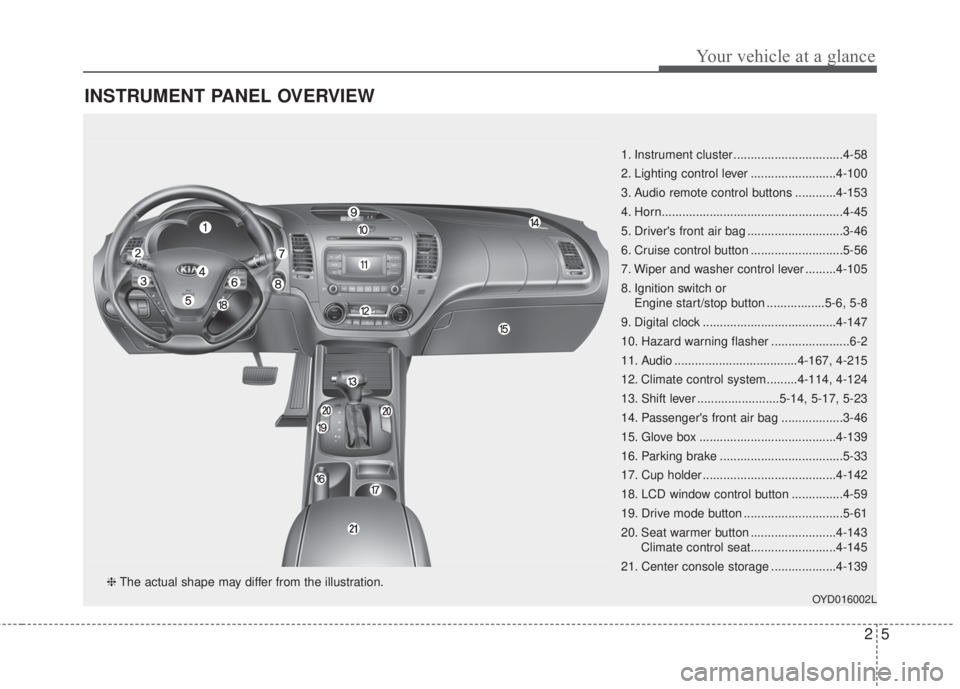
INSTRUMENT PANEL OVERVIEW
1. Instrument cluster ................................4-58
2. Lighting control lever .........................4-100
3. Audio remote control buttons ............4-153
4. Horn.....................................................4-45
5. Driver's front air bag ............................3-46
6. Cruise control button ...........................5-56
7. Wiper and washer control lever .........4-105
8. Ignition switch or
Engine start/stop button .................5-6, 5-8
9. Digital clock .......................................4-147
10. Hazard warning flasher .......................6-2
11. Audio ....................................4-167, 4-215
12. Climate control system.........4-114, 4-124
13. Shift lever ........................5-14, 5-17, 5-23
14. Passenger's front air bag ..................3-46
15. Glove box ........................................4-139
16. Parking brake ....................................5-33
17. Cup holder .......................................4-142
18. LCD window control button ...............4-59
19. Drive mode button .............................5-61
20. Seat warmer button .........................4-143
Climate control seat.........................4-145
21. Center console storage ...................4-139
OYD016002L
❈The actual shape may differ from the illustration.
Page 74 of 595
Mirrors . . . . . . . . . . . . . . . . . . . . . . . . . . . . . . . . . . 4-49
• Inside rearview mirror . . . . . . . . . . . . . . . . . . . . . . . . 4-49
• Outside rearview mirror . . . . . . . . . . . . . . . . . . . . . . . 4-54
Instrument cluster . . . . . . . . . . . . . . . . . . . . . . . . . 4-58
• Instrument cluster control . . . . . . . . . . . . . . . . . . . . . 4-59
• LCD window control . . . . . . . . . . . . . . . . . . . . . . . . . . 4-59
• Gauges . . . . . . . . . . . . . . . . . . . . . . . . . . . . . . . . . . . . . 4-60
• Transaxle shift indicator . . . . . . . . . . . . . . . . . . . . . . . 4-62
LCD windows . . . . . . . . . . . . . . . . . . . . . . . . . . . . . 4-64
• Over view . . . . . . . . . . . . . . . . . . . . . . . . . . . . . . . . . . . 4-64
• LCD modes (for Type B, C instrument cluster) . . . . 4-69
Warning and indicator lights . . . . . . . . . . . . . . . . 4-79
• Warning lights . . . . . . . . . . . . . . . . . . . . . . . . . . . . . . . 4-79
• Indicator Lights . . . . . . . . . . . . . . . . . . . . . . . . . . . . . . 4-87
Parking assist system . . . . . . . . . . . . . . . . . . . . . . . 4-92
• Operation of the parking assist system . . . . . . . . . . . 4-92
• Non-operational conditions of parking assist system . 4-95
• Self-diagnosis . . . . . . . . . . . . . . . . . . . . . . . . . . . . . . . . 4-97
Rearview camera . . . . . . . . . . . . . . . . . . . . . . . . . . 4-98
Lighting . . . . . . . . . . . . . . . . . . . . . . . . . . . . . . . . . . 4-99
• Battery saver function. . . . . . . . . . . . . . . . . . . . . . . . . 4-99
• Headlight escort function . . . . . . . . . . . . . . . . . . . . . . 4-99
• Lighting control . . . . . . . . . . . . . . . . . . . . . . . . . . . . . 4-100
• High beam operation. . . . . . . . . . . . . . . . . . . . . . . . . 4-101
• Turn signals and lane change signals . . . . . . . . . . . 4-102• Front fog light . . . . . . . . . . . . . . . . . . . . . . . . . . . . . . 4-103
• AFLS (Adaptive Front Lighting System) . . . . . . . . 4-104
• Daytime running light . . . . . . . . . . . . . . . . . . . . . . . . 4-104
Wipers and washers . . . . . . . . . . . . . . . . . . . . . . . 4-105
• Windshield wipers . . . . . . . . . . . . . . . . . . . . . . . . . . . 4-105
• Windshield washers (Front) . . . . . . . . . . . . . . . . . . . 4-106
• Rear window wiper and washer switch (5 Door) . . 4-107
Interior light . . . . . . . . . . . . . . . . . . . . . . . . . . . . . 4-108
• Automatic turn off function . . . . . . . . . . . . . . . . . . . 4-108
• Map lamp . . . . . . . . . . . . . . . . . . . . . . . . . . . . . . . . . . 4-108
• Room lamp . . . . . . . . . . . . . . . . . . . . . . . . . . . . . . . . . 4-109
• Luggage room lamp . . . . . . . . . . . . . . . . . . . . . . . . . 4-110
• Glove box lamp . . . . . . . . . . . . . . . . . . . . . . . . . . . . . 4-111
• Vanity mirror lamp . . . . . . . . . . . . . . . . . . . . . . . . . . 4-111
Welcome system . . . . . . . . . . . . . . . . . . . . . . . . . . 4-112
• Headlamp welcome . . . . . . . . . . . . . . . . . . . . . . . . . . 4-112
• Interior light welcome . . . . . . . . . . . . . . . . . . . . . . . . 4-112
• Puddle lamp and pocket lamp . . . . . . . . . . . . . . . . . 4-112
Defroster . . . . . . . . . . . . . . . . . . . . . . . . . . . . . . . . 4-113
• Rear window defroster . . . . . . . . . . . . . . . . . . . . . . . 4-113
• Front wiper deicer . . . . . . . . . . . . . . . . . . . . . . . . . . . 4-113
Manual climate control system . . . . . . . . . . . . . . 4-114
• Heating and air conditioning . . . . . . . . . . . . . . . . . . 4-115
• System operation . . . . . . . . . . . . . . . . . . . . . . . . . . . . 4-120
• Climate control air filter . . . . . . . . . . . . . . . . . . . . . . 4-122
4
Page 122 of 595
Features of your vehicle
50 4
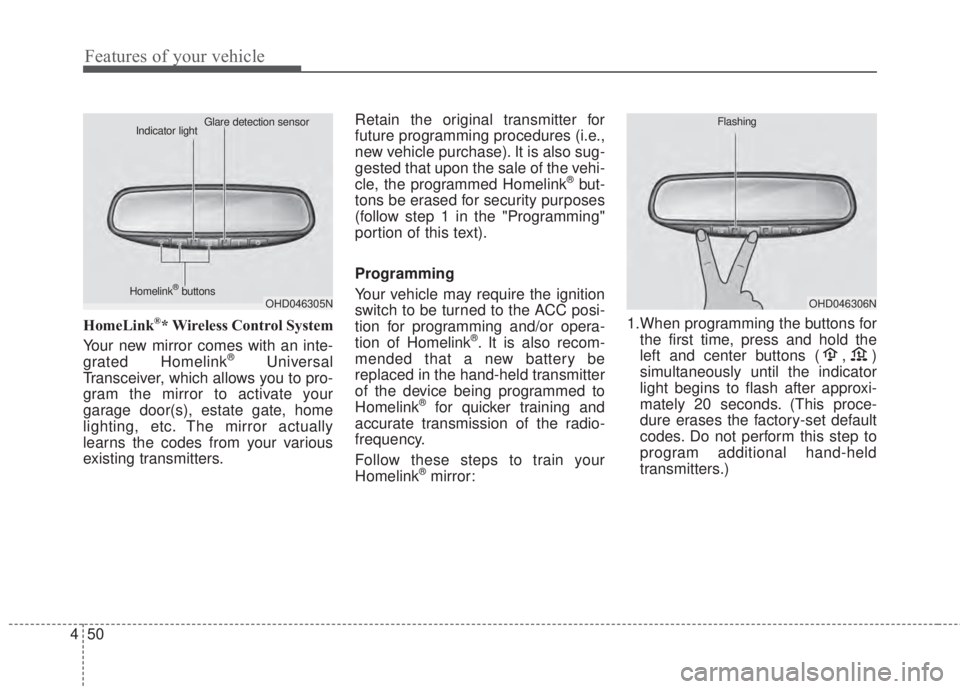
HomeLink®* Wireless Control System
Your new mirror comes with an inte-
grated Homelink
®Universal
Transceiver, which allows you to pro-
gram the mirror to activate your
garage door(s), estate gate, home
lighting, etc. The mirror actually
learns the codes from your various
existing transmitters.Retain the original transmitter for
future programming procedures (i.e.,
new vehicle purchase). It is also sug-
gested that upon the sale of the vehi-
cle, the programmed Homelink
®but-
tons be erased for security purposes
(follow step 1 in the "Programming"
portion of this text).
Programming
Your vehicle may require the ignition
switch to be turned to the ACC posi-
tion for programming and/or opera-
tion of Homelink
®. It is also recom-
mended that a new battery be
replaced in the hand-held transmitter
of the device being programmed to
Homelink
®for quicker training and
accurate transmission of the radio-
frequency.
Follow these steps to train your
Homelink
®mirror:1.When programming the buttons for
the first time, press and hold the
left and center buttons ( , )
simultaneously until the indicator
light begins to flash after approxi-
mately 20 seconds. (This proce-
dure erases the factory-set default
codes. Do not perform this step to
program additional hand-held
transmitters.)
OHD046305N Glare detection sensor
Indicator light
Homelink
®buttonsOHD046306N Flashing
Page 124 of 595
Features of your vehicle
52 4
Rolling code programming
To train a garage door opener (or
other rolling code equipped devices)
with the rolling code feature, follow
these instructions after completing
the “Programming” portion of this
text. (A second person may make the
following training procedures quicker
& easier.)
4. Locate the “learn” or “smart” but-
ton on the device’s motor head
unit. Exact location and color of
the button may vary by product
brand. If there is difficulty locating
the “learn” or “smart” button, refer-
ence the device’s owner’s manual
or contact Homelink
®at 1-800-
355-3515 or on the internet at
www.homelink.com.
5. Press and release the “learn” or
“smart” button on the device’s
motor head unit. You have 30 sec-
onds to complete step number 6.6. Return to the vehicle and firmly
press and release the pro-
grammed Homelink
®button up to
three times. The rolling code
equipped device should now rec-
ognize the Homelink
®signal and
activate when the Homelink®but-
ton is pressed. The remaining two
buttons may now be programmed
if this has not previously been
done. Refer to the “Programming”
portion of this text.Operating Homelink
®
To operate, simply press the pro-
grammed Homelink®button.
Activation will now occur for the
trained product (garage door, securi-
ty system, entry door lock, estate
gate, or home or office lighting). For
convenience, the hand-held trans-
mitter of the device may also be used
at any time. The Homelink
®Wireless
Controls System (once programmed)
or the original hand-held transmitter
may be used to activate the device
(e.g. garage door, entry door lock,
etc.). In the event that there are still
programming difficulties, contact
Homelink
®at 1-800-355-3515 or on
the internet at www.homelink.com.
Page 126 of 595
Features of your vehicle
54 4
Accessories
If you would like additional informa-
tion on the Homelink
®Wireless
Control System, Homelink®compati-
ble products, or to purchase other
accessories such as the HomeLink
®
Lighting Package, please contact
Homelink®at 1-800-355-3515 or on
the internet at www.homelink.com.
This device complies with Industry
Canada licence-exempt RSS stan-
dard(s).
Operation is subject to the following
two conditions:
(1) This device may not cause inter-
ference, and
(2) This device must accept any
interference, including interfer-
ence that may cause undesired
operation of the device.The HomeLink
®transmitter has been
tested and complies with FCC and
DOC/MDC rules. Changes or modifi-
cations not expressly approved by
the party responsible for compliance
could void the user’s authority to
operate the equipment.
IC: 4112104541A Gentex
MODEL/FCC ID: NZLSTDHL3Outside rearview mirror
Be sure to adjust mirror angles
before driving.
Your vehicle is equipped with both
left-hand and right-hand outside
rearview mirrors. The mirrors can be
adjusted remotely with the remote
switch (if equipped). The mirror
heads can be folded to prevent dam-
age during an automatic car wash or
when passing through a narrow
street.
The right outside rearview mirror is
convex. Objects seen in the mirror
are closer than they appear.
Use your interior rearview mirror or
direct observation to determine the
actual distance of following vehicles
when changing lanes.
Page 158 of 595
Features of your vehicle
86 4
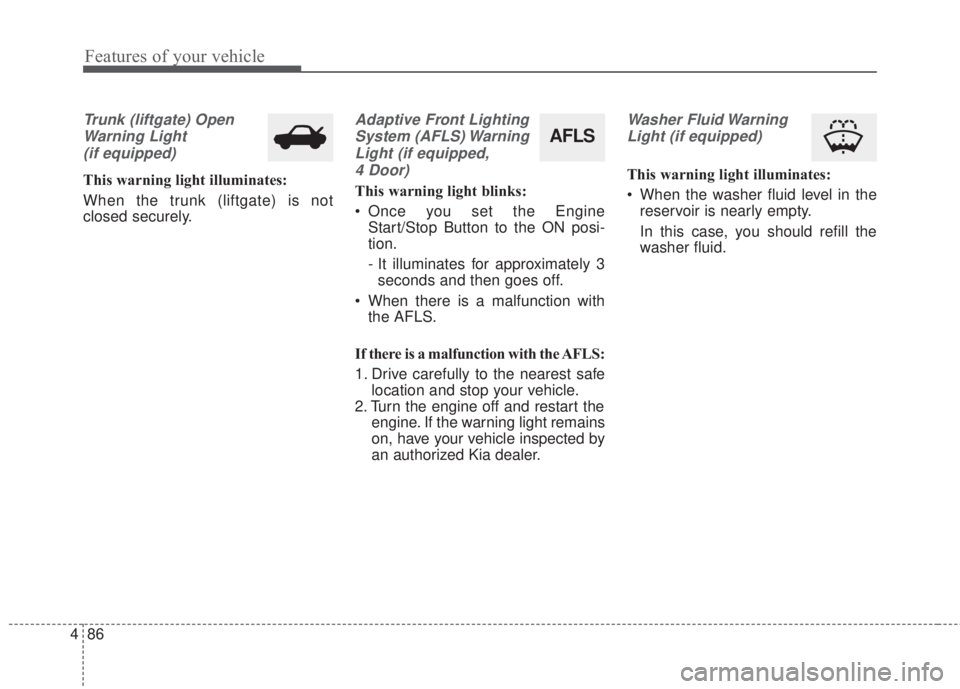
Trunk (liftgate) Open
Warning Light
(if equipped)
This warning light illuminates:
When the trunk (liftgate) is not
closed securely.
Adaptive Front Lighting
System (AFLS) Warning
Light (if equipped,
4 Door)
This warning light blinks:
• Once you set the Engine
Start/Stop Button to the ON posi-
tion.
- It illuminates for approximately 3
seconds and then goes off.
• When there is a malfunction with
the AFLS.
If there is a malfunction with the AFLS:
1. Drive carefully to the nearest safe
location and stop your vehicle.
2. Turn the engine off and restart the
engine. If the warning light remains
on, have your vehicle inspected by
an authorized Kia dealer.
Washer Fluid Warning
Light (if equipped)
This warning light illuminates:
• When the washer fluid level in the
reservoir is nearly empty.
In this case, you should refill the
washer fluid.
AFLS
Page 171 of 595
499
Features of your vehicle
Battery saver function
• The purpose of this feature is to
prevent the battery from being dis-
charged. The system automatically
turns off the parking lights when
the driver removes the ignition key
and opens the driver-side door.
• With this feature, the parking lights
will turn off automatically if the driv-
er parks on the side of the road at
night.
If necessary, to keep the lights on
when the ignition key is removed,
perform the following:
1) Open the driver-side door.
2) Turn the parking lights OFF and
ON again using the light switch
on the steering column.
Headlight escort function
(if equipped)
The headlights (and/or taillights) will
remain on for approximately 20 min-
utes after the ignition key is removed
or turned to the ACC or LOCK posi-
tion. However, if the driver’s door is
opened and closed, the headlights
are turned off after 30 seconds.
The headlights can be turned off by
pressing the lock button on the trans-
mitter (or smart key) twice or turning
off the light switch from the headlight
or Auto light position.If the driver gets out of the vehicle
through other doors (except driver's
door), the battery saver function
does not operate and the headlight
escort function does not turn off
automatically. Therefore, It causes
the battery to be discharged. In this
case, make sure to turn off the lamp
before getting out of the vehicle.
If the headlights are not working
properly have your vehicle inspected
by an authorized Kia dealer.
Don't attempt to inspect or replace
the wiring yourself to prevent mal-
function.
LIGHTING
Page 172 of 595
Features of your vehicle
100 4
Lighting control
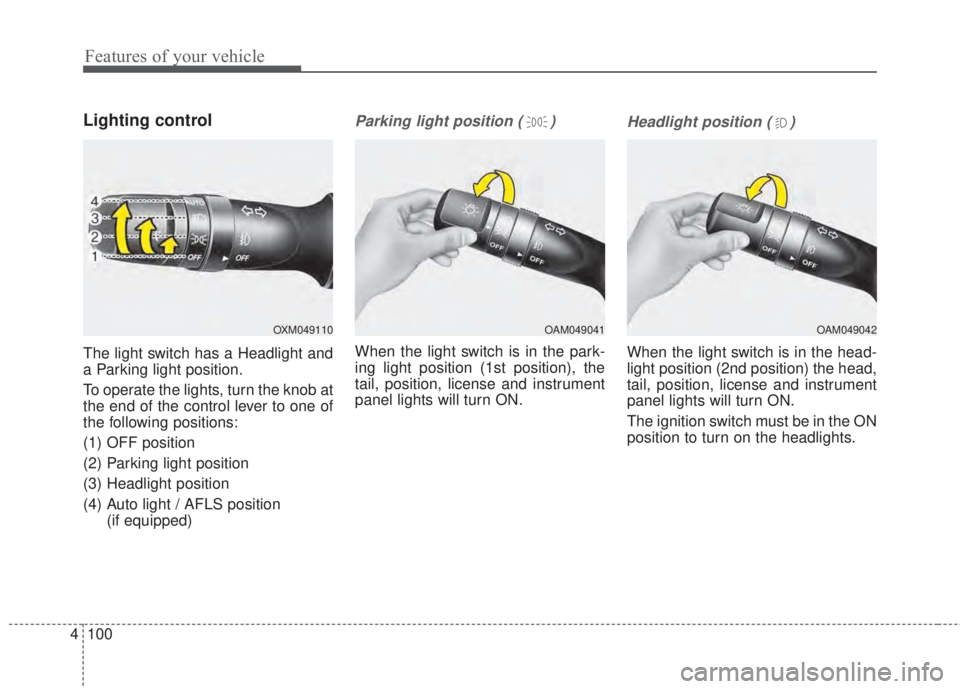
The light switch has a Headlight and
a Parking light position.
To operate the lights, turn the knob at
the end of the control lever to one of
the following positions:
(1) OFF position
(2) Parking light position
(3) Headlight position
(4) Auto light / AFLS position
(if equipped)
Parking light position ( )
When the light switch is in the park-
ing light position (1st position), the
tail, position, license and instrument
panel lights will turn ON.
Headlight position ( )
When the light switch is in the head-
light position (2nd position) the head,
tail, position, license and instrument
panel lights will turn ON.
The ignition switch must be in the ON
position to turn on the headlights.
OAM049041OXM049110OAM049042
Page 176 of 595
Features of your vehicle
104 4
AFLS (Adaptive Front Lighting
System) (if equipped)
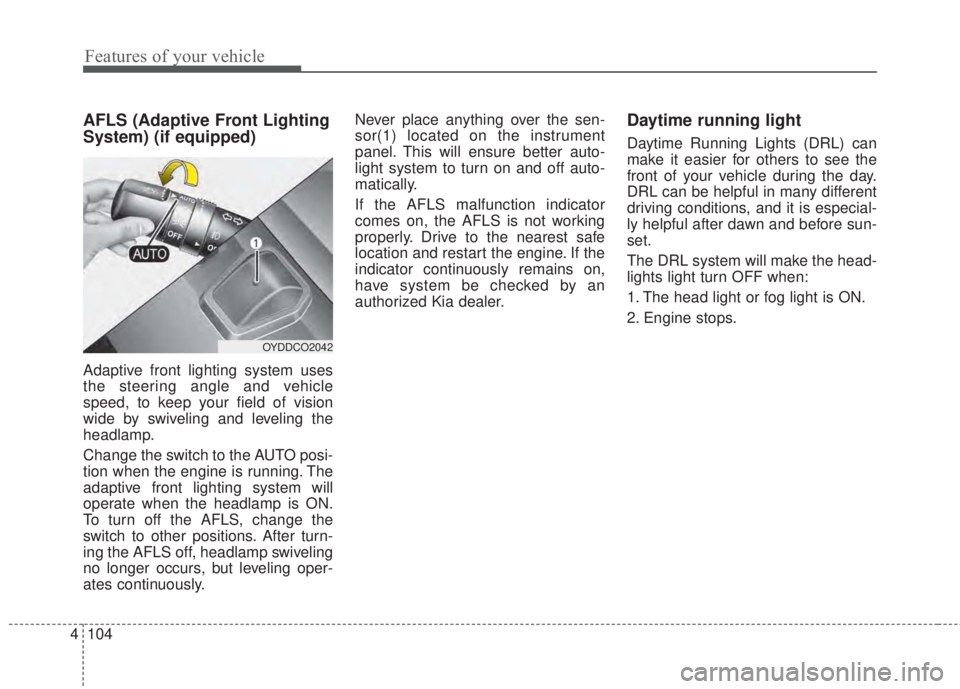
Adaptive front lighting system uses
the steering angle and vehicle
speed, to keep your field of vision
wide by swiveling and leveling the
headlamp.
Change the switch to the AUTO posi-
tion when the engine is running. The
adaptive front lighting system will
operate when the headlamp is ON.
To turn off the AFLS, change the
switch to other positions. After turn-
ing the AFLS off, headlamp swiveling
no longer occurs, but leveling oper-
ates continuously.Never place anything over the sen-
sor(1) located on the instrument
panel. This will ensure better auto-
light system to turn on and off auto-
matically.
If the AFLS malfunction indicator
comes on, the AFLS is not working
properly. Drive to the nearest safe
location and restart the engine. If the
indicator continuously remains on,
have system be checked by an
authorized Kia dealer.
Daytime running light
Daytime Running Lights (DRL) can
make it easier for others to see the
front of your vehicle during the day.
DRL can be helpful in many different
driving conditions, and it is especial-
ly helpful after dawn and before sun-
set.
The DRL system will make the head-
lights light turn OFF when:
1. The head light or fog light is ON.
2. Engine stops.
OYDDCO2042
Page 592 of 595
Index
6I
Lane Keeping Assist System (LKAS) . . . . . . . . . . . . . 5-64
LKAS function change . . . . . . . . . . . . . . . . . . . . . . 5-71
LKAS malfunction . . . . . . . . . . . . . . . . . . . . . . . . . . 5-70
LKAS operation . . . . . . . . . . . . . . . . . . . . . . . . . . . . 5-65
LCD windows . . . . . . . . . . . . . . . . . . . . . . . . . . . . . . . . 4-64
LCD modes (for Type B, C instrument cluster) . . . 4-69
Over view . . . . . . . . . . . . . . . . . . . . . . . . . . . . . . . . . 4-64
Liftgate (5 Door). . . . . . . . . . . . . . . . . . . . . . . . . . . . . . 4-27
Closing the liftgate . . . . . . . . . . . . . . . . . . . . . . . . . . 4-27
Emergency liftgate safety release. . . . . . . . . . . . . . . 4-28
Opening the liftgate . . . . . . . . . . . . . . . . . . . . . . . . . 4-27
Light bulbs . . . . . . . . . . . . . . . . . . . . . . . . . . . . . . . . . . 7-85
Front lights replacement. . . . . . . . . . . . . . . . . . . . . . 7-85
High mounted stop lamp replacement . . . . . . . . . . . 7-95
Interior lamp bulb replacement . . . . . . . . . . . . . . . . 7-98
License plate lamp bulb replacement . . . . . . . . . . . 7-97
Outside Mirrors with Turn Signal Indicators . . . . . . 7-89
Rear combination lamp bulb replacement . . . . . . . . 7-90
Lighting. . . . . . . . . . . . . . . . . . . . . . . . . . . . . . . . . . . . . 4-99
AFLS (Adaptive Front Lighting System) . . . . . . . 4-104
Battery saver function . . . . . . . . . . . . . . . . . . . . . . . 4-99
Daytime running light . . . . . . . . . . . . . . . . . . . . . . 4-104
Front fog light . . . . . . . . . . . . . . . . . . . . . . . . . . . . 4-103
Headlight escort function . . . . . . . . . . . . . . . . . . . . . 4-99High beam operation . . . . . . . . . . . . . . . . . . . . . . . 4-101
Lighting control . . . . . . . . . . . . . . . . . . . . . . . . . . . 4-100
Turn signals and lane change signals . . . . . . . . . . . 4-102
Maintenance services . . . . . . . . . . . . . . . . . . . . . . . . . . . 7-5
Owner maintenance precautions . . . . . . . . . . . . . . . . 7-6
Owner’s responsibility . . . . . . . . . . . . . . . . . . . . . . . . 7-5
Manual climate control system. . . . . . . . . . . . . . . . . . 4-114
Air conditioning refrigerant label . . . . . . . . . . . . . 4-123
Checking the amount of air conditioner
refrigerant and compressor lubricant . . . . . . . . . . 4-123
Climate control air filter. . . . . . . . . . . . . . . . . . . . . 4-122
Heating and air conditioning . . . . . . . . . . . . . . . . . 4-115
System operation . . . . . . . . . . . . . . . . . . . . . . . . . . 4-120
Manual transaxle. . . . . . . . . . . . . . . . . . . . . . . . . . . . . . 5-14
Good driving practices . . . . . . . . . . . . . . . . . . . . . . . 5-16
Manual transaxle operation . . . . . . . . . . . . . . . . . . . 5-14
Mirrors . . . . . . . . . . . . . . . . . . . . . . . . . . . . . . . . . . . . . 4-49
Inside rearview mirror . . . . . . . . . . . . . . . . . . . . . . . 4-49
Outside rearview mirror . . . . . . . . . . . . . . . . . . . . . . 4-54
Owner maintenance . . . . . . . . . . . . . . . . . . . . . . . . . . . . 7-7
Owner maintenance schedule. . . . . . . . . . . . . . . . . . . 7-7
L
M
O