Shield KIA FORTE 2018 Owner's Manual
[x] Cancel search | Manufacturer: KIA, Model Year: 2018, Model line: FORTE, Model: KIA FORTE 2018Pages: 584, PDF Size: 15.14 MB
Page 204 of 584
4129
Features of your vehicle
WINDSHIELD DEFROSTING AND DEFOGGING
For maximum defrosting, set thetemperature control to the extreme
right/hot position and the fan speed
control to the highest speed.
If warm air to the floor is desired while defrosting or defogging, set the
mode to the floor-defrost position.
Before driving, clear all snow and ice from the windshield, rear win-
dow, outside rear view mirrors, and
all side windows.
Clear all snow and ice from the hood and air inlet in the cowl grill to
improve heater and defroster effi-
ciency and to reduce the probabili-
ty of fogging up the inside of the
windshield.Manual climate control system
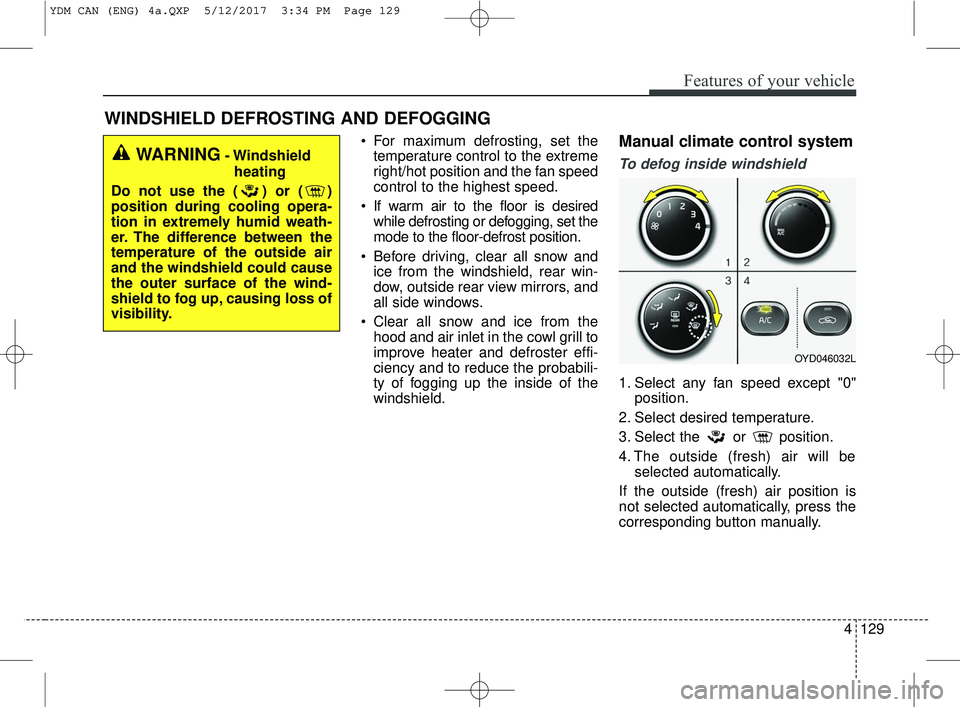
To defog inside windshield
1. Select any fan speed except "0" position.
2. Select desired temperature.
3. Select the or position.
4. The outside (fresh) air will be selected automatically.
If the outside (fresh) air position is
not selected automatically, press the
corresponding button manually.
WARNING- Windshield heating
Do not use the ( ) or ( )
position during cooling opera-
tion in extremely humid weath-
er. The difference between the
temperature of the outside air
and the windshield could cause
the outer surface of the wind-
shield to fog up, causing loss of
visibility.
OYD046032L
YDM CAN (ENG) 4a.QXP 5/12/2017 3:34 PM Page 129
Page 205 of 584
Features of your vehicle
130
4
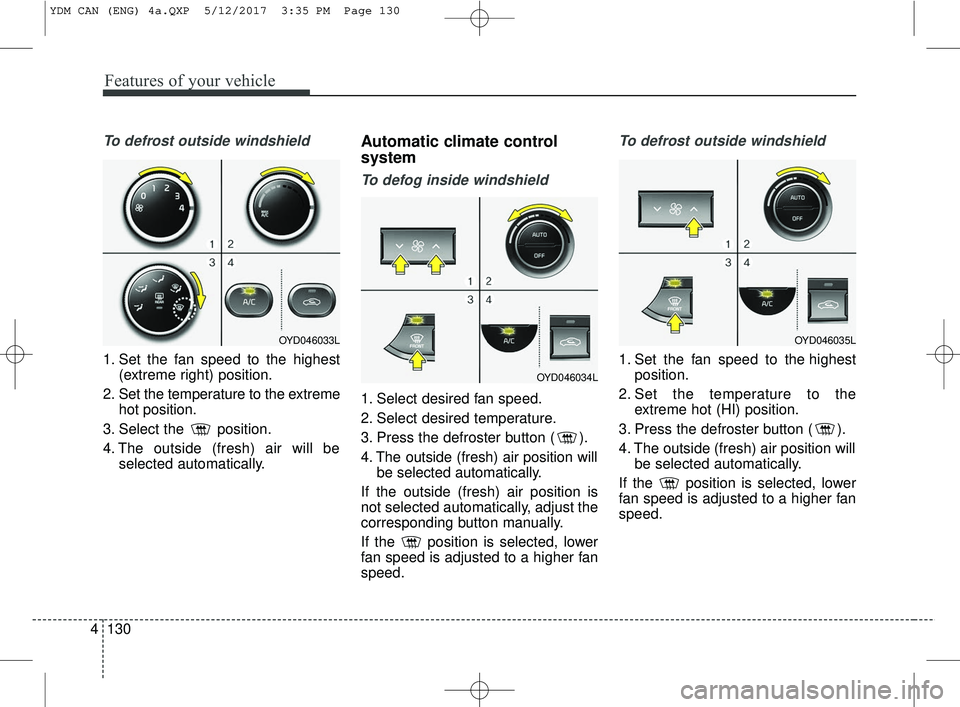
To defrost outside windshield
1. Set the fan speed to the highest
(extreme right) position.
2. Set the temperature to the extreme hot position.
3. Select the position.
4. The outside (fresh) air will be selected automatically.
Automatic climate control
system
To defog inside windshield
1. Select desired fan speed.
2. Select desired temperature.
3. Press the defroster button ( ).
4. The outside (fresh) air position willbe selected automatically.
If the outside (fresh) air position is
not selected automatically, adjust the
corresponding button manually.
If the position is selected, lower
fan speed is adjusted to a higher fan
speed.
To defrost outside windshield
1. Set the fan speed to the highest position.
2. Set the temperature to the extreme hot (HI) position.
3. Press the defroster button ( ).
4. The outside (fresh) air position will be selected automatically.
If the position is selected, lower
fan speed is adjusted to a higher fan
speed.
OYD046033L
OYD046034L
OYD046035L
YDM CAN (ENG) 4a.QXP 5/12/2017 3:35 PM Page 130
Page 206 of 584
4131
Features of your vehicle
Defogging Logic
To reduce the probability of fogging
up inside of the windshield, the air
intake or air conditioning are con-
trolled automatically according to
certain conditions such as or
position. Logic can be disabled and
enabled by doing following :
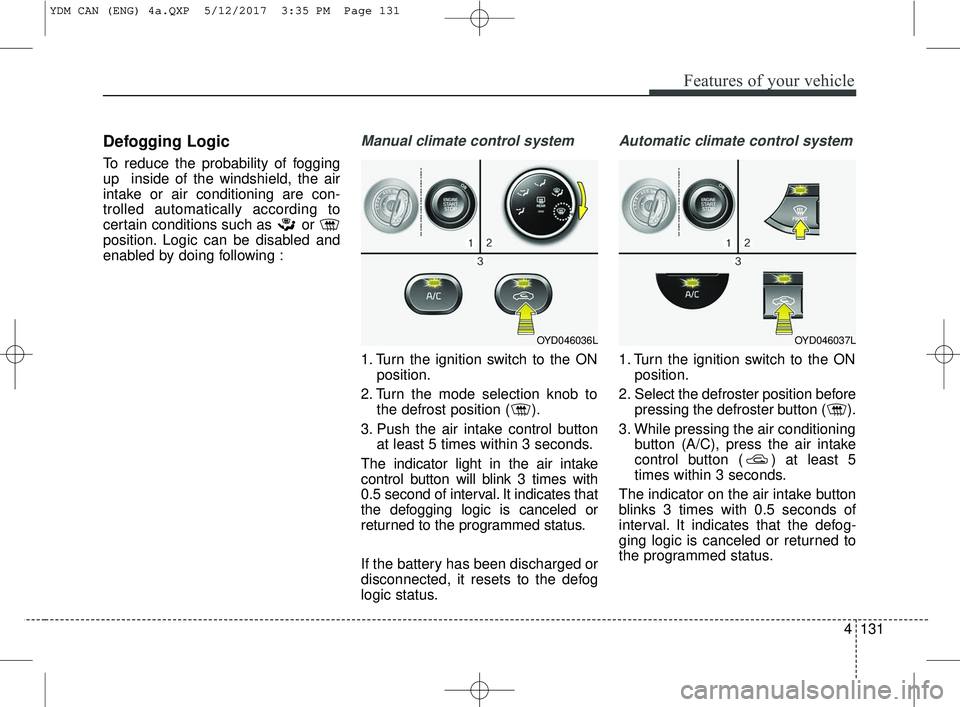
Manual climate control system
1. Turn the ignition switch to the ONposition.
2. Turn the mode selection knob to the defrost position ( ).
3. Push the air intake control button at least 5 times within 3 seconds.
The indicator light in the air intake
control button will blink 3 times with
0.5 second of interval. It indicates that
the defogging logic is canceled or
returned to the programmed status.
If the battery has been discharged or
disconnected, it resets to the defog
logic status.
Automatic climate control system
1. Turn the ignition switch to the ON position.
2. Select the defroster position before pressing the defroster button ( ).
3. While pressing the air conditioning button (A/C), press the air intake
control button ( ) at least 5
times within 3 seconds.
The indicator on the air intake button
blinks 3 times with 0.5 seconds of
interval. It indicates that the defog-
ging logic is canceled or returned to
the programmed status.
OYD046036LOYD046037L
YDM CAN (ENG) 4a.QXP 5/12/2017 3:35 PM Page 131
Page 207 of 584
Features of your vehicle
132
4
If the battery has been discharged or
disconnected, it resets to the defog
logic status.Auto defogging system
(if equipped)
Auto defogging reduces the probabil-
ity of fogging up the inside of the
windshield by automatically sensing
the moisture inside the windshield.
The auto defogging system operates
when the heater or air conditioning is
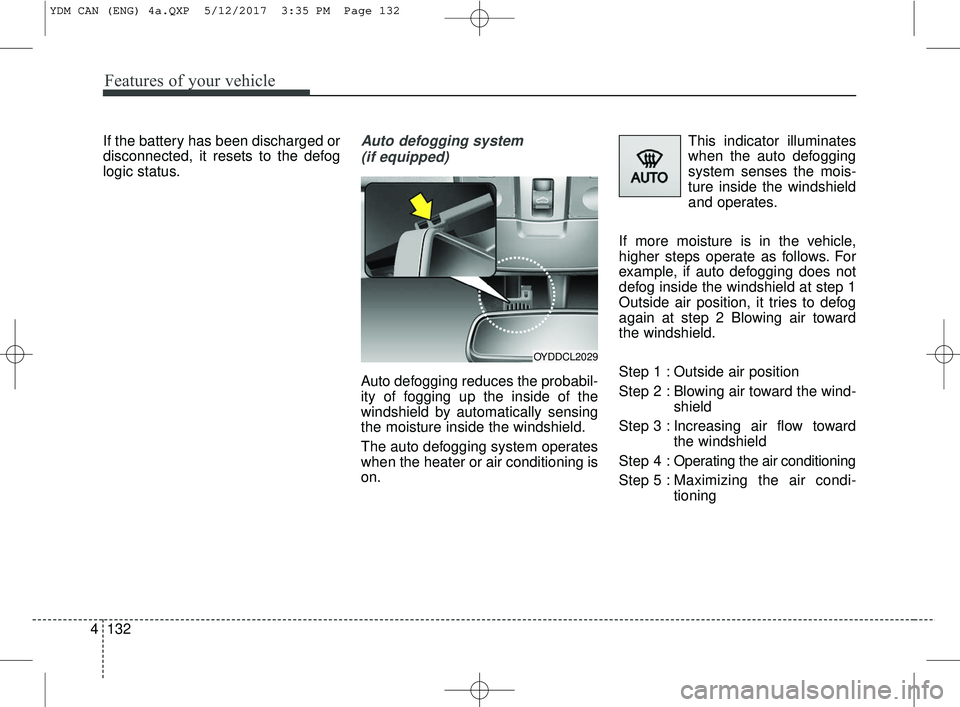
on. This indicator illuminates
when the auto defogging
system senses the mois-
ture inside the windshield
and operates.
If more moisture is in the vehicle,
higher steps operate as follows. For
example, if auto defogging does not
defog inside the windshield at step 1
Outside air position, it tries to defog
again at step 2 Blowing air toward
the windshield.
Step 1 : Outside air position
Step 2 : Blowing air toward the wind- shield
Step 3 : Increasing air flow toward the windshield
Step 4 : Operating the air conditioning
Step 5 : Maxim izing the air condi-
tioning
OYDDCL2029
YDM CAN (ENG) 4a.QXP 5/12/2017 3:35 PM Page 132
Page 208 of 584
4133
Features of your vehicle
If your vehicle is equipped with the
auto defogging system, it is automat-
ically activated when the conditions
are met. However, if you would like to
cancel the auto defogging system,
press the front defroster button 4
times within 2 seconds while press-
ing the AUTO button. The indicator
will blink 3 times to notify you that the
system is cancelled. To use the auto
defogging system again, follow the
procedures mentioned above.
If the battery has been disconnected
or discharged, it resets to the auto
defogging status.✽ ✽NOTICE
• When the air conditioning is
turned on by Auto defogging sys-
tem, if you try to turn off the air
conditioning, the indicator will
blink 3 times and the air condi-
tioning will not be turned off.
• For efficiency, do not select recir- culated air position while Auto
defogging system is operating.
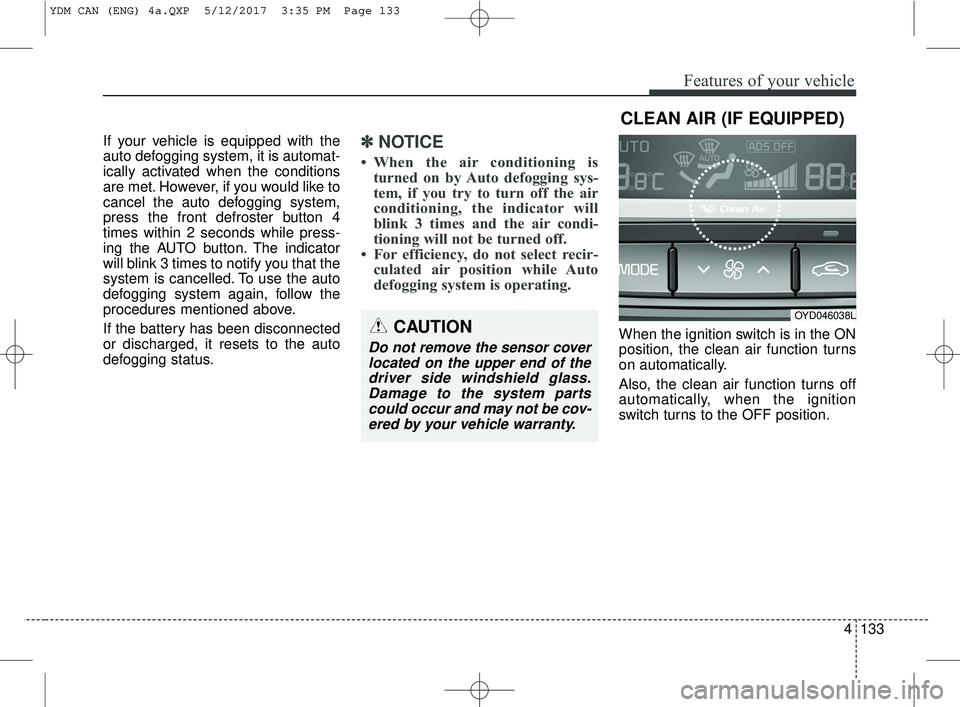
When the ignition switch is in the ON
position, the clean air function turns
on automatically.
Also, the clean air function turns off
automatically, when the ignition
switch turns to the OFF position.CAUTION
Do not remove the sensor cover
located on the upper end of thedriver side windshield glass.Damage to the system partscould occur and may not be cov-ered by your vehicle warranty.
CLEAN AIR (IF EQUIPPED)
OYD046038L
YDM CAN (ENG) 4a.QXP 5/12/2017 3:35 PM Page 133
Page 213 of 584
Features of your vehicle
138
4
Sunvisor
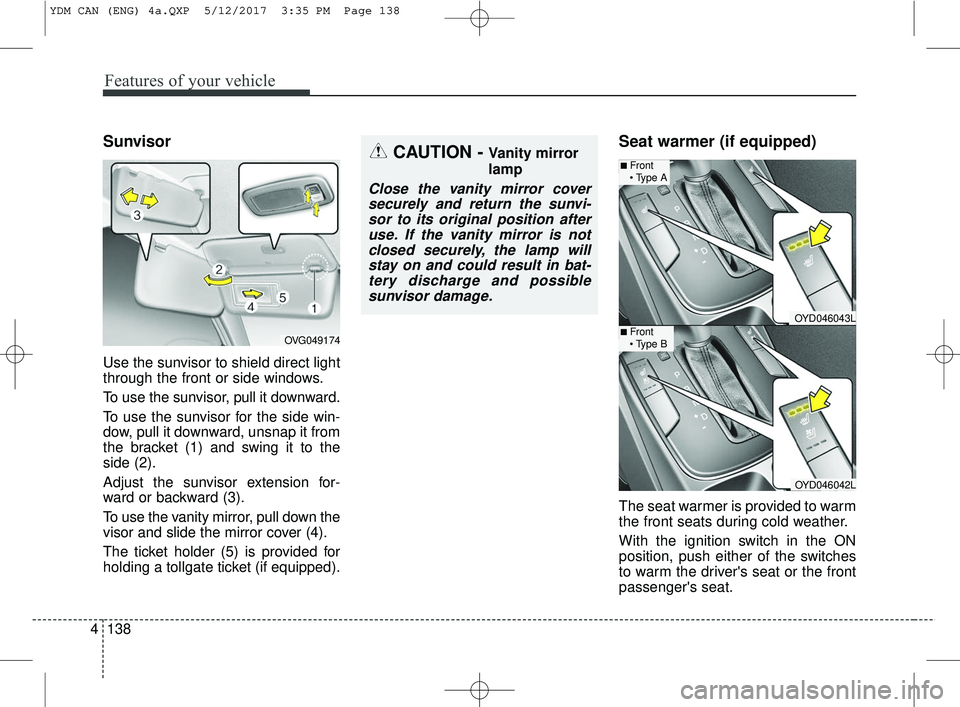
Use the sunvisor to shield direct light
through the front or side windows.
To use the sunvisor, pull it downward.
To use the sunvisor for the side win-
dow, pull it downward, unsnap it from
the bracket (1) and swing it to the
side (2).
Adjust the sunvisor extension for-
ward or backward (3).
To use the vanity mirror, pull down the
visor and slide the mirror cover (4).
The ticket holder (5) is provided for
holding a tollgate ticket (if equipped).
Seat warmer (if equipped)
The seat warmer is provided to warm
the front seats during cold weather.
With the ignition switch in the ON
position, push either of the switches
to warm the driver's seat or the front
passenger's seat.
CAUTION - Vanity mirror
lamp
Close the vanity mirror cover
securely and return the sunvi-sor to its original position afteruse. If the vanity mirror is notclosed securely, the lamp willstay on and could result in bat-tery discharge and possiblesunvisor damage.
OVG049174
OYD046043L
OYD046042L
■Front
■Front
YDM CAN (ENG) 4a.QXP 5/12/2017 3:35 PM Page 138
Page 407 of 584
Driving your vehicle
66
5
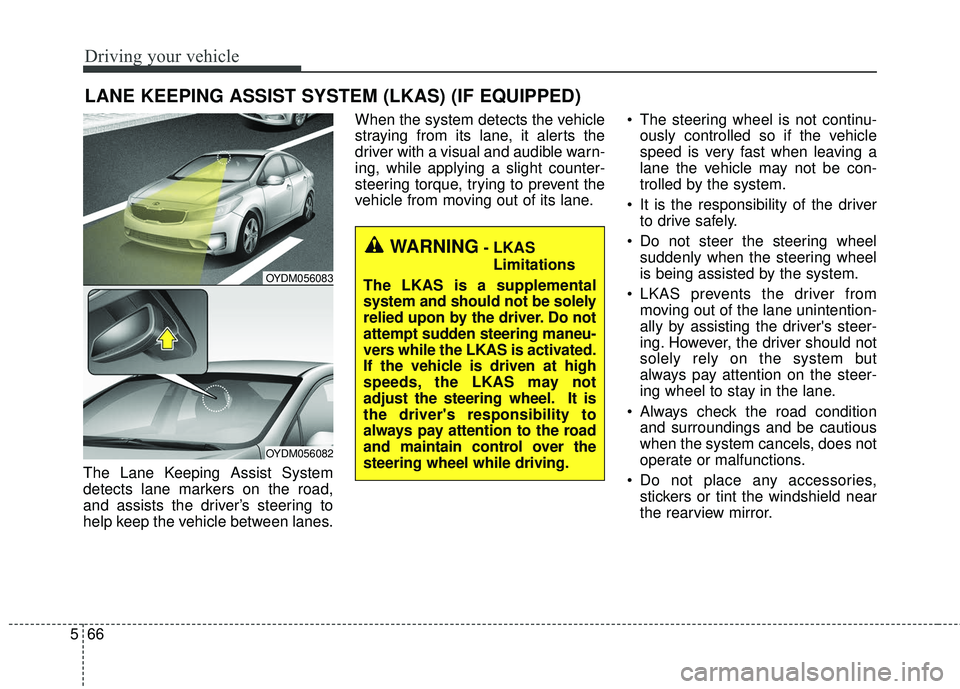
The Lane Keeping Assist System
detects lane markers on the road,
and assists the driver’s steering to
help keep the vehicle between lanes. When the system detects the vehicle
straying from its lane, it alerts the
driver with a visual and audible warn-
ing, while applying a slight counter-
steering torque, trying to prevent the
vehicle from moving out of its lane.
The steering wheel is not continu-
ously controlled so if the vehicle
speed is very fast when leaving a
lane the vehicle may not be con-
trolled by the system.
It is the responsibility of the driver to drive safely.
Do not steer the steering wheel suddenly when the steering wheel
is being assisted by the system.
LKAS prevents the driver from moving out of the lane unintention-
ally by assisting the driver's steer-
ing. However, the driver should not
solely rely on the system but
always pay attention on the steer-
ing wheel to stay in the lane.
Always check the road condition and surroundings and be cautious
when the system cancels, does not
operate or malfunctions.
Do not place any accessories, stickers or tint the windshield near
the rearview mirror.
LANE KEEPING ASSIST SYSTEM (LKAS) (IF EQUIPPED)
OYDM056083
OYDM056082
WARNING- LKAS
Limitations
The LKAS is a supplemental
system and should not be solely
relied upon by the driver. Do not
attempt sudden steering maneu-
vers while the LKAS is activated.
If the vehicle is driven at high
speeds, the LKAS may not
adjust the steering wheel. It is
the driver's responsibility to
always pay attention to the road
and maintain control over the
steering wheel while driving.
Page 412 of 584
571
Driving your vehicle
DRIVER'S ATTENTION
The driver must be cautious in the
below situations for the system may
not assist the driver and may not
work properly.
• The lane is not visible due to snow,rain, stain, a puddle or many other
things.
• The brightness of the outside changes suddenly such as passing
through a tunnel.
• Not turning on the headlight or the light is weak even at night or in
a tunnel.
• Difficult to distinguish the color of the lane marker from the road.
• Driving on a steep grade or a curve.
• Light reflects from the water on the road such as sunlight, streetlight or
the light of oncoming vehicles.
• The lens or windshield is stained with foreign matter.
• The sensor cannot detect the lane because of fog, heavy rain or
heavy snow.
• The surrounding of the inside rear view mirror temperature is high
due to direct light. (Continued)(Continued)
• The lane is very wide or narrow.
• The lane marker is damaged or
indistinct.
• The shadow is on the lane marker by a median strip.
• There is a mark similar to a lane marker.
• There is a boundary structure.
• The distance from vehicle ahead is very short or the vehicle ahead
drives hiding the lane marker.
• The vehicle shakes heavily.
• The lane number increases or decreases or the lane marker are
crossing complicatedly.
• Placing something on the dash- board.
• Driving with the sun in front of you.
• Driving in areas under construction.
• The lane marker is more than two.
• The lane marker in a tunnel is hard to distinguish due to dust or grease.
• The lane marker is hard to distin- guish after raining at night.
• The lane marker is hard to distin- guish due to dust. (Continued)(Continued)
• MDPS (motor driven power steer-
ing) is not operational.
• Some objects are attached in steer- ing wheel.
• The windshield is fogged by humid air in the vehicle.
• The distance from the vehicle ahead is very short or the vehicle
ahead drives covering the lane line.
• The lane line is merged or divided.
• Driving through a toll plaza or toll gate.
• Driving on uneven surface
• An object on roadside which may resemble road markers.
Page 427 of 584

Driving your vehicle
86
5
Adjust your mirrors to reduce the
glare from other driver's head-
lights.
Keep your headlights clean and properly aimed on vehicles not
equipped with the automatic head-
light aiming feature. Dirty or
improperly aimed headlights will
make it much more difficult to see
at night.
Avoid staring directly at the head- lights of oncoming vehicles. You
could be temporarily blinded, and it
will take several seconds for your
eyes to readjust to the darkness.Driving in the rain
Rain and wet roads can make driving
dangerous, especially if you’re not
prepared for the slick pavement.
Here are a few things to consider
when driving in the rain:
A heavy rainfall will make it harderto see and will increase the dis-
tance needed to stop your vehicle,
so slow down.
Keep your windshield wiping equipment in good shape. Replace
your windshield wiper blades when
they show signs of streaking or
missing areas on the windshield. If your tires are not in good condi-
tion, making a quick stop on wet
pavement can cause a skid and
possibly lead to an accident. Be
sure your tires are in good shape.
Turn on your headlights to make it easier for others to see you.
Driving too fast through large pud- dles can affect your brakes. If you
must go through puddles, try to
drive through them slowly.
If you believe you may have gotten your brakes wet, apply them lightly
while driving until normal braking
operation returns.
Driving in flooded areas
Avoid driving through flooded areas
unless you are sure the water is no
higher than the bottom of the wheel
hub. Drive through any water slowly.
Allow adequate stopping distance
because brake performance may be
affected.
After driving through water, dry the
brakes by gently applying them sev-
eral times while the vehicle is moving
slowly.
1JBB3303
Page 465 of 584
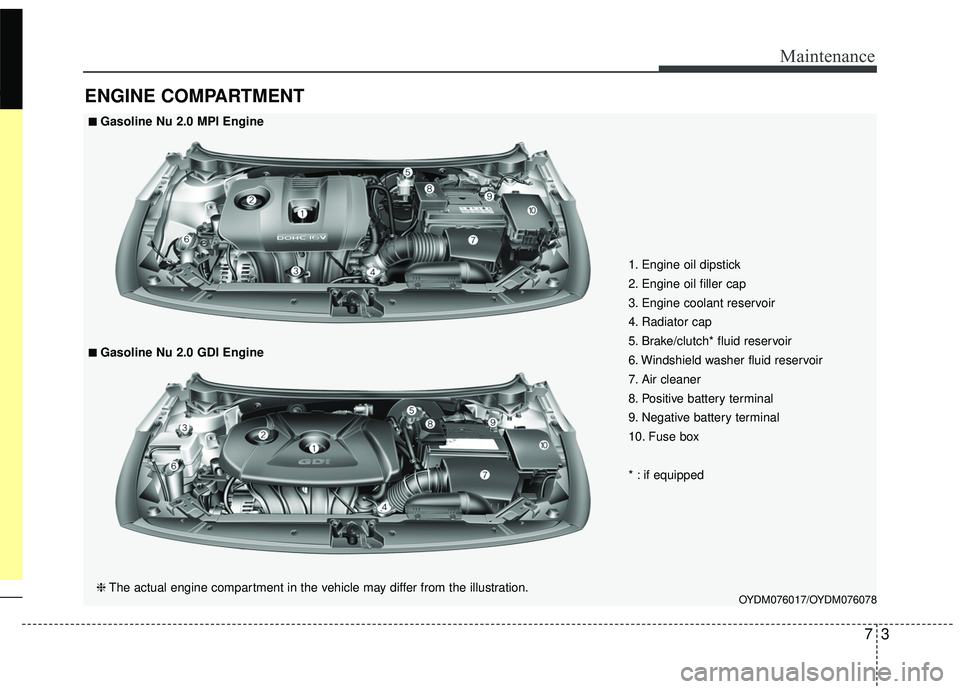
73
Maintenance
ENGINE COMPARTMENT
OYDM076017/OYDM076078
■ ■Gasoline Nu 2.0 MPI Engine
❈ The actual engine compartment in the vehicle may differ from the illustration.
■ ■Gasoline Nu 2.0 GDI Engine 1. Engine oil dipstick
2. Engine oil filler cap
3. Engine coolant reservoir
4. Radiator cap
5. Brake/clutch* fluid reservoir
6. Windshield washer fluid reservoir
7. Air cleaner
8. Positive battery terminal
9. Negative battery terminal
10. Fuse box
* : if equipped