steering KIA FORTE 2018 Owner's Manual
[x] Cancel search | Manufacturer: KIA, Model Year: 2018, Model line: FORTE, Model: KIA FORTE 2018Pages: 584, PDF Size: 15.14 MB
Page 141 of 584
Features of your vehicle
66
4
Elapsed Time (3)
The elapsed time is the total driv-
ing time since the last elapsed time
reset.
- Time range (hh:mm): 00:00 ~ 99:59
To reset the elapsed time, press the RESET button (T ype A :
RESET, Type B, C : ) on the
steering wheel for more than 1
second when the elapsed time is
displayed.
✽ ✽ NOTICE
Even if the vehicle is not in motion,
the elapsed time keeps going while
the engine is running.
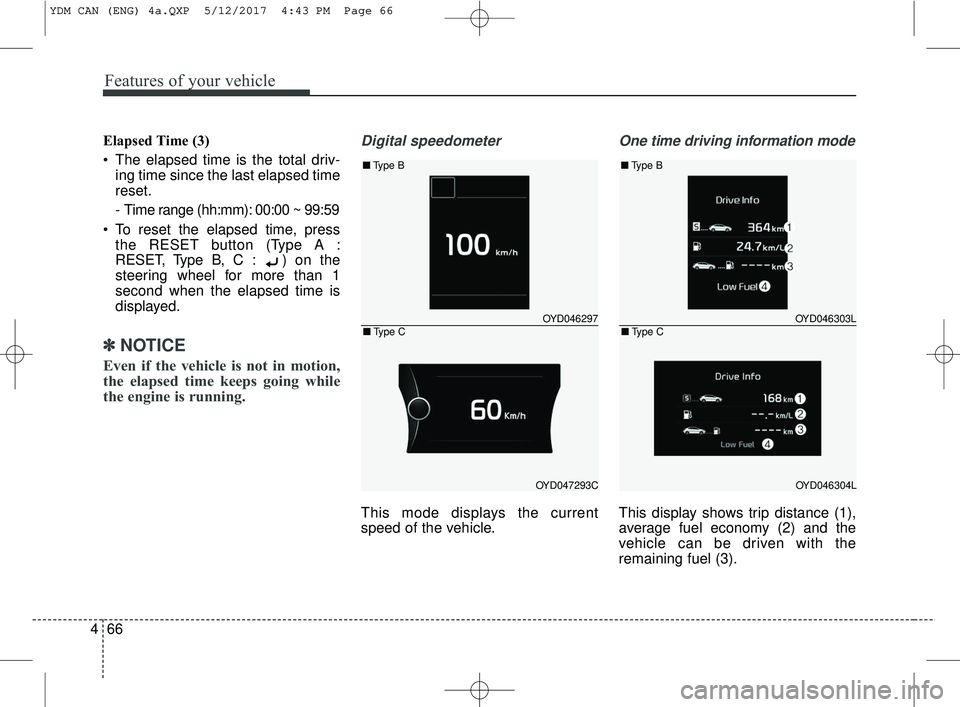
Digital speedometer
This mode displays the current
speed of the vehicle.
One time driving information mode
This display shows trip distance (1),
average fuel economy (2) and the
vehicle can be driven with the
remaining fuel (3).
OYD046297
OYD047293C
■ Type B
■Type COYD046303L
OYD046304L
■Type B
■Type C
YDM CAN (ENG) 4a.QXP 5/12/2017 4:43 PM Page 66
Page 146 of 584
471
Features of your vehicle
Driving Assist (if equipped)
Lane Keeping Assist System(LKAS, if equipped) : To adjust the
sensitivity of the Lane Keeping
Assist System.
- Lane Departure / Standard LKA / Active LKA For more information,
refer to the "Lane Keep Assist
System" in chap ter 5.
Autonomous Emergency Braking system (AEB,if equipped) : To acti-
vate or deactivate the Autonomous
Emergency Braking (AEB).
For more information, refer to
"Autonomous Emergency Braking
(AEB)" in chapter 5. Forward Collision Warning (FCW, if
equipped) : To adjust the initial
warning alert time for Autonomous
Emergency Braking system.
- Late/Normal/Early For more infor- mation, refer to "Autonomous
Emergency Braking (AEB)" in
chapter 6.
Rear Collision Warning (RCW,if equipped)
- Rear Cross Traffic Alert : To acti- vate or deactivate the Rear Cross
Traffic Alert system.
For more information, refer to "Blind
Spot Detection" in chapter 5.
- Blind Spot Detection sound : To activate or deactivate the Blind
Spot Detection sound.
For more information, refer to "Blind
Spot Detection" in chapter 5.
WARNING
Do not adjust the User Setting
while driving. You may lose your
steering control and cause severe
personal injury or accidents.
YDM CAN (ENG) 4a.QXP 5/12/2017 3:32 PM Page 71
Page 152 of 584
477
Features of your vehicle
Press START button while turn steer-
ing (for smart key system)
This warning message illuminatesif the steering wheel does not
unlock normally when the Engine
Start/Stop Button is pressed.
It means that you should press the Engine Start/Stop Button while
turning the steering wheel right
and left.
Steering wheel unlocked
(for smart key system)
This warning message illuminates if the steering wheel does not lock
when the Engine Start/Stop Button
changes to the OFF position. Check Steering Wheel Lock System
(for smart key system)
This warning message illuminates
if the steering wheel does not lock
normally when the Engine
Start/Stop Button changes to the
OFF position.
Press brake pedal to start engine
(for smart key system and automatic
transaxle)
This warning message illuminates if the Engine Start/Stop Button
changes to the ACC position twice
by pressing the button repeatedly
without depressing the brake pedal.
It means that you should depress the brake pedal to start the engine. Press clutch pedal to start engine (for
smart key system and manual transaxle)
This warning message illuminates if
the Engine Start/Stop Button
changes to the ACC position twice
by pressing the button repeatedly
without depressing the clutch pedal.
It means that you should depress the clutch pedal to start the engine.
Key not in vehicle (for smart key system)
This warning message illuminates if the smart key is not in the vehicle
when you press the Engine
Start/Stop Button.
It means that you should always have the smart key with you.
YDM CAN (ENG) 4a.QXP 5/12/2017 3:32 PM Page 77
Page 158 of 584
483
Features of your vehicle
✽ ✽NOTICE- Electronic Brake
force Distribution
(EBD) System
Warning Light
When the ABS Warning Light is on
or both ABS and Parking Brake &
Brake Fluid Warning Lights are on,
the speedometer, odometer, or trip-
meter may not work. Also, the EPS
Warning Light may illuminate and
the steering effort may increase or
decrease.
In this case, have your vehicle inspect-
ed by an authorized Kia dealer as
soon as possible.
Electronic Power
Steering (EPS) WarningLight (if equipped)
This warning light illuminates:
Once you set the ignition switch or Engine Start/Stop Button to the ON
position.
- It remains on until the engine isstarted.
When there is a malfunction with the EPS.
In this case, have your vehicle
inspected by an authorized Kia
dealer.
WARNING - ABS/Brake
Light
When both ABS and Parking
Brake & Brake Fluid Warning
Lights are on, the brake system
will not work normally and you
may experience an unexpected
and dangerous situation during
sudden braking thereby increas-
ing the risk of a crash or injury.
In this case, avoid high speed
driving and abrupt braking.
Have your vehicle inspected by
an authorized Kia dealer as
soon as possible.
YDM CAN (ENG) 4a.QXP 5/12/2017 3:32 PM Page 83
Page 169 of 584
Features of your vehicle
94
4
Battery saver function
The purpose of this feature is to
prevent the battery from being dis-
charged. The system automatically
turns off the parking lights when
the driver removes the ignition key
and opens the driver-side door.
With this feature, the parking lights will turn off automatically if the driv-
er parks on the side of the road at
night.
If necessary, to keep the lights on
when the ignition key is removed,
perform the following:
1) Open the driver-side door.
2) Turn the parking lights OFF and ON again using the light switch
on the steering column.
Headlight escort function
(if equipped)
The headlights (and/or taillights) will
remain on for approximately 20 min-
utes after the ignition key is removed
or turned to the ACC or LOCK posi-
tion. However, if the driver’s door is
opened and closed, the headlights
are turned off after 30 seconds.
The headlights can be turned off by
pressing the lock button on the trans-
mitter (or smart key) twice or turning
off the light switch from the headlight
or Auto light position.
If the driver gets out of the vehicle
through other doors (except driver's
door), the battery saver function
does not operate and the headlight
escort function does not turn off
automatically. Therefore, It causes
the battery to be discharged. In this
case, make sure to turn off the lamp
before getting out of the vehicle.
If the headlights are not working
properly have your vehicle inspected
by an authorized Kia dealer.
Don't attempt to inspect or replace
the wiring yourself to prevent mal-
function.
Daytime running light
Daytime Running Lights (DRL) can
make it easier for others to see the
front of your vehicle during the day.
DRL can be helpful in many different
driving conditions, and it is especially
helpful after dawn and before sunset.
The DRL system turns OFF when:
1. The position lights or headlightsare ON.
2. The parking brake is applied.
3. Engine stops.
LIGHTING
YDM CAN (ENG) 4a.QXP 5/12/2017 3:32 PM Page 94
Page 174 of 584
499
Features of your vehicle
AFLS (Adaptive Front Lighting
System) (if equipped)
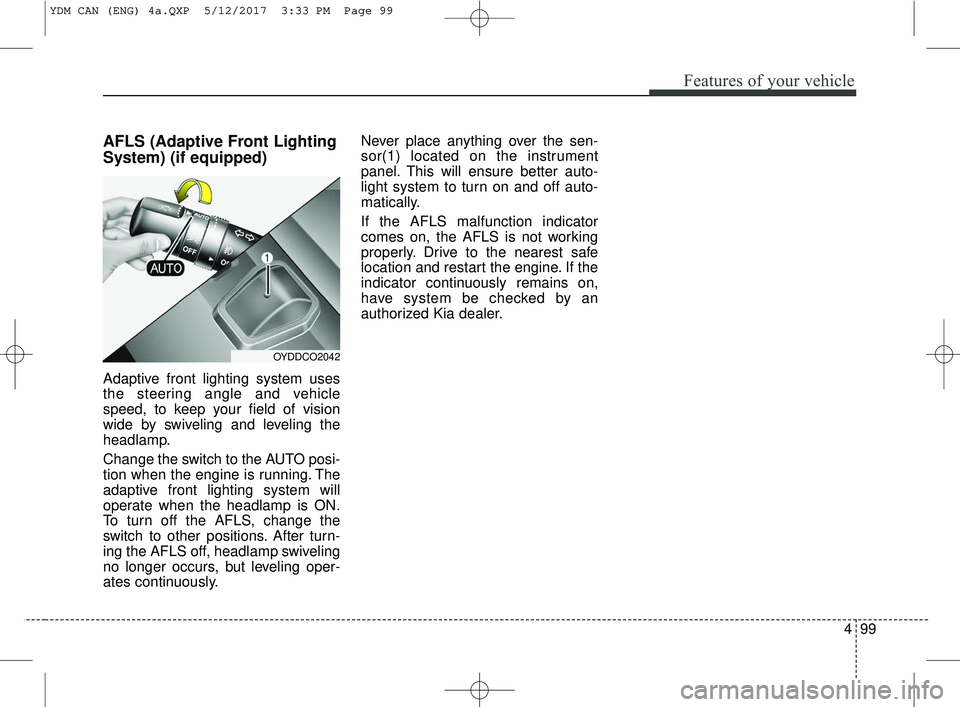
Adaptive front lighting system uses
the steering angle and vehicle
speed, to keep your field of vision
wide by swiveling and leveling the
headlamp.
Change the switch to the AUTO posi-
tion when the engine is running. The
adaptive front lighting system will
operate when the headlamp is ON.
To turn off the AFLS, change the
switch to other positions. After turn-
ing the AFLS off, headlamp swiveling
no longer occurs, but leveling oper-
ates continuously.Never place anything over the sen-
sor(1) located on the instrument
panel. This will ensure better auto-
light system to turn on and off auto-
matically.
If the AFLS malfunction indicator
comes on, the AFLS is not working
properly. Drive to the nearest safe
location and restart the engine. If the
indicator continuously remains on,
have system be checked by an
authorized Kia dealer.
OYDDCO2042
YDM CAN (ENG) 4a.QXP 5/12/2017 3:33 PM Page 99
Page 223 of 584
Steering wheel audio controls
(if equipped)
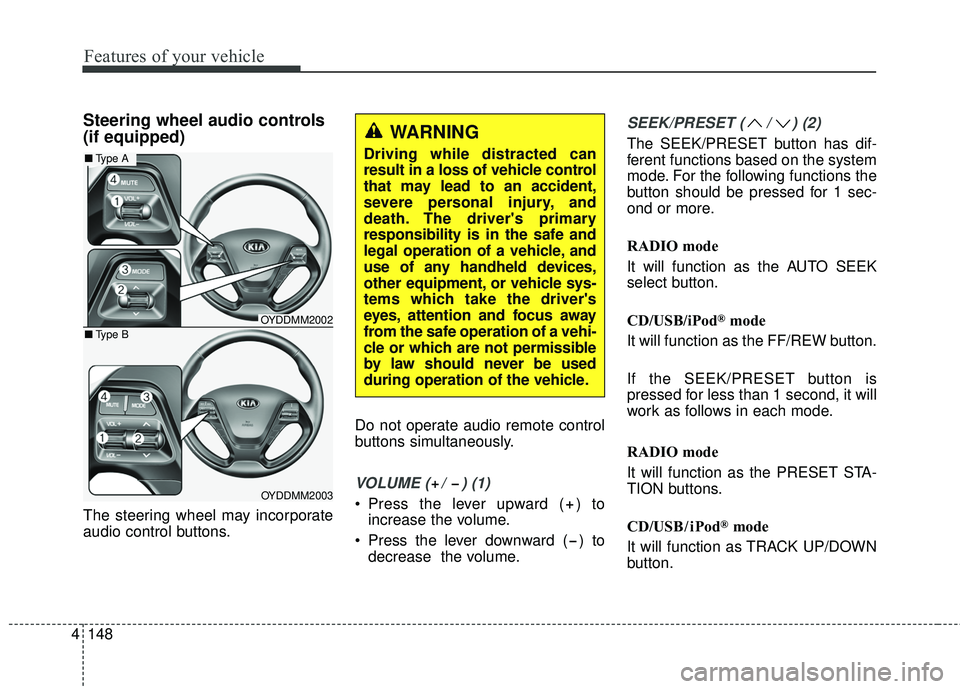
The steering wheel may incorporate
audio control buttons.Do not operate audio remote control
buttons simultaneously.
VOLUME ( / ) (1)
Press the lever upward ( ) to
increase the volume.
Press the lever downward ( ) to decrease the volume.
SEEK/PRESET ( / ) (2)
The SEEK/PRESET button has dif-
ferent functions based on the system
mode. For the following functions the
button should be pressed for 1 sec-
ond or more.
RADIO mode
It will function as the AUTO SEEK
select button.
CD/USB/iPod
®mode
It will function as the FF/REW button.
If the SEEK/PRESET button is
pressed for less than 1 second, it will
work as follows in each mode.
RADIO mode
It will function as the PRESET STA-
TION buttons.
CD/USB/ iPod
®mode
It will function as TRACK UP/DOWN
button.
4 148
Features of your vehicle
OYDDMM2002
OYDDMM2003
■ Type A
■Type B
WARNING
Driving while distracted can
result in a loss of vehicle control
that may lead to an accident,
severe personal injury, and
death. The driver's primary
responsibility is in the safe and
legal operation of a vehicle, and
use of any handheld devices,
other equipment, or vehicle sys-
tems which take the driver's
eyes, attention and focus away
from the safe operation of a vehi-
cle or which are not permissible
by law should never be used
during operation of the vehicle.
Page 261 of 584
4 186
Features of your vehicle
Phone Mode
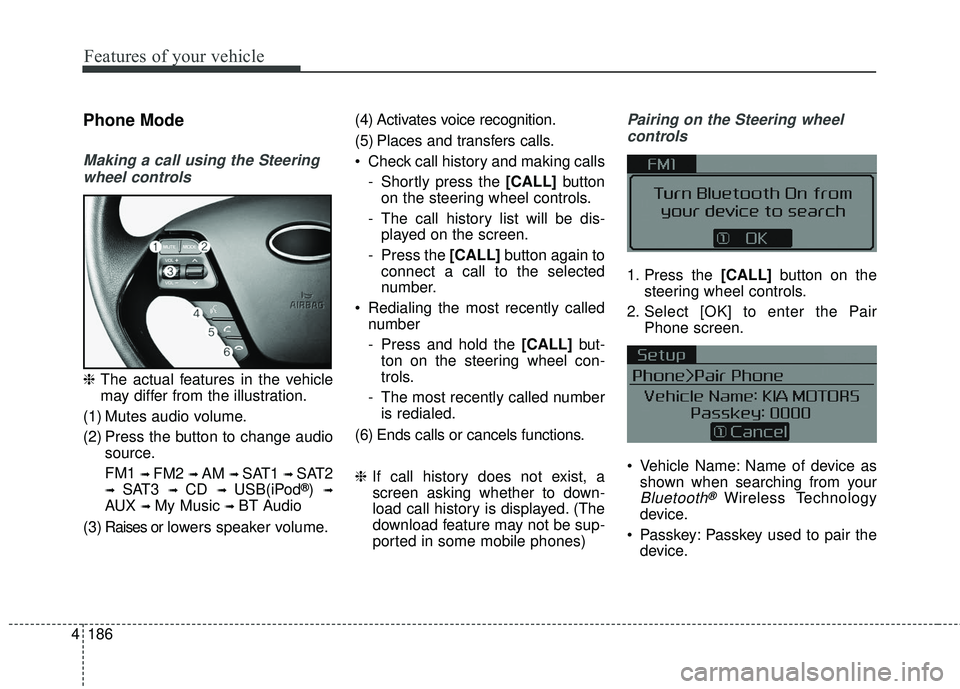
Making a call using the Steeringwheel controls
❈ The actual features in the vehicle
may differ from the illustration.
(1) Mutes audio volume.
(2) Press the button to change audio source.
FM1
➟ FM2 ➟ AM ➟ SAT1 ➟ SAT2
➟ SAT3 ➟ CD ➟ USB(iPod®) ➟
AUX ➟ My Music ➟ BT Audio
( 3 ) Raises or l ow ers speaker volume. (4) Activates voice recognition.
(5) Places and transfers calls.
Check call history and making calls
- Shortly press the [CALL] button
on the steering wheel controls.
- The call history list will be dis- played on the screen.
- Press the [CALL] button again to
connect a call to the selected
number.
Redialing the most recently called number
- Press and hold the [CALL] but-
ton on the steering wheel con-
trols.
- The most recently called number is redialed.
(6) Ends calls or cancels functions.
❈ If call history does not exist, a
screen asking whether to down-
load call history is displayed. (The
download feature may not be sup-
ported in some mobile phones)
Pairing on the Steering wheel
controls
1. Press the [CALL] button on the
steering wheel controls.
2. Select [OK] to enter the Pair Phone screen.
Vehicle Name: Name of device as shown when searching from your
Bluetooth®Wireless Technology
device.
Passkey: Passkey used to pair the device.
Page 262 of 584
187
4
Features of your vehicle
3. From your Bluetooth®Wireless
Technology device (i.e. Mobile
Phone), search and select your
car audio system.
❈ SSP: Secure Simple Pairing
Non SSP supported device:
4. After a few moments, a screen is displayed where the passkey is
entered. Enter the passkey “0000”
to pair your
Bluetooth®Wireless
Technology device with the car
audio system.
SSP supported device:
4. After a few moments, a screen is displayed that has the 6 digit
passkey from any nearby SSP
device that is found. Check the
passkey on your
Bluetooth®
Wireless Technology. Some phones (i.e., iPhone
®, AndroidTM
and Blackberry®phones) may offer
an option to allow acceptance of all
future Bluetooth
®connection requests
by default.
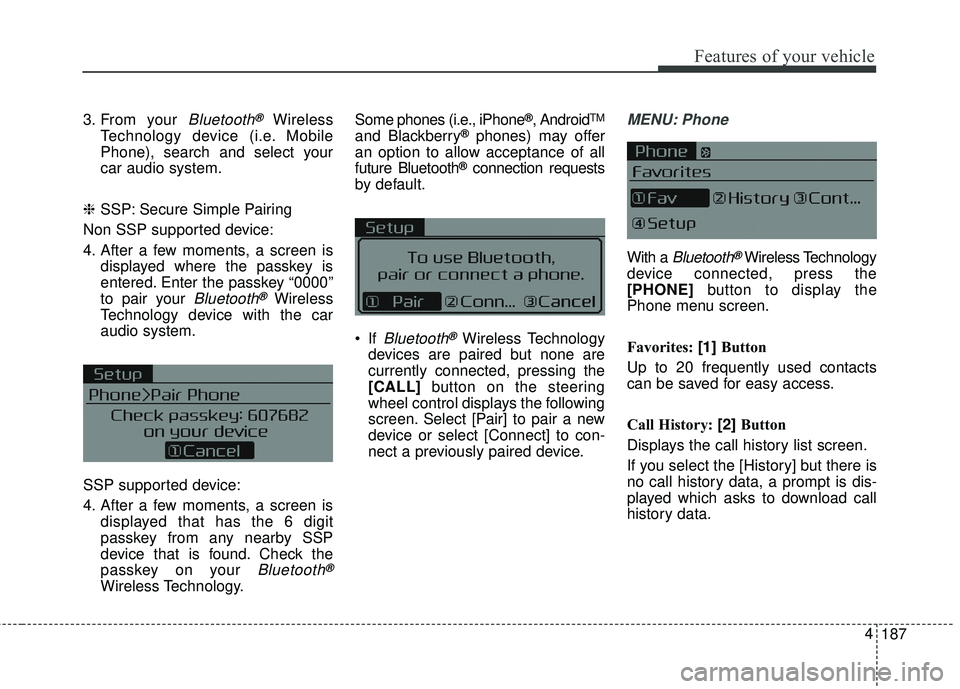
If
Bluetooth®Wireless Technology
devices are paired but none are
currently connected, pressing the
[CALL] button on the steering
wheel control displays the following
screen. Select [Pair] to pair a new
device or select [Connect] to con-
nect a previously paired device.
MENU: Phone
With a Bluetooth®Wireless Technology
device connected, press the
[PHONE] button to display the
Phone menu screen.
Favorites: [1] Button
Up to 20 frequently used contacts
can be saved for easy access.
Call History: [2] Button
Displays the call history list screen.
If you select the [History] but there is
no call history data, a prompt is dis-
played which asks to download call
history data.
Page 263 of 584
![KIA FORTE 2018 Owners Manual 4 188
Features of your vehicle
Contacts: [3]Button
Displays the Contacts list screen.
If you select the [Contacts] but there
is no contacts data stored, a prompt
is displayed which asks to download
co](/img/2/40397/w960_40397-262.png "KIA FORTE 2018 Owners Manual 4 188
Features of your vehicle
Contacts: [3]Button
Displays the Contacts list screen.
If you select the [Contacts] but there
is no contacts data stored, a prompt
is displayed which asks to download
co")
4 188
Features of your vehicle
Contacts: [3]Button
Displays the Contacts list screen.
If you select the [Contacts] but there
is no contacts data stored, a prompt
is displayed which asks to download
contacts data.
Setup: [4] Button
Displays Phone related settings.
This feature may not be supported in
some mobile phones. For more infor-
mation on download support, refer to
your mobile phone’s user manual. Answering a Call
Answering a call with a
Bluetooth®
Wireless Technology device connect-
ed will display the following screen.
To accept the call, press [CALL]
but-
ton on the steering wheel while the
call is incoming.
Caller: Displays the other party’s name when the incoming caller is
saved within your contacts.
Incoming Number: Displays the incoming number.
✽ ✽ NOTICE
• When an incoming call pop-up is
displayed, most Audio and SETUP
mode features are disabled. Only
the call volume will operate.
• The telephone number may not be properly displayed in some mobile
phones.