instrument panel KIA FORTE 2019 User Guide
[x] Cancel search | Manufacturer: KIA, Model Year: 2019, Model line: FORTE, Model: KIA FORTE 2019Pages: 550, PDF Size: 11.66 MB
Page 76 of 550
Safety features of your vehicle
60
3
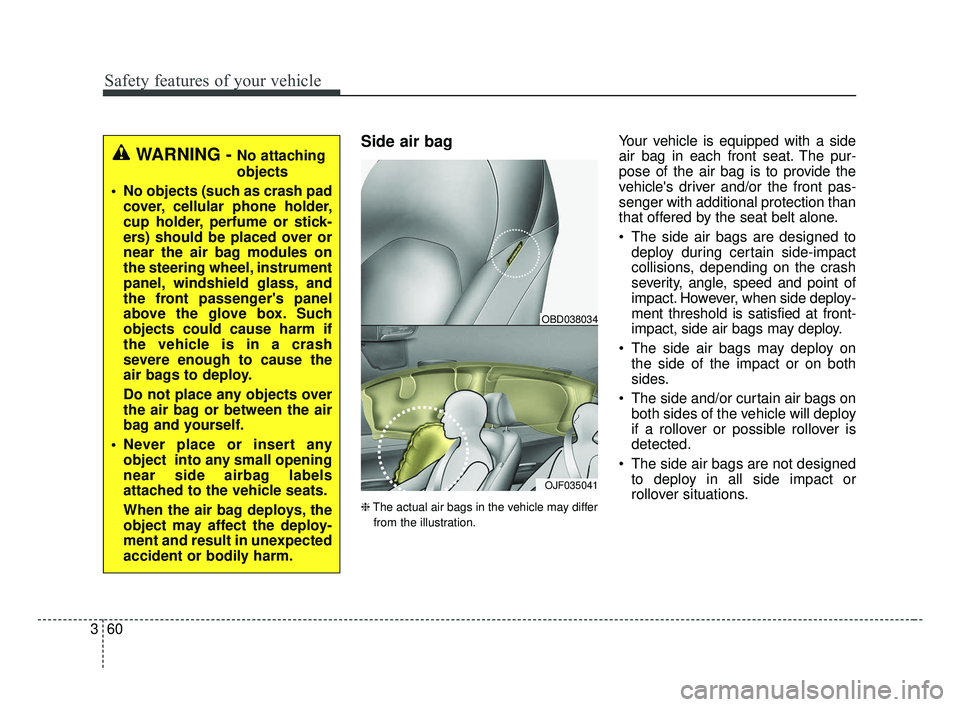
Side air bag
❈ The actual air bags in the vehicle may differ
from the illustration.
Your vehicle is equipped with a side
air bag in each front seat. The pur-
pose of the air bag is to provide the
vehicle's driver and/or the front pas-
senger with additional protection than
that offered by the seat belt alone.
The side air bags are designed to deploy during certain side-impact
collisions, depending on the crash
severity, angle, speed and point of
impact. However, when side deploy-
ment threshold is satisfied at front-
impact, side air bags may deploy.
The side air bags may deploy on the side of the impact or on both
sides.
The side and/or curtain air bags on both sides of the vehicle will deploy
if a rollover or possible rollover is
detected.
The side air bags are not designed to deploy in all side impact or
rollover situations.
OJF035041
OBD038034
WARNING - No attaching
objects
No objects (such as crash pad cover, cellular phone holder,
cup holder, perfume or stick-
ers) should be placed over or
near the air bag modules on
the steering wheel, instrument
panel, windshield glass, and
the front passenger's panel
above the glove box. Such
objects could cause harm if
the vehicle is in a crash
severe enough to cause the
air bags to deploy.
Do not place any objects over
the air bag or between the air
bag and yourself.
Never place or insert any object into any small opening
near side airbag labels
attached to the vehicle seats.
When the air bag deploys, the
object may affect the deploy-
ment and result in unexpected
accident or bodily harm.
BDm CAN (ENG) 3.qxp 6/30/2018 1:44 PM Page 60
Page 133 of 550
Features of your vehicle
48
4
Tilt and telescopic steering
(if equipped)
Tilt steering allows you to adjust the
steering wheel before you drive. You
can also raise it to give your legs
more room when you exit and enter
the vehicle.
The steering wheel should be posi-
tioned so that it is comfortable for
you to drive, while permitting you to
see the instrument panel warning
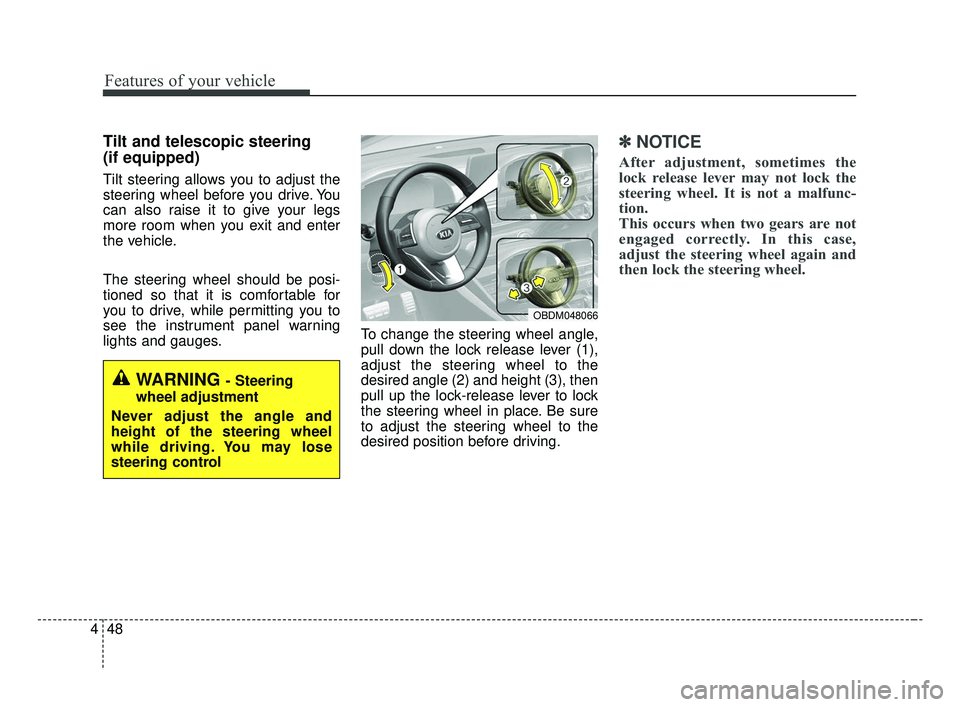
lights and gauges. To change the steering wheel angle,
pull down the lock release lever (1),
adjust the steering wheel to the
desired angle (2) and height (3), then
pull up the lock-release lever to lock
the steering wheel in place. Be sure
to adjust the steering wheel to the
desired position before driving.
✽ ✽
NOTICE
After adjustment, sometimes the
lock release lever may not lock the
steering wheel. It is not a malfunc-
tion.
This occurs when two gears are not
engaged correctly. In this case,
adjust the steering wheel again and
then lock the steering wheel.
WARNING - Steering
wheel adjustment
Never adjust the angle and
height of the steering wheel
while driving. You may lose
steering control
OBDM048066
BDm CAN (ENG) 4.qxp 7/4/2018 10:05 AM Page 48
Page 142 of 550
457
Features of your vehicle
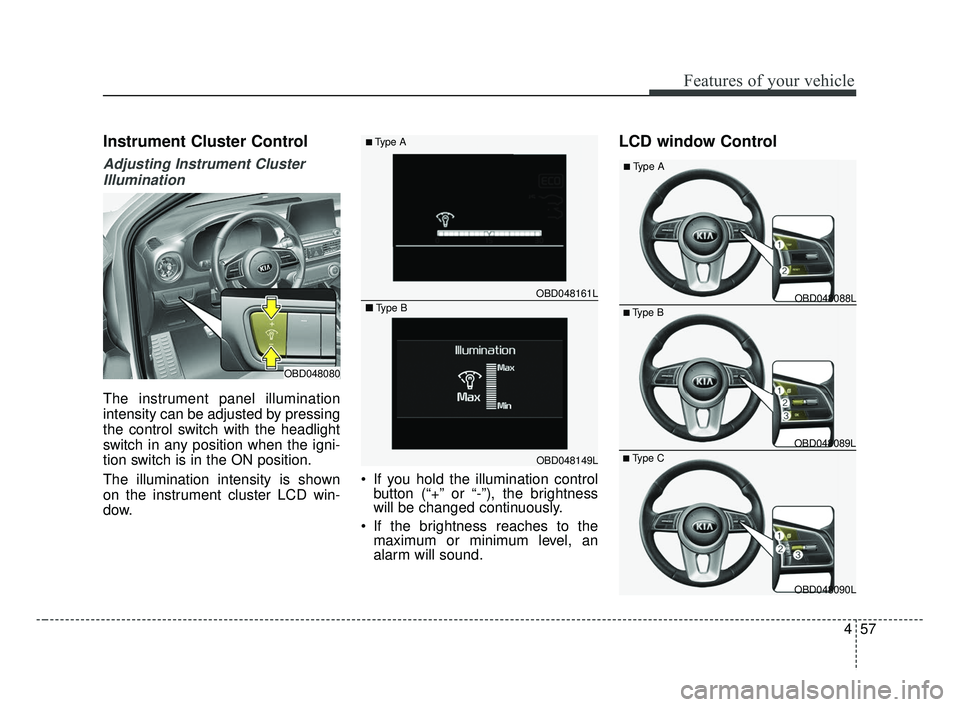
Instrument Cluster Control
Adjusting Instrument ClusterIllumination
The instrument panel illumination
intensity can be adjusted by pressing
the control switch with the headlight
switch in any position when the igni-
tion switch is in the ON position.
The illumination intensity is shown
on the instrument cluster LCD win-
dow. If you hold the illumination control
button (“+” or “-”), the brightness
will be changed continuously.
If the brightness reaches to the maximum or minimum level, an
alarm will sound.
LCD window Control
OBD048080
OBD048149L
OBD048161L
■Type A
■
Type BOBD048088L
OBD048089L
OBD048090L
■Type B
■Type A
■Type C
BDm CAN (ENG) 4.qxp 7/4/2018 10:06 AM Page 57
Page 187 of 550
Features of your vehicle
102
4
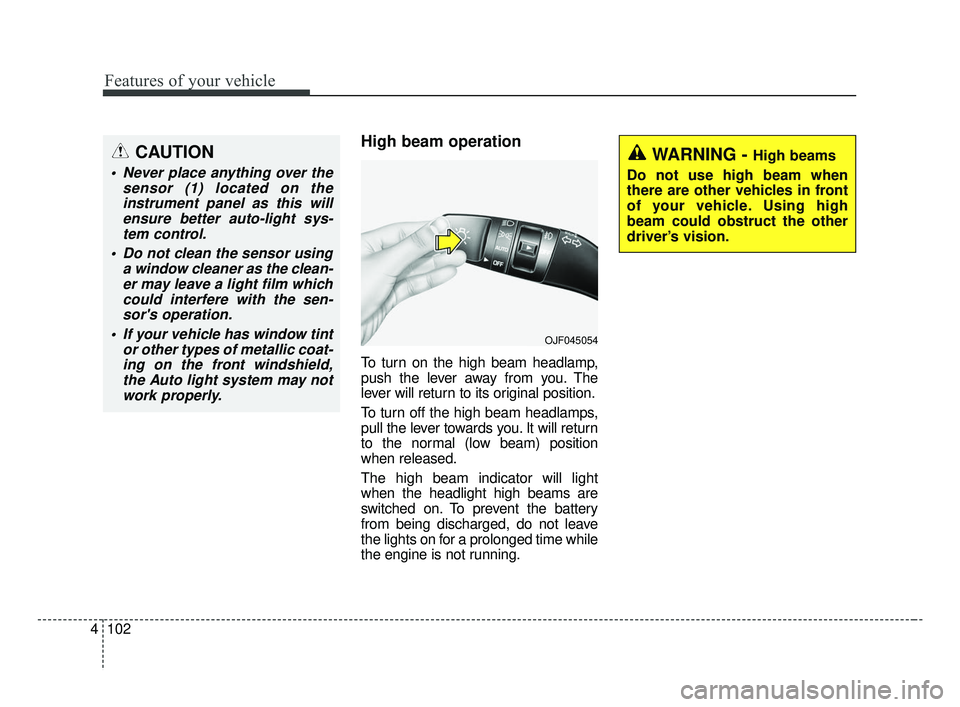
High beam operation
To turn on the high beam headlamp,
push the lever away from you. The
lever will return to its original position.
To turn off the high beam headlamps,
pull the lever towards you. It will return
to the normal (low beam) position
when released.
The high beam indicator will light
when the headlight high beams are
switched on. To prevent the battery
from being discharged, do not leave
the lights on for a prolonged time while
the engine is not running.
WARNING - High beams
Do not use high beam when
there are other vehicles in front
of your vehicle. Using high
beam could obstruct the other
driver’s vision.
OJF045054
CAUTION
Never place anything over the sensor (1) located on theinstrument panel as this willensure better auto-light sys-tem control.
Do not clean the sensor using a window cleaner as the clean-er may leave a light film whichcould interfere with the sen-sor's operation.
If your vehicle has window tint or other types of metallic coat-ing on the front windshield,the Auto light system may notwork properly.
BDm CAN (ENG) 4.qxp 7/4/2018 10:07 AM Page 102
Page 191 of 550
Features of your vehicle
106
4
✽ ✽
NOTICE
• Do not disassemble a front view
camera temporarily for tinted
window or attaching any types of
coatings and accessories. If you
disassemble the camera and
assemble it again, take your vehi-
cle to an authorized Kia dealer
and have the system checked to
need a calibration.
• When you replace or reinstall the windshield glass or front view
camera, take your vehicle to an
authorized Kia dealer and have
the system checked.
• Be careful that water doesn't get into the High Beam Assist unit and
do not remove or damage parts of
the High Beam Assist system.
• Do not place objects on the dash board that reflect light such as
mirrors, white paper, etc. The sys-
tem may not be able to function if
sunlight is reflected. (Continued)(Continued)
• At times, the High Beam Assist
may not operate due to system
limitations. The system is for your
convenience only.
It is the responsibility of the driv-
er to drive safely and always check
the road conditions.
• When the system does not operate normally, change the lamp posi-
tion manually between the high
beam and low beam.
• Do not place any accessories, stickers or tint on the windshield.
Turn signals and lane change
signals
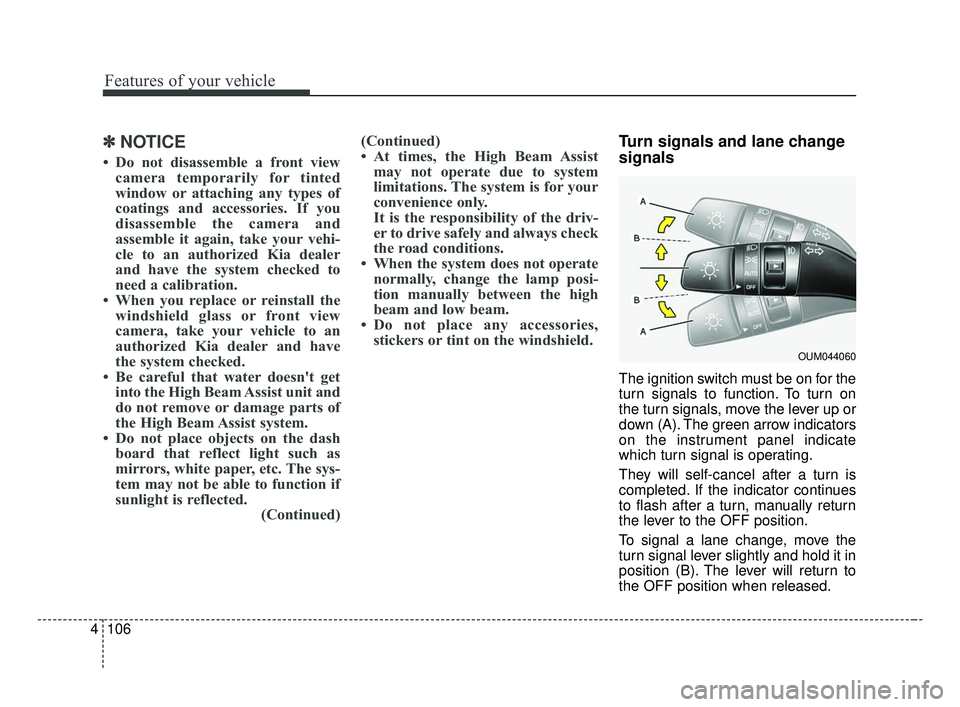
The ignition switch must be on for the
turn signals to function. To turn on
the turn signals, move the lever up or
down (A). The green arrow indicators
on the instrument panel indicate
which turn signal is operating.
They will self-cancel after a turn is
completed. If the indicator continues
to flash after a turn, manually return
the lever to the OFF position.
To signal a lane change, move the
turn signal lever slightly and hold it in
position (B). The lever will return to
the OFF position when released.
OUM044060
BDm CAN (ENG) 4.qxp 7/4/2018 10:07 AM Page 106
Page 199 of 550
Features of your vehicle
114
4
If you want to defrost and defog the
front windshield, refer to “Windshield
defrosting and defogging” in this sec-
tion.
Rear window defroster
The defroster heats the window to
remove frost, fog and thin ice from
the rear window, while the engine is
running.
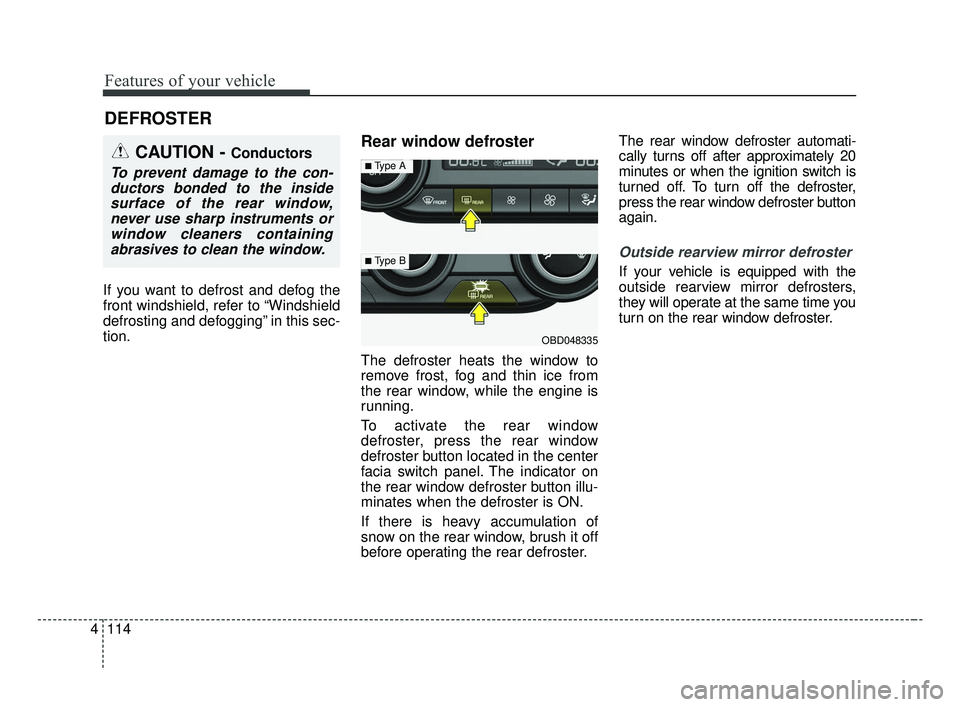
To activate the rear window
defroster, press the rear window
defroster button located in the center
facia switch panel. The indicator on
the rear window defroster button illu-
minates when the defroster is ON.
If there is heavy accumulation of
snow on the rear window, brush it off
before operating the rear defroster. The rear window defroster automati-
cally turns off after approximately 20
minutes or when the ignition switch is
turned off. To turn off the defroster,
press the rear window defroster button
again.
Outside rearview mirror defroster
If your vehicle is equipped with the
outside rearview mirror defrosters,
they will operate at the same time you
turn on the rear window defroster.
DEFROSTER
CAUTION - Conductors
To prevent damage to the con-
ductors bonded to the insidesurface of the rear window,never use sharp instruments orwindow cleaners containingabrasives to clean the window.
OBD048335
■Type A
■ Type B
BDm CAN (ENG) 4.qxp 7/4/2018 10:08 AM Page 114
Page 203 of 550
Features of your vehicle
118
4
MAX A/C selection
The MAX A/C mode is used to cool
the inside of the vehicle faster.
Air flow is directed toward the upper
body and face.
In this mode, the air conditioning and
the recirculated air position will be
selected automatically.
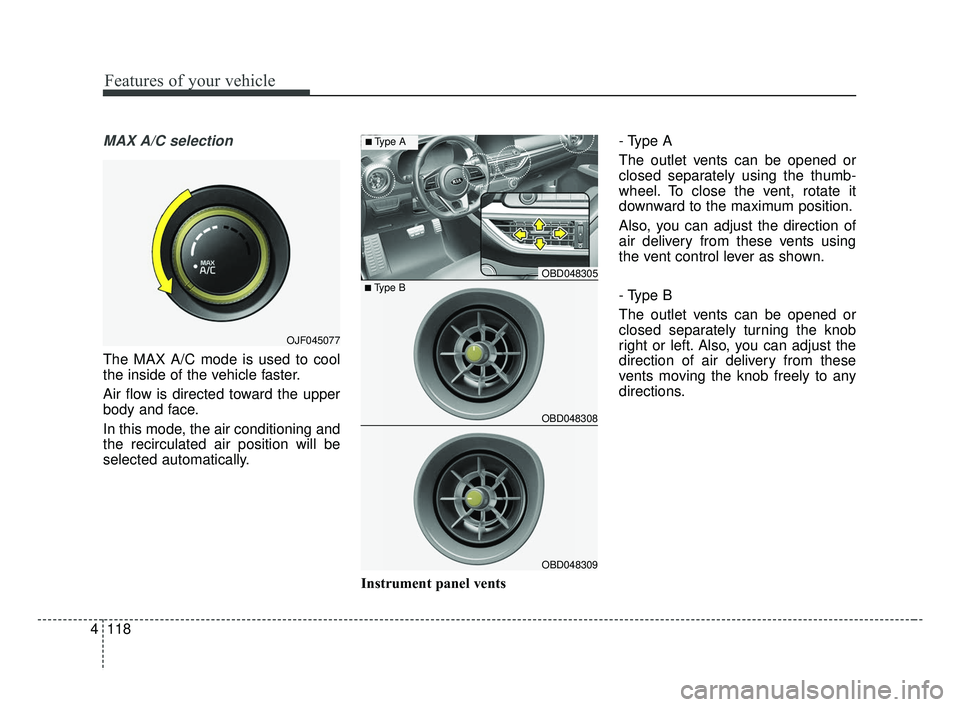
Instrument panel vents- Type A
The outlet vents can be opened or
closed separately using the thumb-
wheel. To close the vent, rotate it
downward to the maximum position.
Also, you can adjust the direction of
air delivery from these vents using
the vent control lever as shown.
- Type B
The outlet vents can be opened or
closed separately turning the knob
right or left. Also, you can adjust the
direction of air delivery from these
vents moving the knob freely to any
directions.
OJF045077
OBD048305
OBD048308
OBD048309
■Type B
■Type A
BDm CAN (ENG) 4.qxp 7/4/2018 10:08 AM Page 118
Page 212 of 550
4127
Features of your vehicle
✽ ✽NOTICE
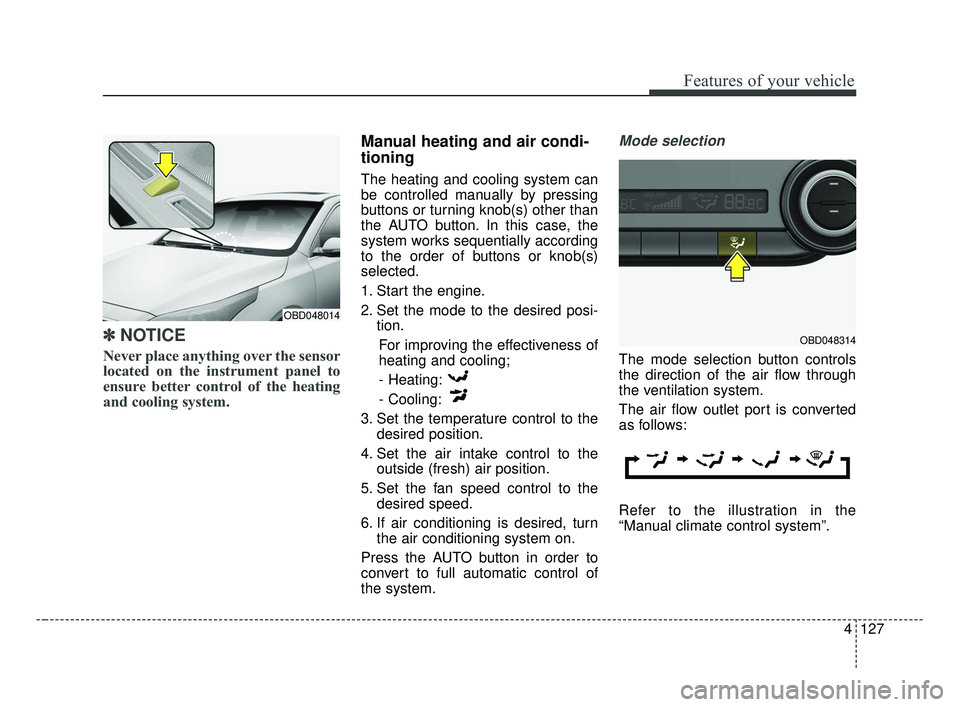
Never place anything over the sensor
located on the instrument panel to
ensure better control of the heating
and cooling system.
Manual heating and air condi-
tioning
The heating and cooling system can
be controlled manually by pressing
buttons or turning knob(s) other than
the AUTO button. In this case, the
system works sequentially according
to the order of buttons or knob(s)
selected.
1. Start the engine.
2. Set the mode to the desired posi-
tion.
For improving the effectiveness of
heating and cooling;- Heating:
- Cooling:
3. Set the temperature control to the desired position.
4. Set the air intake control to the outside (fresh) air position.
5. Set the fan speed control to the desired speed.
6. If air conditioning is desired, turn the air conditioning system on.
Press the AUTO button in order to
convert to full automatic control of
the system.
Mode selection
The mode selection button controls
the direction of the air flow through
the ventilation system.
The air flow outlet port is converted
as follows:
Refer to the illustration in the
“Manual climate control system”.
OBD048314
OBD048014
BDm CAN (ENG) 4.qxp 7/4/2018 10:09 AM Page 127
Page 214 of 550
4129
Features of your vehicle
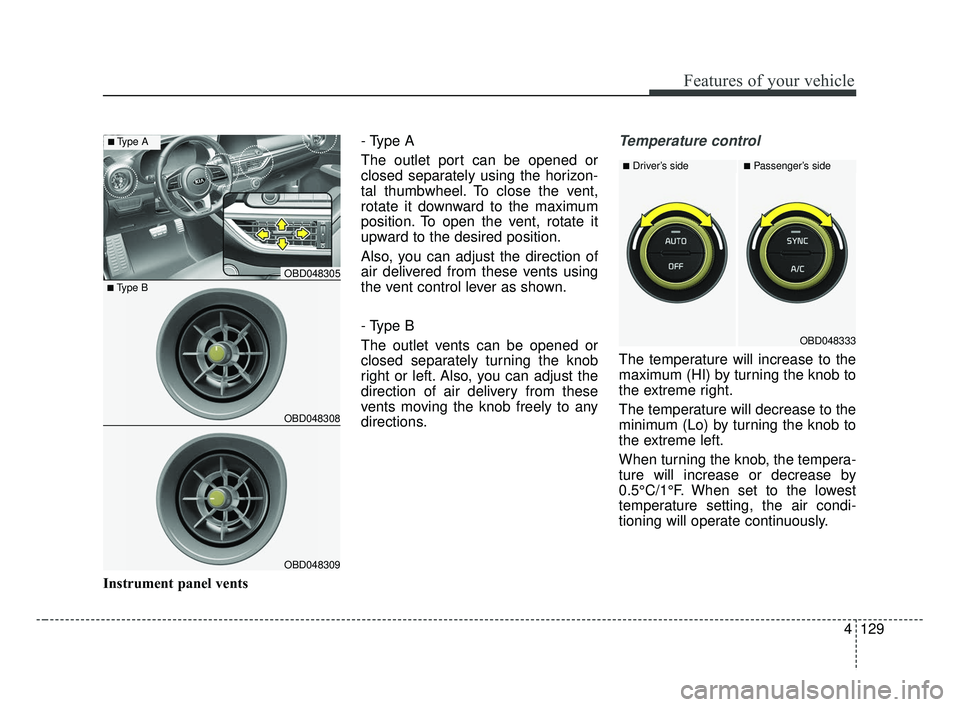
Instrument panel vents- Type A
The outlet port can be opened or
closed separately using the horizon-
tal thumbwheel. To close the vent,
rotate it downward to the maximum
position. To open the vent, rotate it
upward to the desired position.
Also, you can adjust the direction of
air delivered from these vents using
the vent control lever as shown.
- Type B
The outlet vents can be opened or
closed separately turning the knob
right or left. Also, you can adjust the
direction of air delivery from these
vents moving the knob freely to any
directions.
Temperature control
The temperature will increase to the
maximum (HI) by turning the knob to
the extreme right.
The temperature will decrease to the
minimum (Lo) by turning the knob to
the extreme left.
When turning the knob, the tempera-
ture will increase or decrease by
0.5°C/1°F. When set to the lowest
temperature setting, the air condi-
tioning will operate continuously.
■Driver’s side■Passenger’s side
OBD048333
OBD048305
OBD048308
OBD048309
■Type B
■Type A
BDm CAN (ENG) 4.qxp 7/4/2018 10:09 AM Page 129
Page 292 of 550
Driving your vehicle
46
5
The FCA system is designed to
detect and monitor a vehicle ahead
in the roadway through camera
recognition to warn the driver that a
collision is imminent, and if neces-
sary, apply emergency braking.System setting and activation
System setting
When the ignition switch is turned
on, Forward Collision-Avoidance
Assist (FCA) automatically gets acti-
vated. The system can be deactivat-
ed if the driver cancels the system
from the instrument panel as follows
: 'User settings → Driving assist →
Forward Collision-Avoidance Assist'
FORWARD COLLISION-AVOIDANCE ASSIST (FCA) (CAMERA TYPE) (IF EQUIPPED)
WARNING
Take the following precautions
when using the Forward
Collision-Avoidance Assist
(FCA) system:
This system is only a supple-
mental system and it is not
intended to, nor does it replace
the need for extreme care and
attention of the driver. The
sensing range and objects
detectable by the sensors are
limited. Pay attention to the
road conditions at all times.
NEVER drive too fast in accor- dance with the road condi-
tions or while cornering.
Always drive cautiously to prevent unexpected and sud-
den situations from occur-
ring. FCA does not guarantee
to stop the vehicle completely
and does not guarantee to
avoid all collisions.
WARNING
Camera type FCA system does
not operate for pedestrians in
front.
BDm CAN (ENG) 5.QXP 7/4/2018 10:13 AM Page 46