lane assist KIA FORTE 2019 User Guide
[x] Cancel search | Manufacturer: KIA, Model Year: 2019, Model line: FORTE, Model: KIA FORTE 2019Pages: 550, PDF Size: 11.66 MB
Page 360 of 550
Driving your vehicle
114
5
The color of indicator will change
depend on the condition of LKA.
- White : Sensor does not detect the lane marker or vehicle
speed is less than 64
km/h (40 mph).
- Green : Sensor detects the lane
marker and system is able
to control the steering.LKA activation
To see the LKA screen on the LCD
display in the cluster, Tab to the
ASSIST mode ( ).
For further details, refer to [menu settings] in chapter 4.
After LKA is activated, if both lane markers are detected, vehicle
speed is over 64 km/h (40 mph)
and all the activation conditions are
satisfied, a green steering wheel
indicator will illuminate and the
steering wheel will be controlled.WARNING
The Lane Keeping Assist system
is a system to help prevent the
driver from leaving the lane.
However, the driver should not
solely rely on the system but
always check the road condi-
tions when driving.
BDm CAN (ENG) 5.QXP 7/4/2018 10:17 AM Page 114
Page 361 of 550
5115
Driving your vehicle
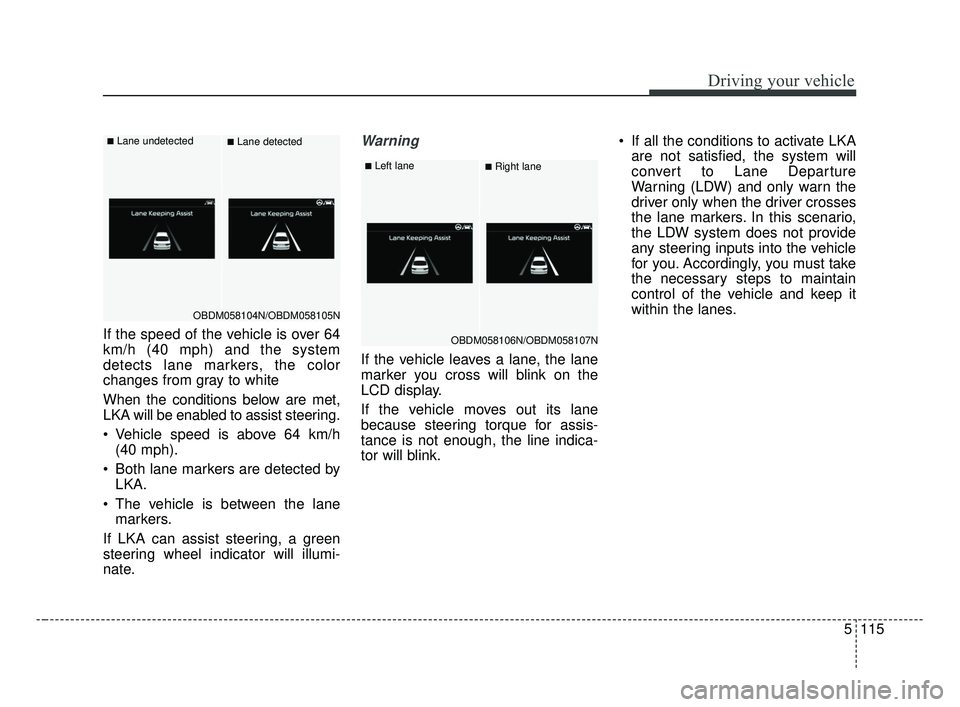
If the speed of the vehicle is over 64
km/h (40 mph) and the system
detects lane markers, the color
changes from gray to white
When the conditions below are met,
LKA will be enabled to assist steering.
Vehicle speed is above 64 km/h(40 mph).
Both lane markers are detected by LKA.
The vehicle is between the lane markers.
If LKA can assist steering, a green
steering wheel indicator will illumi-
nate.
Warning
If the vehicle leaves a lane, the lane
marker you cross will blink on the
LCD display.
If the vehicle moves out its lane
because steering torque for assis-
tance is not enough, the line indica-
tor will blink. If all the conditions to activate LKA
are not satisfied, the system will
convert to Lane Departure
Warning (LDW) and only warn the
driver only when the driver crosses
the lane markers. In this scenario,
the LDW system does not provide
any steering inputs into the vehicle
for you. Accordingly, you must take
the necessary steps to maintain
control of the vehicle and keep it
within the lanes.
OBDM058104N/OBDM058105N
■Lane undetected■Lane detected
OBDM058106N/OBDM058107N
■Left lane■Right lane
BDm CAN (ENG) 5.QXP 7/4/2018 10:17 AM Page 115
Page 362 of 550
Driving your vehicle
116
5
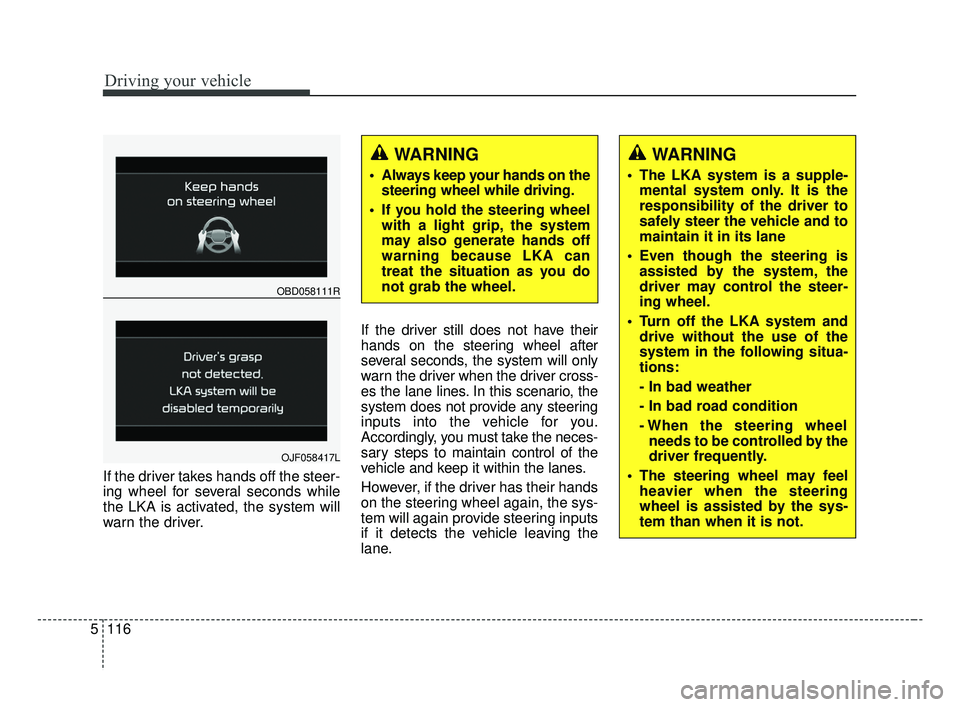
If the driver takes hands off the steer-
ing wheel for several seconds while
the LKA is activated, the system will
warn the driver. If the driver still does not have their
hands on the steering wheel after
several seconds, the system will only
warn the driver when the driver cross-
es the lane lines. In this scenario, the
system does not provide any steering
inputs into the vehicle for you.
Accordingly, you must take the neces-
sary steps to maintain control of the
vehicle and keep it within the lanes.
However, if the driver has their hands
on the steering wheel again, the sys-
tem will again provide steering inputs
if it detects the vehicle leaving the
lane.
WARNING
Always keep your hands on the
steering wheel while driving.
If you hold the steering wheel with a light grip, the system
may also generate hands off
warning because LKA can
treat the situation as you do
not grab the wheel.
OBD058111R
OJF058417L
WARNING
The LKA system is a supple-mental system only. It is the
responsibility of the driver to
safely steer the vehicle and to
maintain it in its lane
Even though the steering is assisted by the system, the
driver may control the steer-
ing wheel.
Turn off the LKA system and drive without the use of the
system in the following situa-
tions:
- In bad weather
- In bad road condition
- When the steering wheelneeds to be controlled by the
driver frequently.
The steering wheel may feel heavier when the steering
wheel is assisted by the sys-
tem than when it is not.
BDm CAN (ENG) 5.QXP 7/4/2018 10:17 AM Page 116
Page 363 of 550
5117
Driving your vehicle
✽ ✽NOTICE
• Even though the steering is assist-
ed by the system, the driver may
control the steering.
• The steering wheel may feel heav- ier when the steering wheel is
assisted by the system than when it
is not.
The system will be cancelled when:
You change lanes with the turn sig-
nal.
- Using the turn signal to changelanes.
- If you change lanes without the turn signal on, the steering wheel
might be controlled.
LKA can transit to steering assist mode when the car is near to mid-
dle of the lane after system on or
the lane was changed. LKA can
not assist steering if the vehicle fol-
lows lane marker too close contin-
uously before transition to steering
assist mode.
The control of ESC (Electronic Stability Control) or VSM (Vehicle
Stability Management) is activated.
The steering will not be assisted when you drive fast on a sharp
curve. The steering will not be assisted
when vehicle speed is below 64
km/h (40 mph). and over 177 km/h
(110 mph). Always obey all traffic
laws and drive safely.
The steering will not be assisted when you change lanes quickly.
The steering will not be assisted when you brake suddenly.
The steering will not be assisted when the lane is very wide or nar-
row.
The steering will not be assisted when only one side lane marker is
detected.
There are more than two lane markers such as a construction
area.
Radius of a curve is too small.
When you turn steering wheel sud- denly, the LKA will be disabled
temporarily.
Driving on a steep slope or hill.
BDm CAN (ENG) 5.QXP 7/4/2018 10:17 AM Page 117
Page 365 of 550
5119
Driving your vehicle
LKA malfunction
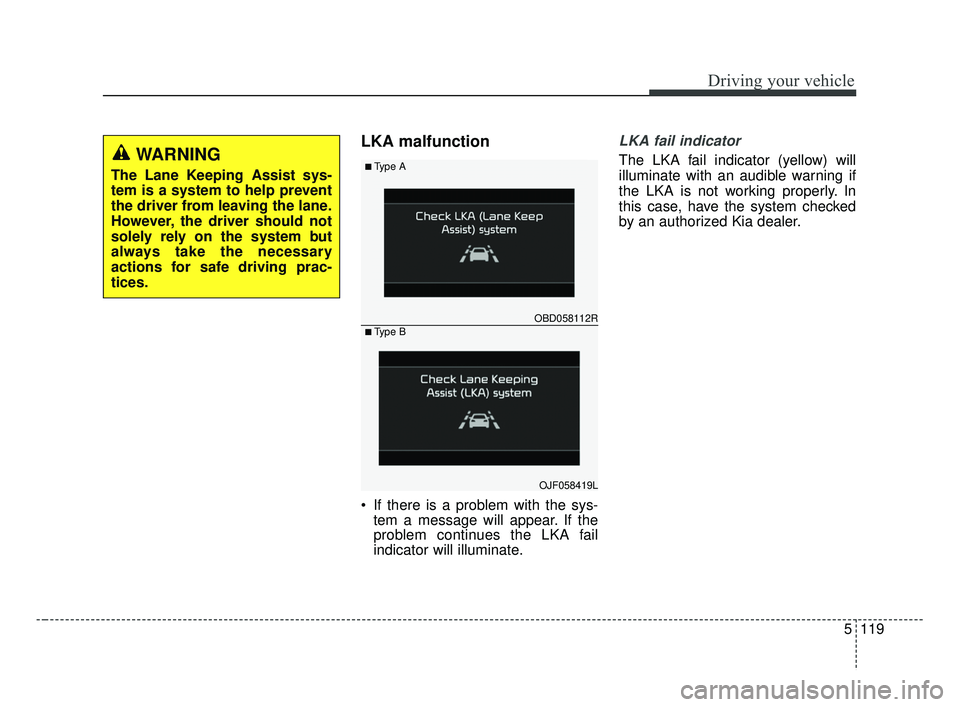
If there is a problem with the sys-tem a message will appear. If the
problem continues the LKA fail
indicator will illuminate.
LKA fail indicator
The LKA fail indicator (yellow) will
illuminate with an audible warning if
the LKA is not working properly. In
this case, have the system checked
by an authorized Kia dealer.WARNING
The Lane Keeping Assist sys-
tem is a system to help prevent
the driver from leaving the lane.
However, the driver should not
solely rely on the system but
always take the necessary
actions for safe driving prac-
tices.
OBD058112R
■Type A
■Type B
OJF058419L
BDm CAN (ENG) 5.QXP 7/4/2018 10:18 AM Page 119
Page 366 of 550
Driving your vehicle
120
5
When there is a problem with the sys-
tem do one of the following:
Turn the system on after turning
the engine off and on again.
Check if the ignition switch is in the ON position.
Check if the system is affected by the weather. (ex: fog, heavy rain,
etc.)
Check if there is foreign matter on the camera lens
If the problem is not solved, take your
vehicle to an authorized Kia dealer
and have the system checked.LKA function change
The driver can change LKA to Lane
Departure Warning (LDW) system or
change the LKA mode between
Standard LKA and Active LKA from
the User Settings Mode on the LCD
display. The driver can choose them by plac-
ing the ignition switch to the ON posi-
tion and by selecting ‘User Settings’,
‘Driver Assistance’, and ‘Lane
Safety’.
The system is automatically set to
Standard LKA when your vehicle is
first delivered from the factory.
Lane Departure Warning
LDW alerts the driver with a visual
and acoustic warning when the sys-
tem detects the vehicle leaving the
lane. In this mode, the system will not
provide steering inputs. When the
vehicle’s front wheel contacts the
inside edge of lane line, LKA issues
the lane departure warning.
Standard LKA
The Standard LKA mode guides the
driver to keep the vehicle within the
lanes. It provides inputs to the steer-
ing, when the vehicle is about to
deviate from the lanes.
Active LKA
The active LKA mode provides more
frequent steering wheel control in
comparison with the Standard LKA
mode. Active LKA can reduce the dri-
ver’s fatigue to assist the steering for
maintaining the vehicle in the middle
of the lane.
BDm CAN (ENG) 5.QXP 7/4/2018 10:18 AM Page 120
Page 371 of 550
5125
Driving your vehicle
✽ ✽NOTICE
The Driver Attention Warning sys-
tem does not detect actual driver
fatigue or drowsiness. The system
monitors driving and provides a
warning if it detects inattentive driv-
ing practices. CAUTION
The Driver Attention Warning
system may not provide alertsin the following situations:
The lane detection perform- ance is limited. (For moreinformation, refer to “LaneKeeping Assist (LKA) system”in this chapter.)
The vehicle is erratically driv- en or is abruptly turned forobstacle avoidance (e.g. con-struction area, other vehicles,fallen objects, bumpy road).
Forward drivability of the vehi- cle is severely undermined(possibly due to wide varia-tion in tire pressures, uneventire wear-out, toe-in/toe-outalignment).
(Continued)
(Continued) The vehicle drives on a curvy road.
The vehicle drives on a bumpy road.
The vehicle drives through a windy area.
The vehicle is controlled by the following driver assistancesystems:
- Lane Keeping Assist (LKA) system
- Forward collision-avoidance assist (FCA) System.
- Smart Cruise Control (SCC) System
BDm CAN (ENG) 5.QXP 7/4/2018 10:18 AM Page 125
Page 389 of 550
63
What to do in an emergency
If the engine stalls at a cross-
road or crossing
If the engine stalls at a crossroad or
crossing, set the shift lever in the N
(Neutral) position and then push the
vehicle to a safe place.
If you have a flat tire while
driving
If a tire goes flat while you are driv-
ing:
1. Take your foot off the acceleratorpedal and let the vehicle slow
down while driving straight ahead.
Do not apply the brakes immedi-
ately or attempt to pull off the road
as this may cause a loss of con-
trol. When the vehicle has slowed
to such a speed that it is safe to do
so, brake carefully and pull off the
road. Drive off the road as far as
possible and park on firm level
ground. If you are on a divided
highway, do not park in the median
area between the two traffic lanes. 2. When the vehicle is stopped, turn
on your emergency hazard flash-
ers, set the parking brake and put
the transmission in P (for Intelligent
Variable Transmission) or in
reverse (Manual Transmission).
3. Have all passengers get out of the vehicle. Be sure they all get out on
the side of the vehicle that is away
from traffic.
4. When changing a flat tire, follow the instruction provided later in
this section.
If the engine stalls while driv-
ing
1. Reduce your speed gradually,keeping a straight line. Move cau-
tiously off the road to a safe place.
2. Turn on your emergency flashers.
3. Try to start the engine again. If your vehicle will not start, contact
an authorized Kia dealer or seek
other qualified assistance.
✽ ✽NOTICE
If there was a check engine light and
loss of power or stall and if safe to do
so, wait at least 10 seconds to restart
the vehicle after it stalls. This may
reset the car so it will no longer run
at low power (limp home) condition.
IN CASE OF AN EMERGENCY WHILE DRIVING
BDm CAN (ENG) 6.qxp 7/4/2018 10:20 AM Page 3
Page 485 of 550
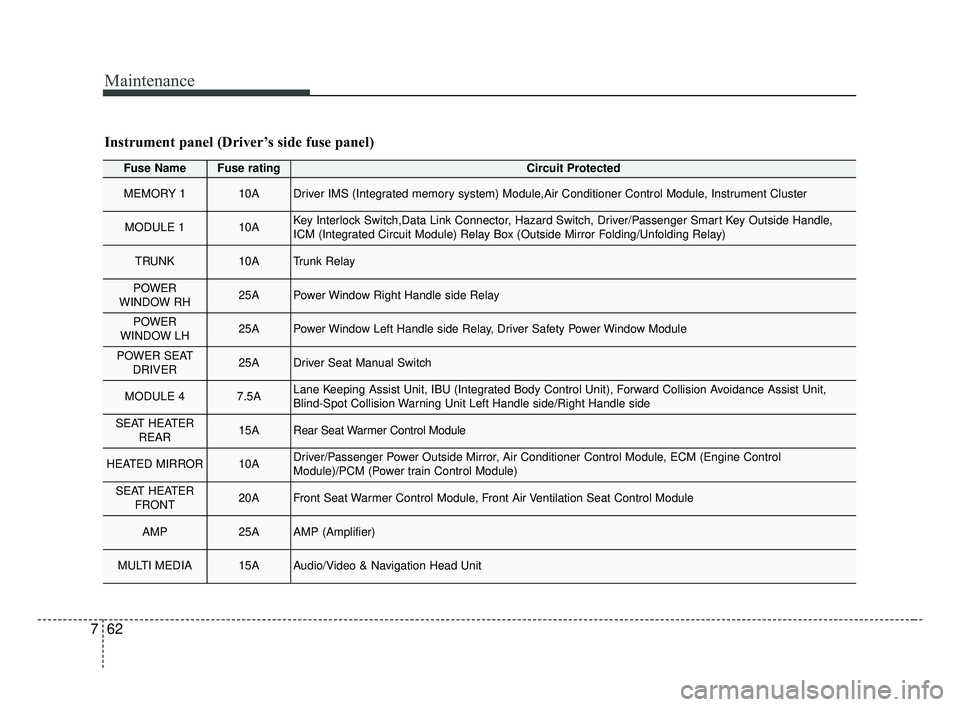
Maintenance
62
7
Fuse NameFuse ratingCircuit Protected
MEMORY 110ADriver IMS (Integrated memory system) Module,Air Conditioner Control Module, Instrument Cluster
MODULE 110AKey Interlock Switch,Data Link Connector, Hazard Switch, Driver/Passenger Smart Key Outside Handle,
ICM (Integrated Circuit Module) Relay Box (Outside Mirror Folding/Unfolding Relay)
TRUNK10ATrunk Relay
POWER
WINDOW RH25APower Window Right Handle side Relay
POWER
WINDOW LH25APower Window Left Handle side Relay, Driver Safety Power Window Module
POWER SEAT DRIVER25ADriver Seat Manual Switch
MODULE 47.5ALane Keeping Assist Unit, IBU (Integrated Body Control Unit), Forward Collision Avoidance Assist Unit,
Blind-Spot Collision Warning Unit Left Handle side/Right Handle side
SEAT HEATER REAR15ARear Seat Warmer Control Module
HEATED MIRROR10ADriver/Passenger Power Outside Mirror, Air Conditioner Control Module, ECM (Engine Control
Module)/PCM (Power train Control Module)
SEAT HEATERFRONT20AFront Seat Warmer Control Module, Front Air Ventilation Seat Control Module
AMP25AAMP (Amplifier)
MULTI MEDIA15AAudio/Video & Navigation Head Unit
Instrument panel (Driver’s side fuse panel)
BDm CAN (ENG) 7.qxp 7/4/2018 10:25 AM Page 62
Page 538 of 550
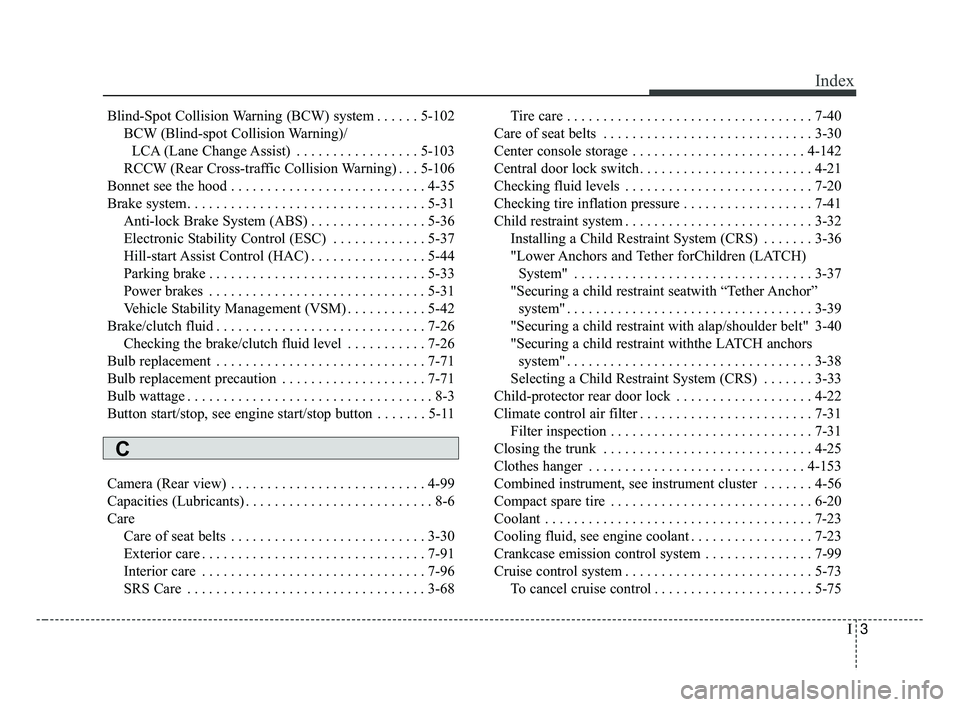
I3
Index
Blind-Spot Collision Warning (BCW) system . . . . . . 5-102BCW (Blind-spot Collision Warning)/LCA (Lane Change Assist) . . . . . . . . . . . . . . . . . 5-103
RCCW (Rear Cross-traffic Collision Warning) . . . 5-106
Bonnet see the hood . . . . . . . . . . . . . . . . . . . . . . . . . . . 4-35
Brake system. . . . . . . . . . . . . . . . . . . . . . . . . . . . . . . . . 5-31 Anti-lock Brake System (ABS) . . . . . . . . . . . . . . . . 5-36
Electronic Stability Control (ESC) . . . . . . . . . . . . . 5-37
Hill-start Assist Control (HAC) . . . . . . . . . . . . . . . . 5-44
Parking brake . . . . . . . . . . . . . . . . . . . . . . . . . . . . . . 5-33
Power brakes . . . . . . . . . . . . . . . . . . . . . . . . . . . . . . 5-31
Vehicle Stability Management (VSM) . . . . . . . . . . . 5-42
Brake/clutch fluid . . . . . . . . . . . . . . . . . . . . . . . . . . . . . 7-26 Checking the brake/clutch fluid level . . . . . . . . . . . 7-26
Bulb replacement . . . . . . . . . . . . . . . . . . . . . . . . . . . . . 7-71
Bulb replacement precaution . . . . . . . . . . . . . . . . . . . . 7-71
Bulb wattage . . . . . . . . . . . . . . . . . . . . . . . . . . . . . . . . . . 8-3
Button start/stop, see engine start/stop button . . . . . . . 5-11
Camera (Rear view) . . . . . . . . . . . . . . . . . . . . . . . . . . . 4-99
Capacities (Lubricants) . . . . . . . . . . . . . . . . . . . . . . . . . . 8-6
Care Care of seat belts . . . . . . . . . . . . . . . . . . . . . . . . . . . 3-30
Exterior care . . . . . . . . . . . . . . . . . . . . . . . . . . . . . . . 7-91
Interior care . . . . . . . . . . . . . . . . . . . . . . . . . . . . . . . 7-96
SRS Care . . . . . . . . . . . . . . . . . . . . . . . . . . . . . . . . . 3-68 Tire care . . . . . . . . . . . . . . . . . . . . . . . . . . . . . . . . . . 7-40\
Care of seat belts . . . . . . . . . . . . . . . . . . . . . . . . . . . . . 3-30
Center console storage . . . . . . . . . . . . . . . . . . . . . . . . 4-142
Central door lock switch. . . . . . . . . . . . . . . . . . . . . . . . 4-21
Checking fluid levels . . . . . . . . . . . . . . . . . . . . . . . . . . 7-20
Checking tire inflation pressure . . . . . . . . . . . . . . . . . . 7-41
Child restraint system . . . . . . . . . . . . . . . . . . . . . . . . . . 3-32 Installing a Child Restraint System (CRS) . . . . . . . 3-36
"Lower Anchors and Tether forChildren (LATCH) System" . . . . . . . . . . . . . . . . . . . . . . . . . . . . . . . . . 3-37
"Securing a child restraint seatwith “Tether Anchor” system" . . . . . . . . . . . . . . . . . . . . . . . . . . . . . . . . . . 3-39\
"Securing a child restraint with alap/shoulder belt" 3-40
"Securing a child restraint withthe LATCH anchors system" . . . . . . . . . . . . . . . . . . . . . . . . . . . . . . . . . . 3-38\
Selecting a Child Restraint System (CRS) . . . . . . . 3-33
Child-protector rear door lock . . . . . . . . . . . . . . . . . . . 4-22
Climate control air filter . . . . . . . . . . . . . . . . . . . . . . . . 7-31 Filter inspection . . . . . . . . . . . . . . . . . . . . . . . . . . . . 7-31
Closing the trunk . . . . . . . . . . . . . . . . . . . . . . . . . . . . . 4-25
Clothes hanger . . . . . . . . . . . . . . . . . . . . . . . . . . . . . . 4-153
Combined instrument, see instrument cluster . . . . . . . 4-56
Compact spare tire . . . . . . . . . . . . . . . . . . . . . . . . . . . . 6-20
Coolant . . . . . . . . . . . . . . . . . . . . . . . . . . . . . . . . . . . . \
. 7-23
Cooling fluid, see engine coolant . . . . . . . . . . . . . . . . . 7-23
Crankcase emission control system . . . . . . . . . . . . . . . 7-99
Cruise control system . . . . . . . . . . . . . . . . . . . . . . . . . . 5-73 To cancel cruise control . . . . . . . . . . . . . . . . . . . . . . 5-75
C
BDm CAN (ENG) Index.qxp 6/30/2018 2:03 PM Page 3