wheel KIA FORTE 2019 Workshop Manual
[x] Cancel search | Manufacturer: KIA, Model Year: 2019, Model line: FORTE, Model: KIA FORTE 2019Pages: 550, PDF Size: 11.66 MB
Page 307 of 550
561
Driving your vehicle
Prerequisite for activation
The FCA gets ready to be activated,
when the FCA is selected on the
LCD display, and when the following
prerequisites are satisfied.
- The ESC is ON.
- The driving speed is over 10 km/h(6 mph). (However, FCA is activat-
ed within certain driving speed.)
- When recognizing a vehicle or the pedestrian in front. (However, FCA
deactivate according to conditions
in front and vehicle systems, but it
notices only certain warnings.)
- The FCA automatically deactivates upon canceling the ESC. When the
ESC is cancelled, the FCA cannot
be activated on the LCD display. In
this situation, the FCA warning
light will illuminate.
FCA warning message and
system control
The FCA system produces warning
messages, warning alarms, and
emergency braking based on the risk
of a frontal collision, such as when a
vehicle ahead suddenly brakes.
The driver can select the initial warn-
ing activation time in the User
Settings in the LCD display. The
options for the initial Forward
Collision-Avoidance Assist include
Early, Normal or Late initial warning
time.
WARNING
The FCA automatically acti-vates upon placing the igni-
tion switch to the ON position.
The driver can deactivate the
FCA by canceling the system
setting on the LCD display.
The FCA automatically deacti- vates upon canceling the
ESC. When the ESC is can-
celled, the FCA cannot be
activated on the LCD display.
The FCA warning light will
illuminate, but it does not indi-
cate a malfunction of the sys-
tem.
Set or cancel FCA with con- trolling switches on steering
wheel after stopping the vehi-
cle in the safe place for your
safety.
BDm CAN (ENG) 5.QXP 7/4/2018 10:14 AM Page 61
Page 308 of 550
Driving your vehicle
62
5
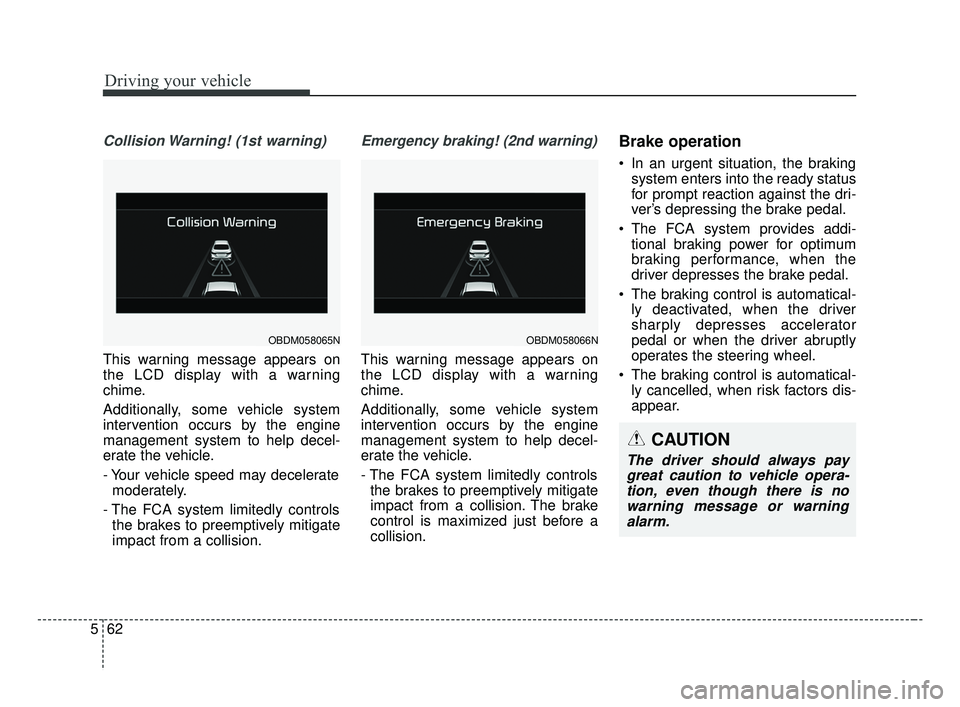
Collision Warning! (1st warning)
This warning message appears on
the LCD display with a warning
chime.
Additionally, some vehicle system
intervention occurs by the engine
management system to help decel-
erate the vehicle.
- Your vehicle speed may decelerate
moderately.
- The FCA system limitedly controls the brakes to preemptively mitigate
impact from a collision.
Emergency braking! (2nd warning)
This warning message appears on
the LCD display with a warning
chime.
Additionally, some vehicle system
intervention occurs by the engine
management system to help decel-
erate the vehicle.
- The FCA system limitedly controlsthe brakes to preemptively mitigate
impact from a collision. The brake
control is maximized just before a
collision.
Brake operation
In an urgent situation, the braking system enters into the ready status
for prompt reaction against the dri-
ver’s depressing the brake pedal.
The FCA system provides addi- tional braking power for optimum
braking performance, when the
driver depresses the brake pedal.
The braking control is automatical- ly deactivated, when the driver
sharply depresses accelerator
pedal or when the driver abruptly
operates the steering wheel.
The braking control is automatical- ly cancelled, when risk factors dis-
appear.
OBDM058065NOBDM058066N
CAUTION
The driver should always paygreat caution to vehicle opera-tion, even though there is nowarning message or warningalarm.
BDm CAN (ENG) 5.QXP 7/4/2018 10:14 AM Page 62
Page 317 of 550
571
Driving your vehicle
- There is a group of pedestrians.
- If a sudden change in the sensorrecognition takes place while pass-
ing through a speed bump,
- When the vehicle is severely shak- en,
- When driving around circular inter- section after the vehicle in front,
- If the front of the camera lens is contaminated by front glass tinting,
film, water repellent coating, dam-
age on glass, or foreign matter
(sticker, insect, etc.)
- The radar or camera or camera lens is damaged.
- If the headlights of a vehicle are not used at night or in a tunnel sec-
tion, or the light is too weak
- If street light or the light of a vehi- cle coming from a opposite direc-
tion is reflected or when sunlight is
reflected by the water on the road
surface - When the back light is projected in
the direction of the vehicle's motion
(including the headlights of vehi-
cles)
- Road sign, shadow on the road, tunnel entrance, toll gate, partial
pavement
- If the windshield has moisture on its surface or if windshield freezes,
- Driving in the fog.
- When objects are out of the sens- ing range of the sensor or radar.
WARNING
Do not use the FCA systemwhen towing a vehicle. Cancel
the FCA in the User Settings
on the LCD display before
towing. Brake application by
the FCA system while towing
may adversely affect your
safety.
Use extreme caution when the vehicle in front of you has
cargo that extends rearward
from the cab, or when the
vehicle in front of you has
higher ground clearance.
The FCA system is designed to detect and monitor the
vehicle ahead or detect a
pedestrian in the roadway
through radar signals and
camera recognition. It is not
designed to detect bicycles,
motorcycles, or smaller
wheeled objects such as lug-
gage bags, shopping carts, or
strollers.
(Continued)
BDm CAN (ENG) 5.QXP 7/4/2018 10:15 AM Page 71
Page 320 of 550
Driving your vehicle
74
5
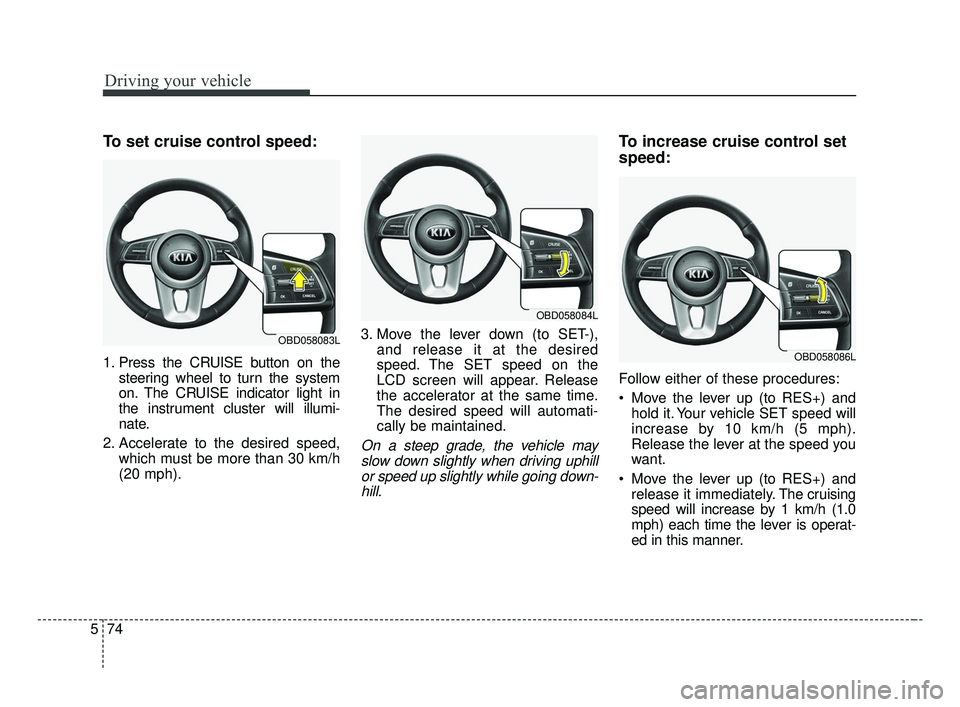
To set cruise control speed:
1. Press the CRUISE button on the
steering wheel to turn the system
on. The CRUISE indicator light in
the instrument cluster will illumi-
nate.
2. Accelerate to the desired speed, which must be more than 30 km/h
(20 mph). 3. Move the lever down (to SET-),
and release it at the desired
speed. The SET speed on the
LCD screen will appear. Release
the accelerator at the same time.
The desired speed will automati-
cally be maintained.
On a steep grade, the vehicle mayslow down slightly when driving uphillor speed up slightly while going down-hill.
To increase cruise control set
speed:
Follow either of these procedures:
Move the lever up (to RES+) and hold it. Your vehicle SET speed will
increase by 10 km/h (5 mph).
Release the lever at the speed you
want.
Move the lever up (to RES+) and release it immediately. The cruising
speed will increase by 1 km/h (1.0
mph) each time the lever is operat-
ed in this manner.
OBD058083L
OBD058084L
OBD058086L
BDm CAN (ENG) 5.QXP 7/4/2018 10:15 AM Page 74
Page 345 of 550
599
Driving your vehicle
SMART mode selects the
proper driving mode
among ECO, NORMAL
and SPORT by judging
the driver's driving habits
(i.e. mild or dynamic)
from the brake pedal
depression or the steer-
ing wheel operation.
Press the DRIVE MODE button to activate SMART mode. When
SMART mode is activated, the
indicator illuminates on the instru-
ment cluster.
The indicator illuminates in blue, when the driver's driving is catego-
rized to be mild. It illuminates in
white, when the driver's driving is
categorized to be normal. It illumi-
nates in red, when the driver's driv-
ing is categorized to be dynamic
during abrupt braking or sharp
curves. The vehicle starts in NORMAL
mode, if the engine was turned
OFF in SMART mode.
SMART mode automatically con- trols the vehicle driving, such as
gear shifting patterns, engine
torque, riding quality in accordance
with the driver's driving habits.✽ ✽ NOTICE
• When you mildly drive the vehicle
in SMART mode, the driving
mode changes to ECO mode to
improve fuel efficiency. However,
the actual fuel efficiency may dif-
fer in accordance with your driv-
ing situations (i.e. upward/down-
ward slope, vehicle
deceleration/acceleration).
• When you dynamically drive the vehicle in SMART mode by
abruptly decelerating or sharply
turning, the driving mode changes
to SPORT mode. However, it may
adversely affect fuel economy.SMART
BDm CAN (ENG) 5.QXP 7/4/2018 10:17 AM Page 99
Page 346 of 550
Driving your vehicle
100
5
Various driving situations, which you
may encounter in SMART mode
The driving mode automatically
changes to ECO mode after a cer-
tain period of time, when you gen-
tly depress the accelerator pedal
(Your driving is categorized to be
mild.).
The driving mode automatically changes from SMART ECO mode
to SMART NORMAL mode after a
certain period of time, when you
sharply or repetitively depress the
accelerator pedal.
The driving mode automatically changes to SMART NORMAL
mode with the same driving pat-
terns, when the vehicle starts to
drive on an upward slope of a cer-
tain angle. The driving mode auto-
matically returns to SMART ECO
mode, when the vehicle enters a
leveled road. The driving mode automatically
changes to SMART SPORT, when
you abruptly accelerate the vehicle
or repetitively operate the steering
wheel (Your driving is categorized
to be sporty.). In this mode, your
vehicle drives in a lower gear for
abrupt accelerating/decelerating
and increases the engine brake
performance.
You may still sense the engine brake performance, even when you
release the accelerator pedal in
SMART SPORT mode. It is
because your vehicle remains in a
lower gear over a certain period of
time.
The driving mode automatically changes to SMART SPORT mode
only in dynamic driving situations.
In most of the normal driving situa-
tions, the driving mode sets to be
either in SMART ECO mode or in
SMART NORMAL mode. Limitation of SMART mode
The SMART mode may be limited in
following situations. (The OFF indica-
tor illuminates in those situations.)
The driver manually moves the
shift lever : It deactivates SMART
mode.
The cruise control is activated : The cruise system may deactivate
the SMART mode. (SMART mode
is not automatically deactivated
just by activing the cruise system.)
The transmission oil temperature is either extremely low or extremely
high : The SMART mode can be
active in most of the normal driving
situations. However, an extremely
high/ low transmission oil tempera-
ture may temporarily deactivate the
SMART mode, because the trans-
mission condition is out of normal
operation condition.
BDm CAN (ENG) 5.QXP 7/4/2018 10:17 AM Page 100
Page 347 of 550
5101
Driving your vehicle
SPORT mode
SPORT mode focuses on
dynamic driving by auto-
matically adjusting the
steering wheel, engine
and transmission system.
button is pressed and
the SPORT mode is
selected, the SPORT
indicator (red) will illumi-
nate.
is activated, and the
engine start/stop button
is turned off and on it will
change to NORMAL
mode. To turn on the
SPORT mode press
DRIVE MODE button
again.
ed:
- While holding vehicle speed, it maintains the
gear and RPM for some
time even though the
accelerator pedal is not
depressed.
- Up-shifting is delayed.
✽ ✽
NOTICE
In Sport drive mode, the fuel effi-
ciency may decrease.
SPORT
BDm CAN (ENG) 5.QXP 7/4/2018 10:17 AM Page 101
Page 358 of 550
Driving your vehicle
112
5
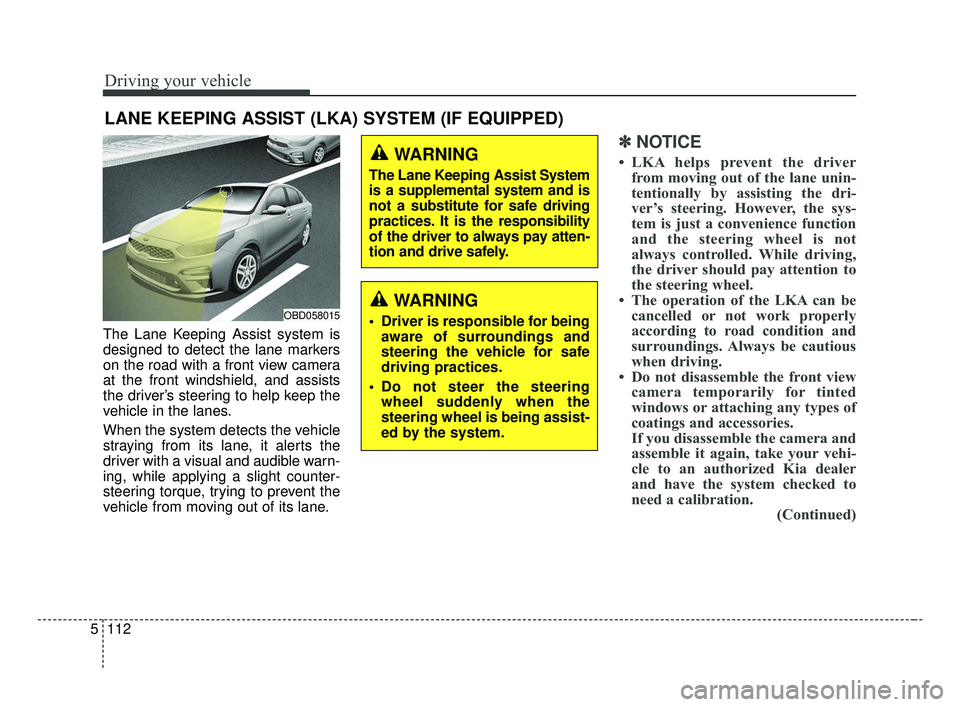
The Lane Keeping Assist system is
designed to detect the lane markers
on the road with a front view camera
at the front windshield, and assists
the driver’s steering to help keep the
vehicle in the lanes.
When the system detects the vehicle
straying from its lane, it alerts the
driver with a visual and audible warn-
ing, while applying a slight counter-
steering torque, trying to prevent the
vehicle from moving out of its lane.
✽ ✽
NOTICE
• LKA helps prevent the driver
from moving out of the lane unin-
tentionally by assisting the dri-
ver’s steering. However, the sys-
tem is just a convenience function
and the steering wheel is not
always controlled. While driving,
the driver should pay attention to
the steering wheel.
• The operation of the LKA can be cancelled or not work properly
according to road condition and
surroundings. Always be cautious
when driving.
• Do not disassemble the front view camera temporarily for tinted
windows or attaching any types of
coatings and accessories.
If you disassemble the camera and
assemble it again, take your vehi-
cle to an authorized Kia dealer
and have the system checked to
need a calibration. (Continued)
LANE KEEPING ASSIST (LKA) SYSTEM (IF EQUIPPED)
WARNING
Driver is responsible for being
aware of surroundings and
steering the vehicle for safe
driving practices.
Do not steer the steering wheel suddenly when the
steering wheel is being assist-
ed by the system.
WARNING
The Lane Keeping Assist System
is a supplemental system and is
not a substitute for safe driving
practices. It is the responsibility
of the driver to always pay atten-
tion and drive safely.
OBD058015
BDm CAN (ENG) 5.QXP 7/4/2018 10:17 AM Page 112
Page 359 of 550
5113
Driving your vehicle
(Continued)
• When you replace the windshieldglass, front view camera or sys-
tem, take your vehicle to an
authorized Kia dealer and have
the system checked to need a cali-
bration.
• The system is designed to detect lane markers using a front view
camera. If the lane markers are
hard to detect, then the system
may be limited. Always be cau-
tious when using the system.
• When the lane markers are hard to detect, please refer to “Driver’s
Attention”.
• Do not remove or damage the related parts of LKA.
• Do not place objects on the dash- board that reflects light such as
mirrors, white paper, etc. This
may prevent the system from
functioning. (Continued)(Continued)
• You may not hear warning sound
of LKA because of the excessive
audio sound.
• If you continue to drive with your hands off the steering wheel, the
LKA system will stop controlling
the steering wheel after the hands
off alarm. Afterwards, if you drive
with your hands on the steering
wheel, the control will be activated
again.
• If the vehicle speed is high, steer- ing torque for assistance will not
be enough to keep your vehicle
within the lane. If so, the vehicle
may move out of its lane. Obey
speed limit when using LKA.
• If you attach objects to the steer- ing wheel, the system may not
assist steering.
• If you attach objects to the steer- ing wheel, hands off alarm may
not work properly.LKA operation
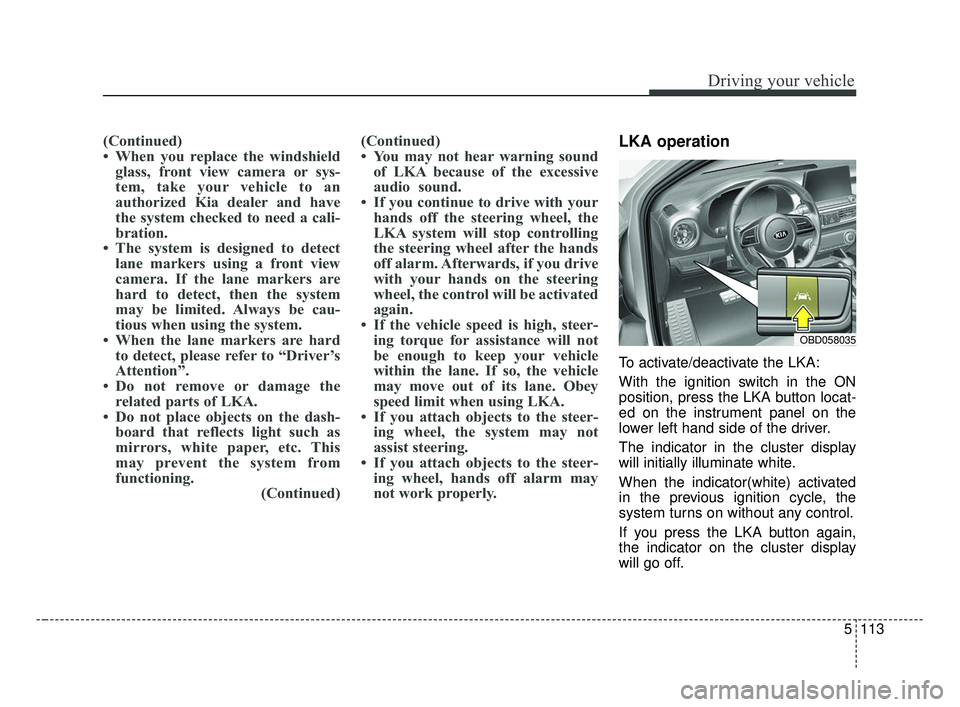
To activate/deactivate the LKA:
With the ignition switch in the ON
position, press the LKA button locat-
ed on the instrument panel on the
lower left hand side of the driver.
The indicator in the cluster display
will initially illuminate white.
When the indicator(white) activated
in the previous ignition cycle, the
system turns on without any control.
If you press the LKA button again,
the indicator on the cluster display
will go off.
OBD058035
BDm CAN (ENG) 5.QXP 7/4/2018 10:17 AM Page 113
Page 360 of 550
Driving your vehicle
114
5
The color of indicator will change
depend on the condition of LKA.
- White : Sensor does not detect the lane marker or vehicle
speed is less than 64
km/h (40 mph).
- Green : Sensor detects the lane
marker and system is able
to control the steering.LKA activation
To see the LKA screen on the LCD
display in the cluster, Tab to the
ASSIST mode ( ).
For further details, refer to [menu settings] in chapter 4.
After LKA is activated, if both lane markers are detected, vehicle
speed is over 64 km/h (40 mph)
and all the activation conditions are
satisfied, a green steering wheel
indicator will illuminate and the
steering wheel will be controlled.WARNING
The Lane Keeping Assist system
is a system to help prevent the
driver from leaving the lane.
However, the driver should not
solely rely on the system but
always check the road condi-
tions when driving.
BDm CAN (ENG) 5.QXP 7/4/2018 10:17 AM Page 114