park assist KIA FORTE 2019 Owners Manual
[x] Cancel search | Manufacturer: KIA, Model Year: 2019, Model line: FORTE, Model: KIA FORTE 2019Pages: 550, PDF Size: 11.66 MB
Page 87 of 550
Instrument cluster . . . . . . . . . . . . . . . . . . . . . . . . . 4-56
• Instrument cluster control . . . . . . . . . . . . . . . . . . . . . 4-57
• LCD window control . . . . . . . . . . . . . . . . . . . . . . . . . . 4-57
• Gauges . . . . . . . . . . . . . . . . . . . . . . . . . . . . . . . . . . . . \
. 4-58
• Transmission shift indicator . . . . . . . . . . . . . . . . . . . . 4-61
LCD windows . . . . . . . . . . . . . . . . . . . . . . . . . . . . . 4-63
• Over view . . . . . . . . . . . . . . . . . . . . . . . . . . . . . . . . . . . 4-\
63
• Trip information (Trip computer) . . . . . . . . . . . . . . . 4-63
• Distance to empty . . . . . . . . . . . . . . . . . . . . . . . . . . . . 4-63
• LCD modes (For type B, C cluster) . . . . . . . . . . . . . . 4-69
• Service mode . . . . . . . . . . . . . . . . . . . . . . . . . . . . . . . . 4-70
• User settings mode (For type B, C cluster) . . . . . . . . 4-71
Warning and indicator lights . . . . . . . . . . . . . . . . 4-80
• Warning lights . . . . . . . . . . . . . . . . . . . . . . . . . . . . . . . 4-80
• Indicator lights. . . . . . . . . . . . . . . . . . . . . . . . . . . . . . . 4-90
Parking distance warning-reverse . . . . . . . . . . . . 4-96
• Operation of the parking distance warning-reverse. 4-96
• Non-operational conditions of parking distance warning-reverse . . . . . . . . . . . . . . . . . . . . . . . . . . . . . 4-97
• Parking distance warning-reverse precautions . . . . 4-98
• Self-diagnosis . . . . . . . . . . . . . . . . . . . . . . . . . . . . . . . . 4-98
Rear view monitor . . . . . . . . . . . . . . . . . . . . . . . . . 4-99
Lighting . . . . . . . . . . . . . . . . . . . . . . . . . . . . . . . . . 4-100
• Battery saver function. . . . . . . . . . . . . . . . . . . . . . . . 4-100
• Daytime running light . . . . . . . . . . . . . . . . . . . . . . . . 4-100 • Lighting control . . . . . . . . . . . . . . . . . . . . . . . . . . . . . 4-100
• High beam operation. . . . . . . . . . . . . . . . . . . . . . . . . 4-102
• High beam assist . . . . . . . . . . . . . . . . . . . . . . . . . . . . 4-103
• Turn signals and lane change signals . . . . . . . . . . . 4-106
• Front fog light . . . . . . . . . . . . . . . . . . . . . . . . . . . . . . 4-107
Wipers and washers . . . . . . . . . . . . . . . . . . . . . . . 4-108
• Windshield wipers . . . . . . . . . . . . . . . . . . . . . . . . . . . 4-108
• Front windshield washers . . . . . . . . . . . . . . . . . . . . . 4-109
Interior lights . . . . . . . . . . . . . . . . . . . . . . . . . . . . 4-110
• Room lamp . . . . . . . . . . . . . . . . . . . . . . . . . . . . . . . . . 4-110
• Map lamp . . . . . . . . . . . . . . . . . . . . . . . . . . . . . . . . . . 4-110
• Trunk room lamp. . . . . . . . . . . . . . . . . . . . . . . . . . . . 4-111
• Vanity mirror lamp . . . . . . . . . . . . . . . . . . . . . . . . . . 4-112
• Glove box lamp . . . . . . . . . . . . . . . . . . . . . . . . . . . . . 4-112
Welcome system . . . . . . . . . . . . . . . . . . . . . . . . . . 4-113
• Headlight (Headlamp) escort function . . . . . . . . . . 4-113
• Interior light . . . . . . . . . . . . . . . . . . . . . . . . . . . . . . . . 4-113
• Pocket light . . . . . . . . . . . . . . . . . . . . . . . . . . . . . . . . . 4-113
Defroster . . . . . . . . . . . . . . . . . . . . . . . . . . . . . . . . 4-114
• Rear window defroster . . . . . . . . . . . . . . . . . . . . . . . 4-114
Manual climate control system . . . . . . . . . . . . . . 4-115
• Heating and air conditioning . . . . . . . . . . . . . . . . . . 4-116
• System operation . . . . . . . . . . . . . . . . . . . . . . . . . . . . 4-121
• Climate control air filter . . . . . . . . . . . . . . . . . . . . . . 4-123
4
BDm CAN (ENG) 4.qxp 7/4/2018 10:03 AM Page 2
Page 156 of 550
471
Features of your vehicle
User Settings Mode
(For type B, C cluster)
On this mode, you can change set-
ting of the doors, lamps, and so on.Shift to P to edit settings/Engage park-
ing brake to edit settings
This warning message appears if
you try to adjust the User Settings
while driving.
- Intelligent variable transmission
For your safety, change the User
Settings after parking the vehicle,
applying the parking brake and mov-
ing the shift lever to P (Park).
- Manual transmission
For your safety, change the User
Settings after engaging the parking
brake.Driver Assistance(if equipped)
Lane Safety (if equipped) :
- Lane Departure Warning : To acti-vate the lane departure warning
function.
- Standard LKA : To activate the standard LKA mode.
- Active LKA : To activate the active LKA mode.
❈ For more details, refer to “LKA
(Lane Keeping Assist)” in chapter 5.
Driver Attention Warning : Choose the alert stage (Off/Normal/High
stage) of the Driver Attention
Warning.
Forward Collision-Avoidance Assist (FCA, if equipped) :
- To activate or deactivate the FCAsystem.
❈ For more details, refer to “Forward
Collision-Avoidance Assist(FCA)”
in chapter 5.
WARNING
Do not adjust the User Setting
while driving. You may lose your
steering control and cause
severe personal injury or acci-
dents.
BDm CAN (ENG) 4.qxp 7/4/2018 10:06 AM Page 71
Page 157 of 550
Features of your vehicle
72
4
Forward Collision Warning (FCW, if
equipped)
- Choose the sensitivity of the for-ward collision warning.
(Late/Normal/Early)
❈ For more details, refer to “Forward
Collision-Avoidance Assist(FCA)”
in chapter 5.
Blind Spot Collision Warning Sound (if equipped)
- If this item is checked, the blindspot collision warning sound
function will be activated.
❈ For more details, refer to “Blind-spot
Collision Warning” in chapter 5. Door
Automatically Lock :
- Enable on Speed : All doors willbe automatically locked when the
vehicle speed exceeds 15 km/h
(9.3 mph).
- Enable on Shift : All doors will be automatically locked if the intelli-
gent variable transmission shift
lever is shifted from the P (Park)
position to the R (Reverse), N
(Neutral), or D (Drive) position.
Automatically Unlock : - Disable : The auto door unlockoperation will be canceled.
- On key out : All doors will be auto- matically unlocked when the
Engine Star/Stop Button or igni-
tion switch is set to the OFF posi-
tion.
- On Shift to P : All doors will be automatically unlocked if the
intelligent variable transmission
shift lever is shifted to the P
(Park) position. Smart trunk (if equipped)
- If this item is checked, the smarttrunk function will be activated.
❈ For more details, refer to “Smart
trunk” in this chapter.
Two Press Unlock (if equipped) - If this item checked, the two pressunlock function will be activated.
(Only the driver’s door will unlock
when unlock button is pressed
once and all doors will unlock
when the same button is pressed
again within 4 seconds.)
Horn Feedback (if equipped) - Off:
The Horn feedback operation will
be deactivated.
- On:
After locking the door by pressing
the lock button on the transmitter, if
you press the lock button again
within 4 seconds, the warning
sound will operate once to indicate
that all doors are locked.
BDm CAN (ENG) 4.qxp 7/4/2018 10:06 AM Page 72
Page 163 of 550
Features of your vehicle
78
4
Press START button with smart key
(for smart key system)
This warning message illuminates
if you press the Engine Start/Stop
Button while the warning message
“Key not detected” is illuminating.
At this time, the immobilizer indica- tor light blinks.
Check fuse “BRAKE SWITCH”
(for smart key system)
This warning message illuminates if the brake switch fuse is discon-
nected.
It means that you should replace the fuse with a new one. If that is
not possible, you can start the
engine by pressing the Engine
Start/Stop Button for 10 seconds in
the ACC position. Shift to P or N to start engine
(for smart key system)
This warning message illuminates
if you try to start the engine with
the shift lever not in the P (Park) or
N (Neutral) position.
✽ ✽ NOTICE
You can start the engine with the
shift lever in the N (Neutral) position.
But, for your safety, we recommend
that you start the engine with the
shift lever in the P (Park) position.
Check Forward Collision Avoidance
Assist system (if equipped)
This warning message illuminates
if there is a malfunction with the
Forward Collision Avoidance Assist
(FCA) system. In this case, have
your vehicle inspected by an
authorized Kia dealer.
❈ For more details, refer to “Forward
Collision Avoidance Assist (FCA)
system” in chapter 5.
BDm CAN (ENG) 4.qxp 7/4/2018 10:07 AM Page 78
Page 167 of 550
Features of your vehicle
82
4
Driving the vehicle with a warning
light ON is dangerous. If the Parking
Brake & Brake Fluid Warning Light
illuminates with the parking brake
released, it indicates that the brake
fluid level is low.
In this case, have your vehicle inspect-
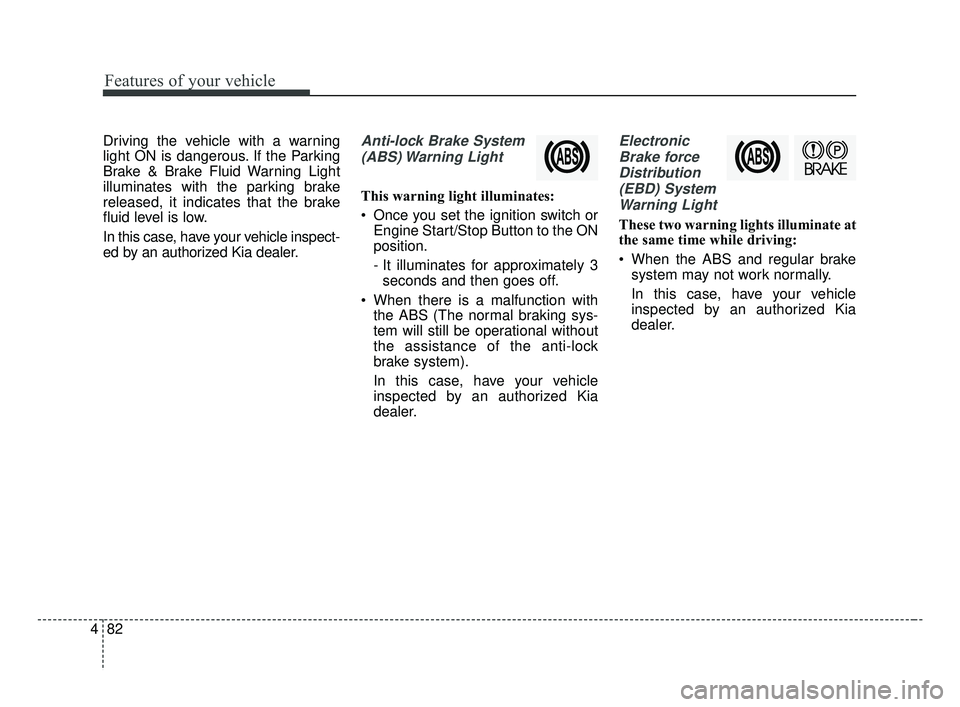
ed by an authorized Kia dealer.Anti-lock Brake System
(ABS) Warning Light
This warning light illuminates:
Once you set the ignition switch or Engine Start/Stop Button to the ON
position.
- It illuminates for approximately 3seconds and then goes off.
When there is a malfunction with the ABS (The normal braking sys-
tem will still be operational without
the assistance of the anti-lock
brake system).
In this case, have your vehicle
inspected by an authorized Kia
dealer.
Electronic
Brake forceDistribution(EBD) SystemWarning Light
These two warning lights illuminate at
the same time while driving:
When the ABS and regular brake system may not work normally.
In this case, have your vehicle
inspected by an authorized Kia
dealer.
BDm CAN (ENG) 4.qxp 7/4/2018 10:07 AM Page 82
Page 181 of 550
Features of your vehicle
96
4
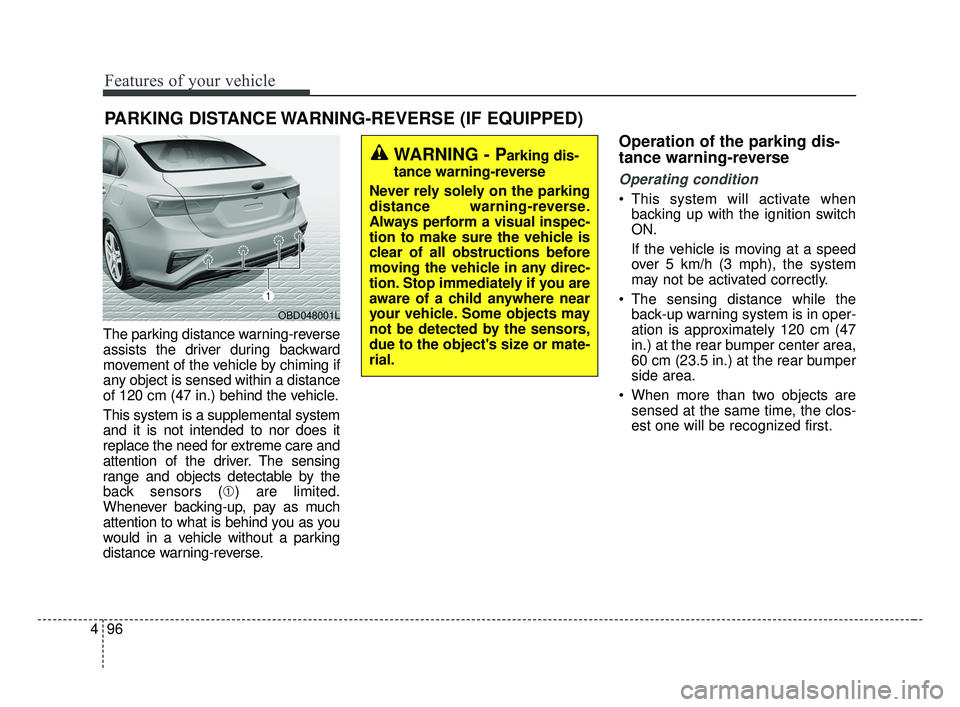
The parking distance warning-reverse
assists the driver during backward
movement of the vehicle by chiming if
any object is sensed within a distance
of 120 cm (47 in.) behind the vehicle.
This system is a supplemental system
and it is not intended to nor does it
replace the need for extreme care and
attention of the driver. The sensing
range and objects detectable by the
back sensors (➀ ) are limited.
Whenever backing-up, pay as much
attention to what is behind you as you
would in a vehicle without a parking
distance warning-reverse.
Operation of the parking dis-
tance warning-reverse
Operating condition
This system will activate when backing up with the ignition switch
ON.
If the vehicle is moving at a speed
over 5 km/h (3 mph), the system
may not be activated correctly.
The sensing distance while the back-up warning system is in oper-
ation is approximately 120 cm (47
in.) at the rear bumper center area,
60 cm (23.5 in.) at the rear bumper
side area.
When more than two objects are sensed at the same time, the clos-
est one will be recognized first.
PARKING DISTANCE WARNING-REVERSE (IF EQUIPPED)
WARNING - Parking dis-
tance warning-reverse
Never rely solely on the parking
distance warning-reverse.
Always perform a visual inspec-
tion to make sure the vehicle is
clear of all obstructions before
moving the vehicle in any direc-
tion. Stop immediately if you are
aware of a child anywhere near
your vehicle. Some objects may
not be detected by the sensors,
due to the object's size or mate-
rial.
OBD048001L
BDm CAN (ENG) 4.qxp 7/4/2018 10:07 AM Page 96
Page 247 of 550
Driving your vehicle
Before driving . . . . . . . . . . . . . . . . . . . . . . . . . . . . . . 5-5
• Before entering vehicle . . . . . . . . . . . . . . . . . . . . . . . . . 5-5
• Necessary inspections . . . . . . . . . . . . . . . . . . . . . . . . . . 5-5
• Before starting . . . . . . . . . . . . . . . . . . . . . . . . . . . . . . . . 5-5
Key positions . . . . . . . . . . . . . . . . . . . . . . . . . . . . . . . 5-7
• Illuminated ignition switch . . . . . . . . . . . . . . . . . . . . . . 5-7
• Ignition switch position . . . . . . . . . . . . . . . . . . . . . . . . . 5-7
• Starting the engine. . . . . . . . . . . . . . . . . . . . . . . . . . . . . 5-9
• Stopping the gasoline engine (Manual transmission) . . . . . . . . . . . . . . . . . . . . . . . 5-10
Engine start/stop button . . . . . . . . . . . . . . . . . . . . 5-11
• Illuminated engine start/stop button . . . . . . . . . . . . . 5-11
• Engine start/stop button position . . . . . . . . . . . . . . . . 5-11
• Starting the engine. . . . . . . . . . . . . . . . . . . . . . . . . . . . 5-14
• Stopping the engine (Manual transmission) . . . . . . . 5-17
Manual transmission . . . . . . . . . . . . . . . . . . . . . . . 5-18
• Manual transmission operation . . . . . . . . . . . . . . . . . 5-18
• Good driving practices . . . . . . . . . . . . . . . . . . . . . . . . 5-20
Intelligent Variable Transmission (IVT) . . . . . . . 5-22
• Intelligent Variable Transmission (IVT) operation . 5-22
• Shift lock system . . . . . . . . . . . . . . . . . . . . . . . . . . . . . 5-27
• Good driving practices . . . . . . . . . . . . . . . . . . . . . . . . 5-28
Brake system . . . . . . . . . . . . . . . . . . . . . . . . . . . . . . 5-31
• Power brakes . . . . . . . . . . . . . . . . . . . . . . . . . . . . . . . . 5-31
• Parking brake . . . . . . . . . . . . . . . . . . . . . . . . . . . . . . . 5-33 • Anti-lock Brake System (ABS). . . . . . . . . . . . . . . . . . 5-36
• Electronic Stability Control (ESC) . . . . . . . . . . . . . . 5-37
• Vehicle Stability Management (VSM) . . . . . . . . . . . . 5-42
• Hill-start Assist Control (HAC) . . . . . . . . . . . . . . . . . 5-44
• Good braking practices. . . . . . . . . . . . . . . . . . . . . . . . 5-44
Forward Collision-avoidance Assist (FCA)
(Camera type) . . . . . . . . . . . . . . . . . . . . . . . . . . . . 5-46
• System setting and activation . . . . . . . . . . . . . . . . . . . 5-46
• FCA warning message and system control . . . . . . . . 5-48
• Brake operation . . . . . . . . . . . . . . . . . . . . . . . . . . . . . . 5-49
• FCA front view camera sensor. . . . . . . . . . . . . . . . . . 5-50
• System malfunction . . . . . . . . . . . . . . . . . . . . . . . . . . . 5-52
• Limitation of the system . . . . . . . . . . . . . . . . . . . . . . . 5-54
Forward Collision-avoidance Assist (FCA) (Camera + radar type). . . . . . . . . . . . . . . . . . . . . 5-59
• System setting and activation . . . . . . . . . . . . . . . . . . . 5-59
• FCA warning message and system control . . . . . . . . 5-61
• Brake operation . . . . . . . . . . . . . . . . . . . . . . . . . . . . . . 5-62
• Sensor to detect the distance from the vehicle in front
(front radar/camera) . . . . . . . . . . . . . . . . . . . . . . . . . 5-63
• System malfunction . . . . . . . . . . . . . . . . . . . . . . . . . . . 5-65
• Limitation of the system . . . . . . . . . . . . . . . . . . . . . . . 5-67
• Recognizing pedestrians . . . . . . . . . . . . . . . . . . . . . . . 5-70
5
BDm CAN (ENG) 5.QXP 7/4/2018 10:12 AM Page 1
Page 248 of 550
Cruise control system. . . . . . . . . . . . . . . . . . . . . . . 5-73
• To set cruise control speed: . . . . . . . . . . . . . . . . . . . . 5-74
• To increase cruise control set speed: . . . . . . . . . . . . . 5-74
• To decrease the cruising speed: . . . . . . . . . . . . . . . . . 5-75
• To temporarily accelerate with the cruise control on . 5-75
• To cancel cruise control, do one of the following . . . 5-75
• To resume cruising speed at more than approximately 30 km/h (20 mph) . . . . . . . . . . . . . . 5-76
• To turn cruise control off, do one of the following. . 5-76
Smart Cruise Control . . . . . . . . . . . . . . . . . . . . . . 5-77
• Smart Cruise Control switch . . . . . . . . . . . . . . . . . . . 5-79
• Smart Cruise Control speed . . . . . . . . . . . . . . . . . . . . 5-79
• Vehicle to vehicle distance setting . . . . . . . . . . . . . . . 5-84
• When the lane ahead is clear . . . . . . . . . . . . . . . . . . . 5-85
• When there is a vehicle ahead of you in your lane . 5-86
• To adjust the sensitivity of smart cruise control . . . 5-90
• To convert to cruise control mode . . . . . . . . . . . . . . . 5-90
• Limitations of the system . . . . . . . . . . . . . . . . . . . . . . 5-91
Drive mode integrated control system . . . . . . . . . 5-98
Blind-spot Collision Warning (BCW) . . . . . . . . 5-102
• BCW (Blind-Spot Collision Warning)/ LCA (Lane Change Assist) . . . . . . . . . . . . . . . . . . . 5-103
• RCCW (Rear Cross-Traffic Collision Warning) . . 5-106
• Driver's Attention . . . . . . . . . . . . . . . . . . . . . . . . . . . 5-110
Lane Keeping Assist (LKA) system . . . . . . . . . . 5-112
• LKA operation . . . . . . . . . . . . . . . . . . . . . . . . . . . . . . 5-113
• LKA malfunction . . . . . . . . . . . . . . . . . . . . . . . . . . . . 5-119
• LKA function change . . . . . . . . . . . . . . . . . . . . . . . . 5-120
Driver Attention Warning (DAW) . . . . . . . . . . . 5-121
• System setting and activation . . . . . . . . . . . . . . . . . . 5-121
• Resetting the system . . . . . . . . . . . . . . . . . . . . . . . . . 5-123
• System disabled . . . . . . . . . . . . . . . . . . . . . . . . . . . . . 5-123
• System malfunction . . . . . . . . . . . . . . . . . . . . . . . . . . 5-124
Economical operation . . . . . . . . . . . . . . . . . . . . . 5-126
Special driving conditions . . . . . . . . . . . . . . . . . . 5-128
• Hazardous driving conditions . . . . . . . . . . . . . . . . . 5-128
• Rocking the vehicle . . . . . . . . . . . . . . . . . . . . . . . . . . 5-128
• Smooth cornering . . . . . . . . . . . . . . . . . . . . . . . . . . . 5-129
• Driving at night . . . . . . . . . . . . . . . . . . . . . . . . . . . . . 5-129
• Driving in the rain . . . . . . . . . . . . . . . . . . . . . . . . . . . 5-130
• Driving in flooded areas . . . . . . . . . . . . . . . . . . . . . . 5-131
• Driving off-road . . . . . . . . . . . . . . . . . . . . . . . . . . . . . 5-131
• Highway driving . . . . . . . . . . . . . . . . . . . . . . . . . . . . 5-131
Winter driving . . . . . . . . . . . . . . . . . . . . . . . . . . . 5-132
• Snowy or icy conditions . . . . . . . . . . . . . . . . . . . . . . 5-132
• Use high quality ethylene glycol coolant . . . . . . . . . 5-133
• Check battery and cables . . . . . . . . . . . . . . . . . . . . . 5-133
• Change to "winter weight" oil if necessary . . . . . . 5-133
• Check spark plugs and ignition system. . . . . . . . . . 5-133
5
BDm CAN (ENG) 5.QXP 7/4/2018 10:12 AM Page 2
Page 290 of 550
Driving your vehicle
44
5
Hill-start assist control (HAC)
A vehicle has the tendency to roll
back on a steep hill when it starts to
go after stopping. The Hill-start
Assist Control (HAC) prevents the
vehicle from rolling back by applying
the brakes automatically for about 2
seconds. The brakes are released
when the accelerator pedal is
depressed or after about 2 seconds.
The HAC is activated only for about 2
seconds, so when the vehicle is
starting off always depress the accel-
erator pedal.
Good braking practices
Check to be sure the parking brake
is not engaged and the parking
brake indicator light is out before
driving away.
Driving through water may get the brakes wet. They can also get wet
when the vehicle is washed. Wet
brakes can be dangerous! Your
vehicle will not stop as quickly if the
brakes are wet. Wet brakes may
cause the vehicle to pull to one side.
To dry the brakes, apply the brakes
lightly until the braking action
returns to normal, taking care to
keep the vehicle under control at all
times. If the braking action does not
return to normal, stop as soon as it
is safe to do so and call an author-
ized Kia dealer for assistance.
Don't coast down hills with the vehicle out of gear. This is extreme-
ly hazardous. Keep the vehicle in
gear at all times, use the brakes to
slow down, then shift to a lower
gear so that engine braking will
help you maintain a safe speed. Don't "ride" the brake pedal.
Resting your foot on the brake
pedal while driving can be danger-
ous because the brakes might
overheat and lose their effective-
ness. It also increases the wear of
the brake components.
If a tire goes flat while you are driv- ing, apply the brakes gently and
keep the vehicle pointed straight
ahead while you slow down. When
you are moving slowly enough for it
to be safe to do so, pull off the road
and stop in a safe place.
If your vehicle is equipped with an Intelligent Variable Transmission /
Dual clutch transmission, don't let
your vehicle creep forward. To
avoid creeping forward, keep your
foot firmly on the brake pedal when
the vehicle is stopped.
Be cautious when parking on a hill. Firmly engage the parking brake
and place the shift lever in P (intel-
ligent variable transmission). If
your vehicle is facing downhill, turn
the front wheels into the curb to
help keep the vehicle from rolling.
WARNING- Maintaining
Brake Pressure on Incline
HAC does not replace the need
to apply brakes while stopped on
an incline. While stopped, make
sure you maintain brake pres-
sure sufficient to prevent your
vehicle from rolling backward
and causing an accident. Don’t
release the brake pedal until you
are ready to accelerate forward.
BDm CAN (ENG) 5.QXP 7/4/2018 10:13 AM Page 44
Page 328 of 550
Driving your vehicle
82
5
Smart cruise control will be tem-
porarily canceled when:
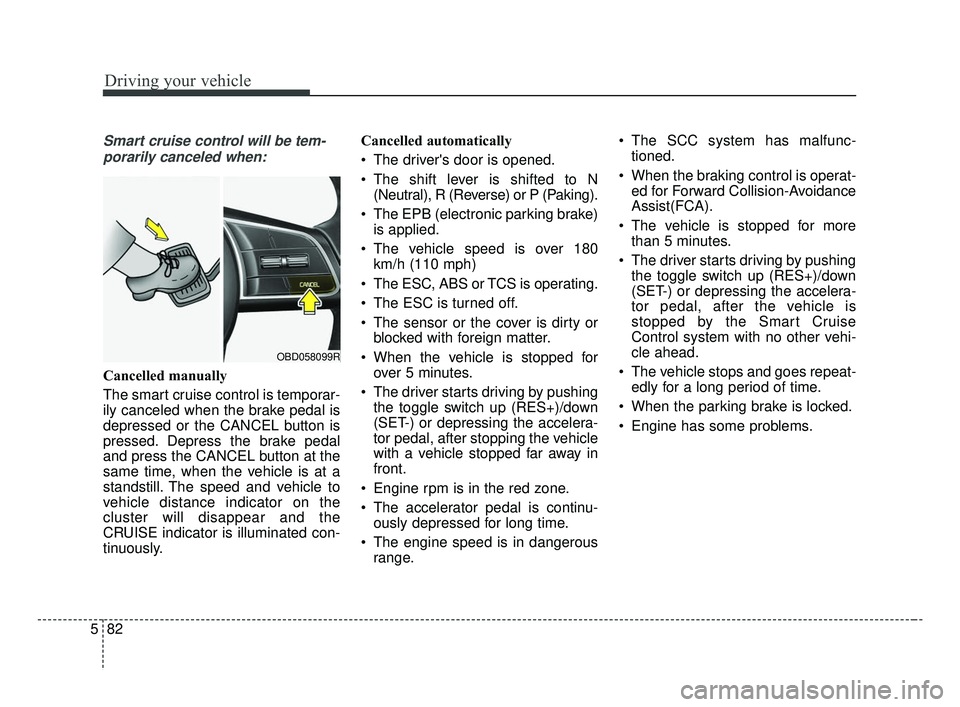
Cancelled manually
The smart cruise control is temporar-
ily canceled when the brake pedal is
depressed or the CANCEL button is
pressed. Depress the brake pedal
and press the CANCEL button at the
same time, when the vehicle is at a
standstill. The speed and vehicle to
vehicle distance indicator on the
cluster will disappear and the
CRUISE indicator is illuminated con-
tinuously. Cancelled automatically
The driver's door is opened.
The shift lever is shifted to N
(Neutral), R (Reverse) or P (Paking).
The EPB (electronic parking brake) is applied.
The vehicle speed is over 180 km/h (110 mph)
The ESC, ABS or TCS is operating.
The ESC is turned off.
The sensor or the cover is dirty or blocked with foreign matter.
When the vehicle is stopped for over 5 minutes.
The driver starts driving by pushing the toggle switch up (RES+)/down
(SET-) or depressing the accelera-
tor pedal, after stopping the vehicle
with a vehicle stopped far away in
front.
Engine rpm is in the red zone.
The accelerator pedal is continu- ously depressed for long time.
The engine speed is in dangerous range. The SCC system has malfunc-
tioned.
When the braking control is operat- ed for Forward Collision-Avoidance
Assist(FCA).
The vehicle is stopped for more than 5 minutes.
The driver starts driving by pushing the toggle switch up (RES+)/down
(SET-) or depressing the accelera-
tor pedal, after the vehicle is
stopped by the Smart Cruise
Control system with no other vehi-
cle ahead.
The vehicle stops and goes repeat- edly for a long period of time.
When the parking brake is locked.
Engine has some problems.
OBD058099R
BDm CAN (ENG) 5.QXP 7/4/2018 10:15 AM Page 82