warning KIA FORTE 2020 Owners Manual
[x] Cancel search | Manufacturer: KIA, Model Year: 2020, Model line: FORTE, Model: KIA FORTE 2020Pages: 568, PDF Size: 8.58 MB
Page 232 of 568
4147
Features of your vehicle
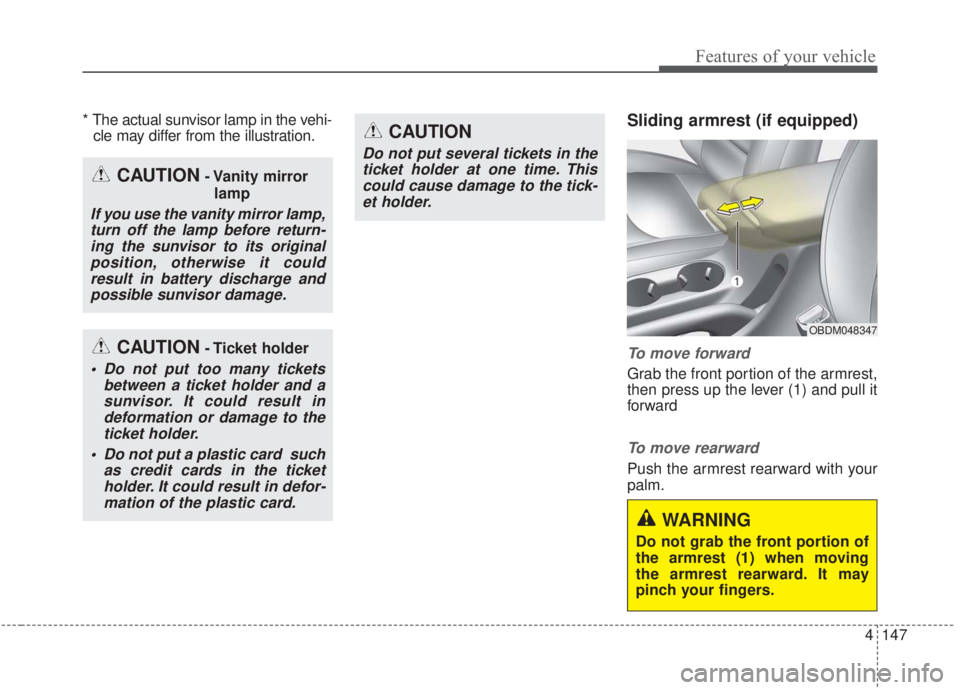
* The actual sunvisor lamp in the vehi-cle may differ from the illustration.Sliding armrest (if equipped)
To move forward
Grab the front portion of the armrest,
then press up the lever (1) and pull it
forward
To move rearward
Push the armrest rearward with your
palm.
WARNING
Do not grab the front portion of
the armrest (1) when moving
the armrest rearward. It may
pinch your fingers.
OBDM048347
CAUTION- Vanity mirror
lamp
If you use the vanity mirror lamp,turn off the lamp before return-ing the sunvisor to its originalposition, otherwise it couldresult in battery discharge andpossible sunvisor damage.
CAUTION- Ticket holder
Do not put too many tickets between a ticket holder and asunvisor. It could result indeformation or damage to theticket holder.
Do not put a plastic card such as credit cards in the ticketholder. It could result in defor-mation of the plastic card.
CAUTION
Do not put several tickets in theticket holder at one time. Thiscould cause damage to the tick-et holder.
Page 233 of 568

Features of your vehicle
148
4
Power outlet (if equipped)
The power outlet is designed to pro-
vide power for mobile telephones or
other devices designed to operate
with vehicle electrical systems. The
devices should draw less than 10
amps with the engine running.
Use the power outlet only when the
engine is running and remove the
accessory plug after use. Using the
accessory plug for prolonged peri-
ods of time with the engine off could
cause the battery to discharge.
Only use 12V electric accessories which are less than 10A in electric
capacity. Close the cover when not in use.
Some electronic devices can cause
electronic interference when
plugged into a vehicle’s power out-
let. These devices may cause
excessive audio static and malfunc-
tions in other electronic systems or
devices used in your vehicle.
Push the plug in as far as it will go. If good contact is not made, the
plug may overheat and the fuse
may open.
Plug in battery equipped electronic devices with reverse current protec-
tion. Otherwise, the current from
the battery may flow into the vehi-
cle’s electrical/electronic system
and cause system malfunction.
WARNING - Electric shock
Do not put a finger or a foreign
object (pen, etc.) into a power
outlet and do not touch with a
wet hand. You may receive an
electric shock.
OBD048022
Page 235 of 568

Features of your vehicle
150
4
Wireless smart phone charg-
ing system (if equipped)
The wireless smart phone charging
system is located in front of the cen-
ter console.
Firmly close all doors, and turn the
ignition to ACC or IGN ON. To start
wireless charging, place the smart
phone equipped with wireless charg-
ing function on the wireless charging
pad. For best wireless charging results,
place the smart phone on the center
of the charging pad.
The wireless charging system is
designed for single usage with smart
phones equipped with QI. Please
refer to the smart phone accessory
cover or the smart phone manufac-
turer homepage to check whether
your smart phone supports QI func-
tion.
OBD048404WARNING
If any metallic object such as a
coin is located between the
wireless charging system and
the smart phone, the charging
may be disrupted. Also, the
metallic object may heat up and
potentially damage the charg-
ing system.
(Continued)
- Ensure the devices are cor- rectly connected, failing to doso may cause serious damageto the device. Please note thatdamages due to incorrectusage are not covered by war-ranty service.
Page 236 of 568

4151
Features of your vehicle
Wireless smart phone charging
1. Remove any object on the smartphone charging pad including the
smart key. If there is any foreign
object on the pad other than a
smart phone, the wireless charging
function may not operate properly.
2. Place the smart phone on the cen- ter of the wireless charging pad.
3. The indicator light will change to orange once the wireless charging
begins. After the charging is com-
plete, the orange light will change
to green.
4. You can choose to turn the wireless charging function to either ON or
OFF by selecting the USM on the
instrument cluster. (Please refer to
“Instrument Cluster” for details).
If the wireless charging does not
work, gently move your smart phone
around the pad until the charging indi-
cator light turns yellow. Depending on
the smart phone, the charging indica-
tor light may not turn green even after
the charging is complete. If the wireless charging is not func-
tioning properly, the orange light will
blink and flash for ten seconds, then
turn off. If that occurs, remove the
smart phone from the pad and
replace it on the pad again, or double
check the charging status.
If you leave the smart phone on the
charging pad when the vehicle igni-
tion is in OFF, the vehicle will alert
you through warning messages and
sound (applicable for vehicles with
voice guidance function) after the
‘Good bye’ function on the instru-
ment cluster ends.WARNING - Distracted
driving
Driving while distracted can
result in a loss of vehicle con-
trol that may lead to an acci-
dent, severe personal injury,
and death. The driver’s primary
responsibility is in the safe and
legal operation of a vehicle, and
use of any handheld devices,
other equipment, or vehicle sys-
tems which take the driver’s
eyes, attention and focus away
from the safe operation of a
vehicle or which are not permis-
sible by law should never be
used during operation of the
vehicle.
Page 238 of 568
4153
Features of your vehicle
This device complies with
Industry Canada licence-exempt
RSS standard(s).
Operation is subject to the following
two conditions:
(1) This device may not cause inter-ference, and
(2) This device must accept any interference, including interfer-
ence that may cause undesired
operation of the device.Clothes hanger
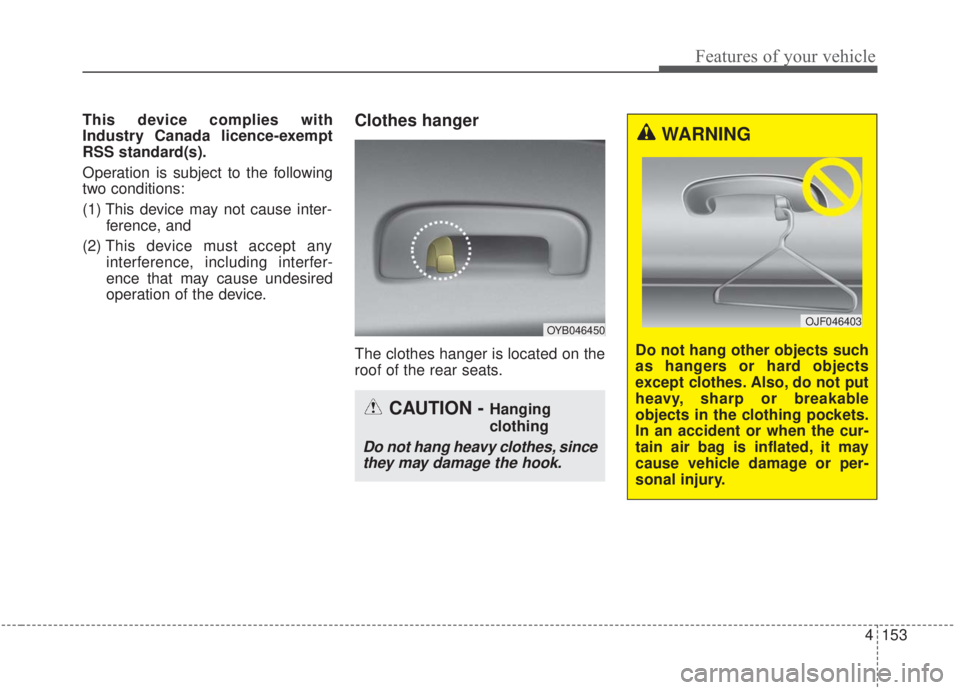
The clothes hanger is located on the
roof of the rear seats.
CAUTION - Hanging
clothing
Do not hang heavy clothes, sincethey may damage the hook.
WARNING
Do not hang other objects such
as hangers or hard objects
except clothes. Also, do not put
heavy, sharp or breakable
objects in the clothing pockets.
In an accident or when the cur-
tain air bag is inflated, it may
cause vehicle damage or per-
sonal injury.
OJF046403OYB046450
Page 239 of 568

Features of your vehicle
154
4
Floor mat anchor (s)
(if equipped)
When using a floor mat on the front
floor carpet, make sure it attaches to
the floor mat anchor(s) in your vehi-
cle. This keeps the floor mat from
sliding forward. The following must be observed
when installing ANY floor mat to the
vehicle.
Ensure that the floor mats are
securely attached to the vehicle's
floor mat anchor(s) before driving
the vehicle.
Do not use ANY floor mat that can- not be firmly attached to the vehi-
cle's floor mat anchors.
Do not stack floor mats on top of one another (e.g. all-weather rub-
ber mat on top of a carpeted floor
mat). Only a single floor mat should
be installed in each position.
✽ ✽ NOTICE
Your vehicle was manufactured with
driver's side floor mat anchors that
are designed to securely hold the
floor mat in place. To avoid any
interference with pedal operation,
Kia recommends that only the Kia
floor mat designed for use in your
vehicle be installed.
WARNING - After market
floor mat
Do not install aftermarket floor
mats that are not capable of
being securely attached to the
vehicle's floor mat anchors.
Unsecured floor mats can inter-
fere with pedal operation.
CAUTION
Ensure to remove any protec- tive film attached to the carpetbefore attaching a floor mat tothe front floor carpet.Otherwise, the floor mat maymove freely on the protectivefilm and it could result in unin-tentional braking or accelerat-ing.
Since the volatile organic compound may be continu-ously generated from variouskinds of protective filmattached for the protection ofthe interior material, be sureto remove it.OXM043309
■Type A■Type B
Page 243 of 568

Features of your vehicle
158
4
Station Swapping - As a FM signal
weakens, another more powerful
signal near the same frequency
may begin to play. This is because
your radio is designed to lock onto
the clearest signal. If this occurs,
select another station with a
stronger signal.
Multi-Path Cancellation - Radio sig- nals being received from several
directions can cause distortion or
fluttering. This can be caused by a
direct and reflected signal from the
same station, or by signals from
two stations with close frequencies.
If this occurs, select another station
until the condition has passed.
Using a cellular phone or a two-
way radio
When a cellular phone is used inside
the vehicle, noise may be produced
from the audio system. This does not
mean that something is wrong with
the audio equipment. If this occurs,
try using the cellular phone as far
away as possible from the audio
equipment.
When using a communication sys-
tem such as a cellular phone or a
radio set inside the vehicle, a sepa-
rate external antenna must be fitted.
When a cellular phone or a radio set
is used with an internal antenna
alone, it may interfere with the vehi-
cle's electrical system and adversely
affect safe operation of the vehicle.
JBM005
WARNING
Do not use a cellular phone
while driving. Stop at a safe
location to use a cellular phone.
WARNING - Driver
Distraction
Driving while distracted can
result in a loss of vehicle con-
trol that may lead to an acci-
dent, severe bodily injury, or
death. The driver's primary
responsibility is the safe and
legal operation of the vehicle,
and the use of any handheld
devices, other equipment, or
vehicle systems which take the
driver's eyes, attention, and
focus away from the safe opera-
tion of the vehicle, or which are
not permissible by law, should
never be used during the opera-
tion of the vehicle.
Page 244 of 568

4159
Features of your vehicle
WARNING - Audio
System
Do not disassemble, assemble,
or modify this audio system.
Such acts could result in fire or
electric shock.
WARNING - Antenna
Do not touch the antenna dur-
ing thunder or lightening as
such acts may lead to lightning
induced electric shock.
Page 247 of 568

Driving your vehicle
Before driving . . . . . . . . . . . . . . . . . . . . . . . . . . . . . . 5-5
• Before entering vehicle . . . . . . . . . . . . . . . . . . . . . . . . . 5-5
. . . . . . . . . . . . . . . . . . . . . . . . . . 5-5
. . . . . . . . . . . . . . . . . . . . . . . . . . . . . . . . 5-5
Key positions . . . . . . . . . . . . . . . . . . . . . . . . . . . . . . . 5-7
. . . . . . . . . . . . . . . . . . . . . . 5-7
. . . . . . . . . . . . . . . . . . . . . . . . . 5-7
. . . . . . . . . . . . . . . . . . . . . . . . . . . . 5-9
. 5-10
Engine start/stop button . . . . . . . . . . . . . . . . . . . . 5-11
. . . . . . . . . . . . . 5-11
. . . . . . . . . . . . . . . . . . . . . . . . . . . 5-14
. . . . . . . 5-17
Manual transmission . . . . . . . . . . . . . . . . . . . . . . . 5-18
. . . . . . . . . . . . . . . . . 5-18
. . . . . . . . . . . . . . . . . . . . . . . . 5-21
Dual Clutch Transmission (DCT) . . . . . . . . . . . . . 5-22
. . . . . . . . . . . . . . 5-22
warning message . . . . . . . . . . . . . . . . . . . . . . . . . . . . 5-24
. . . . . . . . . . . . . . . . . . . . . . . . 5-34
Intelligent Variable Transmission (IVT) . . . . . . . 5-35
. 5-35
. . . . . . . . . . . . . . . . . . . . . . . . . . . . . 5-40
. . . . . . . . . . . . . . . . . . . . . . . . 5-41
Brake system . . . . . . . . . . . . . . . . . . . . . . . . . . . . . . 5-44
. . . . . . . . . . . . . . . . . . . . . . . . . . . . . . . . 5-44
. . . . . . . . . . . . . . . . . . . . . . . . . . . . . . . 5-46
. . . . . . . . . . . . . . 5-50
. . . . . . . . . . . . 5-55
. . . . . . . . . . . . . . . . . 5-57
Forward Collision-avoidance Assist (FCA) (Camera type) . . . . . . . . . . . . . . . . . . . . . . . . . . . . 5-59
. . . . . . . . . . . . . . . . . . . 5-59
. . . . . . . . 5-61
. . . . . . . . . . . . . . . . . . . . . . . . . . . . . . 5-62
. . . . . . . . . . . . . . . . . 5-63
. . . . . . . . . . . . . . . . . . . . . . . . . . . 5-65
. . . . . . . . . . . . . . . . . . . . . . . 5-67
Forward Collision-avoidance Assist (FCA) (Camera + Radar type) . . . . . . . . . . . . . . . . . . . . 5-72
. . . . . . . . . . . . . . . . . . . 5-72
. . . . . . . . 5-74
. . . . . . . . . . . . . . . . . . . . . . . . . . . . . . 5-75
5
Page 248 of 568

front (front radar/camera) . . . . . . . . . . . . . . . . . . . . 5-76
. . . . . . . . . . . . . . . . . . . . . . . . . . . 5-78
. . . . . . . . . . . . . . . . . . . . . . . 5-80
. . . . . . . . . . . . . . . . . . . . . . . 5-83
. . . . . . . . . . . . . . . . . . . . . . . 5-84
Cruise Control System . . . . . . . . . . . . . . . . . . . . . . 5-86
. . . . . . . . . . . . . . . . . . . . . 5-87
. . . . . . . . . . . . . . . . . . 5-88
. 5-88
do one of the following . . . 5-88
30 km/h (20 mph) . . . . . . . . . . . . . . . . . . . . . . . . . . . 5-89
do one of the following . . 5-89
Smart Cruise Control . . . . . . . . . . . . . . . . . . . . . . 5-90
. . . . . . . . . . . . . . . . . . . 5-92
. . . . . . . . . . . . . . . . . . . . 5-92
. . . . . . . . . . . . . . . 5-98
. . . . . . . . . . . . . . . . . . . 5-98
. 5-99
. . 5-103
. . . . . . . . . . . . . . 5-103
. . . . . . . . . . . . . . . . . . . . . 5-104
Drive mode integrated control system . . . . . . . . 5-111
Blind-spot Collision Warning (BCW). . . . . . . . . 5-115
LCA (Lane Change Assist) . . . . . . . . . . . . . . . . . . . 5-116
. . 5-119
. . . . . . . . . . . . . . . . . . . . . . . . . . . 5-123
Lane Keeping Assist (LKA) system . . . . . . . . . . 5-125
. . . . . . . . . . . . . . . . . . . . . . . . . . . . . . 5-126
. . . . . . . . . . . . . . . . . . . . . . . . 5-133
Driver Attention Warning (DAW). . . . . . . . . . . . 5-134
. . . . . . . . . . . . . . . . . . 5-134
. . . . . . . . . . . . . . . . . . . . . . . . . 5-136
. . . . . . . . . . . . . . . . . . . . . . . . . . . . . 5-136
. . . . . . . . . . . . . . . . . . . . . . . . . . 5-137
Economical operation . . . . . . . . . . . . . . . . . . . . . 5-139
Special driving conditions . . . . . . . . . . . . . . . . . . 5-141
. . . . . . . . . . . . . . . . . 5-141
. . . . . . . . . . . . . . . . . . . . . . . . . . 5-141
. . . . . . . . . . . . . . . . . . . . . . . . . . . 5-142
. . . . . . . . . . . . . . . . . . . . . . . . . . . . . 5-142
. . . . . . . . . . . . . . . . . . . . . . . . . . . 5-143
. . . . . . . . . . . . . . . . . . . . . . 5-144
5