brakes KIA FORTE 2020 Owner's Manual
[x] Cancel search | Manufacturer: KIA, Model Year: 2020, Model line: FORTE, Model: KIA FORTE 2020Pages: 568, PDF Size: 8.58 MB
Page 304 of 568

Driving your vehicle
58
5
If your vehicle is facing uphill, turn
the front wheels away from the
curb to help keep the vehicle from
rolling. If there is no curb or if it is
required by other conditions to
keep the vehicle from rolling, chock
the wheels.
Under some conditions, your park- ing brake can freeze in the
engaged position. This is most like-
ly to happen when there is an
accumulation of snow or ice
around or near the rear brakes or if
the brakes are wet. If there is a risk
that the parking brake may freeze,
apply it only temporarily while you
put the shift lever in P (intelligent
variable transmission) and chock
the rear wheels so the vehicle can-
not roll. Then release the parking
brake.
Do not hold the vehicle on an incline with the accelerator pedal.
This can cause the transmission to
overheat. Always use the brake
pedal or parking brake.
Page 307 of 568

561
Driving your vehicle
Prerequisite for activation
The FCA gets ready to be activated
when the FCA is selected on the
LCD display, and when the following
prerequisites are satisfied.
- The ESC is ON.
- The driving speed is over 10 km/h(6 mph ). (However, FCA is activat-
ed within certain driving speed.)
- When recognizing a vehicle in front. (However, FCA deactivates
according to conditions in front and
vehicle systems, but it notices only
certain warnings.)
- The FCA automatically deactivates upon canceling the ESC. When the
ESC is cancelled, the FCA cannot
be activated on the LCD display. In
this situation, the FCA warning
light will illuminate.
FCA warning message and
system control
The FCA system produces warning
messages, warning alarms, and
emergency braking based on the risk
of a frontal collision, such as when a
vehicle ahead suddenly brakes.
The driver can select the initial warn-
ing activation time in the User Settings
in the LCD display. The options for the
initial Forward Collision-Avoidance
Assist include Early, Normal or Late
initial warning time.
WARNING
The FCA automatically acti-vates upon placing the igni-
tion switch to the ON position.
The driver can deactivate the
FCA by canceling the system
setting on the LCD display.
The FCA automatically deacti- vates upon canceling the
ESC. When the ESC is can-
celled, the FCA cannot be
activated on the LCD display.
The FCA warning light will
illuminate, but it does not indi-
cate a malfunction of the sys-
tem.
Set or cancel FCA with the control switches on the steer-
ing wheel after stopping the
vehicle in a safe place.
Page 308 of 568

Driving your vehicle
62
5
Collision Warning! (1st warning)
This warning message appears on
the LCD display with a warning
chime.
Additionally, the engine management
system intervenes to help decelerate
the vehicle.
- Your vehicle speed may decelerate
moderately.
- The FCA system limitedly controls the brakes to preemptively mitigate
impact from a collision.
Emergency braking! (2nd warning)
This warning message appears on
the LCD display with a warning
chime.
Additionally, the engine management
system intervenes to help decelerate
the vehicle.
- The FCA system limitedly controlsthe brakes to preemptively mitigate
impact from a collision. The brake
control is maximized just before a
collision.
Brake operation
In an emergency situation, the braking system enters in ready sta-
tus for prompt reaction upon the
driver depressing the brake pedal.
The FCA system provides addi- tional braking power for optimum
braking performance when the
driver depresses the brake pedal.
The braking control is automatical- ly deactivated when the driver
sharply depresses the accelerator
pedal or when the driver abruptly
operates the steering wheel.
The braking control is automatical- ly cancelled when risk factors dis-
appear.
OBDM058065NOBDM058066N
CAUTION
The driver should always exer-cise great caution during vehi-cle operation, even though thereis no warning message or warn-ing alarm.
Page 312 of 568

Driving your vehicle
66
5
(Continued)
The FCA system may activate
during braking and the vehicle
may stop suddenly. If this
occurs, any load in the vehicle
may endanger passengers.
Therefore, always be mindful
of the load volume in the vehi-
cle.
The FCA system may not acti- vate if the driver applies the
brake pedal to avoid the risk
of a collision.
The FCA system does not operate when the vehicle is in
reverse. In these cases, you
must maintain a safe braking
distance, and if necessary,
depress the brake pedal to
reduce the driving speed in
order to maintain a safe dis
tance.
(Continued)WARNING
The FCA is only a supplemen-tal system for the driver’s con-
venience. It is the driver's
responsibility to control the
vehicle. Do not solely depend
on the FCA system. Rather,
maintain a safe braking dis-
tance, and, if necessary,
depress the brake pedal to
lower the driving speed.
The FCA may unnecessarily produce the warning message
and the warning alarms. Also,
due to sensing limitations, the
FCA may not produce alarms
in certain situations. Read the
section “Limitation of the sys-
tem” for more information.
(Continued)
(Continued)
When there is a malfunctionwith the FCA, the FCA braking
control does not operate upon
detecting a collision risk even
with other braking systems
operating normally.
The FCA system only recog- nizes vehicles in front of it
while driving forward. It does
not identify any animals or
vehicles in the opposite direc-
tion.
The FCA cannot recognize cross-traffic or parked vehi-
cles presenting a side profile.
If the vehicle in front stops suddenly, you may have less
time to apply the brakes sys-
tem. Therefore, always keep a
safe distance between your
vehicle and the vehicle in
front of you.
(Continued)
Page 320 of 568

Driving your vehicle
74
5
Prerequisite for activation
The FCA gets ready to be activated
when the FCA is selected on the
LCD display and when the following
prerequisites are satisfied.
- The ESC is ON.
- The driving speed is over 10 km/h
(6 mph). (However, FCA is activat-
ed within a certain driving speed.)
- When recognizing a vehicle or the pedestrian in front. (However, FCA
deactivates according to condi-
tions in front and vehicle systems,
but it notices only certain warn-
ings.)
- The FCA automatically deactivates upon canceling the ESC. When the
ESC is cancelled, the FCA cannot
be activated on the LCD display. In
this situation, the FCA warning
light will illuminate.
FCA warning message and
system control
The FCA system produces warning
messages, warning alarms, and
emergency braking based on the risk
of a frontal collision, such as when a
vehicle ahead suddenly brakes.
The driver can select the initial warn-
ing activation time in the User
Settings in the LCD display. The
options for the initial Forward
Collision-Avoidance Assist include
Early, Normal or Late initial warning
time.
WARNING
The FCA automatically acti-vates upon placing the igni-
tion switch to the ON position.
The driver can deactivate the
FCA by canceling the system
setting on the LCD display.
The FCA automatically deacti- vates upon canceling the
ESC. When the ESC is can-
celled, the FCA cannot be
activated on the LCD display.
The FCA warning light will
illuminate, but it does not indi-
cate a malfunction of the sys-
tem.
Set or cancel FCA with control switches on the steering
wheel after stopping the vehi-
cle in a safe place.
Page 321 of 568
575
Driving your vehicle
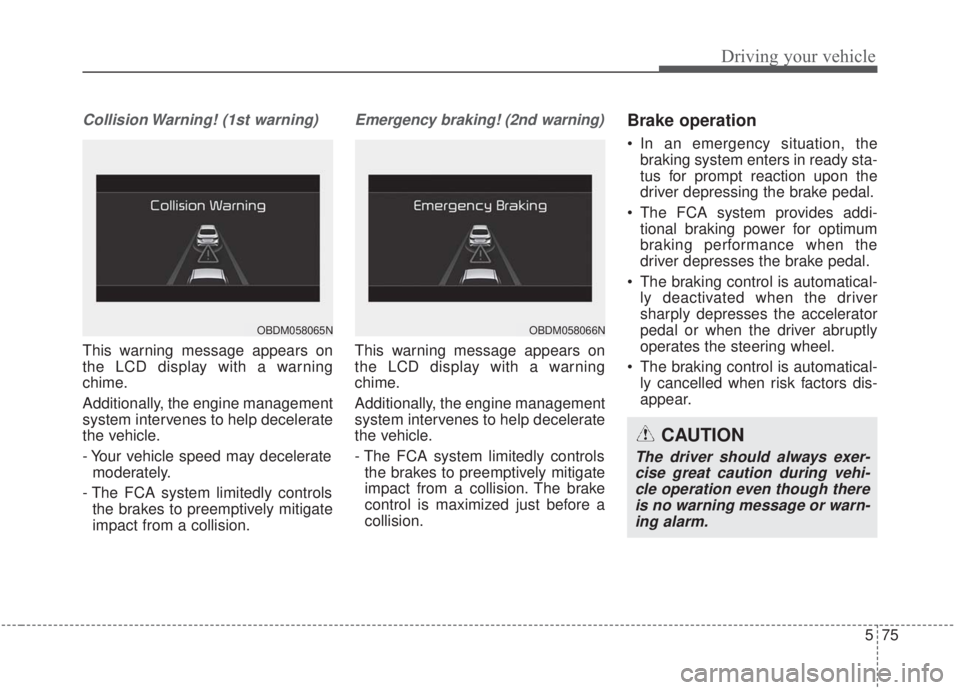
Collision Warning! (1st warning)
This warning message appears on
the LCD display with a warning
chime.
Additionally, the engine management
system intervenes to help decelerate
the vehicle.
- Your vehicle speed may deceleratemoderately.
- The FCA system limitedly controls the brakes to preemptively mitigate
impact from a collision.
Emergency braking! (2nd warning)
This warning message appears on
the LCD display with a warning
chime.
Additionally, the engine management
system intervenes to help decelerate
the vehicle.
- The FCA system limitedly controlsthe brakes to preemptively mitigate
impact from a collision. The brake
control is maximized just before a
collision.
Brake operation
In an emergency situation, the braking system enters in ready sta-
tus for prompt reaction upon the
driver depressing the brake pedal.
The FCA system provides addi- tional braking power for optimum
braking performance when the
driver depresses the brake pedal.
The braking control is automatical- ly deactivated when the driver
sharply depresses the accelerator
pedal or when the driver abruptly
operates the steering wheel.
The braking control is automatical- ly cancelled when risk factors dis-
appear.
OBDM058065NOBDM058066N
CAUTION
The driver should always exer-cise great caution during vehi-cle operation even though thereis no warning message or warn-ing alarm.
Page 325 of 568
579
Driving your vehicle
The FCA system will get deactivat-ed for the sake of driver's safety
when the ESC warning light comes
on. The FCA warning message will
appear at the same time, too. But
that doesn't necessarily mean a
malfunction of the FCA system.
Both the FCA warning light and
warning message will disappear
once the ESC warning light issue is
resolved.(Continued)
The FCA system only recog-nizes vehicles and pedestri-
ans in front of it while driving
forward. It does not identify
any animals or vehicles in the
opposite direction.
The FCA does not recognize cross-traffic or parked vehi-
cles presenting a side profile.
If the vehicle in front stops suddenly, you may have less
to apply the brakes system.
Therefore, always keep a safe
distance between your vehicle
and the vehicle in front of you.
The FCA system may activate during braking and the vehicle
may stop suddenly. If this
occurs, any load in the vehicle
may endanger passengers.
Therefore, always be mindful
of the load volume in the vehi-
cle.
(Continued)WARNING
The FCA is only a supplemen-tal system for the driver’s con-
venience. It is the driver's
responsibility to control the
vehicle. Do not solely depend
on the FCA system. Rather,
maintain a safe braking dis-
tance, and, if necessary,
depress the brake pedal to
lower the driving speed.
The FCA may unnecessarily produce the warning message
and the warning alarms. Also,
due to sensing limitations the
FCA may not produce alarms
in certain situations. Read the
section “Limitation of the sys-
tem” for more information.
When there is a malfunction with the FCA, the FCA braking
control does not operate upon
detecting a collision risk, even
with other braking systems
operating normally.
(Continued)
Page 332 of 568
Driving your vehicle
86
5
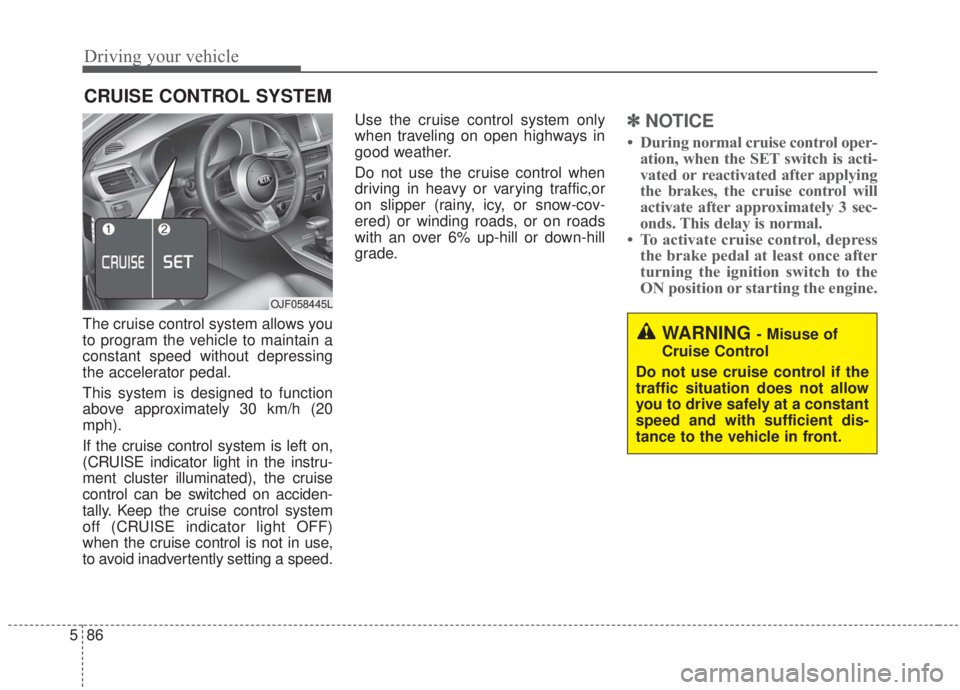
The cruise control system allows you
to program the vehicle to maintain a
constant speed without depressing
the accelerator pedal.
This system is designed to function
above approximately 30 km/h (20
mph).
If the cruise control system is left on,
(CRUISE indicator light in the instru-
ment cluster illuminated), the cruise
control can be switched on acciden-
tally. Keep the cruise control system
off (CRUISE indicator light OFF)
when the cruise control is not in use,
to avoid inadvertently setting a speed. Use the cruise control system only
when traveling on open highways in
good weather.
Do not use the cruise control when
driving in heavy or varying traffic,or
on slipper (rainy, icy, or snow-cov-
ered) or winding roads, or on roads
with an over 6% up-hill or down-hill
grade.
✽ ✽
NOTICE
• During normal cruise control oper-
ation, when the SET switch is acti-
vated or reactivated after applying
the brakes, the cruise control will
activate after approximately 3 sec-
onds. This delay is normal.
• To activate cruise control, depress the brake pedal at least once after
turning the ignition switch to the
ON position or starting the engine.
CRUISE CONTROL SYSTEM
WARNING - Misuse of
Cruise Control
Do not use cruise control if the
traffic situation does not allow
you to drive safely at a constant
speed and with sufficient dis-
tance to the vehicle in front.
OJF058445L
Page 344 of 568
Driving your vehicle
98
5
Vehicle to vehicle distance
setting
To set vehicle to vehicle distance:
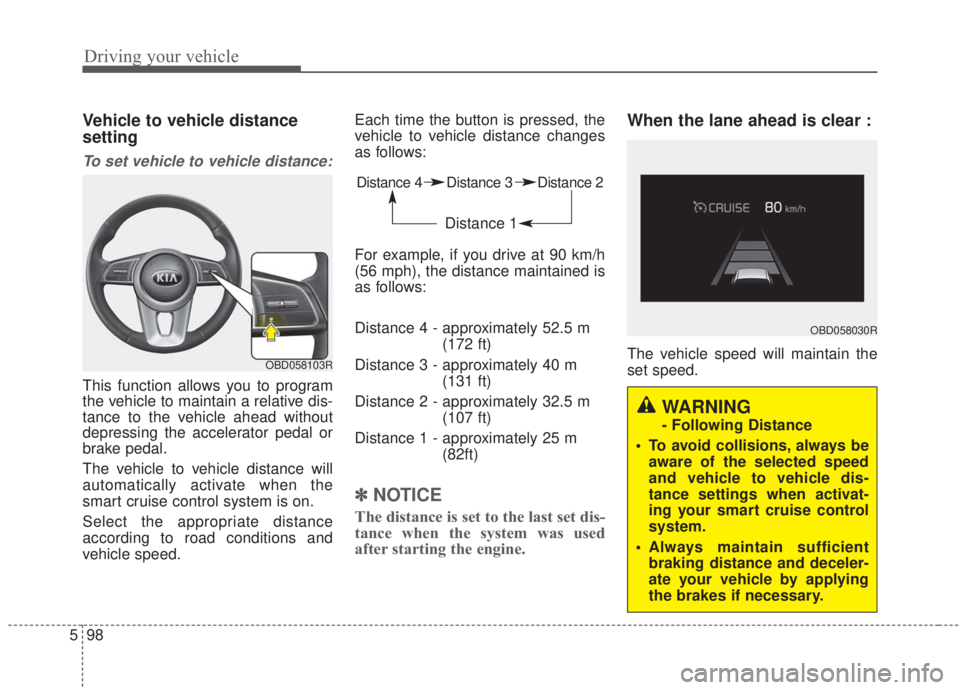
This function allows you to program
the vehicle to maintain a relative dis-
tance to the vehicle ahead without
depressing the accelerator pedal or
brake pedal.
The vehicle to vehicle distance will
automatically activate when the
smart cruise control system is on.
Select the appropriate distance
according to road conditions and
vehicle speed. Each time the button is pressed, the
vehicle to vehicle distance changes
as follows:
For example, if you drive at 90 km/h
(56 mph), the distance maintained is
as follows:
Distance 4 - approximately 52.5 m
(172 ft)
Distance 3 - approximately 40 m (131 ft)
Distance 2 - approximately 32.5 m (107 ft)
Distance 1 - approximately 25 m (82ft)
✽ ✽NOTICE
The distance is set to the last set dis-
tance when the system was used
after starting the engine.
When the lane ahead is clear :
The vehicle speed will maintain the
set speed.OBD058103R
Distance 4 Distance 3 Distance 2
Distance 1
OBD058030R
WARNING
- Following Distance
To avoid collisions, always be aware of the selected speed
and vehicle to vehicle dis-
tance settings when activat-
ing your smart cruise control
system.
Always maintain sufficient braking distance and deceler-
ate your vehicle by applying
the brakes if necessary.
Page 354 of 568
Driving your vehicle
108
5
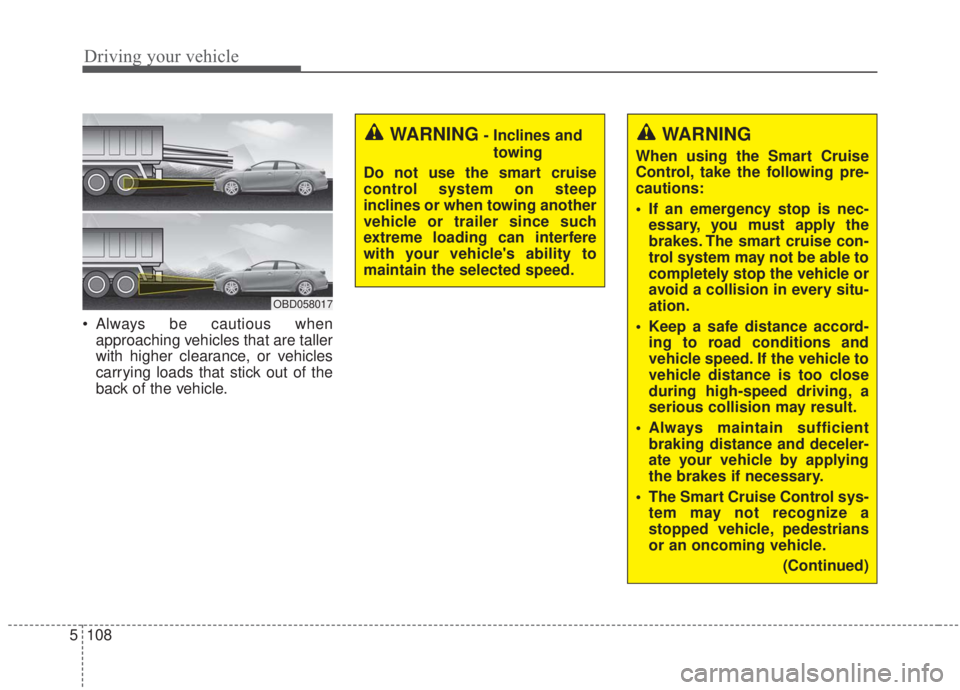
Always be cautious when
approaching vehicles that are taller
with higher clearance, or vehicles
carrying loads that stick out of the
back of the vehicle.
OBD058017
WARNING
When using the Smart Cruise
Control, take the following pre-
cautions:
If an emergency stop is nec-essary, you must apply the
brakes. The smart cruise con-
trol system may not be able to
completely stop the vehicle or
avoid a collision in every situ-
ation.
Keep a safe distance accord- ing to road conditions and
vehicle speed. If the vehicle to
vehicle distance is too close
during high-speed driving, a
serious collision may result.
Always maintain sufficient braking distance and deceler-
ate your vehicle by applying
the brakes if necessary.
The Smart Cruise Control sys- tem may not recognize a
stopped vehicle, pedestrians
or an oncoming vehicle.
(Continued)
WARNING- Inclines andtowing
Do not use the smart cruise
control system on steep
inclines or when towing another
vehicle or trailer since such
extreme loading can interfere
with your vehicle's ability to
maintain the selected speed.