door lock KIA FORTE 2020 Owner's Manual
[x] Cancel search | Manufacturer: KIA, Model Year: 2020, Model line: FORTE, Model: KIA FORTE 2020Pages: 568, PDF Size: 8.58 MB
Page 115 of 568

Features of your vehicle
30
4
(1) Driver’s door power window
switch
(2) Front passenger’s door power window switch
(3) Rear door (left) power window switch
(4) Rear door (right) power window switch
(5) Window opening and closing
(6) Automatic power window up*/ down*
(7) Power window lock button
* if equipped
✽ ✽ NOTICE
In cold and wet climates, power win-
dows may not work properly due to
freezing conditions.
WINDOWS
OBDM048046
■ ■ Front
■ ■Rear
Page 116 of 568

431
Features of your vehicle
Power windows
The ignition switch must be in the ON
position for power windows to oper-
ate.
Each door has a power window
switch that controls the door's win-
dow. The driver has a power window
lock button which can block the oper-
ation of rear passenger windows.
The power windows can be operated
for approximately 10 minutes after
the ignition key is removed or is set
to the to the ACC or LOCK position.
However, if the front doors are
opened, the power windows cannot
be operated even within the 10
minute period.
The driver’s door has a master power
window switch that controls all the
windows in the vehicle.
If a window cannot be closed
because it is blocked by objects,
remove the objects and close the
window.
✽ ✽NOTICE
While driving with the rear windows
down or with the sunroof (if
equipped) in an open (or partially
open) position, your vehicle may
demonstrate a wind buffeting or
pulsation noise. This noise is a nor-
mal occurrence and can be reduced
or eliminated by taking the follow-
ing actions. If the noise occurs with
one or both of the rear windows
down, partially lower both front
windows approximately 2.5 cm (1
in.). If you experience the noise with
the sunroof open, slightly reduce the
size of the sunroof opening.
Window opening and closing
To open or close a window, press
down or pull up the front portion of
the corresponding switch to the first
detent position (5).
OBD048084
CAUTION
Do not install any accessories
in the vehicle that extend intothe open window area. Suchobjects will impact the properfunction of the Automatic rever-sal “jam protection” featuredescribed on “Automatic rever-sal” section of this manual.
Page 119 of 568

Features of your vehicle
34
4
Power window lock button
The driver can disable the power
window switches on the rear passen-
gers' doors by pressing the power
window lock switch to the lock posi-
tion (pressed).
When the power window lock
switch is pressed:
The driver's master control can
operate all the power windows.
The front passenger's control can operate the front passen-
ger's power window.
The rear passenger's control cannot operate the rear passen-
ger's power window. Always double check to make sure
all arms, hands, head and other
obstructions are safely out of the way
before closing a window.
CAUTION
- Opening/closing Window
To prevent possible damage to
the power window system, donot open or close two windowsor more at the same time. Thiswill also ensure the longevity ofthe fuse.
OBD048047
WARNING- Power win-
dows
Do not allow children to play with the power windows. Keep
the power window lock button
(on the driver's door) in the
LOCK (pressed) position.
Do not extend a face or arms outside through the window
opening while driving. Doing
so could result in significant
injury.
Page 126 of 568

441
Features of your vehicle
If your vehicle is equipped with a
sunroof, you can slide or tilt your
sunroof with the sunroof control lever
located on the overhead console.
The sunroof can only be opened,
closed, or tilted when the ignition
switch is in the ON position.
The sunroof can be operated for
approximately 30 seconds after the
ignition key is removed or turned to
the ACC or LOCK (or OFF) position.
However, if the front door is opened,
the sunroof cannot be operated even
within the 30 second period.In cold and wet climates, the sunroof
may not work properly due to freez-
ing conditions.
After the vehicle is washed or in a
rainstorm, be sure to wipe off any
water that is on the sunroof before
operating it.
The sunroof cannot slide when it is in
the tilt position nor can it be tilted
while in an open or slide position.
SUNROOF (IF EQUIPPED)
CAUTION- Sunroof
control lever
Do not continue to press thesunroof control lever after thesunroof is fully opened, closed,or tilted. Damage to the motor orsystem components couldoccur.
OBD048054
WARNING - Sunroof operation
When closing the sunroof, make
sure there are no body parts in
the movement range of the slid-
ing roof. Parts of the body could
become trapped or crushed.
CAUTION
To prevent damage to the sun-
roof, periodically remove anydirt that may accumulate on theguide rail.
WARNING
Never adjust the sunroof or
sunshade while driving. This
could result in loss of control
and an accident that may cause
death, serious injury, or proper-
ty damage.
Page 139 of 568
Features of your vehicle
54
4
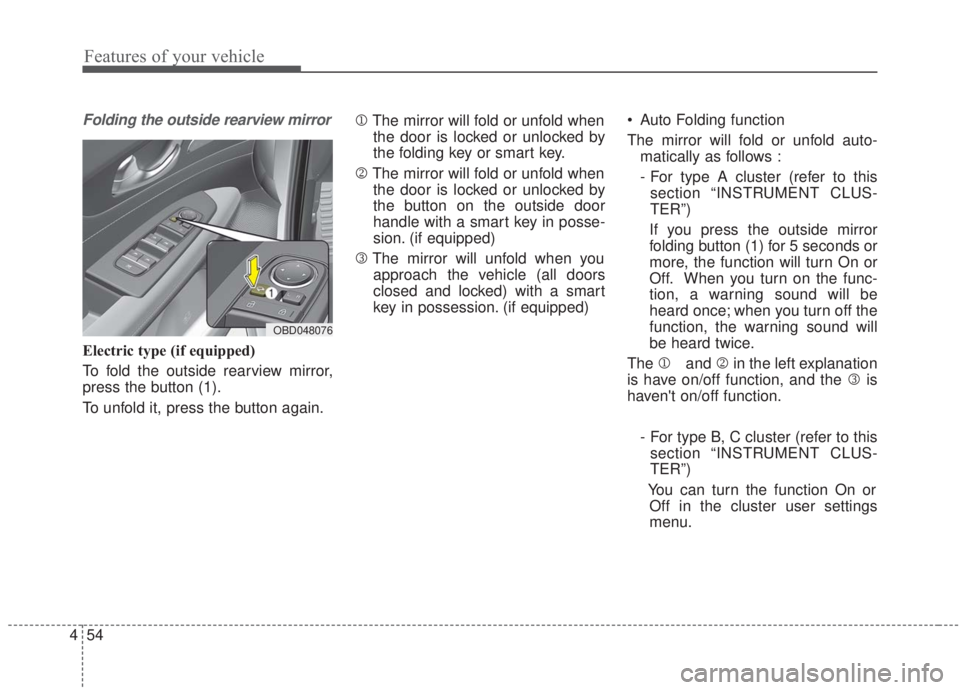
Folding the outside rearview mirror
Electric type (if equipped)
To fold the outside rearview mirror,
press the button (1).
To unfold it, press the button again. 1
The mirror will fold or unfold when
the door is locked or unlocked by
the folding key or smart key.
2 The mirror will fold or unfold when
the door is locked or unlocked by
the button on the outside door
handle with a smart key in posse-
sion. (if equipped)
3 The mirror will unfold when you
approach the vehicle (all doors
closed and locked) with a smart
key in possession. (if equipped) Auto Folding function
The mirror will fold or unfold auto-
matically as follows :
- For type A cluster (refer to thissection “INSTRUMENT CLUS-
TER”)
If you press the outside mirror
folding button (1) for 5 seconds or
more, the function will turn On or
Off. When you turn on the func-
tion, a warning sound will be
heard once; when you turn off the
function, the warning sound will
be heard twice.
The 1 and 2in the left explanation
is have on/off function, and the 3 is
haven't on/off function.
- For type B, C cluster (refer to thissection “INSTRUMENT CLUS-
TER”)
You can turn the function On or Off in the cluster user settings
menu.
OBD048076
Page 157 of 568

Features of your vehicle
72
4
Forward Collision Warning (FCW, if
equipped)
- Choose the sensitivity of the for-ward collision warning.
(Late/Normal/Early)
❈ For more details, refer to the
“Forward Collision Warning (FCW)”
section in Chapter 5.
Blind Spot Collision Warning Sound (if equipped)
- If this item is checked, the blindspot collision warning sound
function will be activated.
❈ For more details, refer to the “Blind-
spot Collision Warning” section in
Chapter 5. Door
Automatically Lock :
- Enable on Speed : All doors willbe automatically locked when the
vehicle speed exceeds 15 km/h
(9.3 mph).
- Enable on Shift : All doors will be automatically locked if the intelli-
gent variable transmission shift
lever is shifted from the P (Park)
position to the R (Reverse), N
(Neutral), or D (Drive) position.
Automatically Unlock : - Disable : The auto door unlockoperation will be canceled.
- On key out : All doors will be auto- matically unlocked when the
Engine Star/Stop Button or igni-
tion switch is set to the OFF posi-
tion.
- On Shift to P : All doors will be automatically unlocked if the
intelligent variable transmission
shift lever is shifted to the P
(Park) position. Smart trunk (if equipped)
- If this item is checked, the smarttrunk function will be activated.
❈ For more details, refer to the
“Smart trunk” section in this chap-
ter.
Two Press Unlock (if equipped) - If this item is checked, the twopress unlock function will be acti-
vated. (Only the driver’s door will
unlock when the unlock button is
pressed once and all doors will
unlock when the same button is
pressed again within 4 seconds.)
Horn Feedback (if equipped) - Off:
The Horn feedback operation will
be deactivated.
- On:
After locking the door by pressing
the lock button on the transmitter, if
you press the lock button again
within 4 seconds, the warning
sound will operate once to indicate
that all doors are locked.
Page 196 of 568

4111
Features of your vehicle
(2) : DOOR mode
- The map lamp and room lampcome on when a door is opened.
The lamps go out after approxi-
mately 30 seconds.
- The map lamp and room lamp come on for approximately 30 sec-
onds when doors are unlocked
with a transmitter or smart key as
long as the doors are not opened.
- The map lamp and room lamp will stay on for approximately 20 min-
utes if a door is opened with the
ignition switch in the ACC or
LOCK/OFF position.
- The map lamp and room lamp will stay on continuously if the door is
opened with the ignition switch in
the ON position.
- The map lamp and room lamp will go out immediately if the ignition
switch is changed to the ON posi-
tion or all doors are locked.
- To turn off the DOOR mode, press the DOOR button (2) once again
(not pressed).✽ ✽ NOTICE
The DOOR mode and ROOM mode
can not be selected at the same time.
Front Room Lamp:
(3): Press this switch to turn the front and rear room lamps
on.
(4): Press this switch to turn the front and rear room lamps
off.
(3): Press this switch to turn the front and rear room lamps on
and off.
Trunk room lamp (if equipped)
The trunk room lamp comes on
when the trunk is opened.
✽ ✽NOTICE
The trunk room lamp comes on as
long as the trunk lid opens. To pre-
vent unnecessary battery drain,
close the trunk lid securely after
using the trunk.
OBD048060
Page 198 of 568

4113
Features of your vehicle
WELCOME SYSTEM (IF EQUIPPED)
Headlight (Headlamp) escort
function
The headlights (and/or taillights)
remain on for approximately 5 min-
utes after the ignition key is removed
or turned to the ACC or LOCK posi-
tion. However, if the driver’s door is
opened and closed, the headlights
are turned off after 15 seconds.
The headlights can be turned off by
pressing the lock button on the trans-
mitter or smart key twice or turning
off the light switch from the headlight
or Auto light position.
Interior light
When the interior light switch is in the
DOOR position and all doors (and
trunk) are locked and closed, the
room lamp will come on for 30 sec-
onds if any of the following occurs:
Without smart key system- When the door unlock button ispressed on the transmitter.
With the smart key system - When the door unlock button ispressed on the smart key.
- When the button on the outside door handle is pressed.
At this time, if you press the door lock
button, the lamps will turn off imme-
diately.
Pocket light (if equipped)
When all the doors (and tailgate) are
locked and closed, the door handle
lamp will come on for about 15 sec-
onds if any of the below is per-
formed.
With the smart key system - When the vehicle is approachedwith the smart key in possession.
OBD048013
Page 228 of 568

4143
Features of your vehicle
✽ ✽
NOTICE
If the temperature control knob is in
the warm or hot position, warm or
hot air will flow into the glove box.
Sunglass holder
To open the sunglass holder, press
the cover and the holder will slowly
open. Place your sunglasses with the
lenses facing out.
To close the sunglass holder, push it
up.
WARNING - Glove Box
To reduce the risk of injury in an
accident or sudden stop, always
keep the glove box door closed
while driving.WARNING- Sunglass holder
Do not keep objects except sunglasses inside the sun-
glass holder. Heavier objects
can be thrown from the holder
in the event of a sudden stop
or an accident, possibly injur-
ing the passengers.
Do not open the sunglass holder while the vehicle is
moving. The rear view mirror
of the vehicle can be blocked
by an opened sunglass holder.
Do not put glasses forcibly into the sunglass holder to
prevent breakage or deforma-
tion of the glasses. It may
cause bodily injury if you try
to open the sunglass holder
forcibly when glasses are
jammed in the holder.
OBD048018
Page 251 of 568

55
Driving your vehicle
Before entering vehicle
• Be sure that all windows, outsidemirror(s), and outside lights are
clean.
Check the condition of the tires.
Check under the vehicle for any sign of leaks.
Be sure there are no obstacles behind you if you intend to back up.
Necessary inspections
Fluid levels, such as engine oil,
engine coolant, brake fluid, and
washer fluid should be checked on a
regular basis, at the exact interval
depending on the fluid. Further
details are provided in chapter 7,
“Maintenance”.
Before starting
Close and lock all doors.
Position the seat so that all con-trols are easily reached.
Buckle your seat belt.
Adjust the inside and outside rearview mirrors.
Be sure that all lights work.
Check all gauges.
Check the operation of warning lights when the ignition switch is
turned to the ON position.
Release the parking brake and make sure the brake warning light
goes out.
For safe operation, be sure you are
familiar with your vehicle and its
equipment.
BEFORE DRIVING
WARNING - Distracted driving
Focus on the road while driving.
The driver's primary responsi-
bility is in the safe and legal
operation of the vehicle. Use of
any handled devices, other
equipment or vehicle systems
that distract the driver should
not be used during vehicle
operation.