light KIA FORTE 2020 Owner's Manual
[x] Cancel search | Manufacturer: KIA, Model Year: 2020, Model line: FORTE, Model: KIA FORTE 2020Pages: 568, PDF Size: 8.58 MB
Page 92 of 568
47
Features of your vehicle
Even though you press the button,
the doors will not lock and the chime
will sound for 3 seconds if any of the
following occurs:
The smart key is in the vehicle.
The ignition switch is in the ACC orON position.
Any door except the trunk is opened.Unlocking
Pressing the button of the driver's
outside door handle with all doors
closed and locked, unlocks the dri-
ver's door. The hazard warning lights
will blink and the chime will sound
twice to indicate that the driver's door
is unlocked.
Pressing the button in the front pas-
senger's outside door handle with all
doors closed and locked, unlocks all
the doors. The hazard warning lights
will blink and the chime will sound
twice to indicate that all doors are
unlocked. The button will only oper-
ate when the smart key is within
0.7~1 m (28~40 in.) from the outside
door handle.
Trunk unlocking
If you are within 0.7 ~ 1 m (28 ~ 40 in.)
from the outside trunk handle, with
your smart key in possession, the
trunk will unlock and open when you
press the trunk handle switch.
The hazard warning lights will blink
twice to indicate that the trunk is
unlocked.
Also, once the trunk is opened and
then closed, the trunk will lock auto-
matically.
Page 95 of 568
Features of your vehicle
10
4
REMOTE KEYLESS ENTRY (IF EQUIPPED)
Remote keyless entry system
operationsLock (1)
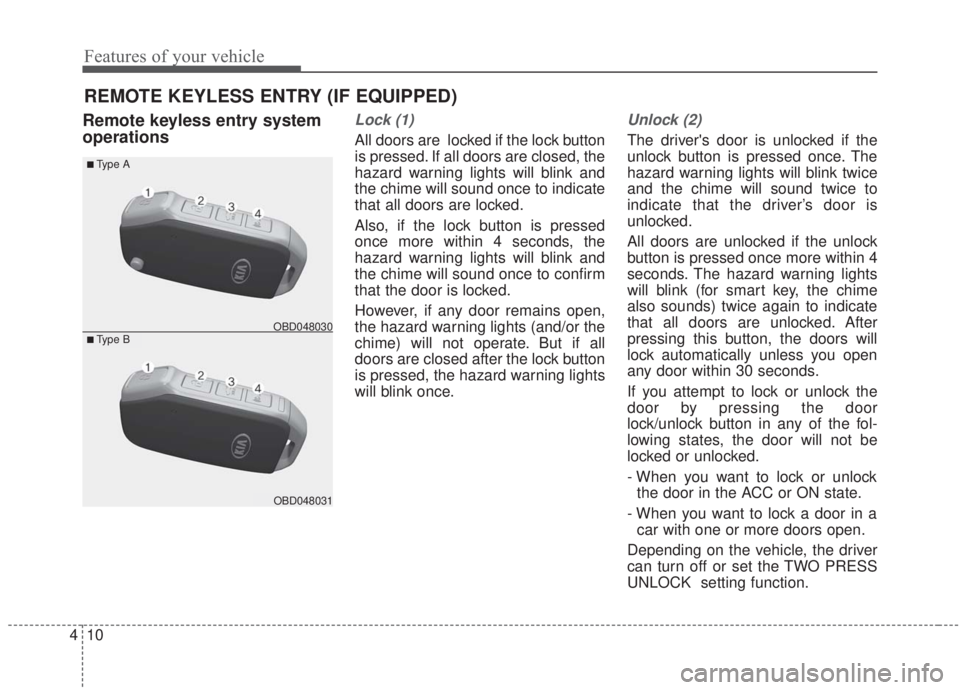
All doors are locked if the lock button
is pressed. If all doors are closed, the
hazard warning lights will blink and
the chime will sound once to indicate
that all doors are locked.
Also, if the lock button is pressed
once more within 4 seconds, the
hazard warning lights will blink and
the chime will sound once to confirm
that the door is locked.
However, if any door remains open,
the hazard warning lights (and/or the
chime) will not operate. But if all
doors are closed after the lock button
is pressed, the hazard warning lights
will blink once.
Unlock (2)
The driver's door is unlocked if the
unlock button is pressed once. The
hazard warning lights will blink twice
and the chime will sound twice to
indicate that the driver’s door is
unlocked.
All doors are unlocked if the unlock
button is pressed once more within 4
seconds. The hazard warning lights
will blink (for smart key, the chime
also sounds) twice again to indicate
that all doors are unlocked. After
pressing this button, the doors will
lock automatically unless you open
any door within 30 seconds.
If you attempt to lock or unlock the
door by pressing the door
lock/unlock button in any of the fol-
lowing states, the door will not be
locked or unlocked.
- When you want to lock or unlock
the door in the ACC or ON state.
- When you want to lock a door in a car with one or more doors open.
Depending on the vehicle, the driver
can turn off or set the TWO PRESS
UNLOCK setting function.
OBD048031
■Type B
■Type A
OBD048030
Page 96 of 568
411
Features of your vehicle
✽ ✽NOTICE
If the keyless entry system is inoper-
ative due to exposure to water or liq-
uids, it will not be covered by your
manufacturer's vehicle warranty.
Trunk open (3)
The trunk is opened if the button is
pressed for more than 1 second.
Once the trunk is opened and then
closed, the trunk will lock automatically.
Panic alarm (4)
The horn sounds and the hazard
warning lights blink for about 30 sec-
onds if this button is pressed for
more than 0.5 seconds. To stop the
horn and lights, press any button on
the transmitter.
Transmitter precautions
The transmitter (or smart key) will not
work if any of following occurs:
The ignition key is in the ignition
switch.
You exceed the operating distance limit (about 30 m [90 feet]).
The battery in the transmitter (or smart key) is weak.
Other vehicles or objects may be blocking the signal.
The weather is extremely cold.
The transmitter (or smart key) is close to a radio transmitter such as
a radio station or an airport which
can interfere with normal operation
of the transmitter.
When the transmitter (or smart key)
does not work properly, open and
close the door with the ignition key. If
you have a problem with the trans-
mitter (or smart key), contact an
authorized Kia dealer.
Page 98 of 568

413
Features of your vehicle
1. Pry open the transmitter cover.
2. Replace the battery with a newbattery (CR2032). When replacing
the battery, make sure the battery
position is correct.
3. Install the battery in the reverse order of removal.
The transmitter or smart key is designed to give you years of trou-
ble-free use, however it can mal-
function if exposed to moisture or
static electricity. If you are unsure
how to use or replace the battery,
contact an authorized Kia dealer.
Using the wrong battery can cause the transmitter or smart key to mal-
function. Be sure to use the correct
battery. An inappropriately dis-
posed battery can be harm-
ful to the environment and
human health. Dispose the
battery according to your
local law(s) or regulation.Immobilizer system
Your vehicle may be equipped with
an electronic engine immobilizer
system to reduce the risk of unau-
thorized vehicle use.
Your immobilizer system is com-
prised of a small transponder in the
ignition key and electronic devices
inside the vehicle.
With the immobilizer system, when-
ever you insert your ignition key into
the ignition switch and turn it to ON,
it checks and determines and verifies
that the ignition key is valid.
If the key is determined to be valid,
the engine will start.
If the key is determined to be invalid,
the engine will not start.
CAUTION- Transmitter
damage
The transmitter or smart key canmalfunction if dropped, exposedto moisture, static electricity,heat or direct sunlight.
IC WARNING
This device complies with
Industry Canada licence-
exempt RSS standard(s).
Operation is subject to the fol-
lowing two conditions: (1) this
device may not cause interfer-
ence, and (2) this device must
accept any interference, includ-
ing interference that may cause
undesired operation of the
device.
Page 101 of 568
Features of your vehicle
16
4
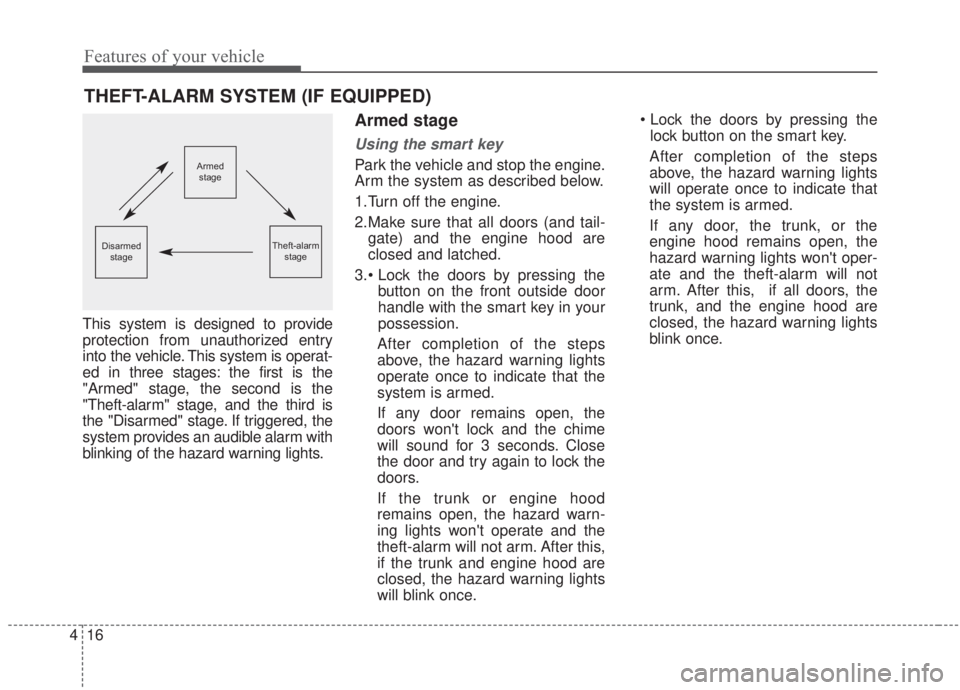
This system is designed to provide
protection from unauthorized entry
into the vehicle. This system is operat-
ed in three stages: the first is the
"Armed" stage, the second is the
"Theft-alarm" stage, and the third is
the "Disarmed" stage. If triggered, the
system provides an audible alarm with
blinking of the hazard warning lights.
Armed stage
Using the smart key
Park the vehicle and stop the engine.
Arm the system as described below.
1.Turn off the engine.
2.Make sure that all doors (and tail-
gate) and the engine hood are
closed and latched.
button on the front outside door
handle with the smart key in your
possession.
After completion of the steps
above, the hazard warning lights
operate once to indicate that the
system is armed.
If any door remains open, the
doors won't lock and the chime
will sound for 3 seconds. Close
the door and try again to lock the
doors.
If the trunk or engine hood
remains open, the hazard warn-
ing lights won't operate and the
theft-alarm will not arm. After this,
if the trunk and engine hood are
closed, the hazard warning lights
will blink once.
lock button on the smart key.
After completion of the steps
above, the hazard warning lights
will operate once to indicate that
the system is armed.
If any door, the trunk, or the
engine hood remains open, the
hazard warning lights won't oper-
ate and the theft-alarm will not
arm. After this, if all doors, the
trunk, and the engine hood are
closed, the hazard warning lights
blink once.
THEFT-ALARM SYSTEM (IF EQUIPPED)
Armed stage
Theft-alarm stageDisarmedstage
Page 102 of 568
417
Features of your vehicle
Using the transmitter
Park the vehicle and stop the engine.
Arm the system as described below.
1.Turn off the engine and remove theignition key from the ignition
switch.
2.Make sure that all doors, the trunk, and the engine hood are closed
and latched.
3.Lock the doors by pressing the lock button on the transmitter.
After completion of the steps
above, the hazard warning lights
will blink once to indicate that the
system is armed.
If any door, the trunk, or the engine
hood remains open, the hazard
warning lights won't operate and
the theft-alarm will not arm. After
this, if all doors, the trunk, and the
engine hood are closed, the haz-
ard warning lights blink once. • Do not arm the system until all
passengers have left the vehi-
cle. If the system is armed while
a passenger(s) remains in the
vehicle, the alarm may be acti-
vated when the remaining pas-
senger(s) leave the vehicle. If
any door, the trunk, or the
engine hood is opened within 30
seconds after entering the
armed stage, the system is dis-
armed to prevent unnecessary
alarm.
Theft-alarm stage
The alarm will be activated if any of
the following occurs while the system
is armed.
A front or rear door is opened withoutusing the mechanical key or trans-
mitter (or smart key).
The trunk is opened without using the mechanical key or transmitter
(or smart key).
The engine hood is opened.
The horn will sound and the hazard
warning lights will blink continuously for
approximately 27 seconds (2 times). To
turn off the system, unlock the doors
with the transmitter (or smart key).
Page 103 of 568
Features of your vehicle
18
4
Disarmed stage
The system will be disarmed when:
Transmitter
- The door unlock button is pressed.
- The engine is started. (within 3
seconds)
- The ignition switch is in the "ON" position for 30 seconds or more.
Smart key
- The door unlock button is pressed.
- The button of the front outside dooris pressed while carrying the smart
key.
- The engine is started. (within 3 seconds)
After the doors are unlocked, the haz-
ard warning lights will blink twice to
indicate that the system is disarmed.
After pressing the unlock button, if any
door or the trunk is not opened within
30 seconds, the system will be
rearmed.
✽ ✽ NOTICE
• Avoid trying to start the engine
while the alarm is activated. The
vehicle starting motor is disabled
during the theft-alarm stage.
If the system is not disarmed with
the transmitter, insert the key into
the ignition switch, turn the igni-
tion switch to the ON position and
wait for 30 seconds. Then the sys-
tem will be disarmed.
• If you lose your keys, consult your authorized Kia dealer.
Page 111 of 568

Features of your vehicle
26
4
On a vehicle equipped with a smart
key, the trunk can be opened with
no-touch activation using the Smart
Trunk system.
How to use the Smart Trunk
The trunk can be opened with no-
touch activation if the conditions
below are satisfied.
After 15 seconds when all doors
are closed and locked
The smart key is positioned in the detecting area for more than 3 sec-
onds.
✽ ✽ NOTICE
• The Smart Trunk does not operate
when:
- The smart key is detected within15 seconds after the doors are
closed and locked, and is contin-
uously detected.
- The smart key is detected within 15 seconds after the doors are
closed and locked, and 1.5 m (60
inches) from the front door han-
dles. (for vehicles equipped with
Welcome Light)
- A door is not locked or closed.
- The smart key is in the vehicle. 1. Setting
To activate the Smart Trunk,
(1) Change the LCD modes to User
setting mode
(2) Select the Door mode
(3) Check the Smart Trunk.
❈ For more details, refer to “LCD
Windows” in this chapter
SMART TRUNK (IF EQUIPPED)
OBD048042OBDM048151C
Page 112 of 568

427
Features of your vehicle
2. Detect and Alert
If you are positioned in the detecting
area (50 ~ 100 cm (20 ~ 40 inches)
behind the vehicle) carrying a smart
key, the hazard warning lights will blink
and chime will sound for about 3 sec-
onds to alert you the smart key has
been detected and the trunk will open.
✽ ✽NOTICE
Do not approach the detecting area if
you do not want the trunk to open. If
you have unintentionally entered the
detecting area and the hazard warn-
ing lights and chime starts to operate,
leave the detecting area with the
smart key. The trunk will stay closed.
3. Automatic opening
The hazard warning lights will blink
and chime will sound 2 times and
then the trunk will open.
✽ ✽NOTICE
The key should be kept out of reach of
children. Children may inadvertently
open the Smart Trunk while playing
around the rear area of the vehicle.
Make certain that you close the
trunk before driving your vehicle.
Make sure there are no people or objects around the trunk befor
opening or closing the trunk.
Make sure to deactivate the Smart trunk function when washing your
vehicle.
Otherwise, the trunk may open
inadvertently.
OBD048043OBD048044
WARNING
Make sure objects in the rear
cargo area do not come out
when opening the trunk as this
could cause serious injury.
Page 116 of 568

431
Features of your vehicle
Power windows
The ignition switch must be in the ON
position for power windows to oper-
ate.
Each door has a power window
switch that controls the door's win-
dow. The driver has a power window
lock button which can block the oper-
ation of rear passenger windows.
The power windows can be operated
for approximately 10 minutes after
the ignition key is removed or is set
to the to the ACC or LOCK position.
However, if the front doors are
opened, the power windows cannot
be operated even within the 10
minute period.
The driver’s door has a master power
window switch that controls all the
windows in the vehicle.
If a window cannot be closed
because it is blocked by objects,
remove the objects and close the
window.
✽ ✽NOTICE
While driving with the rear windows
down or with the sunroof (if
equipped) in an open (or partially
open) position, your vehicle may
demonstrate a wind buffeting or
pulsation noise. This noise is a nor-
mal occurrence and can be reduced
or eliminated by taking the follow-
ing actions. If the noise occurs with
one or both of the rear windows
down, partially lower both front
windows approximately 2.5 cm (1
in.). If you experience the noise with
the sunroof open, slightly reduce the
size of the sunroof opening.
Window opening and closing
To open or close a window, press
down or pull up the front portion of
the corresponding switch to the first
detent position (5).
OBD048084
CAUTION
Do not install any accessories
in the vehicle that extend intothe open window area. Suchobjects will impact the properfunction of the Automatic rever-sal “jam protection” featuredescribed on “Automatic rever-sal” section of this manual.