rear view mirror KIA FORTE 2020 Owners Manual
[x] Cancel search | Manufacturer: KIA, Model Year: 2020, Model line: FORTE, Model: KIA FORTE 2020Pages: 568, PDF Size: 8.58 MB
Page 12 of 568
Your vehicle at a glance
22
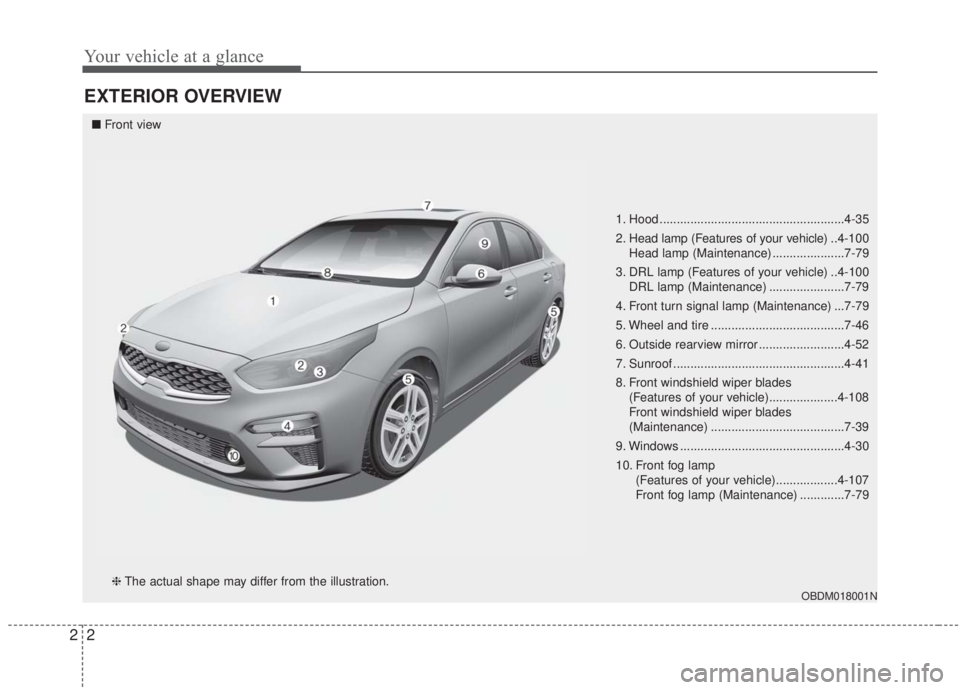
EXTERIOR OVERVIEW
1. Hood ......................................................4-35
2. Head lamp (Features of your vehicle) ..4-100
Head lamp (Maintenance) .....................7-79
3. DRL lamp (Features of your vehicle) ..4-100 DRL lamp (Maintenance) ......................7-79
4. Front turn signal lamp (Maintenance) ...7-79
5. Wheel and tire .......................................7-46
6. Outside rearview mirror .........................4-52
7. Sunroof ..................................................4-41
8. Front windshield wiper blades (Features of your vehicle)....................4-108
Front windshield wiper blades
(Maintenance) .......................................7-39
9. Windows ................................................4-30
10. Front fog lamp (Features of your vehicle)..................4-107
Front fog lamp (Maintenance) .............7-79
OBDM018001N
■Front view
❈ The actual shape may differ from the illustration.
Page 14 of 568
Your vehicle at a glance
42
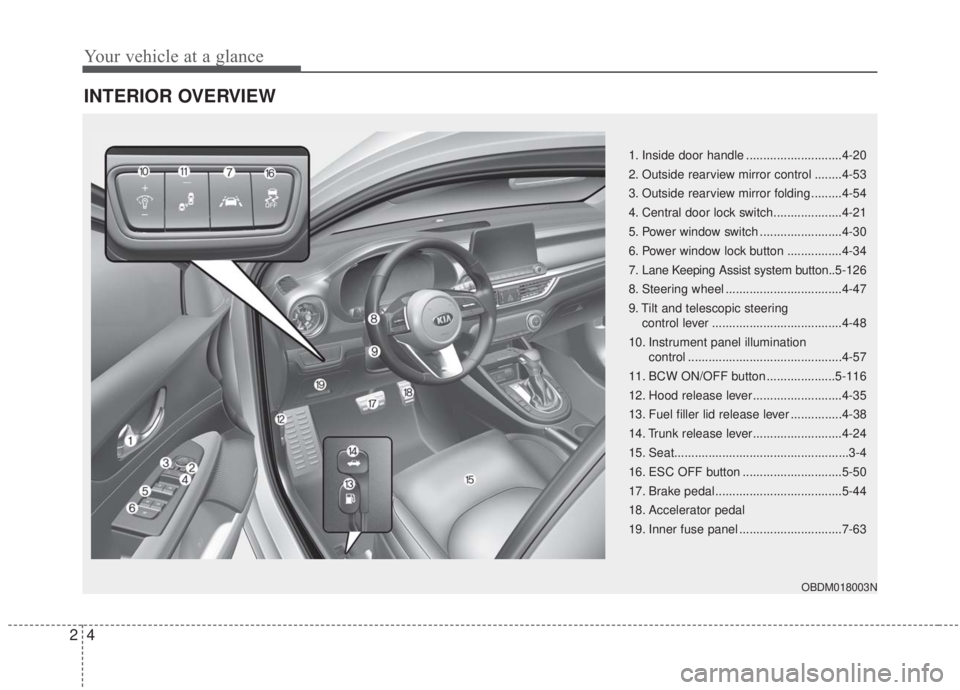
INTERIOR OVERVIEW
1. Inside door handle ............................4-20
2. Outside rearview mirror control ........4-53
3. Outside rearview mirror folding .........4-54
4. Central door lock switch....................4-21
5. Power window switch ........................4-30
6. Power window lock button ................4-34
7. Lane Keeping Assist system button..5-126
8. Steering wheel ..................................4-47
9. Tilt and telescopic steering control lever ......................................4-48
10. Instrument panel illumination control .............................................4-57
11. BCW ON/OFF button ....................5-116
12. Hood release lever ..........................4-35
13. Fuel filler lid release lever ...............4-38
14. Trunk release lever..........................4-24
15. Seat...................................................3-4
16. ESC OFF button .............................5-50
17. Brake pedal .....................................5-44
18. Accelerator pedal
19. Inner fuse panel ..............................7-63
OBDM018003N
Page 136 of 568

451
Features of your vehicle
Inside rearview mirror
Adjust the rearview mirror so that the
center view through the rear window
is seen. Make this adjustment before
you start driving.
Do not place objects in the rear seat
which would interfere with your vision
through the rear window.
Day/night rearview mirror(if equipped)
Make this adjustment before you
start driving and while the day/night
lever is in the day position (1).
Pull the day/night lever toward you
(2) to reduce the glare from the
headlights of the vehicles behind you
during night driving.
Remember that you lose somerearview clarity in the night position.
❈ (1) : Day, (2) : Night
Electrochromic mirror (ECM)
(if equipped)
The electric rearview mirror automat-
ically controls the glare from the
headlights of the vehicles behind you
in nighttime or low light driving condi-
tions. The sensor mounted in the mir-
ror senses the light level around the
vehicle, and automatically controls
the headlight glare from the vehicles
behind you.
When the engine is running, the glare
is automatically controlled by the sen-
sor mounted in the rearview mirror.
Whenever the shift lever is shifted
into reverse (R), the mirror will auto-
matically go to the brightest setting in
order to improve the driver’s view
behind the vehicle.
MIRRORS
WARNING - Mirror
adjustment
Do not adjust the rearview mirror
while the vehicle is moving. This
could result in loss of control.
OUM046434L
WARNING
Do not modify the inside mirror
in any manner including
installing a wider mirror. Doing
so could result in injury during
an accident or deployment of
the air bag.
Page 137 of 568

Features of your vehicle
52
4
To operate the electric rearview mirror:
The mirror defaults to the ON posi-
tion whenever the ignition switch is
turned on.
Press the ON/OFF button (1) to turn the automatic dimming func-
tion off. The mirror indicator light
(2) will turn off.
Press the ON/OFF button (1) to
turn the automatic dimming func-
tion on. The mirror indicator light
(2) will illuminate.
❈ (2) : Indicator, (3) : Sensor
Outside rearview mirror
Be sure to adjust mirror angles
before driving.
Your vehicle is equipped with both
left-hand and right-hand outside
rearview mirrors. The mirrors can be
adjusted remotely with the remote
switch (if equipped). The mirror heads
can be folded to prevent damage dur-
ing an automatic car wash or when
passing through a narrow street.
The right outside rearview mirror is
convex. Objects seen in the mirror
are closer than they appear.
Use your interior rearview mirror or
direct observation to determine the
actual distance of following vehicles
when changing lanes.CAUTION
When cleaning the mirror, use a
paper towel or similar materialdampened with glass cleaner.Do not spray glass cleanerdirectly on the mirror. It maycause the liquid cleaner to enterthe mirror housing.
OJF045227L
Page 138 of 568
453
Features of your vehicle
Remote control
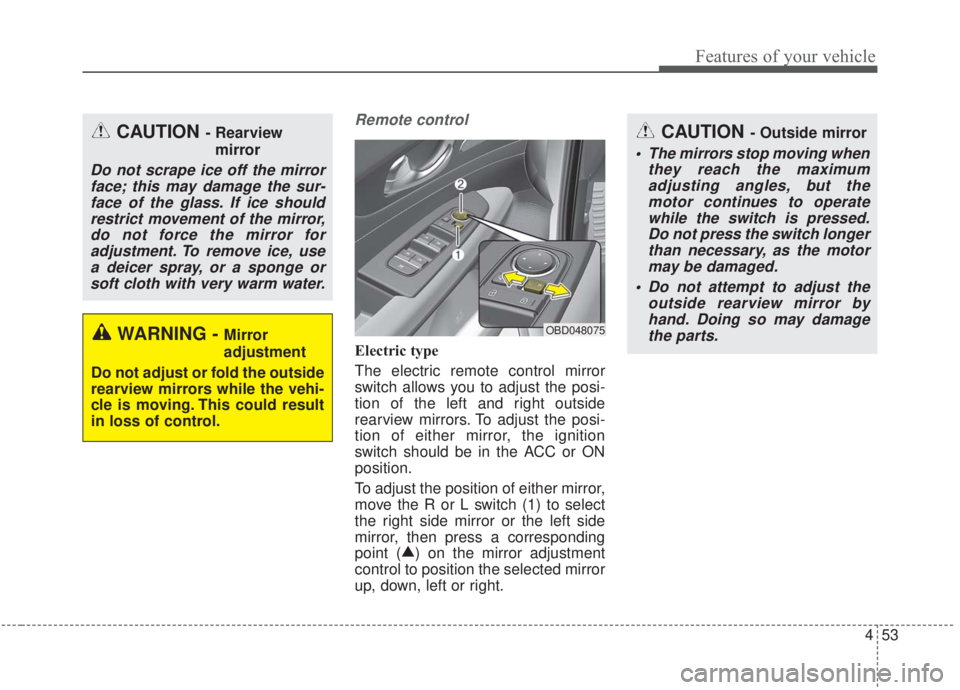
Electric type
The electric remote control mirror
switch allows you to adjust the posi-
tion of the left and right outside
rearview mirrors. To adjust the posi-
tion of either mirror, the ignition
switch should be in the ACC or ON
position.
To adjust the position of either mirror,
move the R or L switch (1) to select
the right side mirror or the left side
mirror, then press a corresponding
point (▲
) on the mirror adjustment
control to position the selected mirror
up, down, left or right.
OBD048075
CAUTION - Outside mirror
The mirrors stop moving when they reach the maximumadjusting angles, but themotor continues to operatewhile the switch is pressed.Do not press the switch longerthan necessary, as the motormay be damaged.
Do not attempt to adjust the outside rearview mirror byhand. Doing so may damagethe parts.
CAUTION - Rearview
mirror
Do not scrape ice off the mirrorface; this may damage the sur-face of the glass. If ice shouldrestrict movement of the mirror,do not force the mirror foradjustment. To remove ice, usea deicer spray, or a sponge orsoft cloth with very warm water.
WARNING - Mirror
adjustment
Do not adjust or fold the outside
rearview mirrors while the vehi-
cle is moving. This could result
in loss of control.
Page 139 of 568
Features of your vehicle
54
4
Folding the outside rearview mirror
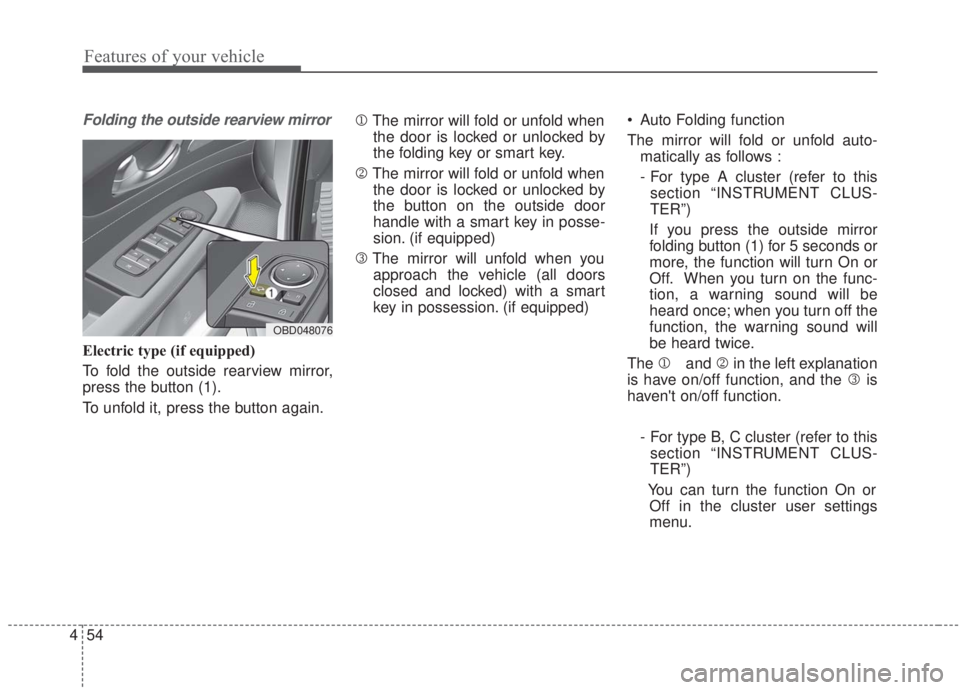
Electric type (if equipped)
To fold the outside rearview mirror,
press the button (1).
To unfold it, press the button again. 1
The mirror will fold or unfold when
the door is locked or unlocked by
the folding key or smart key.
2 The mirror will fold or unfold when
the door is locked or unlocked by
the button on the outside door
handle with a smart key in posse-
sion. (if equipped)
3 The mirror will unfold when you
approach the vehicle (all doors
closed and locked) with a smart
key in possession. (if equipped) Auto Folding function
The mirror will fold or unfold auto-
matically as follows :
- For type A cluster (refer to thissection “INSTRUMENT CLUS-
TER”)
If you press the outside mirror
folding button (1) for 5 seconds or
more, the function will turn On or
Off. When you turn on the func-
tion, a warning sound will be
heard once; when you turn off the
function, the warning sound will
be heard twice.
The 1 and 2in the left explanation
is have on/off function, and the 3 is
haven't on/off function.
- For type B, C cluster (refer to thissection “INSTRUMENT CLUS-
TER”)
You can turn the function On or Off in the cluster user settings
menu.
OBD048076
Page 140 of 568
455
Features of your vehicle
✽ ✽NOTICE
-
Electric type outside rearview
mirror
The electric type outside rearview
mirror operates even though the
ignition switch is in the OFF posi-
tion. However, to prevent unneces-
sary battery discharge, do not
adjust the mirrors longer than nec-
essary while the engine is not run-
ning.
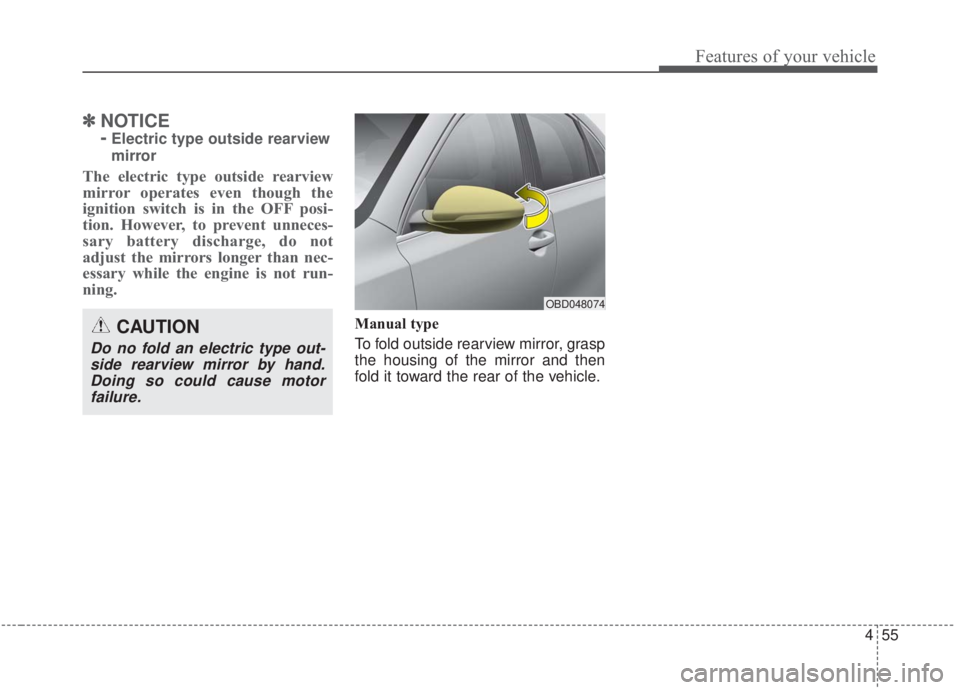
Manual type
To fold outside rearview mirror, grasp
the housing of the mirror and then
fold it toward the rear of the vehicle.CAUTION
Do no fold an electric type out-
side rearview mirror by hand.Doing so could cause motorfailure.
OBD048074
Page 184 of 568

499
Features of your vehicle
The rear view monitor will activate
with the ignition switch ON and the
shift lever in the R (Reverse) position.
The system is a supplemental sys-
tem that shows the area behind the
vehicle through the audio screen
while backing up. It is the responsibility of the driver
to always check the inside/outside
rearview mirrors and the area
behind the vehicle before and
while backing up.
Always keep the camera lens clean. If the lens is covered with
foreign matter, the camera may not
operate normally.
REAR VIEW MONITOR
WARNING - Backing &
using camera
Never rely solely on the rear view
camera. You must always use
other methods of viewing the
area behind you, including look-
ing over both shoulders as well
as continuously checking all
three rear view mirrors. Due to
the difficulty of ensuring that the
area behind you remains clear,
always back-up slowly and stop
immediately if you suspect that a
person, and especially a child,
might be behind you.
OBD048004
OBDM048055N
Page 199 of 568

Features of your vehicle
114
4
If you want to defrost and defog the
front windshield, refer to “Windshield
defrosting and defogging” in this sec-
tion.
Rear window defroster
The defroster heats the window to
remove frost, fog and thin ice from
the rear window, while the engine is
running.
To activate the rear window
defroster, press the rear window
defroster button located in the center
facia switch panel. The indicator on
the rear window defroster button illu-
minates when the defroster is ON.
If there is heavy accumulation of
snow on the rear window, brush it off
before operating the rear defroster. The rear window defroster automati-
cally turns off after approximately 20
minutes or when the ignition switch is
turned off. To turn off the defroster,
press the rear window defroster button
again.
Outside rearview mirror defroster
If your vehicle is equipped with the
outside rearview mirror defrosters,
they will operate at the same time you
turn on the rear window defroster.
DEFROSTER
CAUTION - Conductors
To prevent damage to the con-
ductors bonded to the insidesurface of the rear window,never use sharp instruments orwindow cleaners containingabrasives to clean the window.
OBD048335
■Type A
■ Type B
Page 222 of 568

4137
Features of your vehicle
For maximum defrosting, set thetemperature control all the way to
the right/hot position and the fan
speed control to the highest speed.
If warm air to the floor is desired while defrosting or defogging, set
the mode to the floor-defrost posi-
tion.
Before driving, clear all snow and ice from the windshield, rear win-
dow, outside rear view mirrors, and
all side windows.
Clear all snow and ice from the hood and air inlet in the cowl grill to
improve heater and defroster effi-
ciency and to reduce the probabili-
ty of fogging up the inside of the
windshield.Manual climate control system
To defog inside windshield
1. Set the fan speed to the desired position.
2. Select desired temperature.
3. Select the or position.
4. The outside (fresh) air and air con- ditioning will be selected automat-
ically.
If the air conditioning and/or outside
(fresh) air position are not selected
automatically, press the correspon-
ding button manually.
WINDSHIELD DEFROSTING AND DEFOGGING
WARNING - Windshield
heating
Do not use the or posi-
tion during cooling operation in
extremely humid weather. The
difference between the temper-
ature of the outside air and the
windshield could cause the
outer surface of the windshield
to fog up, causing loss of visi-
bility. In this situation, set the
mode selection to the posi-
tion and fan speed control to a
lower speed.
OBDM048323N