change KIA FORTE 2021 Navigation System Quick Reference Guide
[x] Cancel search | Manufacturer: KIA, Model Year: 2021, Model line: FORTE, Model: KIA FORTE 2021Pages: 300, PDF Size: 10.06 MB
Page 30 of 300
1-8
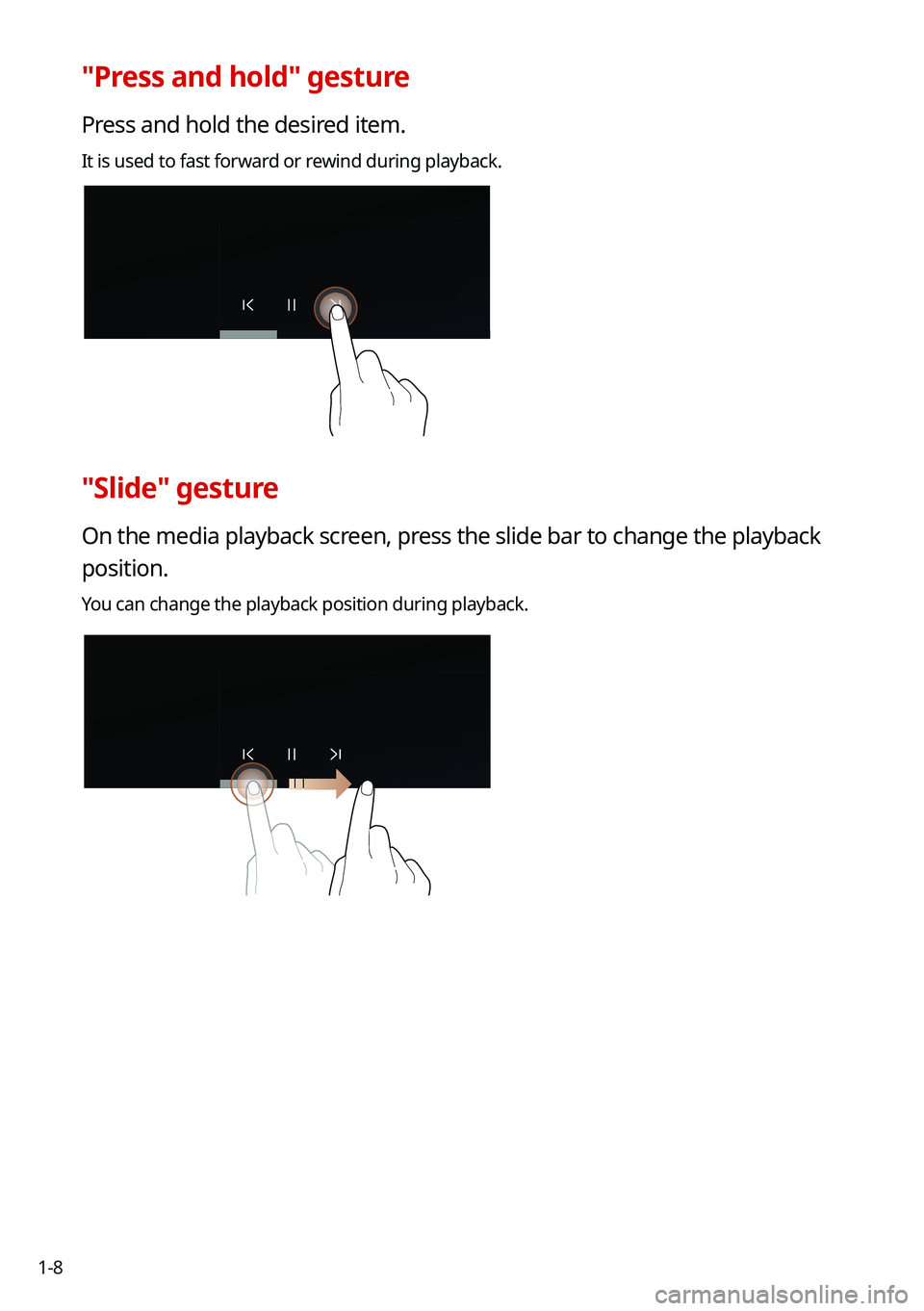
"Press and hold" gesture
Press and hold the desired item.
It is used to fast forward or rewind during playback.
"Slide" gesture
On the media playback screen, press the slide bar to change the playback
position.
You can change the playback position during playback.
Page 34 of 300

You can edit the types and positions of the widgets to display on the Hom\
e screen.
1 At the upper left of the Home screen, press Menu >
Edit Home")
1-12
Editing the widgets on the Home screen (Type1)
You can edit the types and positions of the widgets to display on the Hom\
e screen.
1 At the upper left of the Home screen, press Menu >
Edit Home
Widgets.
2 Perform any of the following methods:
\225 To change the widget type, press and hold the desired widget on List of widgets
and then drag it to Widget area.
\225To change the listed order for widgets, press and hold a widget on Widget area and
then drag it to the desired position.
\037\036
a a List of widgets
b b Widget area
0000
A
The screen may differ depending on the vehicle model and specifications.
0000
A
To initialize the types and positions of widgets, press Reset.
Editing the icons on the Home screen (Type1)
You can see the icon list on the Home screen and change the locations for icons.
1 At the upper left of the Home screen, press Menu >
Edit Home Icons.
2 To change the location of an icon, press and hold, and drag the icon to
the desired position.
0000
A
The screen may differ depending on the vehicle model and specifications.
0000
A
To initialize the positions of icons, press Reset.
Page 35 of 300
1-13
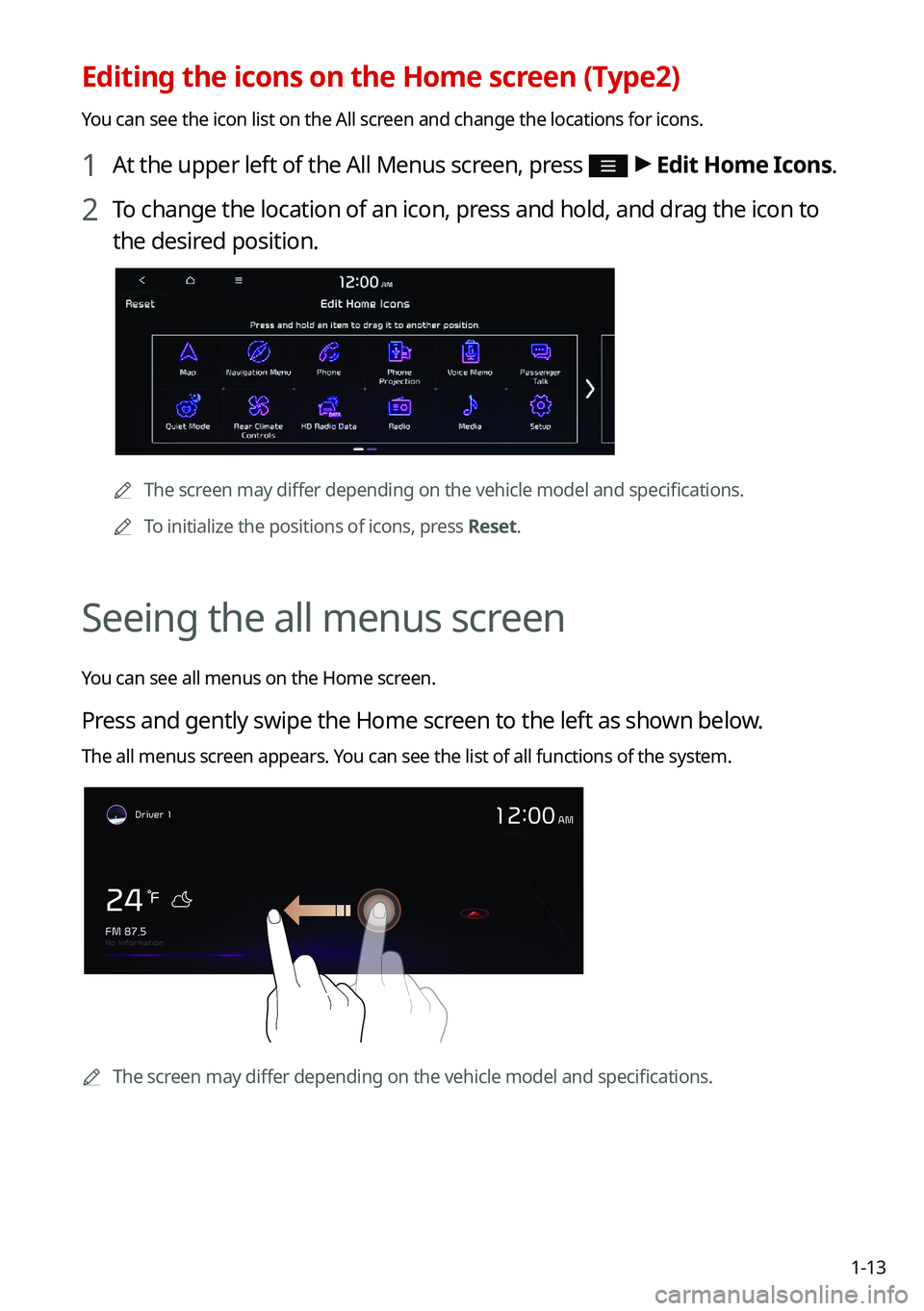
Editing the icons on the Home screen (Type2)
You can see the icon list on the All screen and change the locations for icons.
1 At the upper left of the All Menus screen, press >
Edit Home Icons.
2 To change the location of an icon, press and hold, and drag the icon to
the desired position.
0000A
The screen may differ depending on the vehicle model and specifications.
0000
A
To initialize the positions of icons, press Reset.
Seeing the all menus screen
You can see all menus on the Home screen.
Press and gently swipe the Home screen to the left as shown below.
The all menus screen appears. You can see the list of all functions of the system.
0000AThe screen may differ depending on the vehicle model and specifications.
Page 37 of 300
1-15
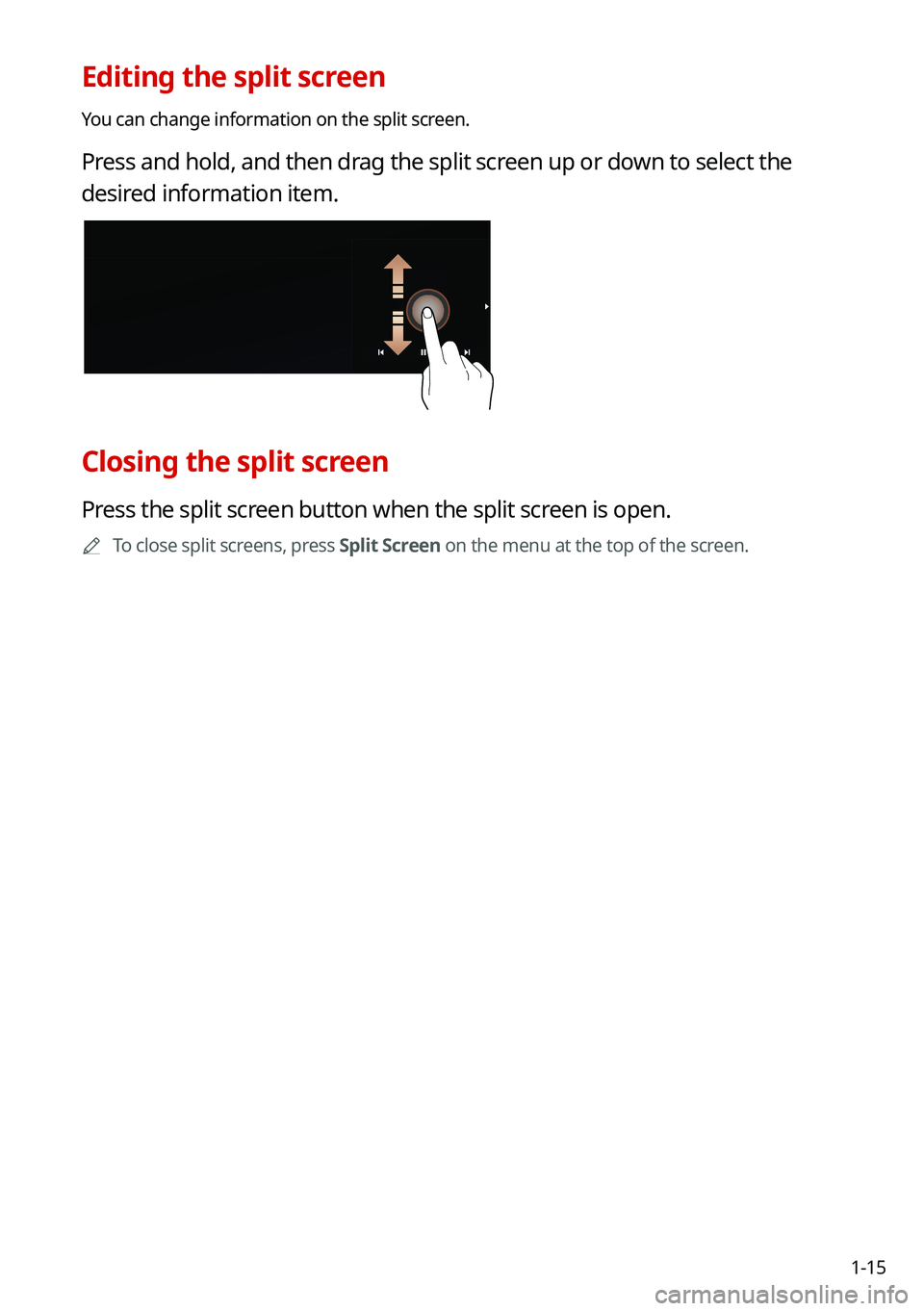
Editing the split screen
You can change information on the split screen.
Press and hold, and then drag the split screen up or down to select the
desired information item.
Closing the split screen
Press the split screen button when the split screen is open.
0000
A
To close split screens, press Split Screen on the menu at the top of the screen.
Page 41 of 300
2-3
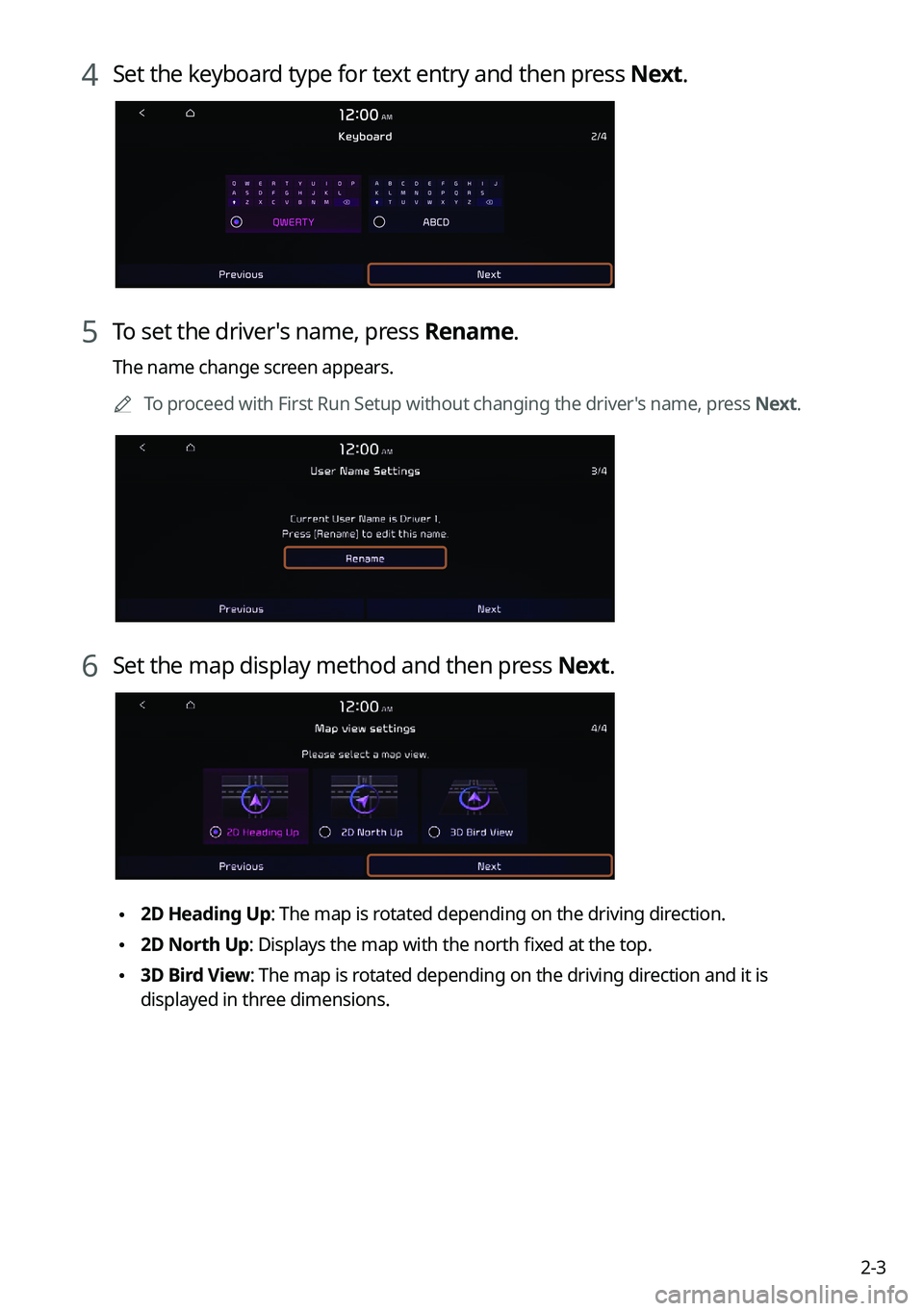
4 Set the keyboard type for text entry and then press Next.
5 To set the driver's name, press Rename.
The name change screen appears.0000
A
To proceed with First Run Setup without changing the driver's name, press Next.
6 Set the map display method and then press Next.
\2252D Heading Up: The map is rotated depending on the driving direction.
\2252D North Up: Displays the map with the north fixed at the top.
\2253D Bird View: The map is rotated depending on the driving direction and it is
displayed in three dimensions.
Page 44 of 300

2-6
Using the Android Auto
1 On the All Menus screen, press Android Auto.
2 Perform the desired function.
\225To run the functions for phone, music, or navigation on the smartphone, p\
ress the
corresponding app icon.
0000
A
When you are using your smartphone′s navigation via phone projection, sounds
from both the system′s radio/media function and the navigation will be output
through your vehicle′s speakers. When you turn the Volume knob while both
sounds are being output, the navigation volume is adjusted first.
\225To use the Google voice recognition, press and hold the Voice Recognition button on
the steering wheel.
0000
A
By pressing the [ MODE] button on the steering wheel, you can run the media App on
your smartphone as well as the Radio/Media mode of the system.
0000
A
To specify which functions to run when the [ MODE] button on the steering wheel is
pressed, press and hold the [ MODE] button to display the settings screen.
0000
A
By pressing the Call button on the steering wheel, you can make a call via Bluetooth
connection.
0000
A
When phone projection is active, you cannot change the phone projection settings. To
change the settings, remove the USB cable from your system.
0000
A
The icons on the screen are subject to change according to the policy of Google
Corporation.
0000
A
Apps or functions used through Android Auto are subject to change according to the
policy of Google Corporation. For supportable functions, visit the Android website at
https://www.android.com/auto.
0000
A
To use the functions on your smartphone with the minimized system settings, update the
smartphone OS to the latest version.
0000
A
The recognition time may differ depending on the device type, firmware, and OS version.
0000
A
Charges may apply for any mobile data used while Android Auto is running.
0000
A
Some functions may not work properly depending on the network signal strength.
0000
A
Avoid interacting with the smartphone while using Android Auto.
0000
A
You cannot use the following functions when Android Auto is in use.
000DUSB mode
000DApple CarPlay
000DSearches using the control panel or the steering wheel remote control
Page 46 of 300
 on your iP\
hone, press th")
2-8
Using the Apple CarPlay
1 On the All Menus screen, press Apple CarPlay.
2 Perform the desired function.
\225To run any of functions (phone, messaging, navigation, etc.) on your iP\
hone, press the
corresponding function icon.
0000
A
When you are using your smartphone′s navigation via phone projection, sounds
from both the system′s radio/media function and the navigation will be output
through your vehicle′s speakers. When you turn the Volume knob while both
sounds are being output, the navigation volume is adjusted first.
\225To run the Siri voice recognition, press and hold the Voice Recognition button on the
steering wheel.
0000
A
To display the system Home screen, press
.
0000
A
By pressing the [ MODE] button on the steering wheel, you can run the media App on
your smartphone as well as the Radio/Media mode of the system.
0000
A
To specify which functions to run when the [ MODE] button on the steering wheel is
pressed, press and hold the [ MODE] button to display the settings screen.
0000
A
When you receive a call, press the Call button on the steering wheel to answer it.
0000
A
When phone projection is active, you cannot change the phone projection settings. To
change the settings, remove the USB cable from your system.
0000
A
Apps or functions used through Apple CarPlay are subject to change according to the
policy of Apple Corporation. For supportable functions, visit the Apple Corporation
website at http://www.apple.com/ios/carplay .
0000
A
To use the functions on your smartphone with the minimized system settings, update the
smartphone OS to the latest version.
0000
A
The recognition time may differ depending on the device type, firmware, and OS version.
0000
A
Charges may apply for any mobile data used while Apple CarPlay is running.
0000
A
Some functions may not work properly depending on the network signal strength.
0000
A
Avoid interacting with the smartphone while using Apple CarPlay.
0000
A
You cannot use the following functions when Apple CarPlay is in use.
000DBluetooth phone
000DUSB mode
000DAndroid Auto
000DBrowsing using the [TUNE/FILE] knob on the control panel (if equipped)
Page 48 of 300

2-10
a a Moving direction lines (yellow)
Displays the vehicle's moving direction based on the steering angle.
b b Neutral steering lines (blue)
Displays the moving direction if you reverse the vehicle in neutral. Noting these
lines, you can determine whether the vehicle is stopped in correct direction and the
distances to the neighboring vehicles are adequate.
c c Collision warning lines (red)
Used to prevent collision.
d d Rear top view button (if equipped)
Press the button to display the rear top view.
e e Parking distance warning (if equipped)
Depending on the distance to obstacles, the warning color and alert sound change
along with the level (1/2/3) to notify of the distance.
f f Camera image adjustment (if equipped)
Used to adjust the brightness and contrast of camera images.
0000
A
Available settings may differ depending on the vehicle model and specifications.
0000
A
You can set to display the rear camera display even when you change the shift position
other than "R" (Reverse) after reversing. To change rear camera operation settings, On
the All Menus screen, press Setup >
Display >
Extend Rear Camera Use and select the
Extend Rear Camera Use checkbox to turn on or off the function (if equipped).
0000
A
Noting the parking assist guide lines based on the steering, you can see\
the moving
direction.
0000AA warning sound is heard when the vehicle approaches obstacles while parking. When
you set to automatically lower the audio volume while parking, it can prevent accidents
caused by failure to hear the warning sound. On the All Menus screen, press Setup >
Sound >
Driving Guidance >
Parking Safety Priority.
0000
A
When you press the [
] button with the shift position in "P" (Park), you can see the rear
view (if equipped).
Page 49 of 300
2-11
Viewing the rear top view display (if equipped)
You can look down the rear view from the top through the rear-view display.
1 On the rear-view screen, press .
2 Check the top view display and assist guide lines.
0000
A
The guide lines appear on the rear top view.
000DDisplays the space required to open the trunk (tailgate). After a parking, check
whether the space is sufficient to open the trunk (tailgate) and there is no obstacle.
000DDisplays the extension line from the center of the vehicle. According to the steering
direction, the moving direction of the center is displayed on the screen.
Setting the rear view screen environment (if equipped)
1 On the surround view screen, press .
2 Select and then change the settings.
\225
To select the information to display on the screen, press Display Contents (Rear view
parking guidance).
\225To adjust the brightness and contrast of the rear-view screen, press Display Settings.
\225To set the information to display on the rear-view screen and adjust or reset the
brightness and contrast of the image, on the All Menus screen, press Setup >
Vehicle
> Driver Assistance >
Parking Safety >
Camera Settings.
Surround View Monitor (if equipped)
You can check the surroundings by using multiple cameras on the vehicle.
0000
A
Use the +/- button on the right of the screen to zoom in or out.
Viewing the surround view while driving
1 In order to see the surround view, press the [] or [] button.
The system displays both the front view and surround view.
0000
A
The surround view monitor function operates only when any of the following
conditions are met.
000DThe driving speed is below 9mph with the shift position in "D" (Drive).
000DThe vehicle is stationary and the shift position is in "D" (Drive) or \
"N" (Neutral).
0000
A
You can use Remote Smart Parking Assist by long pressing the [
] button. For more
information, refer to the owner’s manual that is separately provided (if equipped).
Page 50 of 300
2-12
2 Press the icon to get a view in the desired direction.
IconDescription
Displays the zoom-in front top view and top view.
Displays the front wide view and top view (default).
Display the front blind spot view and top view.
Displays the surround view settings.
0000
A
When any door or trunk (tailgate) is open or outside rear-view mirrors are folded, an
alert icon appears on the screen.
0000
A
To turn off the surround view screen, press the [
] or [] button.
Viewing the surround view while reversing
1 Press the "R" (Reverse) button shifter (or move the shift lever to "R" in a
previous vehicle model) with the vehicle turned on.
The system displays the rear view of the vehicle.
0000
A
The surround view monitor function is not available when you change the shift
position to "P" (Park).
0000
A
When you press the [
] button with the shift position in "P" (Park), you can see the
rear view (if equipped).
2 Press the icon to get a view in the desired direction.
Icon Description
Displays the zoom-in rear top view and top view.
Displays the rear wide view and top view (default).
Display the rear blind spot view and top view.
Displays the surround view settings.