check KIA FORTE 2023 Navigation System Quick Reference Guide
[x] Cancel search | Manufacturer: KIA, Model Year: 2023, Model line: FORTE, Model: KIA FORTE 2023Pages: 324, PDF Size: 10.59 MB
Page 298 of 324
10-6
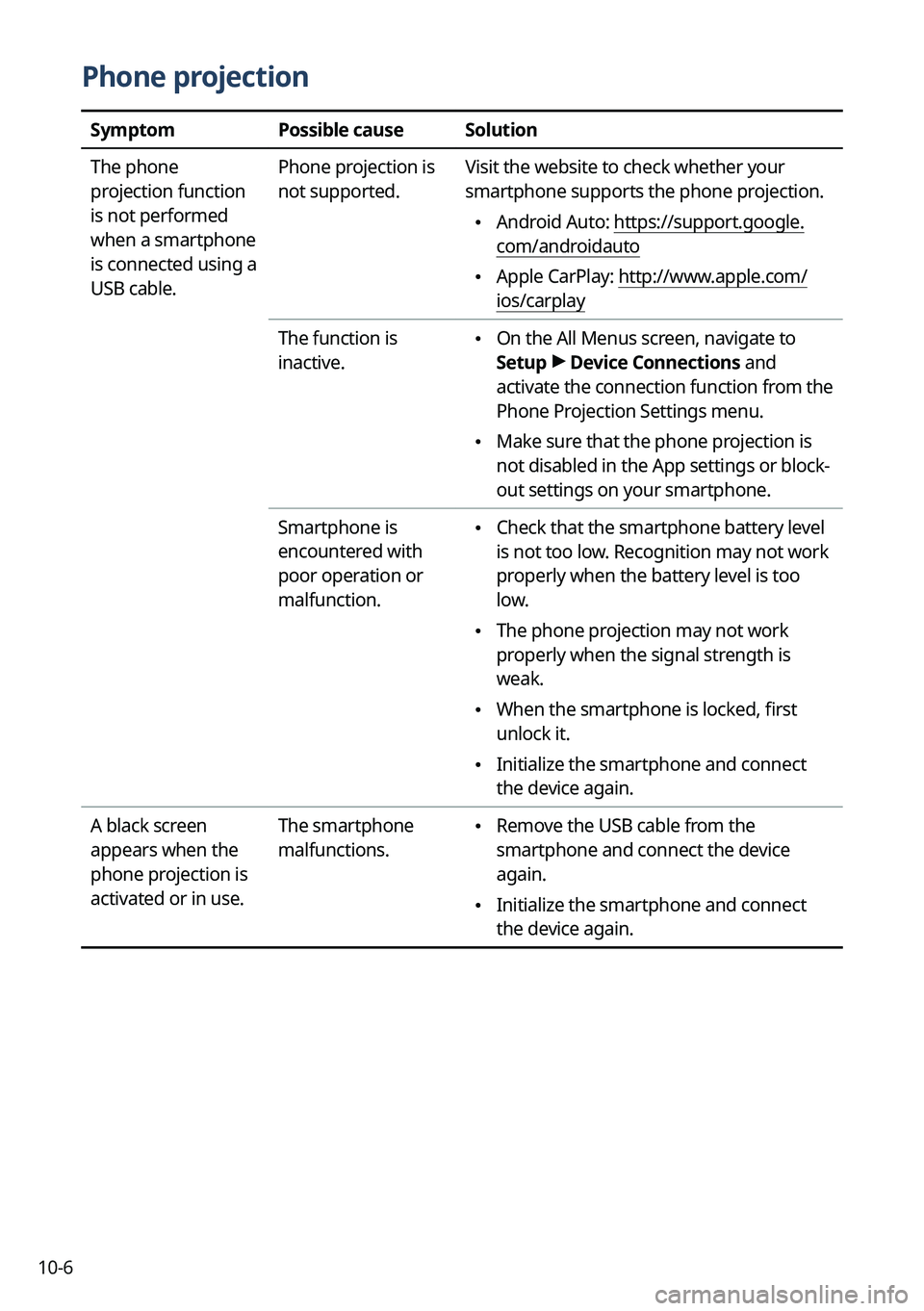
Phone projection
SymptomPossible causeSolution
The phone
projection function
is not performed
when a smartphone
is connected using a
USB cable. Phone projection is
not supported.
Visit the website to check whether your
smartphone supports the phone projection.
•
Android Auto: https://support.google.
com/androidauto
•Apple CarPlay: http://www.apple.com/
ios/carplay
The function is
inactive.
• On the All Menus screen, navigate to
Setup >
Device Connections and
activate the connection function from the
Phone Projection Settings menu.
• Make sure that the phone projection is
not disabled in the App settings or block-
out settings on your smartphone.
Smartphone is
encountered with
poor operation or
malfunction.
• Check that the smartphone battery level
is not too low. Recognition may not work
properly when the battery level is too
low.
•The phone projection may not work
properly when the signal strength is
weak.
•When the smartphone is locked, first
unlock it.
•Initialize the smartphone and connect
the device again.
A black screen
appears when the
phone projection is
activated or in use. The smartphone
malfunctions.
•
Remove the USB cable from the
smartphone and connect the device
again.
•Initialize the smartphone and connect
the device again.
Page 300 of 324

10-8
Navigation system operation
SymptomPossible causeSolution
The destination is
not searched. Outdated map data
Update the map to the latest version.
> See "How to Update the Map and Software for
your Infotainment System."
Route guidance
of the navigation
system does not
match the actual
road conditions. Outdated map data
Update the map to the latest version.
> See "How to Update the Map and Software for
your Infotainment System."
There have been
changes in the road
after a map update. Route guidance of the navigation system
may not match the actual road conditions
even after the map is updated to the latest
version because the update depends on the
creation date. Be sure to drive according to
actual road conditions and regulations.
Guidance is made
by bypassing the
route or the speed
camera alerts are
not followed. The update for the
system and map
data is required.
Update the map to the latest version.
> See "
How to Update the Map and Software for
your Infotainment System."
The real-time traffic
information is not
received. Poor signal
reception •
Reception of traffic information may
not be made smoothly in mountain and
island areas. Check the reception status
again in a region with strong signals.
•If the problem persists, contact your
place of purchase or dealer.
Page 301 of 324

10-9
System status indicator icons
You can see the system status by checking the status indicator icons at the top right of the
system screen.
Different status indicator icons appear when each function is performed. The meanings of
the icons are as follows:
Mute/memo recording
Navigation sound muted
Radio/Media sound muted
All sound outputs muted
Recording a voice memo
Bluetooth/call
Connecting a phone via Bluetooth
Connecting an audio device via Bluetooth
Connecting a phone and an audio device via Bluetooth
Making a call via a Bluetooth phone
Bluetooth phone's microphone off
Downloading the contact and list of recent calls from the connected Bluetooth
phone
Page 315 of 324

10-23
Trademarks
•Bluetooth®
Wireless Technology
A compatible Bluetooth
® Wireless Technology-enabled cell
phone is required to use Bluetooth® Wireless Technology. The
Bluetooth® word mark and logos are registered trademarks
owned by Bluetooth SIG, Inc. and any use of such marks by Kia
is under license. Other trademarks and trade names are those
of their respective owners. A Bluetooth
® enabled cell phone is
required to use Bluetooth® Wireless Technology. Bluetooth®
Wireless Technology phone compatibility can be checked by
visiting https://www.kia.com.
•Google, Android, Android Auto, and Google Play are registered trademarks of Google
LLC. Distracted driving can result in a loss of vehicle control. Never use a handheld device
or vehicle system that takes your focus away from safe vehicle operation.
•Apple®, Apple CarPlay™, iPad®, iPad mini™, iPhone®, iPod®, iPod classic®, iPod nano®,
iPod touch®, iTunes®, and Siri® are trademarks of Apple Inc. Distracted driving can result
in a loss of vehicle control. Never use a handheld device or vehicle system that takes your
focus away from safe vehicle operation.
• HD Radio™ Technology is manufactured under license from
iBiquity Digital Corporation. U.S. and Foreign Patents. For
patents, see https://dts.com/patents/. HD Radio and the HD,
HD Radio
™, and "ARC" logos are registered trademarks or
trademarks of iBiquity Digital Corporation in the United States
and/or other countries.
• Sirius, XM, SiriusXM and all related marks and logos are trademarks of SiriusXM Radio
Inc.
•Other trademarks and trade names are those of their respective owners.