change time KIA FORTE 5 2018 Owners Manual
[x] Cancel search | Manufacturer: KIA, Model Year: 2018, Model line: FORTE 5, Model: KIA FORTE 5 2018Pages: 584, PDF Size: 15.16 MB
Page 1 of 584
Kia, THE COMPANY
Thank you for becoming the owner of a new Kia vehicle.
As a global car manufacturer focused on building high-quality vehi-
cles with exceptional value, Kia Motors is dedicated to providing you
with a customer service experience that exceeds your expectations.
All information contained in this Owner’s Manual was accurate at the
time of publication. However, Kia reserves the right to make changes
at any time so that our policy of continual product improvement can
be carried out.
This manual applies to all models of this vehicle and includes descrip-
tions and explanations of optional as well as standard equipment. As a
result, you may encounter material in this manual that is not applica-
ble to your specific Kia vehicle.Drive safely and enjoy your Kia!
Page 2 of 584
i
Thank you for choosing a Kia vehicle.
When you require service, remember that your Kia dealer
knows your vehicle best. Your dealer has factory-trained tech-
nicians, recommended special tools and genuine Kia replace-
ment parts. It is dedicated to your complete customer satisfac-
tion.
Because subsequent owners require this important information
as well, this publication should remain with the vehicle if it is
sold.
This manual will familiarize you with operational, mainte-
nance and safety information about your new vehicle. It is sup-
plemented by a Warranty and Consumer Information manual
that provides important information on all warranties regarding
your vehicle.
We urge you to read these publications carefully and follow the
recommendations to help assure enjoyable and safe operation
of your new vehicle.
Kia offers a great variety of options, components and features
for its various models. Therefore, some of the equipment
described in this manual, along with the various illustrations,
may not be applicable to your particular vehicle.
The information and specifications provided in this manual
were accurate at the time of printing. Kia reserves the right to
discontinue or change specifications or design at any time
without notice and without incurring any obligation. If you
have questions, always check with your Kia dealer.
We assure you of our continuing interest in your motoring
pleasure and satisfaction in your Kia vehicle.
© 2017 Kia Canada Inc.
All rights reserved. Reproduction by any means, electronic or
mechanical, including photocopying, recording, or by any
information storage and retrieval system or translation in
whole or part is not permitted without written authorization
from Kia Canada Inc..
Printed in Mexico
Foreword
Page 22 of 584
35
Safety features of your vehicle
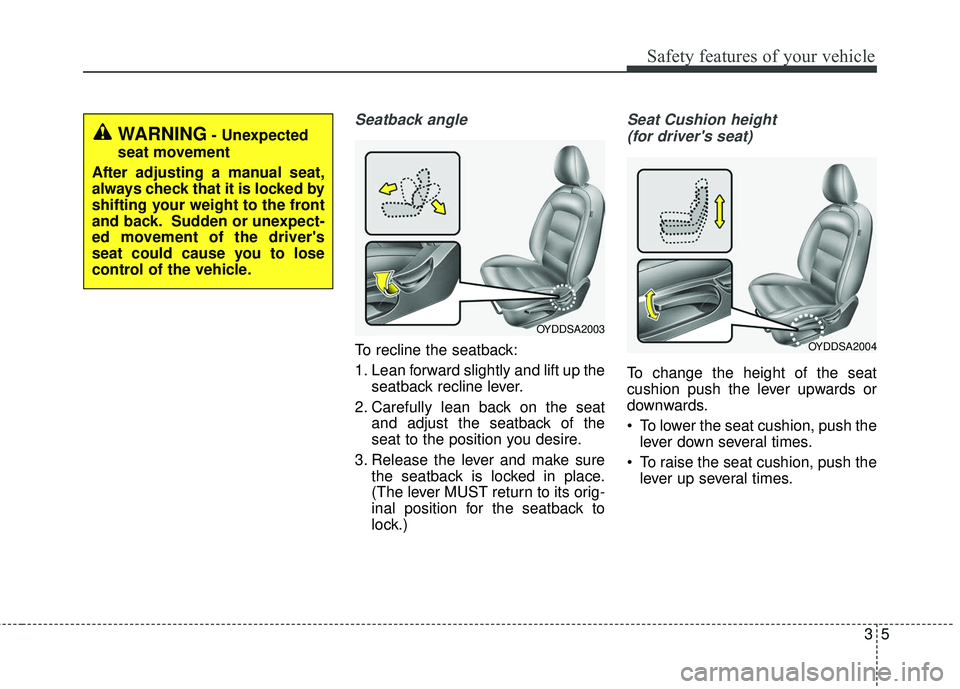
Seatback angle
To recline the seatback:
1. Lean forward slightly and lift up theseatback recline lever.
2. Carefully lean back on the seat and adjust the seatback of the
seat to the position you desire.
3. Release the lever and make sure the seatback is locked in place.
(The lever MUST return to its orig-
inal position for the seatback to
lock.)
Seat Cushion height
(for driver's seat)
To change the height of the seat
cushion push the lever upwards or
downwards.
To lower the seat cushion, push the lever down several times.
To raise the seat cushion, push the lever up several times.
WARNING- Unexpected
seat movement
After adjusting a manual seat,
always check that it is locked by
shifting your weight to the front
and back. Sudden or unexpect-
ed movement of the driver's
seat could cause you to lose
control of the vehicle.
OYDDSA2004
OYDDSA2003
Page 45 of 584
Safety features of your vehicle
28
3
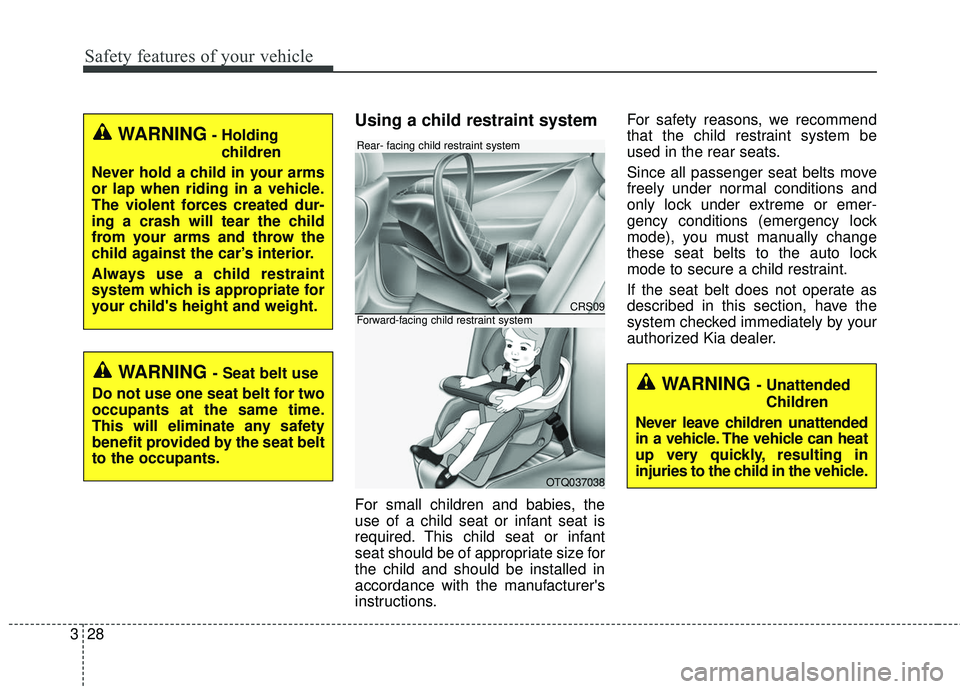
Using a child restraint system
For small children and babies, the
use of a child seat or infant seat is
required. This child seat or infant
seat should be of appropriate size for
the child and should be installed in
accordance with the manufacturer's
instructions. For safety reasons, we recommend
that the child restraint system be
used in the rear seats.
Since all passenger seat belts move
freely under normal conditions and
only lock under extreme or emer-
gency conditions (emergency lock
mode), you must manually change
these seat belts to the auto lock
mode to secure a child restraint.
If the seat belt does not operate as
described in this section, have the
system checked immediately by your
authorized Kia dealer.
WARNING- Holding
children
Never hold a child in your arms
or lap when riding in a vehicle.
The violent forces created dur-
ing a crash will tear the child
from your arms and throw the
child against the car’s interior.
Always use a child restraint
system which is appropriate for
your child's height and weight.
WARNING - Seat belt use
Do not use one seat belt for two
occupants at the same time.
This will eliminate any safety
benefit provided by the seat belt
to the occupants.
CRS09
OTQ037038
Rear- facing child restraint system
Forward-facing child restraint system
WARNING - Unattended Children
Never leave children unattended
in a vehicle. The vehicle can heat
up very quickly, resulting in
injuries to the child in the vehicle.
Page 77 of 584
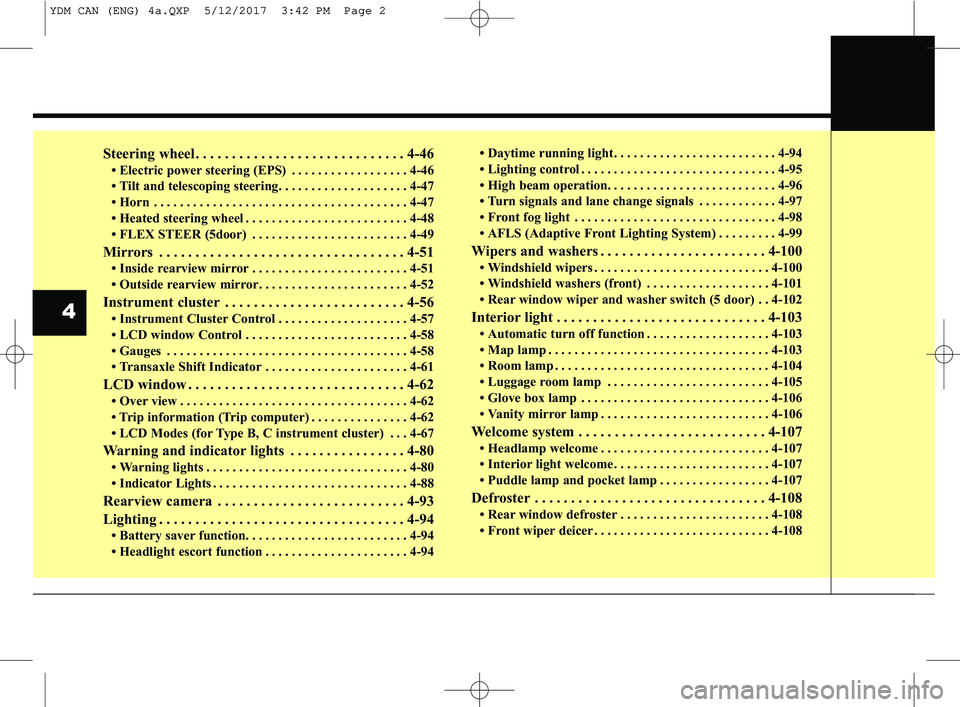
Steering wheel . . . . . . . . . . . . . . . . . . . . . . . . . . . . . 4-46
• Electric power steering (EPS) . . . . . . . . . . . . . . . . . . 4-46
• Tilt and telescoping steering. . . . . . . . . . . . . . . . . . . . 4-47
• Horn . . . . . . . . . . . . . . . . . . . . . . . . . . . . . . . . . . . . \
. . . 4-47
• Heated steering wheel . . . . . . . . . . . . . . . . . . . . . . . . . 4-48
• FLEX STEER (5door) . . . . . . . . . . . . . . . . . . . . . . . . 4-49
Mirrors . . . . . . . . . . . . . . . . . . . . . . . . . . . . . . . . . . 4-51\
• Inside rearview mirror . . . . . . . . . . . . . . . . . . . . . . . . 4-51
• Outside rearview mirror. . . . . . . . . . . . . . . . . . . . . . . 4-52
Instrument cluster . . . . . . . . . . . . . . . . . . . . . . . . . 4-56
• Instrument Cluster Control . . . . . . . . . . . . . . . . . . . . 4-57
• LCD window Control . . . . . . . . . . . . . . . . . . . . . . . . . 4-58
• Gauges . . . . . . . . . . . . . . . . . . . . . . . . . . . . . . . . . . . . \
. 4-58
• Transaxle Shift Indicator . . . . . . . . . . . . . . . . . . . . . . 4-61
LCD window . . . . . . . . . . . . . . . . . . . . . . . . . . . . . . 4-62
• Over view . . . . . . . . . . . . . . . . . . . . . . . . . . . . . . . . . . . 4-\
62
• Trip information (Trip computer) . . . . . . . . . . . . . . . 4-62
• LCD Modes (for Type B, C instrument cluster) . . . 4-67
Warning and indicator lights . . . . . . . . . . . . . . . . 4-80
• Warning lights . . . . . . . . . . . . . . . . . . . . . . . . . . . . . . . 4-80
• Indicator Lights . . . . . . . . . . . . . . . . . . . . . . . . . . . . . . 4-88
Rearview camera . . . . . . . . . . . . . . . . . . . . . . . . . . 4-93
Lighting . . . . . . . . . . . . . . . . . . . . . . . . . . . . . . . . . . 4-94\
• Battery saver function. . . . . . . . . . . . . . . . . . . . . . . . . 4-94
• Headlight escort function . . . . . . . . . . . . . . . . . . . . . . 4-94• Daytime running light . . . . . . . . . . . . . . . . . . . . . . . . . 4-94
• Lighting control . . . . . . . . . . . . . . . . . . . . . . . . . . . . . . 4-95
• High beam operation. . . . . . . . . . . . . . . . . . . . . . . . . . 4-96
• Turn signals and lane change signals . . . . . . . . . . . . 4-97
• Front fog light . . . . . . . . . . . . . . . . . . . . . . . . . . . . . . . 4-98
• AFLS (Adaptive Front Lighting System) . . . . . . . . . 4-99
Wipers and washers . . . . . . . . . . . . . . . . . . . . . . . 4-100
• Windshield wipers . . . . . . . . . . . . . . . . . . . . . . . . . . . 4-100
• Windshield washers (front) . . . . . . . . . . . . . . . . . . . 4-101
• Rear window wiper and washer switch (5 door) . . 4-102
Interior light . . . . . . . . . . . . . . . . . . . . . . . . . . . . . 4-103
• Automatic turn off function . . . . . . . . . . . . . . . . . . . 4-103
• Map lamp . . . . . . . . . . . . . . . . . . . . . . . . . . . . . . . . . . 4-10\
3
• Room lamp . . . . . . . . . . . . . . . . . . . . . . . . . . . . . . . . . 4-104
• Luggage room lamp . . . . . . . . . . . . . . . . . . . . . . . . . 4-105
• Glove box lamp . . . . . . . . . . . . . . . . . . . . . . . . . . . . . 4-106
• Vanity mirror lamp . . . . . . . . . . . . . . . . . . . . . . . . . . 4-106
Welcome system . . . . . . . . . . . . . . . . . . . . . . . . . . 4-107
• Headlamp welcome . . . . . . . . . . . . . . . . . . . . . . . . . . 4-107
• Interior light welcome . . . . . . . . . . . . . . . . . . . . . . . . 4-107
• Puddle lamp and pocket lamp . . . . . . . . . . . . . . . . . 4-107
Defroster . . . . . . . . . . . . . . . . . . . . . . . . . . . . . . . . 4-108
• Rear window defroster . . . . . . . . . . . . . . . . . . . . . . . 4-108
• Front wiper deicer . . . . . . . . . . . . . . . . . . . . . . . . . . . 4-108
4
YDM CAN (ENG) 4a.QXP 5/12/2017 3:42 PM Page 2
Page 124 of 584
449
Features of your vehicle
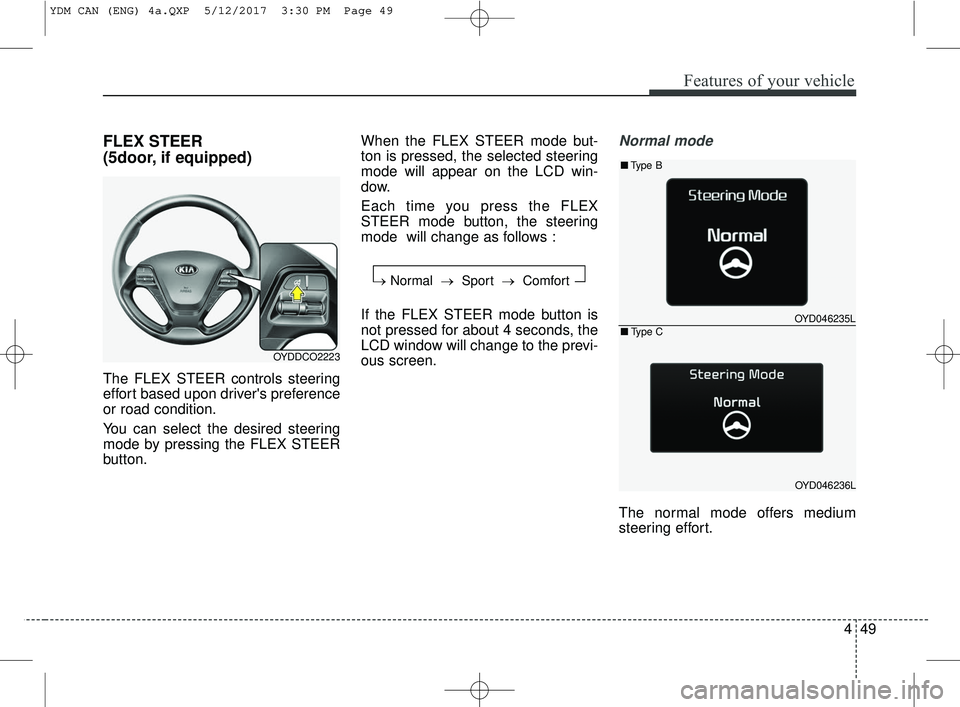
FLEX STEER
(5door, if equipped)
The FLEX STEER controls steering
effort based upon driver's preference
or road condition.
You can select the desired steering
mode by pressing the FLEX STEER
button.When the FLEX STEER mode but-
ton is pressed, the selected steering
mode will appear on the LCD win-
dow.
Each time you press the FLEX
STEER mode button, the steering
mode will change as follows :
If the FLEX STEER mode button is
not pressed for about 4 seconds, the
LCD window will change to the previ-
ous screen.
Normal mode
The normal mode offers medium
steering effort.
OYDDCO2223
→
Normal → Sport →Comfort
OYD046235L
OYD046236L
■Type B
■Type C
YDM CAN (ENG) 4a.QXP 5/12/2017 3:30 PM Page 49
Page 148 of 584
473
Features of your vehicle
Light
One Touch Turn Signal (if equipped)
-Off: The one touch turn signal function
will be deactivated.
- 3, 5, 7 Flashes : The lane changesignals will blink 3, 5, or 7 times
when the turn signal lever is moved
slightly.
For more details, refer to "Light" in
this chapter.
Head Lamp Delay (if equipped)
- If this item checked, the head lamp delay function will be activated.
Welcome Light (If equipped)
- If this item checked, the welcome light function will be activated. Sound
Cluster voice guide Vol. (if
equipped) : Adjust the cluster voice
guide volume. (Level 0~3)
BSD (Blind Spot Detection) Sound (if equipped)
If this item checked, the blind spot
detection sound will be activated.
For more details, refer to "Blind Spot
Detection System" in chapter 5.
Welcome Sound (if equipped)
If this item checked, the welcome
sound function will be activated. Convenience
Seat Easy Access(if equipped)
- None : The seat easy access func-
tion is deactivated.
- Normal/Extended : When you turn off the engine, the driver’s seat will
automatically move rearward short
(Normal) or long (Extended) for
you to enter or exit the vehicle
more comfortably.
If you change the Engine
Start/Stop button from OFF posi-
tion to the ACC, ON, or START
position, the driver’s seat will return
to the original position.
For more details, refer to "Driver
Position Memory System" in chapter 3.
YDM CAN (ENG) 4a.QXP 5/12/2017 3:32 PM Page 73
Page 151 of 584
Features of your vehicle
76
4
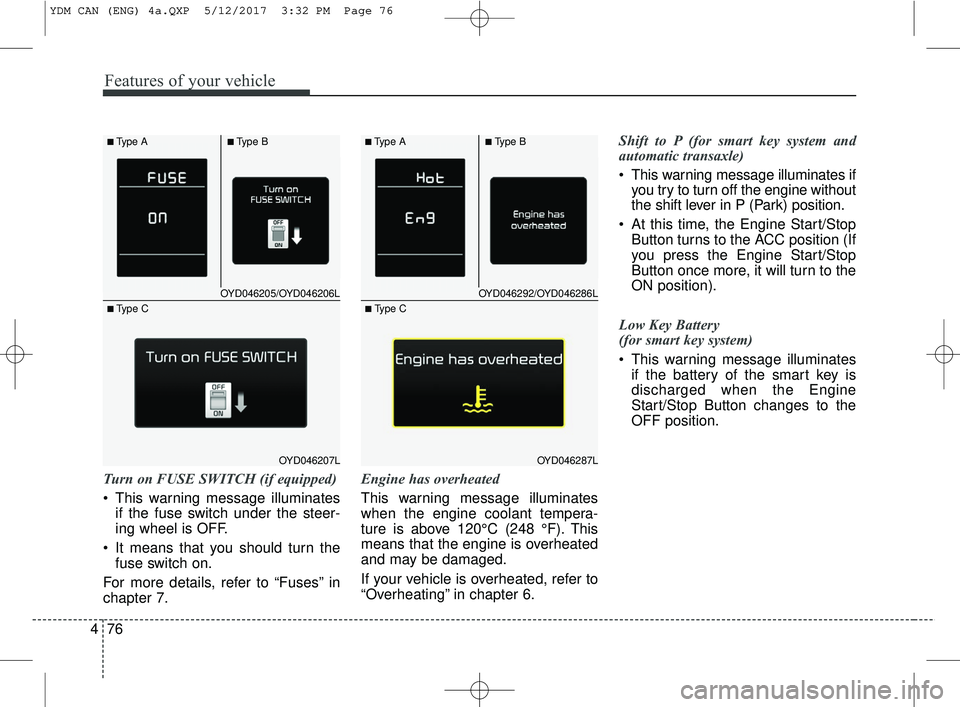
Turn on FUSE SWITCH (if equipped)
This warning message illuminates
if the fuse switch under the steer-
ing wheel is OFF.
It means that you should turn the fuse switch on.
For more details, refer to “Fuses” in
chapter 7. Engine has overheated
This warning message illuminates
when the engine coolant tempera-
ture is above 120°C (248 °F). This
means that the engine is overheated
and may be damaged.
If your vehicle is overheated, refer to
“Overheating” in chapter 6.Shift to P (for smart key system and
automatic transaxle)
This warning message illuminates if
you try to turn off the engine without
the shift lever in P (Park) position.
At this time, the Engine Start/Stop Button turns to the ACC position (If
you press the Engine Start/Stop
Button once more, it will turn to the
ON position).
Low Key Battery
(for smart key system)
This warning message illuminates if the battery of the smart key is
discharged when the Engine
Start/Stop Button changes to the
OFF position.
OYD046205/OYD046206L
OYD046207L
■Type A■Type B
■ Type C
OYD046292/OYD046286L
OYD046287L
■Type A■Type B
■ Type C
YDM CAN (ENG) 4a.QXP 5/12/2017 3:32 PM Page 76
Page 163 of 584
Features of your vehicle
88
4
Master Warning Mode
(if equipped)
This warning light informs the driv- er the following situations
- Low washer fluid (if equipped)
- Blind Spot Detection (BSD) mal-function (if equipped)
- Service reminder and so on.
The Master Warning Light illumi-
nates when more than one of the
above warning situations occur. At
this time, the LCD Modes Icon will
change from ( ) to ( ).
If the warning situation is solved, the
master warning light will be turned off
and the LCD Modes Icon will be
changed back to its previous icon ( ).
(ex : refill the washer fluid)
Indicator Lights
Electronic Stability Control (ESC) IndicatorLight
This indicator light illuminates:
Once you set the ignition switch or Engine Start/Stop Button to the ON
position.
- It illuminates for approximately 3seconds and then goes off.
When there is a malfunction with the ESC system.
In this case, have your vehicle
inspected by an authorized Kia
dealer.
This indicator light blinks:
While the ESC is operating.
For more details, refer to "Electronic
Stability Control (ESC)" in chapter 5.
Electronic Stability Control (ESC) OFFIndicator Light
This indicator light illuminates:
Once you set the ignition switch or Engine Start/Stop Button to the ON
position.
- It illuminates for approximately 3seconds and then goes off.
When you deactivate the ESC sys- tem by pressing the ESC OFF but-
ton.
For more details, refer to "Electronic
Stability Control (ESC)" in chapter 5.
YDM CAN (ENG) 4a.QXP 5/12/2017 3:32 PM Page 88
Page 173 of 584
Features of your vehicle
98
4
If an indicator stays on and does not
flash or if it flashes abnormally, one of
the turn signal bulbs may be burned
out and will require replacement.
If an indicator flash is abnormally
quick or slow, a bulb may be burned
out or have a poor electrical connec-
tion in the circuit.One-touch lane change function
To activate an one-touch lane
change function, move the turn sig-
nal lever slightly and then release it.
The lane change signals will blink 3,
5 or 7 times.
You can choose one-touch lane
change blinking function in "One
touch turn lamp" of "User setting".
Refer to "User setting" in chapter 4.
✽ ✽
NOTICE
If an indicator flash is abnormally
quick or slow, the bulb may be
burned out or have a poor electrical
connection in the circuit.
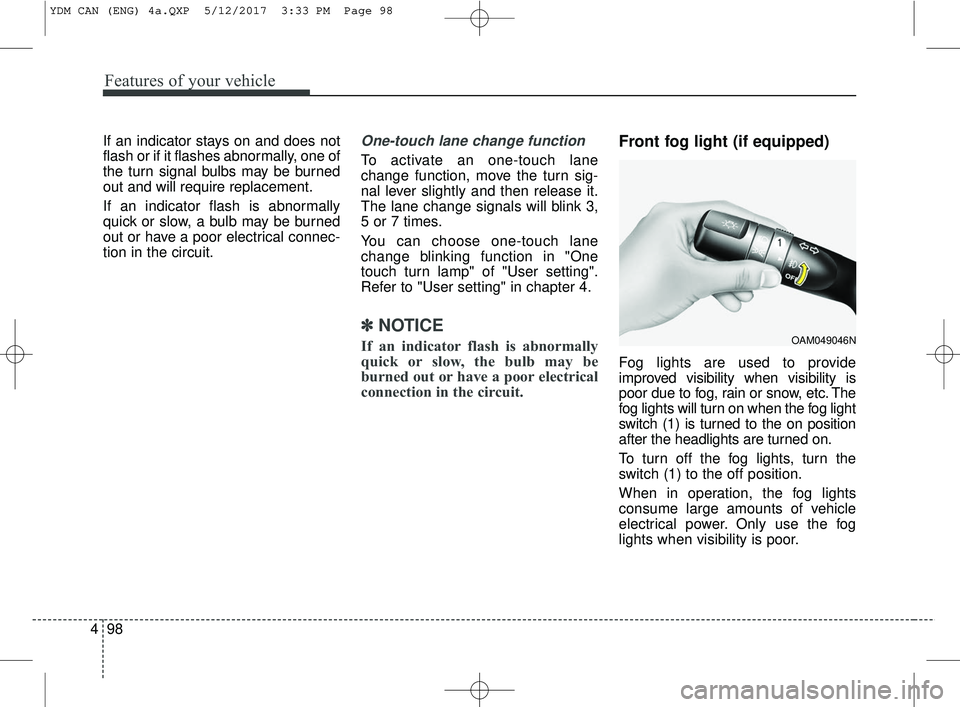
Front fog light (if equipped)
Fog lights are used to provide
improved visibility when visibility is
poor due to fog, rain or snow, etc. The
fog lights will turn on when the fog light
switch (1) is turned to the on position
after the headlights are turned on.
To turn off the fog lights, turn the
switch (1) to the off position.
When in operation, the fog lights
consume large amounts of vehicle
electrical power. Only use the fog
lights when visibility is poor.
OAM049046N
YDM CAN (ENG) 4a.QXP 5/12/2017 3:33 PM Page 98