air condition KIA K900 2017 User Guide
[x] Cancel search | Manufacturer: KIA, Model Year: 2017, Model line: K900, Model: KIA K900 2017Pages: 542, PDF Size: 14.89 MB
Page 157 of 542
Features of your vehicle
4
4-77
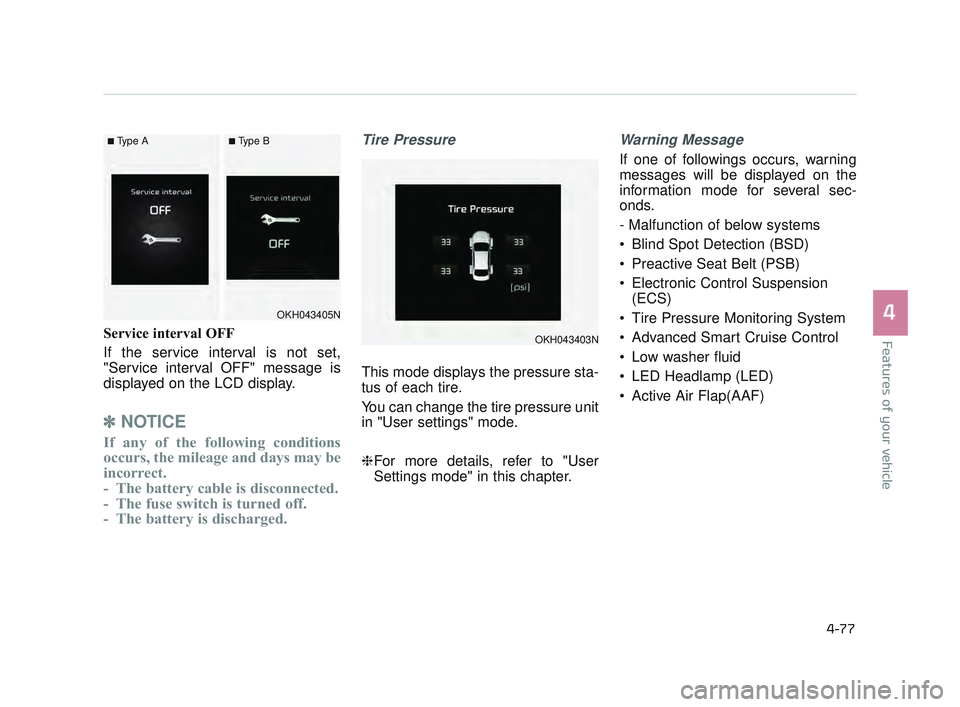
Service interval OFF
If the service interval is not set,
"Service interval OFF" message is
displayed on the LCD display.
✽NOTICE
If any of the following conditions
occurs, the mileage and days may be
incorrect.
- The battery cable is disconnected.
- The fuse switch is turned off.
- The battery is discharged.
Tire Pressure
This mode displays the pressure sta-
tus of each tire.
You can change the tire pressure unit
in "User settings" mode.
❈For more details, refer to "User
Settings mode" in this chapter.
Warning Message
If one of followings occurs, warning
messages will be displayed on the
information mode for several sec-
onds.
- Malfunction of below systems
Blind Spot Detection (BSD)
Preactive Seat Belt (PSB)
Electronic Control Suspension
(ECS)
Tire Pressure Monitoring System
Advanced Smart Cruise Control
Low washer fluid
LED Headlamp (LED)
Active Air Flap(AAF)
OKH043403N
OKH043405N
■Type A■Type B
KH USA 4:2015 12/2/2016 10:25 AM Page 77
Page 173 of 542
Features of your vehicle
4
4-93
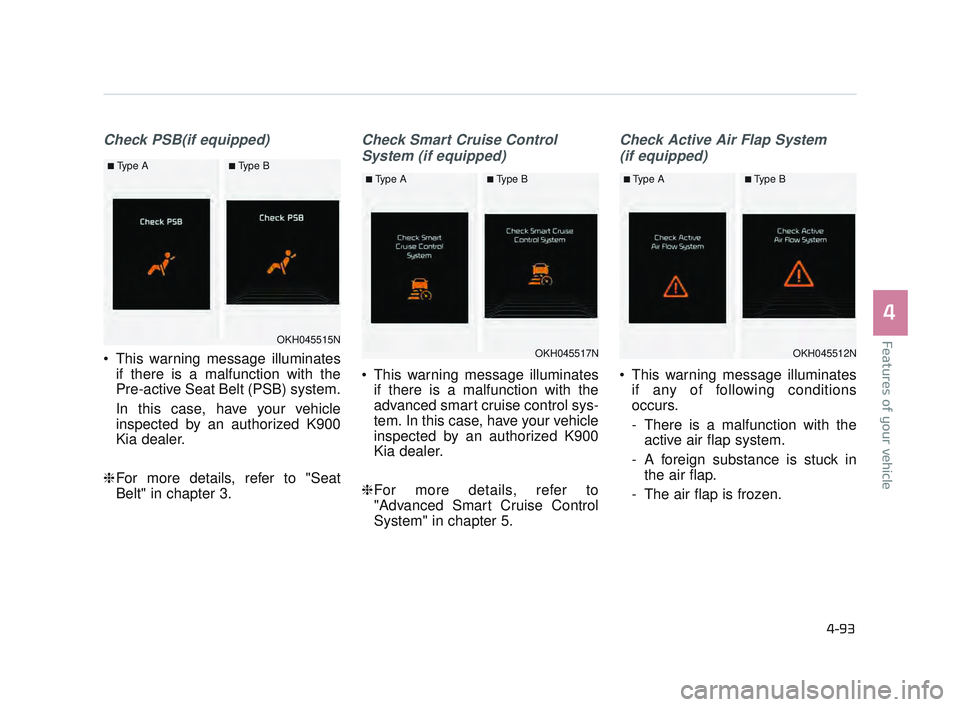
Check PSB(if equipped)
This warning message illuminatesif there is a malfunction with the
Pre-active Seat Belt (PSB) system.
In this case, have your vehicle
inspected by an authorized K900
Kia dealer.
❈ For more details, refer to "Seat
Belt" in chapter 3.
Check Smart Cruise Control
System (if equipped)
This warning message illuminates if there is a malfunction with the
advanced smart cruise control sys-
tem. In this case, have your vehicle
inspected by an authorized K900
Kia dealer.
❈ For more details, refer to
"Advanced Smart Cruise Control
System" in chapter 5.
Check Active Air Flap System
(if equipped)
This warning message illuminates if any of following conditions
occurs.
- There is a malfunction with theactive air flap system.
- A foreign substance is stuck in the air flap.
- The air flap is frozen.
OKH045515N
■Type A■Type B
OKH045517N
■Type A■Type B
OKH045512N
■Type A■Type B
KH USA 4:2015 12/2/2016 10:26 AM Page 93
Page 195 of 542
Features of your vehicle
4
4-115
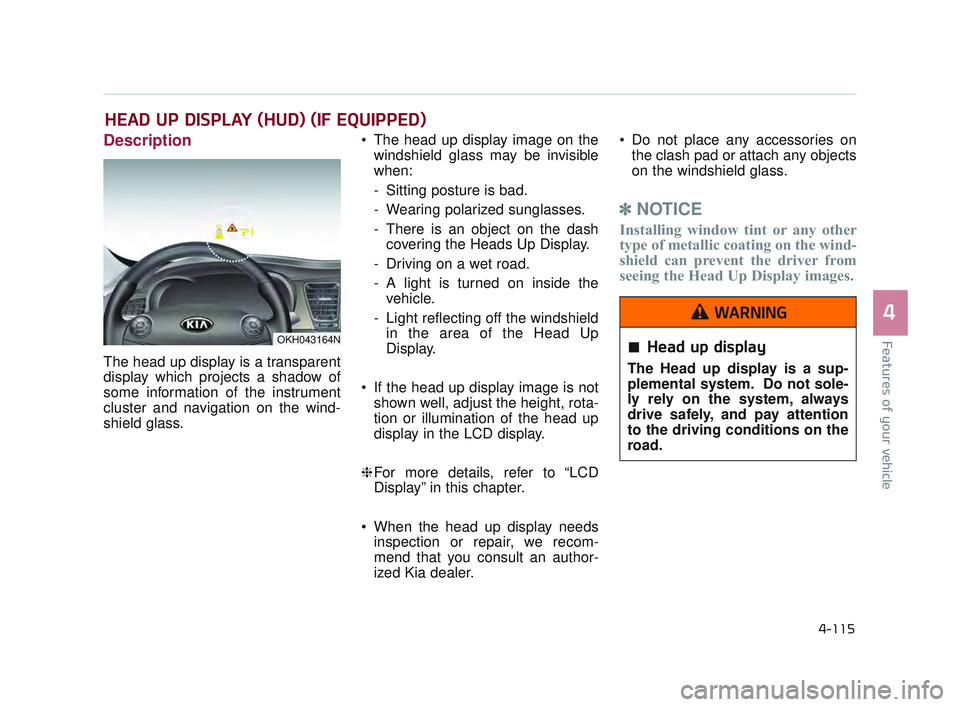
Description
The head up display is a transparent
display which projects a shadow of
some information of the instrument
cluster and navigation on the wind-
shield glass. The head up display image on the
windshield glass may be invisible
when:
- Sitting posture is bad.
- Wearing polarized sunglasses.
- There is an object on the dashcovering the Heads Up Display.
- Driving on a wet road.
- A light is turned on inside the vehicle.
- Light reflecting off the windshield in the area of the Head Up
Display.
If the head up display image is not shown well, adjust the height, rota-
tion or illumination of the head up
display in the LCD display.
❈ For more details, refer to “LCD
Display” in this chapter.
When the head up display needs inspection or repair, we recom-
mend that you consult an author-
ized Kia dealer. Do not place any accessories on
the clash pad or attach any objects
on the windshield glass.
✽ NOTICE
Installing window tint or any other
type of metallic coating on the wind-
shield can prevent the driver from
seeing the Head Up Display images.
HEAD UP DISPLAY (HUD) (IF EQUIPPED)
OKH043164NHead up display
The Head up display is a sup-
plemental system. Do not sole-
ly rely on the system, always
drive safely, and pay attention
to the driving conditions on the
road.
WARNING
KH USA 4:2015 12/2/2016 10:27 AM Page 115
Page 200 of 542
Features of your vehicle
4-120
Non-operational conditions of
parking assist system
Parking assist system may notoperate normally when:
1.Moisture is frozen to the sensor. (It will operate normally when mois-
ture melts.)
2.Sensor is covered with foreign mat- ter, such as snow or water, or the
sensor cover is blocked. (It will
operate normally when the materi-
al is removed or the sensor is no
longer blocked.)
3.Sensor is stained with foreign mat- ter such as snow or water.
(Sensing range will return to nor-
mal when removed.)
4.The parking assist button is off.
There is a possibility of parking assist system malfunction when:
1.Driving on uneven road surfaces such as unpaved roads, gravel,
bumps, or gradient.
2.Objects generating excessive noise such as vehicle horns, loud motor-
cycle engines, or truck air brakes
can interfere with the sensor.
3.Heavy rain or water spray.
4.Wireless transmitters or mobile phones present near the sensor.
5.Sensor is covered with snow.
Detecting range may decrease when:
1.Outside air temperature is extremely hot or cold.
2.Undetectable objects smaller than 39 in (1 m) and narrower than 5.5
in (14 cm) in diameter.
The following objects may not be
recognized by the sensor:
1.Sharp or slim objects such as ropes, chains or small poles.
2.Objects, which tend to absorb sen- sor frequency such as clothes,
spongy material or snow.
KH USA 4:2015 12/2/2016 10:27 AM Page 120
Page 224 of 542
Features of your vehicle
4-144
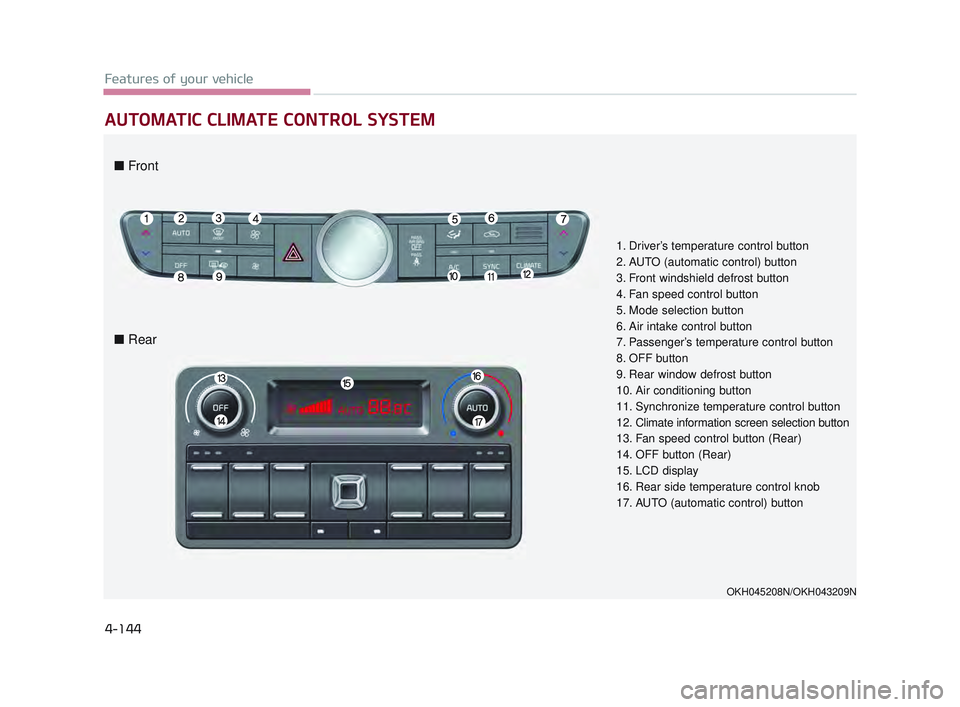
AUTOMATIC CLIMATE CONTROL SYSTEM
1. Driver’s temperature control button
2. AUTO (automatic control) button
3. Front windshield defrost button
4. Fan speed control button
5. Mode selection button
6. Air intake control button
7. Passenger’s temperature control button
8. OFF button
9. Rear window defrost button
10. Air conditioning button
11. Synchronize temperature control button
12. Climate information screen selection button
13. Fan speed control button (Rear)
14. OFF button (Rear)
15. LCD display
16. Rear side temperature control knob
17. AUTO (automatic control) button
OKH045208N/OKH043209N
■ Front
■ Rear
KH USA 4:2015 12/2/2016 10:29 AM Page 144
Page 225 of 542
Features of your vehicle
4
4-145
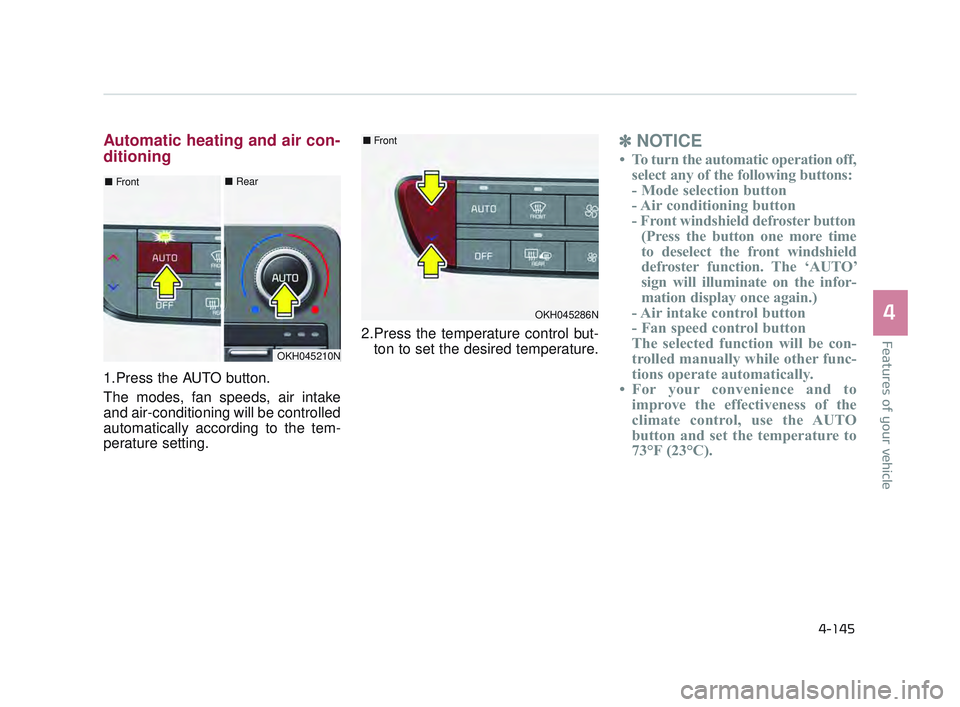
Automatic heating and air con-
ditioning
1.Press the AUTO button.
The modes, fan speeds, air intake
and air-conditioning will be controlled
automatically according to the tem-
perature setting.2.Press the temperature control but-
ton to set the desired temperature.
✽ NOTICE
• To turn the automatic operation off,
select any of the following buttons:
- Mode selection button
- Air conditioning button
- Front windshield defroster button(Press the button one more time
to deselect the front windshield
defroster function. The ‘AUTO’
sign will illuminate on the infor-
mation display once again.)
- Air intake control button
- Fan speed control button
The selected function will be con-
trolled manually while other func-
tions operate automatically.
• For your convenience and to improve the effectiveness of the
climate control, use the AUTO
button and set the temperature to
73°F (23°C).
OKH045210N
■ Front■Rear
OKH045286N
■Front
KH USA 4:2015 12/2/2016 10:29 AM Page 145
Page 226 of 542
Features of your vehicle
4-146
✽NOTICE
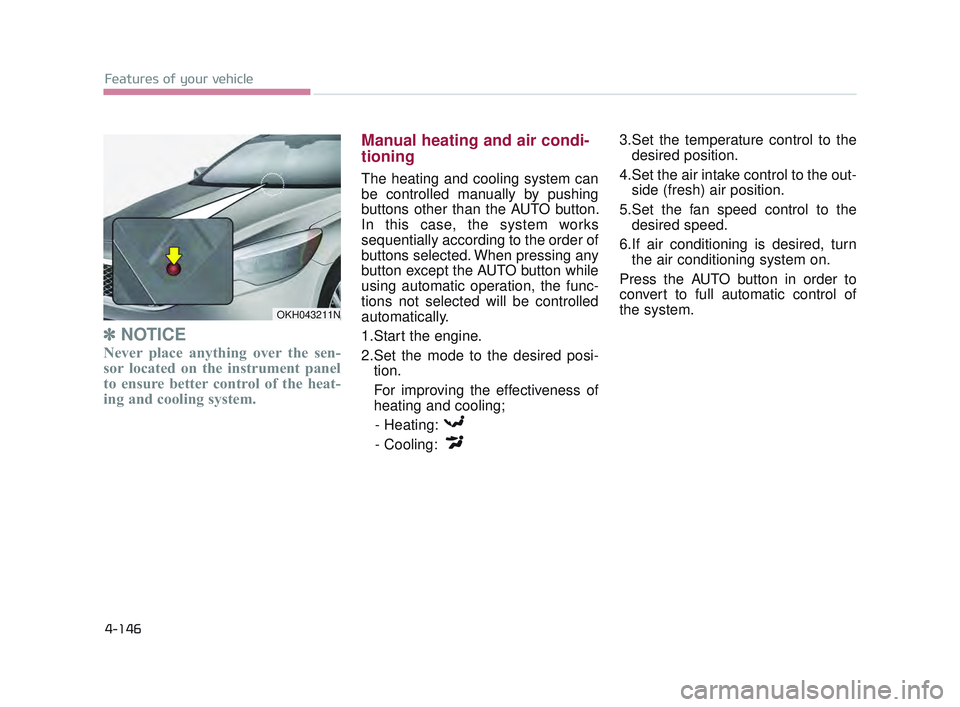
Never place anything over the sen-
sor located on the instrument panel
to ensure better control of the heat-
ing and cooling system.
Manual heating and air condi-
tioning
The heating and cooling system can
be controlled manually by pushing
buttons other than the AUTO button.
In this case, the system works
sequentially according to the order of
buttons selected. When pressing any
button except the AUTO button while
using automatic operation, the func-
tions not selected will be controlled
automatically.
1.Start the engine.
2.Set the mode to the desired posi-
tion.
For improving the effectiveness of
heating and cooling;
- Heating:
- Cooling: 3.Set the temperature control to the
desired position.
4.Set the air intake control to the out- side (fresh) air position.
5.Set the fan speed control to the desired speed.
6.If air conditioning is desired, turn the air conditioning system on.
Press the AUTO button in order to
convert to full automatic control of
the system.
OKH043211N
KH USA 4:2015 12/2/2016 10:29 AM Page 146
Page 230 of 542
Features of your vehicle
4-150
The temperature will decrease to the
minimum (Lo) by pushing the down
( ) button (for front) or turn the knob
to the left (for rear).
When pushing the button (for front) or
turning the knob (for rear), the tem-
perature will increase or decrease by
0.5°C/1°F. When set to the lowest
temperature setting, the air condition-
ing will operate continuously.Adjusting the driver, passenger and
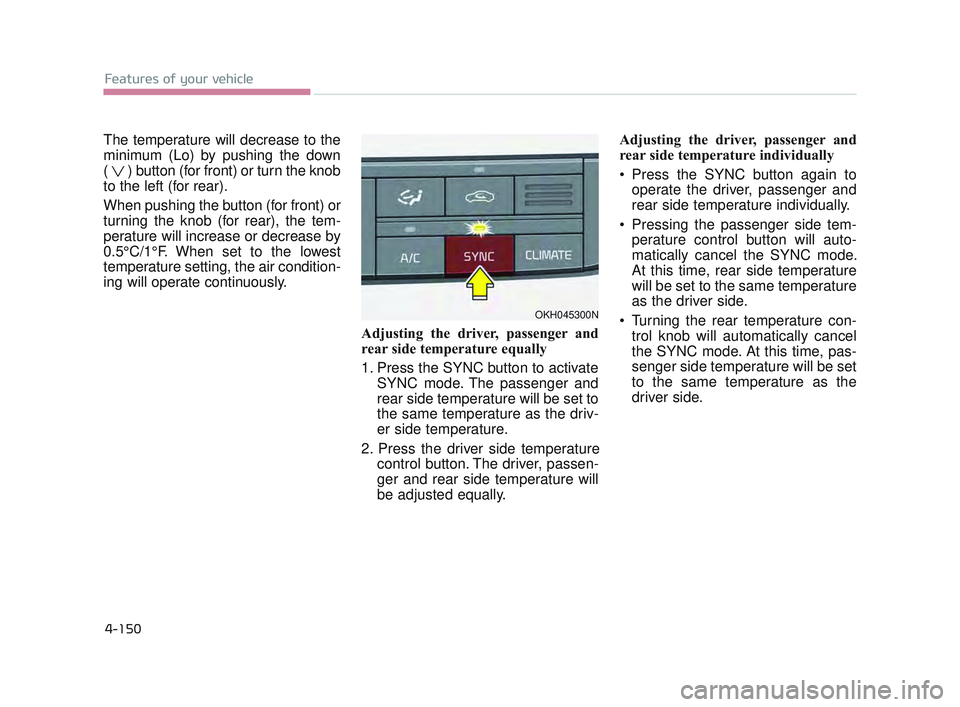
rear side temperature equally
1. Press the SYNC button to activateSYNC mode. The passenger and
rear side temperature will be set to
the same temperature as the driv-
er side temperature.
2. Press the driver side temperature control button. The driver, passen-
ger and rear side temperature will
be adjusted equally. Adjusting the driver, passenger and
rear side temperature individually
Press the SYNC button again to
operate the driver, passenger and
rear side temperature individually.
Pressing the passenger side tem- perature control button will auto-
matically cancel the SYNC mode.
At this time, rear side temperature
will be set to the same temperature
as the driver side.
Turning the rear temperature con- trol knob will automatically cancel
the SYNC mode. At this time, pas-
senger side temperature will be set
to the same temperature as the
driver side.
OKH045300N
KH USA 4:2015 12/2/2016 10:29 AM Page 150
Page 232 of 542
Features of your vehicle
4-152
✽NOTICE
Prolonged operation of the heater in
the recirculated air position (with-
out air conditioning selected) may
cause fogging of the windshield and
side windows and the air within the
passenger compartment may
become stale.
In addition, prolonged use of the air
conditioning with the recirculated
air position selected will result in
excessively dry air in the passenger
compartment.
Sunroof Inside Air Recirculation
(if equipped)
When the heater or air conditioning
system is on with the sunroof
opened, the outside (fresh) air posi-
tion will be automatically selected. At
this time, if you press the recirculated
air position button, the recirculated
air position will be selected but will
change back to the outside (fresh) air
position after 3 minutes. When the
sunroof is closed, the air intake posi-
tion will return to the original position
that was selected.
Reduced visibility
Continued use of the climate
control system in the recirculat-
ed air position may allow
humidity to increase inside the
vehicle which may fog the glass
and obscure visibility.
WARNING
Sleeping with AC on
Do not sleep in a vehicle with
the air conditioning or heating
system on as this may cause
serious harm or death due to a
drop in the oxygen level and/or
body temperature.
WARNING
Recirculated air
Continued use of the climate
control system in the recirculat-
ed air position can cause
drowsiness or sleepiness, and
loss of vehicle control. Set the
air intake control to the outside
(fresh) air position as much as
possible while driving.
WARNING
KH USA 4:2015 12/2/2016 10:29 AM Page 152
Page 233 of 542
Features of your vehicle
4
4-153
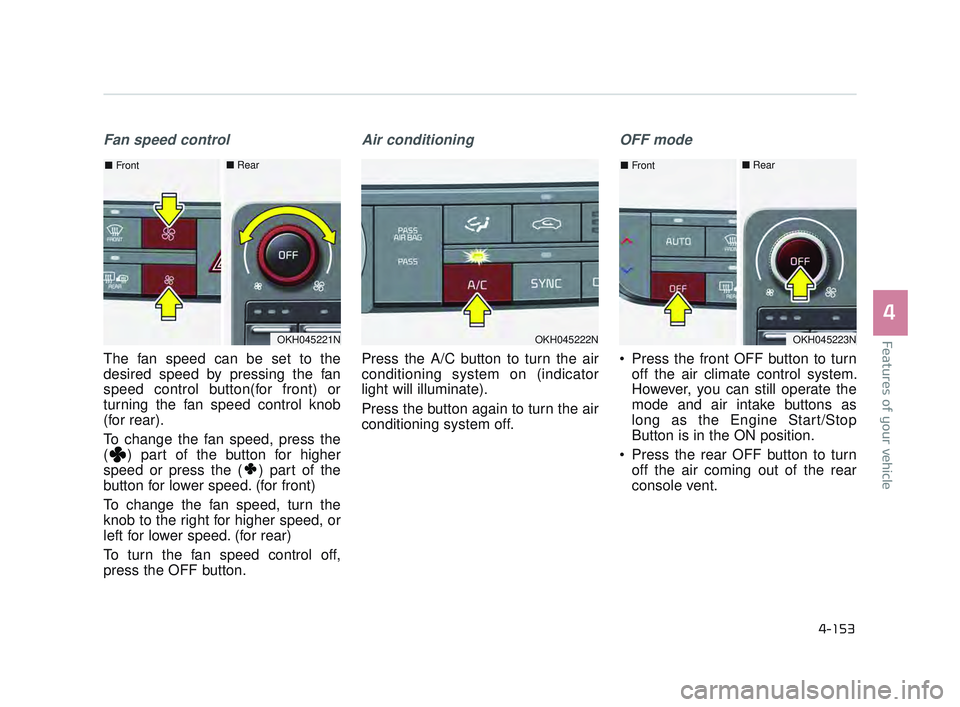
Fan speed control
The fan speed can be set to the
desired speed by pressing the fan
speed control button(for front) or
turning the fan speed control knob
(for rear).
To change the fan speed, press the
( ) part of the button for higher
speed or press the ( ) part of the
button for lower speed. (for front)
To change the fan speed, turn the
knob to the right for higher speed, or
left for lower speed. (for rear)
To turn the fan speed control off,
press the OFF button.
Air conditioning
Press the A/C button to turn the air
conditioning system on (indicator
light will illuminate).
Press the button again to turn the air
conditioning system off.
OFF mode
Press the front OFF button to turnoff the air climate control system.
However, you can still operate the
mode and air intake buttons as
long as the Engine Start/Stop
Button is in the ON position.
Press the rear OFF button to turn off the air coming out of the rear
console vent.
OKH045222NOKH045221N
■ Front■ Rear
OKH045223N
■Front■ Rear
KH USA 4:2015 12/2/2016 10:29 AM Page 153