engine KIA K900 2017 Owner's Manual
[x] Cancel search | Manufacturer: KIA, Model Year: 2017, Model line: K900, Model: KIA K900 2017Pages: 542, PDF Size: 14.89 MB
Page 63 of 542
Seat and safety features of your vehicle
3
3-45
✽NOTICE
Before you replace a fuse or discon-
nect a battery terminal, turn the
Engine Start/Stop button to the OFF
position. Never remove or replace
the air bag related fuse(s) when the
Engine Start/Stop button is in the
ON position. Failure to heed this
warning will cause the SRS air bag
warning light to illuminate.
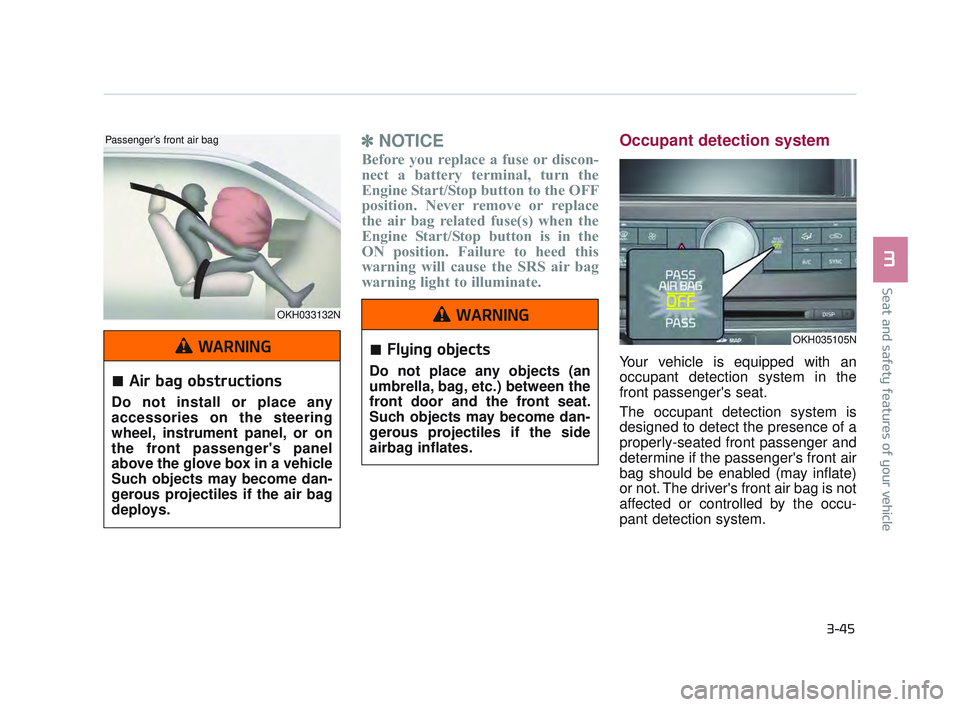
Occupant detection system
Your vehicle is equipped with an
occupant detection system in the
front passenger's seat.
The occupant detection system is
designed to detect the presence of a
properly-seated front passenger and
determine if the passenger's front air
bag should be enabled (may inflate)
or not. The driver's front air bag is not
affected or controlled by the occu-
pant detection system.
OKH033132N
Passenger’s front air bag
OKH035105N
Air bag obstructions
Do not install or place any
accessories on the steering
wheel, instrument panel, or on
the front passenger's panel
above the glove box in a vehicle
Such objects may become dan-
gerous projectiles if the air bag
deploys.
WARNINGFlying objects
Do not place any objects (an
umbrella, bag, etc.) between the
front door and the front seat.
Such objects may become dan-
gerous projectiles if the side
airbag inflates.
WARNING
KH USA 3:2016 12/2/2016 10:13 AM Page 45
Page 67 of 542
Seat and safety features of your vehicle
3
3-49
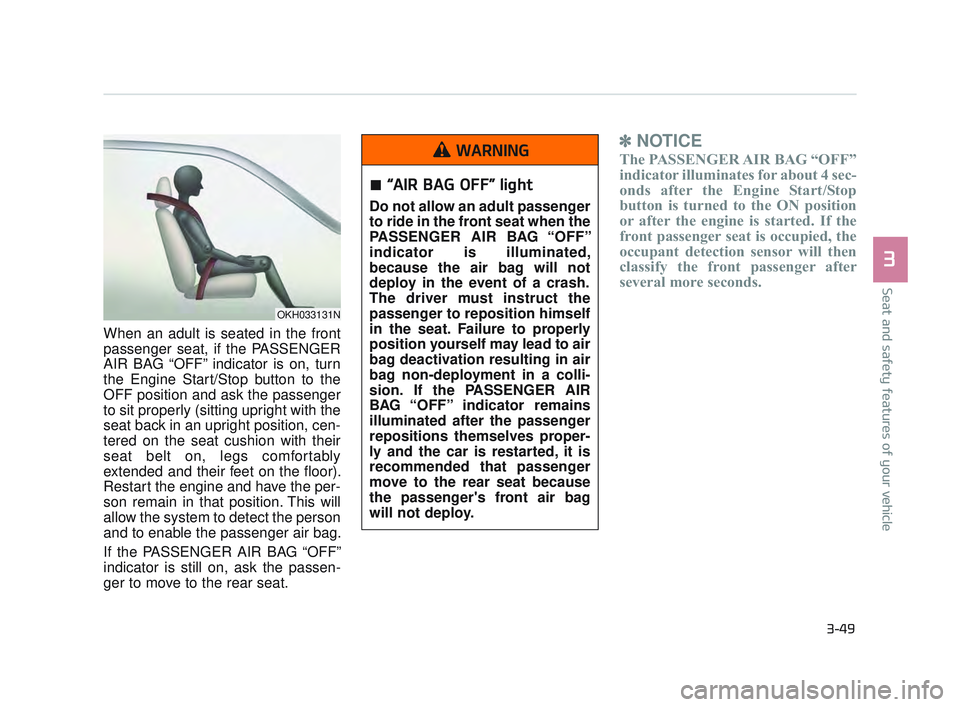
When an adult is seated in the front
passenger seat, if the PASSENGER
AIR BAG “OFF” indicator is on, turn
the Engine Start/Stop button to the
OFF position and ask the passenger
to sit properly (sitting upright with the
seat back in an upright position, cen-
tered on the seat cushion with their
seat belt on, legs comfortably
extended and their feet on the floor).
Restart the engine and have the per-
son remain in that position. This will
allow the system to detect the person
and to enable the passenger air bag.
If the PASSENGER AIR BAG “OFF”
indicator is still on, ask the passen-
ger to move to the rear seat.
✽NOTICE
The PASSENGER AIR BAG “OFF”
indicator illuminates for about 4 sec-
onds after the Engine Start/Stop
button is turned to the ON position
or after the engine is started. If the
front passenger seat is occupied, the
occupant detection sensor will then
classify the front passenger after
several more seconds.
OKH033131N
“AIR BAG OFF” light
Do not allow an adult passenger
to ride in the front seat when the
PASSENGER AIR BAG “OFF”
indicator is illuminated,
because the air bag will not
deploy in the event of a crash.
The driver must instruct the
passenger to reposition himself
in the seat. Failure to properly
position yourself may lead to air
bag deactivation resulting in air
bag non-deployment in a colli-
sion. If the PASSENGER AIR
BAG “OFF” indicator remains
illuminated after the passenger
repositions themselves proper-
ly and the car is restarted, it is
recommended that passenger
move to the rear seat because
the passenger's front air bag
will not deploy.
WARNING
KH USA 3:2016 12/2/2016 10:13 AM Page 49
Page 72 of 542

3-54
Seat and safety features of your vehicle
For best protection from the side air
bag system and to avoid being
injured by the deploying side air bag,
both front seat occupants should sit
in an upright position with the seat
belt properly fastened. The driver's
hands should be placed on the steer-
ing wheel at the 9:00 and 3:00 posi-
tions. The passenger's arms and
hands should be placed on their laps.
If seat or seat cover is damaged, have
the vehicle checked and repaired by
an authorized K900 Kia dealer.
Inform that your vehicle is equipped
with side air bags and an occupant
detection system.
Unexpected deployment
Avoid impact to the side air bag
sensor when the Engine Start/ Stop
button is ON to prevent unexpected
deployment of the side air bag.
WARNING
No attaching objects
Do not place any objects overthe air bag or between the air
bag and yourself. Also, do not
attach any objects around the
area the air bag inflates such
as the door, side door glass,
front and rear pillar.
Do not put any objects between the side airbag label
and seat cushion. It could
cause harm if the vehicle is in
a crash severe enough to
cause the air bags to deploy.
Never place or insert any object into any small opening
near side airbag labels
attached to the vehicle seats.
When the air bag deploys, the
object may affect the deploy-
ment and result in unexpected
accident or bodily harm.
Do not install any accessories on the side or near the side air
bags.
WARNING
KH USA 3:2016 12/2/2016 10:13 AM Page 54
Page 85 of 542

With smart key, you can lock or
unlock doors (and trunk) and start
the engine without inserting the key.
Refer to the following, for more
details.Locking
Pressing the button of the front out-
side door handles with all doors
closed and any door unlocked, locks
all the doors. The hazard warning
lights will blink and the chime will
sound once to indicate that all doors
are locked. The button will only oper-
ate when the smart key is within
28~40 in. (0.7~1 m) from the outside
door handle. If you want to make
sure that a door has locked or not,
you should check the door lock but-
ton inside the vehicle or pull the out-
side door handle.In some instances, when the outside
door button is selected, the doors will
not lock and an audible chime will
sound for 3 seconds if any of the fol-
lowing occurs:
The smart key is in the vehicle.
The Engine Start/Stop button is in
the ACC or ON position.
Any door except the trunk is opened.
Features of your vehicle
4
4-5
OKH043003N
KH USA 4:2015 12/2/2016 10:22 AM Page 5
Page 86 of 542
Features of your vehicle
4-6
Unlocking
Pressing the button of the driver's (or
front passenger’s) outside door han-
dle with all doors closed and locked,
unlocks the driver's door.
The hazard warning lights will blink
and the chime will sound twice to
indicate that the driver's door is
unlocked. Also, the outside rearview
mirrors will automatically unfold if the
outside rearview mirror folding switch
is in the AUTO position.
If you press the button of the driver's
outside door handle again within 4
seconds, The other doors will be
unlocked. But if you press the button
of the driver's outside door handle
again after 4 seconds, all doors will
be locked.
The button will only operate when the
smart key is within 28~40 in. (0.7~1m)
from the outside door handle.
Start-up
You can start the engine without
inserting the key. For detailed infor-
mation refer to “Starting the engine
with a smart key” in chapter 5.
Smart key precautions
If you lose your smart key, you willnot be able to start the engine. Tow
the vehicle, if necessary, and con-
tact an authorized K900 Kia dealer.
A maximum of 2 smart keys can be registered to a single vehicle. If you
lose a smart key, you should imme-
diately take the vehicle and key to
your authorized K900 Kia dealer to
protect it from potential theft.
The smart key will not work if any of following occurs:
- The smart key is close to a radiotransmitter such as a radio sta-
tion or an airport which can inter-
fere with normal operation of the
smart key.
- The smart key near a mobile two-way radio system or a cellu-
lar phone.
- Another vehicle’s smart key is being operated close to your
vehicle. When the smart key does not work
correctly, open and close the door
with the mechanical key. If you
have a problem with the smart key,
contact an authorized K900 Kia
dealer.
If the smart key is in close proximity to your cell phone or smart phone,
the signal from the smart key could
be blocked by normal operation of
your cell phone or smart phone.
This is especially important when
the phone is active such as making
call, receiving calls, text messaging,
and/or sending/receiving emails.
Avoid placing the smart key and
your cell phone or smart phone in
the same pants or jacket pocket and
maintain adequate distance
between the two devices.
Transmitter
Keep the smart key away from
water or any liquid as it can
become damaged and not func-
tion properly.
CAUTION
KH USA 4:2015 12/2/2016 10:22 AM Page 6
Page 91 of 542

Features of your vehicle
4
4-11
To lock:
1.Remove the mechanical key fromthe Smart Key.
2.Unlock the glove box by using the mechanical key, then open it.
3.Set the Trunk Lid Control button to the OFF position (not depressed).
4.Close and lock the glove box using the mechanical key.
5.Leave the Smart Key with the attendant and keep the mechanical
key with you.
The Smart Key can only be used to
start the engine and operate door
locks.
To release:
1.Open the glove box with the mechanical key.
2.Set the Trunk Lid Control button to the ON position (depressed).
In this position the trunk lid will open
with the Trunk Lid button or the
Smart Key. Immobilizer system
Your vehicle is equipped with an
electronic engine immobilizer system
to reduce the risk of unauthorized
vehicle use.
Whenever the ENGINE START/STOP
button is changed to the ON position,
the immobilizer system checks and
verifies if the key is valid or not.
If the key is valid, the engine will start.
If the key is invalid, the engine will
not start.
To deactivate the immobilizer system
Change the ENGINE START/STOP
button to the ON position.
To activate the immobilizer system
Change the ENGINE START/STOP
button to the OFF position. The immo-
bilizer system activates automatically.
Without a valid smart key for your
vehicle, the engine will not start.
Your immobilizer password is a cus-
tomer unique password and should
be kept confidential. Do not leave this
number anywhere in your vehicle.
✽ NOTICE
Keep each key separate in order to
avoid a starting malfunction.
KH USA 4:2015 12/2/2016 10:22 AM Page 11
Page 92 of 542
Features of your vehicle
4-12
Do not put metal accessories near
the smart key.
Metal accessories may interrupt the
transponder signal and may prevent
the engine from being started.
If you need additional keys or lose
your keys, consult an authorized
K900 Kia dealer.Pursuant to Code of Federal
Regulations, Title 47, Part 15
("FCC Rules")
Operation is subject to the following
two conditions:
1.This device may not cause harmfulinterference, and
2.This device must accept any inter- ference received, including inter-
ference that may cause undesired
operation.
✽ NOTICE
Changes or modifications not
expressly approved by the party
responsible for compliance could
void the user's authority to operate
the equipment.
Immobilizer damage
Do not expose your immobilizer
system to moisture, static elec-
tricity and rough handling. This
may damage your immobilizer.
CAUTION
Immobilizer alterations
Do not change, alter or adjust
the immobilizer system because
it could cause the immobilizer
system to malfunction.
CAUTION
KH USA 4:2015 12/2/2016 10:22 AM Page 12
Page 93 of 542
Features of your vehicle
4
4-13
THEFT-ALARM SYSTEM
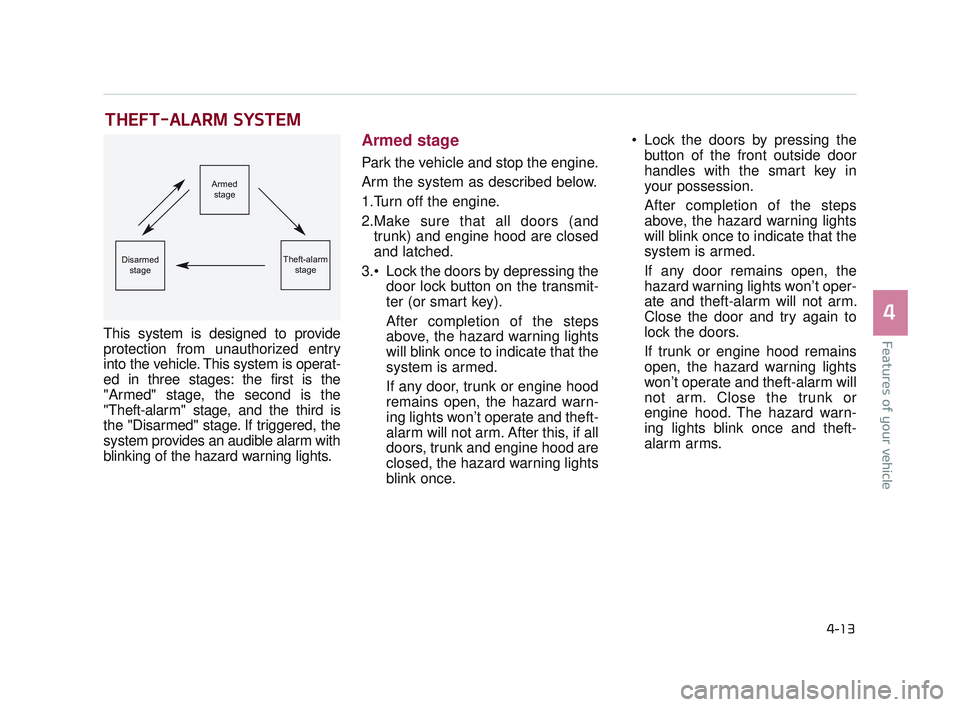
This system is designed to provide
protection from unauthorized entry
into the vehicle. This system is operat-
ed in three stages: the first is the
"Armed" stage, the second is the
"Theft-alarm" stage, and the third is
the "Disarmed" stage. If triggered, the
system provides an audible alarm with
blinking of the hazard warning lights.
Armed stage
Park the vehicle and stop the engine.
Arm the system as described below.
1.Turn off the engine.
2.Make sure that all doors (andtrunk) and engine hood are closed
and latched.
Lock the doors by depressing the door lock button on the transmit-
ter (or smart key).
After completion of the steps
above, the hazard warning lights
will blink once to indicate that the
system is armed.
If any door, trunk or engine hood
remains open, the hazard warn-
ing lights won’t operate and theft-
alarm will not arm. After this, if all
doors, trunk and engine hood are
closed, the hazard warning lights
blink once. Lock the doors by pressing the
button of the front outside door
handles with the smart key in
your possession.
After completion of the steps
above, the hazard warning lights
will blink once to indicate that the
system is armed.
If any door remains open, the
hazard warning lights won’t oper-
ate and theft-alarm will not arm.
Close the door and try again to
lock the doors.
If trunk or engine hood remains
open, the hazard warning lights
won’t operate and theft-alarm will
not arm. Close the trunk or
engine hood. The hazard warn-
ing lights blink once and theft-
alarm arms.
Armed
stage
Theft-alarm stageDisarmedstage
KH USA 4:2015 12/2/2016 10:22 AM Page 13
Page 94 of 542
Features of your vehicle
4-14
The theft-alarm system by the key
can be activated by an authorized
Kia dealer.
If you want this feature, consult an
authorized K900 Kia dealer.
Do not arm the system until all
passengers have left the vehicle. If
the system is armed while a pas-
senger(s) remains in the vehicle,
the alarm may be activated when
the remaining passenger(s)
leaves the vehicle. If any door (or
trunk) or engine hood is opened
within 30 seconds after the sys-
tem enters the armed stage, the
system will be disarmed to pre-
vent unnecessary alarm.Theft-alarm stage
The alarm will be activated if any of
the following occurs while the system
is armed.
A front or rear door is opened with-out using the smart key (or
mechanical key).
The trunk is opened without using the smart key (or mechanical key).
The engine hood is opened.
The horn will sound and the hazard
warning lights will blink continuously
for approximately 27 seconds. To
turn off the system, unlock the doors
with the smart key.
Disarmed stage
The system will be disarmed when:
- The door unlock button is pressed.
- The button of the front outside door is pressed while carrying the smart
key.
- The engine is started. (within 3 seconds)
After the doors are unlocked, the haz-
ard warning lights will blink twice to
indicate that the system is disarmed.
After pressing the unlock button, if
any door (or trunk) is not opened
within 30 seconds, the system will be
rearmed.
KH USA 4:2015 12/2/2016 10:22 AM Page 14
Page 95 of 542
Features of your vehicle
4
4-15
Avoid trying to start the enginewhile the alarm is activated. The
vehicle starting motor is disabled
during the theft-alarm stage.
If the system is not disarmed with
the smart key, open the doors by
using the mechanical key and start
the engine by directly pressing the
engine Start/Stop button with the
smart key.
If you lose your keys, consult your authorized K900 Kia dealer.
KH USA 4:2015 12/2/2016 10:22 AM Page 15