light KIA K900 2017 Owner's Manual
[x] Cancel search | Manufacturer: KIA, Model Year: 2017, Model line: K900, Model: KIA K900 2017Pages: 542, PDF Size: 14.89 MB
Page 87 of 542
Features of your vehicle
4
4-7
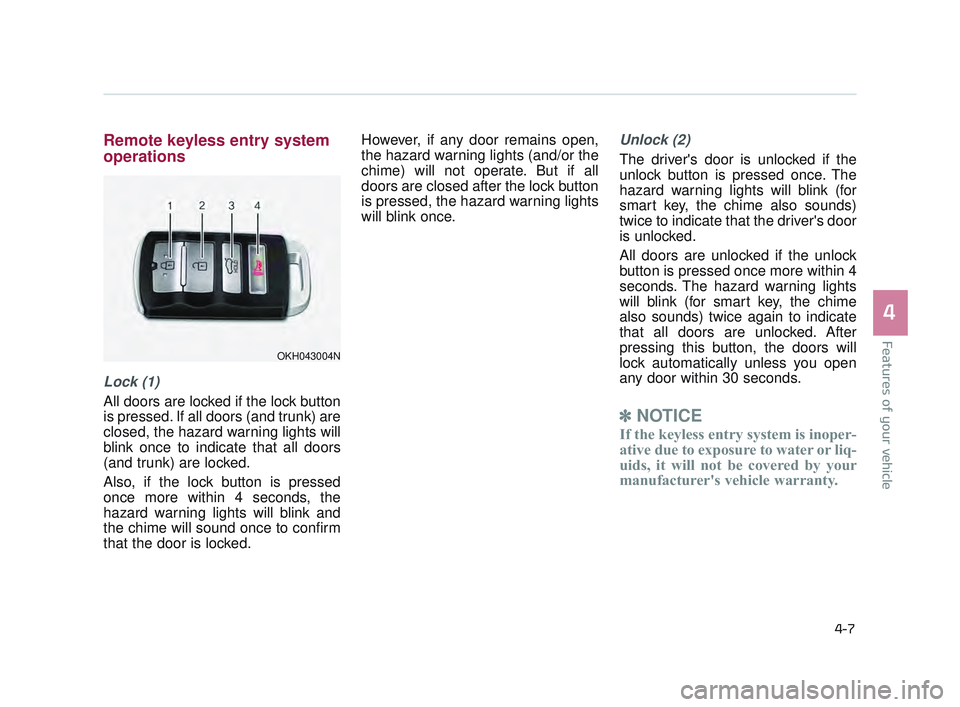
Remote keyless entry system
operations
Lock (1)
All doors are locked if the lock button
is pressed. If all doors (and trunk) are
closed, the hazard warning lights will
blink once to indicate that all doors
(and trunk) are locked.
Also, if the lock button is pressed
once more within 4 seconds, the
hazard warning lights will blink and
the chime will sound once to confirm
that the door is locked.However, if any door remains open,
the hazard warning lights (and/or the
chime) will not operate. But if all
doors are closed after the lock button
is pressed, the hazard warning lights
will blink once.
Unlock (2)
The driver's door is unlocked if the
unlock button is pressed once. The
hazard warning lights will blink (for
smart key, the chime also sounds)
twice to indicate that the driver's door
is unlocked.
All doors are unlocked if the unlock
button is pressed once more within 4
seconds. The hazard warning lights
will blink (for smart key, the chime
also sounds) twice again to indicate
that all doors are unlocked. After
pressing this button, the doors will
lock automatically unless you open
any door within 30 seconds.
✽
NOTICE
If the keyless entry system is inoper-
ative due to exposure to water or liq-
uids, it will not be covered by your
manufacturer's vehicle warranty.
OKH043004N
KH USA 4:2015 12/2/2016 10:22 AM Page 7
Page 88 of 542
Features of your vehicle
4-8
Trunk open (3)
The trunk is opened if the button is
pressed for more than 1 second.
Once the trunk is opened and then
closed, the trunk will lock automati-
cally.
Panic alarm (4)
The horn sounds and the hazard
warning lights blink for about 30 sec-
onds if this button is pressed for
more than 0.5 seconds. To stop the
horn and lights, press any button on
the transmitter.
Transmitter precautions
The transmitter (or smart key) will not
work if any of following occurs:
You exceed the operating distancelimit (about 90 feet [30 m]).
The battery in the transmitter (or smart key) is weak.
Other vehicles or objects may be blocking the signal.
The weather is extremely cold.
The transmitter (or smart key) is close to a radio transmitter such as
a radio station or an airport which
can interfere with normal operation
of the transmitter.
When the transmitter (or smart key)
does not work properly, open and
close the door with the smart key. If
you have a problem with the trans-
mitter (or smart key), contact an
authorized K900 Kia dealer. If the transmitter is in close proximi-
ty to your cell phone or smart phone,
the signal from the transmitter could
be blocked by normal operation of
your cell phone or smart phone. This
is especially important when the
phone is active such as making call,
receiving calls, text messaging,
and/or sending/receiving emails.
Avoid placing the transmitter and
your cell phone or smart phone in
the same pants or jacket pocket and
maintain adequate distance
between the two devices.
Transmitter damage
Do not drop, wet or expose the
keyless entry system transmit-
ter to heat or sunlight.
CAUTION
KH USA 4:2015 12/2/2016 10:22 AM Page 8
Page 93 of 542
Features of your vehicle
4
4-13
THEFT-ALARM SYSTEM
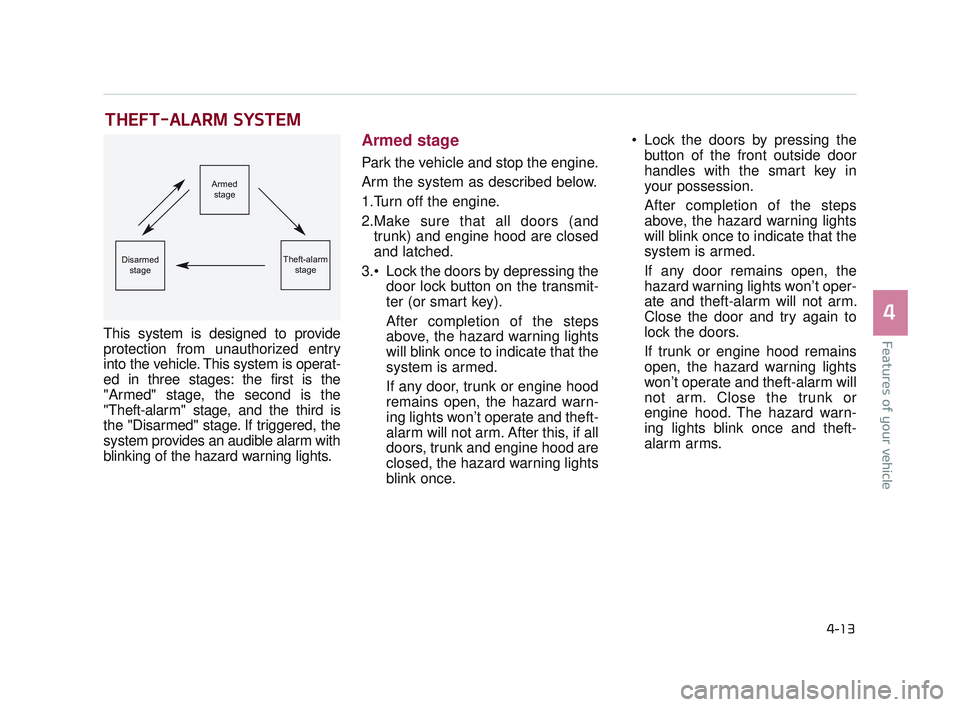
This system is designed to provide
protection from unauthorized entry
into the vehicle. This system is operat-
ed in three stages: the first is the
"Armed" stage, the second is the
"Theft-alarm" stage, and the third is
the "Disarmed" stage. If triggered, the
system provides an audible alarm with
blinking of the hazard warning lights.
Armed stage
Park the vehicle and stop the engine.
Arm the system as described below.
1.Turn off the engine.
2.Make sure that all doors (andtrunk) and engine hood are closed
and latched.
Lock the doors by depressing the door lock button on the transmit-
ter (or smart key).
After completion of the steps
above, the hazard warning lights
will blink once to indicate that the
system is armed.
If any door, trunk or engine hood
remains open, the hazard warn-
ing lights won’t operate and theft-
alarm will not arm. After this, if all
doors, trunk and engine hood are
closed, the hazard warning lights
blink once. Lock the doors by pressing the
button of the front outside door
handles with the smart key in
your possession.
After completion of the steps
above, the hazard warning lights
will blink once to indicate that the
system is armed.
If any door remains open, the
hazard warning lights won’t oper-
ate and theft-alarm will not arm.
Close the door and try again to
lock the doors.
If trunk or engine hood remains
open, the hazard warning lights
won’t operate and theft-alarm will
not arm. Close the trunk or
engine hood. The hazard warn-
ing lights blink once and theft-
alarm arms.
Armed
stage
Theft-alarm stageDisarmedstage
KH USA 4:2015 12/2/2016 10:22 AM Page 13
Page 94 of 542
Features of your vehicle
4-14
The theft-alarm system by the key
can be activated by an authorized
Kia dealer.
If you want this feature, consult an
authorized K900 Kia dealer.
Do not arm the system until all
passengers have left the vehicle. If
the system is armed while a pas-
senger(s) remains in the vehicle,
the alarm may be activated when
the remaining passenger(s)
leaves the vehicle. If any door (or
trunk) or engine hood is opened
within 30 seconds after the sys-
tem enters the armed stage, the
system will be disarmed to pre-
vent unnecessary alarm.Theft-alarm stage
The alarm will be activated if any of
the following occurs while the system
is armed.
A front or rear door is opened with-out using the smart key (or
mechanical key).
The trunk is opened without using the smart key (or mechanical key).
The engine hood is opened.
The horn will sound and the hazard
warning lights will blink continuously
for approximately 27 seconds. To
turn off the system, unlock the doors
with the smart key.
Disarmed stage
The system will be disarmed when:
- The door unlock button is pressed.
- The button of the front outside door is pressed while carrying the smart
key.
- The engine is started. (within 3 seconds)
After the doors are unlocked, the haz-
ard warning lights will blink twice to
indicate that the system is disarmed.
After pressing the unlock button, if
any door (or trunk) is not opened
within 30 seconds, the system will be
rearmed.
KH USA 4:2015 12/2/2016 10:22 AM Page 14
Page 108 of 542
Features of your vehicle
4-28
How to use the Smart Trunk
The trunk can be opened with
notouch activation satisfying all the
conditions below.
After 15 seconds when all doorsare closed and locked
Positioned in the detecting area for more than 3 seconds.
✽ NOTICE
• The Smart Trunk does not operate
when:
- The smart key is detected within15 seconds after the doors are
closed and locked, and is contin-
uously detected.
- The smart key is detected within 15 seconds after the doors are
closed and locked, and within 60
inches (1.5 m) from the front
door handles. (for vehicles
equipped with Welcome Light)
- A door is not locked or closed.
- The smart key is in the vehicle.
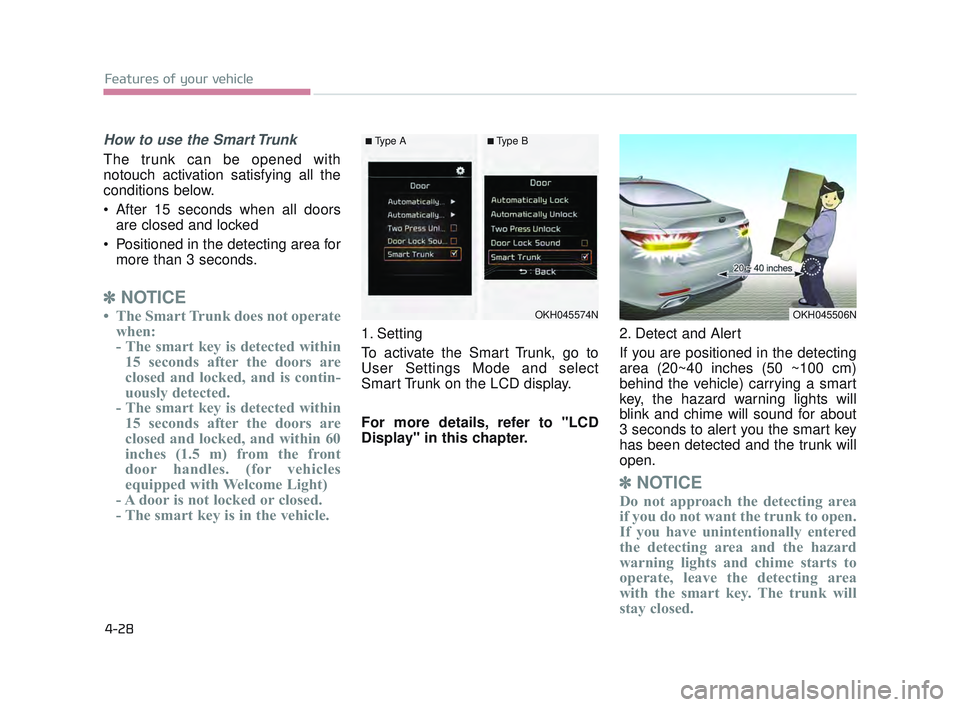
1. Setting
To activate the Smart Trunk, go to
User Settings Mode and select
Smart Trunk on the LCD display.
For more details, refer to "LCD
Display" in this chapter. 2. Detect and Alert
If you are positioned in the detecting
area (20~40 inches (50 ~100 cm)
behind the vehicle) carrying a smart
key, the hazard warning lights will
blink and chime will sound for about
3 seconds to alert you the smart key
has been detected and the trunk will
open.
✽
NOTICE
Do not approach the detecting area
if you do not want the trunk to open.
If you have unintentionally entered
the detecting area and the hazard
warning lights and chime starts to
operate, leave the detecting area
with the smart key. The trunk will
stay closed.
OKH045574NOKH045506N
■Type A■Type B
KH USA 4:2015 12/2/2016 10:23 AM Page 28
Page 109 of 542
Features of your vehicle
4
4-29
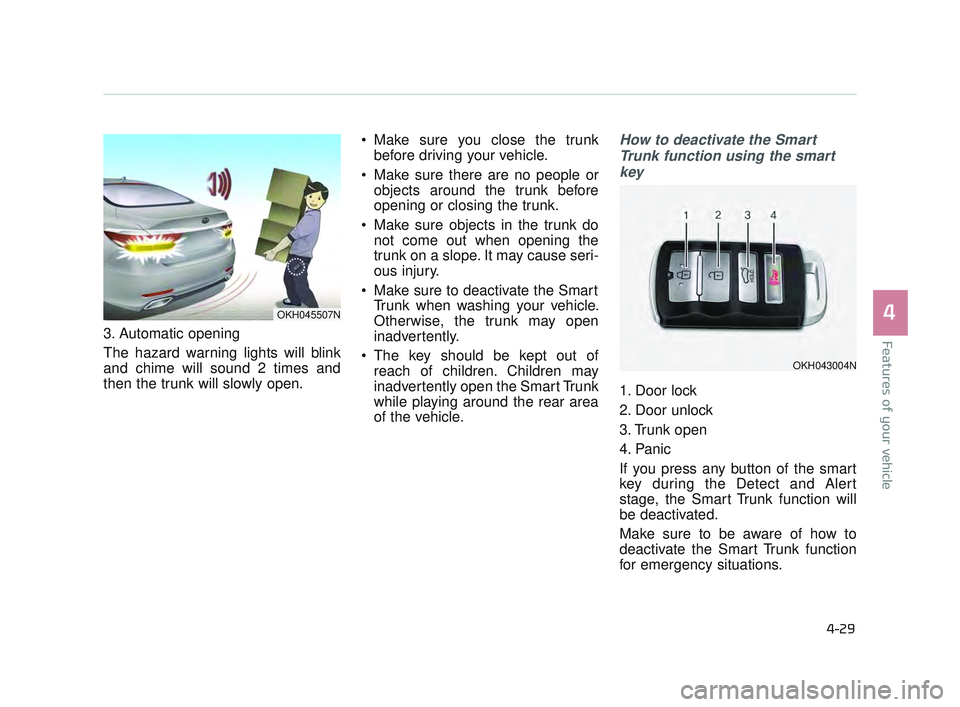
3. Automatic opening
The hazard warning lights will blink
and chime will sound 2 times and
then the trunk will slowly open. Make sure you close the trunk
before driving your vehicle.
Make sure there are no people or objects around the trunk before
opening or closing the trunk.
Make sure objects in the trunk do not come out when opening the
trunk on a slope. It may cause seri-
ous injury.
Make sure to deactivate the Smart Trunk when washing your vehicle.
Otherwise, the trunk may open
inadvertently.
The key should be kept out of reach of children. Children may
inadvertently open the Smart Trunk
while playing around the rear area
of the vehicle.
How to deactivate the Smart
Trunk function using the smartkey
1. Door lock
2. Door unlock
3. Trunk open
4. Panic
If you press any button of the smart
key during the Detect and Alert
stage, the Smart Trunk function will
be deactivated.
Make sure to be aware of how to
deactivate the Smart Trunk function
for emergency situations.
OKH045507N
OKH043004N
KH USA 4:2015 12/2/2016 10:23 AM Page 29
Page 112 of 542
Features of your vehicle
4-32
In cold and wet climates, power win-
dows may not work properly due to
freezing conditions.
Power windows
The Engine Start/Stop button must
be in the ON position for power win-
dows to operate. Each door has a
power window switch that controls
the door’s window. The driver has a
power window lock switch which can
block the operation of rear passen-
ger windows.
The power windows can be operated
for approximately 30 seconds after
engine is turned off. However, if the
front doors are opened, the power
windows cannot be operated even
within the 30 second period.
✽NOTICE
While driving with the rear windows
down or with the sunroof (if
equipped) in an open (or partially
open) position, your vehicle may
demonstrate a wind buffeting or
pulsation noise. This noise is a nor-
mal occurrence and can be reduced
or eliminated by taking the follow-
ing actions. If the noise occurs with
one or both of the rear windows
down, partially lower both front
windows approximately one inch. If
you experience the noise with the
sunroof open, slightly reduce the
size of the sunroof opening.
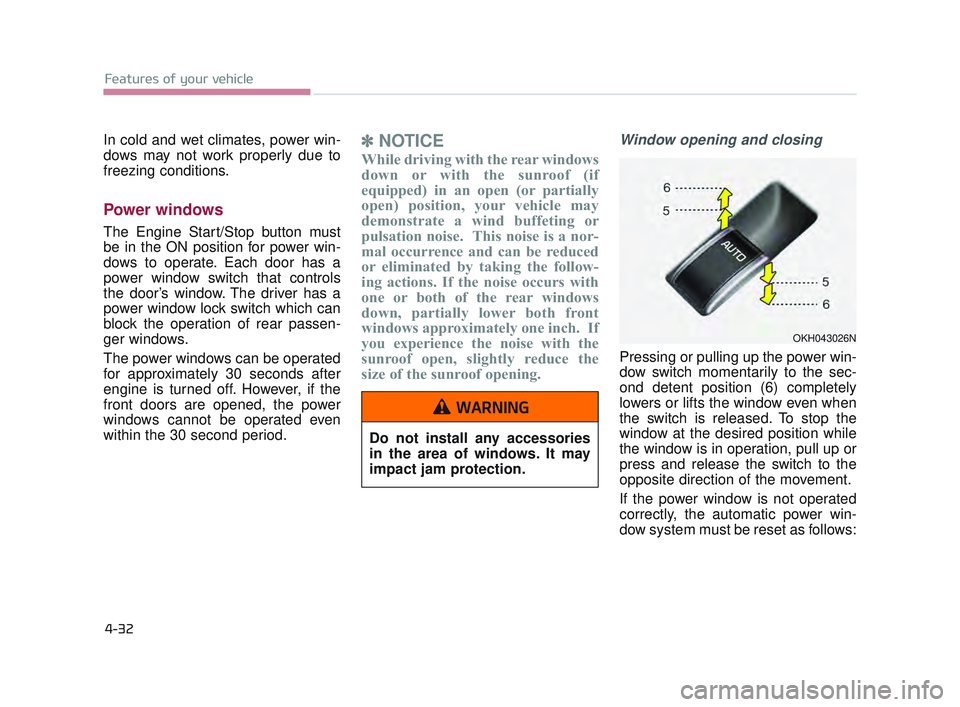
Window opening and closing
Pressing or pulling up the power win-
dow switch momentarily to the sec-
ond detent position (6) completely
lowers or lifts the window even when
the switch is released. To stop the
window at the desired position while
the window is in operation, pull up or
press and release the switch to the
opposite direction of the movement.
If the power window is not operated
correctly, the automatic power win-
dow system must be reset as follows:
OKH043026N
Do not install any accessories
in the area of windows. It may
impact jam protection.
WARNING
KH USA 4:2015 12/2/2016 10:23 AM Page 32
Page 115 of 542

Features of your vehicle
4
4-35
HOOD
Opening the hood
1.Pull the release lever to unlatch thehood. The hood should pop open
slightly.
Open the hood after turning off the
engine on a flat surface, shifting the
shift lever to the P (Park) position for
automatic transaxle and to the 1st
(First) gear or R (Reverse) for manu-
al transaxle, and setting the parking
brake. 2.Go to the front of the vehicle, raise
the hood slightly, push the second-
ary latch (1) left of the hood center
and lift the hood (2).
3.Raise the hood. It will raise com- pletely by itself after it has been
raised about halfway.
OKH043028N
OKH043029N
Unsecured Engine Hood
Always double check to be sure
that the hood is firmly latched
before driving away. If it is not
latched, the hood could fly open
while the vehicle is being driv-
en, causing a total loss of visi-
bility, which might result in an
accident.
WARNING
KH USA 4:2015 12/2/2016 10:23 AM Page 35
Page 116 of 542
Features of your vehicle
4-36
Closing the hood
1.Before closing the hood, check thefollowing:
All filler caps in engine compart-ment must be correctly installed.
Gloves, rags or any other com- bustible material must be
removed from the engine com-
partment.
2.Lower the hood halfway and push down to securely lock in place.
Then double check to be sure thehood is secure.
If the hood can be lifted with a slight force, open the hood again
and close it more firmly.
Hood obstruction
Before closing the hood, ensure
that all obstructions are
removed from the hood open-
ing. Closing the hood with an
obstruction present in the hood
opening may result in property
damage or severe personal
injury.
WARNING
Fire risk
Do not leave gloves, rags or any
other combustible material in
the engine compartment. Doing
so may cause a heat-induced
fire.
WARNING
KH USA 4:2015 12/2/2016 10:23 AM Page 36
Page 117 of 542
Features of your vehicle
4
4-37
FUEL FILLER LID
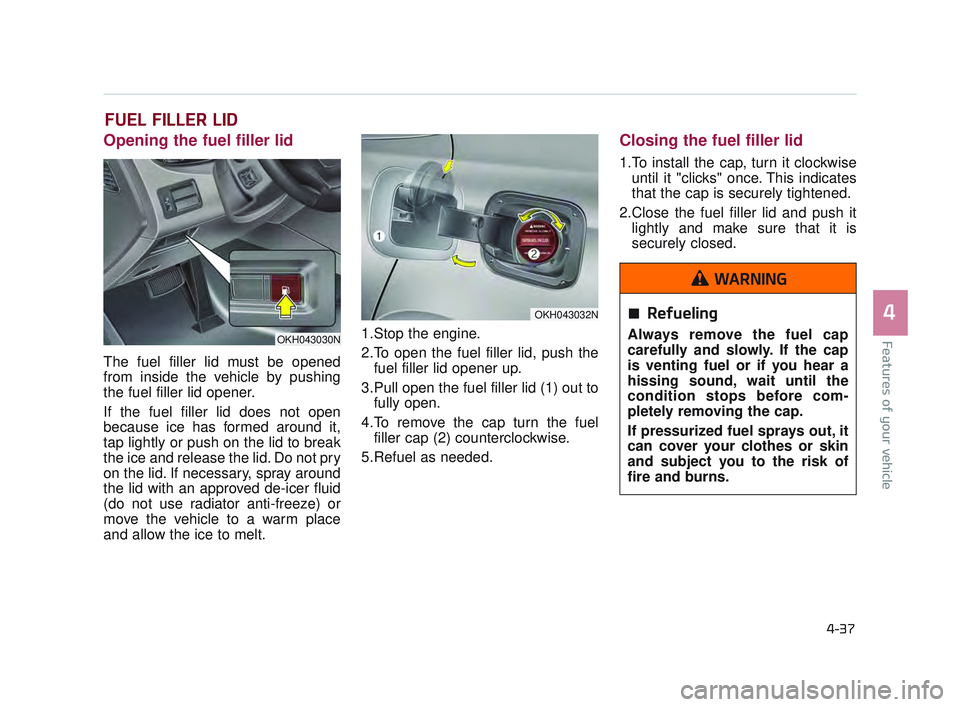
Opening the fuel filler lid
The fuel filler lid must be opened
from inside the vehicle by pushing
the fuel filler lid opener.
If the fuel filler lid does not open
because ice has formed around it,
tap lightly or push on the lid to break
the ice and release the lid. Do not pry
on the lid. If necessary, spray around
the lid with an approved de-icer fluid
(do not use radiator anti-freeze) or
move the vehicle to a warm place
and allow the ice to melt.1.Stop the engine.
2.To open the fuel filler lid, push the
fuel filler lid opener up.
3.Pull open the fuel filler lid (1) out to fully open.
4.To remove the cap turn the fuel filler cap (2) counterclockwise.
5.Refuel as needed.
Closing the fuel filler lid
1.To install the cap, turn it clockwise until it "clicks" once. This indicates
that the cap is securely tightened.
2.Close the fuel filler lid and push it lightly and make sure that it is
securely closed.
Refueling
Always remove the fuel cap
carefully and slowly. If the cap
is venting fuel or if you hear a
hissing sound, wait until the
condition stops before com-
pletely removing the cap.
If pressurized fuel sprays out, it
can cover your clothes or skin
and subject you to the risk of
fire and burns.
WARNING
OKH043030N
OKH043032N
KH USA 4:2015 12/2/2016 10:23 AM Page 37