Eco KIA K900 2017 Workshop Manual
[x] Cancel search | Manufacturer: KIA, Model Year: 2017, Model line: K900, Model: KIA K900 2017Pages: 542, PDF Size: 14.89 MB
Page 121 of 542
Features of your vehicle
4
4-41
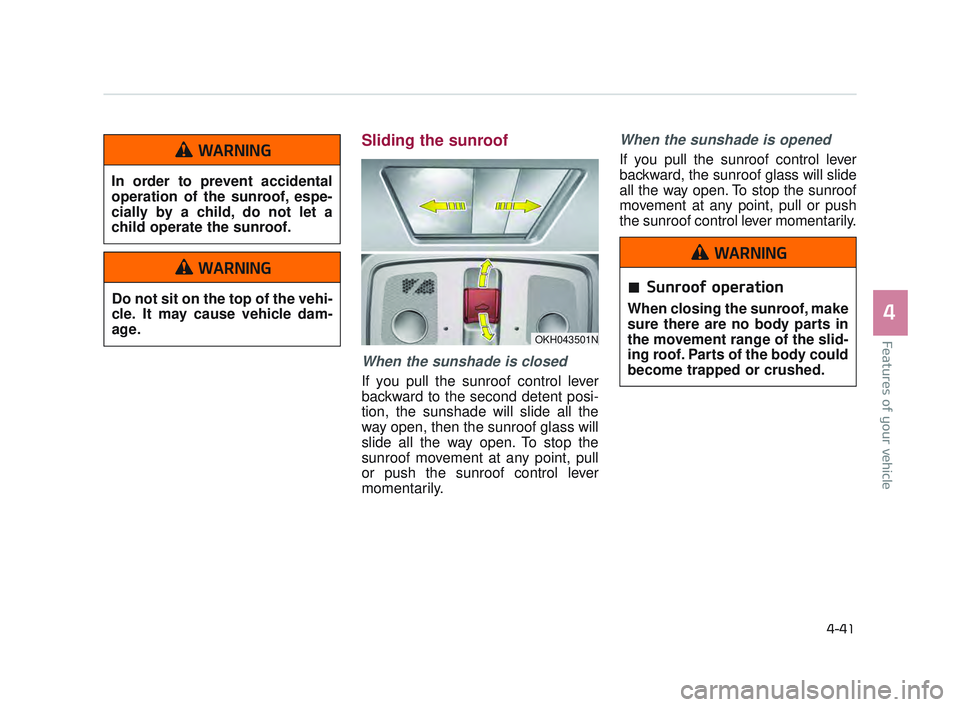
Sliding the sunroof
When the sunshade is closed
If you pull the sunroof control lever
backward to the second detent posi-
tion, the sunshade will slide all the
way open, then the sunroof glass will
slide all the way open. To stop the
sunroof movement at any point, pull
or push the sunroof control lever
momentarily.
When the sunshade is opened
If you pull the sunroof control lever
backward, the sunroof glass will slide
all the way open. To stop the sunroof
movement at any point, pull or push
the sunroof control lever momentarily.
OKH043501N
Sunroof operation
When closing the sunroof, make
sure there are no body parts in
the movement range of the slid-
ing roof. Parts of the body could
become trapped or crushed.
WARNING
In order to prevent accidental
operation of the sunroof, espe-
cially by a child, do not let a
child operate the sunroof.
WARNING
Do not sit on the top of the vehi-
cle. It may cause vehicle dam-
age.
WARNING
KH USA 4:2015 12/2/2016 10:23 AM Page 41
Page 122 of 542
Features of your vehicle
4-42
Closing the sunroof
To close the sunroof glass only
Push the sunroof control lever for-
ward to the first detent position or
pull the lever downward.
To close the sunroof glass withthe sunshade
Push the sunroof control lever for-
ward to the second detent position.
The sunroof glass will close, then the
sunshade close automatically.
To stop the sunroof movement at any
point, pull or push the sunroof control
lever momentarily.
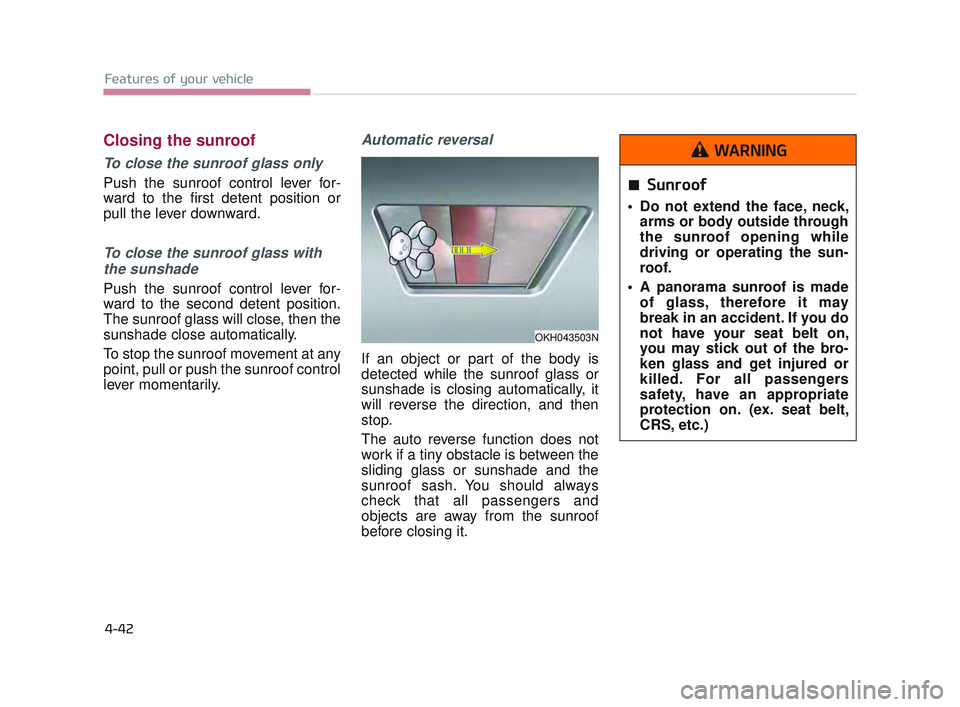
Automatic reversal
If an object or part of the body is
detected while the sunroof glass or
sunshade is closing automatically, it
will reverse the direction, and then
stop.
The auto reverse function does not
work if a tiny obstacle is between the
sliding glass or sunshade and the
sunroof sash. You should always
check that all passengers and
objects are away from the sunroof
before closing it.
OKH043503N
Sunroof
Do not extend the face, neck, arms or body outside through
the sunroof opening while
driving or operating the sun-
roof.
A panorama sunroof is made of glass, therefore it may
break in an accident. If you do
not have your seat belt on,
you may stick out of the bro-
ken glass and get injured or
killed. For all passengers
safety, have an appropriate
protection on. (ex. seat belt,
CRS, etc.)
WARNING
KH USA 4:2015 12/2/2016 10:23 AM Page 42
Page 124 of 542
Features of your vehicle
4-44
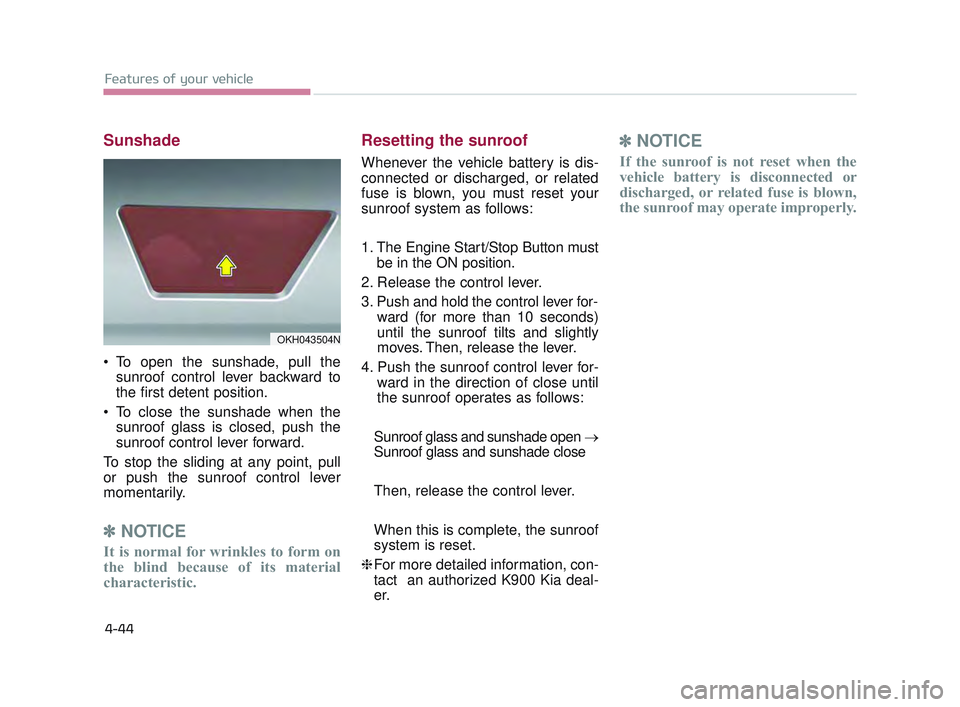
Sunshade
To open the sunshade, pull thesunroof control lever backward to
the first detent position.
To close the sunshade when the sunroof glass is closed, push the
sunroof control lever forward.
To stop the sliding at any point, pull
or push the sunroof control lever
momentarily.
✽ NOTICE
It is normal for wrinkles to form on
the blind because of its material
characteristic.
Resetting the sunroof
Whenever the vehicle battery is dis-
connected or discharged, or related
fuse is blown, you must reset your
sunroof system as follows:
1. The Engine Start/Stop Button must
be in the ON position.
2. Release the control lever.
3. Push and hold the control lever for- ward (for more than 10 seconds)
until the sunroof tilts and slightly
moves. Then, release the lever.
4. Push the sunroof control lever for- ward in the direction of close until
the sunroof operates as follows:
Sunroof glass and sunshade open →
Sunroof glass and sunshade close
Then, release the control lever.
When this is complete, the sunroof
system is reset.
❈ For more detailed information, con-
tact an authorized K900 Kia deal-
er.
✽ NOTICE
If the sunroof is not reset when the
vehicle battery is disconnected or
discharged, or related fuse is blown,
the sunroof may operate improperly.
OKH043504N
KH USA 4:2015 12/2/2016 10:23 AM Page 44
Page 125 of 542
Features of your vehicle
4
4-45
STEERING WHEEL
Electronic Hydraulic Power
Steering (EHPS)
This system uses an electromotor to
assist you with steering the vehicle.
If the engine is turned off or if the
EHPS becomes inoperative, you
may still steer the vehicle, but it will
require increased steering effort.
Should you notice any change in the
effort required to steer during normal
vehicle operation, have the EHPS
checked by an authorized K900 Kia
dealer.
✽NOTICE
If the EHPS motor pump malfunc-
tions, the steering effort will greatly
increase.
✽NOTICE
If the vehicle is parked for extended
periods outside in cold weather
(below 14°F/-10°C), the power steer-
ing may require increased effort
when the engine is first started. This
is caused by increased fluid viscosity
due to the cold weather and does not
indicate a malfunction.
When this happens, increase the
engine RPM by depressing accelera-
tor until the RPM reaches 1,500 rpm
then release or let the engine idle for
two or three minutes to warm up the
fluid.
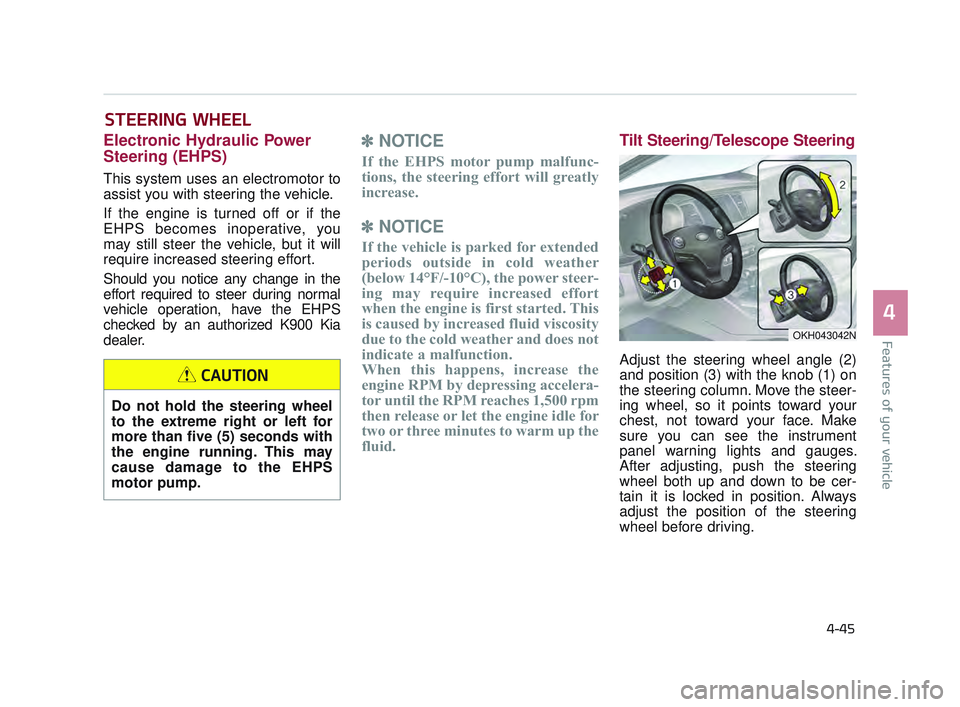
Tilt Steering/Telescope Steering
Adjust the steering wheel angle (2)
and position (3) with the knob (1) on
the steering column. Move the steer-
ing wheel, so it points toward your
chest, not toward your face. Make
sure you can see the instrument
panel warning lights and gauges.
After adjusting, push the steering
wheel both up and down to be cer-
tain it is locked in position. Always
adjust the position of the steering
wheel before driving.
Do not hold the steering wheel
to the extreme right or left for
more than five (5) seconds with
the engine running. This may
cause damage to the EHPS
motor pump.
CAUTION
OKH043042N
KH USA 4:2015 12/2/2016 10:24 AM Page 45
Page 126 of 542
Features of your vehicle
4-46
Heated steering wheel
(if equipped)
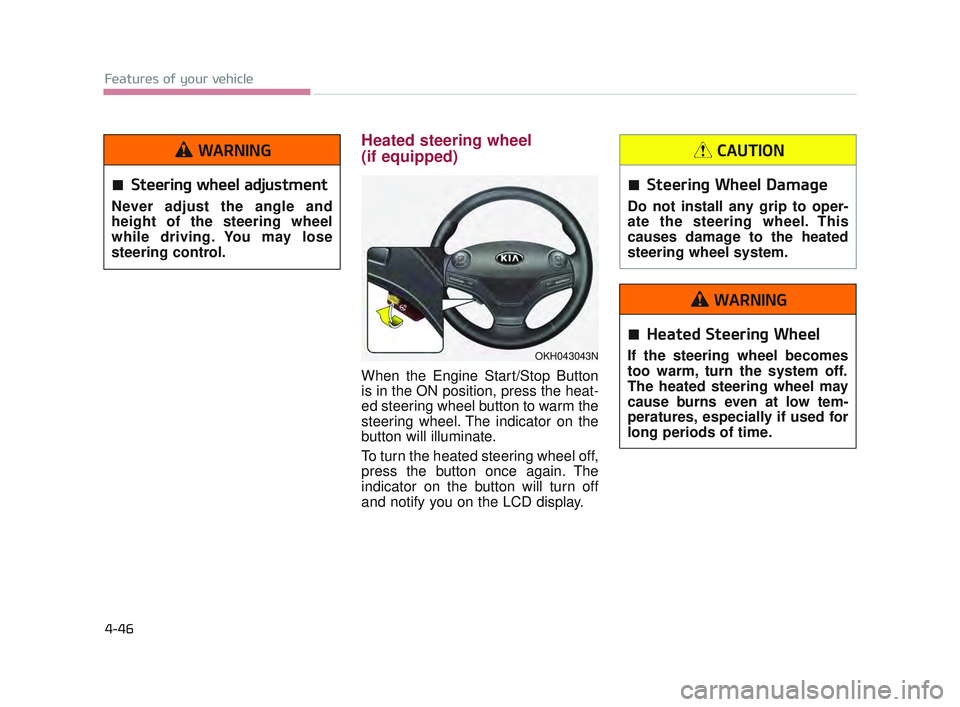
When the Engine Start/Stop Button
is in the ON position, press the heat-
ed steering wheel button to warm the
steering wheel. The indicator on the
button will illuminate.
To turn the heated steering wheel off,
press the button once again. The
indicator on the button will turn off
and notify you on the LCD display.
OKH043043N
Steering wheel adjustment
Never adjust the angle and
height of the steering wheel
while driving. You may lose
steering control.
WARNING
Steering Wheel Damage
Do not install any grip to oper-
ate the steering wheel. This
causes damage to the heated
steering wheel system.
CAUTION
Heated Steering Wheel
If the steering wheel becomes
too warm, turn the system off.
The heated steering wheel may
cause burns even at low tem-
peratures, especially if used for
long periods of time.
WARNING
KH USA 4:2015 12/2/2016 10:24 AM Page 46
Page 131 of 542
Features of your vehicle
4
4-51
To adjust the Zone setting:
1.Determine the desired ZoneNumber based upon your current
location on the Zone Map.
2.Press and hold the button for more than 3, but less than 6 sec-
onds, the current Zone Number will
appear on the display.
3.Pressing and holding the button again will cause the numbers to
increment (Note: they will repeat
…13, 14, 15, 1, 2, …). Releasing
the button when the desired Zone
Number appears on the display will
set the new Zone.
4.Within about 5 seconds, the com- pass will start displaying a com-
pass heading again. There are some conditions that can
cause changes to the vehicle mag-
nets, such as installing a ski rack or a
CB antenna. Body repair work on the
vehicle can also cause changes to the
vehicle's magnetic field. In these situa-
tions, the compass will need to be re-
calibrated to quickly correct for these
changes. To re-calibrate the compass:
1.Press and hold the button for
more than 6 seconds. When the
compass memory is cleared, a "C"
will appear in the display.
2.To calibrate the compass, drive the vehicle in 2 complete circles at less
than 5 mph (8 km/h). Integrated HomeLink®
Wireless Control System
The HomeLink
®Wireless Control
System provides a convenient way to
replace up to three hand-held radio-
frequency (RF) transmitters with a
single built-in device. This innovative
feature will learn the radio frequency
codes of most current transmitters to
operate devices such as gate opera-
tors, garage door openers, entry
door locks, security systems, even
home lighting. Both standard and
rolling code-equipped transmitters
can be programmed by following the
outlined procedures. Additional
HomeLink
®information can be found
at: www.homelink.com or by calling
1-800-355-3515.
❈ HomeLink
®is a registered trade-
mark of Johnson Controls, Inc.
KH USA 4:2015 12/2/2016 10:24 AM Page 51
Page 132 of 542
Features of your vehicle
4-52
\Retain the original transmitter of the
RF device you are programming for
use in other vehicles as well as for
future HomeLink
®programming. It is
also suggested that upon the sale of
the vehicle, the programmed
HomeLink
®buttons be erased for
security purposes. Programming HomeLink
®
✽
NOTICE
• When programming a garage
door opener, it is advised to park
the vehicle outside of the garage.
• It is recommended that a new bat- tery be placed in the hand-held
transmitter of the device being pro-
grammed to HomeLink
®for quick-
er training and accurate transaxle
of the radio-frequency signal.
• Some vehicles may require the Engine Start/Stop button to be
turned to the second (or "acces-
sories") position for programming
and/or operation of HomeLink
®.
• In the event that there are still pro- gramming difficulties or questions
after following the programming
steps listed below, contact
HomeLink
®at: www.homelink.com
or 1-800-355-3515.
Standard programming
To train most devices, follow these
instructions:
1. For first-time programming, press
and hold the two outside buttons,
HomeLink
®Channel 1 and
Channel 3 Buttons, until the indi-
cator light begins to flash (after 20
seconds). Release both buttons.
Do not hold the buttons for longer
than 30 seconds.
2. Position the end of your hand-held transmitter 1-3 inches (2-8 cm)
away from the HomeLink
®buttons
while keeping the indicator light in
view.
3. Simultaneously press and hold both the HomeLink
®and hand-
held transmitter button. DO NOT
release the buttons until step 4
has been completed.
4. While continuing to hold the but- tons the red Indicator Status LED
will flash slowly and then rapidly
after HomeLink
®successfully
trains to the frequency signal from
the hand-held transmitter. Release
both buttons.
KH USA 4:2015 12/2/2016 10:24 AM Page 52
Page 133 of 542
Features of your vehicle
4
4-53
5. Press and hold the just-trainedHomeLink®button and observe
the red Status Indicator LED. If the
indicator light stays on constantly,
programming is complete and
your device should activate when
the HomeLink
®button is pressed
and released.
6. To program the remaining two HomeLink
®buttons, follow steps 2
through 5. Rolling code programming
Rolling code devices which are
"code-protected" and manufactured
after 1996 may be determined by the
following:
Reference the device owner's
manual for verification.
The handheld transmitter appears to program the HomeLink®
Universal Transceiver but does not
activate the device.
Press and hold the trained HomeLink
®button. The device has
the rolling code feature if the indi-
cator light flashes rapidly and then
turns solid after 2 seconds. To train rolling code devices, follow
these instructions:
1. At the garage door opener receiver
(motor-head unit) in the garage,
locate the "learn" or "smart" button.
This can usually be found where the
hanging antenna wire is attached to
the motor-head unit. Exact location
and color of the button may vary by
garage door opener brand.
If there is difficulty locating the train-
ing button, reference the device
owner's manual or please visit our
Web site at www.homelink.com.
2. Firmly press and release the "learn" or "smart" button (which
activates the "training light").
✽NOTICE
There are 30 seconds in which to ini-
tiate step 3.
KH USA 4:2015 12/2/2016 10:24 AM Page 53
Page 134 of 542
Features of your vehicle
4-54
3. Return to the vehicle, firmly pressand hold for two seconds the desired
HomeLink
®button then release.
Repeat the "press/hold/release"
sequence a second time to com-
plete the programming. (Some
devices may require you to repeat
this sequence a third time to com-
plete the programming.)
4. Press and hold the just-trained HomeLink
®button and observe
the red Status Indicator LED. If the
indicator light stays on constantly,
programming is complete and
your device should activate.
5. To program the remaining two HomeLink
®buttons, follow either
steps 1 through 4 above for other
Rolling Code devices or steps 2
through 5 in Standard
Programming for standard devices. Gate operator &
Canadian programming
During programming, your handheld
transmitter may automatically stop
transmitting. Continue to press the
Integrated HomeLink
®Wireless
Control System button (note steps 2
through 4 in the Standard
Programming portion of this docu-
ment) while you press and re-press
("cycle") your handheld transmitter
every two seconds until the frequen-
cy signal has been learned. The indi-
cator light will flash slowly and then
rapidly after several seconds upon
successful training. Operating HomeLink
®
To operate, simply press and release
the programmed HomeLink®button.
Activation will now occur for the
trained device (i.e. garage door
opener, gate operator, security sys-
tem, entry door lock, home/office
lighting, etc.). For convenience, the
hand-held transmitter of the device
may also be used at any time.
KH USA 4:2015 12/2/2016 10:24 AM Page 54
Page 135 of 542
Features of your vehicle
4
4-55
Reprogramming a single
HomeLink®button
To program a new device to a previ-
ously trained HomeLink
®button, fol-
low these steps:
1. Press and hold the desired HomeLink
®button. Do NOT release
until step 4 has been completed.
2. When the indicator light begins to flash slowly (after 20 seconds),
position the handheld transmitter
1 to 3 inches away from the
HomeLink
®surface.
3. Press and hold the handheld transmitter button. The
HomeLink
®indicator light will
flash, first slowly and then rapidly.
4. When the indicator light begins to flash rapidly, release both buttons.
5. Press and hold the just-trained HomeLink
®button and observe
the red Status Indicator LED. If the
indicator light stays on constantly,
programming is complete and
your new device should activate. Erasing HomeLink
®buttons
Individual buttons cannot be erased.
However, to erase all three pro-
grammed buttons:
1. Press and hold the two outer HomeLink
®buttons until the indi-
cator light begins to flash-after 20
seconds.
2. Release both buttons. Do not hold for longer than 30 seconds.
The Integrated HomeLink
®Wireless
Control System is now in the training
(learn) mode and can be pro-
grammed at any time following the
appropriate steps in the Programming
sections above. FCC ID: NZLZTVHL3
IC: 4112A-ZTVHL3
Pursuant to Code of Federal
Regulations, Title 47, Part 15
("FCC Rules")
Operation is subject to the following
two conditions:
1. This device may not cause harm-
ful interference, and
2. This device must accept any inter- ference received, including inter-
ference that may cause undesired
operation.
KH USA 4:2015 12/2/2016 10:24 AM Page 55