change wheel KIA K900 2017 Owners Manual
[x] Cancel search | Manufacturer: KIA, Model Year: 2017, Model line: K900, Model: KIA K900 2017Pages: 542, PDF Size: 14.89 MB
Page 125 of 542
Features of your vehicle
4
4-45
STEERING WHEEL
Electronic Hydraulic Power
Steering (EHPS)
This system uses an electromotor to
assist you with steering the vehicle.
If the engine is turned off or if the
EHPS becomes inoperative, you
may still steer the vehicle, but it will
require increased steering effort.
Should you notice any change in the
effort required to steer during normal
vehicle operation, have the EHPS
checked by an authorized K900 Kia
dealer.
✽NOTICE
If the EHPS motor pump malfunc-
tions, the steering effort will greatly
increase.
✽NOTICE
If the vehicle is parked for extended
periods outside in cold weather
(below 14°F/-10°C), the power steer-
ing may require increased effort
when the engine is first started. This
is caused by increased fluid viscosity
due to the cold weather and does not
indicate a malfunction.
When this happens, increase the
engine RPM by depressing accelera-
tor until the RPM reaches 1,500 rpm
then release or let the engine idle for
two or three minutes to warm up the
fluid.
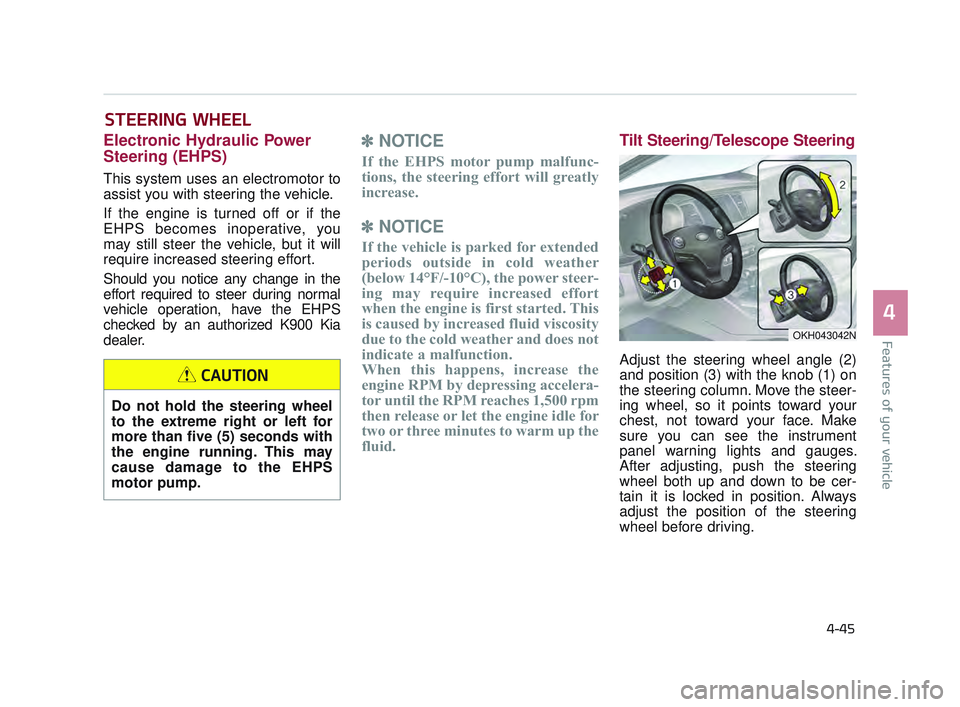
Tilt Steering/Telescope Steering
Adjust the steering wheel angle (2)
and position (3) with the knob (1) on
the steering column. Move the steer-
ing wheel, so it points toward your
chest, not toward your face. Make
sure you can see the instrument
panel warning lights and gauges.
After adjusting, push the steering
wheel both up and down to be cer-
tain it is locked in position. Always
adjust the position of the steering
wheel before driving.
Do not hold the steering wheel
to the extreme right or left for
more than five (5) seconds with
the engine running. This may
cause damage to the EHPS
motor pump.
CAUTION
OKH043042N
KH USA 4:2015 12/2/2016 10:24 AM Page 45
Page 148 of 542
Features of your vehicle
4-68
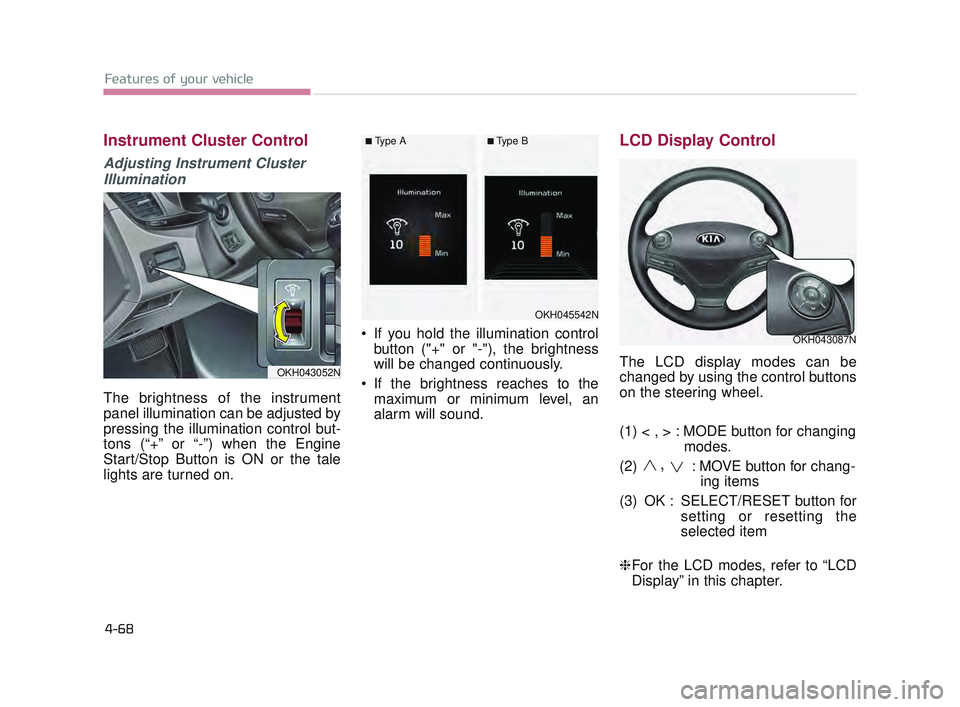
Instrument Cluster Control
Adjusting Instrument ClusterIllumination
The brightness of the instrument
panel illumination can be adjusted by
pressing the illumination control but-
tons (“+” or “-”) when the Engine
Start/Stop Button is ON or the tale
lights are turned on. If you hold the illumination control
button ("+" or "-"), the brightness
will be changed continuously.
If the brightness reaches to the maximum or minimum level, an
alarm will sound.
LCD Display Control
The LCD display modes can be
changed by using the control buttons
on the steering wheel.
(1) < , > : MODE button for changing modes.
(2)
,: MOVE button for chang- ing items
(3) OK : SELECT/RESET button for setting or resetting the
selected item
❈ For the LCD modes, refer to “LCD
Display” in this chapter.
OKH043052N
OKH045542N
OKH043087N
■Type A■Type B
KH USA 4:2015 12/2/2016 10:25 AM Page 68
Page 270 of 542
Driving your vehicle
5
5-7
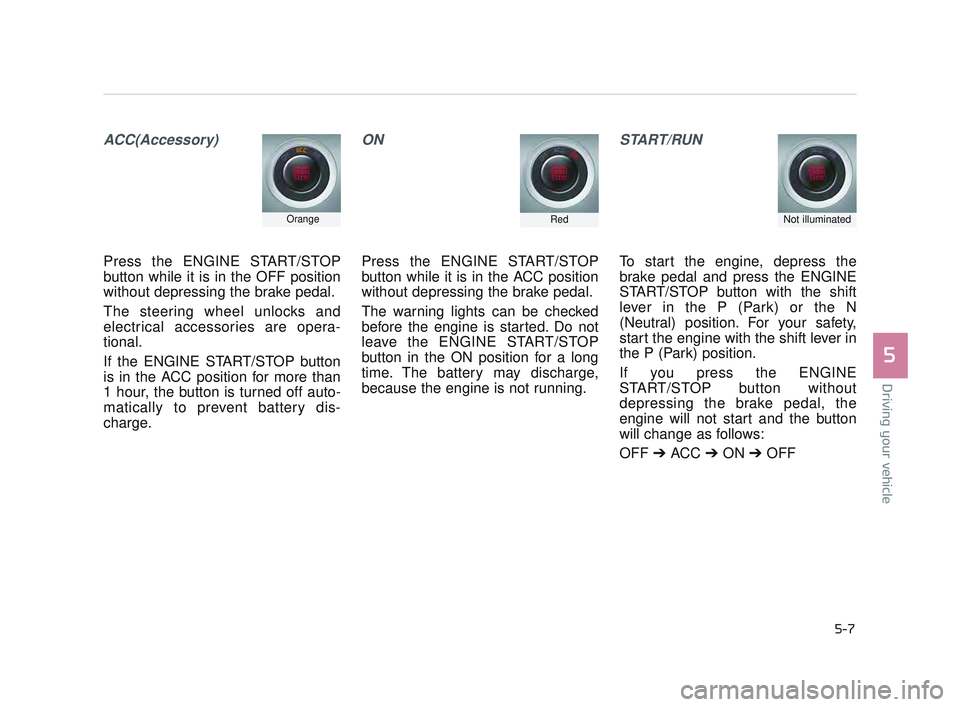
ACC(Accessory)
Press the ENGINE START/STOP
button while it is in the OFF position
without depressing the brake pedal.
The steering wheel unlocks and
electrical accessories are opera-
tional.
If the ENGINE START/STOP button
is in the ACC position for more than
1 hour, the button is turned off auto-
matically to prevent battery dis-
charge.
ON
Press the ENGINE START/STOP
button while it is in the ACC position
without depressing the brake pedal.
The warning lights can be checked
before the engine is started. Do not
leave the ENGINE START/STOP
button in the ON position for a long
time. The battery may discharge,
because the engine is not running.
START/RUN
To start the engine, depress the
brake pedal and press the ENGINE
START/STOP button with the shift
lever in the P (Park) or the N
(Neutral) position. For your safety,
start the engine with the shift lever in
the P (Park) position.
If you press the ENGINE
START/STOP button without
depressing the brake pedal, the
engine will not start and the button
will change as follows:
OFF ➔ ACC ➔ON ➔OFF
OrangeRedNot illuminated
KH USA 5:2016 12/1/2016 10:54 PM Page 7
Page 281 of 542
5-18
Driving your vehicle
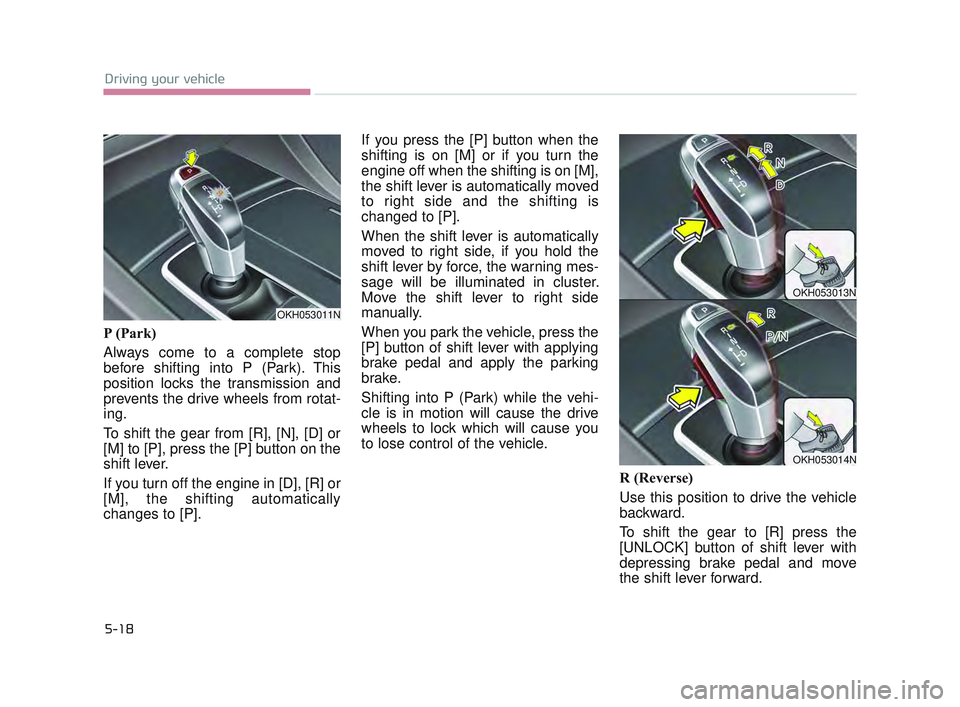
P (Park)
Always come to a complete stop
before shifting into P (Park). This
position locks the transmission and
prevents the drive wheels from rotat-
ing.
To shift the gear from [R], [N], [D] or
[M] to [P], press the [P] button on the
shift lever.
If you turn off the engine in [D], [R] or
[M], the shifting automatically
changes to [P].If you press the [P] button when the
shifting is on [M] or if you turn the
engine off when the shifting is on [M],
the shift lever is automatically moved
to right side and the shifting is
changed to [P].
When the shift lever is automatically
moved to right side, if you hold the
shift lever by force, the warning mes-
sage will be illuminated in cluster.
Move the shift lever to right side
manually.
When you park the vehicle, press the
[P] button of shift lever with applying
brake pedal and apply the parking
brake.
Shifting into P (Park) while the vehi-
cle is in motion will cause the drive
wheels to lock which will cause you
to lose control of the vehicle.
R (Reverse)
Use this position to drive the vehicle
backward.
To shift the gear to [R] press the
[UNLOCK] button of shift lever with
depressing brake pedal and move
the shift lever forward.
OKH053011N
OKH053013N
OKH053014N
KH USA 5:2016 12/1/2016 10:54 PM Page 18
Page 282 of 542
Driving your vehicle
5
5-19
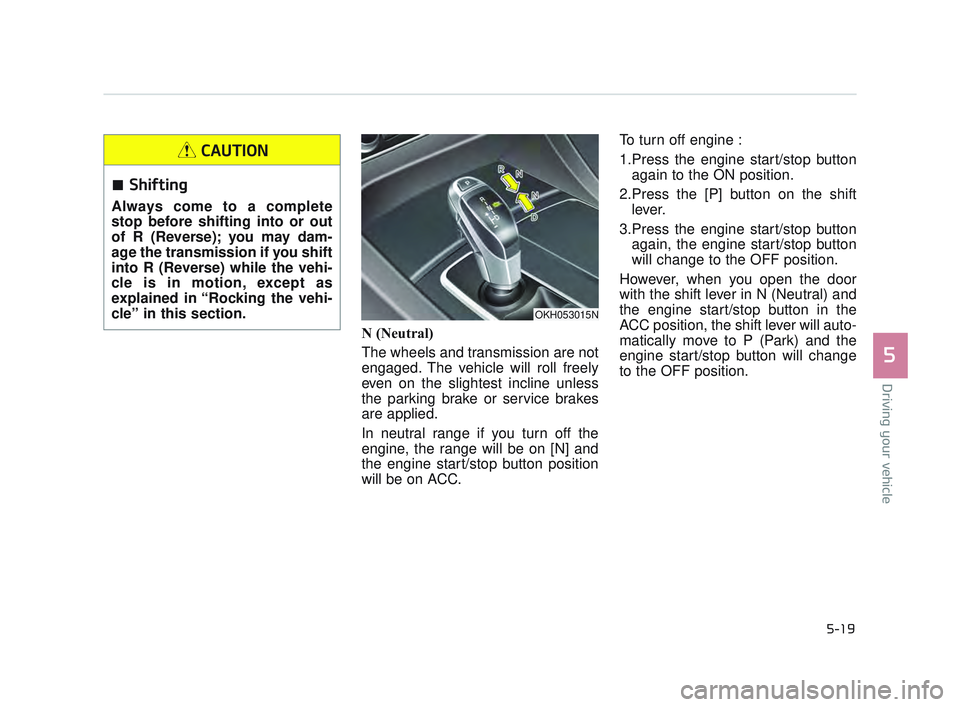
N (Neutral)
The wheels and transmission are not
engaged. The vehicle will roll freely
even on the slightest incline unless
the parking brake or service brakes
are applied.
In neutral range if you turn off the
engine, the range will be on [N] and
the engine start/stop button position
will be on ACC. To turn off engine :
1.Press the engine start/stop button
again to the ON position.
2.Press the [P] button on the shift lever.
3.Press the engine start/stop button again, the engine start/stop button
will change to the OFF position.
However, when you open the door
with the shift lever in N (Neutral) and
the engine start/stop button in the
ACC position, the shift lever will auto-
matically move to P (Park) and the
engine start/stop button will change
to the OFF position.
OKH053015N
Shifting
Always come to a complete
stop before shifting into or out
of R (Reverse); you may dam-
age the transmission if you shift
into R (Reverse) while the vehi-
cle is in motion, except as
explained in “Rocking the vehi-
cle” in this section.
CAUTION
KH USA 5:2016 12/1/2016 10:54 PM Page 19
Page 321 of 542
5-58
Driving your vehicle
DRIVE MODE Indicator Screen
The DRIVE MODE indicator screen
can be displayed by using the trip com-
puter button on the steering wheel.
DRIVE MODE indicator screen dis-
plays status of current drive mode.
DRIVE MODE button is located onthe lower part of the transmission
lever for selecting drive mode.
If drive mode is selected manually
by the user, the drive mode indica-
tor screen will show user-selected
drive mode. (NORMAL, ECO, or
SPORT)
If SMART MODE is selected by
DRIVE MODE button, the drive
mode indicator screen will show
current drive mode automatically
selected by SMART MODE sys-
tem. (SMART NORMAL, SMART
ECO, or SMART SPORT) When the trip computer mode is
selected to show DRIVE MODE
and the SMART MODE is in oper-
ation, an automatically selected
driving mode SMART ECO,
SMART NORMAL, or SMART
SPORT, will be selected on the
cluster's center.
And right below is the horizontal
driving style gauge which reflects
the driving style in real time.
If you drive carefully and slowly in SMART MODE, the left side of the
driving style gauge will illuminate,
and be automatically shifted to the
SMART ECO MODE.
When the driver accelerates more
frequently, the right side of the driv-
ing style gauge will fill up, and shift
to SMART NORMAL MODE.
In addition, if the rate of accelera-
tion and speed is high, drive mode
will change to SMART SPORT
MODE. If the auto cruise control function is
operated or the transmission is
shifted to manual mode while
SMART MODE is on, the SMART
MODE will stop temporarily, and
the DRIVE MODE will be displayed
as OFF. The driving style gauge
light will be turned off accordingly.
If the trip computer is not set to show DRIVE MODE indicator
screen, and you want to know the
on/off status of the SMART MODE,
simply check whether the letters
'SMART' is lighten up on the
screen or not (green - ECO MODE,
white - NORMAL MODE, red -
SPORT MODE).
KH USA 5:2016 12/1/2016 10:55 PM Page 58
Page 332 of 542
Driving your vehicle
5
5-69
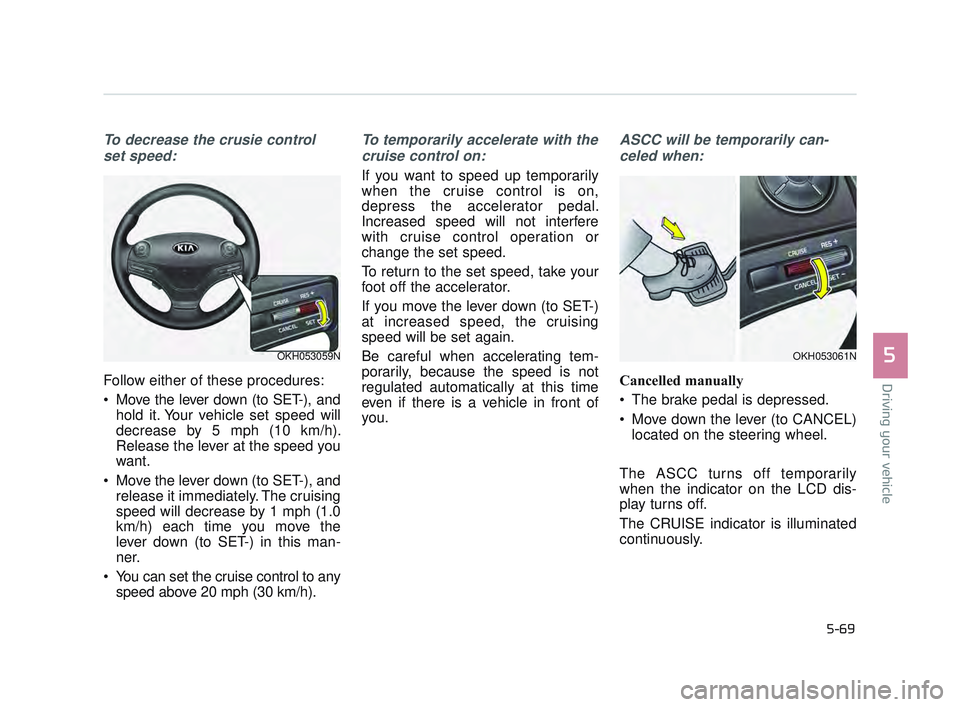
To decrease the crusie controlset speed:
Follow either of these procedures:
Move the lever down (to SET-), and hold it. Your vehicle set speed will
decrease by 5 mph (10 km/h).
Release the lever at the speed you
want.
Move the lever down (to SET-), and release it immediately. The cruising
speed will decrease by 1 mph (1.0
km/h) each time you move the
lever down (to SET-) in this man-
ner.
You can set the cruise control to any speed above 20 mph (30 km/h).
To temporarily accelerate with the
cruise control on:
If you want to speed up temporarily
when the cruise control is on,
depress the accelerator pedal.
Increased speed will not interfere
with cruise control operation or
change the set speed.
To return to the set speed, take your
foot off the accelerator.
If you move the lever down (to SET-)
at increased speed, the cruising
speed will be set again.
Be careful when accelerating tem-
porarily, because the speed is not
regulated automatically at this time
even if there is a vehicle in front of
you.
ASCC will be temporarily can-celed when:
Cancelled manually
The brake pedal is depressed.
Move down the lever (to CANCEL) located on the steering wheel.
The ASCC turns off temporarily
when the indicator on the LCD dis-
play turns off.
The CRUISE indicator is illuminated
continuously.
OKH053059NOKH053061N
KH USA 5:2016 12/1/2016 10:56 PM Page 69
Page 357 of 542
5-94
Driving your vehicle
ECONOMICAL OPERATION
Your vehicle's fuel economy depends
mainly on your style of driving, where
you drive and when you drive.
Each of these factors affects how
many miles (kilometers) you can get
from a gallon (liter) of fuel. To operate
your vehicle as economically as pos-
sible, use the following driving sug-
gestions to help save money in both
fuel and repairs:
Drive smoothly. Accelerate at amoderate rate. Don't make "jack-
rabbit" starts or full-throttle shifts
and maintain a steady cruising
speed. Don't race between stop-
lights. Try to adjust your speed to
the traffic so you don't have to
change speeds unnecessarily.
Avoid heavy traffic whenever pos-
sible. Always maintain a safe dis-
tance from other vehicles so you
can avoid unnecessary braking.
This also reduces brake wear.
Drive at a moderate speed. The faster you drive, the more fuel your
vehicle uses. Driving at a moderate
speed, especially on the highway,
is one of the most effective ways to
help reduce fuel consumption. Don't "ride" the brake pedal. This
can increase fuel consumption and
also increase wear on brake com-
ponents. In addition, driving with
your foot resting on the brake pedal
may cause the brakes to overheat,
which reduces their effectiveness
and may lead to more serious con-
sequences.
Take care of your tires. Keep them inflated to the recommended pres-
sure. Incorrect inflation, either too
much or too little, results in unnec-
essary tire wear. Check the tire
pressures at least once a month.
Be sure that the wheels are aligned correctly. Improper align-
ment can result from hitting curbs
or driving too fast over irregular
surfaces. Poor alignment causes
faster tire wear and may also result
in other problems as well as
greater fuel consumption. Keep your vehicle in good condi-
tion. For better fuel economy and
reduced maintenance costs, main-
tain your vehicle in accordance
with the maintenance schedule in
section 7. If you drive your vehicle
in severe conditions, more frequent
maintenance is required (see sec-
tion 7 for details).
Keep your vehicle clean. For maxi- mum service, your vehicle should
be kept clean and free of corrosive
materials. It is especially important
that mud, dirt, ice, etc. not be
allowed to accumulate on the
underside of the vehicle. This extra
weight can result in increased fuel
consumption and also contribute to
corrosion.
Travel lightly. Don't carry unneces- sary weight in your vehicle. Weight
reduces fuel economy.
Don't let the engine idle longer than necessary. If you are waiting
(and not in traffic), turn off your
engine and restart only when
you're ready to go.
KH USA 5:2016 12/1/2016 10:57 PM Page 94
Page 359 of 542
5-96
Driving your vehicle
Hazardous driving conditions
When hazardous driving conditions
are encountered such as water,
snow, ice, mud, sand, or similar haz-
ards, follow these suggestions:
Drive cautiously and allow extradistance for braking.
Avoid sudden braking or steering.
When braking with non-ABS brakes pump the brake pedal with
a light up-and-down motion until
the vehicle is stopped. Do not pump the brake pedal on a
vehicle equipped with ABS.
If stalled in snow, mud, or sand,
use second gear. Accelerate slow-
ly to avoid spinning the drive
wheels.
Use sand, rock salt, tire chains, or other non-slip material under the
drive wheels to provide traction
when stalled in ice, snow, or mud.
Rocking the vehicle
If it is necessary to rock the vehicle
to free it from snow, sand, or mud,
first turn the steering wheel right and
left to clear the area around your
front wheels. Then, shift back and
forth between R (Reverse) and any
forward gear in vehicles equipped
with an automatic transaxle. Do not
race the engine, and spin the wheels
as little as possible. If you are still
stuck after a few tries, have the vehi-
cle pulled out by a tow vehicle to
avoid engine overheating and possi-
ble damage to the transaxle.
The ESC system should be turned
OFF prior to rocking the vehicle.
SPECIAL DRIVING CONDITIONS
Downshifting
Do not downshift with an auto-
matic transaxle while driving on
slippery surfaces. The sudden
change in tire speed could
cause the tires to skid and
result in an accident.
WARNING
Vehicle rocking
Prolonged rocking may cause
engine overheating, transaxle
damage or failure, and tire dam-
age.
CAUTION
KH USA 5:2016 12/1/2016 10:57 PM Page 96
Page 366 of 542
Driving your vehicle
5
5-103
Change to "winter weight" oil
if necessary
In some climates it is recommended
that a lower viscosity "winter weight"
oil be used during cold weather. See
section 8 for recommendations. If
you aren't sure what weight oil you
should use, consult an authorized
K900 Kia dealer.
Check spark plugs and igni-
tion system
Inspect your spark plugs as
described in section 7 and replace
them if necessary. Also check all
ignition wiring and components to be
sure they are not cracked, worn or
damaged in any way.
To keep locks from freezing
To keep the locks from freezing,
squirt an approved de-icer fluid or
glycerine into the key opening. If a
lock is covered with ice, squirt it with
an approved de-icing fluid to remove
the ice. If the lock is frozen internally,
you may be able to thaw it out by
using a heated key. Handle the heat-
ed key with care to avoid injury.
Use approved window washer
anti-freeze in system
To keep the water in the window
washer system from freezing, add an
approved window washer anti-freeze
solution in accordance with instruc-
tions on the container. Window wash-
er anti-freeze is available from an
authorized K900 Kia dealer and most
auto parts outlets. Do not use engine
coolant or other types of anti-freeze
as these may damage the paint fin-
ish.
Don't let your parking brake
freeze
Under some conditions your parking
brake can freeze in the engaged
position. This is most likely to hap-
pen when there is an accumulation
of snow or ice around or near the
rear brakes or if the brakes are wet. If
there is a risk the parking brake may
freeze, apply it only temporarily while
you put the shift lever in P (Park) and
block the rear wheels so the vehicle
cannot roll. Then release the parking
brake.
Don't let ice and snow accu-
mulate underneath
Under some conditions, snow and
ice can build up under the fenders
and interfere with the steering. When
driving in severe winter conditions
where this may happen, you should
periodically check underneath the
car to be sure the movement of the
front wheels and the steering com-
ponents is not obstructed.
KH USA 5:2016 12/1/2016 10:57 PM Page 103