manual transmission KIA K900 2017 Owners Manual
[x] Cancel search | Manufacturer: KIA, Model Year: 2017, Model line: K900, Model: KIA K900 2017Pages: 542, PDF Size: 14.89 MB
Page 4 of 542
ii
1
2
3
4
5 6
7
8 I
IntroductionHow to use this manual / Fuel requirements / Vehicle break-in process /Vehicle data collection and event data recorders
Your vehicle at a glance
Exterior overview / Interior overview / Instrument panel overview / Engine compartment
Seat and safety features of your vehicle
Seats / Seat belts / Child restraint system / Air bag
Features of your vehicleSmart key / Door locks / Trunk / Windows / Hood / Fuel filler lid / Panoramic sunroof / Steering wheel / Mirrors /
Instrument cluster / Lighting / Wipers & Washers / Climate control system / Audio system / Etc.
Driving your vehicleBefore driving / Engine start/stop button / Transmission / Brake system /
Cruise control system / Advanced Smart Cruise Control system / Winter driving / Vehicle load limit / Etc.
What to do in an emergencyRoad warning / Emergency while driving / Emergency starting / Engine overheat / TPMS / Flat tire / Towing / Etc.
MaintenanceEngine compartment / Maintenance service / Engine oil / Engine coolant / Brake flui\
d / Washer fluid / Parking
brake / Air cleaner / Wiper blades / Battery / Tire and wheels / Fuses / Light bulbs / Etc.
Specifications, Consumer information and Reporting safety defects
Index
Table of contents
KH USA FOREWORD:2016 4/26/2016 9:50 AM Page 3
Page 277 of 542
5-14
Driving your vehicle
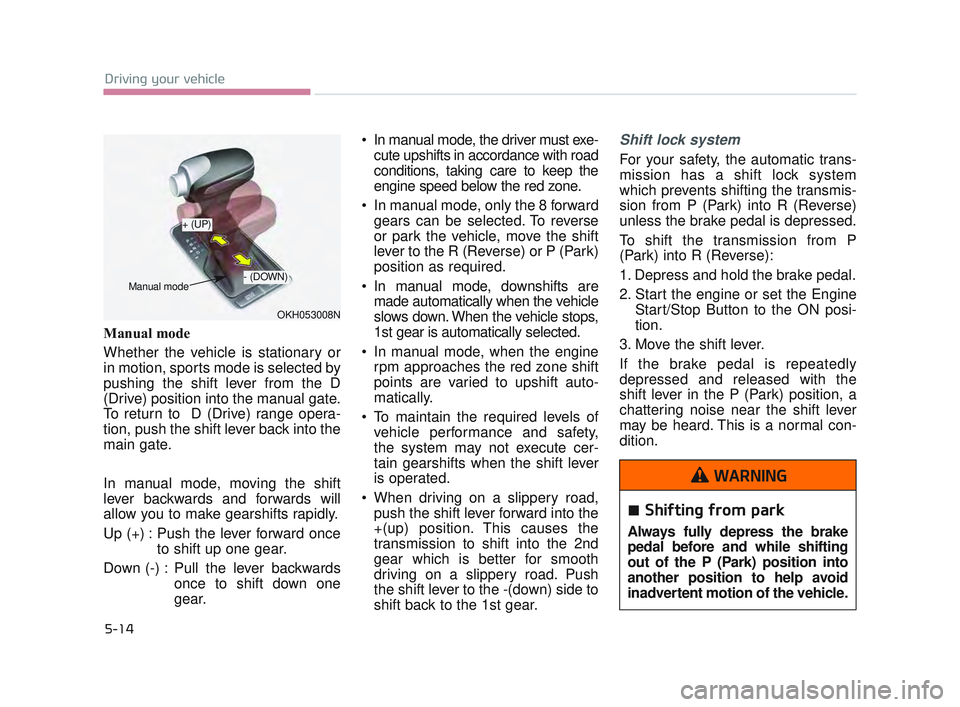
Manual mode
Whether the vehicle is stationary or
in motion, sports mode is selected by
pushing the shift lever from the D
(Drive) position into the manual gate.
To return to D (Drive) range opera-
tion, push the shift lever back into the
main gate.
In manual mode, moving the shift
lever backwards and forwards will
allow you to make gearshifts rapidly.
Up (+) : Push the lever forward onceto shift up one gear.
Down (-) : Pull the lever backwards once to shift down one
gear. In manual mode, the driver must exe-
cute upshifts in accordance with road
conditions, taking care to keep the
engine speed below the red zone.
In manual mode, only the 8 forward gears can be selected. To reverse
or park the vehicle, move the shift
lever to the R (Reverse) or P (Park)
position as required.
In manual mode, downshifts are made automatically when the vehicle
slows down. When the vehicle stops,
1st gear is automatically selected.
In manual mode, when the engine rpm approaches the red zone shift
points are varied to upshift auto-
matically.
To maintain the required levels of vehicle performance and safety,
the system may not execute cer-
tain gearshifts when the shift lever
is operated.
When driving on a slippery road, push the shift lever forward into the
+(up) position. This causes the
transmission to shift into the 2nd
gear which is better for smooth
driving on a slippery road. Push
the shift lever to the -(down) side to
shift back to the 1st gear.
Shift lock system
For your safety, the automatic trans-
mission has a shift lock system
which prevents shifting the transmis-
sion from P (Park) into R (Reverse)
unless the brake pedal is depressed.
To shift the transmission from P
(Park) into R (Reverse):
1. Depress and hold the brake pedal.
2. Start the engine or set the Engine Start/Stop Button to the ON posi-
tion.
3. Move the shift lever.
If the brake pedal is repeatedly
depressed and released with the
shift lever in the P (Park) position, a
chattering noise near the shift lever
may be heard. This is a normal con-
dition.
Shifting from park
Always fully depress the brake
pedal before and while shifting
out of the P (Park) position into
another position to help avoid
inadvertent motion of the vehicle.
WARNING
OKH053008N
+ (UP)
- (DOWN)
Manual mode
KH USA 5:2016 12/1/2016 10:54 PM Page 14
Page 281 of 542
5-18
Driving your vehicle
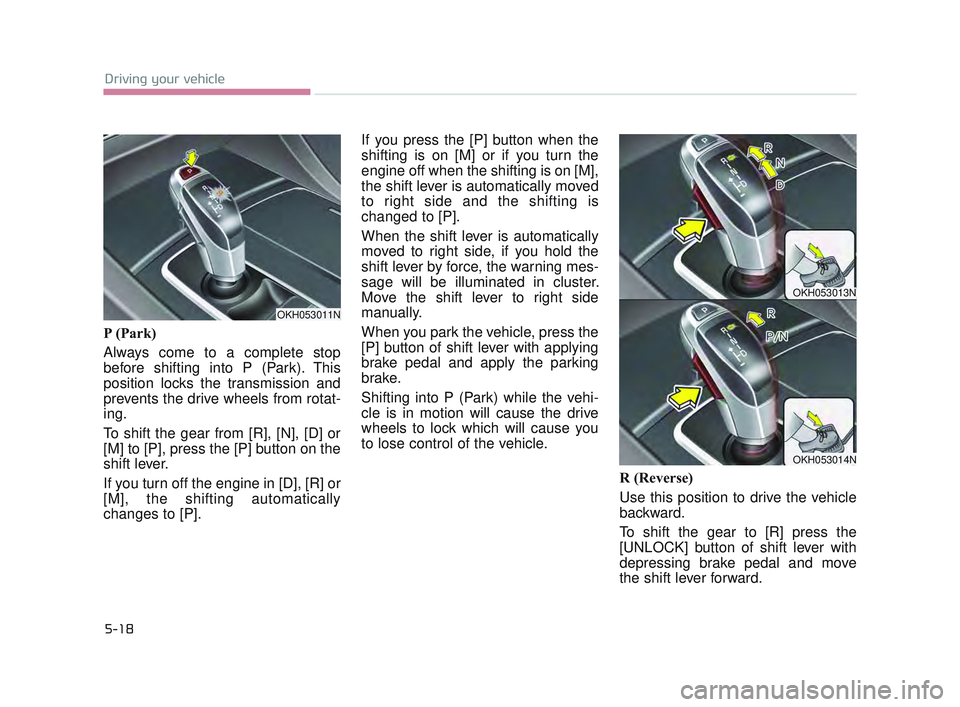
P (Park)
Always come to a complete stop
before shifting into P (Park). This
position locks the transmission and
prevents the drive wheels from rotat-
ing.
To shift the gear from [R], [N], [D] or
[M] to [P], press the [P] button on the
shift lever.
If you turn off the engine in [D], [R] or
[M], the shifting automatically
changes to [P].If you press the [P] button when the
shifting is on [M] or if you turn the
engine off when the shifting is on [M],
the shift lever is automatically moved
to right side and the shifting is
changed to [P].
When the shift lever is automatically
moved to right side, if you hold the
shift lever by force, the warning mes-
sage will be illuminated in cluster.
Move the shift lever to right side
manually.
When you park the vehicle, press the
[P] button of shift lever with applying
brake pedal and apply the parking
brake.
Shifting into P (Park) while the vehi-
cle is in motion will cause the drive
wheels to lock which will cause you
to lose control of the vehicle.
R (Reverse)
Use this position to drive the vehicle
backward.
To shift the gear to [R] press the
[UNLOCK] button of shift lever with
depressing brake pedal and move
the shift lever forward.
OKH053011N
OKH053013N
OKH053014N
KH USA 5:2016 12/1/2016 10:54 PM Page 18
Page 283 of 542
5-20
Driving your vehicle
D (Drive)
This is the normal forward driving
position. The transmission will auto-
matically shift through a 8-gear
sequence, providing the best fuel
economy and power.
For extra power when passing anoth-
er vehicle or climbing grades,
depress the accelerator fully, at
which time the transmission will
automatically downshift to the next
lower gear.
To shift into [D], depress the brake
pedal and press the [UNLOCK] but-
ton of shift lever. And then move the
shift lever to backward.
To shift into [D], from [N] you must
depress the brake pedal.
✽NOTICE
Always come to a complete stop
before shifting into D (Drive).
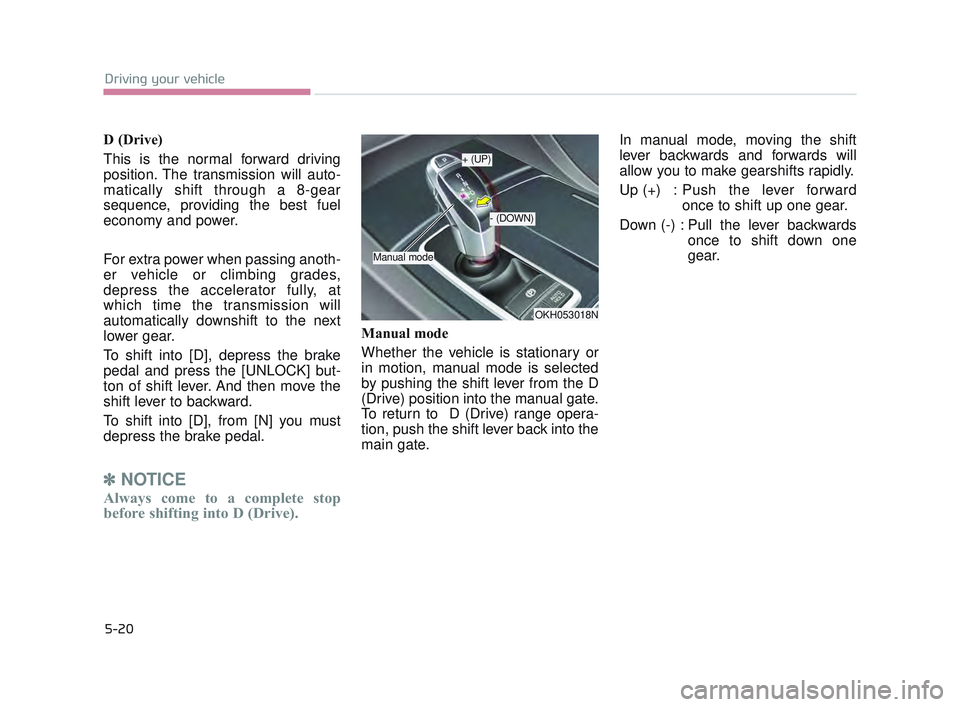
Manual mode
Whether the vehicle is stationary or
in motion, manual mode is selected
by pushing the shift lever from the D
(Drive) position into the manual gate.
To return to D (Drive) range opera-
tion, push the shift lever back into the
main gate. In manual mode, moving the shift
lever backwards and forwards will
allow you to make gearshifts rapidly.
Up (+) : Push the lever forward
once to shift up one gear.
Down (-) : Pull the lever backwards once to shift down one
gear.
OKH053018N
+ (UP)
- (DOWN)
Manual mode
KH USA 5:2016 12/1/2016 10:54 PM Page 20
Page 284 of 542
Driving your vehicle
5
5-21
In manual mode, the driver mustexecute upshifts in accordance
with road conditions, taking care to
keep the engine speed below the
red zone.
In manual mode, only the 8 forward gears can be selected. To reverse
or park the vehicle, move the shift
lever to the R (Reverse) or P (Park)
position as required.
In manual mode, downshifts are made automatically when the vehi-
cle slows down. When the vehicle
stops, 1st gear is automatically
selected.
In manual mode, when the engine rpm approaches the red zone shift
points are varied to upshift auto-
matically.
To maintain the required levels of vehicle performance and safety,
the system may not execute cer-
tain gearshifts when the shift lever
is operated. When driving on a slippery road,
push the shift lever forward into the
+(up) position. This causes the
transmission to shift into the 2nd
gear which is better for smooth
driving on a slippery road. Push
the shift lever to the -(down) side to
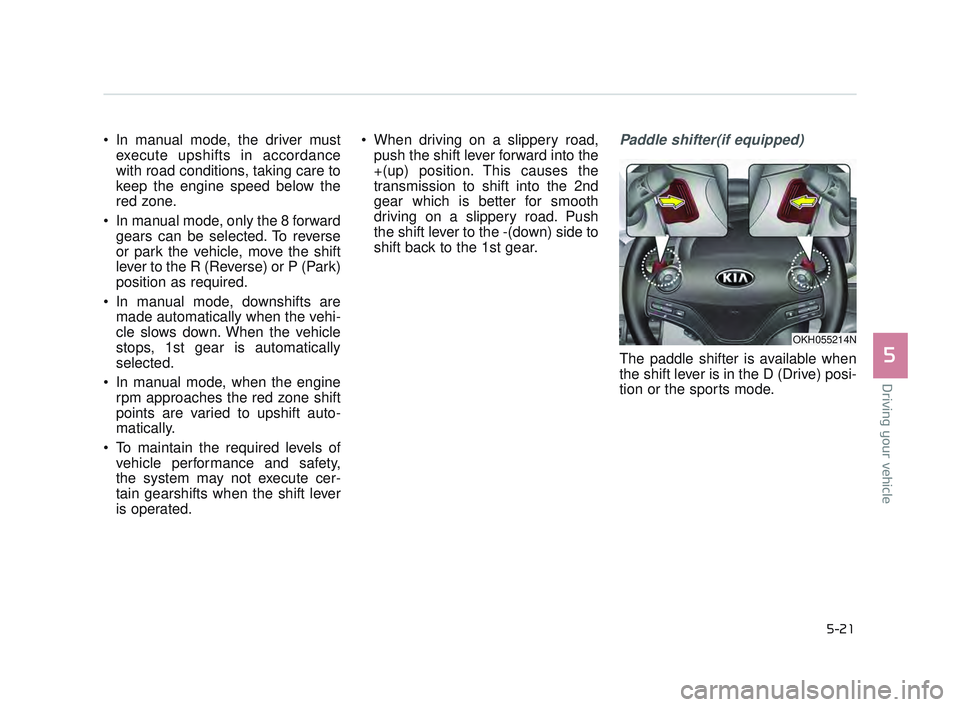
shift back to the 1st gear.Paddle shifter(if equipped)
The paddle shifter is available when
the shift lever is in the D (Drive) posi-
tion or the sports mode.
OKH055214N
KH USA 5:2016 12/1/2016 10:54 PM Page 21
Page 285 of 542
![KIA K900 2017 Owners Manual With the shift lever in the D position
The paddle shifter will operate when
the vehicle speed is more than 6
mph (10 km/h).
Pull the [+] or [-] paddle shifter once
to shift up or down one gear and the](/img/2/55061/w960_55061-284.png "KIA K900 2017 Owners Manual With the shift lever in the D position
The paddle shifter will operate when
the vehicle speed is more than 6
mph (10 km/h).
Pull the [+] or [-] paddle shifter once
to shift up or down one gear and the")
With the shift lever in the D position
The paddle shifter will operate when
the vehicle speed is more than 6
mph (10 km/h).
Pull the [+] or [-] paddle shifter once
to shift up or down one gear and the
system changes from automatic
mode to manual mode.
When the vehicle speed is lower
than 6 mph (10 km/h), if you depress
the accelerator pedal for more than 5
seconds or if you move the shift lever
from D (Drive) to Sports Mode and
move it from Sports Mode to D
(Drive) again, the system changes
from manual mode to automatic
mode.With the shift lever in the sports mode
Pull the [+] or [-] paddle shifter once
to shift up or down one gear.
✽
NOTICE
If the [+] and [-] paddle shifters are
pulled at the same time, gear change
may not occur.
Shift lock system (if equipped)
For your safety, the automatic trans-
mission has a shift lock system
which prevents shifting the transmis-
sion from P (Park) into R (Reverse)
unless the brake pedal is depressed.
To shift the transmission from P
(Park) into R (Reverse) or D (Drive) :
1. Depress and hold the brake pedal.
2. Start the engine or turn the Engine
Start / Stop Button to the ON posi-
tion.
3. Move the shift lever to R (Reverse) or D (Drive) with pressing [UNLOCK]
button.
If the brake pedal is repeatedly
depressed and released with the
shift lever in the P (Park) position, a
chattering noise near the shift lever
may be heard. This is a normal con-
dition.
5-22
Driving your vehicle
KH USA 5:2016 12/1/2016 10:54 PM Page 22
Page 318 of 542
Driving your vehicle
5
5-55
ECO (ACTIVE ECO) MODE
ACTIVE ECO systemenhances fuel efficiency
through eco control of
the engine and trans-
mission. The actual fuel
efficiency will depend on
personal driving style
and habits.
By pressing the DRIVE MODE button and
selecting ECO MODE,
green ECO indicator
light will illuminate.
ECO MODE Driving:
The vehicle engine and transmission
will operate in fuel economy oriented
mode.
ACTIVE ECO MODE system will
restrain fuel economy worsening
driving habits, such as sudden starts
and accelerations, compared to the
NORMAL MODE.
Conditions that limit Active
ECO MODE:
Below are a list of conditions in which
when in ACTIVE ECO MODE, the
indicator light will not change, but the
internal system may operate differ-
ently.
When engine coolant temperatureis low:
When temperature of the transaxle
oil is below the normal range, the
ACTIVE ECO MODE may become
temporarily unavailable until the
transaxle oil heats up after vehicle
ignition.
When in an uphill gradient: Since the ACTIVE ECO MODE
partially limits the engine torque,
ACTIVE ECO MODE may become
temporarily unavailable when more
torque is essential for going uphill.
When using the manual transmis- sion operation mode:
If transmission operation is
changed from automatic to manual,
vehicle will reflect it and automati-
cally stop the ACTIVE ECO MODE.
KH USA 5:2016 12/1/2016 10:55 PM Page 55
Page 321 of 542
5-58
Driving your vehicle
DRIVE MODE Indicator Screen
The DRIVE MODE indicator screen
can be displayed by using the trip com-
puter button on the steering wheel.
DRIVE MODE indicator screen dis-
plays status of current drive mode.
DRIVE MODE button is located onthe lower part of the transmission
lever for selecting drive mode.
If drive mode is selected manually
by the user, the drive mode indica-
tor screen will show user-selected
drive mode. (NORMAL, ECO, or
SPORT)
If SMART MODE is selected by
DRIVE MODE button, the drive
mode indicator screen will show
current drive mode automatically
selected by SMART MODE sys-
tem. (SMART NORMAL, SMART
ECO, or SMART SPORT) When the trip computer mode is
selected to show DRIVE MODE
and the SMART MODE is in oper-
ation, an automatically selected
driving mode SMART ECO,
SMART NORMAL, or SMART
SPORT, will be selected on the
cluster's center.
And right below is the horizontal
driving style gauge which reflects
the driving style in real time.
If you drive carefully and slowly in SMART MODE, the left side of the
driving style gauge will illuminate,
and be automatically shifted to the
SMART ECO MODE.
When the driver accelerates more
frequently, the right side of the driv-
ing style gauge will fill up, and shift
to SMART NORMAL MODE.
In addition, if the rate of accelera-
tion and speed is high, drive mode
will change to SMART SPORT
MODE. If the auto cruise control function is
operated or the transmission is
shifted to manual mode while
SMART MODE is on, the SMART
MODE will stop temporarily, and
the DRIVE MODE will be displayed
as OFF. The driving style gauge
light will be turned off accordingly.
If the trip computer is not set to show DRIVE MODE indicator
screen, and you want to know the
on/off status of the SMART MODE,
simply check whether the letters
'SMART' is lighten up on the
screen or not (green - ECO MODE,
white - NORMAL MODE, red -
SPORT MODE).
KH USA 5:2016 12/1/2016 10:55 PM Page 58
Page 324 of 542
Driving your vehicle
5
5-61
Conditions which Limit SMARTMODE
In following conditions your vehicle will
temporarily stop the SMART Mode
and the indicator light will turn off.
When using the manual transmis- sion operation mode: If the
transaxle system is changed from
automatic to manual, your vehicle
will automatically stop the SMART
MODE.
If transmission operation is
changed from automatic to manu-
al, vehicle will reflect it and auto-
matically stop the SMART MODE.
When the Cruise Control system is turned on:
When the driver sets a target
cruise control speed, your vehicle
will automatically stop the SMART
MODE. (The SMART MODE will
not stop immediately after you
press the cruise control button, but
when the cruise control system
takes control of the vehicle speed.) If the temperature of the transaxle
oil is very high or low:
The SMART MODE control system
will operate in nearly all driving
conditions. But when the tempera-
ture of the transaxle oil is out of the
normal range, the SMART MODE
system may become temporarily
unavailable.
KH USA 5:2016 12/1/2016 10:55 PM Page 61
Page 400 of 542
What to do in an emergency
6
6-27
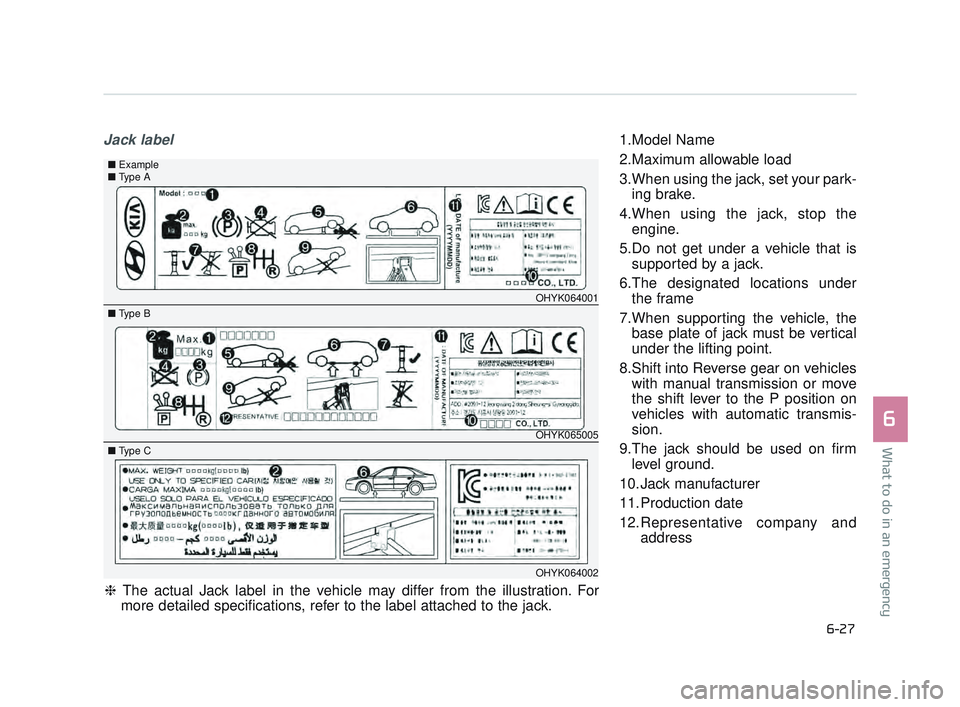
Jack label1.Model Name
2.Maximum allowable load
3.When using the jack, set your park-ing brake.
4.When using the jack, stop the engine.
5.Do not get under a vehicle that is supported by a jack.
6.The designated locations under the frame
7.When supporting the vehicle, the base plate of jack must be vertical
under the lifting point.
8.Shift into Reverse gear on vehicles with manual transmission or move
the shift lever to the P position on
vehicles with automatic transmis-
sion.
9.The jack should be used on firm level ground.
10. Jack manufacturer
11. Production date
12.Representative company and address
OHYK064001
OHYK065005
■ Type A■Example
■ Type B
OHYK064002
■ Type C
❈ The actual Jack label in the vehicle may differ from the illustration. For
more detailed specifications, refer to the label attached to the jack.
KH USA 6:2016 12/1/2016 11:09 PM Page 27