ESP KIA K900 2018 User Guide
[x] Cancel search | Manufacturer: KIA, Model Year: 2018, Model line: K900, Model: KIA K900 2018Pages: 544, PDF Size: 14.82 MB
Page 137 of 544
Features of your vehicle
4-56
The transceiver has been tested and
complies with FCC and Industry
Canada rules. Changes or modifica-
tions not expressly approved by the
party responsible for compliance
could void the user's authority to
operate the device.
NVS
®and Z-NAV™ are registered
trademarks. Nav®are of Gentex
Corporation, Zeeland, Michigan.
HomeLink
®is a registered trade-
mark owned by Johnson Controls
Technology Company, Holland,
Michigan.
Electric chromic mirror (ECM) with
HomeLink® system, compass andUVO (for U.S.A, if equipped)
Your vehicle may be equipped with a
Gentex Automatic-Dimming Mirror
with a Z-Nav™ Electronic Compass
Display and an Integrated HomeLink
®
Wireless Control System. During
nighttime driving, this feature will
automatically detect and reduce
rearview mirror glare while the com-
pass indicates the direction the vehi-
cle is pointed. The HomeLink
®
Universal Transceiver allows you to
activate your garage door(s), electric
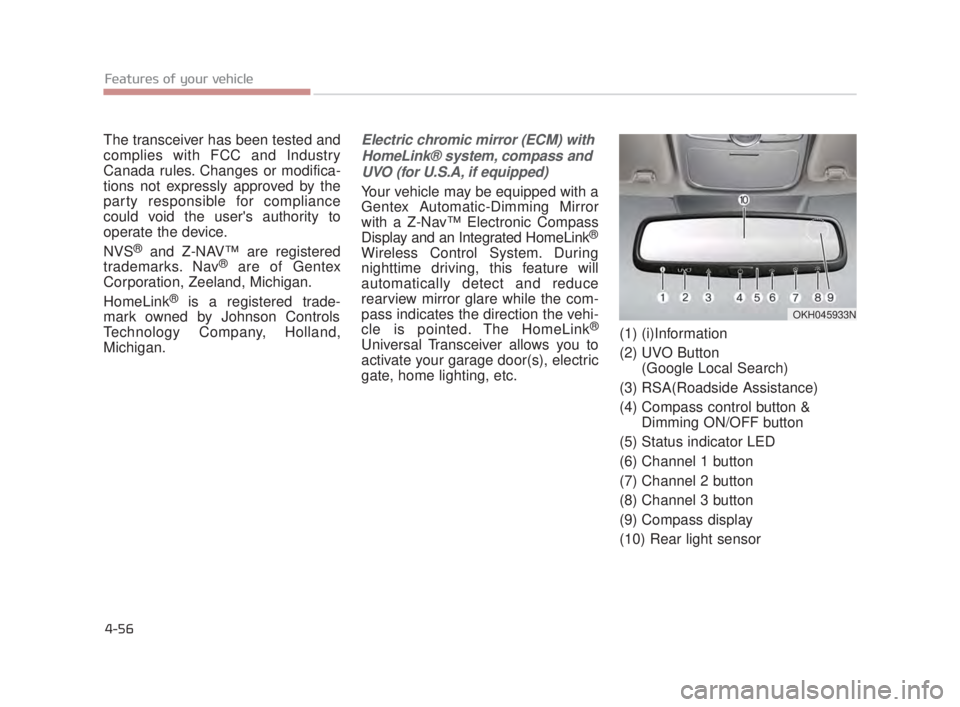
gate, home lighting, etc. (1) (i)Information
(2) UVO Button
(Google Local Search)
(3) RSA(Roadside Assistance)
(4) Compass control button & Dimming ON/OFF button
(5) Status indicator LED
(6) Channel 1 button
(7) Channel 2 button
(8) Channel 3 button
(9) Compass display
(10) Rear light sensor
OKH045933N
KH USA 4:2018 4/18/2017 5:57 PM Page 56
Page 144 of 544
Features of your vehicle
4
4-63
Erasing HomeLink®buttons
Individual buttons cannot be erased.
However, to erase all three pro-
grammed buttons:
1. Press and hold the two outerHomeLink
®buttons until the indi-
cator light begins to flash after 10
seconds.
2. Release both buttons. Do not hold for longer than 20 seconds.
The Integrated HomeLink
®Wireless
Control System is now in the training
(learn) mode and can be programmed
at any time following the appropriate
steps in the Programming chapters
above.
NVS
®is a registered trademark and
Z-Nav™ is a trademark of the Gentex
Corporation, Zeeland, Michigan.
HomeLink
®is a registered trade-
mark owned by Johnson Controls,
Incorporated, Milwaukee, Wisconsin.
FCC ID: NZLTLMHL4
IC: 4112A-TLMHL4
INFORMATION
This device complies with Part 15 of
the FCC Rules.
Operation is subject to the following
three conditions:
1. This device may not cause harm- ful interference, and
2. This device must accept any inter- ference received, including inter-
ference that may cause undesired
operation.
3. The transceiver has been tested and complies with FCC and
Industry Canada rules. Changes
or modifications not expressly
approved by the party responsible
for compliance could void the
user’s authority to operate the
device.
Outside rearview mirror
Be sure to adjust mirror angles before
driving.
Your vehicle is equipped with both
left-hand and right-hand outside
rearview mirrors. The mirrors can be
adjusted remotely with the remote
switch. The mirror heads can be fold-
ed to prevent damage during an auto-
matic car wash or when passing
through a narrow street.
The right outside rearview mirror is
convex. Objects seen in the mirror
are closer than they appear.
Use your interior rearview mirror or
direct observation to determine the
actual distance of following vehicles
when changing lanes.
i
KH USA 4:2018 4/18/2017 5:58 PM Page 63
Page 193 of 544
Features of your vehicle
4-112
ECO Indicator Light
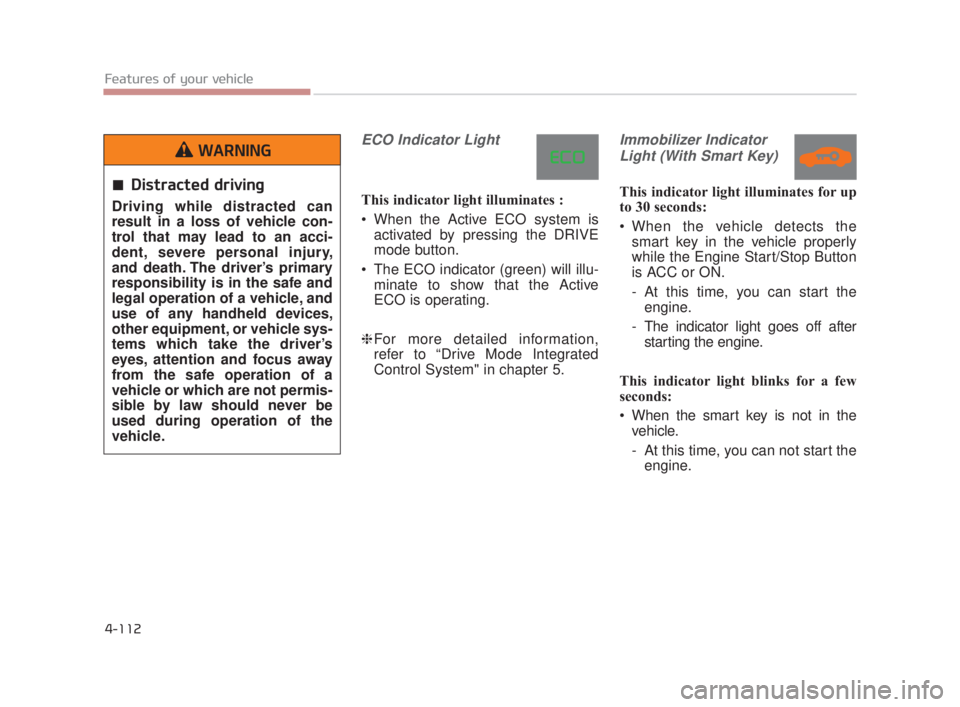
This indicator light illuminates :
When the Active ECO system isactivated by pressing the DRIVE
mode button.
The ECO indicator (green) will illu- minate to show that the Active
ECO is operating.
❈ For more detailed information,
refer to “Drive Mode Integrated
Control System" in chapter 5.
Immobilizer Indicator
Light (With Smart Key)
This indicator light illuminates for up
to 30 seconds:
When the vehicle detects the smart key in the vehicle properly
while the Engine Start/Stop Button
is ACC or ON.
- At this time, you can start theengine.
- The indicator light goes off after starting the engine.
This indicator light blinks for a few
seconds:
When the smart key is not in the vehicle.
- At this time, you can not start theengine.Distracted driving
Driving while distracted can
result in a loss of vehicle con-
trol that may lead to an acci-
dent, severe personal injury,
and death. The driver’s primary
responsibility is in the safe and
legal operation of a vehicle, and
use of any handheld devices,
other equipment, or vehicle sys-
tems which take the driver’s
eyes, attention and focus away
from the safe operation of a
vehicle or which are not permis-
sible by law should never be
used during operation of the
vehicle.
WARNING
KH USA 4:2018 4/18/2017 6:00 PM Page 112
Page 204 of 544
This system is a supplementaryfunction only. It is the responsibility
of the driver to always check the
area behind the vehicle before and
while backing up.
Always keep the camera lens clean. If the lens is covered with
foreign matter, the camera may not
operate normally.
Features of your vehicle
4
4-123
Backing up & using camera
Never rely solely on the rear
view camera when backing. You
must always use methods of
viewing the area behind you
including looking over both
shoulders as well as continu-
ously checking all three rear
view mirrors. Due to the difficul-
ty of ensuring that the area
behind you remains clear,
always back slowly and stop
immediately if you even suspect
that a person, and especially a
child, might be behind you.
WARNING
KH USA 4:2018 4/18/2017 6:01 PM Page 123
Page 205 of 544
Features of your vehicle
4-124
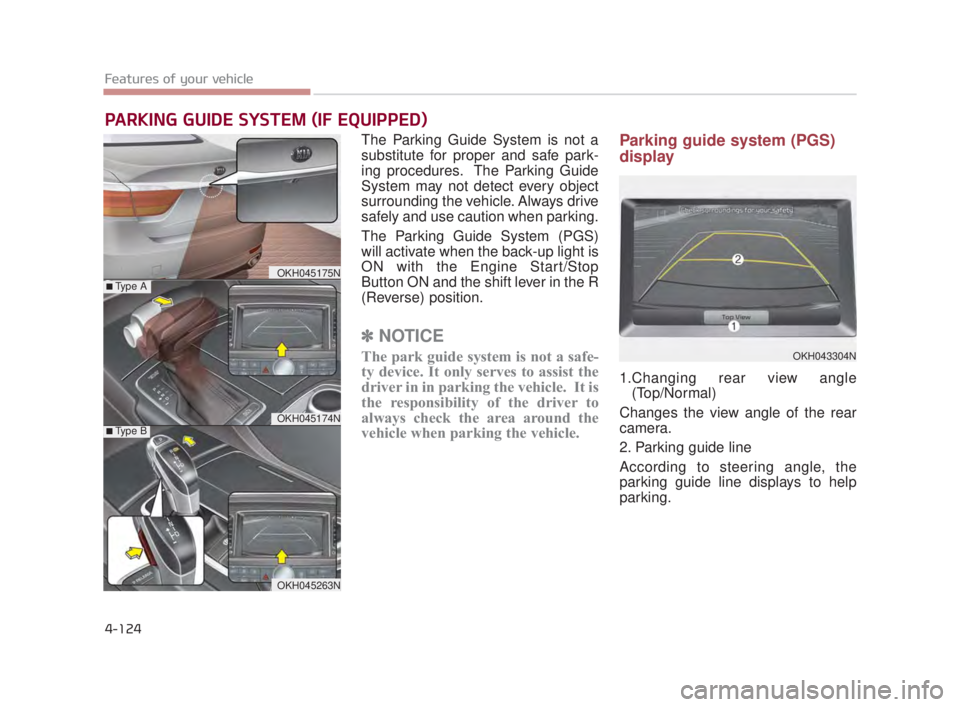
The Parking Guide System is not a
substitute for proper and safe park-
ing procedures. The Parking Guide
System may not detect every object
surrounding the vehicle. Always drive
safely and use caution when parking.
The Parking Guide System (PGS)
will activate when the back-up light is
ON with the Engine Start/Stop
Button ON and the shift lever in the R
(Reverse) position.
✽NOTICE
The park guide system is not a safe-
ty device. It only serves to assist the
driver in in parking the vehicle. It is
the responsibility of the driver to
always check the area around the
vehicle when parking the vehicle.
Parking guide system (PGS)
display
1.Changing rear view angle
(Top/Normal)
Changes the view angle of the rear
camera.
2. Parking guide line
According to steering angle, the
parking guide line displays to help
parking.
PARKING GUIDE SYSTEM (IF EQUIPPED)
OKH045175N
OKH045174N
■Type A
■Type B
OKH045263N
OKH043304N
KH USA 4:2018 4/18/2017 6:01 PM Page 124
Page 208 of 544
Features of your vehicle
4
4-127
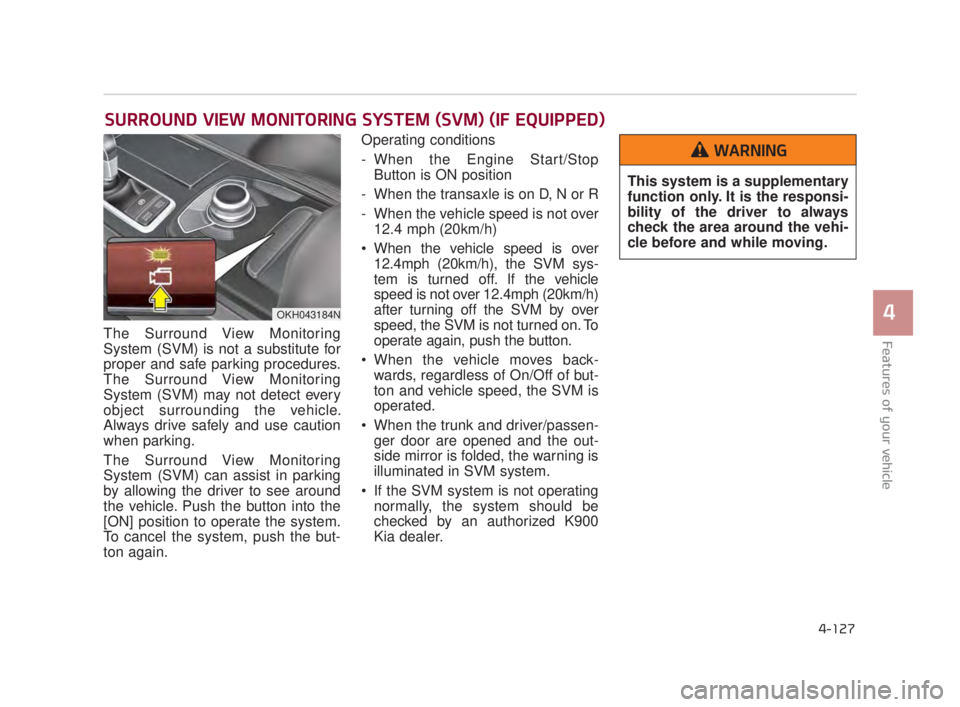
The Surround View Monitoring
System (SVM) is not a substitute for
proper and safe parking procedures.
The Surround View Monitoring
System (SVM) may not detect every
object surrounding the vehicle.
Always drive safely and use caution
when parking.
The Surround View Monitoring
System (SVM) can assist in parking
by allowing the driver to see around
the vehicle. Push the button into the
[ON] position to operate the system.
To cancel the system, push the but-
ton again.Operating conditions
- When the Engine Start/Stop
Button is ON position
- When the transaxle is on D, N or R
- When the vehicle speed is not over 12.4 mph (20km/h)
When the vehicle speed is over 12.4mph (20km/h), the SVM sys-
tem is turned off. If the vehicle
speed is not over 12.4mph (20km/h)
after turning off the SVM by over
speed, the SVM is not turned on. To
operate again, push the button.
When the vehicle moves back- wards, regardless of On/Off of but-
ton and vehicle speed, the SVM is
operated.
When the trunk and driver/passen- ger door are opened and the out-
side mirror is folded, the warning is
illuminated in SVM system.
If the SVM system is not operating normally, the system should be
checked by an authorized K900
Kia dealer.
SURROUND VIEW MONITORING SYSTEM (SVM) (IF EQUIPPED)
OKH043184N
This system is a supplementary
function only. It is the responsi-
bility of the driver to always
check the area around the vehi-
cle before and while moving.
WARNING
KH USA 4:2018 4/18/2017 6:01 PM Page 127
Page 211 of 544
Features of your vehicle
4-130
Daytime running light
The Daytime Running Lights (DRL)
can make it easier for others to see
the front of your vehicle during the
day. DRL can be helpful in many dif-
ferent driving conditions, and it is
especially helpful after dawn and
before sunset.
The DRL system turns OFF when:
1. The headlight switch is ON.
2. The engine is OFF.
3. The front fog light is ON.
4. Engaging the Parking Brake
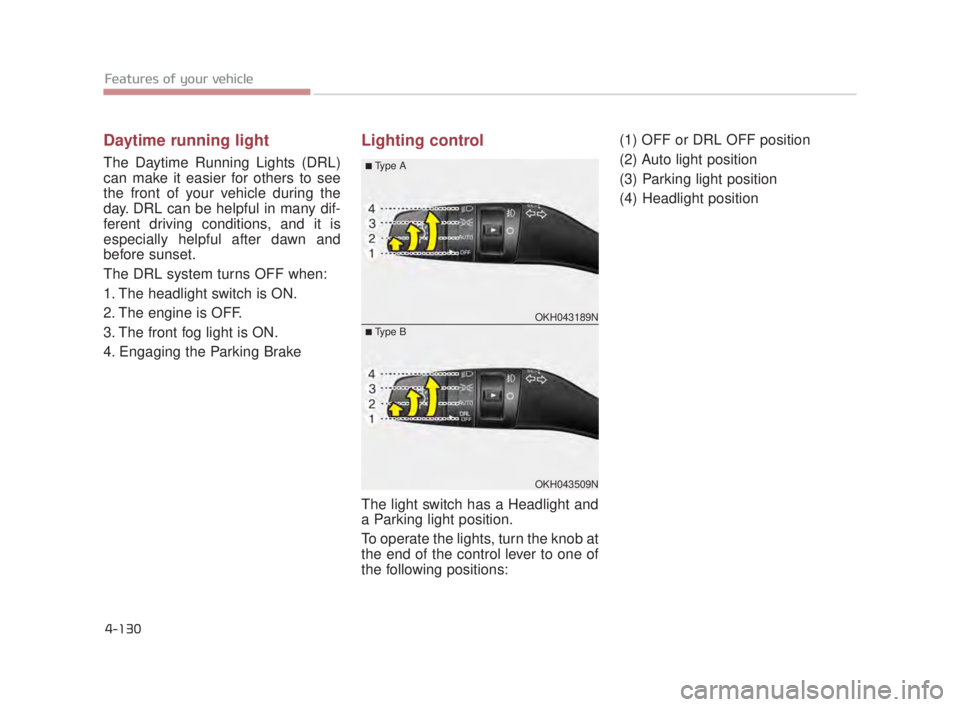
Lighting control
The light switch has a Headlight and
a Parking light position.
To operate the lights, turn the knob at
the end of the control lever to one of
the following positions:(1) OFF or DRL OFF position
(2) Auto light position
(3) Parking light position
(4) Headlight position
OKH043189N
OKH043509N
■Type A
■Type B
KH USA 4:2018 4/18/2017 6:01 PM Page 130
Page 240 of 544
Features of your vehicle
4
4-159
If the air conditioning and outside
(fresh) air position are not selected
automatically, adjust the correspon-
ding button manually. If the posi-
tion is selected, lower fan speed is
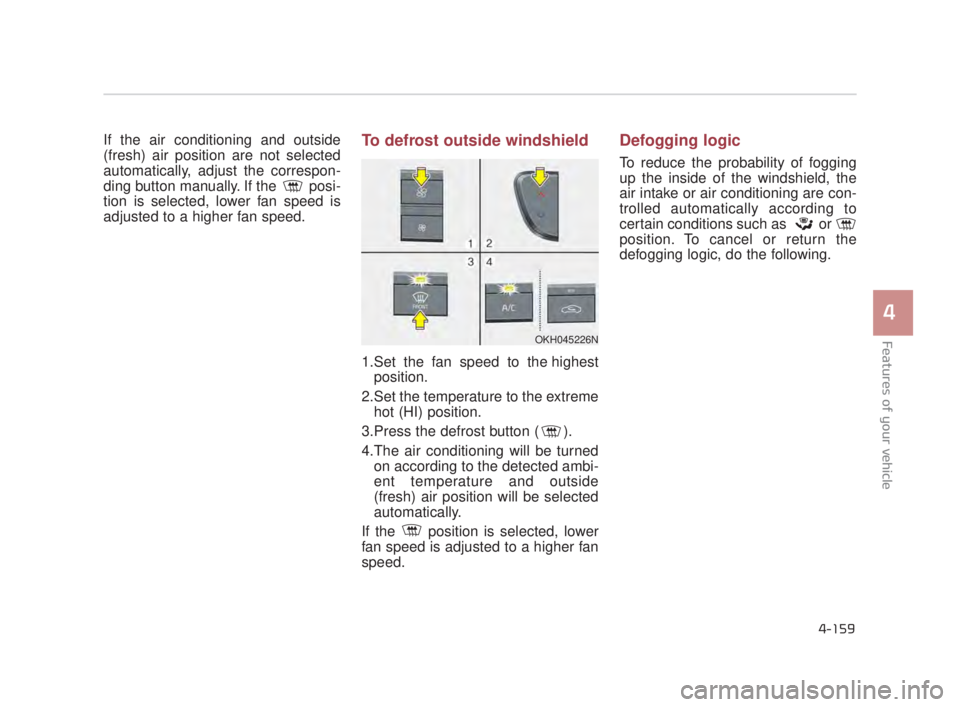
adjusted to a higher fan speed.To defrost outside windshield
1.Set the fan speed to the highestposition.
2.Set the temperature to the extreme hot (HI) position.
3.Press the defrost button ( ).
4.The air conditioning will be turned on according to the detected ambi-
ent temperature and outside
(fresh) air position will be selected
automatically.
If the position is selected, lower
fan speed is adjusted to a higher fan
speed.
Defogging logic
To reduce the probability of fogging
up the inside of the windshield, the
air intake or air conditioning are con-
trolled automatically according to
certain conditions such as or
position. To cancel or return the
defogging logic, do the following.
OKH045226N
KH USA 4:2018 4/18/2017 6:03 PM Page 159
Page 261 of 544
Features of your vehicle
4-180
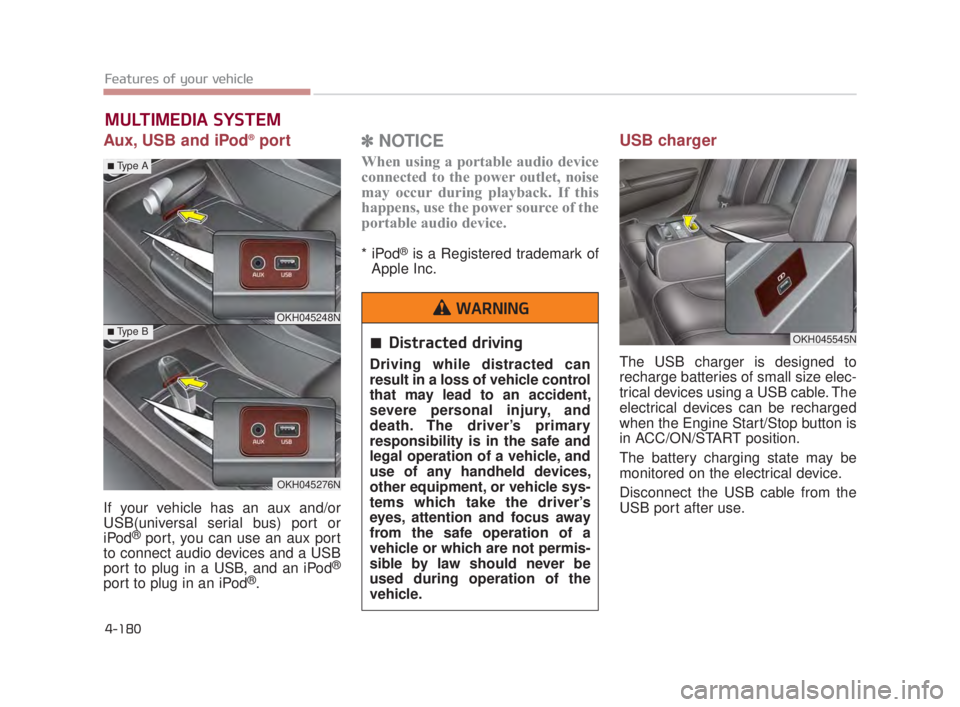
Aux, USB and iPod®port
If your vehicle has an aux and/or
USB(universal serial bus) port or
iPod
®port, you can use an aux port
to connect audio devices and a USB
port to plug in a USB, and an iPod
®
port to plug in an iPod®.
✽ NOTICE
When using a portable audio device
connected to the power outlet, noise
may occur during playback. If this
happens, use the power source of the
portable audio device.
* iPod®is a Registered trademark of
Apple Inc.
USB charger
The USB charger is designed to
recharge batteries of small size elec-
trical devices using a USB cable. The
electrical devices can be recharged
when the Engine Start/Stop button is
in ACC/ON/START position.
The battery charging state may be
monitored on the electrical device.
Disconnect the USB cable from the
USB port after use.
MULTIMEDIA SYSTEM
OKH045545N
OKH045248N
OKH045276N
■Type A
■Type BDistracted driving
Driving while distracted can
result in a loss of vehicle control
that may lead to an accident,
severe personal injury, and
death. The driver’s primary
responsibility is in the safe and
legal operation of a vehicle, and
use of any handheld devices,
other equipment, or vehicle sys-
tems which take the driver’s
eyes, attention and focus away
from the safe operation of a
vehicle or which are not permis-
sible by law should never be
used during operation of the
vehicle.
WARNING
KH USA 4:2018 4/18/2017 6:04 PM Page 180
Page 263 of 544
Features of your vehicle
4-182
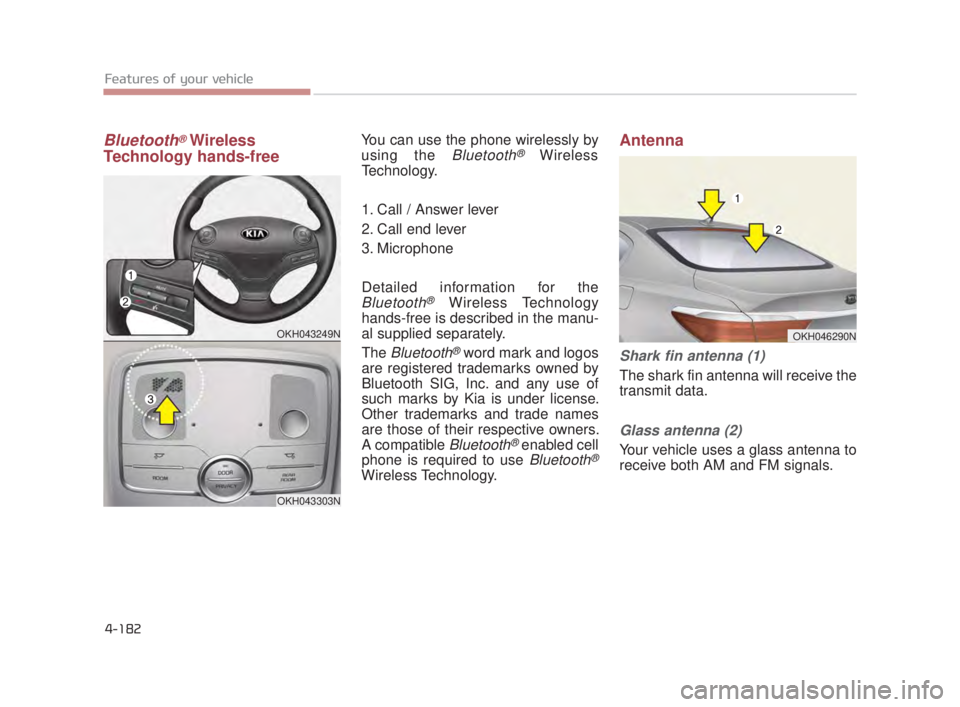
Bluetooth®Wireless
Technology hands-freeYou can use the phone wirelessly by
using the
Bluetooth®Wireless
Technology.
1. Call / Answer lever
2. Call end lever
3. Microphone
Detailed information for the
Bluetooth®Wireless Technology
hands-free is described in the manu-
al supplied separately.
The
Bluetooth®word mark and logos
are registered trademarks owned by
Bluetooth SIG, Inc. and any use of
such marks by Kia is under license.
Other trademarks and trade names
are those of their respective owners.
A compatible
Bluetooth®enabled cell
phone is required to use
Bluetooth®
Wireless Technology.
Antenna
Shark fin antenna (1)
The shark fin antenna will receive the
transmit data.
Glass antenna (2)
Your vehicle uses a glass antenna to
receive both AM and FM signals.
OKH043249N
OKH043303N
OKH046290N
KH USA 4:2018 4/18/2017 6:04 PM Page 182