key KIA K900 2018 Owner's Guide
[x] Cancel search | Manufacturer: KIA, Model Year: 2018, Model line: K900, Model: KIA K900 2018Pages: 544, PDF Size: 14.82 MB
Page 166 of 544

Features of your vehicle
4
4-85
Warning Messages
(if equipped)
Shift to P position
This warning message illuminates ifyou try to turn off the engine without
the shift lever in P (Park) position.
At this time, the Engine Start/Stop Button turns to the ACC position (If
you press the Engine Start/Stop
Button once more, it will turn to the
ON position).
Low Key Battery
This warning message illuminatesif the battery of the smart key is
discharged when the Engine
Start/Stop Button changes to the
OFF position.
Press brake pedal to start engine
This warning message illuminatesif the Engine Start/Stop Button
changes to the ACC position twice
by pressing the button repeatedly
without depressing the brake pedal.
It means that you should depress the brake pedal to start the engine.OKH043921N
■Type A■Type B
OKH045418N
■Type A■Type B
OKH045927N
■Type A■Type B
KH USA 4:2018 4/18/2017 5:59 PM Page 85
Page 167 of 544

Features of your vehicle
4-86
Key not in vehicle
This warning message illuminatesif the smart key is not in the vehicle
while the door is opened or closed
with the Engine Start/Stop button
in the ACC position or engine is
running.
It means that you should always have the smart key with you.
Key not detected
This warning message illuminatesif the smart key is not detected
when you press the Engine
Start/Stop Button.
Press start button again
This warning message illuminatesif you can not operate the Engine
Start/Stop Button when there is a
problem with the Engine Start/Stop
Button system.
It means that you could start the engine by pressing the Engine
Start/ Stop Button once more.
If the warning illuminates each time you press the Engine
Start/Stop Button, have your vehi-
cle inspected by an authorized
K900 Kia dealer.
OKH045928N
■Type A■Type B
OKH045929N
■Type A■Type B
OKH043930N
■Type A■Type B
KH USA 4:2018 4/18/2017 5:59 PM Page 86
Page 168 of 544

Features of your vehicle
4
4-87
Press start button with smart key
This warning message illuminatesif you press the Engine Start/Stop
Button while the warning message
“Key not detected” is illuminating.
At this time, the immobilizer indica- tor light blinks.
Check headlamp LED (if equipped)
This warning message illuminatesif the headlamp does not turned on
normally when you turn the head
lamp on.
In this case, have your vehicle
inspected by an authorized K900
Kia dealer.
Check headlamp FAN (if equipped)
This warning message illuminatesif the headlamp is overheated.
It means, the headlamp fan does
not work normally.
In this case, have your vehicle
inspected by an authorized K900
Kia dealer as soon as possible.
OKH045513N
■Type A■Type B
OKH045514N
■Type A■Type B
OKH045931N
■Type A■Type B
KH USA 4:2018 4/18/2017 5:59 PM Page 87
Page 193 of 544
Features of your vehicle
4-112
ECO Indicator Light
This indicator light illuminates :
When the Active ECO system isactivated by pressing the DRIVE
mode button.
The ECO indicator (green) will illu- minate to show that the Active
ECO is operating.
❈ For more detailed information,
refer to “Drive Mode Integrated
Control System" in chapter 5.
Immobilizer Indicator
Light (With Smart Key)
This indicator light illuminates for up
to 30 seconds:
When the vehicle detects the smart key in the vehicle properly
while the Engine Start/Stop Button
is ACC or ON.
- At this time, you can start theengine.
- The indicator light goes off after starting the engine.
This indicator light blinks for a few
seconds:
When the smart key is not in the vehicle.
- At this time, you can not start theengine.Distracted driving
Driving while distracted can
result in a loss of vehicle con-
trol that may lead to an acci-
dent, severe personal injury,
and death. The driver’s primary
responsibility is in the safe and
legal operation of a vehicle, and
use of any handheld devices,
other equipment, or vehicle sys-
tems which take the driver’s
eyes, attention and focus away
from the safe operation of a
vehicle or which are not permis-
sible by law should never be
used during operation of the
vehicle.
WARNING
KH USA 4:2018 4/18/2017 6:00 PM Page 112
Page 194 of 544
Features of your vehicle
4
4-113
This indicator light illuminates for 2
seconds and goes off:
When the vehicle can not detectthe smart key which is in the vehi-
cle while the Engine Start/Stop
Button is ON.
In this case, have your vehicle
inspected by an authorized K900
Kia dealer.
This indicator light blinks:
When the battery of the smart key is weak.
- At this time, you can not start theengine. However, you can start
the engine if you press the Engine
Start/Stop Button with the smart
key. (For more details, refer to
“Starting the Engine” in chapter
5).
When there is a malfunction with the immobilizer system.
In this case, have your vehicle
inspected by an authorized K900
Kia dealer.Turn Signal Indicator
Light
This indicator light blinks:
When you turn the turn signal light on.
If any of the following occurs, there
may be a malfunction with the turn
signal system. In this case, have your
vehicle inspected by an authorized
K900 Kia dealer. - The indicator light does not blinkbut illuminates.
- The indicator light blinks more rapidly.
- The indicator light does not illu- minate at all.
High Beam Indicator
Light
This indicator light illuminates:
When the headlights are on and in the high beam position.
When the turn signal lever is pulled into the Flash-to-Pass position.
KH USA 4:2018 4/18/2017 6:00 PM Page 113
Page 209 of 544
Features of your vehicle
4-128
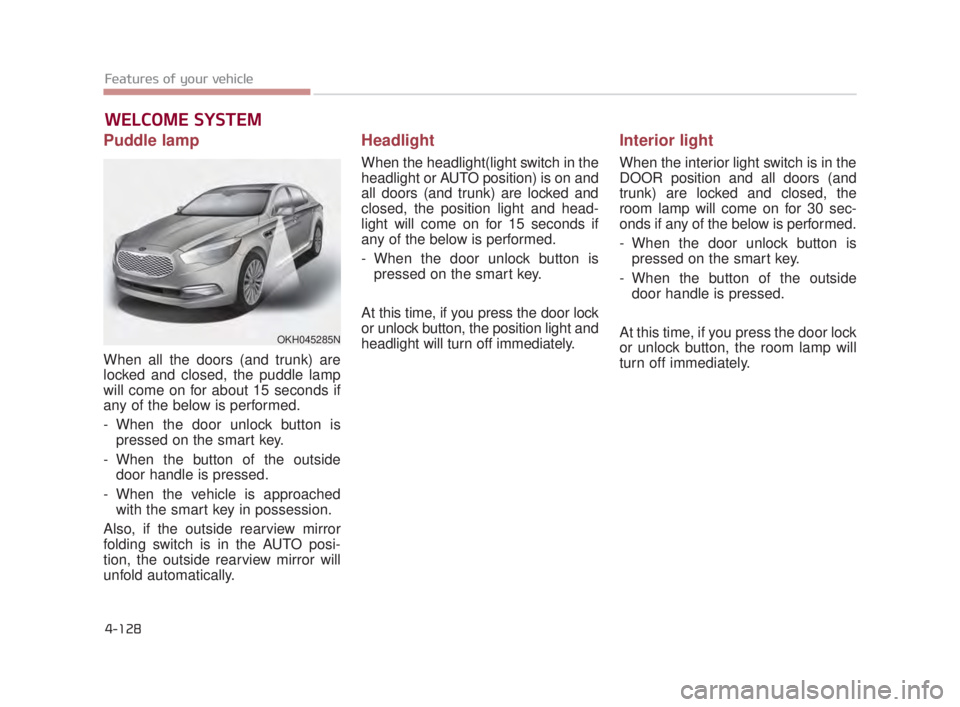
Puddle lamp
When all the doors (and trunk) are
locked and closed, the puddle lamp
will come on for about 15 seconds if
any of the below is performed.
- When the door unlock button ispressed on the smart key.
- When the button of the outside door handle is pressed.
- When the vehicle is approached with the smart key in possession.
Also, if the outside rearview mirror
folding switch is in the AUTO posi-
tion, the outside rearview mirror will
unfold automatically.
Headlight
When the headlight(light switch in the
headlight or AUTO position) is on and
all doors (and trunk) are locked and
closed, the position light and head-
light will come on for 15 seconds if
any of the below is performed.
- When the door unlock button is pressed on the smart key.
At this time, if you press the door lock
or unlock button, the position light and
headlight will turn off immediately.
Interior light
When the interior light switch is in the
DOOR position and all doors (and
trunk) are locked and closed, the
room lamp will come on for 30 sec-
onds if any of the below is performed.
- When the door unlock button is pressed on the smart key.
- When the button of the outside door handle is pressed.
At this time, if you press the door lock
or unlock button, the room lamp will
turn off immediately.
WELCOME SYSTEM
OKH045285N
KH USA 4:2018 4/18/2017 6:01 PM Page 128
Page 210 of 544
Features of your vehicle
4
4-129
LIGHTING
Battery saver function
The purpose of this feature is toprevent the battery from being dis-
charged. The system automatically
turns off the parking lights when
the driver turns off the engine and
opens the driver-side door.
With this feature, the parking lights will be turned off automatically if
the driver parks on the side of the
road at night.
If necessary, to keep the lights on
when the engine is turned OFF,
perform the following:
1) Open the driver-side door.
2) Turn the parking lights OFF and ON again using the light switch
on the steering column.
Headlight escort function
If you turn the Engine Start/Stop
Button to the ACC or OFF position
with the headlights ON, the head-
lights (and/or tail lights) remain on for
about 5 minutes. However, if the dri-
ver’s door is opened and closed, the
headlights are turned off after 15
seconds.
The headlights can be turned off by
pressing the lock button on the smart
key twice or turning the light switch to
the OFF or Auto position.
However, if you turn the light switch
to the Auto position when it is dark
outside, the headlights will not be
turned off. If the driver gets out of the vehicle
through other doors (except driver's
door), the battery saver function
does not operate and the headlight
escort function does not turn off
automatically. Therefore, It causes
the battery to be discharged. In this
case, make sure to turn off the lamp
before getting out of the vehicle.
KH USA 4:2018 4/18/2017 6:01 PM Page 129
Page 221 of 544
Features of your vehicle
4-140
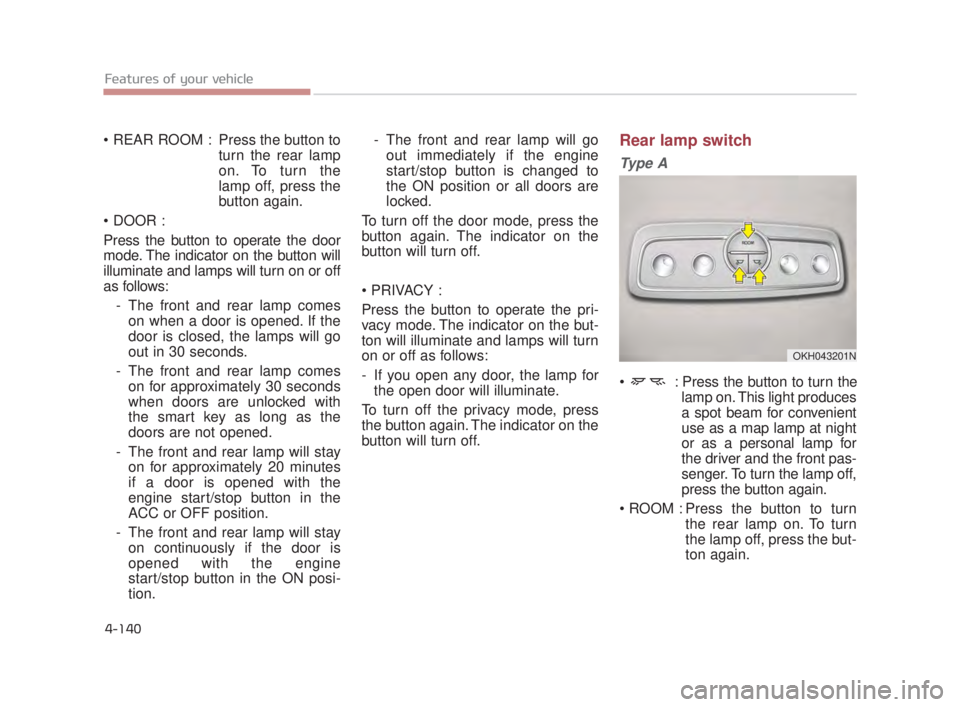
Press the button toturn the rear lamp
on. To turn the
lamp off, press the
button again.
Press the button to operate the door
mode. The indicator on the button will
illuminate and lamps will turn on or off
as follows: - The front and rear lamp comeson when a door is opened. If the
door is closed, the lamps will go
out in 30 seconds.
- The front and rear lamp comes on for approximately 30 seconds
when doors are unlocked with
the smart key as long as the
doors are not opened.
- The front and rear lamp will stay on for approximately 20 minutes
if a door is opened with the
engine start/stop button in the
ACC or OFF position.
- The front and rear lamp will stay on continuously if the door is
opened with the engine
start/stop button in the ON posi-
tion. - The front and rear lamp will go
out immediately if the engine
start/stop button is changed to
the ON position or all doors are
locked.
To turn off the door mode, press the
button again. The indicator on the
button will turn off.
Press the button to operate the pri-
vacy mode. The indicator on the but-
ton will illuminate and lamps will turn
on or off as follows:
- If you open any door, the lamp for the open door will illuminate.
To turn off the privacy mode, press
the button again. The indicator on the
button will turn off.Rear lamp switch
Ty p e A
: Press the button to turn the lamp on. This light produces
a spot beam for convenient
use as a map lamp at night
or as a personal lamp for
the driver and the front pas-
senger. To turn the lamp off,
press the button again.
Press the button to turn the rear lamp on. To turn
the lamp off, press the but-
ton again.
OKH043201N
KH USA 4:2018 4/18/2017 6:01 PM Page 140
Page 246 of 544
Features of your vehicle
4
4-165
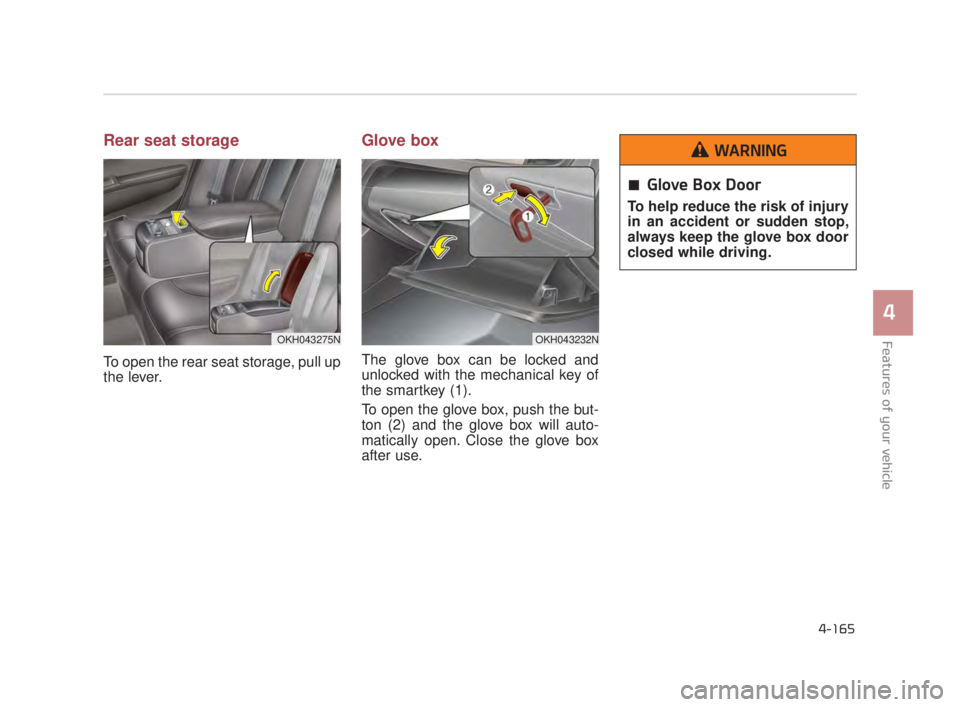
Rear seat storage
To open the rear seat storage, pull up
the lever.
Glove box
The glove box can be locked and
unlocked with the mechanical key of
the smartkey (1).
To open the glove box, push the but-
ton (2) and the glove box will auto-
matically open. Close the glove box
after use.
OKH043232NOKH043275N
Glove Box Door
To help reduce the risk of injury
in an accident or sudden stop,
always keep the glove box door
closed while driving.
WARNING
KH USA 4:2018 4/18/2017 6:03 PM Page 165
Page 274 of 544
Driving your vehicle
5
5-9
Starting the engine with a
smart key
1.Carry the smart key or leave itinside the vehicle.
2.Make sure the parking brake is firmly applied
3.Place the transaxle shift lever in P (Park).
4.Press the ENGINE START/STOP button while depressing the brake
pedal.
5.Do not wait for the engine to warm up while the vehicle remains sta-
tionary. Start driving at moderate
engine speeds.(Steep accelerating
and decelerating should be avoid-
ed). Whether the engine is cold or warm,
it should be started without depress-
ing the accelerator.
Even if the smart key is in the vehi-
cle, but is far away from you, the
engine may not start.
When the ENGINE START/STOP button is in the ACC position or
above, if any door is opened, the
system checks for the smart key. If
the smart key is not in the vehi-
cle,the “ ” indicator will blink or
the warning "Key not in vehicle" will
illuminate on the LCD display. And
if all doors are closed, the chime
will sound for 5 seconds. The indi-
cator or warning will turn off while
the vehicle is moving. Always have
the smart key with you.
The engine will start only when the
smart key is in the vehicle.
STARTING THE ENGINE
Proper footwear
Always wear appropriate shoes
when operating your vehicle.
Unsuitable shoes (high heels, ski
boots, sandals, etc.) may inter-
fere with your ability to use the
brake and accelerator pedals.
WARNING
KH USA 5:2018 4/12/2017 9:58 AM Page 9