trip computer KIA K900 2018 Owners Manual
[x] Cancel search | Manufacturer: KIA, Model Year: 2018, Model line: K900, Model: KIA K900 2018Pages: 544, PDF Size: 14.82 MB
Page 83 of 544
......................................4-68
...............................................4-68
..................................................................4-69
.........................................4-72
LCD display.......................................................4-73
...........................................................4-73
.......................................4-75
...............................................4-75
..............................................................4-75
..................................................4-76
...............................................4-78
Trip computer ....................................................4-96
...............................................................4-96
........................................................4-96
..................................................................4-98
Warning and indicator lights ...........................4-100
.....................................................4-109
Head up display (HUD) ...................................4-115
..........................................................4-115
..............................4-116
.....................................4-117
Parking Assist System ....................................4-118
.............4-118
System ..............................................................4-120
......................................................4-121
Rear Camera Display .....................................4-122
Parking Guide System ....................................4-124
.................4-124
...................................4-125
Front Blind Spot Monitoring System ...............4-126
Surround View Monitoring System (SVM) ......4-127
Welcome system.............................................4-128
........................................................4-128
.............................................................4-128
.........................................................4-128
Lighting ...........................................................4-129
.........................................4-129
....................................4-129
..........................................4-130
....................................................4-130
...........................................4-133
.................4-134
......................................................4-135
Wipers and washers .......................................4-136
Interior light .....................................................4-139
..................................4-139
................................................4-139
4
KH USA 4:2018 4/18/2017 5:55 PM Page 2
Page 154 of 544
Features of your vehicle
4
4-73
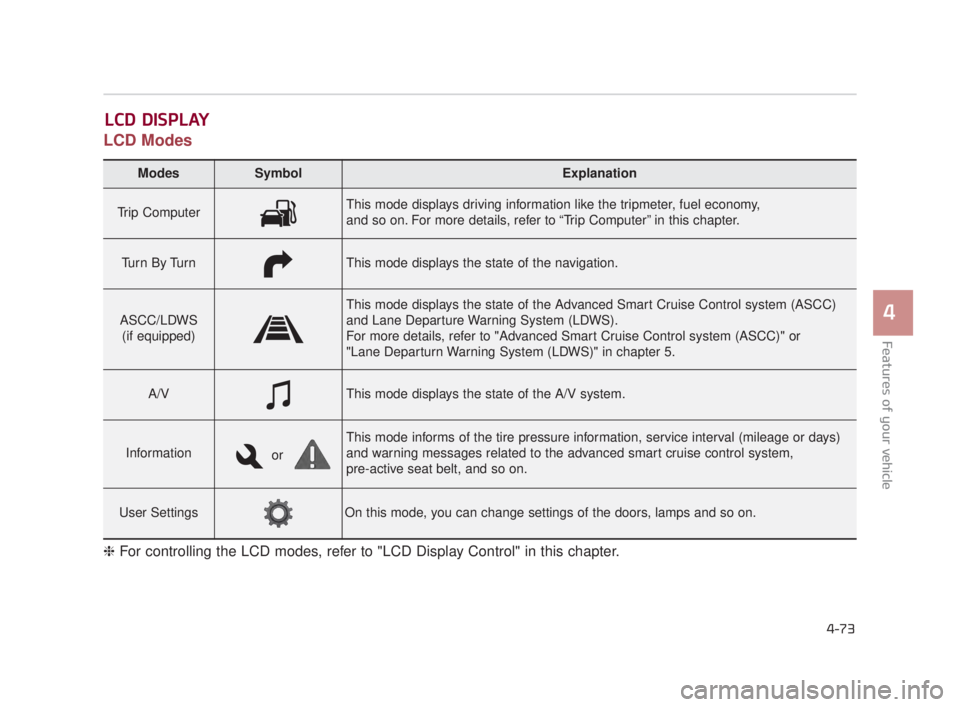
LCD Modes
LCD DISPLAY
Modes SymbolExplanation
Trip ComputerThis mode displays driving information like the tripmeter, fuel economy,
and so on. For more details, refer to “Trip Computer” in this chapter.
Tu r n B y Tu r nThis mode displays the state of the navigation.
ASCC/LDWS(if equipped)
This mode displays the state of the Advanced Smart Cruise Control system (ASCC)
and Lane Departure Warning System (LDWS).
For more details, refer to "Advanced Smart Cruise Control system (ASCC)" or
"Lane Departurn Warning System (LDWS)" in chapter 5.
A/VThis mode displays the state of the A/V system.
Information
This mode informs of the tire pressure information, service interval (mileage or days)
and warning messages related to the advanced smart cruise control system,
pre-active seat belt, and so on.
User SettingsOn this mode, you can change settings of the doors, lamps and so on.
❈ For controlling the LCD modes, refer to "LCD Display Control" in this chapter.
or
KH USA 4:2018 4/18/2017 5:59 PM Page 73
Page 155 of 544
Features of your vehicle
4-74
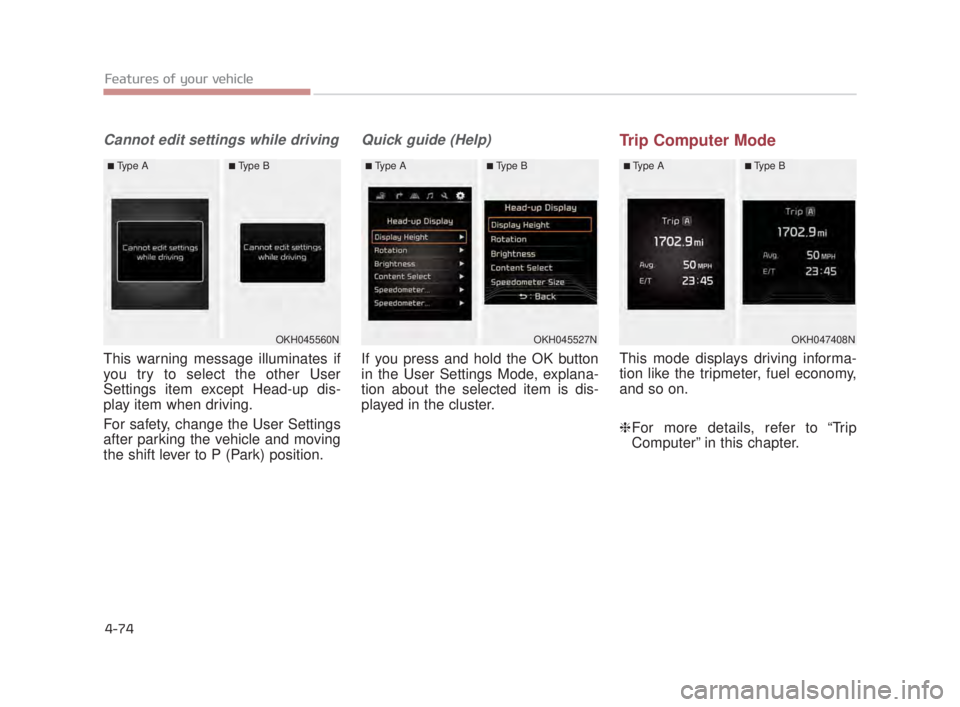
Cannot edit settings while driving
This warning message illuminates if
you try to select the other User
Settings item except Head-up dis-
play item when driving.
For safety, change the User Settings
after parking the vehicle and moving
the shift lever to P (Park) position.
Quick guide (Help)
If you press and hold the OK button
in the User Settings Mode, explana-
tion about the selected item is dis-
played in the cluster.
Trip Computer Mode
This mode displays driving informa-
tion like the tripmeter, fuel economy,
and so on.
❈For more details, refer to “Trip
Computer” in this chapter.
OKH047408N
■Type A■Type B
OKH045560N
■Type A■Type B
OKH045527N
■Type A■Type B
KH USA 4:2018 4/18/2017 5:59 PM Page 74
Page 165 of 544

Features of your vehicle
4-84
Other FeaturesService Interval
ItemsExplanation
Fuel Economy Auto Reset
The average fuel economy will not reset automatically whenever refueling.
The average fuel economy will reset automatically when refueling.
❈ For more details, refer to "Trip Computer" in this chapter.
Wiper/Lights Display
Tire Pressure UnitChoose the tire pressure unit. (psi, kPa, Bar)
ItemsExplanation
Service Interval
On this mode, you can activate the service interval function with mileage (km or mi.) and period
(months).
KH USA 4:2018 4/18/2017 5:59 PM Page 84
Page 175 of 544
Features of your vehicle
4-94
✽NOTICE
The warning message "Check
Active Air Flap System" may not be
displayed immediately in colder cli-
mates.
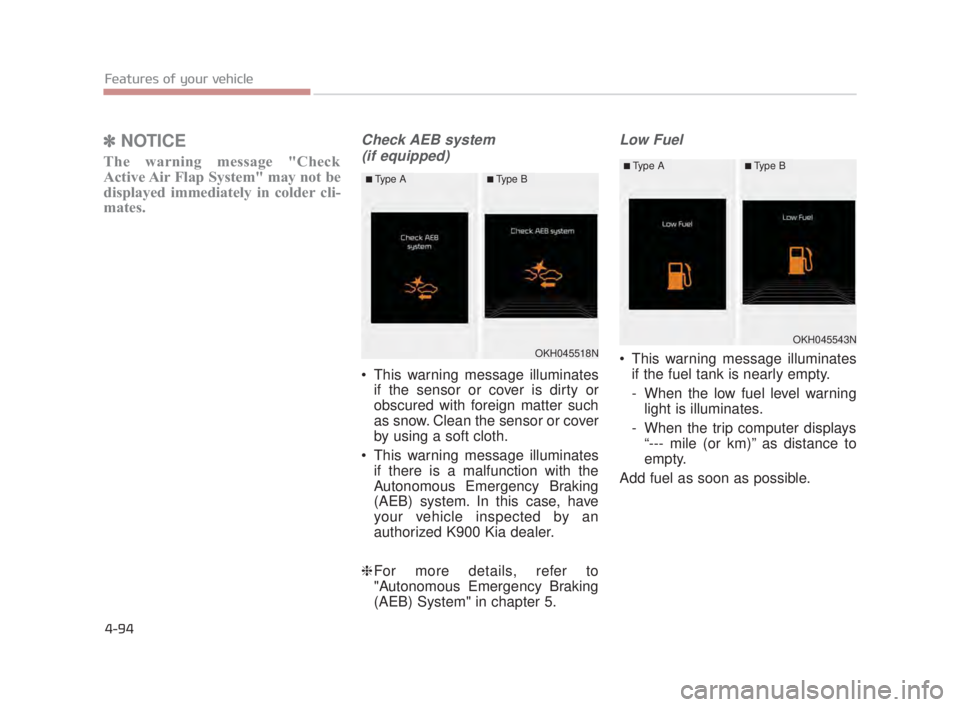
Check AEB system
(if equipped)
This warning message illuminates if the sensor or cover is dirty or
obscured with foreign matter such
as snow. Clean the sensor or cover
by using a soft cloth.
This warning message illuminates if there is a malfunction with the
Autonomous Emergency Braking
(AEB) system. In this case, have
your vehicle inspected by an
authorized K900 Kia dealer.
❈ For more details, refer to
"Autonomous Emergency Braking
(AEB) System" in chapter 5.
Low Fuel
This warning message illuminates
if the fuel tank is nearly empty.
- When the low fuel level warninglight is illuminates.
- When the trip computer displays “--- mile (or km)” as distance to
empty.
Add fuel as soon as possible.OKH045518N
■Type A■Type B
OKH045543N
■Type A■Type B
KH USA 4:2018 4/18/2017 5:59 PM Page 94
Page 177 of 544
Features of your vehicle
4-96
Overview
Description
The trip computer is a microcomput-
er-controlled driver information sys-
tem that displays information related
to driving.
✽NOTICE
Some driving information stored in
the trip computer (for example
Average Vehicle Speed) resets if the
battery is disconnected.
Trip ModesFuel Economy
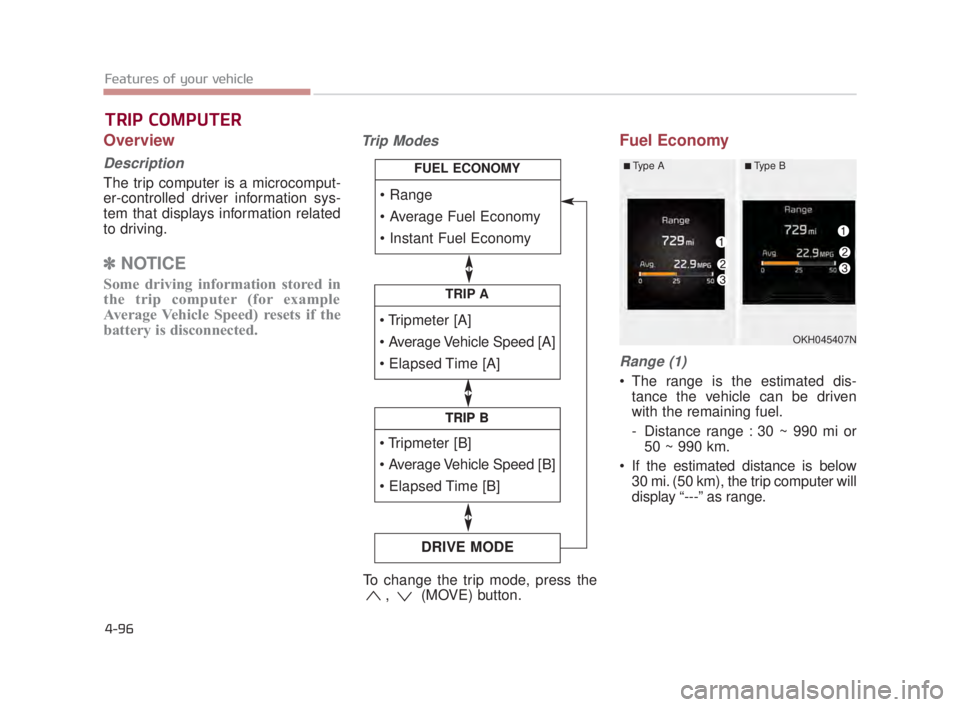
Range (1)
The range is the estimated dis-
tance the vehicle can be driven
with the remaining fuel.
- Distance range : 30 ~ 990 mi or50 ~ 990 km.
If the estimated distance is below 30 mi. (50 km), the trip computer will
display “---” as range.
TRIP COMPUTER
TRIP A
TRIP B
DRIVE MODE
TRIP B
FUEL ECONOMY
To change the trip mode, press the , (MOVE) button.
OKH045407N
■Type A■Type B
KH USA 4:2018 4/18/2017 6:00 PM Page 96
Page 178 of 544
Features of your vehicle
4
4-97
✽NOTICE
• If the vehicle is not on level ground
or the battery power has been
interrupted, the range function
may not operate correctly.
• The range may differ from the actual driving distance as it is an
estimate of the available driving
distance.
• The trip computer may not register additional fuel if less than 1.6 gal-
lons (6 liters) of fuel are added to
the vehicle.
• The fuel economy and range may vary significantly based on driving
conditions, driving habits, and con-
dition of the vehicle.
Average Fuel Economy (2)
The average fuel economy is calcu-
lated by the total driving distance
and fuel consumption since the last
average fuel economy reset.
- Fuel economy range: 0.0 ~ 99.9MPG or L/100km
The average fuel economy can be reset both manually and automati-
cally.
Manual reset
To clear the average fuel economy
manually, press the OK (RESET) but-
ton on the steering wheel for more
than 1 second when the average fuel
economy is displayed. Automatic reset
To make the average fuel economy
be reset automatically whenever refu-
eling, select the “Auto Reset” mode in
User Setting menu of the LCD display
(Refer to “LCD Display”).
Under “Auto Reset” mode, the aver-
age fuel economy will be cleared to
zero (---) when the vehicle speed
exceeds 1 km/h after refueling more
than 1.6 gallons (6 liters).
✽
NOTICE
The average fuel economy is not dis-
played for more accurate calculation
if the vehicle does not drive more
than 0.19 miles (300 meters) since
the Engine Start/Stop button is
turned to ON.
KH USA 4:2018 4/18/2017 6:00 PM Page 97
Page 323 of 544
5-58
Driving your vehicle
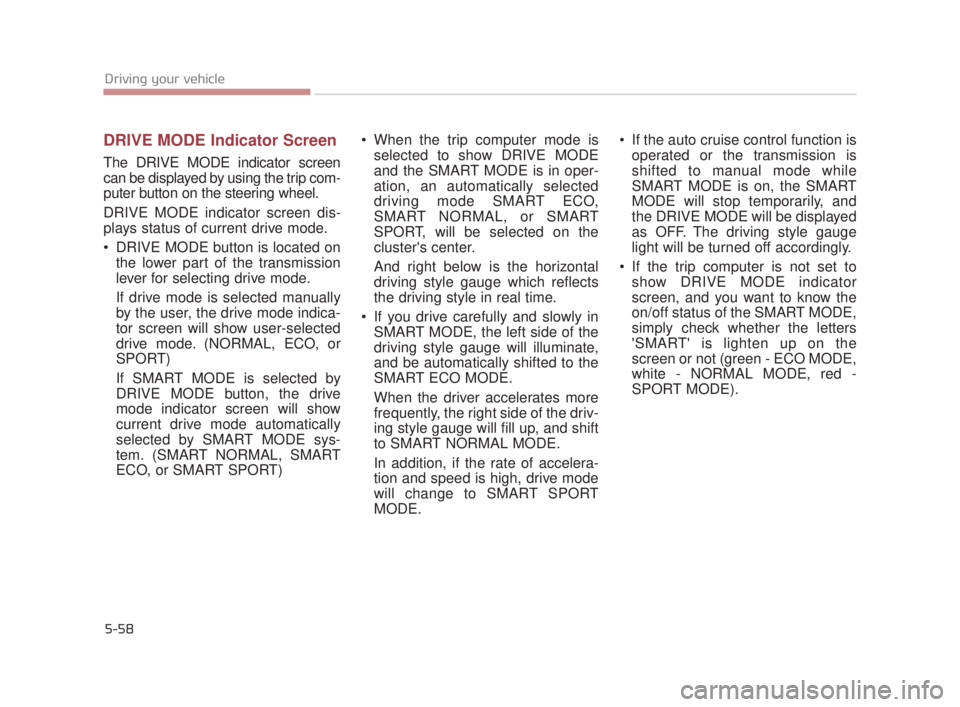
DRIVE MODE Indicator Screen
The DRIVE MODE indicator screen
can be displayed by using the trip com-
puter button on the steering wheel.
DRIVE MODE indicator screen dis-
plays status of current drive mode.
DRIVE MODE button is located onthe lower part of the transmission
lever for selecting drive mode.
If drive mode is selected manually
by the user, the drive mode indica-
tor screen will show user-selected
drive mode. (NORMAL, ECO, or
SPORT)
If SMART MODE is selected by
DRIVE MODE button, the drive
mode indicator screen will show
current drive mode automatically
selected by SMART MODE sys-
tem. (SMART NORMAL, SMART
ECO, or SMART SPORT) When the trip computer mode is
selected to show DRIVE MODE
and the SMART MODE is in oper-
ation, an automatically selected
driving mode SMART ECO,
SMART NORMAL, or SMART
SPORT, will be selected on the
cluster's center.
And right below is the horizontal
driving style gauge which reflects
the driving style in real time.
If you drive carefully and slowly in SMART MODE, the left side of the
driving style gauge will illuminate,
and be automatically shifted to the
SMART ECO MODE.
When the driver accelerates more
frequently, the right side of the driv-
ing style gauge will fill up, and shift
to SMART NORMAL MODE.
In addition, if the rate of accelera-
tion and speed is high, drive mode
will change to SMART SPORT
MODE. If the auto cruise control function is
operated or the transmission is
shifted to manual mode while
SMART MODE is on, the SMART
MODE will stop temporarily, and
the DRIVE MODE will be displayed
as OFF. The driving style gauge
light will be turned off accordingly.
If the trip computer is not set to show DRIVE MODE indicator
screen, and you want to know the
on/off status of the SMART MODE,
simply check whether the letters
'SMART' is lighten up on the
screen or not (green - ECO MODE,
white - NORMAL MODE, red -
SPORT MODE).
KH USA 5:2018 4/12/2017 10:00 AM Page 58
Page 324 of 544
Driving your vehicle
5
5-59
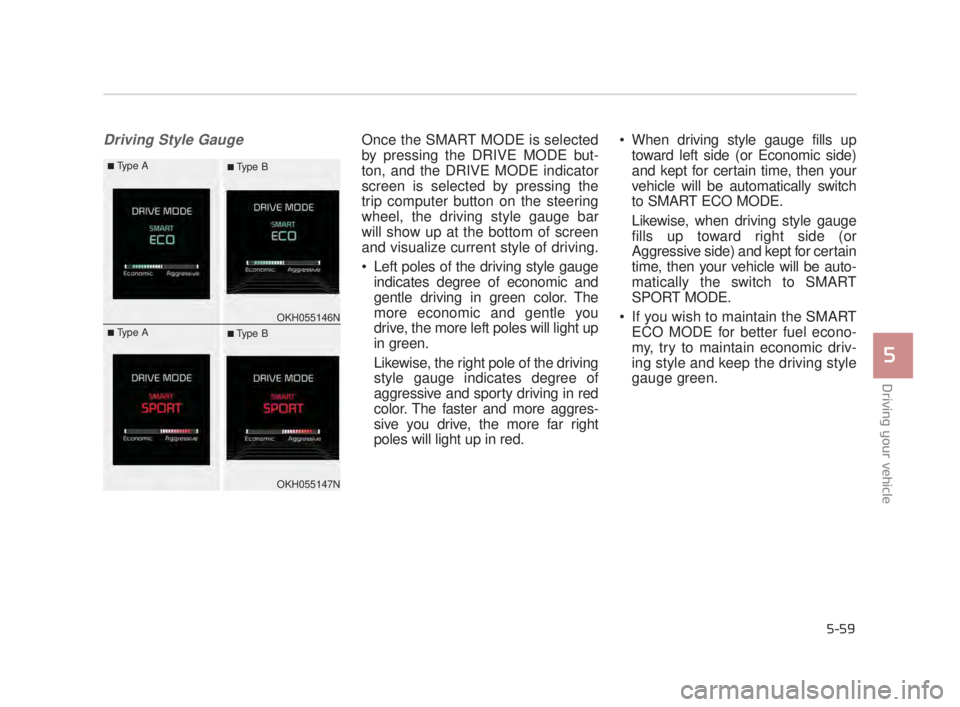
Driving Style GaugeOnce the SMART MODE is selected
by pressing the DRIVE MODE but-
ton, and the DRIVE MODE indicator
screen is selected by pressing the
trip computer button on the steering
wheel, the driving style gauge bar
will show up at the bottom of screen
and visualize current style of driving.
Left poles of the driving style gaugeindicates degree of economic and
gentle driving in green color. The
more economic and gentle you
drive, the more left poles will light up
in green.
Likewise, the right pole of the driving
style gauge indicates degree of
aggressive and sporty driving in red
color. The faster and more aggres-
sive you drive, the more far right
poles will light up in red. When driving style gauge fills up
toward left side (or Economic side)
and kept for certain time, then your
vehicle will be automatically switch
to SMART ECO MODE.
Likewise, when driving style gauge
fills up toward right side (or
Aggressive side) and kept for certain
time, then your vehicle will be auto-
matically the switch to SMART
SPORT MODE.
If you wish to maintain the SMART ECO MODE for better fuel econo-
my, try to maintain economic driv-
ing style and keep the driving style
gauge green.
OKH055146N
OKH055147N
■Type A■ Type B
■Type A■ Type B
KH USA 5:2018 4/12/2017 10:00 AM Page 59
Page 461 of 544
Maintenance
7
7-53
Disconnect the battery charger inthe following order.
1.Turn off the battery charger main switch.
2.Unhook the negative clamp from the negative battery terminal.
3.Unhook the positive clamp from the positive battery terminal.
Before performing maintenance or recharging the battery, turn off all
accessories and stop the engine.
The negative battery cable must be removed first and installed last
when the battery is disconnected.
Operation related to the battery should be done at an authorized
K900 Kia dealer.Reset items
Items should be reset after the bat-
tery has been discharged or the bat-
tery has been disconnected.
Auto up/down window (See section 4)
Sunroof (See section 4)
Driver position memory system (See section 4)
Trip computer (See section 4)
Climate control system (See section 4)
Clock (See section 4)
Audio (See section 4)
Power trunk (See section 4)
Battery in trunk
Your vehicle is equipped with a
battery in the trunk. For your
safety, avoid storing containers
with liquid in the trunk of the
vehicle. If the liquid leaks, this
could contact the battery and
create a risk of electrocution.
WARNING
KH USA 7:2018 4/14/2017 6:38 PM Page 53