instrument panel KIA K900 2019 User Guide
[x] Cancel search | Manufacturer: KIA, Model Year: 2019, Model line: K900, Model: KIA K900 2019Pages: 580, PDF Size: 15.11 MB
Page 74 of 580
357
Safety features of your vehicle
The SRS can function only whenthe Engine Start/Stop button is in
the ON position. If the SRS air bag
warning light does not illuminate,
or continuously remains on after
illuminating for about 6 seconds
when the ignition switch is turned
to the ON position, or after the
engine is started, comes on while
driving, the SRS is not working
properly. If this occurs, have your
vehicle immediately inspected by
an authorized K900 Kia dealer.
✽ ✽ NOTICE
Before you replace a fuse or discon-
nect a battery terminal, turn the
Engine Start/Stop button to the OFF
position.
Never remove or replace the air bag
related fuse (s) when the Engine
Start/Stop button to the ON position.
Failure to heed this warning will
cause the SRS air bag warning light
to illuminate.
Occupant Detection System
(ODS)
Your vehicle is equipped with an
occupant detection system in the
front passenger's seat.
The occupant detection system is
designed to detect the presence of a
properly-seated front passenger and
determine if the passenger's front air
bag should be enabled (may inflate)
or not. Only the front passenger front
air bag is controlled by the Occupant
Detection System.
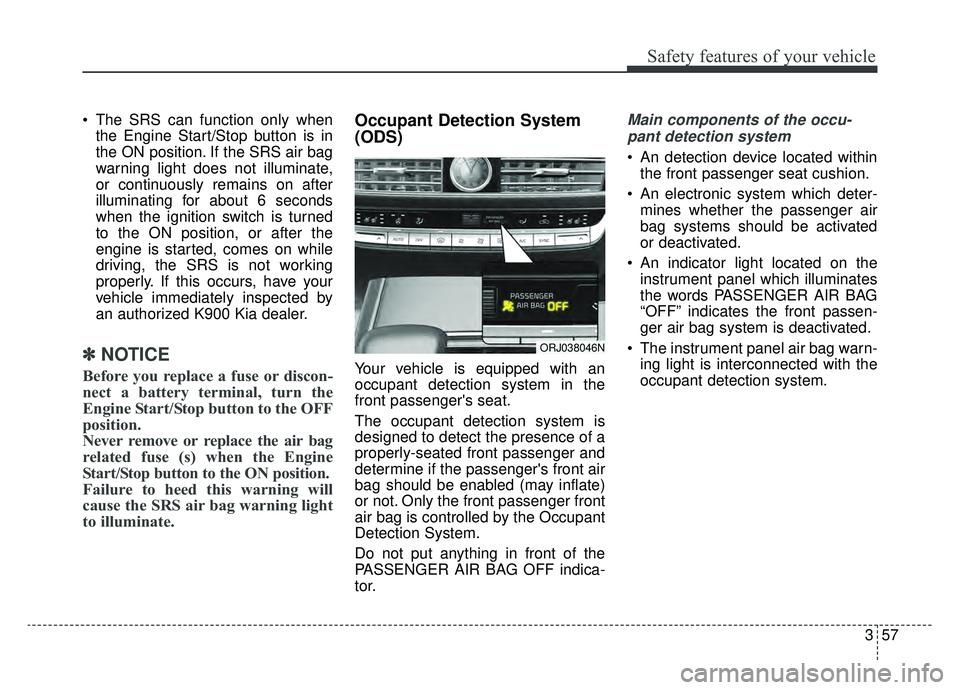
Do not put anything in front of the
PASSENGER AIR BAG OFF indica-
tor.
Main components of the occu-
pant detection system
An detection device located within the front passenger seat cushion.
An electronic system which deter- mines whether the passenger air
bag systems should be activated
or deactivated.
An indicator light located on the instrument panel which illuminates
the words PASSENGER AIR BAG
“OFF” indicates the front passen-
ger air bag system is deactivated.
The instrument panel air bag warn- ing light is interconnected with the
occupant detection system.
ORJ038046N
Page 81 of 580
Safety features of your vehicle
64
3
✽ ✽
NOTICE
The PASSENGER AIR BAG “OFF”
indicator illuminates for about 4 sec-
onds after the Engine Start/Stop
button is turned to the ON position
or after the engine is started. If the
front passenger seat is occupied, the
occupant detection sensor will then
classify the front passenger after
several more seconds.
Even though your vehicle is
equipped with the occupant detec-
tion system, never install a child
restraint system in the front pas-
senger's seat. A deploying air bag
can forcefully strike a child result-
ing in serious injuries or death. Any
child age 12 and under should ride
in the rear seat. Children too large
for child restraints should use the
available lap/shoulder belts. No
matter what type of crash, children
of all ages are safer when
restrained in the rear seat.
If the PASSENGER AIR BAG “OFF” indicator is illuminated when
the front passenger's seat is occu-
pied by an adult and he/she sits
properly (sitting upright with the
seatback in an upright position,
centered on the seat cushion with
their seat belt on, legs comfortably
extended and their feet on the
floor), have that person sit in the
rear seat. Any child age 12 and under should
ride in the rear seat. Children too
large for child restraints should use
the available lap/shoulder belts. No
matter what type of crash, children of
all ages are safer when restrained in
the rear seat.
If the occupant detection system is
not working properly, the SRS air
bag warning light on the instrument
panel will illuminate because the
passenger's front air bag is connect-
ed with the occupant detection sys-
tem. If there is a malfunction of the
occupant detection system, the PAS-
SENGER AIR BAG “OFF” indicator
will not illuminate and the passen-
ger's front air bag will inflate in frontal
impact crashes even if there is no
occupant in the front passenger's
seat.
Page 84 of 580
367
Safety features of your vehicle
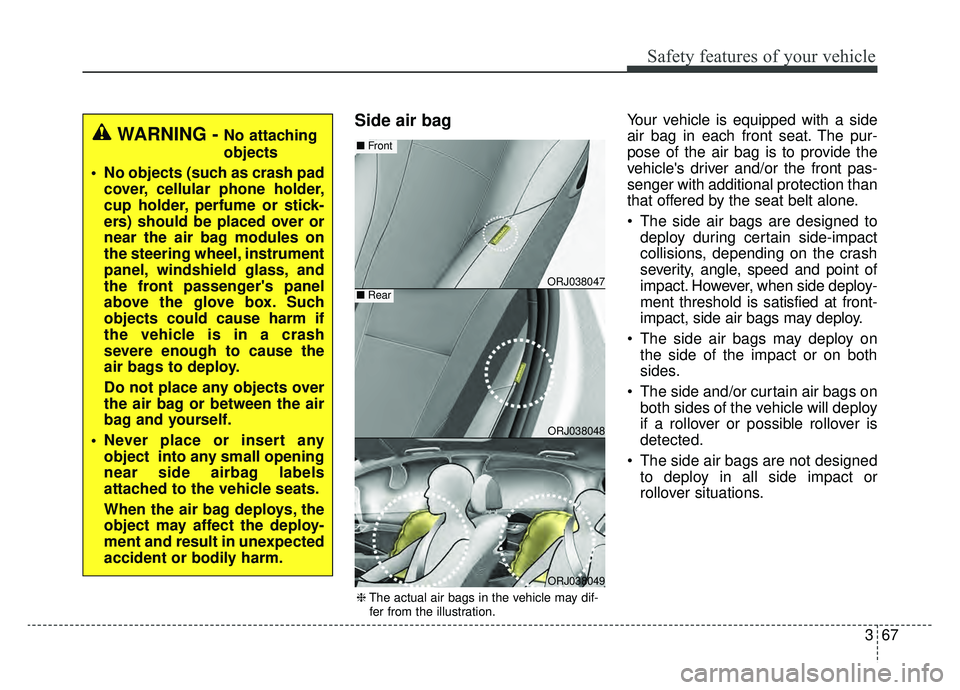
Side air bagYour vehicle is equipped with a side
air bag in each front seat. The pur-
pose of the air bag is to provide the
vehicle's driver and/or the front pas-
senger with additional protection than
that offered by the seat belt alone.
The side air bags are designed todeploy during certain side-impact
collisions, depending on the crash
severity, angle, speed and point of
impact. However, when side deploy-
ment threshold is satisfied at front-
impact, side air bags may deploy.
The side air bags may deploy on the side of the impact or on both
sides.
The side and/or curtain air bags on both sides of the vehicle will deploy
if a rollover or possible rollover is
detected.
The side air bags are not designed to deploy in all side impact or
rollover situations.
WARNING - No attaching
objects
No objects (such as crash pad cover, cellular phone holder,
cup holder, perfume or stick-
ers) should be placed over or
near the air bag modules on
the steering wheel, instrument
panel, windshield glass, and
the front passenger's panel
above the glove box. Such
objects could cause harm if
the vehicle is in a crash
severe enough to cause the
air bags to deploy.
Do not place any objects over
the air bag or between the air
bag and yourself.
Never place or insert any object into any small opening
near side airbag labels
attached to the vehicle seats.
When the air bag deploys, the
object may affect the deploy-
ment and result in unexpected
accident or bodily harm.
ORJ038047
ORJ038048
■ Front
■Rear
ORJ038049
❈The actual air bags in the vehicle may dif-
fer from the illustration.
Page 99 of 580
Features of your vehicle
64
When Two press unlock function is
activated,
- If you press the driver's outsidedoor handle button, the driver`s
door will unlock.
- If you press the driver's outside door handle button within four sec-
onds again, then all the doors will
unlock.
✽ ✽ NOTICE
You can activate or deactivate the
Two Press Unlock function. Refer to
“Set Up” in the Navigation touch
screen in instrument panel.
Trunk unlocking
If you are within 28 ~ 40 in. (0.7 ~ 1
m) from the outside trunk handle,
with your smart key in possession,
the lift gate will unlock and open
when you press the trunk handle
switch.
The hazard warning lights will blink
twice to indicate that the trunk is
unlocked.
Also, once the trunk is opened and
then closed, the trunk will lock auto-
matically.
Smart key precautions
If you lose your smart key, you will
not be able to start the engine. Tow
the vehicle, if necessary, and con-
tact an authorized K900 Kia dealer.
A maximum of 2 smart keys can be registered to a single vehicle. If you
lose a smart key, you should imme-
diately take the vehicle and key to
your authorized K900 Kia dealer to
protect it from potential theft.
The smart key will not work if any of following occurs:
- The smart key is close to a radiotransmitter such as a radio sta-
tion or an airport which can inter-
fere with normal operation of the
smart key.
- The smart key is near a mobile two way radio system or a cellular
phone.
- Another vehicle’s smart key is being operated close to your
vehicle.
Page 101 of 580
Features of your vehicle
84
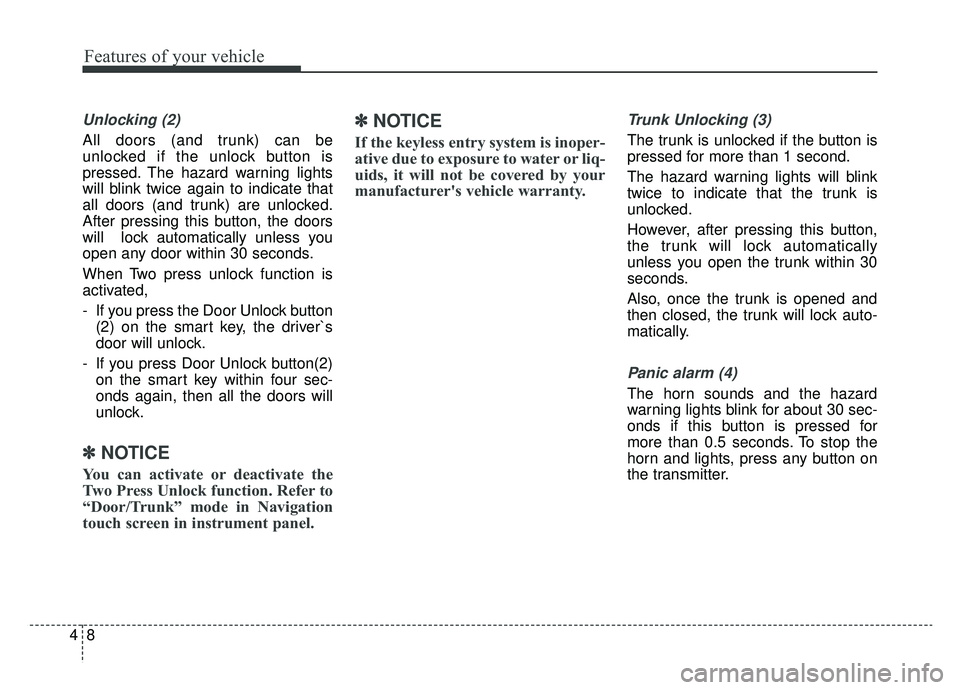
Unlocking (2)
All doors (and trunk) can be
unlocked if the unlock button is
pressed. The hazard warning lights
will blink twice again to indicate that
all doors (and trunk) are unlocked.
After pressing this button, the doors
will lock automatically unless you
open any door within 30 seconds.
When Two press unlock function is
activated,
- If you press the Door Unlock button(2) on the smart key, the driver`s
door will unlock.
- If you press Door Unlock button(2) on the smart key within four sec-
onds again, then all the doors will
unlock.
✽ ✽ NOTICE
You can activate or deactivate the
Two Press Unlock function. Refer to
“Door/Trunk” mode in Navigation
touch screen in instrument panel.
✽ ✽NOTICE
If the keyless entry system is inoper-
ative due to exposure to water or liq-
uids, it will not be covered by your
manufacturer's vehicle warranty.
Trunk Unlocking (3)
The trunk is unlocked if the button is
pressed for more than 1 second.
The hazard warning lights will blink
twice to indicate that the trunk is
unlocked.
However, after pressing this button,
the trunk will lock automatically
unless you open the trunk within 30
seconds.
Also, once the trunk is opened and
then closed, the trunk will lock auto-
matically.
Panic alarm (4)
The horn sounds and the hazard
warning lights blink for about 30 sec-
onds if this button is pressed for
more than 0.5 seconds. To stop the
horn and lights, press any button on
the transmitter.
Page 126 of 580
433
Features of your vehicle
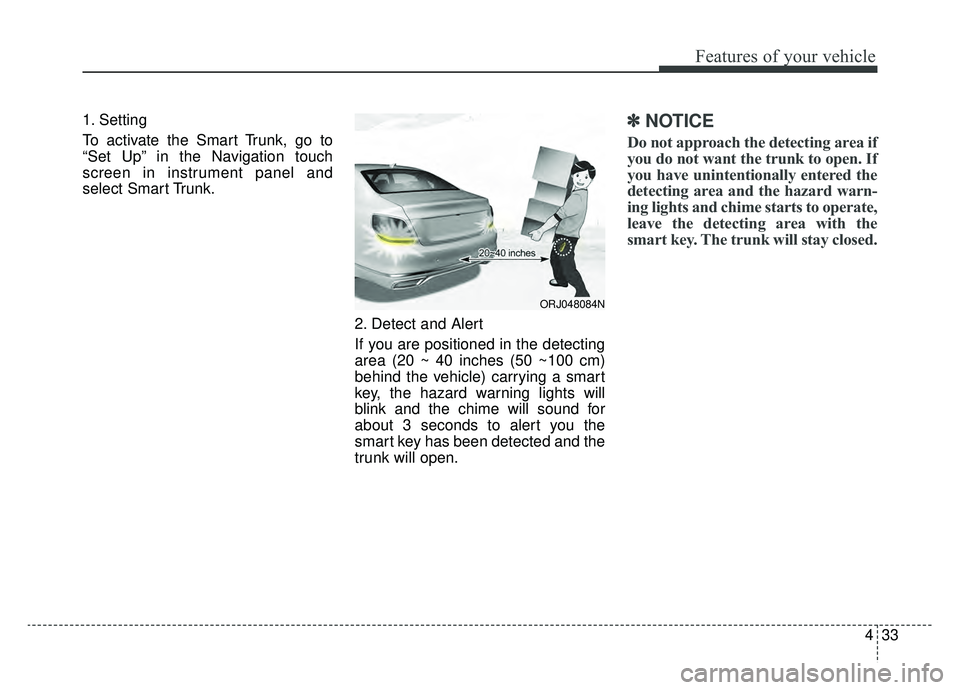
1. Setting
To activate the Smart Trunk, go to
“Set Up” in the Navigation touch
screen in instrument panel and
select Smart Trunk.2. Detect and Alert
If you are positioned in the detecting
area (20 ~ 40 inches (50 ~100 cm)
behind the vehicle) carrying a smart
key, the hazard warning lights will
blink and the chime will sound for
about 3 seconds to alert you the
smart key has been detected and the
trunk will open.✽ ✽NOTICE
Do not approach the detecting area if
you do not want the trunk to open. If
you have unintentionally entered the
detecting area and the hazard warn-
ing lights and chime starts to operate,
leave the detecting area with the
smart key. The trunk will stay closed.
ORJ048084N
Page 148 of 580
455
Features of your vehicle
(Continued)
• When the charging system warninglight comes on due to low voltage
(when the alternator or battery do
not operate normally or malfunc-
tion), the steering wheel may
require increased steering effort.Tilt and telescopic steering
Tilt and telescopic steering allows
you to adjust the steering wheel
before you drive. You can also raise it
to give your legs more room when
you exit and enter the vehicle.
The steering wheel should be posi-
tioned so that it is comfortable for
you to drive, while permitting you to
see the instrument panel warning
lights and gauges.
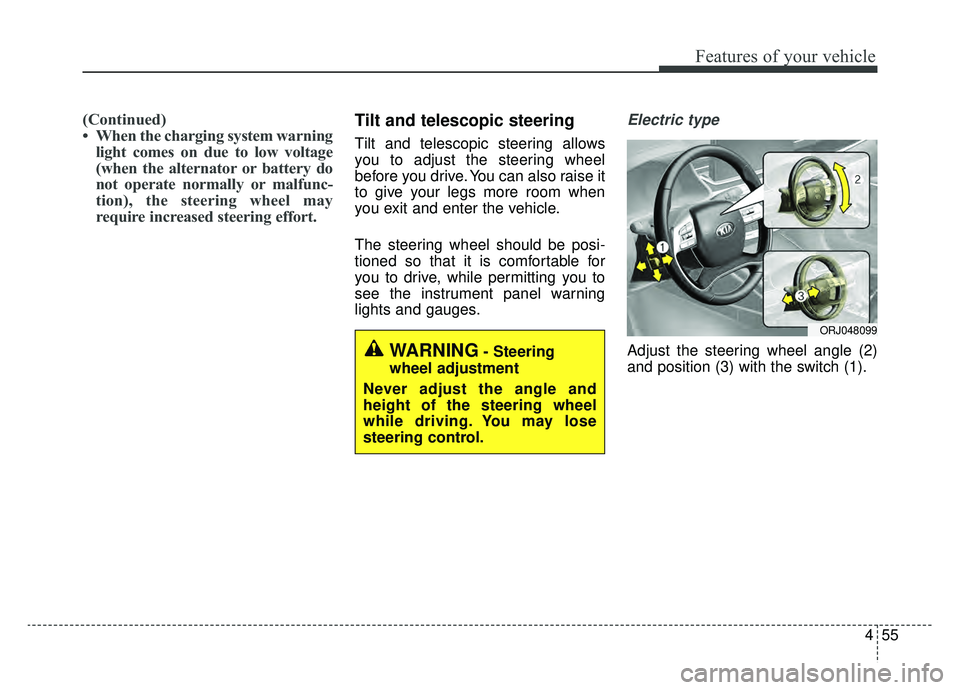
Electric type
Adjust the steering wheel angle (2)
and position (3) with the switch (1).WARNING- Steering
wheel adjustment
Never adjust the angle and
height of the steering wheel
while driving. You may lose
steering control.
ORJ048099
Page 163 of 580
Features of your vehicle
70
4
Instrument Cluster Control
Adjusting Instrument Cluster
Illumination
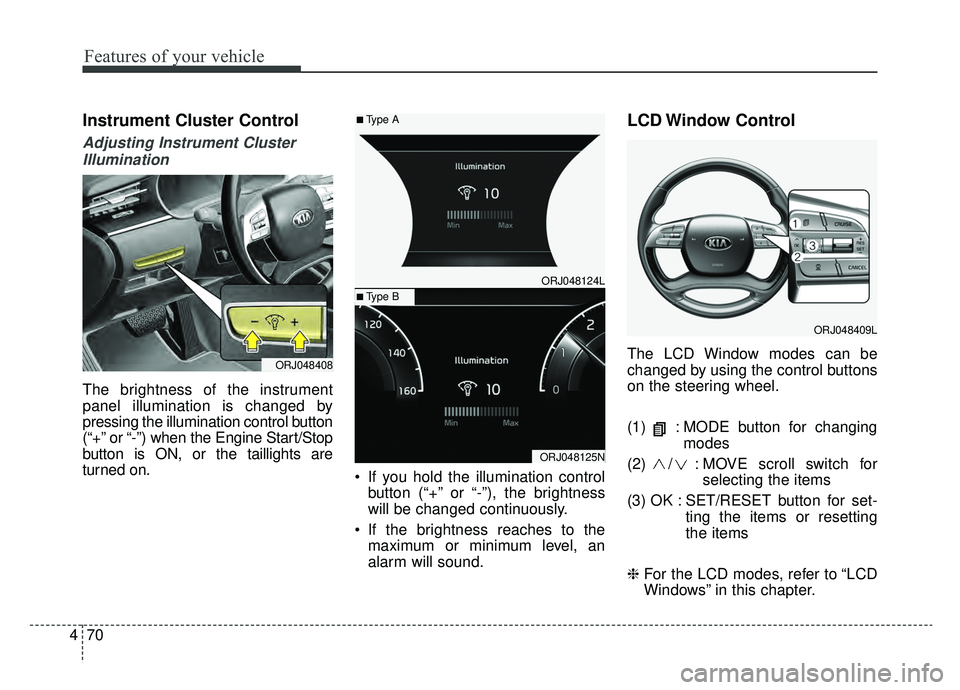
The brightness of the instrument
panel illumination is changed by
pressing the illumination control button
(“+” or “-”) when the Engine Start/Stop
button is ON, or the taillights are
turned on. If you hold the illumination control
button (“+” or “-”), the brightness
will be changed continuously.
If the brightness reaches to the maximum or minimum level, an
alarm will sound.
LCD Window Control
The LCD Window modes can be
changed by using the control buttons
on the steering wheel.
(1) : MODE button for changing modes
(2) / : MO VE scroll switch for
selecting the items
(3) OK : SET/RESET button for set- ting the items or resetting
the items
❈ For the LCD modes, refer to “LCD
Windows” in this chapter.ORJ048408
ORJ048409L
ORJ048124L
ORJ048125N
■Type A
■Type B
Page 167 of 580
Features of your vehicle
74
4
Outside Temperature Gauge
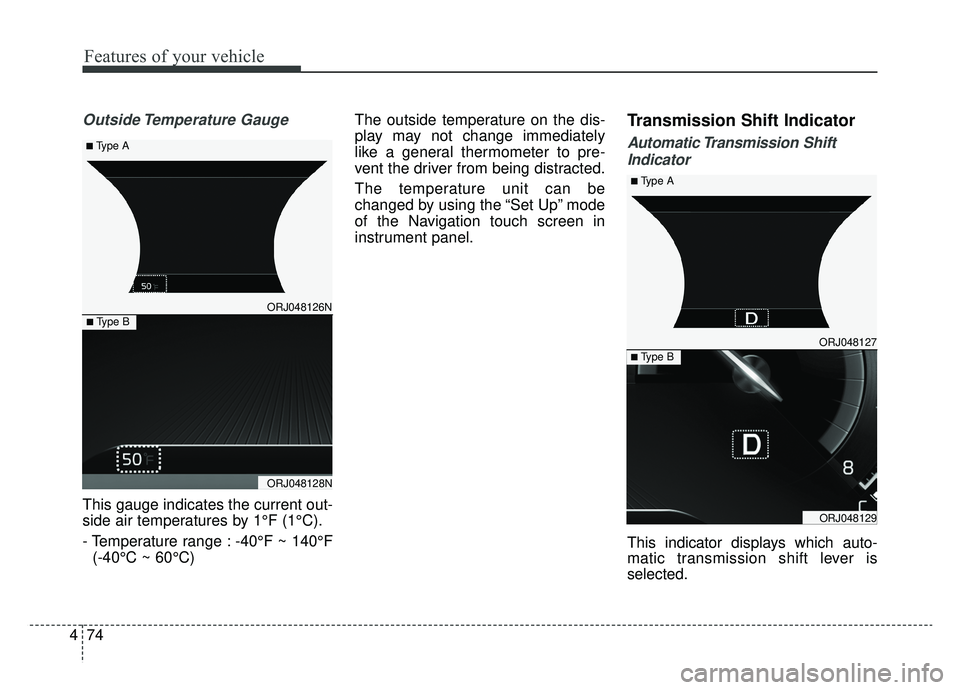
This gauge indicates the current out-
side air temperatures by 1°F (1°C).
- Temperature range : -40°F ~ 140°F
(-40°C ~ 60°C) The outside temperature on the dis-
play may not change immediately
like a general thermometer to pre-
vent the driver from being distracted.
The temperature unit can be
changed by using the “Set Up” mode
of the Navigation touch screen in
instrument panel.
Transmission Shift Indicator
Automatic Transmission Shift
Indicator
This indicator displays which auto-
matic transmission shift lever is
selected.
ORJ048127
ORJ048129
■ Type B
■ Type A
ORJ048126N
ORJ048128N
■ Type B
■ Type A
Page 171 of 580
Features of your vehicle
78
4
Automatic reset
To make the average fuel economy
be reset automatically whenever
refueling, select the “Fuel economy
auto reset” mode in Set Up menu of
the Navigation touch screen in
instrument panel.
OFF - You may set to default man-
ually by using the trip switch reset
button.
When driving - The vehicle will automatically set to default once 4
hours pass after the Engine
Start/Stop Button is in the ACC or
OFF position.
When refueling - After refueling more than 2 gallons (6 liters) and
driving over 1 mph (1 km/h), the
vehicle will reset to default auto-
matically.✽ ✽ NOTICE
For a more accurate calculation of
the average fuel economy, the vehi-
cle must be continuously driven
more than 10 seconds and 0.03 miles
(50 meters).
Instant Fuel Economy (2)
This mode displays the instant fuel
economy during the last few sec-
onds when the vehicle speed is
more than 6.2 mph (10 km/h).
- Fuel economy range : 0 ~ 50(MPG), 0 ~ 30 (km/L, L/100 km).
CAUTION - Low Fuel
Level
Level warning light on or withthe fuel level below “E” cancause the engine to misfire anddamage the catalytic converter(if equipped).