reset KIA K900 2019 User Guide
[x] Cancel search | Manufacturer: KIA, Model Year: 2019, Model line: K900, Model: KIA K900 2019Pages: 580, PDF Size: 15.11 MB
Page 172 of 580
479
Features of your vehicle
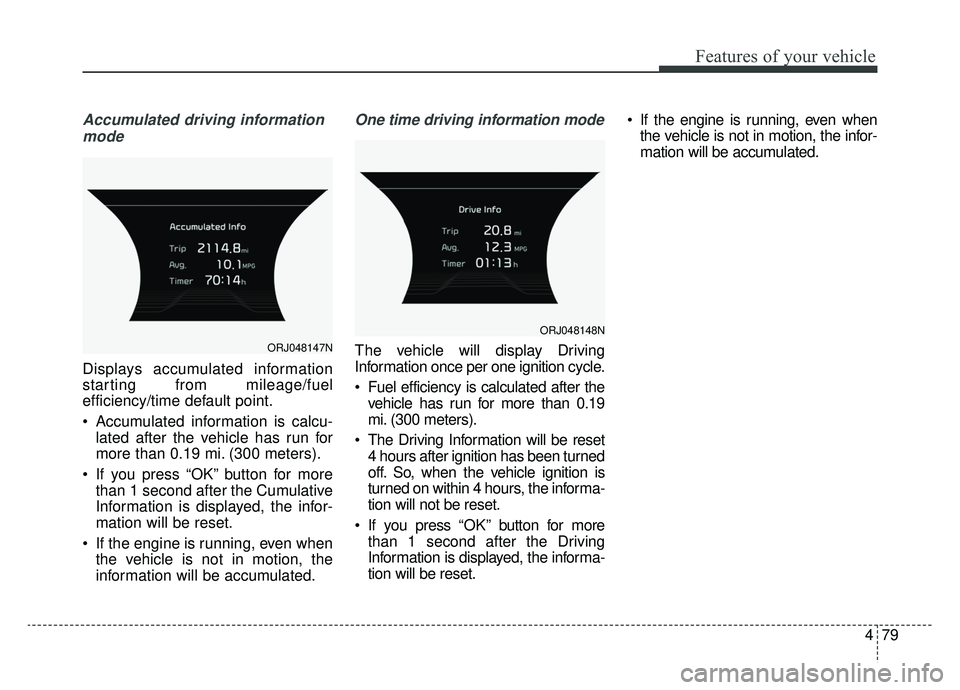
Accumulated driving informationmode
Displays accumulated information
starting from mileage/fuel
efficiency/time default point.
Accumulated information is calcu- lated after the vehicle has run for
more than 0.19 mi. (300 meters).
If you press “OK” button for more than 1 second after the Cumulative
Information is displayed, the infor-
mation will be reset.
If the engine is running, even when the vehicle is not in motion, the
information will be accumulated.
One time driving information mode
The vehicle will display Driving
Information once per one ignition cycle.
Fuel efficiency is calculated after thevehicle has run for more than 0.19
mi. (300 meters).
The Driving Information will be reset 4 hours after ignition has been turned
off. So, when the vehicle ignition is
turned on within 4 hours, the informa-
tion will not be reset.
If you press “OK” button for more
than 1 second after the Driving
Information is displayed, the informa-
tion will be reset. If the engine is running, even when
the vehicle is not in motion, the infor-
mation will be accumulated.ORJ048147N
ORJ048148N
Page 231 of 580
Features of your vehicle
138
4
The temperature will decrease to the
minimum (Lo) by pressing the tem-
perature button with the arrow point-
ed downward or turning the knob to
the extreme left.
When pressing the temperature but-
ton or turning the knob, the tempera-
ture will increase or decrease by
0.5°C/1°F. When set to the lowest
temperature setting, the air condi-
tioning will operate continuously.
Turn the rear seat temperature con-
trol knob to adjust temperature.
The front and rear seat side temper-
ature is adjusted individually. Adjusting the driver and passenger
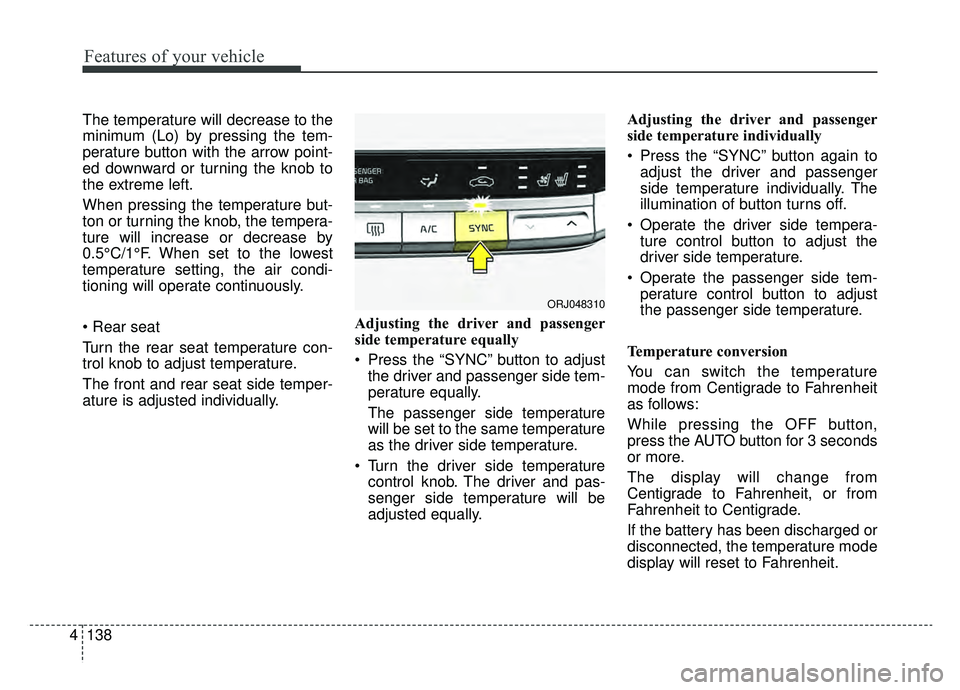
side temperature equally
Press the “SYNC” button to adjust
the driver and passenger side tem-
perature equally.
The passenger side temperature
will be set to the same temperature
as the driver side temperature.
Turn the driver side temperature control knob. The driver and pas-
senger side temperature will be
adjusted equally. Adjusting the driver and passenger
side temperature individually
Press the “SYNC” button again to
adjust the driver and passenger
side temperature individually. The
illumination of button turns off.
Operate the driver side tempera- ture control button to adjust the
driver side temperature.
Operate the passenger side tem- perature control button to adjust
the passenger side temperature.
Temperature conversion
You can switch the temperature
mode from Centigrade to Fahrenheit
as follows:
While pressing the OFF button,
press the AUTO button for 3 seconds
or more.
The display will change from
Centigrade to Fahrenheit, or from
Fahrenheit to Centigrade.
If the battery has been discharged or
disconnected, the temperature mode
display will reset to Fahrenheit.
ORJ048310
Page 241 of 580
Features of your vehicle
148
4
Automatic climate control system
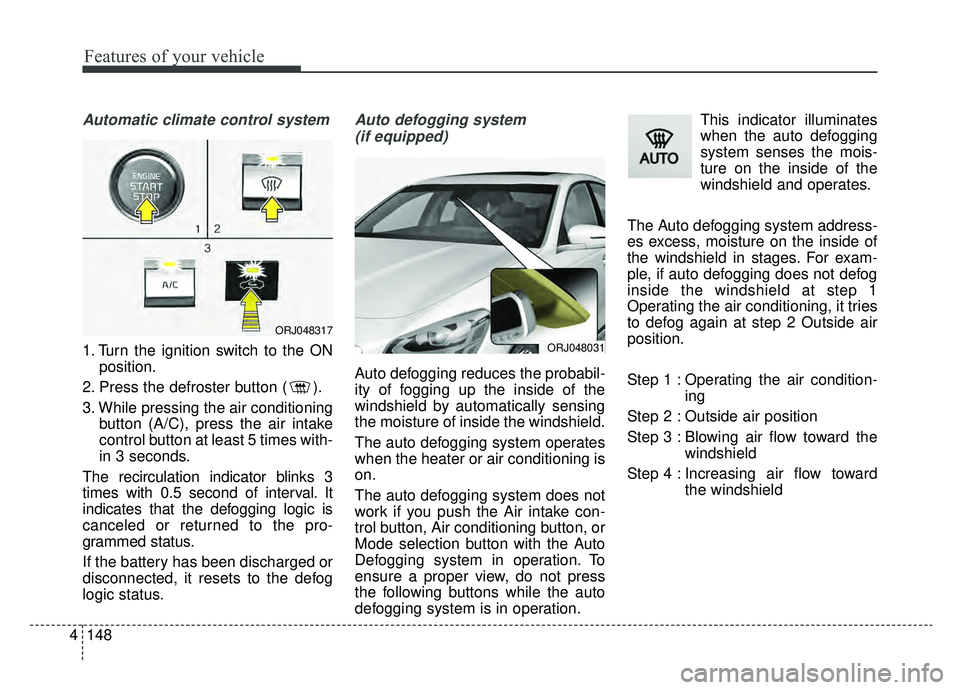
1. Turn the ignition switch to the ON
position.
2. Press the defroster button ( ).
3. While pressing the air conditioning button (A/C), press the air intake
control button at least 5 times with-
in 3 seconds.
The recirculation indicator blinks 3
times with 0.5 second of interval. It
indicates that the defogging logic is
canceled or returned to the pro-
grammed status.
If the battery has been discharged or
disconnected, it resets to the defog
logic status.
Auto defogging system (if equipped)
Auto defogging reduces the probabil-
ity of fogging up the inside of the
windshield by automatically sensing
the moisture of inside the windshield.
The auto defogging system operates
when the heater or air conditioning is
on.
The auto defogging system does not
work if you push the Air intake con-
trol button, Air conditioning button, or
Mode selection button with the Auto
Defogging system in operation. To
ensure a proper view, do not press
the following buttons while the auto
defogging system is in operation. This indicator illuminates
when the auto defogging
system senses the mois-
ture on the inside of the
windshield and operates.
The Auto defogging system address-
es excess, moisture on the inside of
the windshield in stages. For exam-
ple, if auto defogging does not defog
inside the windshield at step 1
Operating the air conditioning, it tries
to defog again at step 2 Outside air
position.
Step 1 : Operating the air condition- ing
Step 2 : Outside air position
Step 3 : Blowing air flow toward the windshield
Step 4 : Increasing air flow toward the windshield
ORJ048031
ORJ048317
Page 242 of 580
4149
Features of your vehicle
To cancel or reset the Auto Defogging
System
Press the front windshield defroster
button for 3 seconds when the igni-
tion switch is in the ON position.
When the ADS system is canceled,
Indicator on the button will blink 3
times per 0.5 sec and the position
“ADS OFF” will be displayed on the
climate control information screen.
When the ADS system is reset,
Indicator on the button will blink 6
times per 0.25sec and the position
“ADS OFF” will be disappeared on
the climate control information
screen.
You can set or release the Auto
Defogging System on the AVN
Climate Information selection screen.
“AVN → Climate →Menu →Auto
defog”
If the battery is discharged or
detached, the auto defogging system
will be reset. Adjust the feature
accordingly.Automatic ventilation
(if equipped)
The system automatically selects the
outside (fresh) air position when the
climate control system operates over
a certain period of time (approxi-
mately 5 minutes) in low temperature
with the recirculated air position and
Floor/Bi-level Mode selected and the
state that air conditioning is turned
off.
CAUTION
Do not remove the sensor cover located on the upper end of thepassenger side windshieldglass. Damage to the systemparts could occur and may notbe covered by your vehicle war-ranty.
Page 243 of 580
Features of your vehicle
150
4
To cancel or reset the Automatic
Ventilation
When the air conditioning system is
on, select Face Level mode and
while pressing the A/C button, press
the recirculated air position button
five times within three seconds.
When the automatic ventilation is
canceled, the indicator blinks 3
times. When the automatic ventila-
tion is activated, the indicator blinks
6 times.
If the battery is discharged or
detached, the automatic ventilation
will be reset. Adjust the feature
accordingly.
Smart ventilation (if equipped)
The smart ventilation system main-
tains pleasant/fresh air condition
inside the passenger compartment
by automatically detecting/controlling
the temperature and humidity when
you drive the vehicle with the climate
control system in the OFF position.
When the smart ventilation system
starts to operate, the message,
“SMART VENTILATION ON”
appears for 5 seconds. The driver can activate the smart
ventilation by placing the ignition
switch to the ON position and by
selecting on the audio display:
“AVN
→Climate →Menu →Smart
vent”
The smart ventilation system stops operating, when the OFF button of
the climate control system is
selected.
The smart ventilation system stops operating, when any button of the
climate control system is selected
for operation.
The smart ventilation system may not operate, when the vehicle is
driven at low speed.
Page 408 of 580
5143
Driving your vehicle
Resetting the system
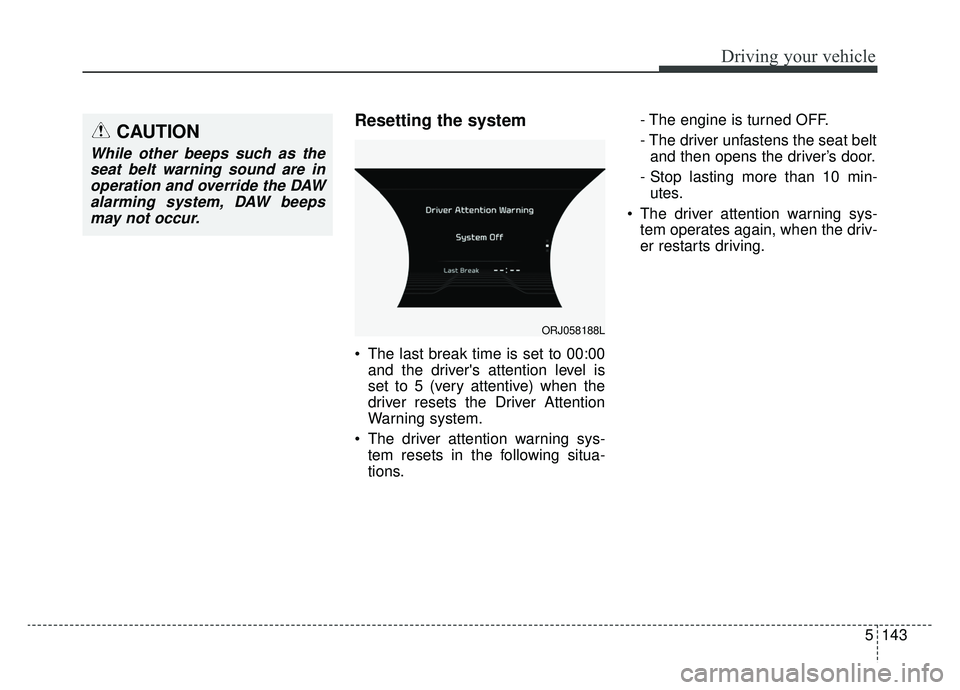
The last break time is set to 00:00and the driver's attention level is
set to 5 (very attentive) when the
driver resets the Driver Attention
Warning system.
The driver attention warning sys- tem resets in the following situa-
tions. - The engine is turned OFF.
- The driver unfastens the seat belt
and then opens the driver’s door.
- Stop lasting more than 10 min- utes.
The driver attention warning sys- tem operates again, when the driv-
er restarts driving.
ORJ058188L
CAUTION
While other beeps such as theseat belt warning sound are inoperation and override the DAWalarming system, DAW beepsmay not occur.
Page 429 of 580
63
What to do in an emergency
If the engine stalls at a cross-
road or crossing
If the engine stalls at a crossroad or
crossing, set the shift lever in the N
(Neutral) position and then push the
vehicle to a safe place.
If you have a flat tire while
driving
If a tire goes flat while you are driv-
ing:
1. Take your foot off the acceleratorpedal and let the vehicle slow
down while driving straight ahead.
Do not apply the brakes immedi-
ately or attempt to pull off the road
as this may cause a loss of con-
trol. When the vehicle has slowed
to such a speed that it is safe to do
so, brake carefully and pull off the
road. Drive off the road as far as
possible and park on firm level
ground. If you are on a divided
highway, do not park in the median
area between the two traffic lanes. 2. When the vehicle is stopped, turn
on your emergency hazard flash-
ers, set the parking brake and put
the transmission in P.
3. Have all passengers get out of the vehicle. Be sure they all get out on
the side of the vehicle that is away
from traffic.
4. When changing a flat tire, follow the instruction provided later in
this section.
If the engine stalls while driv-
ing
1. Reduce your speed gradually,keeping a straight line. Move cau-
tiously off the road to a safe place.
2. Turn on your emergency flashers.
3. Try to start the engine again. If your vehicle will not start, contact
an authorized K900 Kia dealer or
seek other qualified assistance.
✽ ✽NOTICE
If there was a check engine light and
loss of power or stall and if safe to do
so, wait at least 10 seconds to restart
the vehicle after it stalls. This may
reset the car so it will no longer run
at low power (limp home) condition.
IN CASE OF AN EMERGENCY WHILE DRIVING
Page 456 of 580

Battery . . . . . . . . . . . . . . . . . . . . . . . . . . . . . . . . . . . 7-\
34
• Battery replacement . . . . . . . . . . . . . . . . . . . . . . . . . . 7-34
• Recharging the battery . . . . . . . . . . . . . . . . . . . . . . . . 7-36
• Reset items . . . . . . . . . . . . . . . . . . . . . . . . . . . . . . . . . . 7-37\
Tires and wheels . . . . . . . . . . . . . . . . . . . . . . . . . . . 7-38
• Tire care . . . . . . . . . . . . . . . . . . . . . . . . . . . . . . . . . . . . \
7-38
• Recommended cold tire inflation pressures . . . . . . . 7-38
• Tire pressure . . . . . . . . . . . . . . . . . . . . . . . . . . . . . . . . 7-39
• Checking tire inflation pressure. . . . . . . . . . . . . . . . . 7-39
• Tire rotation . . . . . . . . . . . . . . . . . . . . . . . . . . . . . . . . 7-40
• Wheel alignment and tire balance . . . . . . . . . . . . . . . 7-41
• Tire replacement . . . . . . . . . . . . . . . . . . . . . . . . . . . . . 7-42
• Wheel replacement . . . . . . . . . . . . . . . . . . . . . . . . . . . 7-43
• Tire traction . . . . . . . . . . . . . . . . . . . . . . . . . . . . . . . . . 7-43
• Tire maintenance . . . . . . . . . . . . . . . . . . . . . . . . . . . . 7-43
• Tire sidewall labeling . . . . . . . . . . . . . . . . . . . . . . . . . 7-43
• All season tires . . . . . . . . . . . . . . . . . . . . . . . . . . . . . . 7-50
• Summer tires . . . . . . . . . . . . . . . . . . . . . . . . . . . . . . . . 7-50
• Snow tires . . . . . . . . . . . . . . . . . . . . . . . . . . . . . . . . . . . 7-\
50
• Tire chains . . . . . . . . . . . . . . . . . . . . . . . . . . . . . . . . . . 7-51\
• Radial-ply tires . . . . . . . . . . . . . . . . . . . . . . . . . . . . . . 7-51
• Low aspect ratio tire . . . . . . . . . . . . . . . . . . . . . . . . . . 7-52
Fuses . . . . . . . . . . . . . . . . . . . . . . . . . . . . . . . . . . . . \
7-53
• Inner panel fuse replacement . . . . . . . . . . . . . . . . . . . 7-55
• Engine compartment fuse replacement. . . . . . . . . . . 7-57
• Fuse/relay panel description. . . . . . . . . . . . . . . . . . . . 7-59
Light bulbs . . . . . . . . . . . . . . . . . . . . . . . . . . . . . . . 7-77
• Lamp (LED type) bulb replacement . . . . . . . . . . . . . 7-77
• Light bulb position (Front). . . . . . . . . . . . . . . . . . . . . 7-79
• Light bulb position (Rear) . . . . . . . . . . . . . . . . . . . . . 7-79
• Light bulb position (Side) . . . . . . . . . . . . . . . . . . . . . . 7-80
• Headlamp (LED type) bulb replacement . . . . . . . . . 7-80
• Rear combination lamp (LED type) bulbreplacement . . . . . . . . . . . . . . . . . . . . . . . . . . . . . . . . 7-80
• High mounted stop lamp (LED type) bulb replacement . . . . . . . . . . . . . . . . . . . . . . . . . . . . . . . . 7-81
• License plate lamp (LED type) bulb replacement . . 7-81
• Rear fog lamp (LED type) bulb replacement . . . . . . 7-81
• Side repeater lamp (LED type) bulb replacement . . 7-82
• Map lamp (LED type) bulb replacement . . . . . . . . . 7-82
• Vanity mirror lamp (front)(LED type) bulb replacement . . . . . . . . . . . . . . . . . . . . . . . . . . . . . . . . 7-82
• Room lamp (LED type) bulb replacement . . . . . . . . 7-83
• Glove box lamp (LED type) bulb replacement . . . . 7-83
• Trunk lamp (LED type) bulb replacement . . . . . . . . 7-83
Appearance care . . . . . . . . . . . . . . . . . . . . . . . . . . . 7-84
• Exterior care . . . . . . . . . . . . . . . . . . . . . . . . . . . . . . . . 7-84
• Interior care . . . . . . . . . . . . . . . . . . . . . . . . . . . . . . . . . 7-89
7
Page 491 of 580
737
Maintenance
Reset items
Items should be reset after the bat-
tery has been discharged or the bat-
tery has been disconnected.
Auto up/down window (See chapter 4)
Sunroof (See chapter 4)
Trip computer (See chapter 4)
Climate control system (See chapter 4)
Driver position memory system (See chapter 3)
Audio (See chapter 4)
Page 495 of 580
741
Maintenance
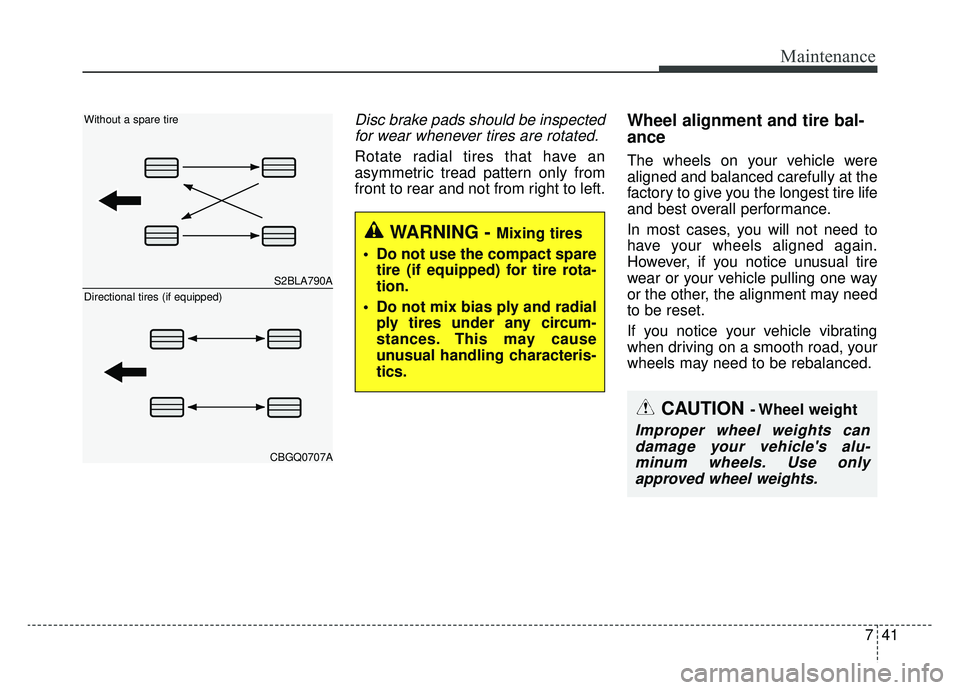
Disc brake pads should be inspectedfor wear whenever tires are rotated.
Rotate radial tires that have an
asymmetric tread pattern only from
front to rear and not from right to left.
Wheel alignment and tire bal-
ance
The wheels on your vehicle were
aligned and balanced carefully at the
factory to give you the longest tire life
and best overall performance.
In most cases, you will not need to
have your wheels aligned again.
However, if you notice unusual tire
wear or your vehicle pulling one way
or the other, the alignment may need
to be reset.
If you notice your vehicle vibrating
when driving on a smooth road, your
wheels may need to be rebalanced.
WARNING - Mixing tires
Do not use the compact spare tire (if equipped) for tire rota-
tion.
Do not mix bias ply and radial ply tires under any circum-
stances. This may cause
unusual handling characteris-
tics.
CAUTION - Wheel weight
Improper wheel weights candamage your vehicle's alu-minum wheels. Use onlyapproved wheel weights.
S2BLA790A
CBGQ0707A
Without a spare tire
Directional tires (if equipped)