cruise control KIA K900 2019 Owner's Manual
[x] Cancel search | Manufacturer: KIA, Model Year: 2019, Model line: K900, Model: KIA K900 2019Pages: 580, PDF Size: 15.11 MB
Page 347 of 580
Driving your vehicle
82
5
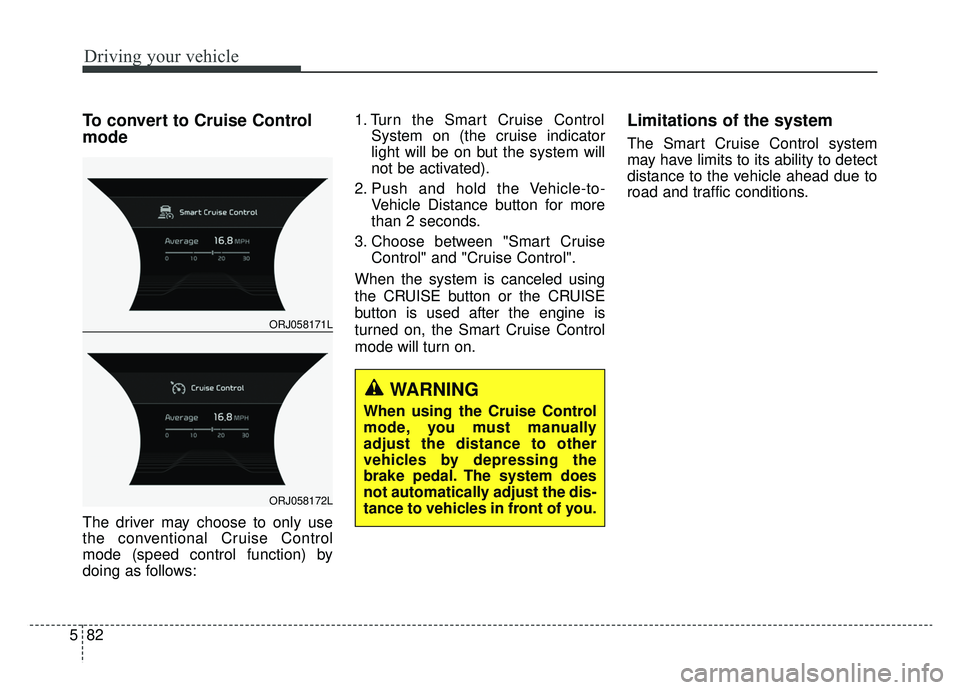
To convert to Cruise Control
mode
The driver may choose to only use
the conventional Cruise Control
mode (speed control function) by
doing as follows: 1. Turn the Smart Cruise Control
System on (the cruise indicator
light will be on but the system will
not be activated).
2. Push and hold the Vehicle-to- Vehicle Distance button for more
than 2 seconds.
3. Choose between "Smart Cruise Control" and "Cruise Control".
When the system is canceled using
the CRUISE button or the CRUISE
button is used after the engine is
turned on, the Smart Cruise Control
mode will turn on.
Limitations of the system
The Smart Cruise Control system
may have limits to its ability to detect
distance to the vehicle ahead due to
road and traffic conditions.
WARNING
When using the Cruise Control
mode, you must manually
adjust the distance to other
vehicles by depressing the
brake pedal. The system does
not automatically adjust the dis-
tance to vehicles in front of you.
ORJ058171L
ORJ058172L
Page 348 of 580
583
Driving your vehicle
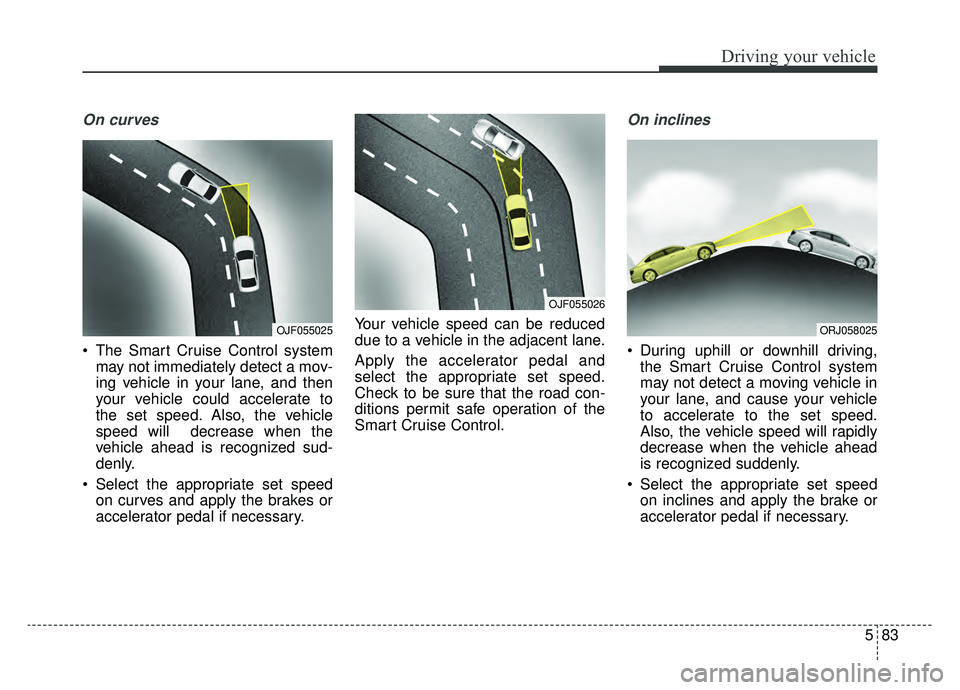
On curves
The Smart Cruise Control systemmay not immediately detect a mov-
ing vehicle in your lane, and then
your vehicle could accelerate to
the set speed. Also, the vehicle
speed will decrease when the
vehicle ahead is recognized sud-
denly.
Select the appropriate set speed on curves and apply the brakes or
accelerator pedal if necessary. Your vehicle speed can be reduced
due to a vehicle in the adjacent lane.
Apply the accelerator pedal and
select the appropriate set speed.
Check to be sure that the road con-
ditions permit safe operation of the
Smart Cruise Control.
On inclines
During uphill or downhill driving,
the Smart Cruise Control system
may not detect a moving vehicle in
your lane, and cause your vehicle
to accelerate to the set speed.
Also, the vehicle speed will rapidly
decrease when the vehicle ahead
is recognized suddenly.
Select the appropriate set speed on inclines and apply the brake or
accelerator pedal if necessary.
OJF055025
OJF055026
ORJ058025
Page 351 of 580
Driving your vehicle
86
5
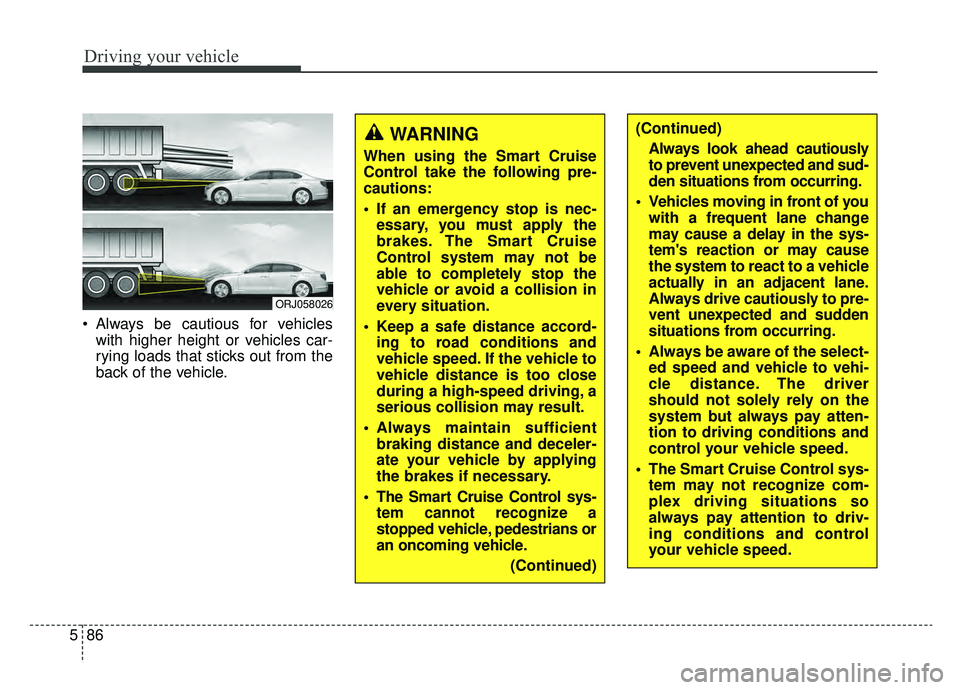
Always be cautious for vehicles
with higher height or vehicles car-
rying loads that sticks out from the
back of the vehicle.
ORJ058026
WARNING
When using the Smart Cruise
Control take the following pre-
cautions:
If an emergency stop is nec-essary, you must apply the
brakes. The Smart Cruise
Control system may not be
able to completely stop the
vehicle or avoid a collision in
every situation.
Keep a safe distance accord- ing to road conditions and
vehicle speed. If the vehicle to
vehicle distance is too close
during a high-speed driving, a
serious collision may result.
Always maintain sufficient braking distance and deceler-
ate your vehicle by applying
the brakes if necessary.
The Smart Cruise Control sys- tem cannot recognize a
stopped vehicle, pedestrians or
an oncoming vehicle.
(Continued)
(Continued)Always look ahead cautiously
to prevent unexpected and sud-
den situations from occurring.
Vehicles moving in front of you with a frequent lane change
may cause a delay in the sys-
tem's reaction or may cause
the system to react to a vehicle
actually in an adjacent lane.
Always drive cautiously to pre-
vent unexpected and sudden
situations from occurring.
Always be aware of the select- ed speed and vehicle to vehi-
cle distance. The driver
should not solely rely on the
system but always pay atten-
tion to driving conditions and
control your vehicle speed.
The Smart Cruise Control sys- tem may not recognize com-
plex driving situations so
always pay attention to driv-
ing conditions and control
your vehicle speed.
Page 352 of 580
587
Driving your vehicle
✽ ✽NOTICE
The Smart Cruise Control system
may not operate temporarily due to:
• Electrical interference
• Modified suspension
• Differences of tire abrasion or tire
pressure
• Installation of different type of tires
This device complies with Part 15
of the FCC rules.
Operation is subject to the following
three conditions:
1. This device may not cause harm-
ful interference, and
2. This device must accept any inter- ference received, including inter-
ference that may cause undesired
operation.
3. Changes or modifications not expressly approved by the party
responsible for compliance could
void the user’s authority to operate
the device. Radio frequency radiation expo-
sure information:
This equipment complies with FCC
radiation exposure limits set forth for
an uncontrolled environment.
This equipment should be installed
and operated with minimum distance
of 8 in. (20 cm) between the radiator
(antenna) and your body.
This transmitter must not be co-locat-
ed or operating in conjunction with
any other antenna or transmitter.
Page 353 of 580
Driving your vehicle
88
5
The Leading Vehicle Departure Alert
system alerts the driver of the depar-
ture of the vehicle in front when the
vehicle is stopped and the Smart
Cruise Control (SCC) system is in
activation.System setting and operating
conditions
System setting
With the engine ON, the Leading
Vehicle Departure Alert system turns
on and gets ready to be activated
when the 'AVN → Settings →Vehicle
→ Driver Assistance →Driving
assist →Leading vehicle departure
alert' is selected on the cluster. The
system stops operation when the
setting is deactivated. However, if the
engine is turned off then on again,
the system maintains the previous
state.
Operating conditions
While the Smart Cruise Control
(SCC) system is in operation, your
vehicle stops behind the vehicle in
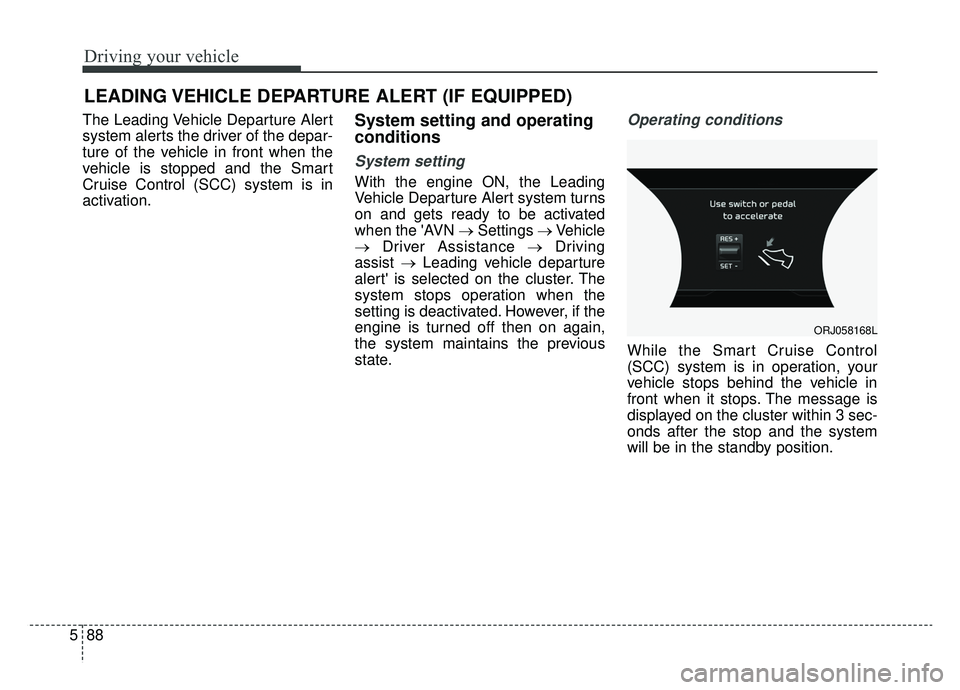
front when it stops. The message is
displayed on the cluster within 3 sec-
onds after the stop and the system
will be in the standby position.
LEADING VEHICLE DEPARTURE ALERT (IF EQUIPPED)
ORJ058168L
Page 354 of 580
589
Driving your vehicle
System activation
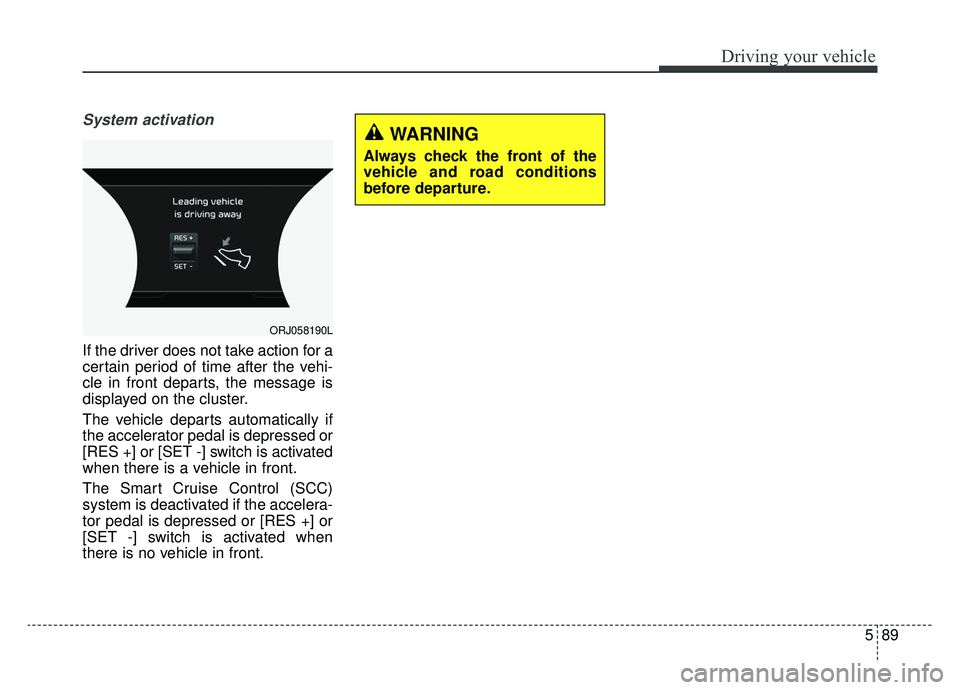
If the driver does not take action for a
certain period of time after the vehi-
cle in front departs, the message is
displayed on the cluster.
The vehicle departs automatically if
the accelerator pedal is depressed or
[RES +] or [SET -] switch is activated
when there is a vehicle in front.
The Smart Cruise Control (SCC)
system is deactivated if the accelera-
tor pedal is depressed or [RES +] or
[SET -] switch is activated when
there is no vehicle in front.
ORJ058190L
WARNING
Always check the front of the
vehicle and road conditions
before departure.
Page 361 of 580
Driving your vehicle
96
5
Various driving situations, which you
may encounter in SMART mode
The driving mode automatically
changes to ECO mode after a cer-
tain period of time, when you gen-
tly depress the accelerator pedal
(Your driving is categorized to be
mild.).
The driving mode automatically changes from SMART ECO mode
to SMART COMFORT mode after
a certain period of time, when you
sharply or repetitively depress the
accelerator pedal.
The driving mode automatically changes to SMART COMFORT
mode with the same driving pat-
terns, when the vehicle starts to
drive on an upward slope of a cer-
tain angle. The driving mode auto-
matically returns to SMART ECO
mode, when the vehicle enters a
leveled road. The driving mode automatically
changes to SMART SPORT, when
you abruptly accelerate the vehicle
or repetitively operate the steering
wheel (Your driving is categorized
to be sporty.). In this mode, your
vehicle drives in a lower gear for
abrupt accelerating/decelerating
and increases the engine brake
performance.
You may still sense the engine brake performance, even when you
release the accelerator pedal in
SMART SPORT mode. It is
because your vehicle remains to
be in a lower gear over a certain
period of time for next acceleration.
Thus, it is a normal driving situa-
tion, not indicating any malfunc-
tion.
The driving mode automatically changes to SMART SPORT mode
only in harsh driving situations. In
most of the normal driving situa-
tions, the driving mode sets to be
either in SMART ECO mode or in
SMART COMFORT mode. Limitation of SMART mode
The SMART mode may be limited in
following situations. (The OFF indica-
tor illuminates in those situations.)
The driver manually moves the
shift lever : It deactivates SMART
mode. The vehicle drives, as the
driver manually moves the shift
lever.
The cruise control is activated : The cruise system may deactivate
the SMART mode. When a higher
system is set by the cruise system,
it starts to control vehicle speed
and deactivates SMART mode.
(SMART mode is not deactivated
just by activing the cruise system.)
The transmission oil temperature is either extremely low or extremely
high : The SMART mode can be
active in most of the normal driving
situations. However, an extremely
high/ low transmission oil tempera-
ture may temporarily deactivate the
SMART mode, because the trans-
mission condition is out of normal
operation condition.
Page 365 of 580
![KIA K900 2019 Owners Manual Driving your vehicle
100
5
LFA system operation
With the ignition [ON], select or
release the setting from "AVN →
Settings →Vehicle →Driver assis-
tance →Driving assist → LFA (Lane
Foll](/img/2/55057/w960_55057-364.png "KIA K900 2019 Owners Manual Driving your vehicle
100
5
LFA system operation
With the ignition [ON], select or
release the setting from \"AVN →
Settings →Vehicle →Driver assis-
tance →Driving assist → LFA (Lane
Foll")
Driving your vehicle
100
5
LFA system operation
With the ignition [ON], select or
release the setting from "AVN →
Settings →Vehicle →Driver assis-
tance →Driving assist → LFA (Lane
Following Assist)".
Select the LFA system in the AVN
and meet the following conditions,
the system will operate.
- When Smart Cruise Control is in operation (Vehicle deceleration and
acceleration control)
Refer to
details.
- Driving the vehicle at 95 mph (150 km/h) and under
Once the system starts working, the
indicator light ( ) comes on the
instrument panel.
The indicator light colors according
to the system status are as follows.
- White: steering assist mode deacti- vation
- Green: steering assist mode activa- tion
(Continued)
- Depending on your surround- ings and road conditions, theLFA system could fail to rec-ognize the lane and stop work-ing. In turn, extra caution isrequired while driving withthe LFA system on.
- Be sure to check the non- operating conditions and cau-tions for the driver beforeusing the LFA system.
- Do not place reflective materi- als such as white paper ormirror on the dashboard pad.Sunlight reflections can causethe LFA system to not operateproperly.
- Loud audio volumes can pre- vent the occupants from hear-ing the alarm sounds from theLFA system
(Continued)(Continued)- Keeping your hands off the wheel while driving will triggerthe hands-off warning anddeactivate the steering-assistsystem. Put your hands backon the wheel, then the steer-ing-assist system will be re-activated.
- When driving at a high speed, the steering assist force canbecome weak and the vehiclecan drive out of its lane. Extracaution is required, and com-ply with the speed limit.
- Attaching an object to the steering wheel could detersteering assistance.
- Attaching an object to the steering wheel could deter thehands-off alarming system.
Page 410 of 580
5145
Driving your vehicle
✽ ✽NOTICE
The Driver Attention Warning sys-
tem utilizes the camera sensor on the
front windshield for its operation.
To keep the camera sensor in the
best condition, you should observe
the followings:
- Do not disassemble camera tem-
porarily for tinted window or
attaching any types of coatings and
accessories. If you disassemble a
camera and assemble it again, have
the system checked by an author-
ized K900 Kia dealer.
- Do not locate any reflective objects (i.e. white paper, mirror)
over the dashboard. Any light
reflection may cause a mal-func-
tion of the Driver Attention
Warning (DAW) system.
- Pay extreme caution to keep the camera sensor out of water.
- Do not arbitrarily disassemble the camera assembly, nor apply any
impact on the camera assembly.
• Playing the vehicle audio system at high volume may offset the
Driver Attention Warning system
warning sounds.
✽ ✽ NOTICE
The DAW system does not detect
actual driver fatigue or drowsiness.
The system monitors driving and
provides a warning if it detects inat-
tentive driving practices.
CAUTION
The Driver Attention Warning
system may not properly oper-ate with limited alerting in thefollowing situations:
The lane detection perform- ance is limited. (For moreinformation, refer to "LaneKeeping Assist (LKA) System"in this chapter.)
The vehicle is violently driven or is abruptly turned for obsta-cle avoidance (e.g. construc-tion area, other vehicles, fallenobjects, bumpy road).
Forward drivability of the vehi- cle is severely undermined(possibly due to wide varia-tion in tire pressures, uneventire wear-out, toe-in/toe-outalignment).
The vehicle drives on a curvy road.
The vehicle drives on a bumpy road.
(Continued)
(Continued) The vehicle drives through a windy area.
The vehicle is controlled by the following driving assistsystems:
- Lane Keeping Assist (LKA) System
- Forward Collision-Avoidance Assist (FCA) System
- Blind-Spot Collision- Avoidance Assist (BCA)System
- Lane Following Assist (LFA) System
- Smart Cruise Control (SCC) System
Page 524 of 580
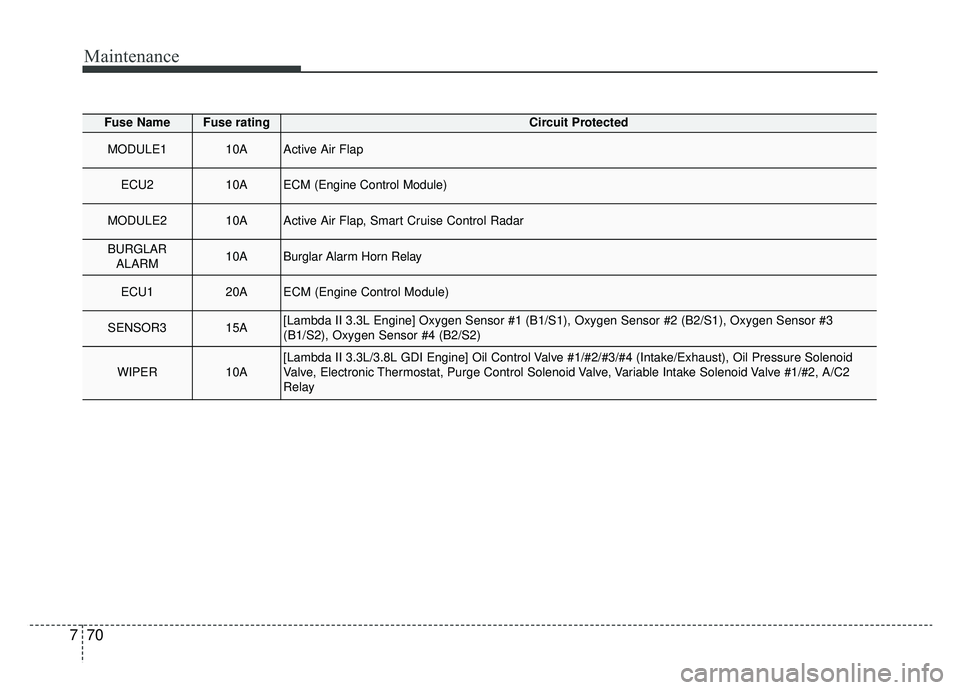
Maintenance
70
7
Fuse NameFuse ratingCircuit Protected
MODULE110AActive Air Flap
ECU210AECM (Engine Control Module)
MODULE210AActive Air Flap, Smart Cruise Control Radar
BURGLAR
ALARM10ABurglar Alarm Horn Relay
ECU120AECM (Engine Control Module)
SENSOR315A[Lambda II 3.3L Engine] Oxygen Sensor #1 (B1/S1), Oxygen Sensor #2 (B\
2/S1), Oxygen Sensor #3
(B1/S2), Oxygen Sensor #4 (B2/S2)
WIPER10A[Lambda II 3.3L/3.8L GDI Engine] Oil Control Valve #1/#2/#3/#4 (Intake/Exhaust), Oil Pressure Solenoid
Valve, Electronic Thermostat, Purge Control Solenoid Valve, Variable Intake Solenoid Valve #1/#2, A/C2
Relay