key battery KIA K900 2020 User Guide
[x] Cancel search | Manufacturer: KIA, Model Year: 2020, Model line: K900, Model: KIA K900 2020Pages: 593, PDF Size: 14.99 MB
Page 207 of 593
Features of your vehicle
114
4
Battery saver function
The purpose of this feature is to
prevent the battery from being dis-
charged if the lights are left in the
ON position. The system automati-
cally shuts off the parking lights 30
seconds after the ignition key is
removed and the driver’s door is
opened and closed.
With this feature, the parking lights will turn off automatically if the driver
parks on the side of the road at night
and opens the driver’s side door.
If necessary, to keep the parking
lights on when the ignition key is
removed, perform the following:
1) Open the driver-side door.
2) Turn the parking lights OFF and ON again using the light switch
on the steering column.
Daytime running light
The Daytime Running Lights (DRL)
can make it easier for others to see the
front of your vehicle during the day.
DRL can be helpful in many different
driving conditions, and it is especially
helpful after dawn and before sunset.
The DRL system will turn the dedi-
cated lamp OFF when :
1.The headlight switch is on
- It includes that the headlight is onin the dark when the headlight
switch is in the auto light position.
2.The engine is off
3.The parking brake is engaged.
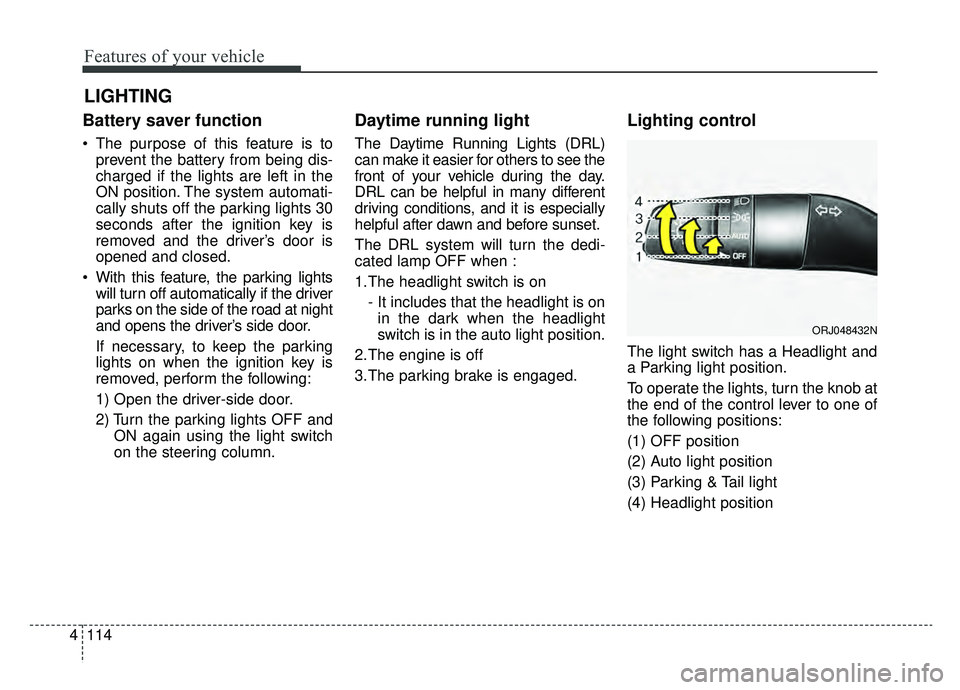
Lighting control
The light switch has a Headlight and
a Parking light position.
To operate the lights, turn the knob at
the end of the control lever to one of
the following positions:
(1) OFF position
(2) Auto light position
(3) Parking & Tail light
(4) Headlight position
LIGHTING
ORJ048432N
Page 273 of 593
57
Driving your vehicle
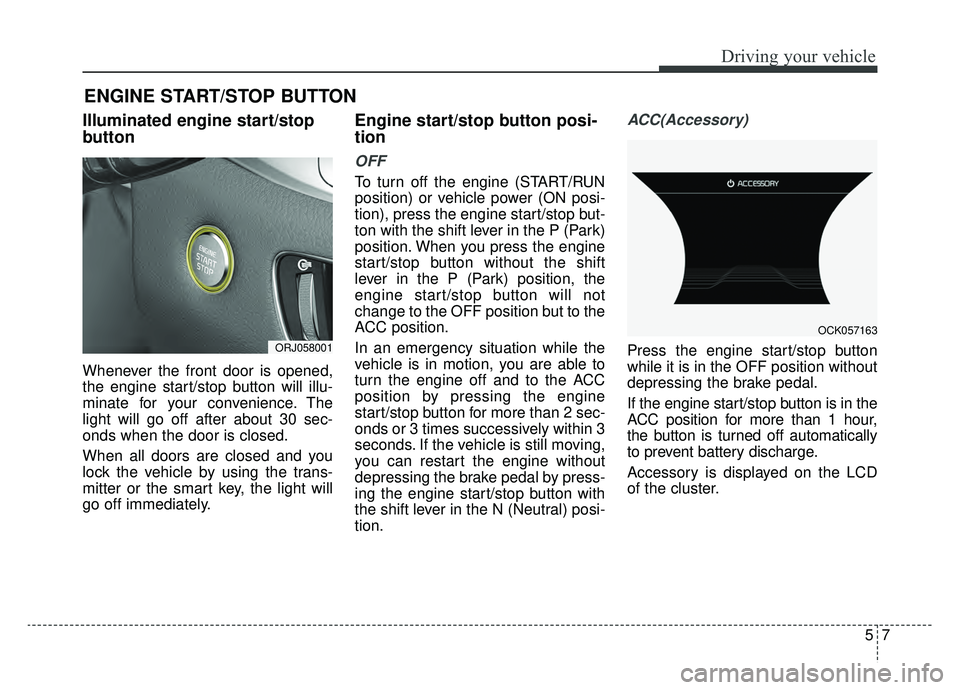
Illuminated engine start/stop
button
Whenever the front door is opened,
the engine start/stop button will illu-
minate for your convenience. The
light will go off after about 30 sec-
onds when the door is closed.
When all doors are closed and you
lock the vehicle by using the trans-
mitter or the smart key, the light will
go off immediately.
Engine start/stop button posi-
tion
OFF
To turn off the engine (START/RUN
position) or vehicle power (ON posi-
tion), press the engine start/stop but-
ton with the shift lever in the P (Park)
position. When you press the engine
start/stop button without the shift
lever in the P (Park) position, the
engine start/stop button will not
change to the OFF position but to the
ACC position.
In an emergency situation while the
vehicle is in motion, you are able to
turn the engine off and to the ACC
position by pressing the engine
start/stop button for more than 2 sec-
onds or 3 times successively within 3
seconds. If the vehicle is still moving,
you can restart the engine without
depressing the brake pedal by press-
ing the engine start/stop button with
the shift lever in the N (Neutral) posi-
tion.
ACC(Accessory)
Press the engine start/stop button
while it is in the OFF position without
depressing the brake pedal.
If the engine start/stop button is in the
ACC position for more than 1 hour,
the button is turned off automatically
to prevent battery discharge.
Accessory is displayed on the LCD
of the cluster.
ENGINE START/STOP BUTTON
ORJ058001
OCK057163
Page 276 of 593
Driving your vehicle
10
5
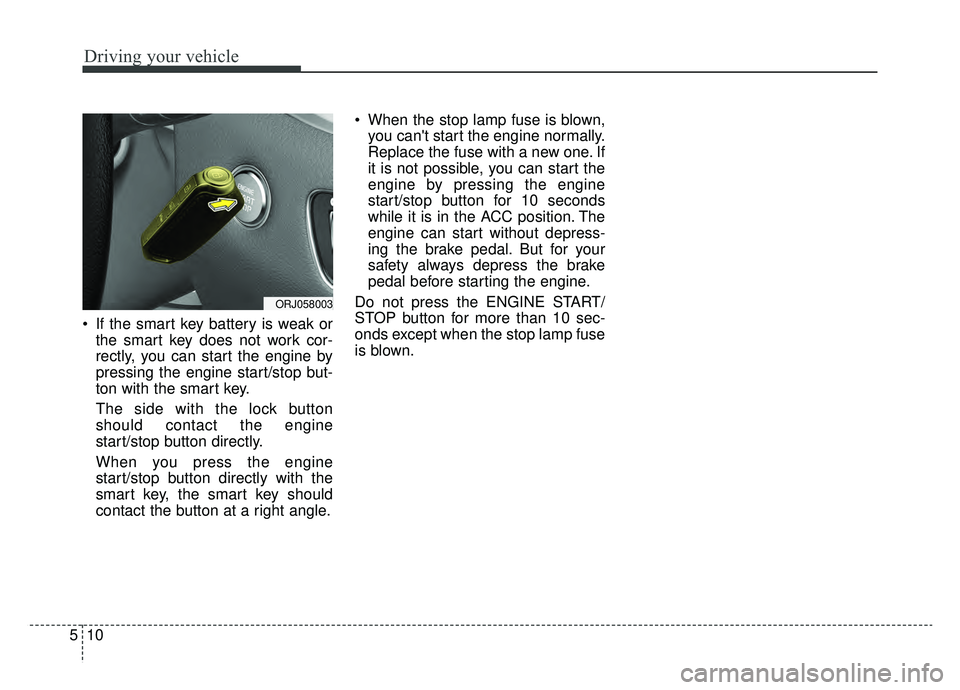
If the smart key battery is weak or
the smart key does not work cor-
rectly, you can start the engine by
pressing the engine start/stop but-
ton with the smart key.
The side with the lock button
should contact the engine
start/stop button directly.
When you press the engine
start/stop button directly with the
smart key, the smart key should
contact the button at a right angle. When the stop lamp fuse is blown,
you can't start the engine normally.
Replace the fuse with a new one. If
it is not possible, you can start the
engine by pressing the engine
start/stop button for 10 seconds
while it is in the ACC position. The
engine can start without depress-
ing the brake pedal. But for your
safety always depress the brake
pedal before starting the engine.
Do not press the ENGINE START/
STOP button for more than 10 sec-
onds except when the stop lamp fuse
is blown.
ORJ058003
Page 395 of 593

5129
Driving your vehicle
ISG system malfunction
The system may not operate when:
The system may not operate when
an ISG related sensor or system
error occurs.
The following will happen:
The yellow AUTO STOP ( ) indi-cator on the instrument cluster will
stay on after blinking for 5 seconds.
The light on the ISG OFF button will illuminate.
✽ ✽ NOTICE
If the ISG OFF button light is not
turned off by pressing the ISG OFF
button again or if the ISG system
continuously does not work correct-
ly, have your vehicle inspected by an
authorized K900 Kia dealer.
When the engine is in Idle Stop
mode, it's possible to restart the
engine without the driver taking any
action. Before leaving the car or
doing anything in the engine com-
partment, stop the engine by turning
the ignition switch to the LOCK/OFF
position or removing the ignition key.
✽ ✽NOTICE
If the AGM battery is reconnected
or replaced, ISG function will not
operate immediately.
If you want to use the ISG function,
the battery sensor needs to be cali-
brated for approximately 4 hours
with the ignition off. After calibra-
tion, turn the engine on and off 2 or
3 times.
ORJ058213N
Page 590 of 593

I9
Index
Seat belts . . . . . . . . . . . . . . . . . . . . . . . . . . . . . . . . . . . . \
3-27Seat belt restraint system . . . . . . . . . . . . . . . . . . . . . 3-27
Pre-tensioner seat belt . . . . . . . . . . . . . . . . . . . . . . . 3-33
Pre-active Seat belt (PSB) . . . . . . . . . . . . . . . . . . . . 3-35
Seat belt precautions . . . . . . . . . . . . . . . . . . . . . . . . 3-36
Care of seat belts . . . . . . . . . . . . . . . . . . . . . . . . . . . 3-38
Smart Cruise Control (SCC) system . . . . . . . . . . . . . 5-100 Smart Cruise Control switch . . . . . . . . . . . . . . . . . 5-100
Smart Cruise Control speed . . . . . . . . . . . . . . . . . . 5-101
Smart Cruise Control vehicle-to-vehicle distance . 5-107
Sensor to detect distance to the vehicle ahead . . . . 5-110
To adjust the sensitivity of Smart Cruise Control . 5-112
To convert to cruise control mode . . . . . . . . . . . . . 5-113
Limitations of the system . . . . . . . . . . . . . . . . . . . . 5-113
Smart key . . . . . . . . . . . . . . . . . . . . . . . . . . . . . . . . . . . . \
4-4 Record your key number . . . . . . . . . . . . . . . . . . . . . . 4-4
Smart key functions . . . . . . . . . . . . . . . . . . . . . . . . . . 4-4
Remote keyless entry system operations . . . . . . . . . . 4-7
Transmitter precautions . . . . . . . . . . . . . . . . . . . . . . . 4-9
Battery replacement . . . . . . . . . . . . . . . . . . . . . . . . . 4-10
Mechanical key operations. . . . . . . . . . . . . . . . . . . . 4-11
Immobilizer system . . . . . . . . . . . . . . . . . . . . . . . . . 4-12
Smart trunk . . . . . . . . . . . . . . . . . . . . . . . . . . . . . . . . . . 4-32\
Emergency trunk safety release . . . . . . . . . . . . . . . . 4-36
Special driving conditions . . . . . . . . . . . . . . . . . . . . . 5-163 Hazardous driving conditions . . . . . . . . . . . . . . . . 5-163
Rocking the vehicle . . . . . . . . . . . . . . . . . . . . . . . . 5-163
Smooth cornering . . . . . . . . . . . . . . . . . . . . . . . . . . 5-164 Driving at night . . . . . . . . . . . . . . . . . . . . . . . . . . . 5-164
Driving in the rain . . . . . . . . . . . . . . . . . . . . . . . . . 5-165
Driving in flooded areas. . . . . . . . . . . . . . . . . . . . . 5-166
Driving off-road . . . . . . . . . . . . . . . . . . . . . . . . . . . 5-166
Highway driving . . . . . . . . . . . . . . . . . . . . . . . . . . . 5-166
Steering wheel . . . . . . . . . . . . . . . . . . . . . . . . . . . . . . . 4-54 Electric Power Steering (EPS) . . . . . . . . . . . . . . . . . 4-54
Tilt and telescopic steering. . . . . . . . . . . . . . . . . . . . 4-55
Heated steering wheel . . . . . . . . . . . . . . . . . . . . . . . 4-56
Horn . . . . . . . . . . . . . . . . . . . . . . . . . . . . . . . . . . . . \
. 4-57
Storage compartments . . . . . . . . . . . . . . . . . . . . . . . . 4-151 Center console storage . . . . . . . . . . . . . . . . . . . . . . 4-151
Glove box . . . . . . . . . . . . . . . . . . . . . . . . . . . . . . . . 4-151
Sunglass holder . . . . . . . . . . . . . . . . . . . . . . . . . . . 4-152
Sunroof . . . . . . . . . . . . . . . . . . . . . . . . . . . . . . . . . . . . \
. 4-48 Sunroof open warning . . . . . . . . . . . . . . . . . . . . . . . 4-49
Sunshade. . . . . . . . . . . . . . . . . . . . . . . . . . . . . . . . . . 4-50\
Sliding the sunroof . . . . . . . . . . . . . . . . . . . . . . . . . . 4-50
Tilting the sunroof . . . . . . . . . . . . . . . . . . . . . . . . . . 4-52
Resetting the sunroof . . . . . . . . . . . . . . . . . . . . . . . . 4-52
Surround View Monitoring system (SVM) . . . . . . . . 4-112
The Eco-Coasting system . . . . . . . . . . . . . . . . . . . . . . . 5-23 The Eco-Coasting system setting . . . . . . . . . . . . . . . 5-23
Eco-Coasting operation conditions . . . . . . . . . . . . . 5-24
The Eco-Coasting system release conditions. . . . . . 5-24
T