power steering KIA K900 2020 User Guide
[x] Cancel search | Manufacturer: KIA, Model Year: 2020, Model line: K900, Model: KIA K900 2020Pages: 593, PDF Size: 14.99 MB
Page 316 of 593
Driving your vehicle
50
5
VSM operation off
If you press the ESC OFF button to
turn off the ESC, the VSM will also
cancel and the ESC OFF indicator
light ( ) illuminates.
To turn on the VSM, press the button
again. The ESC OFF indicator light
will turn off.
Malfunction indicator
The VSM can be deactivated even if
you don’t cancel the VSM operation
by pressing the ESC OFF button. It
indicates that a malfunction has
been detected somewhere in the
Electric Power Steering system or
VSM system. If the ESC indicator
light ( ) or EPS warning light
remains on, take your vehicle to an
authorized K900 Kia dealer and have
the system checked.
✽ ✽
NOTICE
• The VSM is designed to function
above approximately 13 mph (22
km/h) on curves.
• The VSM is designed to function above approximately 6 mph (10
km/h) when a vehicle is braking on
a split-mu surface. A split-mu sur-
face is made of two surfaces which
have different friction forces.
The Vehicle Stability Management
system is not a substitute for safe
driving practices but a ssupple-
mental function only. It is the
responsibility of the driver to
always check the speed and the
distance to the vehicle ahead.
Always hold the steering wheel
firmly while driving.
Your vehicle is designed to activate according to the driver’s intention,
even with installed VSM. Always fol-
low all the normal precautions for
driving at safe speeds for the condi-
tions - including driving in inclement
weather and on a slippery road.
WARNING
For maximum protection, always
wear your seat belt. No system,
no matter how advanced, can
compensate for all driver error
and/or driving conditions.
Always drive responsibly.
WARNING- Vehicle stabili-
ty management
Drive carefully even though your
vehicle has Vehicle stability man-
agement. It can only assist you in
maintaining control under cer-
tain circumstances.
Page 323 of 593
557
Driving your vehicle
It will operate if the vehicle speed isgreater than 5 mph (8 km/h) and
less than or equal to 47 mph (75
km/h) on a forward vehicle.
(Depending on the condition of the
vehicle ahead and the environment
surrounding it, the possible maxi-
mum operating speed may be
reduced.)
For pedestrians and cyclists, the vehicle speed is greater than or
equal to 5 mph (8 km/h) and less
than 40 mph (65 km/h).
(Depending on the condition of
pedestrians and bike riders and
the surrounding environment the
possible maximum operating
speed may be reduced.)
If you select “Warning only”, for FCA system setting, FCA system
activates and produces only warn-
ing alarms in accordance with the
collision risk levels. You should
control the brake directly because
FCA system will not control the
brake.Brake operation
In an emergency situation, thebraking system enters in ready sta-
tus for prompt reaction upon the
driver depressing the brake pedal.
FCA system provides additional braking power for optimum braking
performance when the driver
depresses the brake pedal.
The braking control is automatical- ly deactivated when the driver
depresses the accelerator pedal
quickly, or when the driver abruptly
operates the steering wheel.
FCA system brake control is auto- matically canceled when risk fac-
tors disappear.
WARNING
The braking control cannot
completely stop the vehicle nor
avoid all collisions. The driver
should hold the responsibility
to safely drive and control the
vehicle.
CAUTION
The driver should always useextreme caution while operatingthe vehicle, whether or not thereis a warning message or alarmfrom FCA system.
Page 352 of 593

Driving your vehicle
86
5
It gently applies braking power on the
tire which is located in the opposite
side of the possibly-colliding point.
The instrument cluster will inform the
driver of the system activation.
Blind-Spot Collision-Avoidance Assist
(BCA) system is automatically deacti-
vated when:
- The vehicle drives a certain dis-
tance away
- The vehicle direction is changed against the possible-colliding point
- The steering wheel is abruptly moved
- The brake pedal is depressed
- After a certain period of time
The driver should drive the vehicle in
the middle of the vehicle lanes to
keep the system in the ready status.
When the vehicle drives too close to
one side of the vehicle lanes, the
system may not properly operate.
In addition, the system may not prop-
erly control your vehicle in accor-
dance with driving situations. Thus,
always pay close attention to road
situations.Detecting Sensor (Front View Camera / Rear Corner Radars)
WARNING
The driver is responsible for accurate steering.
Do not unnecessarily operate the steering wheel when Blind-
Spot Collision-Avoidance
Assist (BCA) system is in oper-
ation.
Always pay extreme caution while driving. Blind-Spot
Collision-Avoidance Assist
(BCA) system may not oper-
ate or unnecessarily operate
in accordance with your driv-
ing situations.
Blind-Spot Collision- Avoidance Assist (BCA) sys-
tem is not a substitute for safe
driving practices, but a con-
venience function only. It is
the responsibility of the driver
to always drive cautiously to
prevent unexpected and sud-
den situations from occur-
ring. Pay attention to the road
conditions at all times.
ORJ058024
ORJ058035
■ Front View Camera
■Rear Corner Radar
Page 397 of 593
5131
Driving your vehicle
SMART mode selects the
proper driving mode
among ECO, COMFORT
and SPORT by judging
the driver's driving habits
(i.e. mild or dynamic) from
the brake pedal depres-
sion or the steering wheel
operation.
Press the DRIVE MODE button to activate SMART mode. When
SMART mode is activated, the
indicator illuminates on the instru-
ment cluster.
The indicator illuminates in blue when the driver's driving is catego-
rized to be mild. It illuminates in
white when the driver's driving is
categorized to be normal. It illumi-
nates in red when the driver's driv-
ing is categorized to be dynamic
during abrupt braking or sharp
curving. The vehicle starts in COMFORT
mode when the engine was turned
OFF in SMART mode.
SMART mode automatically con- trols driving characteristics, such
as gear shifting patterns, engine
torque, ride quality (if equipped
with the electronic suspension sys-
tem), and power distribution (if
equipped with the All-Wheel Drive
(AWD) system), in accordance with
the driver's driving habits.✽ ✽ NOTICE
• When you drive the vehicle mildly
in SMART mode, the driving
mode changes to ECO mode to
improve fuel efficiency. However,
the actual fuel efficiency may dif-
fer in accordance with your driv-
ing situations (i.e. upward/down-
ward slope, vehicle
deceleration/acceleration).
• When you drive the vehicle dynamically in SMART mode by
abruptly decelerating or sharply
curving, the driving mode changes
to SPORT mode. However, it may
adversely affect fuel economy.SMART
Page 400 of 593
Driving your vehicle
134
5
When ECO mode is activated:
The acceleration response may be
slightly reduced if the accelerator
pedal is depressed moderately.
The air conditioner performance may be limited.
The shift pattern of the automatic transmission may change.
The engine noise may get louder.
The above situations are normal
conditions when ECO mode is acti-
vated to improve fuel efficiency. Limitation of ECO mode operation:
If the following conditions occur while
ECO mode is operating, the system
operation is limited even though
there is no change in the ECO indi-
cator.
When the coolant temperature is
low:
The system will be limited until
engine performance becomes nor-
mal.
When driving up a hill: The system will be limited to gain
power when driving uphill because
engine torque is restricted.
When driving the vehicle with the automatic transmission gear shift
lever in manual mode.
The system will be limited accord-
ing to the shift location.CUSTOM mode
In CUSTOM mode, the
driver can select sepa-
rate modes and com-
bine them on the AVN
System screen.
Engine/Transmission: ECO/COM- FORT/ SPORT/SNOW
Steering wheel: COMFORT/ SPORT
Suspension: COMFORT+/COM- FORT/SPORT
All-Wheel Drive (AWD) system: ECO/COMFORT/SPORT
For more information, refer to the
separately supplied AVN System
manual.
When CUSTOM mode is selected by pressing the DRIVE MODE but-
ton, the CUSTOM mode indicator
will illuminate.
CUSTOM
Page 428 of 593
Driving your vehicle
162
5
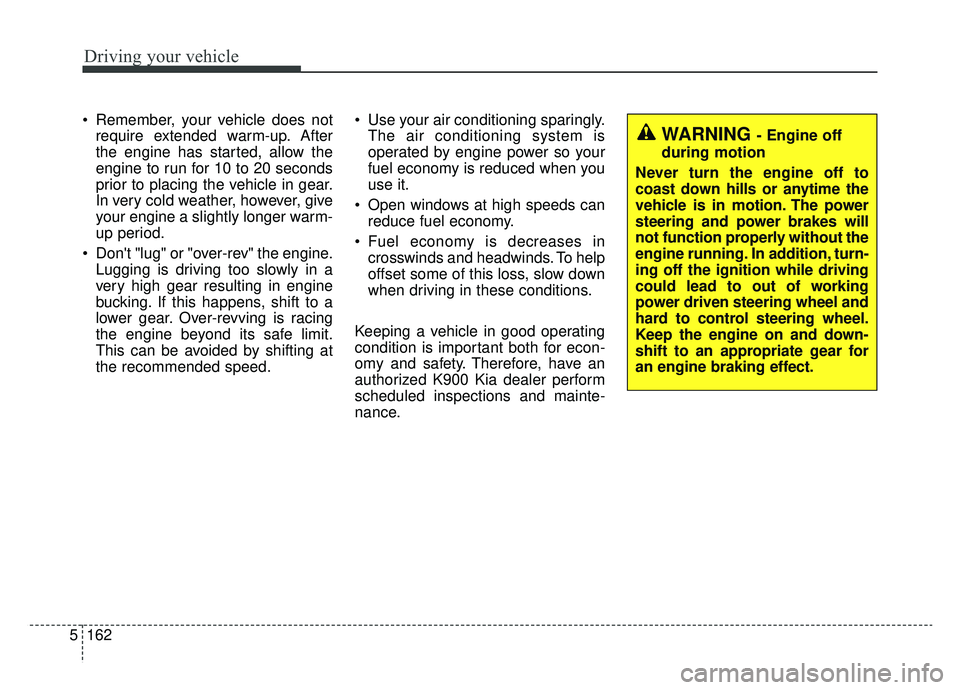
WARNING - Engine off
during motion
Never turn the engine off to
coast down hills or anytime the
vehicle is in motion. The power
steering and power brakes will
not function properly without the
engine running. In addition, turn-
ing off the ignition while driving
could lead to out of working
power driven steering wheel and
hard to control steering wheel.
Keep the engine on and down-
shift to an appropriate gear for
an engine braking effect.
Remember, your vehicle does not require extended warm-up. After
the engine has started, allow the
engine to run for 10 to 20 seconds
prior to placing the vehicle in gear.
In very cold weather, however, give
your engine a slightly longer warm-
up period.
Don't "lug" or "over-rev" the engine. Lugging is driving too slowly in a
very high gear resulting in engine
bucking. If this happens, shift to a
lower gear. Over-revving is racing
the engine beyond its safe limit.
This can be avoided by shifting at
the recommended speed. Use your air conditioning sparingly.
The air conditioning system is
operated by engine power so your
fuel economy is reduced when you
use it.
Open windows at high speeds can reduce fuel economy.
Fuel economy is decreases in crosswinds and headwinds. To help
offset some of this loss, slow down
when driving in these conditions.
Keeping a vehicle in good operating
condition is important both for econ-
omy and safety. Therefore, have an
authorized K900 Kia dealer perform
scheduled inspections and mainte-
nance.
Page 468 of 593
What to do in an emergency
26
6
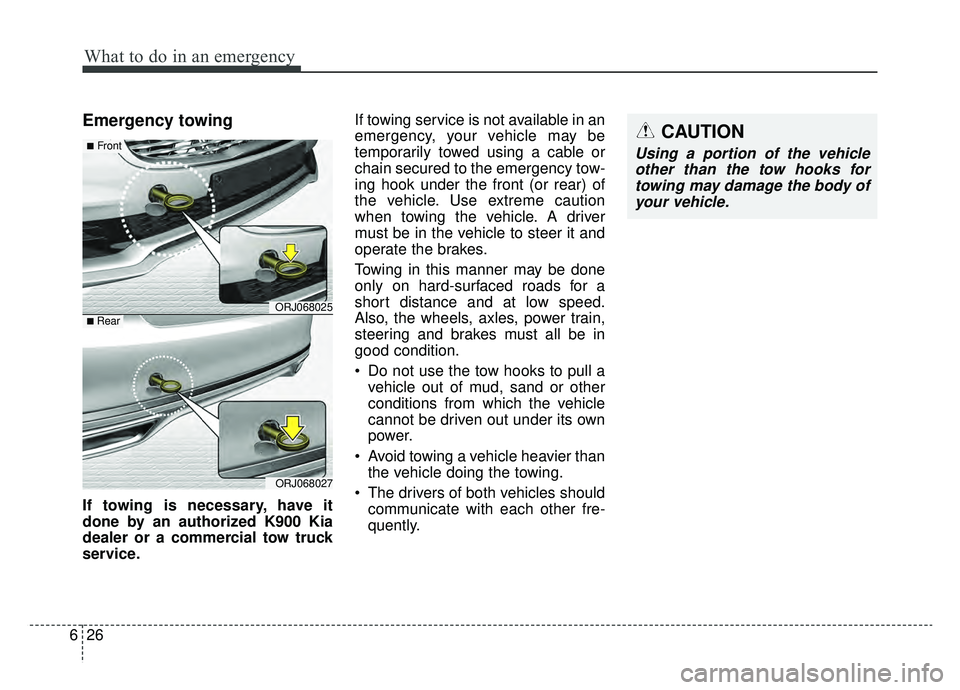
Emergency towing
If towing is necessary, have it
done by an authorized K900 Kia
dealer or a commercial tow truck
service. If towing service is not available in an
emergency, your vehicle may be
temporarily towed using a cable or
chain secured to the emergency tow-
ing hook under the front (or rear) of
the vehicle. Use extreme caution
when towing the vehicle. A driver
must be in the vehicle to steer it and
operate the brakes.
Towing in this manner may be done
only on hard-surfaced roads for a
short distance and at low speed.
Also, the wheels, axles, power train,
steering and brakes must all be in
good condition.
Do not use the tow hooks to pull a
vehicle out of mud, sand or other
conditions from which the vehicle
cannot be driven out under its own
power.
Avoid towing a vehicle heavier than the vehicle doing the towing.
The drivers of both vehicles should communicate with each other fre-
quently.
CAUTION
Using a portion of the vehicleother than the tow hooks fortowing may damage the body ofyour vehicle.
ORJ068025
ORJ068027
■Front
■ Rear
Page 470 of 593
What to do in an emergency
28
6
Emergency towing precautions
Turn the Engine Start/Stop button
to ACC position so the steering
wheel isn’t locked.
Place the transmission shift lever in N (Neutral).
Release the parking bake.
Press the brake pedal with more force than normal since you will
have reduced brake performance.
More steering effort will be required because the power steer-
ing system will be disabled.
If you are driving down a long hill, the brakes may overheat and brake
performance will be reduced. Stop
often and let the brakes cool off.
The vehicle should be towed at a speed of 15 mph (25 km/h) or less
within a distance of 12 miles (20
km). If the car is being towed with all
four wheels on the ground, it can
be towed only from the front. Be
sure that the transmission is in
neutral. Be sure the steering is
unlocked by placing the Engine
Start/Stop button to ACC position.
A driver must be in the towed vehi-
cle to operate the steering and
brakes.CAUTION- Automatic
transmission
To avoid serious damage to the automatic, limit the vehiclespeed to 10 mph (15 km/h) anddrive less than 1 mile (1.5 km)when towing.
Before towing, check the auto- matic transmission for fluidleaks under your vehicle. If theautomatic transmission fluidis leaking, flatbed equipmentor a towing dolly must beused.
Page 534 of 593

Maintenance
64
7
Fuse NameFuse ratingCircuit Protected
DRIVER POWER
SEAT225ADriver Power Seat Module, Driver Seat Relay Module, Driver Lumbar Support Unit
TRUNK LID10ATrunk Lid Relay, Fuel Lid Relay, Fuel Filler Door & Trunk Lid Switch
MODULE910AMultifunction Switch, Cooling Fan Controller (BLDC (Brushless Direct Current) Type), Surround View
Monitor Unit, Rear Seat Armrest Console Switch
MODULE610AIBU (Integrated Body Control Unit), 4WD (4 Wheel Drive) ECM (Electronic Control Module), ESC
(Electronic Stability Control) Unit, Lane Keeping Assist Unit (Line), Crash Pad Switch, Steering Tilt &
Telescopic Module
POWER HANDLE15ASteering Tilt & Telescopic Module
REAR LH POWER SEAT215ARear Seat Relay Module Left Handle side (8WAY)
PASSENGER
POWER SEAT225APassenger Power Seat Module, Passenger Seat Relay Module, Passenger Lumbar Support Unit
MODULE310AData Link Connector, Front Console Switch, Rain Sensor, Blind-Spot Collision Warning Unit Left Handle
side/Right Handle side, Rear Seat Armrest Console Switch, Rain Sensor
MODULE710A
Multipurpose Check Connector, Multifunction Switch, Keyboard, Audio/Video & Navigation Head Unit, MTS
(Mozen Telematics System) E-Call Module, Air Quality Sensor, AMP (Amplifier), Air Conditioner Control
Module, Electro Chromic Mirror, Front Air Conditioner Controller, Driver/Passenger Seat Relay Module,
Driver/Passenger Seat Warmer Control Module, Rear Seat Warmer Control Module Left Handle side/Right
Handle side, Driver/Passenger Power Seat Module, Driver/Passenger CCS (Climate Control Seat) Module,
Rear Seat CCS (Climate Control Seat) Module Left Handle side/Right Han\
dle side, Rear Seat Armrest
Console Switch
SUNROOF20ASunroof Control Unit (Glass)
Page 537 of 593
767
Maintenance
Fuse NameFuse ratingCircuit Protected
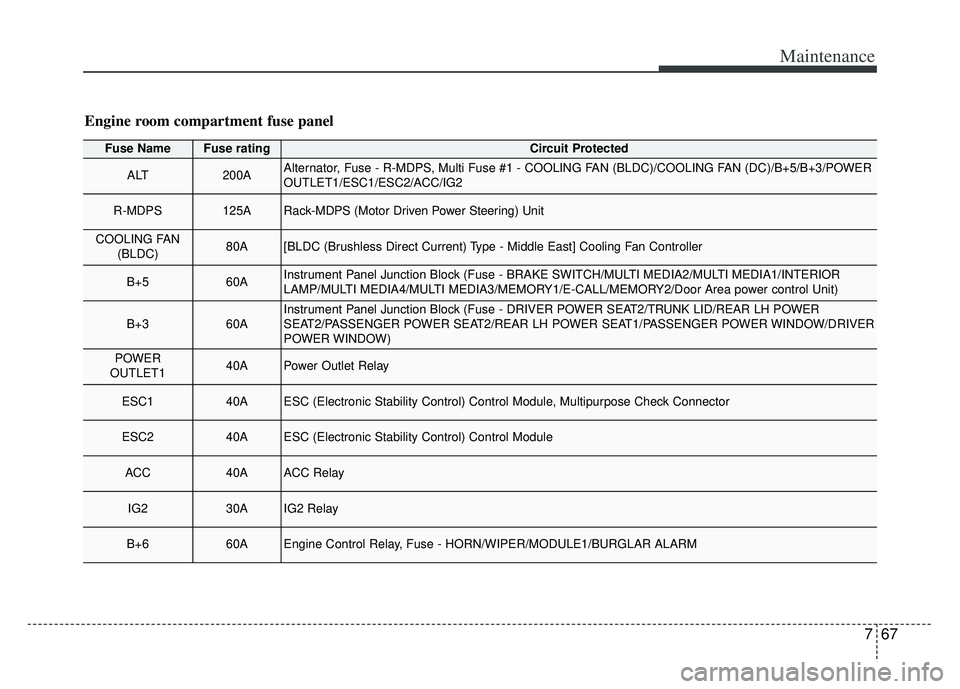
ALT200AAlternator, Fuse - R-MDPS, Multi Fuse #1 - COOLING FAN (BLDC)/COOLING FAN (DC)/B+5/B+3/POWER
OUTLET1/ESC1/ESC2/ACC/IG2
R-MDPS125ARack-MDPS (Motor Driven Power Steering) Unit
COOLING FAN(BLDC)80A[BLDC (Brushless Direct Current) Type - Middle East] Cooling Fan Controller
B+560AInstrument Panel Junction Block (Fuse - BRAKE SWITCH/MULTI MEDIA2/MULTI MEDIA1/INTERIOR
LAMP/MULTI MEDIA4/MULTI MEDIA3/MEMORY1/E-CALL/MEMORY2/Door Area power control Unit)
B+360AInstrument Panel Junction Block (Fuse - DRIVER POWER SEAT2/TRUNK LID/REAR LH POWER
SEAT2/PASSENGER POWER SEAT2/REAR LH POWER SEAT1/PASSENGER POWER WINDOW/DRIVER
POWER WINDOW)
POWER
OUTLET140APower Outlet Relay
ESC140AESC (Electronic Stability Control) Control Module, Multipurpose Check Connector
ESC240AESC (Electronic Stability Control) Control Module
ACC40AACC Relay
IG230AIG2 Relay
B+660AEngine Control Relay, Fuse - HORN/WIPER/MODULE1/BURGLAR ALARM
Engine room compartment fuse panel