change time KIA K900 2020 Owner's Manual
[x] Cancel search | Manufacturer: KIA, Model Year: 2020, Model line: K900, Model: KIA K900 2020Pages: 593, PDF Size: 14.99 MB
Page 284 of 593
Driving your vehicle
18
5
✽ ✽
NOTICE
In situations where the gear needs to
be changed from P (Park) to N
(Neutral) when the engine start/stop
button is in the OFF position, refer
to step 4.
The actuators work to shift the gear
into the N (Neutral) or P (Parking)
and make a normal mechanical
sound.
Parking
Always come to a complete stop and
continue to depress the brake pedal.
Move the shift lever into the P (Park)
position, apply the parking brake,
and place the engine start/stop but-
ton in the OFF position. Take the Key
with you when exiting the vehicle.
LCD display messages
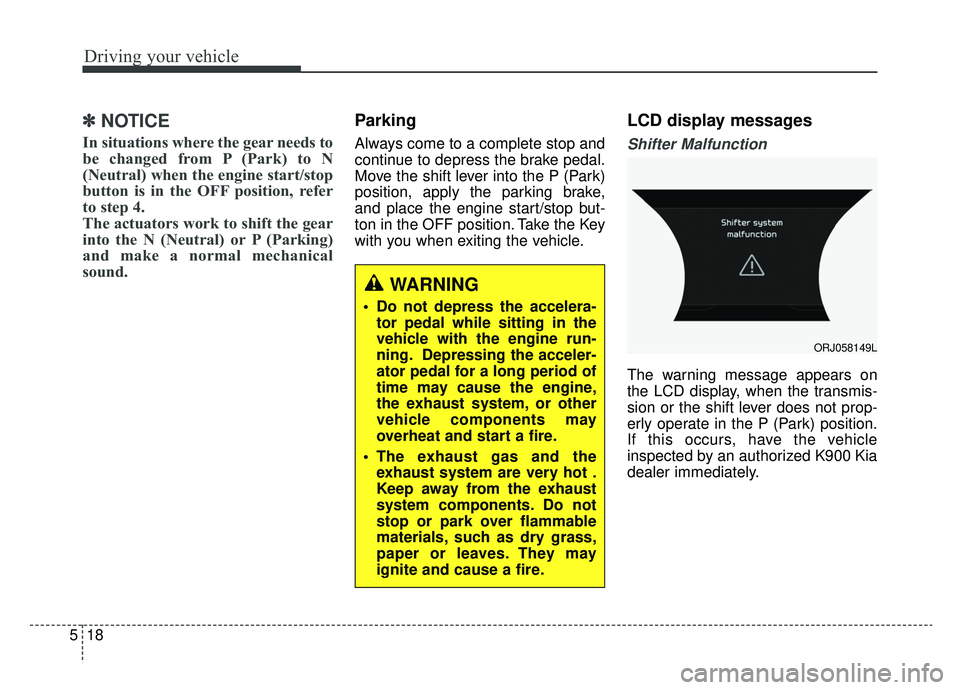
Shifter Malfunction
The warning message appears on
the LCD display, when the transmis-
sion or the shift lever does not prop-
erly operate in the P (Park) position.
If this occurs, have the vehicle
inspected by an authorized K900 Kia
dealer immediately.
WARNING
Do not depress the accelera-
tor pedal while sitting in the
vehicle with the engine run-
ning. Depressing the acceler-
ator pedal for a long period of
time may cause the engine,
the exhaust system, or other
vehicle components may
overheat and start a fire.
The exhaust gas and the exhaust system are very hot .
Keep away from the exhaust
system components. Do not
stop or park over flammable
materials, such as dry grass,
paper or leaves. They may
ignite and cause a fire.
ORJ058149L
Page 287 of 593
521
Driving your vehicle
Depressing both accelerator andbrake pedals at the same time can
trigger logic for engine power
reduction to assure vehicle decel-
eration. Vehicle acceleration will
resume after the brake pedal is
released.
When driving in Sports Mode, slow down before shifting to a lower
gear. Otherwise, the lower gear
may not be engaged if the engine
rpms are outside of the allowable
range.
Always apply the parking brake when leaving the vehicle. Do not
depend on placing the transmis-
sion in P (Park) to keep the vehicle
from moving. Exercise extreme caution when
driving on a slippery surface. Be
especially careful when braking,
accelerating or shifting gears. On a
slippery surface, an abrupt change
in vehicle speed can cause the
drive wheels to lose traction and
may cause loss of vehicle control
resulting in an accident.
Optimum vehicle performance and economy is obtained by smoothly
depressing and releasing the
accelerator.
WARNING
To reduce the risk of SERIOUS
INJURY or DEATH:
ALWAYS wear your seatbelt.In a collision, an unbelted
occupant is significantly more
likely to be seriously injured
or killed than a properly belt-
ed occupant.
Avoid high speeds when cor- nering or turning.
Do not make quick steering wheel movements, such as
sharp lane changes or fast,
sharp turns.
The risk of rollover is greatly increased if you lose control
of your vehicle at highway
speeds.
(Continued)
Page 320 of 593
Driving your vehicle
54
5
The warning light illumi-
nates on the LCD display,
when you cancel FCA sys-
tem. The driver can moni-
tor FCA system ON/OFF status on
the LCD display. Also, the warning
light illuminates when the ESC
(Electronic Stability Control) is
turned off. If the warning light
remains ON when FCA system is
activated, we recommend that you
have the system checked by an
authorized K900 Kia dealer.
The driver can select the initial warning activation time on the LCD
display.
Go to the “AVN → Setup →Vehicle
→ Driver Assistance → Forward
Safety”. The options for the initial Forward
Collision Warning includes the fol-
lowing:
- Normal:
When this condition is selected,
the initial Forward Collision
Warning is activated sensitively. If
you feel the warning activates too
early, set the Forward Collision
Warning to 'Later'. Even though,
'Normal' is selected if the front
vehicle suddenly stops the initial
warning activation time may not
seem fast.
- Later: When this condition is selected,
the initial Forward Collision
Warning is activated later than nor-
mal. This setting reduces the
amount of distance between the
vehicle or pedestrian or cyclist
ahead before the initial warning
occurs.
Select 'Later' when traffic is light
and when driving speed is slow.✽ ✽ NOTICE
If you change the warning timing,
the warning timing of other systems
may change. Always be aware of
warning timing before changing the
warning timing.
Page 335 of 593

569
Driving your vehicle
The Forward Collision-Avoidance
Assist-Lane-Change Oncoming func-
tion detects the oncoming vehicle
with a front view camera at the front
wihdshield. And it assists the driver’s
steering to help avoid a collision with
oncoming vehicles and with keeping
the vehicle in the lanes when the
vehicle drives over the centerline.Function operation
Driver can activate(or deactivate) the
function from the AVN:
“AVN → Setup →Vehicle →Driver
Assistance →Forward Collision-
Avoidance Assist (FCA)” For further
details, refer to [System setting] in
this chapter, [FCA].
Warning message and func-
tion control
After FCA system is on, vehicle speed is over 60 kph (37 mph) and
if the vehicle across the centerline
even though the oncoming vehicle
approaching, this warning mes-
sage appears on the LCD display
with audible warning.
Additionally, FCA provides steering assist to return the vehicle back
into lanes.
FORWARD COLLISION-AVOIDANCE ASSIST-LANE-CHANGE ONCOMING FUNCTION
(FCA-LO)
WARNING
FCA system is only a supple-
mental system and does not
replace the need for the dri-
ver's extreme care and atten-
tion. FCA system's sensing
range of oncoming vehicles is
limited. Pay attention to the
road conditions at all times.
Always drive cautiously to help prevent unexpected and
sudden situations from occur-
ring. The function does not
steer the vehicle completely
and is not a collision avoid-
ance system.
ORJ058123L
Page 348 of 593
Driving your vehicle
82
5
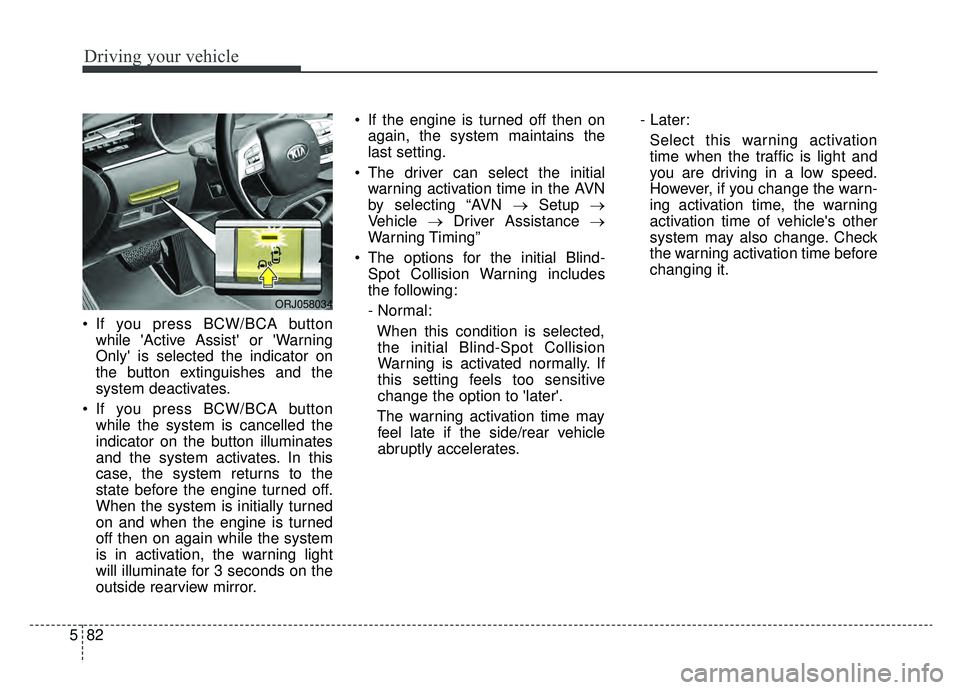
If you press BCW/BCA button
while 'Active Assist' or 'Warning
Only' is selected the indicator on
the button extinguishes and the
system deactivates.
If you press BCW/BCA button while the system is cancelled the
indicator on the button illuminates
and the system activates. In this
case, the system returns to the
state before the engine turned off.
When the system is initially turned
on and when the engine is turned
off then on again while the system
is in activation, the warning light
will illuminate for 3 seconds on the
outside rearview mirror. If the engine is turned off then on
again, the system maintains the
last setting.
The driver can select the initial warning activation time in the AVN
by selecting “AVN →Setup →
Vehicle →Driver Assistance →
Warning Timing”
The options for the initial Blind- Spot Collision Warning includes
the following:
- Normal:
When this condition is selected,the initial Blind-Spot Collision
Warning is activated normally. If
this setting feels too sensitive
change the option to 'later'.
The warning activation time may feel late if the side/rear vehicle
abruptly accelerates. - Later:
Select this warning activation
time when the traffic is light and
you are driving in a low speed.
However, if you change the warn-
ing activation time, the warning
activation time of vehicle's other
system may also change. Check
the warning activation time before
changing it.
ORJ058034
Page 352 of 593

Driving your vehicle
86
5
It gently applies braking power on the
tire which is located in the opposite
side of the possibly-colliding point.
The instrument cluster will inform the
driver of the system activation.
Blind-Spot Collision-Avoidance Assist
(BCA) system is automatically deacti-
vated when:
- The vehicle drives a certain dis-
tance away
- The vehicle direction is changed against the possible-colliding point
- The steering wheel is abruptly moved
- The brake pedal is depressed
- After a certain period of time
The driver should drive the vehicle in
the middle of the vehicle lanes to
keep the system in the ready status.
When the vehicle drives too close to
one side of the vehicle lanes, the
system may not properly operate.
In addition, the system may not prop-
erly control your vehicle in accor-
dance with driving situations. Thus,
always pay close attention to road
situations.Detecting Sensor (Front View Camera / Rear Corner Radars)
WARNING
The driver is responsible for accurate steering.
Do not unnecessarily operate the steering wheel when Blind-
Spot Collision-Avoidance
Assist (BCA) system is in oper-
ation.
Always pay extreme caution while driving. Blind-Spot
Collision-Avoidance Assist
(BCA) system may not oper-
ate or unnecessarily operate
in accordance with your driv-
ing situations.
Blind-Spot Collision- Avoidance Assist (BCA) sys-
tem is not a substitute for safe
driving practices, but a con-
venience function only. It is
the responsibility of the driver
to always drive cautiously to
prevent unexpected and sud-
den situations from occur-
ring. Pay attention to the road
conditions at all times.
ORJ058024
ORJ058035
■ Front View Camera
■Rear Corner Radar
Page 369 of 593
5103
Driving your vehicle
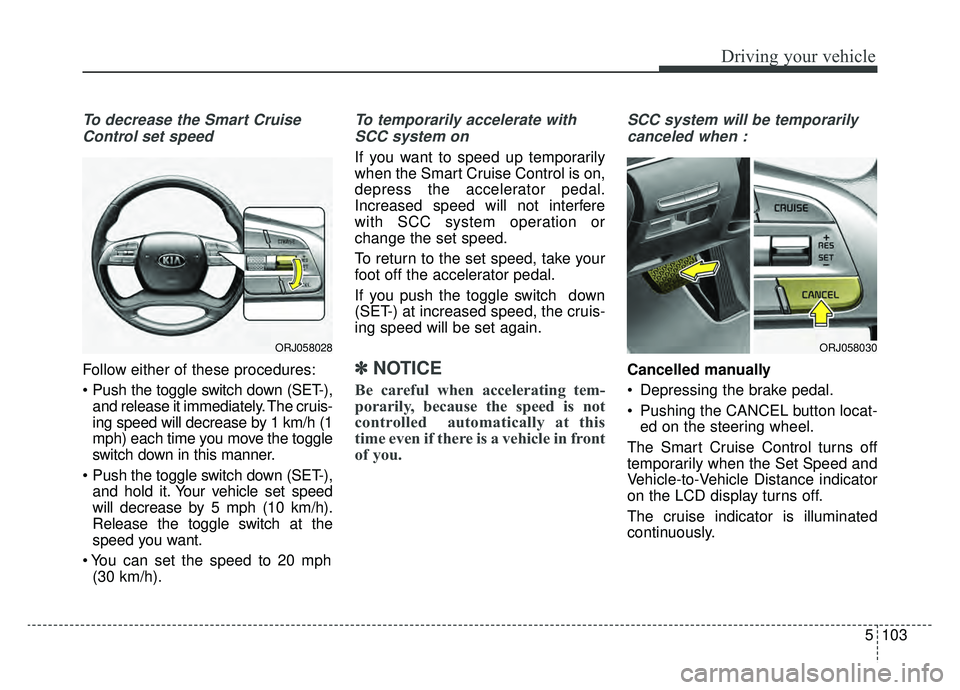
To decrease the Smart CruiseControl set speed
Follow either of these procedures:
and release it immediately. The cruis-
ing speed will decrease by 1 km/h (1
mph) each time you move the toggle
switch down in this manner.
and hold it. Your vehicle set speed
will decrease by 5 mph (10 km/h).
Release the toggle switch at the
speed you want.
(30 km/h).
To temporarily accelerate with
SCC system on
If you want to speed up temporarily
when the Smart Cruise Control is on,
depress the accelerator pedal.
Increased speed will not interfere
with SCC system operation or
change the set speed.
To return to the set speed, take your
foot off the accelerator pedal.
If you push the toggle switch down
(SET-) at increased speed, the cruis-
ing speed will be set again.
✽ ✽ NOTICE
Be careful when accelerating tem-
porarily, because the speed is not
controlled automatically at this
time even if there is a vehicle in front
of you.
SCC system will be temporarily
canceled when :
Cancelled manually
Depressing the brake pedal.
Pushing the CANCEL button locat- ed on the steering wheel.
The Smart Cruise Control turns off
temporarily when the Set Speed and
Vehicle-to-Vehicle Distance indicator
on the LCD display turns off.
The cruise indicator is illuminated
continuously.
ORJ058028ORJ058030
Page 373 of 593
5107
Driving your vehicle
Smart Cruise Control Vehicle-
to-Vehicle Distance
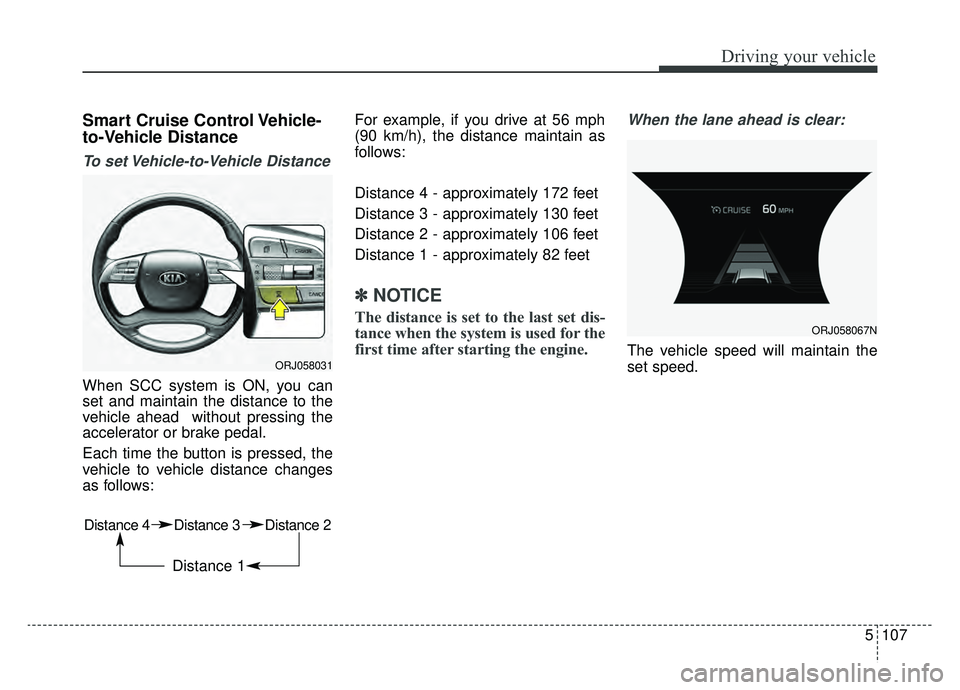
To set Vehicle-to-Vehicle Distance
When SCC system is ON, you can
set and maintain the distance to the
vehicle ahead without pressing the
accelerator or brake pedal.
Each time the button is pressed, the
vehicle to vehicle distance changes
as follows:For example, if you drive at 56 mph
(90 km/h), the distance maintain as
follows:
Distance 4 - approximately 172 feet
Distance 3 - approximately 130 feet
Distance 2 - approximately 106 feet
Distance 1 - approximately 82 feet
✽ ✽
NOTICE
The distance is set to the last set dis-
tance when the system is used for the
first time after starting the engine.
When the lane ahead is clear:
The vehicle speed will maintain the
set speed.ORJ058031
Distance 4 Distance 3 Distance 2
Distance 1
ORJ058067N
Page 390 of 593
Driving your vehicle
124
5
(Continued)
• Deceleration by the system may
not be sufficient due to road con-
ditions such as uneven road sur-
faces, narrow lanes, etc.
• If the road is controlled, due to construction or holiday events, the
system might not work properly.CAUTION
The Navigation-based Cruise
Control system may not func-tion properly in the following sit-uations:
The navigation is not working properly.
The navigation is not updated. The real-time GPS or map information provided haserrors.
The navigation is overloaded by performing functions suchas route search, video play-back, voice recognition, etc.are performing simultaneous-ly.
GPS signals are blocked in areas such as a tunnel.
The driver goes off course or the route to the destination ischanged or canceled by reset-ting the navigation.
The vehicle enters a service station or rest area.
(Continued)
(Continued) A section of the highway’s shape has changed.
Android Auto or Car Play is operating.
The navigation cannot detect the current vehicle position(ex: elevated roads includingoverpass adjacent to generalroads or nearby roads exist ina parallel way).
The navigation is being updat- ed while driving.
The navigation is being reset while driving.
The road is slippery due to bad weather such as rain orsnow.
Page 398 of 593
Driving your vehicle
132
5
Various driving situations which you
may encounter in SMART mode
The driving mode automatically
changes to ECO mode after a cer-
tain period of time when you gently
depress the accelerator pedal
(Your driving is categorized to be
mild).
The driving mode automatically changes from SMART ECO mode
to SMART COMFORT mode after
a certain period of time when you
sharply or repetitively depress the
accelerator pedal.
The driving mode automatically changes to SMART COMFORT
mode with the same driving pat-
terns when the vehicle starts to
drive on an upward slope of a cer-
tain angle. The driving mode auto-
matically returns to SMART ECO
mode when the vehicle enters a
leveled road. The driving mode automatically
changes to SMART SPORT when
you abruptly accelerate the vehicle
or repetitively operate the steering
wheel (Your driving is categorized
to be sporty). In this mode, your
vehicle drives in a lower gear for
faster accelerating/decelerating
and increased engine brake per-
formance.
You may still sense the engine brake performance, even when you
release the accelerator pedal in
SMART SPORT mode. It is
because your vehicle remains to
be in a lower gear over a certain
period of time for next acceleration.
Thus, it is a normal driving situa-
tion, not indicating any malfunc-
tion.
The driving mode automatically changes to SMART SPORT mode
only in harsh driving situations. In
most the normal driving situations,
the driving mode sets to either
SMART ECO mode or SMART
NORMAL mode. Limitations of SMART mode
The SMART mode may be limited in
following situations. (The OFF indica-
tor illuminates these situations.)
The driver manually moves the
shift lever : It deactivates SMART
mode. The vehicle drives, as the
driver manually moves the shift
lever.
The cruise control is activated : The cruise system may deactivate
the SMART mode. When a higher
system is set by the cruise system,
it starts to control vehicle speed
and deactivates SMART mode.
(SMART mode is not deactivated
just by activing the cruise system.)
The transmission oil temperature is either extremely low or extremely
high : The SMART mode can be
active in most normal driving situa-
tions. However, an extremely high/
low transmission oil temperature
may temporarily deactivate the
SMART mode, because the trans-
mission condition is out of normal
operation condition.