ignition KIA K900 2020 Owner's Manual
[x] Cancel search | Manufacturer: KIA, Model Year: 2020, Model line: K900, Model: KIA K900 2020Pages: 593, PDF Size: 14.99 MB
Page 234 of 593
4141
Features of your vehicle
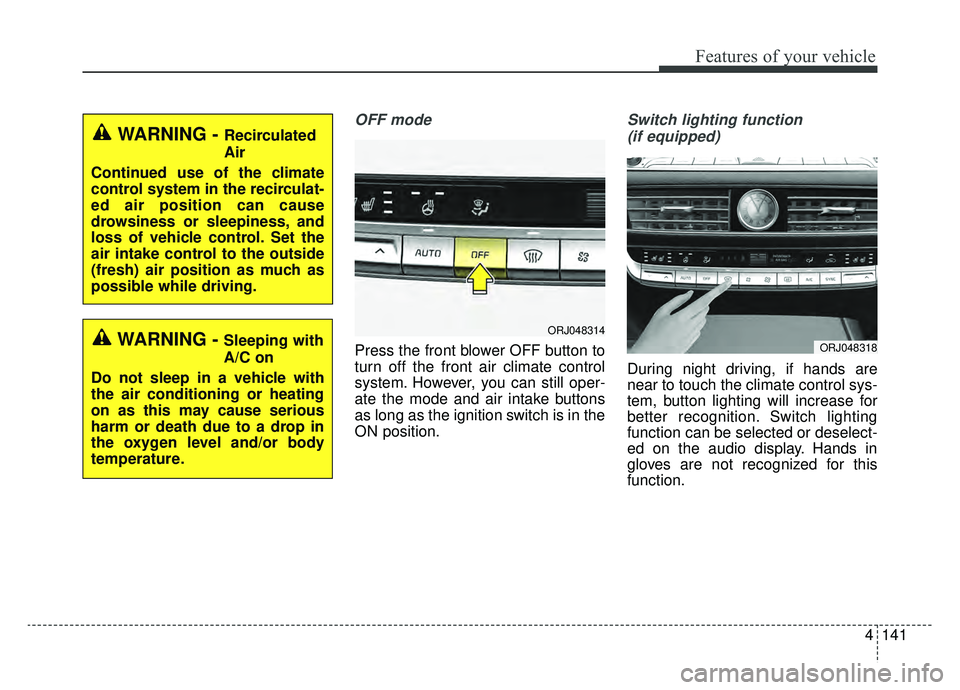
OFF mode
Press the front blower OFF button to
turn off the front air climate control
system. However, you can still oper-
ate the mode and air intake buttons
as long as the ignition switch is in the
ON position.
Switch lighting function (if equipped)
During night driving, if hands are
near to touch the climate control sys-
tem, button lighting will increase for
better recognition. Switch lighting
function can be selected or deselect-
ed on the audio display. Hands in
gloves are not recognized for this
function.
WARNING - Recirculated
Air
Continued use of the climate
control system in the recirculat-
ed air position can cause
drowsiness or sleepiness, and
loss of vehicle control. Set the
air intake control to the outside
(fresh) air position as much as
possible while driving.
WARNING - Sleeping with
A/C on
Do not sleep in a vehicle with
the air conditioning or heating
on as this may cause serious
harm or death due to a drop in
the oxygen level and/or body
temperature.ORJ048314
ORJ048318
Page 241 of 593
Features of your vehicle
148
4
Automatic climate control system
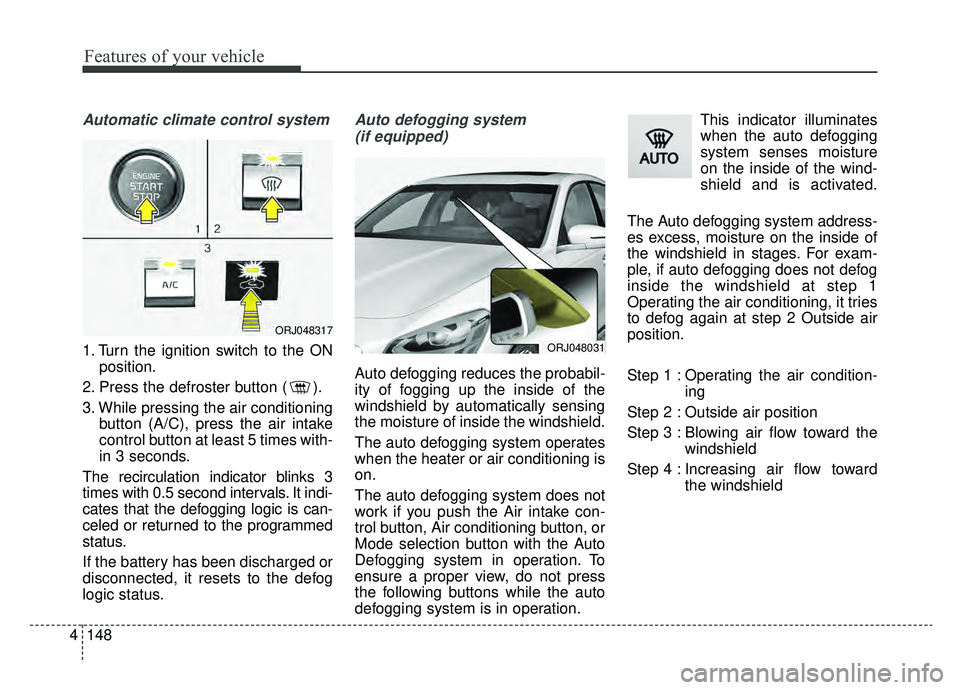
1. Turn the ignition switch to the ON
position.
2. Press the defroster button ( ).
3. While pressing the air conditioning button (A/C), press the air intake
control button at least 5 times with-
in 3 seconds.
The recirculation indicator blinks 3
times with 0.5 second intervals. It indi-
cates that the defogging logic is can-
celed or returned to the programmed
status.
If the battery has been discharged or
disconnected, it resets to the defog
logic status.
Auto defogging system (if equipped)
Auto defogging reduces the probabil-
ity of fogging up the inside of the
windshield by automatically sensing
the moisture of inside the windshield.
The auto defogging system operates
when the heater or air conditioning is
on.
The auto defogging system does not
work if you push the Air intake con-
trol button, Air conditioning button, or
Mode selection button with the Auto
Defogging system in operation. To
ensure a proper view, do not press
the following buttons while the auto
defogging system is in operation. This indicator illuminates
when the auto defogging
system senses moisture
on the inside of the wind-
shield and is activated.
The Auto defogging system address-
es excess, moisture on the inside of
the windshield in stages. For exam-
ple, if auto defogging does not defog
inside the windshield at step 1
Operating the air conditioning, it tries
to defog again at step 2 Outside air
position.
Step 1 : Operating the air condition- ing
Step 2 : Outside air position
Step 3 : Blowing air flow toward the windshield
Step 4 : Increasing air flow toward the windshield
ORJ048031
ORJ048317
Page 243 of 593
Features of your vehicle
150
4
To cancel or reset the Automatic
Ventilation
When the air conditioning system is
on, select Face Level mode and
while pressing the A/C button, press
the recirculated air position button
five times within three seconds.
When the automatic ventilation is
canceled, the indicator blinks 3
times. When the automatic ventila-
tion is activated, the indicator blinks
6 times.
If the battery is discharged or
detached, the automatic ventilation
will be reset. Adjust the feature
accordingly.
Smart ventilation (if equipped)
The smart ventilation system main-
tains pleasant/fresh air inside the
passenger compartment by automat-
ically detecting/controlling the tem-
perature and humidity when you
drive the vehicle with the climate
control system in the OFF position.
When the smart ventilation system
starts to operate, the message,
“SMART VENTILATION ON”
appears for 5 seconds. The driver can activate the smart
ventilation by placing the ignition
switch to the ON position and by
selecting on the audio display:
“AVN
→Climate →Menu →Smart
vent”
The smart ventilation system stops operating, when the OFF button of
the climate control system is
selected.
The smart ventilation system stops operating, when any button of the
climate control system is selected
for operation.
The smart ventilation system may not operate, when the vehicle is
driven at low speed.
Page 247 of 593
Features of your vehicle
154
4
Seat warmer (if equipped)
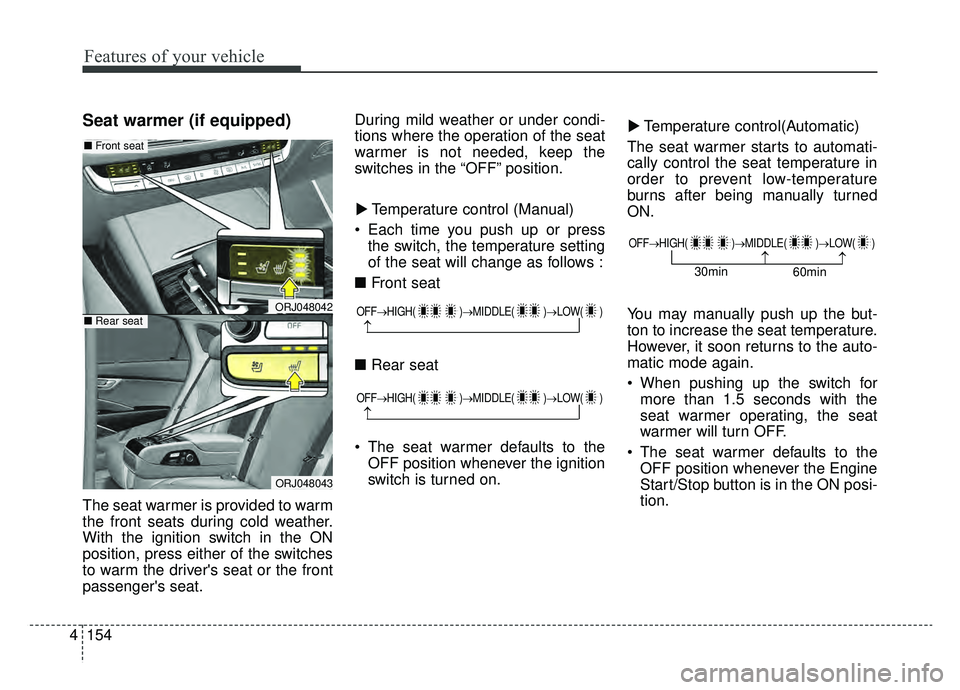
The seat warmer is provided to warm
the front seats during cold weather.
With the ignition switch in the ON
position, press either of the switches
to warm the driver's seat or the front
passenger's seat. During mild weather or under condi-
tions where the operation of the seat
warmer is not needed, keep the
switches in the “OFF” position.
Temperature control (Manual)
Each time you push up or press the switch, the temperature setting
of the seat will change as follows :
■ Front seat
■ Rear seat
The seat warmer defaults to the OFF position whenever the ignition
switch is turned on. Temperature control(Automatic)
The seat warmer starts to automati-
cally control the seat temperature in
order to prevent low-temperature
burns after being manually turned
ON.
You may manually push up the but-
ton to increase the seat temperature.
However, it soon returns to the auto-
matic mode again.
When pushing up the switch for more than 1.5 seconds with the
seat warmer operating, the seat
warmer will turn OFF.
The seat warmer defaults to the OFF position whenever the Engine
Start/Stop button is in the ON posi-
tion.
▼
▼
OFF→
HIGH( )→ MIDDLE( )→LOW( )
→
OFF→HIGH( )→ MIDDLE( )→LOW( )
→
ORJ048042
ORJ048043
■Front seat
■Rear seat
OFF→ HIGH( )→ MIDDLE( )→LOW( )
→→30min
60min
Page 249 of 593
Features of your vehicle
156
4
Each time you push down the but-
ton, the airflow will change as fol-
lows:
The seat warmer (with air ventila- tion) defaults to the OFF position
whenever the ignition switch is
turned on.Sunvisor
Use the sunvisor to shield direct light
through the front or side windows.
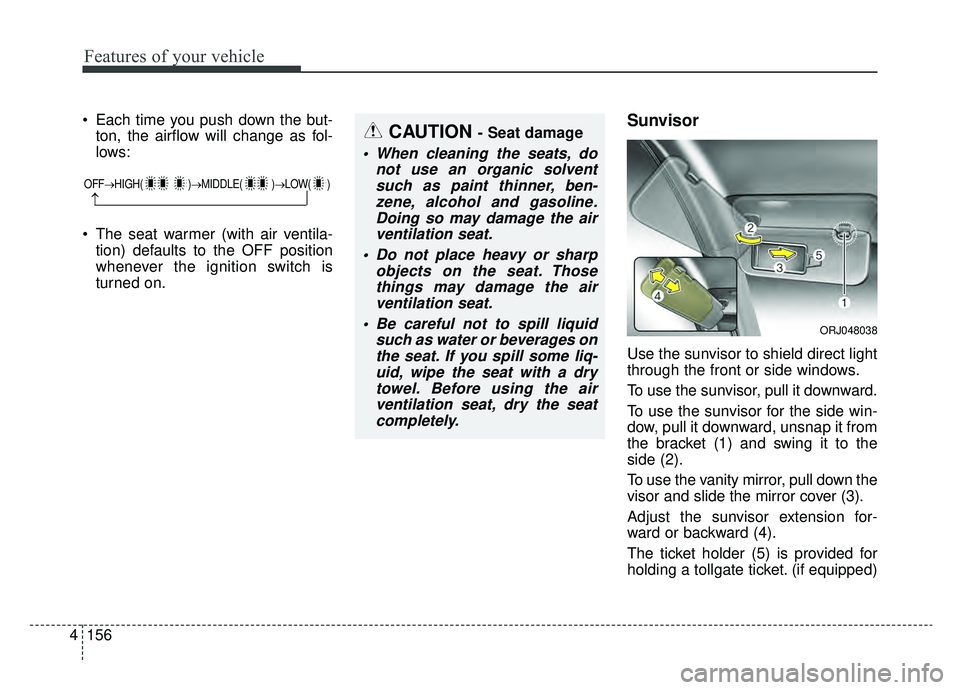
To use the sunvisor, pull it downward.
To use the sunvisor for the side win-
dow, pull it downward, unsnap it from
the bracket (1) and swing it to the
side (2).
To use the vanity mirror, pull down the
visor and slide the mirror cover (3).
Adjust the sunvisor extension for-
ward or backward (4).
The ticket holder (5) is provided for
holding a tollgate ticket. (if equipped)
CAUTION - Seat damage
When cleaning the seats, do not use an organic solventsuch as paint thinner, ben-zene, alcohol and gasoline.Doing so may damage the airventilation seat.
Do not place heavy or sharp objects on the seat. Thosethings may damage the airventilation seat.
Be careful not to spill liquid such as water or beverages onthe seat. If you spill some liq-uid, wipe the seat with a drytowel. Before using the airventilation seat, dry the seatcompletely.
ORJ048038
OFF→ HIGH( )→ MIDDLE( )→LOW( )
→
Page 252 of 593
4159
Features of your vehicle
The battery charging state may be
monitored on the electrical device.
Disconnect the USB cable from the
USB port after use.
Use the USB charger when theengine is running to prevent bat-
tery discharge.
Only devices that fits the USB port can be used.
The USB charger can be used only for battery charging purposes.Wireless smart phone charg-
ing system (if equipped)
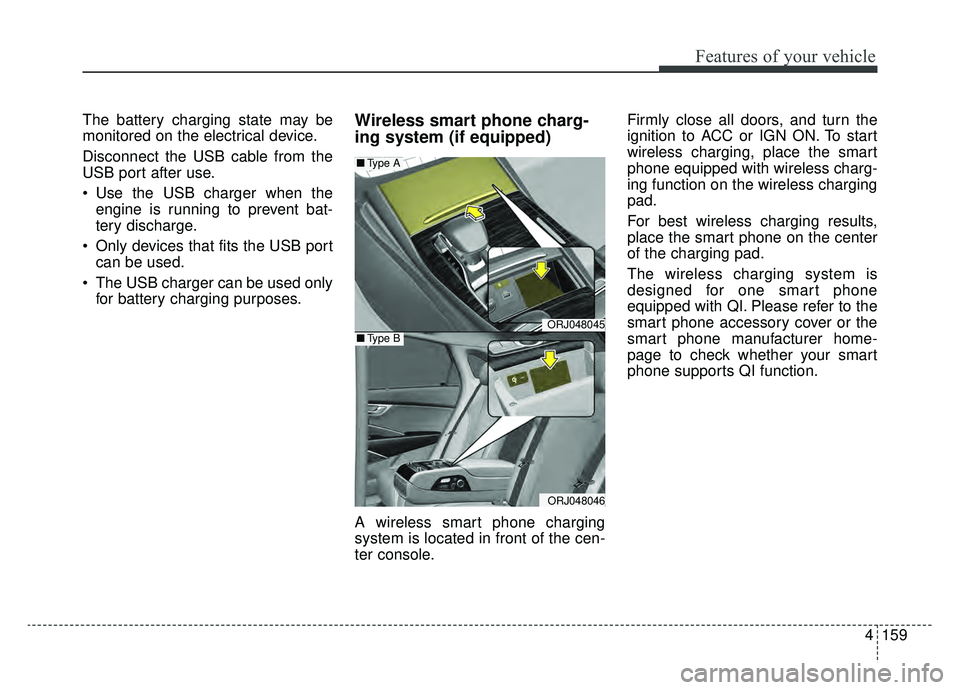
A wireless smart phone charging
system is located in front of the cen-
ter console. Firmly close all doors, and turn the
ignition to ACC or IGN ON. To start
wireless charging, place the smart
phone equipped with wireless charg-
ing function on the wireless charging
pad.
For best wireless charging results,
place the smart phone on the center
of the charging pad.
The wireless charging system is
designed for one smart phone
equipped with QI. Please refer to the
smart phone accessory cover or the
smart phone manufacturer home-
page to check whether your smart
phone supports QI function.
ORJ048045
ORJ048046
■
Type A
■Type B
Page 254 of 593
4161
Features of your vehicle
✽ ✽NOTICE
• If it is not possible to close the tray
cover due to the size of your smart
phone or because the tray cover
has been broken, do not use the
wireless smart phone charging
function.
• Even if you're not charging your smart phone, keep the tray cover
closed at all times when it is left in
the tray. Driving with the tray
cover opened will increase the
chance of accidents and result in
injury as you're highly likely to get
distracted by the smart phone.
• When the interior temperature of the wireless charging system rises
above a set temperature, the wire-
less charging will cease to func-
tion. After the interior tempera-
ture drops below the threshold,
the wireless charging function will
resume.
• The wireless charging may not function properly when there is a
heavy accessory cover on the
smart phone.
• Charging a smart phone with a protection cover on may heat up. (Continued)(Continued)
• The wireless charging will stop
when the smart key is moved out
of the vehicle with the ignition in
ON.
• Charging may be temporarily interrupted when smart key detec-
tion is activated. (when turning on
ignition, opening or closing the
doors)
• The wireless charging will stop when the vehicle is turned OFF.
• The wireless charging will stop when the smart phone is not in
complete contact with the wireless
charging pad.
• Items equipped with magnetic components such as credit cards,
telephone cards, bank-books, or a
transportation ticket may become
damaged during wireless charg-
ing.
• Place the smart phone on the cen- ter of the charge pad for best
results. The smart phone may not
charge when placed near the rim
of the charging pad. When the
smart phone does get charged, it
may heat up excessively. (Continued)CAUTION - Liquid in
Wireless Smart Phone
Charger
To prevent liquid from damaging the wireless smart phone charg-ing system in your vehicle,securely close the tray coverwhen charging your phone.
WARNING - Metal in
Wireless Charging System
If any metallic object such as a
coin is placed between the wire-
less charging system and the
smart phone, the charging may
be disrupted. Also, the metallic
object may heat up and poten-
tially damage the charging sys-
tem. If there is any metallic
object between the smart phone
and the charging pad, immedi-
ately remove the smart phone.
Remove the metallic object
after it has cooled down.
Page 271 of 593
55
Driving your vehicle
Before entering vehicle
• Be sure that all windows, outsidemirror(s), and outside lights are
clean.
Check the condition of the tires.
Check under the vehicle for any sign of leaks.
Be sure there are no obstacles behind you if you intend to back up.
Necessary inspections
Fluid levels, such as engine oil,
engine coolant, brake fluid, and
washer fluid should be checked on a
regular basis, at the exact interval
depending on the fluid. Further
details are provided in chapter 7,
“Maintenance”.
Before starting
Close and lock all doors.
Position the seat so that all con-trols are easily reached.
Buckle your seat belt.
Adjust the inside and outside rearview mirrors.
Be sure that all lights work.
Check all gauges.
Check the operation of warning lights when the ignition switch is
turned to the ON position.
Release the parking brake and make sure the brake warning light
goes out.
Input any phone numbers or map locations (if vehicle equipped with
a navigation system) that you may
need during your trip.
For safe operation, be sure you are
familiar with your vehicle and its
equipment.
BEFORE DRIVING
WARNING - Distracted driving
Focus on the road while driving.
The driver's primary responsi-
bility is in the safe and legal
operation of the vehicle. Any
handheld devices, other equip-
ment or vehicle systems that
distract the driver should not be
used during vehicle operation.
Page 281 of 593
515
Driving your vehicle
For extra power when passing anoth-
er vehicle or driving uphill, depress
the accelerator pedal further until
you feel the transmission downshift
to a lower gear.
To shift into D (Drive), depress the
brake pedal and press the
[UNLOCK] button on the shift lever.
Move the shift lever backward.
To shift into D (Drive) from N
(Neutral), you must depress the
brake pedal.
✽ ✽NOTICE
Always come to complete stop
before shifting into D (Drive).
- Parking in N (Neutral) gear
Follow the steps below when parking
and you want the vehicle to move
when pushed.
1.After parking your vehicle, step on
the brake pedal and press the [P]
button with the ignition button in
[ON] or while the engine is running.
2.If the parking brake is applied unlock the parking brake.
- For EPB (Electronic ParkingBrake) equipped vehicles, push
the brake pedal with the ignition
button in [ON] or while the engine
is running to disengage the park-
ing brake. If [AUTO HOLD] func-
tion is used while driving (If
[AUTO HOLD] indicator is on in
the cluster), press [AUTO HOLD]
switch and [AUTO HOLD] func-
tion will be turned off.
3.While pressing the brake pedal, turn the ignition button [OFF].
- For smart key equipped vehicles,the ignition switch can be [OFF]
only after pressing the [P] button. 4.Remove the cap-cover and insert a
tool (e.g. flathead screwdriver) into
the access hole while depressing
the brake pedal. Then, the gear will
change to the N (Neutral) position.
The tool should be inserted into the
access hole within 3 minutes after
turning OFF the engine.
✽ ✽ NOTICE
When moving the shift lever to
N(Neutral) position, a normal
mechanical sound will occur.
CAUTION
For EPB (Electronic Parking
Brake) equipped vehicles with[AUTO HOLD] function usedwhile driving, if the ignition but-ton has been turned [OFF], theelectronic parking brake will beengaged automatically.Therefore, [AUTO HOLD] functionshould be turned off before theignition button is turned off.
Page 282 of 593
Driving your vehicle
16
5
✽ ✽
NOTICE
After the ignition switch has been
turned off, the electronic parking
brake cannot be disengaged.
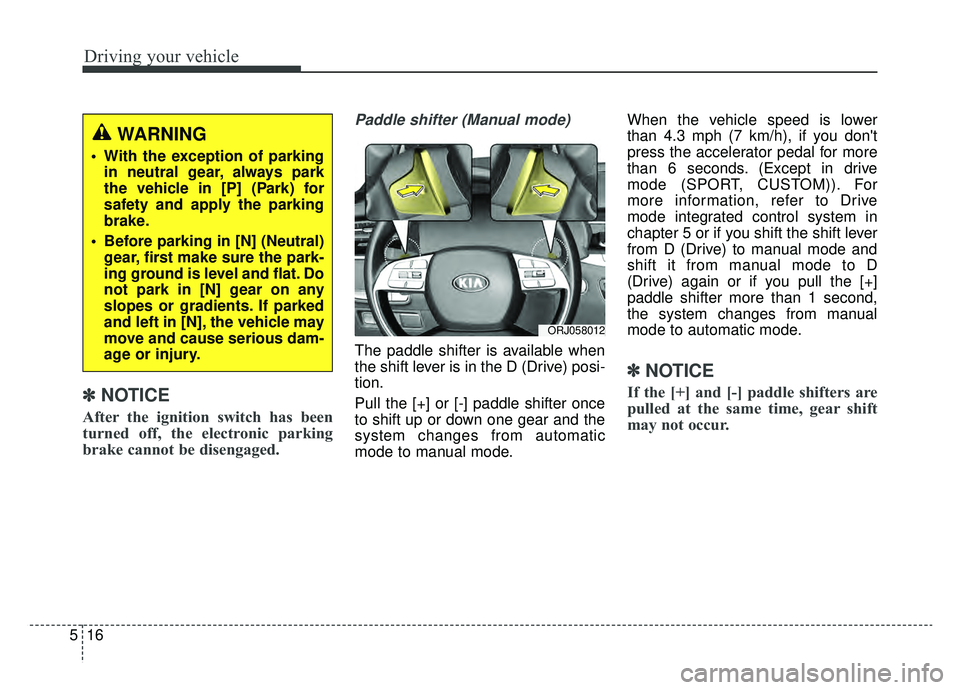
Paddle shifter (Manual mode)
The paddle shifter is available when
the shift lever is in the D (Drive) posi-
tion.
Pull the [+] or [-] paddle shifter once
to shift up or down one gear and the
system changes from automatic
mode to manual mode. When the vehicle speed is lower
than 4.3 mph (7 km/h), if you don't
press the accelerator pedal for more
than 6 seconds. (Except in drive
mode (SPORT, CUSTOM)). For
more information, refer to Drive
mode integrated control system in
chapter 5 or if you shift the shift lever
from D (Drive) to manual mode and
shift it from manual mode to D
(Drive) again or if you pull the [+]
paddle shifter more than 1 second,
the system changes from manual
mode to automatic mode.
✽ ✽
NOTICE
If the [+] and [-] paddle shifters are
pulled at the same time, gear shift
may not occur.
ORJ058012
WARNING
With the exception of parking
in neutral gear, always park
the vehicle in [P] (Park) for
safety and apply the parking
brake.
Before parking in [N] (Neutral) gear, first make sure the park-
ing ground is level and flat. Do
not park in [N] gear on any
slopes or gradients. If parked
and left in [N], the vehicle may
move and cause serious dam-
age or injury.